
In Xcode 26.0 + iOS 26.0, there's an issue where the large title in NavigationStack disappears

This page has been translated by machine translation. View original
I am currently developing an iOS app using Xcode 16.4 and conducting preliminary research for migration to Xcode 26. While testing Xcode 26.0.1, I discovered an issue where the Large Title in NavigationStack is not being displayed.
This phenomenon occurs when customizing the navigation bar using UINavigationBarAppearance in existing code bases. I've compiled my findings on what changed in iOS 26.0 and potential workarounds.
In this article, I'll introduce the NavigationStack title display issue that occurs with the combination of Xcode 26.0 and iOS 26.0, along with its solution. I hope this will be helpful for developers facing the same problem.
Testing Environment
- Xcode 26.0.1
- iPhone 17 Pro / iOS 26.0
- iPhone 15 Pro / iOS 18.5
Problem Details
With the combination of Xcode 26.0 and iOS 26.0, when setting a background color for the navigation bar using the backgroundColor property of UINavigationBarAppearance, the Large Title becomes hidden behind the background.
Specifically, the issue occurs when all of the following conditions are met:
- Built with Xcode 26.0
- Running on iOS 26.0
- Using the
backgroundColorproperty ofUINavigationBarAppearance - Displaying a Large Title in NavigationStack
Expected vs. Actual Behavior
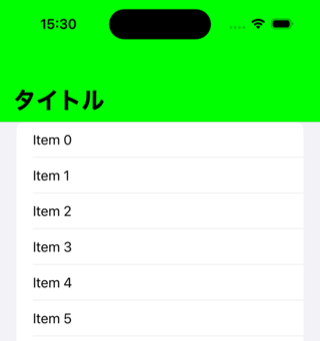
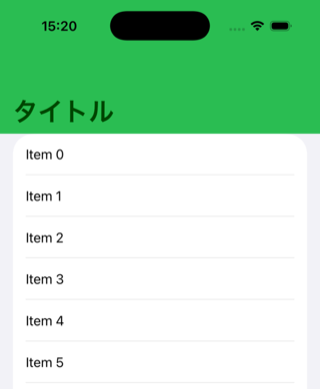
Expected behavior (as seen in iOS 18.5):
- Large Title displays normally
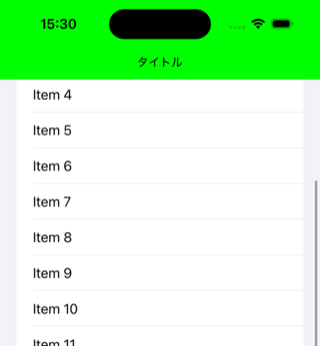
- Smooth transition from Large Title to Small Title when scrolling
- Background color is properly applied
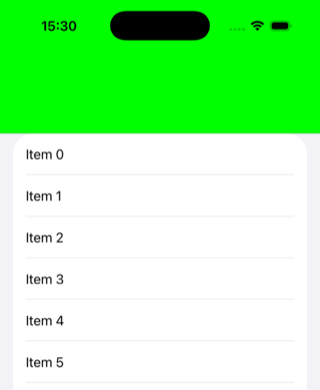
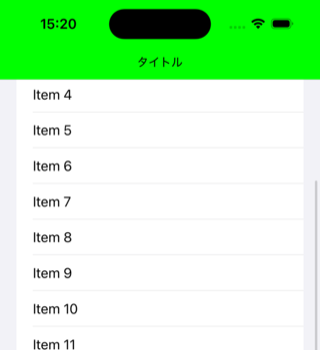
Actual behavior (in iOS 26.0):
- Large Title is not visible (hidden behind the background)
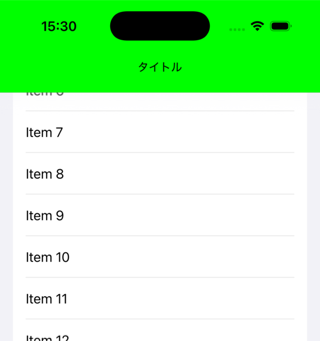
- Small Title displays normally
- Background color is applied, but the title becomes invisible
Code That Causes the Issue
The following code displays correctly in iOS 18 but the Large Title disappears in iOS 26.0:
import SwiftUI

struct ContentView: View {
    var body: some View {
        NavigationStack {
            List {
                ForEach(0 ..< 20) { index in
                    Text("Item \(index)")
                }
            }
            .navigationTitle(Text("タイトル"))
            .defaultNavigationBar()
        }
    }
}

struct CustomNavigationBarModifier: ViewModifier {
    init() {
        let appearance = UINavigationBarAppearance()
        appearance.configureWithOpaqueBackground()
        appearance.backgroundColor = .green  // ← This setting is the cause of the problem
        appearance.largeTitleTextAttributes = [
            .font: UIFont.systemFont(ofSize: 30, weight: .heavy),
            .foregroundColor: UIColor.black,
        ]
        appearance.titleTextAttributes = [
            .font: UIFont.systemFont(ofSize: 15, weight: .regular),
            .foregroundColor: UIColor.black,
        ]
        UINavigationBar.appearance().standardAppearance = appearance
        UINavigationBar.appearance().scrollEdgeAppearance = appearance
    }

    func body(content: Content) -> some View {
        content
    }
}

extension View {
    func defaultNavigationBar() -> some View {
        modifier(CustomNavigationBarModifier())
    }
}

#Preview {
    ContentView()
}
Behavior Comparison
When running the sample code, the Large Title is not displayed in iOS 26.0.
| iOS 18.5 | iOS 26.0 |
|---|---|
 |
 |
 |
 |
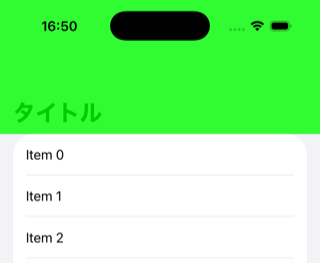
The Large Title Exists Behind the Background
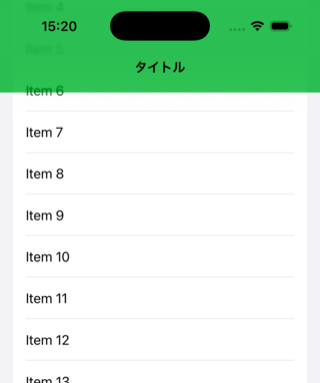
By making the background color semi-transparent, I found that the Large Title exists behind the background.
struct CustomNavigationBarModifier: ViewModifier {
    init() {
        let appearance = UINavigationBarAppearance()
        appearance.configureWithOpaqueBackground()
        // Making the background semi-transparent for testing
        appearance.backgroundColor = .green.withAlphaComponent(0.8)
        appearance.largeTitleTextAttributes = [
            .font: UIFont.systemFont(ofSize: 30, weight: .heavy),
            .foregroundColor: UIColor.black,
        ]
        appearance.titleTextAttributes = [
            .font: UIFont.systemFont(ofSize: 15, weight: .regular),
            .foregroundColor: UIColor.black,
        ]
        UINavigationBar.appearance().standardAppearance = appearance
        UINavigationBar.appearance().scrollEdgeAppearance = appearance
    }
    // Omitted below
}
The result looks like the image below. It seems that the rendering order has changed in iOS 26.0 and later.
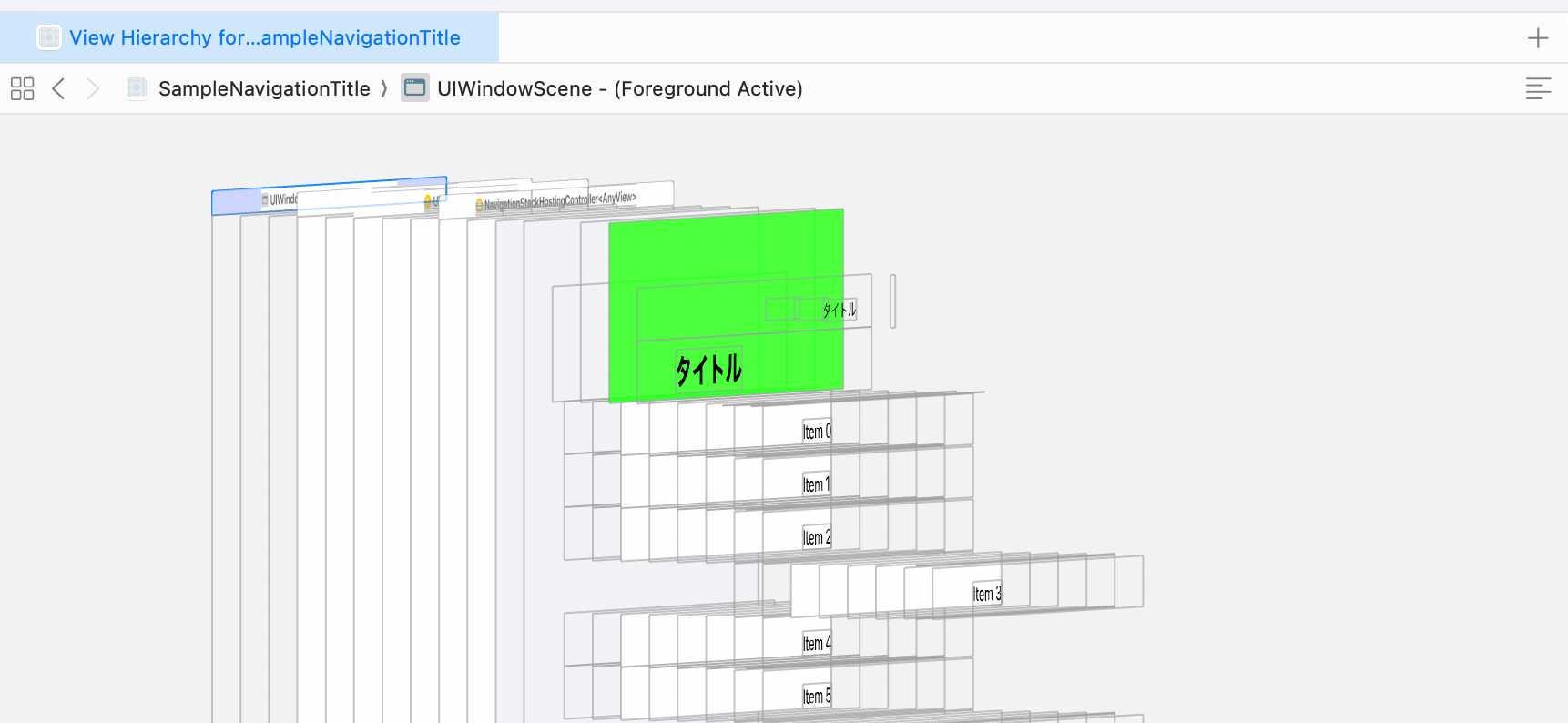
Let's use Xcode's View Hierarchy (a debugging feature that displays the view hierarchy in 3D) to check the actual view arrangement.
View hierarchy in iOS 18.5:
We can see that the "タイトル" label is positioned in front of the green background View.
View hierarchy in iOS 26.0:
We can see that the "タイトル" label is positioned behind the green background View.
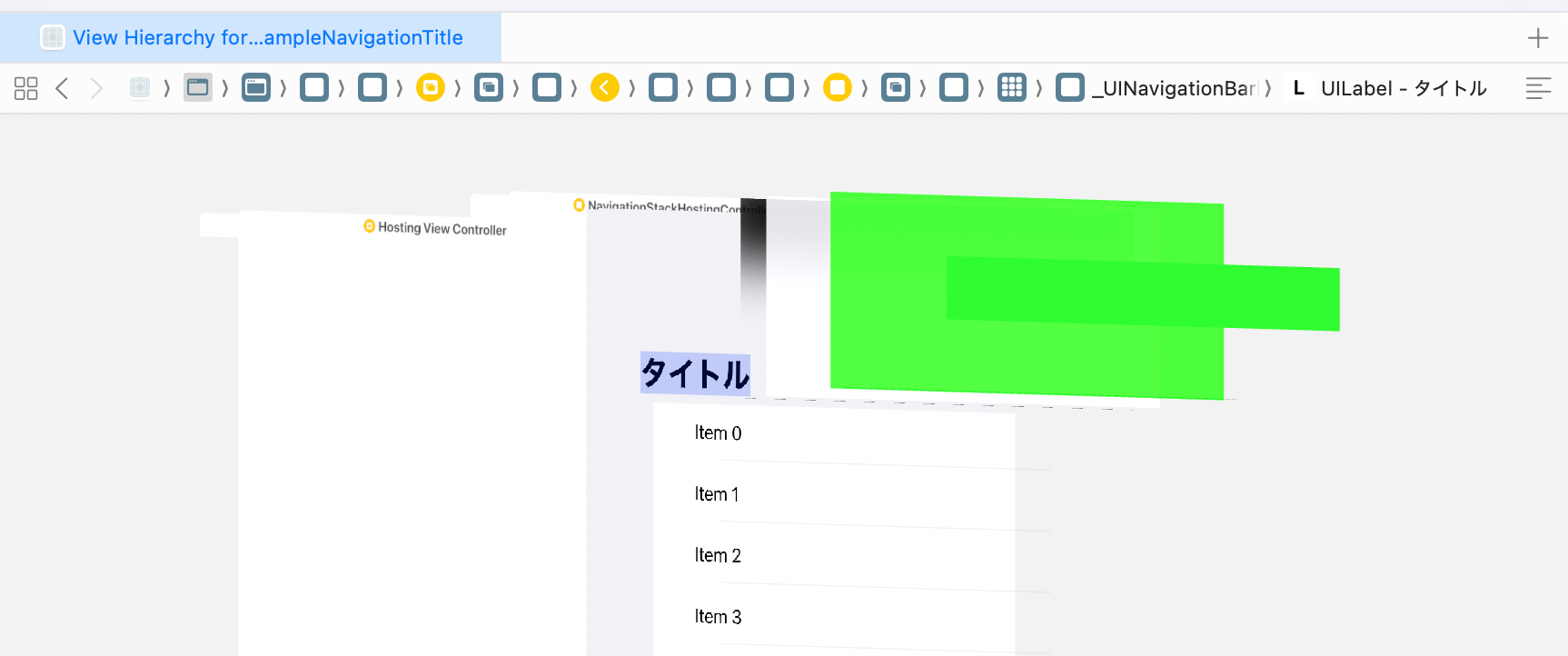
This confirms that the internal implementation of NavigationStack has changed. The layer structure was probably changed to implement the Liquid Glass effect introduced in iOS 26.
Inferred Cause
In iOS 26.0, the internal implementation of NavigationStack has changed, altering the rendering order when using the backgroundColor property of UINavigationBarAppearance. It appears that the background layer is now drawn in front of the Large Title.
Solution
Although it's not exactly the same as before, we can work around the issue by using toolbarBackground and toolbarBackgroundVisibility for iOS 26.0 and later, while continuing to use the traditional backgroundColor of UINavigationBarAppearance for iOS 18 and earlier.
Applying the following Modifier to the ContentView mentioned earlier makes it work on both OS versions:
struct CustomNavigationBarModifier: ViewModifier {
    init() {
        let appearance = UINavigationBarAppearance()
        appearance.configureWithOpaqueBackground()
        if #unavailable(iOS 26.0) {
            // Set backgroundColor only for versions below iOS 26.0
            appearance.backgroundColor = .green
        }
        appearance.largeTitleTextAttributes = [
            .font: UIFont.systemFont(ofSize: 30, weight: .heavy),
            .foregroundColor: UIColor.black,
        ]
        appearance.titleTextAttributes = [
            .font: UIFont.systemFont(ofSize: 15, weight: .regular),
            .foregroundColor: UIColor.black,
        ]
        UINavigationBar.appearance().standardAppearance = appearance
        UINavigationBar.appearance().scrollEdgeAppearance = appearance
    }

    func body(content: Content) -> some View {
        if #available(iOS 26, *) {
            // Use toolbarBackground for iOS 26.0 and later
            content
                .toolbarBackgroundVisibility(.visible, for: .navigationBar)
                .toolbarBackground(.green, for: .navigationBar)
        } else {
            content
        }
    }
}

extension View {
    func defaultNavigationBar() -> some View {
        modifier(CustomNavigationBarModifier())
    }
}
Verification Results
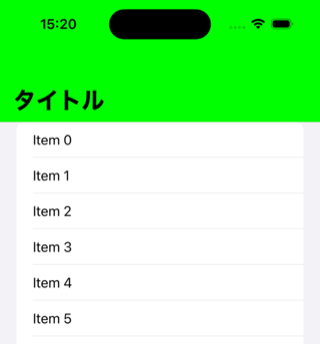
When running the sample code, the Large Title is now displayed in iOS 26.0 as well.
| iOS 18.5 | iOS 26.0 |
|---|---|
 |
 |
 |
 |
Implementation Points
- Use
#unavailable(iOS 26.0)to setbackgroundColoronly for versions below iOS 26.0 - Use
#available(iOS 26, *)to usetoolbarBackgroundonly for iOS 26.0 and later - This ensures the Large Title displays correctly on both OS versions
- However, due to constraints with
toolbarBackgroundin iOS 26.0, the appearance won't be exactly identical
Conclusion
I investigated the NavigationStack Large Title display issue that occurs with the combination of Xcode 26.0 and iOS 26.0 and found a practical solution.
This issue has been reported on Apple Developer Forums and remains unresolved as of iOS 26.0.1. It's unclear whether this is a bug or an intentional specification change by Apple, but as developers, we need to adapt.
While the solution presented here isn't perfect, it's a practical approach to providing an app that works on both OS versions. We should continue to monitor future developments as this issue might be fixed in iOS 26.1 or later releases.
If you're facing the same problem, I hope you'll try this workaround. And if you find a better solution, please share it.
References
Sample code.
Job Information: Classmethod is hiring iOS engineers
Starbucks Digital Technology Department is looking for engineers capable of iOS app development. We're waiting for applications from people who would like to work with us while sharing information about new Xcode compatibility and other topics in misc-ios!