
I Tried to Complete Everything from Specification Definition to Implementation and IaC with Kiro (Blog Author Statistics Batch)

This page has been translated by machine translation. View original
I had the opportunity to try a development flow using the AI editor "Kiro" to consistently handle everything from specification definition to implementation and infrastructure IaC (CloudFormation).
This article introduces the process of building a batch process that automatically generates monthly post count trend graphs for each author based on DevelopersIO writing data exported to S3 daily.
In particular, I performed the "elevation from prototyping to IaC" in the following steps:
- Interactive CLI building: Kiro executes AWS CLI commands based on instructions
- Specification documentation: Recording the build process in parallel as a document (Spec)
- IaC conversion: Generating CloudFormation templates based on the Spec and rebuilding as production environment
Development Background and Architecture
The purpose of this project is to visualize past writing performance to help motivate authors.
For input data, I reused JSONL files on S3 that were already being exported for existing internal BI tools (Looker, QuickSuite).
Architecture:
- Input:
all-blog-posts.jsonl.gz(existing S3 data) - Process: Lambda (Python/Matplotlib/Seaborn) with EventBridge Scheduler
- Output: PNG images for each author (S3 + CloudFront with OAC)
1. Existing Data Asset Investigation and Specification
First, I investigated the actual data to understand the input data structure and created data-spec.md.
Examining Actual Data
I used AWS CLI to retrieve the actual data from S3 and checked its structure.
# Download the latest dump file from S3
# <SOURCE-BUCKET-NAME> is the actual bucket name
aws s3 cp s3://<SOURCE-BUCKET-NAME>/contentful/all-blog-posts.jsonl.gz .
gzip -dc all-blog-posts.jsonl.gz | head -n 1 | jq .
Reflecting in the Spec File
Based on the investigation, I defined the specification document data-spec.md to feed into Kiro.
Here, I extracted only the essential elements for the batch processing (aggregation, joining, visualization) from the vast data fields, helping the AI focus.
data-spec.md (excerpt):
## Data Schema Specification
Reusing existing data for BI tool integration.

### all-blog-posts.jsonl.gz (transaction)
- **Required fields**:
  - `author_id`: **Join key**. Essential for linking with the author master.
  - `first_published_at`: **Aggregation axis**. Required for monthly grouping.
  - `title`: For verification and debugging.

### authorProfile.jsonl.gz (master)
- **Required fields**:
  - `id`: **Join key**.
  - `slug`: Used for **output filename** (e.g., `suzuki-ryo.png`).
  - `display_name`: Used for **graph title** (display name).
With this specification, Kiro was able to implement the "master joining," "time-series aggregation," and "artifact generation" logic without confusion.
2. Application Implementation: Master Joining
Kiro read data-spec.md and implemented the joining process between "transactions (posts)" and "master (authors)".
Since the data volume is about 60,000 records, it generated efficient code (lambda_batch.py) that converts the master into a dictionary (hash map) for
    # 1. Convert author master to dictionary
    authors = {}
    with gzip.open(authors_file, 'rt', encoding='utf-8') as f:
        # ... Master loading process ...

    # 2. Look up information from the dictionary for post aggregation data
    for author_id, monthly_data in data.items():
        if author_id in authors:
             # ...
3. Prototyping and Refactoring to IaC
This is the highlight of this development. Rather than writing CloudFormation directly, I took an approach of first creating an interactively working environment.
3.1 Kiro Acting as AWS Operator (Prototyping)
First, I gave Kiro the instruction "I want to create an AWS environment where this Python code can run" in a chat format.
Here, I didn't directly execute AWS CLI commands. Instead, I communicated requirements to Kiro in dialog format, and Kiro generated and executed the necessary commands using its built-in use_aws tool.
- User: "Create an S3 bucket to use as output destination"
- Kiro: Executed
aws s3 mb ...
- Kiro: Executed
- User: "Run the local Python code as a Docker container"
- Kiro: Created a Dockerfile and executed
docker buildcommand to create an image
- Kiro: Created a Dockerfile and executed
- User: "Run this image that works locally on AWS Lambda"
- Kiro: "To use a container image in Lambda, you need to push to Amazon ECR. Would you like to create a repository?" (suggestion)
- Kiro: (after approval) Executed
aws ecr create-repository ...and pushed the Docker image
In this way, I provided "abstract requirements and goals" as a human, while Kiro handled "resolving specific procedures and dependencies (like Lambda needing ECR)" and "command input."
After building, I verified the operation in the actual environment and confirmed that the aggregation for the last 7 days was performed correctly.
3.2 Documenting Procedures and Spec Creation
In parallel with the build work, I instructed Kiro to document the procedures, creating spec/batch-setup.md.
Rather than analyzing logs afterward, I instructed "add this setting to the Spec" each time a resource was created, ensuring the procedure document always reflected the most current state.
spec/batch-setup.md (excerpt):
1. Docker image build and push
2. IAM role creation (trust policy, S3 access policy)
3. Lambda function creation
4. CloudFront distribution setup (OAC creation, distribution creation)
3.3 Conversion to CloudFormation Template
Finally, I had Kiro create a CloudFormation template based on this spec/batch-setup.md.
Having a "CLI procedure document that has been verified" made the refactoring work of converting it to an "IaC template" extremely smooth.
Instruction to Kiro:
Convert the contents of spec/batch-setup.md to a CloudFormation template (author-stats-batch.yaml).
As a result, an accurate template including complex settings such as OAC configuration and S3 bucket policies was generated.
4. Redeployment to a Clean Environment and Verification
After completing the template, I removed the prototype environment resources and performed a "production-equivalent" deployment using CloudFormation.
4.1 Stack Deployment
aws cloudformation create-stack \
  --stack-name author-stats-batch-stack \
  --template-body file://cloudformation/author-stats-batch.yaml \
  --parameters \
    ParameterKey=SourceBucketName,ParameterValue=<SOURCE-BUCKET-NAME> \
    ParameterKey=ECRImageUri,ParameterValue=<ACCOUNT-ID>.dkr.ecr.us-east-1.amazonaws.com/author-stats-batch:latest \
    ParameterKey=ScheduleExpression,ParameterValue="cron(45 17 * * ? *)" \
  --capabilities CAPABILITY_NAMED_IAM \
  --region us-east-1
Execution result:
Waiting for stack creation...
Stack created successfully!
The stack creation was completed in a few minutes, and I confirmed that CloudFront domains and S3 buckets were provisioned.
4.2 Final Operation Verification
I ran tests again in the reconstructed environment.
Updates for the last 7 days (normal operation)
2025-11-25T22:11:57 Found 68 active authors
2025-11-25T22:12:24 REPORT Duration: 27054.79 ms   Max Memory Used: 259 MB
Graphs for 68 authors were successfully generated.
All-period (15 years) bulk generation (high-load test)
2025-11-25T22:13:54 Processing authors active in last 5475 days
2025-11-25T22:13:54 Found 1056 active authors
...
2025-11-25T22:18:28 Processed: littleossa
Graphs for all 1,056 authors were completed in about 5 minutes without errors.
S3 output confirmation:
aws s3 ls s3://<DEST-BUCKET-NAME>/author-monthly-stats/ | wc -l
> 1047
Display confirmation:
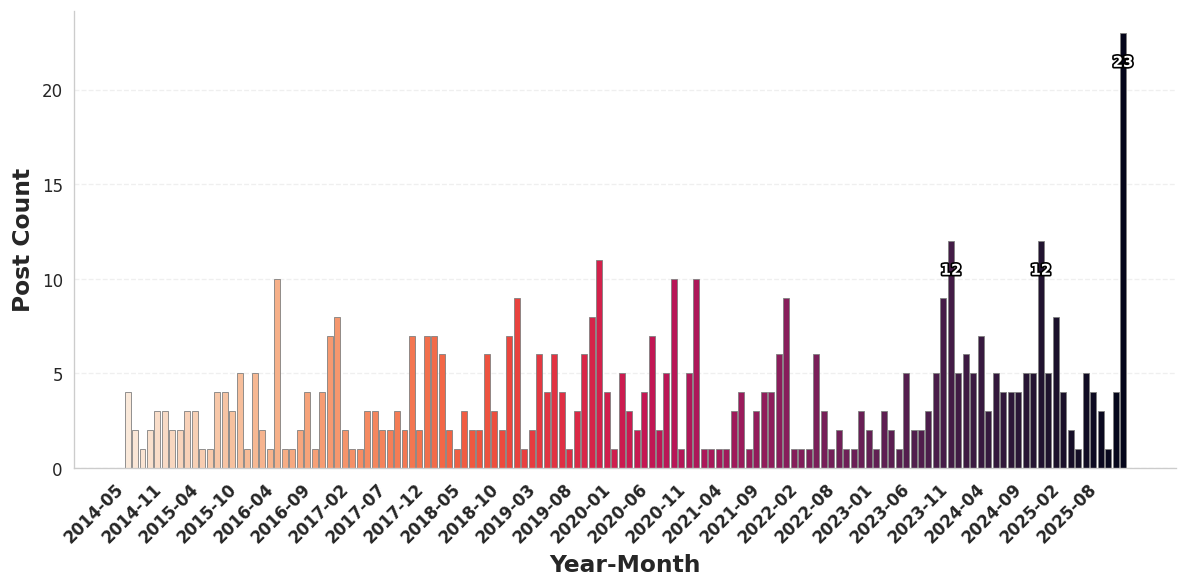
The number of generated image files also matched, confirming that the IaC-based reconstruction was perfectly executed.
5. Future Prospects and Release
With this validation, the backend generation logic and distribution infrastructure are complete. Going forward, we will make the following adjustments before deploying to the production environment:
- Job stability confirmation: We will monitor daily execution by EventBridge for several days.
- Design adjustment: We will fine-tune the colors and font sizes of the generated graphs to match the DevelopersIO site design.
After these verification tasks, we plan to actually publish these statistical graphs on each author's profile page on DevelopersIO in the near future. Please look forward to it.
Summary
In this validation, I was able to practice the following modern development flow using Kiro:
- Interactive prototyping: By giving instructions in natural language and having Kiro handle CLI commands, I accelerated the trial and error of resource creation.
- Process specification: Recording procedures in Markdown while building prevented black-boxing.
- Refactoring to IaC: Generating CloudFormation templates based on verified procedure documents and migrating to a robust environment.
"First create something that works, document in parallel, and finally code it." Being able to realize this ideal cycle through pair programming with AI was a significant achievement.