Krita 6.0.0 beta1 has been released, so I tried implementing a Python plugin to detect PII

This page has been translated by machine translation. View original
Introduction
Krita 6.0.0 beta1 has been released. As it includes major updates such as the migration to Qt 6, I first tested startup and basic operations in a Windows 11 environment. Additionally, to confirm that Krita's Python plugin mechanism works properly, I created a small plugin that roughly detects text that appears to be PII (Personally Identifiable Information) in screenshots and reflects it in the selection area.
What is Krita?
Krita is an open-source painting software primarily designed for digital painting and illustration creation. It offers a comprehensive set of basic features centered around brush drawing and layers. It also has high extensibility, supporting Python scripting and plugin creation. This allows for automation of repetitive tasks and adding custom functionality to suit your production workflow.
What is Krita 6.0.0 beta1?
Krita 6.0.0 beta1 has been released as a beta version of the Krita 6 series. The release notes explain that Krita 6 is now based on Qt 6, and improvements in display systems such as Wayland and HDR are progressing.
Test Environment
- OS: Windows 11
- Shell: Git Bash 2.47.1.windows.1
- Python: 3.11.9
- Krita: 6.0.0 beta1
- GPU: None (OCR is executed on CPU only)
Target Audience
- Those who want to edit images or process screenshots using Krita on Windows
- Those who want to try out new features and changes in Krita 6.0.0 beta1
- Those who want to reduce the burden of manually checking for PIIs like email addresses and phone numbers in images
- Those interested in simple automation with Python and want to try Krita's scripting features
References
- How to make a Krita Python plugin — Krita Manual 5.2.0 documentation
- Krita 5.3 and 6.0 Release Notes | Krita
- Getting Krita Logs — Krita Manual 5.2.0 documentation
Installing and Launching Krita 6.0.0 beta1
To obtain Krita 6.0.0 beta1, follow the instructions on the official announcement page.
Krita startup screen. The illustration is cute.
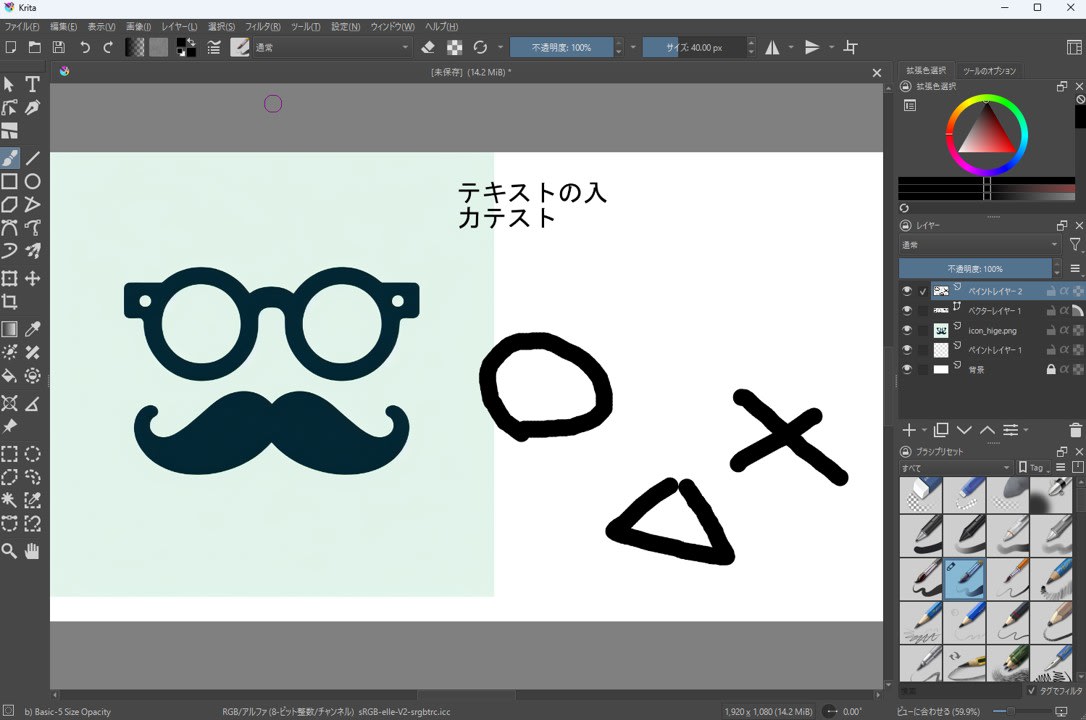
After installation, I first checked operations within my usual range, including canvas display, layer operations, image import and export.
Checking if Python Plugins Work
Krita has a Python extension mechanism. For this verification, my goal was to place the plugin on the Krita side and be able to run it from the menu (Tools → Scripts).
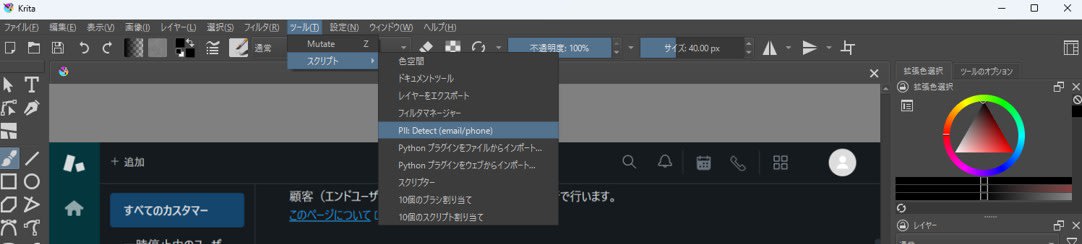
The location for plugins is in the pykrita directory under Krita's resource folder. You can open the resource folder from Settings → Manage Resources... > Open Resource Folder.
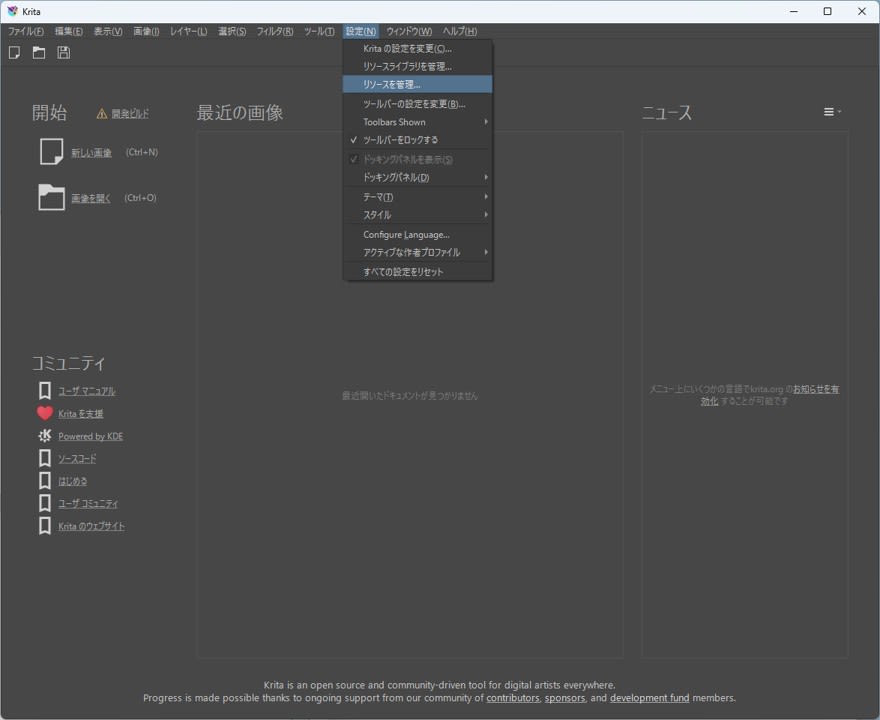
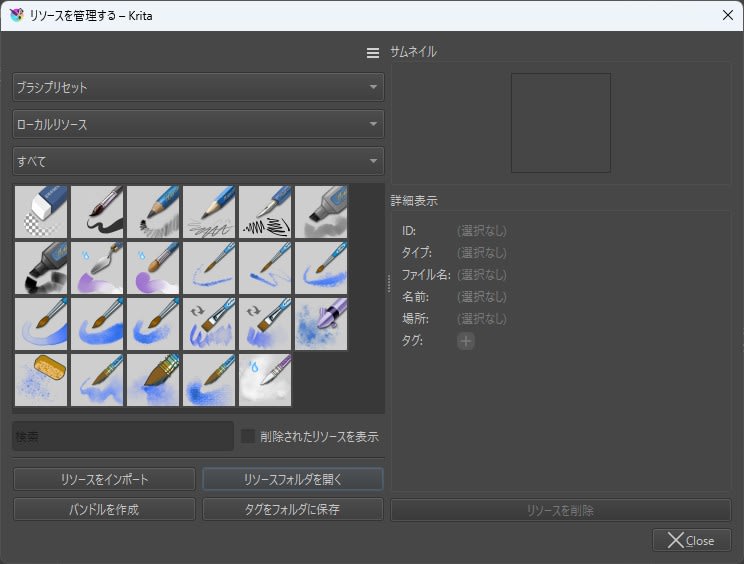
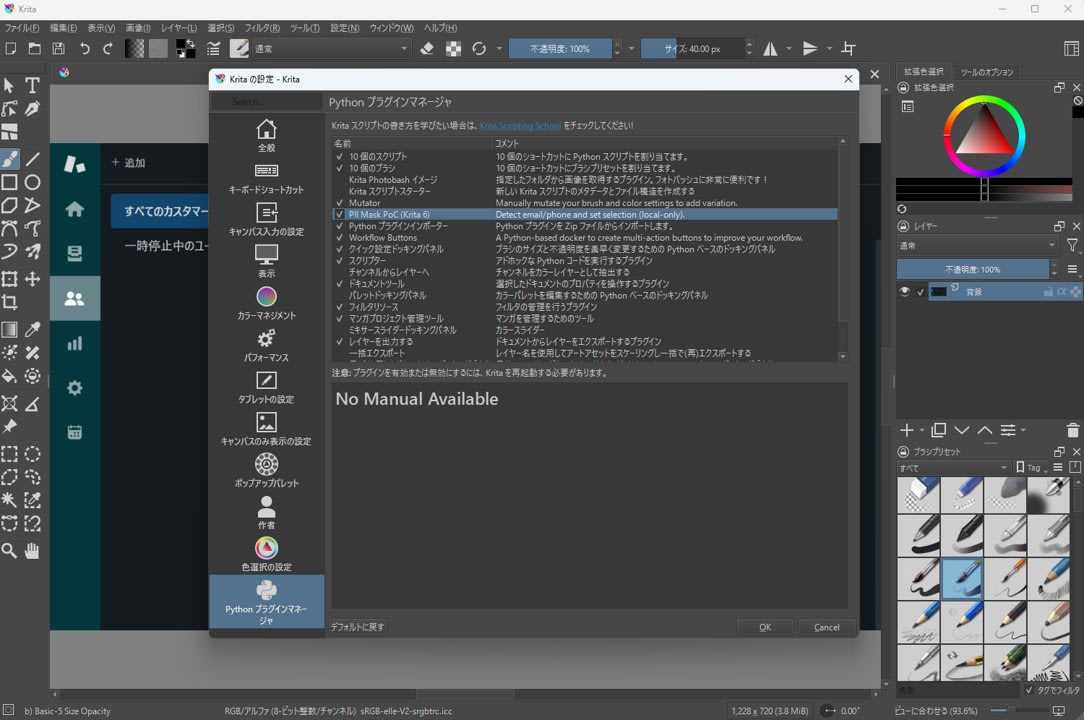
The screen to enable plugins is at Settings → Configure Krita → Python Plugin Manager. Enabling the target plugin here and restarting Krita will register the action in the Scripts menu.
Detecting PII in Screenshots and Making Selection Areas
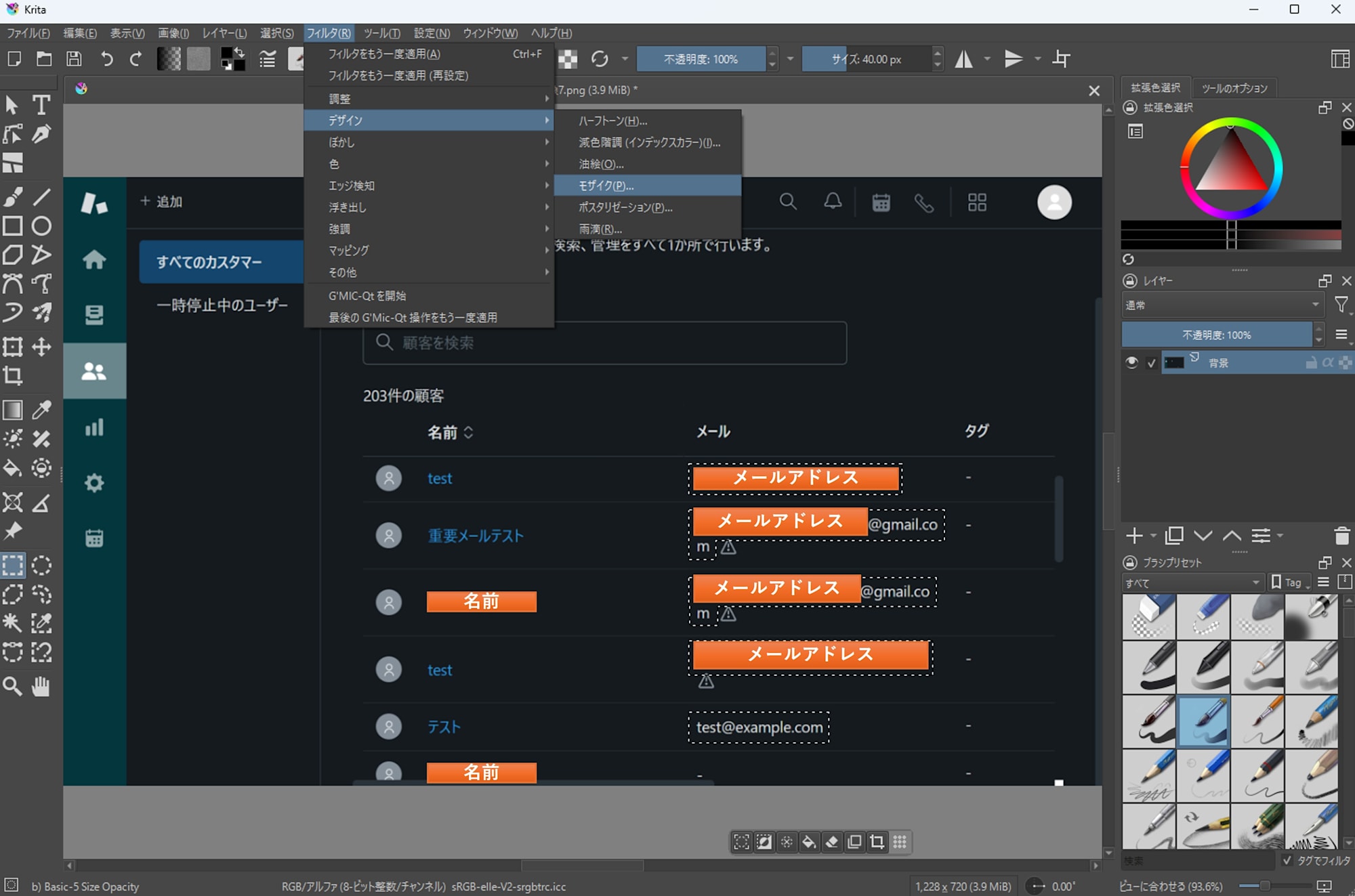
When pasting screenshots for support responses or verification notes, there are times when you want to hide email addresses or phone numbers. Since Krita comes with a mosaic filter built-in, there's no need to create a mosaic function in the plugin. For this project, I only implemented the following parts in the plugin:
- Run text recognition (OCR) on the image
- Extract areas that look like email addresses or phone numbers
- Reflect the extracted rectangles in the selection area
Note that OCR is executed in a separate Python environment (venv), not with Krita's bundled Python. This separates Krita's runtime environment from dependency libraries (like EasyOCR) to avoid conflicts with Qt or Python modules.
Sample code is provided at the end of this article.
How to Use
- Open a screenshot image in Krita
- Run
Tools→Scripts→PII: Detect (email/phone)
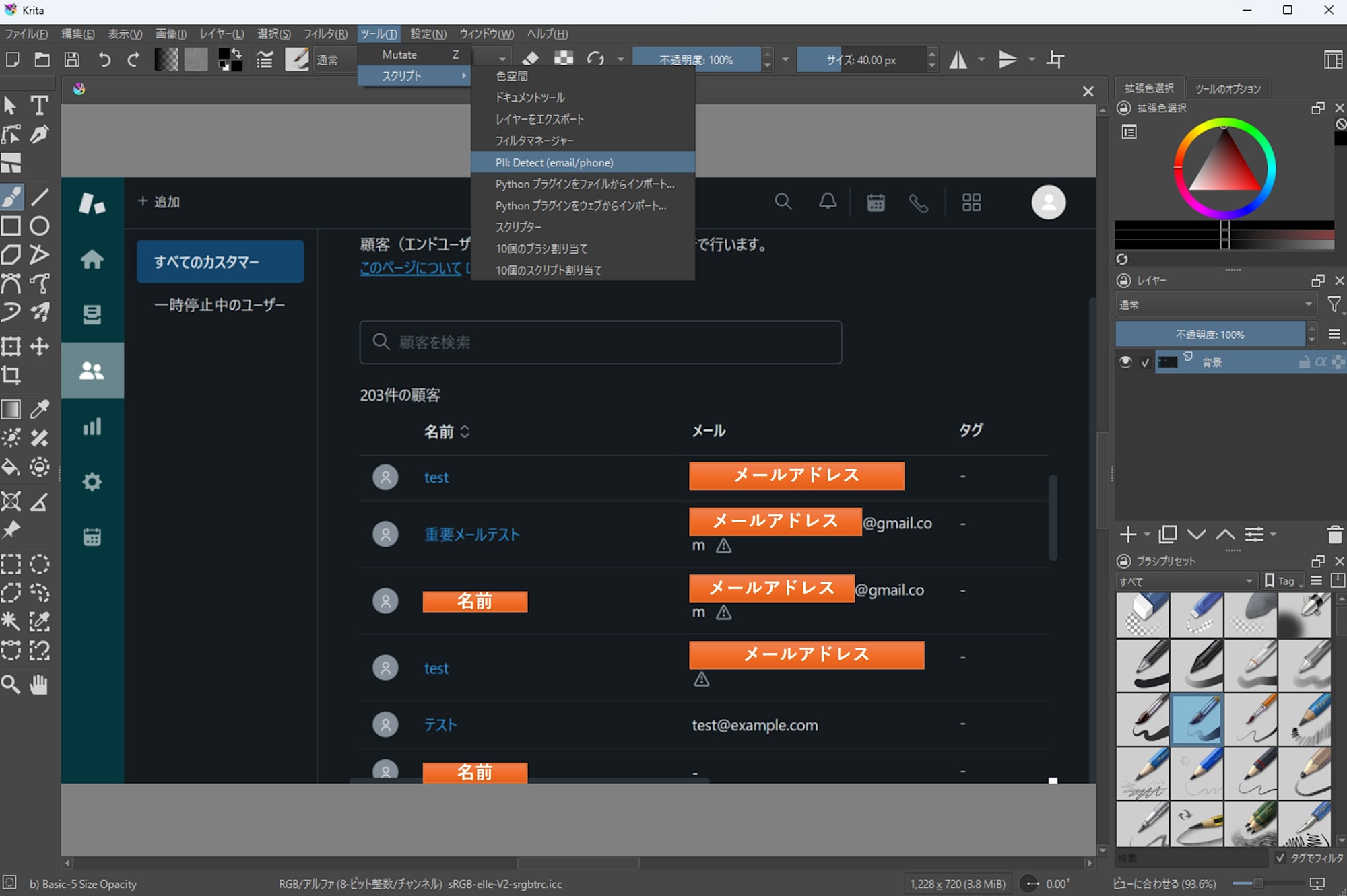
- A PNG export options dialog will appear; basically proceed with OK using the defaults.
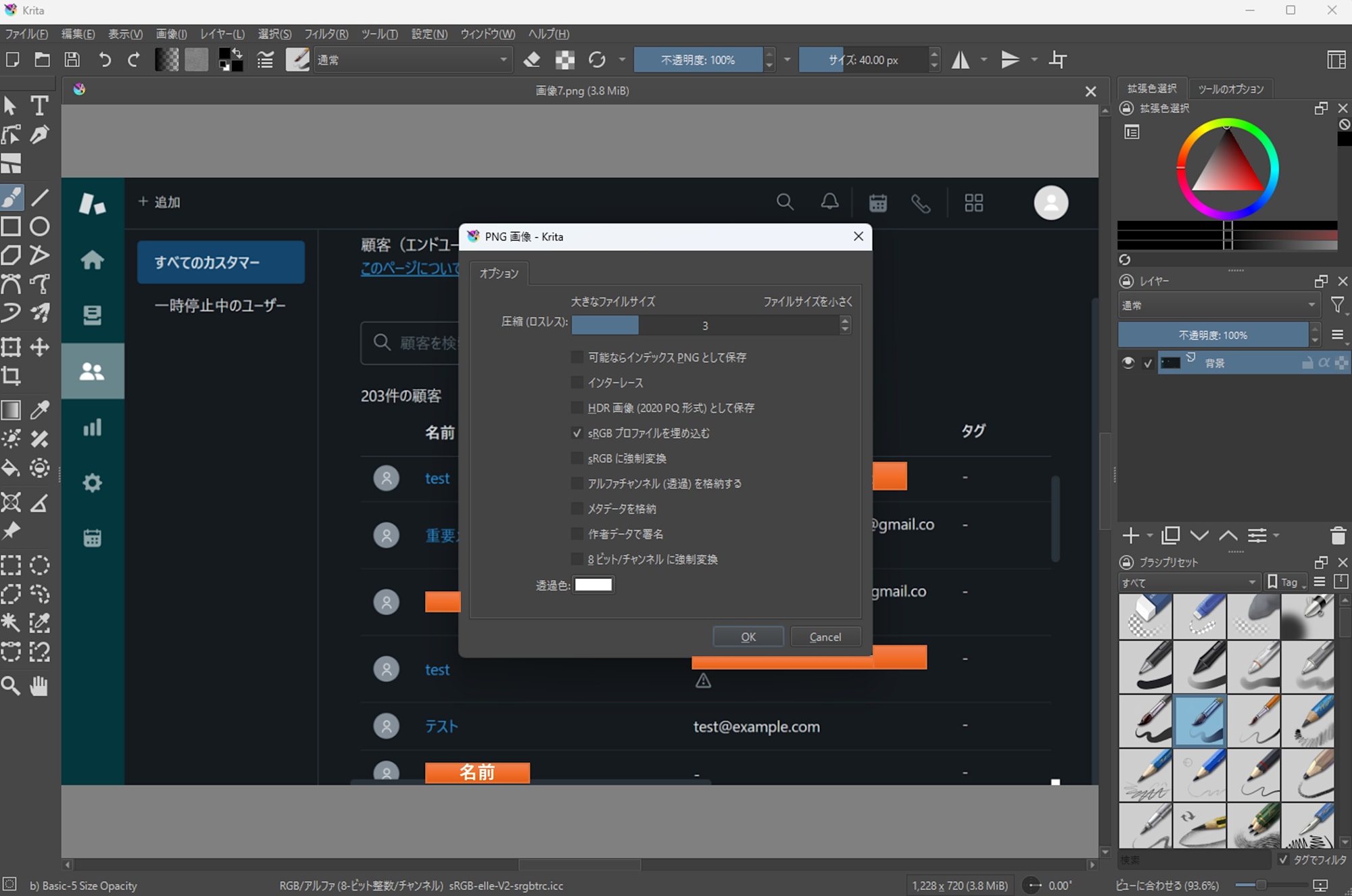
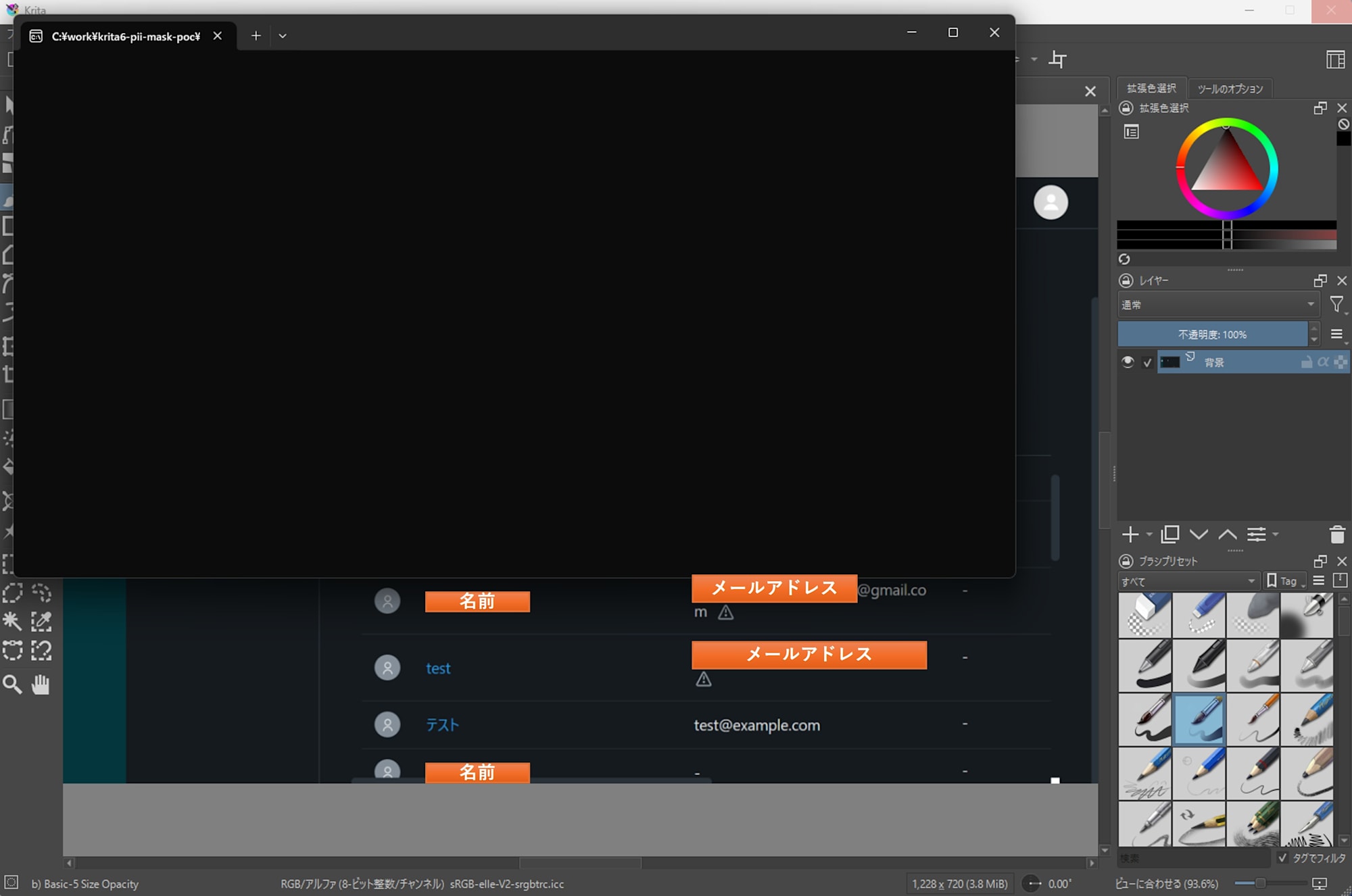
- Wait for detection to complete. In my environment (CPU only, no GPU), it took about 30 seconds. It may take over a minute depending on image size and resolution.
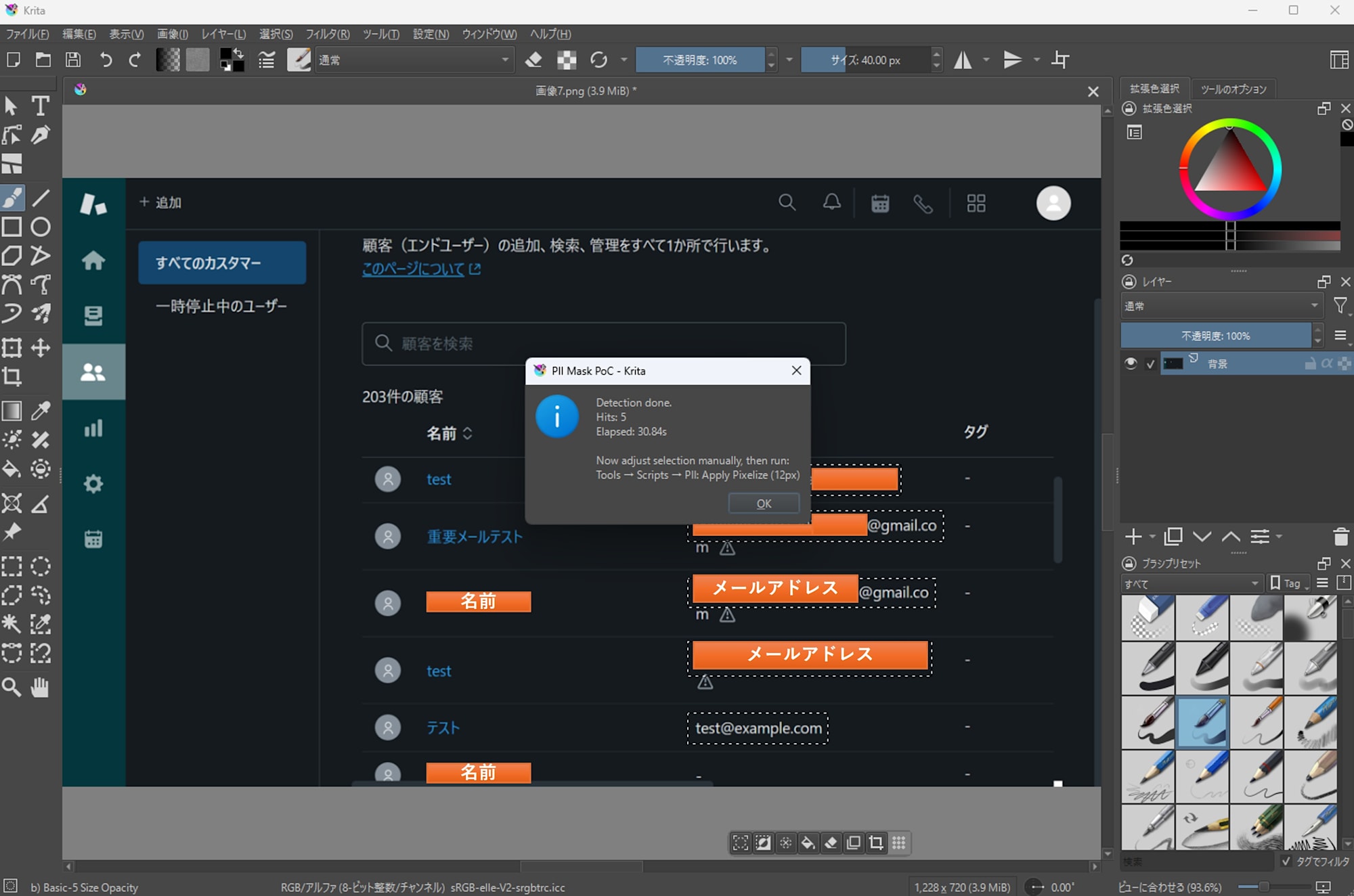
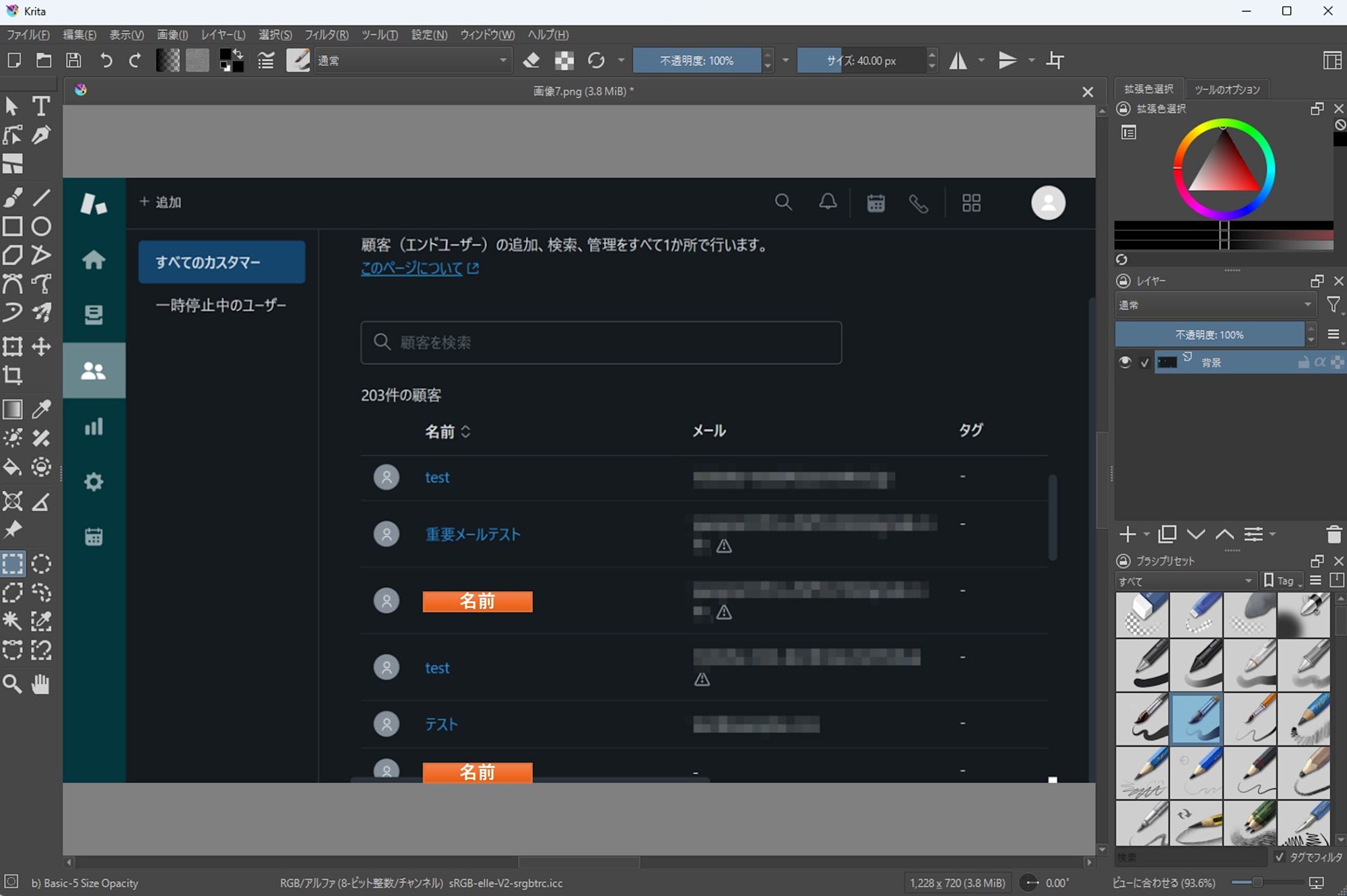
- When detection succeeds, selection areas are automatically set.
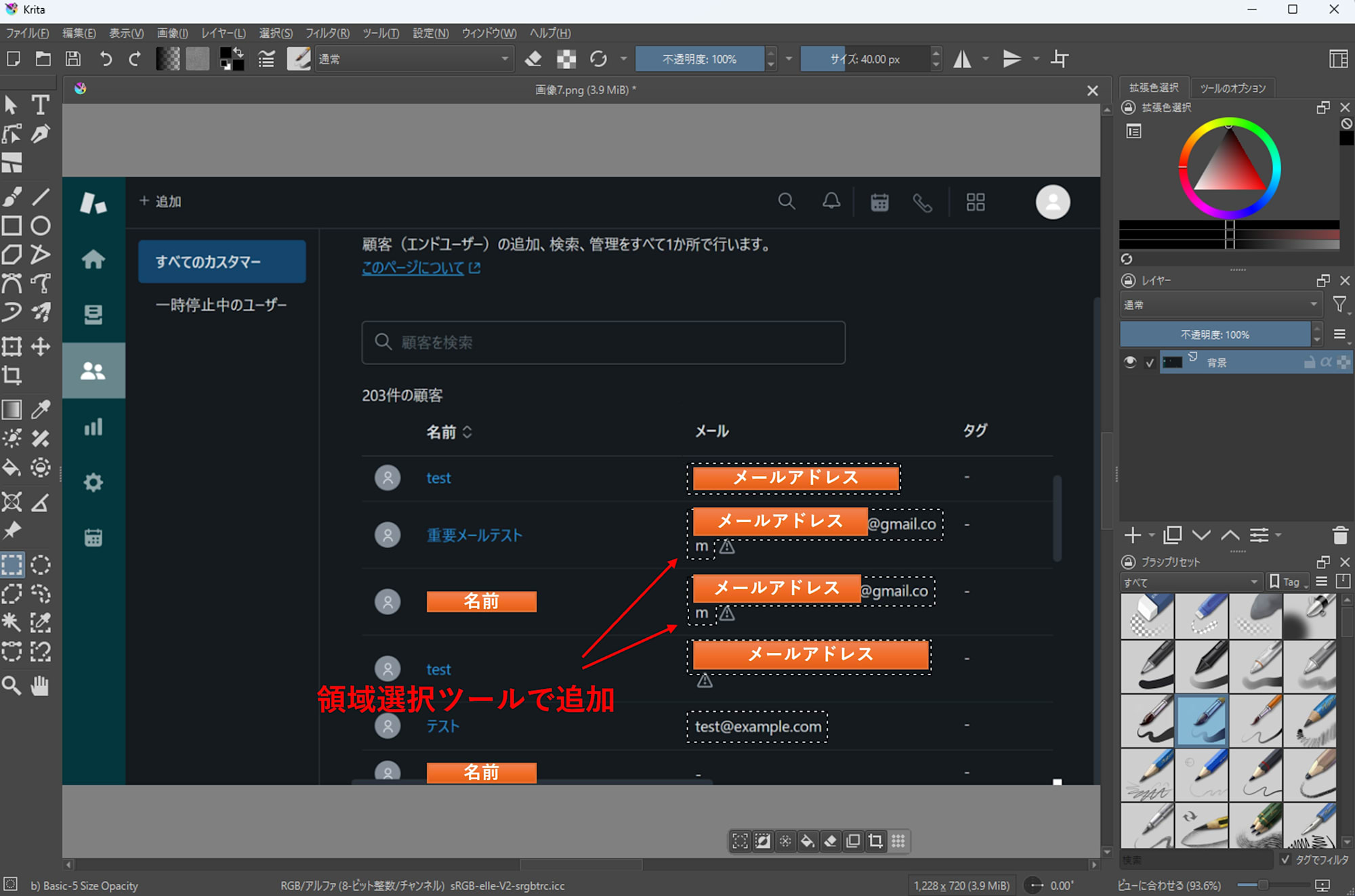
- Add or remove selection areas as needed.
- Finally, apply a mosaic or other filter using Krita's standard filters.
Troubleshooting (Menu Item Doesn't Appear / Plugin Doesn't Work)
Two methods were effective for troubleshooting:
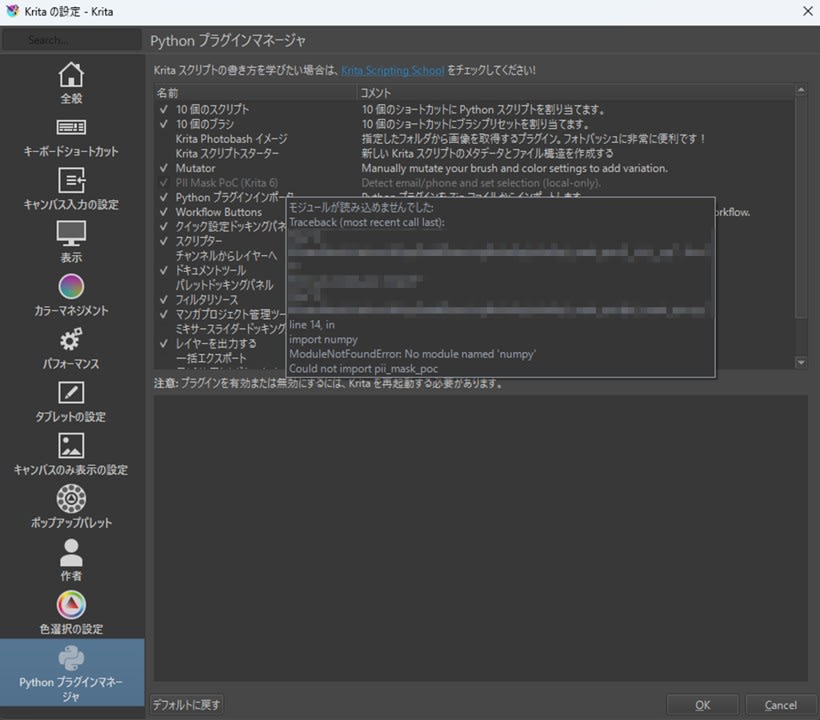
- Error messages in Python Plugin Manager
If a plugin appears in gray text and cannot be enabled, hovering over it will display an error message.
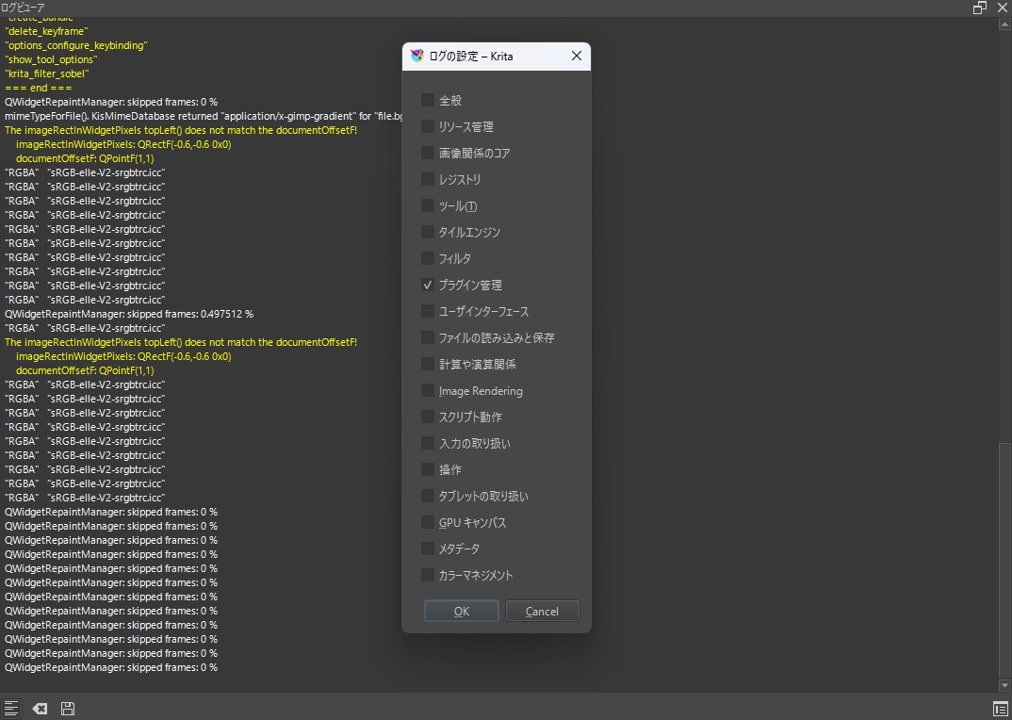
- Log Viewer
You can view logs fromSettings>Dockers>Log Viewer. Enable logging with the toggle button in the lower left, then use the button in the lower right to filter and display only necessary logs.
Conclusion
I tested Krita 6.0.0 beta1 on Windows 11, confirming both basic operations and that Python plugins work properly. The PII detection plugin implemented automates up to the point of setting selection areas based on detection results, leaving the masking process itself to Krita's standard features. While looking forward to stabilization for the official release, it's reassuring to check that the beta version doesn't interfere with your workflow.
Appendix: Sample Code
Appendix: Sample Code
pii_mask_poc.desktop
Place this in the pykrita directory.
[Desktop Entry]
Type=Service
ServiceTypes=Krita/PythonPlugin
X-KDE-Library=pii_mask_poc
X-Python-2-Compatible=false
Name=PII Detector PoC (Krita 6)
Comment=Detect email/+E.164-ish and set selection (local-only).
pii_mask_poc/__init__.py
from .pii_mask_poc import *
pii_mask_poc/config.json
Assumes using an external Python. Adjust python and detector paths to match your setup.
{
  "python": "C:\\path\\to\\.venv\\Scripts\\python.exe",
  "detector": "C:\\path\\to\\detector\\pii_detect.py",
  "langs": "en,ja",
  "min_conf": 0.40,
  "pad": 2,
  "scale": 0,
  "gpu": false
}
Setting gpu to true allows EasyOCR to use CUDA, significantly reducing detection time. Keep it false if you don't have a CUDA-compatible GPU.
pii_mask_poc/pii_mask_poc.py
# pykrita/pii_mask_poc/pii_mask_poc.py
from __future__ import annotations

import json
import os
import subprocess
import tempfile
import time
from pathlib import Path
from typing import Any, Dict, List, Optional

from krita import Extension, InfoObject, Krita, Selection  # type: ignore

try:
    from PyQt6.QtWidgets import QMessageBox
except Exception:  # pragma: no cover
    from PyQt5.QtWidgets import QMessageBox  # type: ignore

PLUGIN_TITLE = "PII Detector PoC"

def _load_config() -> Dict[str, Any]:
    cfg_path = Path(__file__).with_name("config.json")
    if not cfg_path.exists():
        raise RuntimeError(f"config.json not found: {cfg_path}")
    return json.loads(cfg_path.read_text(encoding="utf-8"))

def _msg(title: str, text: str) -> None:
    app = Krita.instance()
    w = app.activeWindow()
    parent = w.qwindow() if w is not None else None
    QMessageBox.information(parent, title, text)

def _err(title: str, text: str) -> None:
    app = Krita.instance()
    w = app.activeWindow()
    parent = w.qwindow() if w is not None else None
    QMessageBox.critical(parent, title, text)

def _export_projection_png(doc, out_path: Path) -> None:
    # projection (見た目通り) を書き出す
    doc.exportImage(str(out_path), InfoObject())

def _rects_to_selection(doc_w: int, doc_h: int, rects: List[Dict[str, int]]) -> Selection:
    sel = Selection()
    sel.resize(doc_w, doc_h)
    sel.clear()

    for r in rects:
        x, y, w, h = int(r["x"]), int(r["y"]), int(r["w"]), int(r["h"])
        if w <= 0 or h <= 0:
            continue
        tmp = Selection()
        tmp.resize(doc_w, doc_h)
        tmp.clear()
        tmp.select(x, y, w, h, 255)
        sel.add(tmp)

    return sel

def _clean_env_for_external_python() -> Dict[str, str]:
    env = os.environ.copy()

    for k in list(env.keys()):
        if k.upper().startswith("PYTHON"):
            env.pop(k, None)

    for k in ["QT_PLUGIN_PATH", "QML2_IMPORT_PATH"]:
        env.pop(k, None)

    return env

def _detector_sanity_check(detector_path: Path) -> Optional[str]:
    try:
        head = detector_path.read_text(encoding="utf-8", errors="ignore")[:2000]
    except Exception:
        return None

    if "from krita import" in head or "import krita" in head:
        return (
            "Detector script looks like a Krita plugin (it imports 'krita').\n"
            "config.json 'detector' may be pointing to the wrong file.\n\n"
            f"detector: {detector_path}"
        )

    return None

class PIIDetectorPoCExtension(Extension):
    def __init__(self, parent):
        super().__init__(parent)

    def setup(self) -> None:
        pass

    def createActions(self, window) -> None:
        a1 = window.createAction("pii_detect_email_phone", "PII: Detect (email/phone)", "tools/scripts")
        a1.triggered.connect(self.detect)

    def detect(self) -> None:
        app = Krita.instance()
        doc = app.activeDocument()
        if doc is None:
            _err(PLUGIN_TITLE, "No active document.")
            return

        try:
            cfg = _load_config()
        except Exception as e:
            _err(PLUGIN_TITLE, f"Failed to load config.json:\n{e}")
            return

        py = Path(str(cfg.get("python", "")))
        detector = Path(str(cfg.get("detector", "")))
        langs = str(cfg.get("langs", "en,ja"))
        min_conf = float(cfg.get("min_conf", 0.40))
        pad = int(cfg.get("pad", 2))
        scale = int(cfg.get("scale", 0))
        gpu = bool(cfg.get("gpu", False))

        if not py.exists():
            _err(PLUGIN_TITLE, f"python not found:\n{py}")
            return
        if not detector.exists():
            _err(PLUGIN_TITLE, f"detector not found:\n{detector}")
            return

        bad = _detector_sanity_check(detector)
        if bad:
            _err(PLUGIN_TITLE, bad)
            return

        tmp_dir = Path(tempfile.gettempdir()) / "krita_pii_detector_poc"
        tmp_dir.mkdir(parents=True, exist_ok=True)
        in_png = tmp_dir / "input.png"
        out_json = tmp_dir / "hits.json"

        try:
            _export_projection_png(doc, in_png)
        except Exception as e:
            _err(PLUGIN_TITLE, f"Failed to export image:\n{e}")
            return

        cmd = [
            str(py),
            "-E",
            "-s",
            str(detector),
            "--in",
            str(in_png),
            "--out",
            str(out_json),
            "--langs",
            langs,
            "--min-conf",
            str(min_conf),
            "--pad",
            str(pad),
            "--scale",
            str(scale),
        ]
        if gpu:
            cmd.append("--gpu")

        t0 = time.perf_counter()
        try:
            p = subprocess.run(
                cmd,
                capture_output=True,
                text=True,
                check=False,
                env=_clean_env_for_external_python(),
            )
        except Exception as e:
            _err(PLUGIN_TITLE, f"Failed to run detector:\n{e}")
            return
        elapsed = time.perf_counter() - t0

        print(f"[{PLUGIN_TITLE}] detector elapsed: {elapsed:.2f}s")
        if p.stdout.strip():
            print(f"[{PLUGIN_TITLE}] detector stdout:\n{p.stdout}")
        if p.stderr.strip():
            print(f"[{PLUGIN_TITLE}] detector stderr:\n{p.stderr}")

        if p.returncode != 0:
            _err(
                PLUGIN_TITLE,
                f"Detector failed (code={p.returncode}).\n\nElapsed: {elapsed:.2f}s\n\nSTDERR:\n{p.stderr}\n\nSTDOUT:\n{p.stdout}",
            )
            return

        try:
            data = json.loads(out_json.read_text(encoding="utf-8"))
            hits = data.get("hits", [])
        except Exception as e:
            _err(PLUGIN_TITLE, f"Failed to read JSON:\n{e}")
            return

        rects = [h["rect"] for h in hits if isinstance(h, dict) and "rect" in h]
        sel = _rects_to_selection(doc.width(), doc.height(), rects)
        doc.setSelection(sel)

        _msg(
            PLUGIN_TITLE,
            f"Detection done.\nHits: {len(rects)}\nElapsed: {elapsed:.2f}s\n\n"
            "Adjust selection manually, then apply pixelize (or other) filter using Krita built-ins.",
        )

Krita.instance().addExtension(PIIDetectorPoCExtension(Krita.instance()))
detector/pii_detect.py
# detector/pii_detect.py (standalone CLI)
from __future__ import annotations

import argparse
import json
import re
import time
import unicodedata
from dataclasses import dataclass
from pathlib import Path
from typing import List, Tuple

import easyocr  # type: ignore
import numpy as np  # type: ignore
from PIL import Image  # type: ignore

@dataclass
class Token:
    text: str
    conf: float
    x: int
    y: int
    w: int
    h: int

    @property
    def x2(self) -> int:
        return self.x + self.w

@dataclass
class Rect:
    x: int
    y: int
    w: int
    h: int

def clamp(v: int, lo: int, hi: int) -> int:
    return max(lo, min(hi, v))

def normalize_text(s: str) -> str:
    s = unicodedata.normalize("NFKC", s)
    s = s.replace("…", "...")
    s = s.replace("+", "+")
    return s.strip()

def digit_count(s: str) -> int:
    return sum(c.isdigit() for c in s)

def bbox_points_to_rect(points: List[List[float]]) -> Tuple[int, int, int, int]:
    xs = [p[0] for p in points]
    ys = [p[1] for p in points]
    x0 = int(min(xs))
    y0 = int(min(ys))
    x1 = int(max(xs))
    y1 = int(max(ys))
    return x0, y0, max(1, x1 - x0), max(1, y1 - y0)

def pad_rect(r: Rect, img_w: int, img_h: int, pad: int) -> Rect:
    x = clamp(r.x - pad, 0, img_w - 1)
    y = clamp(r.y - pad, 0, img_h - 1)
    x2 = clamp(r.x + r.w + pad, 0, img_w)
    y2 = clamp(r.y + r.h + pad, 0, img_h)
    return Rect(x=x, y=y, w=max(1, x2 - x), h=max(1, y2 - y))

def iou(a: Rect, b: Rect) -> float:
    ax1, ay1 = a.x + a.w, a.y + a.h
    bx1, by1 = b.x + b.w, b.y + b.h
    ix0, iy0 = max(a.x, b.x), max(a.y, b.y)
    ix1, iy1 = min(ax1, bx1), min(ay1, by1)
    iw, ih = max(0, ix1 - ix0), max(0, iy1 - iy0)
    inter = iw * ih
    if inter <= 0:
        return 0.0
    area = a.w * a.h + b.w * b.h - inter
    return inter / max(1, area)

def group_lines(tokens: List[Token]) -> List[List[Token]]:
    sorted_t = sorted(tokens, key=lambda t: (t.y, t.x))
    lines: List[List[Token]] = []
    for t in sorted_t:
        cy = t.y + t.h // 2
        placed = False
        for line in lines:
            lcy = line[0].y + line[0].h // 2
            if abs(cy - lcy) <= max(12, max(t.h, line[0].h) // 2):
                line.append(t)
                placed = True
                break
        if not placed:
            lines.append([t])
    for line in lines:
        line.sort(key=lambda t: t.x)
    return lines

def cluster_by_xgap(tokens: List[Token], max_gap: int) -> List[List[Token]]:
    if not tokens:
        return []
    tokens = sorted(tokens, key=lambda t: t.x)
    clusters: List[List[Token]] = [[tokens[0]]]
    for t in tokens[1:]:
        prev = clusters[-1][-1]
        gap = t.x - prev.x2
        if gap <= max_gap:
            clusters[-1].append(t)
        else:
            clusters.append([t])
    return clusters

def looks_like_phone(text: str) -> bool:
    if not text:
        return False

    bad = 0
    for c in text:
        if c.isdigit() or c in "+-() ":
            continue
        bad += 1
    if bad > 2:
        return False

    d = digit_count(text)
    if d >= 10:
        return True
    if "+" in text and d >= 8:
        return True
    return False

def dedupe_hits(hits: List[Tuple[str, Rect, float]], iou_th: float = 0.65) -> List[Tuple[str, Rect, float]]:
    kept: List[Tuple[str, Rect, float]] = []
    for kind, r, conf in sorted(hits, key=lambda x: x[2], reverse=True):
        if any(iou(r, kr) >= iou_th for _, kr, _ in kept):
            continue
        kept.append((kind, r, conf))
    return kept

def main() -> None:
    ap = argparse.ArgumentParser()
    ap.add_argument("--in", dest="in_path", required=True)
    ap.add_argument("--out", dest="out_path", required=True)

    ap.add_argument("--langs", default="en,ja")
    ap.add_argument("--min-conf", type=float, default=0.40)
    ap.add_argument("--pad", type=int, default=2)
    ap.add_argument("--scale", type=int, default=0, help="0=auto, 2/3/4...")
    ap.add_argument("--gpu", action="store_true", default=False)

    args = ap.parse_args()

    t0 = time.perf_counter()

    in_path = Path(args.in_path)
    out_path = Path(args.out_path)

    img0 = Image.open(in_path).convert("RGB")
    w0, h0 = img0.size

    scale = args.scale
    if scale == 0:
        scale = 3 if max(w0, h0) <= 1400 else 2

    img = img0.resize((w0 * scale, h0 * scale), Image.Resampling.BICUBIC) if scale != 1 else img0
    img_np = np.array(img)

    langs = [s.strip() for s in args.langs.split(",") if s.strip()]
    reader = easyocr.Reader(langs, gpu=args.gpu)

    results = reader.readtext(
        img_np,
        detail=1,
        paragraph=False,
        decoder="greedy",
        text_threshold=0.40,
        low_text=0.20,
        link_threshold=0.20,
    )

    tokens: List[Token] = []
    for bbox, text, conf in results:
        if conf is None or conf < args.min_conf:
            continue
        t = normalize_text(text or "")
        if not t:
            continue

        x, y, w, h = bbox_points_to_rect(bbox)
        x = int(x / scale)
        y = int(y / scale)
        w = int(w / scale)
        h = int(h / scale)
        tokens.append(Token(text=t, conf=float(conf), x=x, y=y, w=w, h=h))

    raw_hits: List[Tuple[str, Rect, float]] = []

    for line in group_lines(tokens):
        at_idxs = [i for i, t in enumerate(line) if "@" in t.text]
        for i in at_idxs:
            center = line[i]
            cand = [center]

            j = i - 1
            while j >= 0:
                prev = line[j]
                gap = cand[0].x - prev.x2
                if gap <= max(20, prev.h):
                    cand.insert(0, prev)
                    j -= 1
                else:
                    break

            j = i + 1
            while j < len(line):
                nxt = line[j]
                gap = nxt.x - cand[-1].x2
                if gap <= max(20, nxt.h):
                    cand.append(nxt)
                    j += 1
                else:
                    break

            r = Rect(cand[0].x, cand[0].y, cand[-1].x2 - cand[0].x, max(t.h for t in cand))
            r = pad_rect(r, w0, h0, args.pad)
            conf2 = sum(t.conf for t in cand) / len(cand)
            raw_hits.append(("email", r, conf2))

        phoneish = [t for t in line if any(c.isdigit() for c in t.text) or any(c in t.text for c in "+-()")]
        for cl in cluster_by_xgap(phoneish, max_gap=24):
            joined = normalize_text(" ".join(t.text for t in cl))
            if looks_like_phone(joined):
                r = Rect(cl[0].x, cl[0].y, cl[-1].x2 - cl[0].x, max(t.h for t in cl))
                r = pad_rect(r, w0, h0, args.pad)
                conf2 = sum(t.conf for t in cl) / len(cl)
                raw_hits.append(("phone_e164", r, conf2))

    raw_hits = dedupe_hits(raw_hits)

    hits = [
        {"kind": k, "rect": {"x": r.x, "y": r.y, "w": r.w, "h": r.h}, "confidence": c}
        for k, r, c in raw_hits
    ]
    out = {"image": {"path": str(in_path), "width": w0, "height": h0}, "hits": hits}
    out_path.parent.mkdir(parents=True, exist_ok=True)
    out_path.write_text(json.dumps(out, ensure_ascii=False, indent=2), encoding="utf-8")

    elapsed = time.perf_counter() - t0
    print(f"[pii_detect] elapsed: {elapsed:.2f}s, hits={len(hits)}, image={w0}x{h0}")

if __name__ == "__main__":
    main()
Example of Dependency Installation
Execute the following in the external Python environment.
python -m venv .venv
.venv/Scripts/python -m pip install --upgrade pip
.venv/Scripts/pip install easyocr pillow numpy