![[Update] A metadata endpoint has been added that allows you to retrieve which AZ an AWS Lambda function execution environment is running in](https://images.ctfassets.net/ct0aopd36mqt/wp-thumbnail-484d8afca1cbe50513cd4d6738af2960/fa0838fa40f247093d532945fc785e88/aws-lambda?w=3840&fm=webp)
[Update] A metadata endpoint has been added that allows you to retrieve which AZ an AWS Lambda function execution environment is running in

This page has been translated by machine translation. View original
Introduction
I'm Onoyan.
A metadata endpoint has been added to AWS Lambda that allows you to retrieve which AZ the function execution environment is running in.
Until now, there was no direct way to check which AZ a Lambda function was executing in. With this update, you can retrieve the AZ ID with a single HTTP request from within the function.
What you can now obtain is not the AZ name (ap-northeast-1a) but the AZ ID (apne1-az1). While AZ names may map to different physical AZs for each account behind the scenes, AZ IDs refer to the same physical AZ across all AWS accounts.
For EC2 instances, you can get the AZ ID using the instance metadata service with curl http://169.254.169.254/latest/meta-data/placement/availability-zone-id. For ECS and EKS, there were ways to retrieve AZ information (though conversion was necessary) from container metadata or Node Labels.
However, Lambda functions didn't have an equivalent to EC2's instance metadata service, and there was no official way to get AZ information. At the time of writing, perhaps not yet reflected in both Japanese and English, the AWS whitepaper introduced the following steps to estimate the AZ of a Lambda function:
Lambda — Availability zones are not directly exposed to functions. You need to complete several steps to find it. For this, you need to build a private API Gateway REST endpoint that returns the requester's IP address. This identifies the private IP assigned to the Elastic Network Interface the function is using.
- Call the Lambda GetFunction API to find the function's VPC ID.
- Call the API Gateway service to get the function's IP.
- Use the IP and VPC ID to find the associated network interface and extract the availability zone
With this update, you can now directly retrieve the AZ ID.
Specifically, two new environment variables are automatically set in the Lambda execution environment:
| Environment Variable | Description |
|---|---|
AWS_LAMBDA_METADATA_API |
Metadata server address (in {ipv4}:{port} format) |
AWS_LAMBDA_METADATA_TOKEN |
Authentication token unique to each execution environment |
You can retrieve the AZ ID with this HTTP request:
GET http://${AWS_LAMBDA_METADATA_API}/2026-01-15/metadata/execution-environment
Trying It Out
So, I'll create a Lambda function and try to retrieve the AZ ID from the metadata endpoint.
First, I'll create a Lambda function. It will send an HTTP request to the metadata endpoint to get the AZ ID like this:
import json
import os
import urllib.request

def handler(event, context):
    metadata_api = os.environ.get("AWS_LAMBDA_METADATA_API")
    metadata_token = os.environ.get("AWS_LAMBDA_METADATA_TOKEN")

    if not metadata_api or not metadata_token:
        return {
            "statusCode": 500,
            "body": json.dumps({"error": "Metadata environment variables not available"})
        }

    url = f"http://{metadata_api}/2026-01-15/metadata/execution-environment"
    req = urllib.request.Request(
        url,
        headers={"Authorization": f"Bearer {metadata_token}"}
    )

    with urllib.request.urlopen(req) as response:
        metadata = json.loads(response.read().decode())

    return {
        "statusCode": 200,
        "body": json.dumps({
            "availability_zone_id": metadata.get("AvailabilityZoneID"),
            "function_name": context.function_name,
            "request_id": context.aws_request_id
        })
    }
After deploying the Lambda function, the AZ ID was returned like this. I can confirm that availability_zone_id shows an AZ ID like apne1-az1.
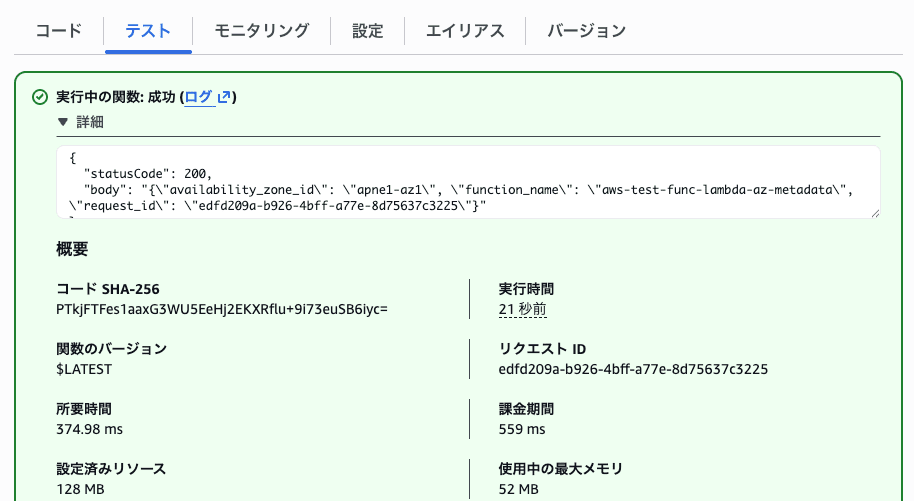
{
  "statusCode": 200,
  "body": "{\"availability_zone_id\": \"apne1-az1\", \"function_name\": \"aws-test-func-lambda-az-metadata\", \"request_id\": \"edfd209a-b926-4bff-a77e-8d75637c3225\"}"
}
When I started Lambda again a few minutes later, a different AZ ID (apne1-az2) was recorded.
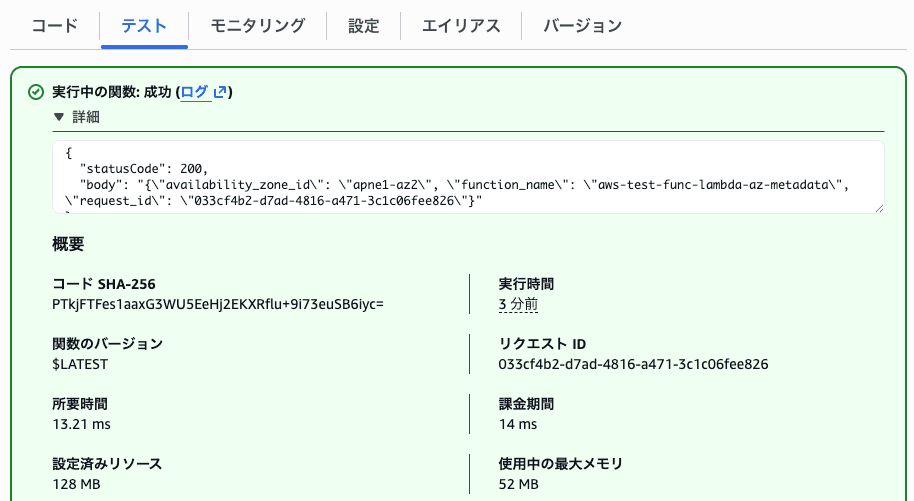
{
  "statusCode": 200,
  "body": "{\"availability_zone_id\": \"apne1-az2\", \"function_name\": \"aws-test-func-lambda-az-metadata\", \"request_id\": \"033cf4b2-d7ad-4816-a471-3c1c06fee826\"}"
}
In Lambda, the physical AZ for creating the execution environment is automatically determined during a cold start. This behavior can now be confirmed with the addition of the metadata endpoint.
Lambda runs your function in multiple Availability Zones to ensure that it's available to process events in case there's a service interruption in a single zone.
I'll execute the Lambda function multiple times via AWS CLI to check if it gets placed in different physical AZs.
for i in $(seq 1 10); do
  aws lambda invoke \
    --function-name "aws-test-func-lambda-az-metadata" \
    --region ap-northeast-1 \
    --payload '{}' \
    /dev/stdout 2>/dev/null | jq -r '.body' | jq -r '.availability_zone_id'
done
The same AZ ID was returned. The same execution environment is being reused (the null outputs are because the jq command couldn't find '.body' in some of the invoke metadata, as opposed to the function response).
apne1-az2
null
apne1-az2
null
apne1-az2
null
apne1-az2
null
apne1-az2
null
apne1-az2
null
apne1-az2
null
apne1-az2
null
apne1-az2
null
apne1-az2
null
Summary
Previously, retrieving AZ information for Lambda functions required complex procedures involving VPC connections, multiple API calls, and additional infrastructure. With this update, you can now retrieve the AZ ID with an HTTP request, regardless of whether you're using a VPC or not.
This will be useful for monitoring Lambda at the AZ level or conducting AZ failure tests. That's it!