
I tried auto-posting daily tasks using Discord Webhook and Lambda

This page has been translated by machine translation. View original
Introduction
Hello, I'm Shota Yamamoto.
I recently started playing a new mobile game, but I was having trouble forgetting to do tasks because there are many daily updates.
So this time, I'd like to create a system that sends a daily task list at a specific time using Discord Webhook.
1. Getting the Webhook URL
First, let's get the Webhook URL. Follow these steps to get the URL.
- Click the gear icon of the channel where you want to send the tasks
- Select "Integrations" and then "Webhooks"
- Click "New Webhook" and set a name
- Click "Copy Webhook URL" to get the URL
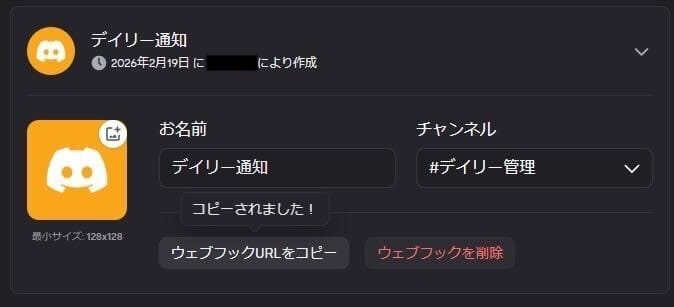
Please save the obtained URL in a notepad etc. for later use.
2. Creating and Setting up a Lambda Function
Creating the Function
Next, let's create a Lambda function.
Click "Create function" from the management console and create a Lambda function with the following settings:
- Name: DailyTaskBot (or any name you prefer)
- Runtime: Python 3.12
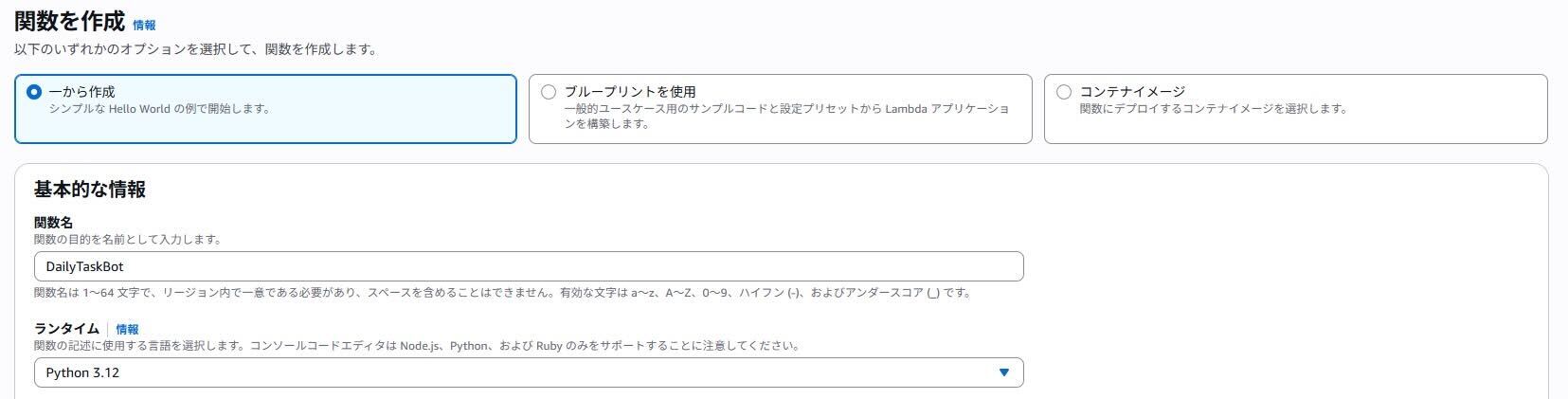
Configuring the Function
Now let's change the settings of the created function.
First, save the webhook URL you saved earlier as an environment variable.
Open the "Configuration" tab and set the following from "Environment variables":
- Key: DISCORD_WEBHOOK_URL
- Value: (paste the saved URL)
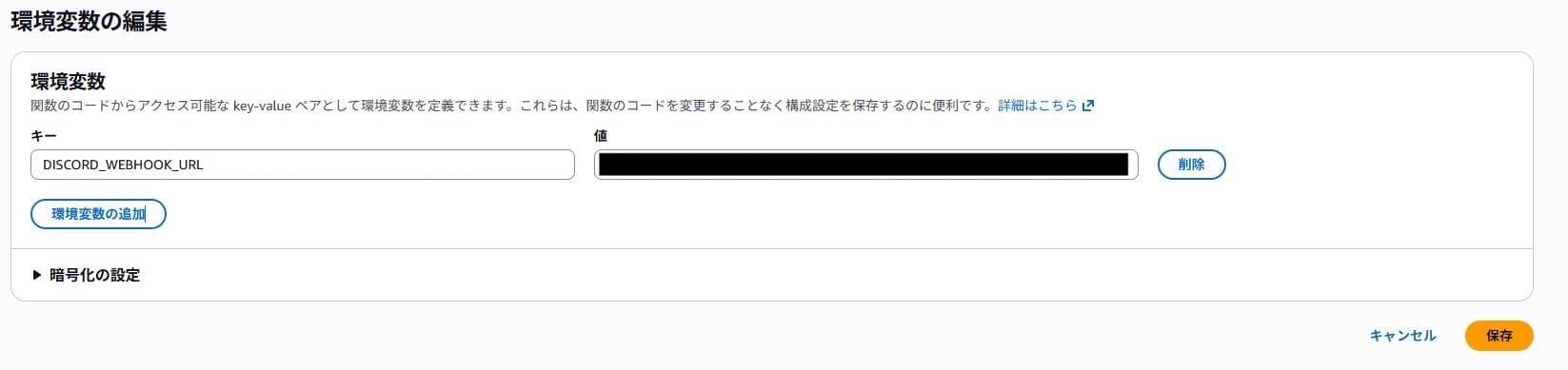
After saving, change the timeout duration.
For this project, we're sending messages with a 1-second interval for each task.
From the "Configuration" tab, select "General configuration" and change the timeout to 1 minute.
Entering the Code
Next, enter the code to send messages to Discord.
Click the "Code" tab and paste the following code:
import json
import urllib.request
import time
import os
from datetime import datetime, timedelta, timezone

WEBHOOK_URL = os.environ.get('DISCORD_WEBHOOK_URL')

def send_message(content):
    if not WEBHOOK_URL:
        print("Error: DISCORD_WEBHOOK_URL is not set.")
        return None

    payload = {"content": content}
    headers = {
        "Content-Type": "application/json",
        "User-Agent": "DiscordBot (https://example.com, v1.0)"
    }

    data = json.dumps(payload).encode("utf-8")
    req = urllib.request.Request(WEBHOOK_URL, data=data, headers=headers, method="POST")

    try:
        with urllib.request.urlopen(req) as res:
            return res.getcode()
    except Exception as e:
        print(f"Error: {e}")
        return None

def lambda_handler(event, context):
    # 日本時間の取得
    jst = timezone(timedelta(hours=+9), 'JST')
    today = datetime.now(jst).strftime('%Y/%m/%d')

    # 送信したいタスクリスト
    tasks = [
        f"━━━━━━━━━━━━━━━━━━━━\n**📅 {today} のデイリータスク**\n━━━━━━━━━━━━━━━━━━━━",
        "**タスクA**: デイリークエストをクリアする",
        "**タスクB**: ショップの無料枠を回収する",
        "**タスクC**: 収集物の確認",
    ]

    # 1秒ごとに送信
    for task in tasks:
        send_message(task)
        time.sleep(1)

    return {
        'statusCode': 200,
        'body': f'Tasks for {today} sent successfully'
    }
This code creates a task list and sends it every second.
If you want to change the content of the tasks, modify the following section:
    tasks = [
        f"━━━━━━━━━━━━━━━━━━━━\n**📅 {today} のデイリータスク**\n━━━━━━━━━━━━━━━━━━━━",
        "**タスクA**: デイリークエストをクリアする",
        "**タスクB**: ショップの無料枠を回収する",
        "**タスクC**: 収集物の確認",
    ]
3. Setting up the Trigger
Next, set up a trigger to run at a scheduled time daily.
Click "Add trigger" at the top of the Lambda screen.
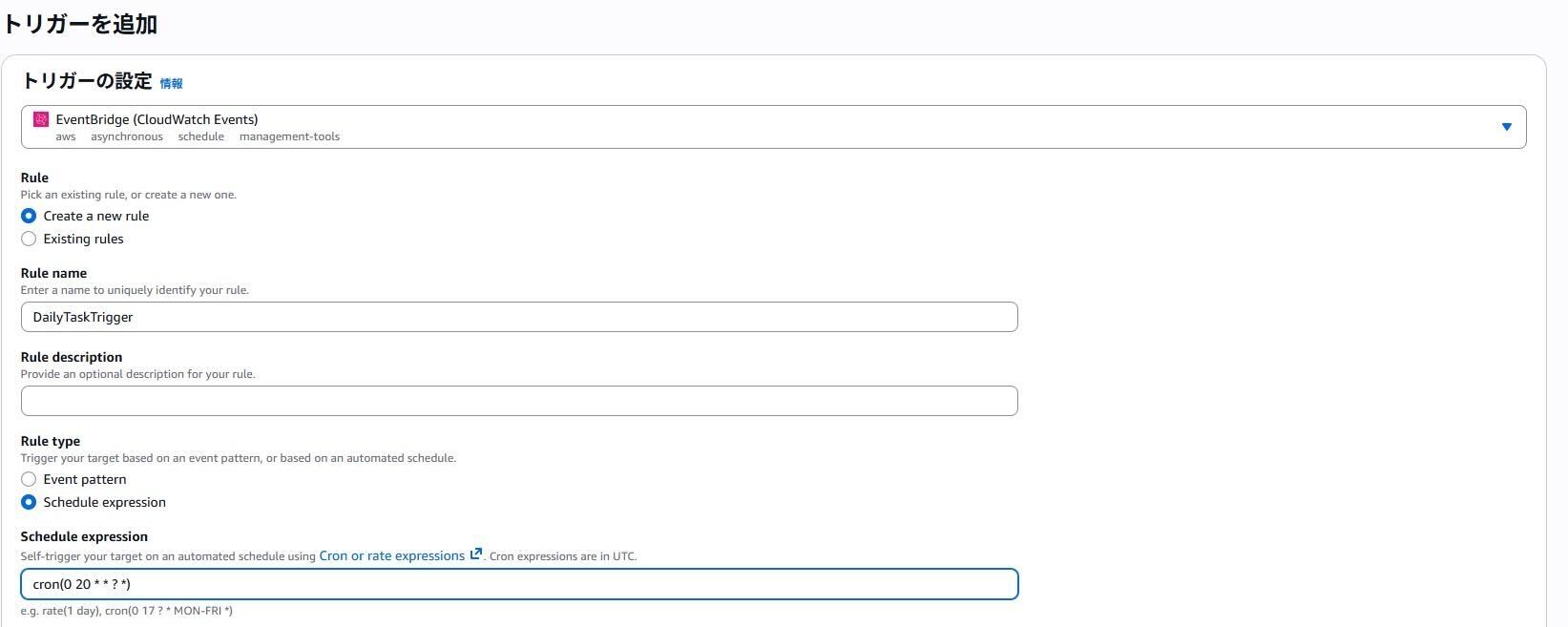
Select "EventBridge (CloudWatch Events)" as the source, and select "Create a new rule".
After entering a rule name, enter a schedule expression in "Schedule expression".
In this case, I've set it to send at 5:00 AM to match when the game updates.
cron(0 20 * * ? *)
4. Testing and Actual Operation
Finally, let's run a test.
Click the "Test" button in the "Test" tab to send the task list regardless of the time.
If everything is set up correctly, it will display as shown in the image below.
When actually operating, tasks are sent individually as configured, so manage completed tasks by adding reactions to them.

Conclusion
That's all for this tutorial.
Using Webhook is simple and recommended for one-way notifications like this one.
However, note that you cannot respond to received messages or perform operations with them. Choose between Webhook and Bot according to your needs.
References
About Classmethod Operations Inc.
We are an operations company within the Classmethod Group.
Our specialized teams in operations, maintenance development, support, IT systems, and back office provide services from business operations to problem solving and high value-added services through mechanisms that fully utilize IT and AI. We are a group of experts.
We are recruiting members for various positions.
If you are interested in our culture, mechanisms, and work style that realize "Operation Excellence" and "Working like yourself, living like yourself," please visit Classmethod Operations Inc. Corporate Site. *We changed our company name from Annotation Inc. in January 2026.