
I Tried Node.js 24 with Lambda@Edge

This page has been translated by machine translation. View original
On November 25, 2025, AWS Lambda started supporting Node.js 24. While I've covered how it works with regular Lambda functions in a previous article,
this time I've verified its operation with Lambda@Edge.
Lambda@Edge is a Lambda function that runs at CloudFront edge locations and has different constraints compared to regular Lambda.
Node.js 24 includes a breaking change with the deprecation of the callback format, but I've confirmed through hands-on testing that this change doesn't compromise the compatibility of Lambda@Edge's basic functionality (four event hooks and header manipulation).
Testing Environment
- Region: us-east-1
- Runtime: nodejs24.x
- Deployment method: CloudFormation
- Test items: All four event types (viewer-request, origin-request, origin-response, viewer-response)
Lambda@Edge Function Implementation
I prepared Lambda@Edge functions for all four triggers.
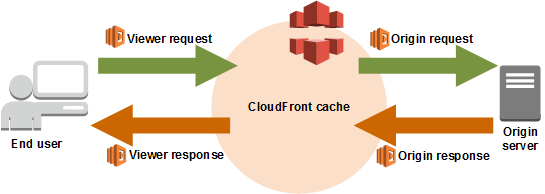
1. Viewer Request Handler
Viewer Request executes immediately after CloudFront receives a request from a viewer. You can add request headers or rewrite URIs.
exports.handler = async (event) => {
  const request = event.Records[0].cf.request;

  // Add custom header
  request.headers['x-custom-header'] = [{
    key: 'X-Custom-Header',
    value: 'Node24-Edge'
  }];

  // URI rewrite example
  if (request.uri === '/old-path') {
    request.uri = '/new-path';
  }

  return request;
};
Constraints:
- Timeout: 5 seconds
- Memory: 128MB
2. Origin Request Handler
Origin Request executes just before CloudFront forwards the request to the origin. You can read headers added by CloudFront (like geolocation information).
exports.handler = async (event) => {
  const request = event.Records[0].cf.request;

  // Add header for the origin
  request.headers['x-origin-header'] = [{
    key: 'X-Origin-Header',
    value: 'from-edge'
  }];

  // Read CloudFront headers
  console.log('CloudFront-Viewer-Country:',
    request.headers['cloudfront-viewer-country']);

  return request;
};
Constraints:
- Timeout: 30 seconds
- Memory: 128MB
3. Origin Response Handler
Origin Response executes immediately after CloudFront receives a response from the origin. Used to add security headers, etc.
exports.handler = async (event) => {
  const response = event.Records[0].cf.response;

  // Add security headers
  response.headers['strict-transport-security'] = [{
    key: 'Strict-Transport-Security',
    value: 'max-age=63072000'
  }];

  response.headers['x-content-type-options'] = [{
    key: 'X-Content-Type-Options',
    value: 'nosniff'
  }];

  return response;
};
Constraints:
- Timeout: 30 seconds
- Memory: 128MB
4. Viewer Response Handler
Viewer Response executes just before CloudFront returns the response to the viewer. Used to add cache control headers, etc.
exports.handler = async (event) => {
  const response = event.Records[0].cf.response;

  // Add cache control headers
  response.headers['cache-control'] = [{
    key: 'Cache-Control',
    value: 'public, max-age=3600'
  }];

  // Note: Status code changes are not allowed in Viewer Response

  return response;
};
Constraints:
- Timeout: 5 seconds
- Memory: 128MB
- Status code changes not allowed
CloudFormation Template
I prepared a CloudFormation template to deploy all four Lambda@Edge functions and the CloudFront distribution at once.
Full Template
AWSTemplateFormatVersion: '2010-09-09'
Description: Lambda@Edge with Node.js 24 - All Event Types

Resources:
  EdgeFunctionRole:
    Type: AWS::IAM::Role
    Properties:
      AssumeRolePolicyDocument:
        Version: '2012-10-17'
        Statement:
          - Effect: Allow
            Principal:
              Service:
                - lambda.amazonaws.com
                - edgelambda.amazonaws.com
            Action: sts:AssumeRole
      ManagedPolicyArns:
        - arn:aws:iam::aws:policy/service-role/AWSLambdaBasicExecutionRole

  ViewerRequestFunction:
    Type: AWS::Lambda::Function
    Properties:
      FunctionName: node24-edge-viewer-request
      Runtime: nodejs24.x
      Handler: index.handler
      Role: !GetAtt EdgeFunctionRole.Arn
      Timeout: 5
      MemorySize: 128
      Code:
        ZipFile: |
          exports.handler = async (event) => {
            const request = event.Records[0].cf.request;
            request.headers['x-custom-header'] = [{ key: 'X-Custom-Header', value: 'Node24-Edge' }];
            if (request.uri === '/old-path') {
              request.uri = '/new-path';
            }
            return request;
          };

  ViewerRequestVersion:
    Type: AWS::Lambda::Version
    Properties:
      FunctionName: !Ref ViewerRequestFunction

  OriginRequestFunction:
    Type: AWS::Lambda::Function
    Properties:
      FunctionName: node24-edge-origin-request
      Runtime: nodejs24.x
      Handler: index.handler
      Role: !GetAtt EdgeFunctionRole.Arn
      Timeout: 30
      MemorySize: 128
      Code:
        ZipFile: |
          exports.handler = async (event) => {
            const request = event.Records[0].cf.request;
            request.headers['x-origin-header'] = [{ key: 'X-Origin-Header', value: 'from-edge' }];
            console.log('CloudFront-Viewer-Country:', request.headers['cloudfront-viewer-country']);
            return request;
          };

  OriginRequestVersion:
    Type: AWS::Lambda::Version
    Properties:
      FunctionName: !Ref OriginRequestFunction

  OriginResponseFunction:
    Type: AWS::Lambda::Function
    Properties:
      FunctionName: node24-edge-origin-response
      Runtime: nodejs24.x
      Handler: index.handler
      Role: !GetAtt EdgeFunctionRole.Arn
      Timeout: 30
      MemorySize: 128
      Code:
        ZipFile: |
          exports.handler = async (event) => {
            const response = event.Records[0].cf.response;
            response.headers['strict-transport-security'] = [{
              key: 'Strict-Transport-Security',
              value: 'max-age=63072000'
            }];
            response.headers['x-content-type-options'] = [{
              key: 'X-Content-Type-Options',
              value: 'nosniff'
            }];
            return response;
          };

  OriginResponseVersion:
    Type: AWS::Lambda::Version
    Properties:
      FunctionName: !Ref OriginResponseFunction

  ViewerResponseFunction:
    Type: AWS::Lambda::Function
    Properties:
      FunctionName: node24-edge-viewer-response
      Runtime: nodejs24.x
      Handler: index.handler
      Role: !GetAtt EdgeFunctionRole.Arn
      Timeout: 5
      MemorySize: 128
      Code:
        ZipFile: |
          exports.handler = async (event) => {
            const response = event.Records[0].cf.response;
            response.headers['cache-control'] = [{
              key: 'Cache-Control',
              value: 'public, max-age=3600'
            }];
            return response;
          };

  ViewerResponseVersion:
    Type: AWS::Lambda::Version
    Properties:
      FunctionName: !Ref ViewerResponseFunction

  OriginBucket:
    Type: AWS::S3::Bucket
    Properties:
      # Note: 123456789012 is a dummy AWS account ID. Please change it according to your environment.
      BucketName: !Sub 'node24-edge-origin-${AWS::AccountId}'

  OriginAccessControl:
    Type: AWS::CloudFront::OriginAccessControl
    Properties:
      OriginAccessControlConfig:
        Name: node24-edge-oac
        OriginAccessControlOriginType: s3
        SigningBehavior: always
        SigningProtocol: sigv4

  CloudFrontDistribution:
    Type: AWS::CloudFront::Distribution
    Properties:
      DistributionConfig:
        Enabled: true
        DefaultCacheBehavior:
          TargetOriginId: S3Origin
          ViewerProtocolPolicy: redirect-to-https
          CachePolicyId: 658327ea-f89d-4fab-a63d-7e88639e58f6
          LambdaFunctionAssociations:
            - EventType: viewer-request
              LambdaFunctionARN: !Ref ViewerRequestVersion
            - EventType: origin-request
              LambdaFunctionARN: !Ref OriginRequestVersion
            - EventType: origin-response
              LambdaFunctionARN: !Ref OriginResponseVersion
            - EventType: viewer-response
              LambdaFunctionARN: !Ref ViewerResponseVersion
        Origins:
          - Id: S3Origin
            DomainName: !GetAtt OriginBucket.RegionalDomainName
            OriginAccessControlId: !Ref OriginAccessControl
            OriginShield:
              Enabled: true
              OriginShieldRegion: us-east-1
            S3OriginConfig: {}

  BucketPolicy:
    Type: AWS::S3::BucketPolicy
    Properties:
      Bucket: !Ref OriginBucket
      PolicyDocument:
        Statement:
          - Effect: Allow
            Principal:
              Service: cloudfront.amazonaws.com
            Action: s3:GetObject
            Resource: !Sub '${OriginBucket.Arn}/*'
            Condition:
              StringEquals:
                AWS:SourceArn: !Sub 'arn:aws:cloudfront::${AWS::AccountId}:distribution/${CloudFrontDistribution}'

Outputs:
  DistributionDomainName:
    Value: !GetAtt CloudFrontDistribution.DomainName
  ViewerRequestVersion:
    Value: !Ref ViewerRequestVersion
  OriginRequestVersion:
    Value: !Ref OriginRequestVersion
  OriginResponseVersion:
    Value: !Ref OriginResponseVersion
  ViewerResponseVersion:
    Value: !Ref ViewerResponseVersion
  OriginBucket:
    Value: !Ref OriginBucket
Reason for adopting Origin Shield:
Since Lambda@Edge runs at each edge location, logs are distributed across regions worldwide. By enabling Origin Shield, logs for Origin Request/Response events can be consolidated in us-east-1, making log verification and analysis easier.
Note when using CloudFormation ZipFile:
When using the ZipFile property in CloudFormation, you cannot include package.json, so CommonJS format (exports.handler) is required. If you want to use ES Modules format (export const handler), you need to create a separate ZIP file, upload it to S3, and use Code.S3Bucket / Code.S3Key.
After deployment, I confirmed that Lambda@Edge was associated in the CloudFront Behavior settings.

Deployment Procedure
I created the CloudFormation stack using the CLI.
aws cloudformation create-stack \
  --stack-name node24-lambda-edge \
  --template-body file://cloudformation-edge.yaml \
  --capabilities CAPABILITY_IAM \
  --region us-east-1
Verification
1. Upload Test File
# Create test HTML file
cat > test.html << 'EOF'
<!DOCTYPE html>
<html>
<head>
    <title>Lambda@Edge Node.js 24 Test</title>
</head>
<body>
    <h1>Lambda@Edge Node.js 24 Test Page</h1>
    <p>This page tests all four Lambda@Edge event types.</p>
</body>
</html>
EOF

# Upload to S3
# Note: Replace node24-edge-origin-123456789012 with the bucket name created in your environment
aws s3 cp test.html s3://node24-edge-origin-123456789012/test.html --region us-east-1
2. Access via CloudFront
curl -I https://d1234567890abc.cloudfront.net/test.html
3. Results
HTTP/1.1 200 OK
Content-Type: text/html
Content-Length: 451
Date: Fri, 28 Nov 2025 11:39:40 GMT
Last-Modified: Fri, 28 Nov 2025 11:39:30 GMT
ETag: "b4ec68bdc1ddae9aa15ce5803a10c28f"
Strict-Transport-Security: max-age=63072000
X-Content-Type-Options: nosniff
Cache-Control: public, max-age=3600
Via: 1.1 7bb66c5fc1e732675b1f05b324f80096.cloudfront.net (CloudFront)
X-Cache: Miss from cloudfront
I confirmed the operation of Lambda@Edge functions as follows:
| Event Type | Added Header | Value |
|---|---|---|
| Origin Response | Strict-Transport-Security | max-age=63072000 |
| Origin Response | X-Content-Type-Options | nosniff |
| Viewer Response | Cache-Control | public, max-age=3600 |
| Viewer Request | X-Custom-Header | Node24-Edge(*) |
| Origin Request | X-Origin-Header | from-edge(*) |
*Request headers are not displayed in the response, so these were confirmed via CloudWatch Logs
Conclusion
Through this verification, I confirmed that the Node.js 24 runtime works properly in the Lambda@Edge environment and its basic functions are available.
Node.js 24 has long-term support (LTS) planned until April 2028 and offers improved execution performance at edge locations. I recommend it as the first choice for new development projects.
For existing Lambda@Edge functions that use the callback format, migration to async/await is mandatory. However, since Lambda@Edge functions tend to have less code, the cost of modification is likely to be relatively low.
That said, updating just before EoL carries unexpected risks. Please consider a Node.js 24 migration plan with plenty of lead time.