I created an MCP Apps using Hono × React × Lambda, and made an app that allows you to narrow down products using AI

This page has been translated by machine translation. View original
Hello, I'm Shunta Toda from the Retail App Co-creation Department 戸田駿太.
MCP Apps × Hono × React × AWS Lambda - I created a remote MCP server that displays custom UI within AI chats. This article explains the mechanism of MCP Apps and the implementation steps for serverless deployment to AWS Lambda.
What I Built
"Show me a list of products" "Filter to just electronics" — This application responds to natural language instructions where AI determines categories and conditions, then displays products with a rich UI.
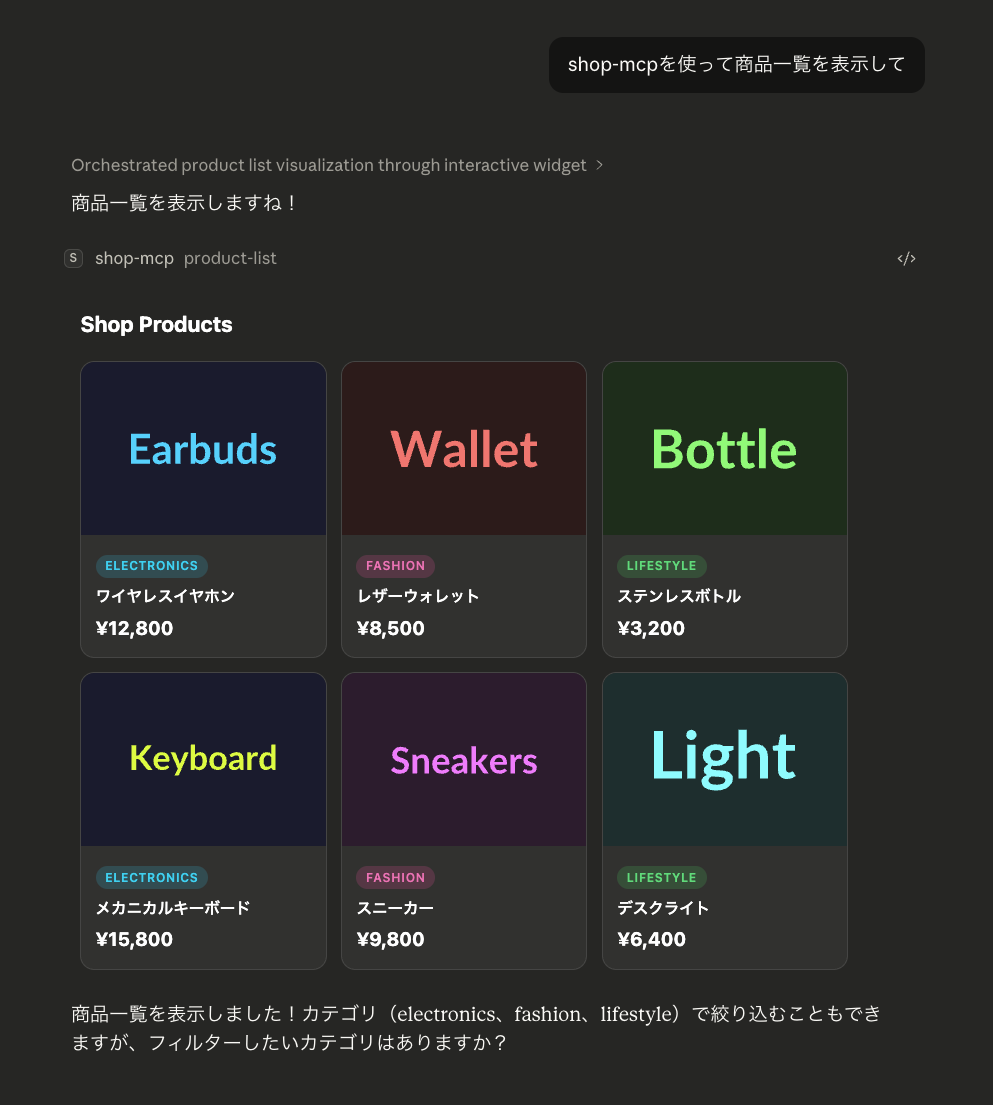
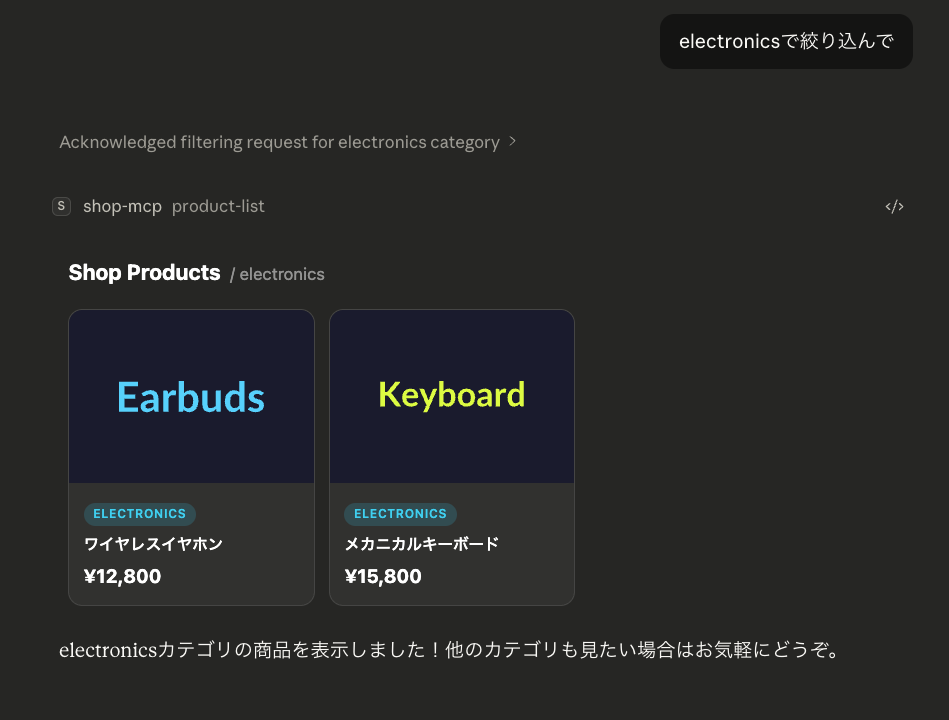
The AI selects a category from the conversation context and calls an MCP tool, displaying a React-built product list UI inline in the chat.
What is MCP Apps
MCP Apps is a mechanism that allows custom HTML/React UI to be displayed inline with MCP tool call results. Claude Desktop, ChatGPT, and others support it.
While normal MCP tools only return text, MCP Apps lets you display React UI in a sandboxed iframe.
For more details about MCP Apps, please read this article.
Why MCP Apps?
AI Determines Conditions
Traditional e-commerce sites require users to set categories and filter conditions themselves. With MCP Apps, AI interprets conditions from natural language and calls tools, so users can simply ask "Do you have blue shoes from XX brand?"
Display Information That Text Can't Fully Convey
While MCP tool return values are basically text, for things like product listings where you want to compare images, prices, and categories in a list, text alone is insufficient. MCP Apps lets you display rich card UIs created with React inline in chats.
Interactive Refinement
While viewing results, you can continue the conversation with "Do you have something more casual?" or "Within a $100 budget," and the AI will adjust conditions and call the tool again. This creates an experience of exploring products while bouncing ideas off the AI.
Architecture
Technically, Hono plays two roles:
- MCP Streamable HTTP Transport — Handles MCP protocol communication from Claude Desktop
- REST API Server — Responds to product data retrieval requests from React UI
Streamable HTTP Transport is a transport used for MCP remote communication. From client to server it uses standard HTTP POST, and from server to client it returns streaming responses via SSE (Server-Sent Events).
All of this runs on AWS Lambda + Function URL. The infrastructure is managed with AWS CDK and can be deployed with a single cdk deploy command.
Technology Stack
| Technology | Version | Purpose |
|---|---|---|
| Hono | 4.12.7 | HTTP framework (on Lambda) |
| @hono/mcp | 0.2.4 | Streamable HTTP Transport for Hono |
| @modelcontextprotocol/sdk | 1.27.1 | MCP Server SDK |
| @modelcontextprotocol/ext-apps | 1.2.2 | MCP Apps (React custom UI) |
| React | 19 | MCP Apps UI |
| Vite | 6 | React build (singlefile output) |
| Tailwind CSS | v4 | Styling |
| AWS CDK | 2.x | Infrastructure (Lambda + Function URL) |
| pnpm workspaces | - | Monorepo management |
Mechanism
- Build: Vite +
vite-plugin-singlefileoutputs React app as a single HTML file- Normally Vite separates JS and CSS into separate files, but this plugin inlines everything into HTML
- MCP Apps requires returning bundled HTML as a string via
registerAppResource, so single-file is essential
- Tool Registration:
registerAppToollinks_meta.ui.resourceUrito the tool - Resource Registration:
registerAppResourceserves the built HTML via aui://URI - Display: Client (Claude Desktop, etc.) fetches the resource when calling the tool and displays it in an iframe
- Communication: React in the iframe uses the
useApphook for bidirectional communication with the host
Project Structure
Monorepo structure using pnpm workspaces.
shop-mcp/
├── pnpm-workspace.yaml
├── .env                         # Centrally manage FUNCTION_URL
├── packages/
│   ├── server/                  Hono + MCP Server (Lambda)
│   │   └── src/
│   │       ├── index.ts         Hono app + MCP tool registration
│   │       ├── lambda.ts        Lambda handler
│   │       └── html.d.ts        Type definition for HTML import
│   ├── app/                     React (MCP Apps UI)
│   │   ├── vite.config.ts
│   │   ├── mcp-app.html         Vite entry HTML
│   │   └── src/
│   │       ├── mcp-app.tsx      useApp hook usage
│   │       └── index.css        Tailwind CSS
│   └── infra/                   AWS CDK
│       └── lib/
│           ├── app.ts           CDK App entry
│           └── stack.ts         Lambda + Function URL stack
Implementation
1. Hono + MCP Server (packages/server/src/index.ts)
Co-locate REST API and MCP endpoint in a Hono app. It combines Hono's AWS Lambda adapter and @hono/mcp.
The key point is the part import mcpAppHtml from "../../app/dist/mcp-app.html". Using esbuild's loader: { ".html": "text" }, the HTML is embedded in the bundle as a string at build time.
Pitfall: HTML files can't be read in Lambda environment
Initially I tried to read the HTML with fs.readFile, but got an ENOENT error in the Lambda environment. This is because packages/app/dist/mcp-app.html isn't included in the Lambda bundle and file system access is restricted. I solved it by embedding it as an import statement using esbuild's loader: { ".html": "text" }. TypeScript type definitions are also needed.
2. MCP Tool and Resource Registration
Register the tool with registerAppTool and distribute the React UI HTML as a resource with registerAppResource.
The tool's return value is just a confirmation message. The product data is fetched directly by the React UI from the Hono API. This architecture eliminates the need for parsing the MCP tool results, allowing Hono to function as a pure API server.
Pitfall: External resources blocked by CSP
Since MCP Apps' iframe is a sandbox environment, access to external domains is restricted by default. This caused issues where product images (placehold.co) weren't displayed and fetch requests to the Hono API failed.
The solution was to allow domains using _meta.ui.csp in registerAppResource's contents.
3. MCP Endpoint
Since Lambda is stateless, McpServer and StreamableHTTPTransport are generated anew for each request. Session management is disabled with sessionIdGenerator: undefined.
4. Lambda Handler (packages/server/src/lambda.ts)
Using streamHandle to deliver MCP's SSE (Server-Sent Events) responses via Lambda response streaming.
5. React MCP Apps UI (packages/app/src/mcp-app.tsx)
Key data flow points
- Register
ontoolinputhandler withuseApp'sonAppCreated - When AI calls the tool, receive tool arguments (category) via
ontoolinput - Fetch Hono API
/api/productsinuseEffect - Render the fetched product data with React
The key is using ontoolinput (tool arguments) rather than ontoolresult (tool execution results). The product data is fetched directly from the Hono API, not from the server's tool result.
Pitfall: Choosing between ontoolinput and ontoolresult
MCP Apps has two events:
| Event | Timing | Use case |
|---|---|---|
ontoolinput |
Right after AI calls the tool | Pass tool arguments to UI |
ontoolresult |
After server returns results | Display tool execution results in UI |
Initially I tried using ontoolresult to include product data in the tool result and pass it to React, but this made data transfer complex. I revised the design to have React directly fetch from the Hono API. It receives only the category argument via ontoolinput and uses it as a query parameter for the API.
6. Vite Configuration (packages/app/vite.config.ts)
vite-plugin-singlefile inlines all JS and CSS into the HTML. MCP Apps distributes this single HTML file as a resource, eliminating the need for external file references.
loadEnv(mode, "../..", "FUNCTION_URL") loads FUNCTION_URL from the root .env file, and define embeds the API base URL at build time.
7. CDK Stack (packages/infra/lib/stack.ts)
invokeMode: RESPONSE_STREAM is crucial. MCP's Streamable HTTP Transport uses SSE, so response streaming is essential. CDK's NodejsFunction configures esbuild bundling.
Pitfall: CDK circular reference error
If you try to pass the Function URL as an environment variable to the Lambda function using fn.addEnvironment("FUNCTION_URL", functionUrl.url), you'll get a circular reference (Lambda → Function URL → Lambda environment variable).
The solution was to define FUNCTION_URL in the root .env file and embed it at build time using esbuild's define. This design has both Vite and CDK reference the same .env file.
# .env
FUNCTION_URL=https://xxxxx.lambda-url.ap-northeast-1.on.aws
Since the Function URL is undetermined during the first deployment, you'll need to deploy once to get the URL, write it to .env, then rebuild and redeploy.
Build Flow
- Vite builds React + Tailwind CSS into a single HTML file (
dist/mcp-app.html) - CDK's esbuild bundles the code (embedding HTML file as a string)
- Deployed to Lambda and published via Function URL
Connecting from Claude Desktop
To connect to the deployed MCP server from Claude Desktop, add the following to claude_desktop_config.json:
{
  "mcpServers": {
    "shop-mcp": {
      "command": "npx",
      "args": ["mcp-remote", "https://xxxxx.lambda-url.ap-northeast-1.on.aws/mcp"]
    }
  }
}
Summary
With the combination of MCP Apps × Hono × React × AWS Lambda, we achieved:
- MCP Apps: Inline display of React UI in AI chats
- Dual role of Hono: Implemented both MCP Streamable HTTP Transport + REST API server in a single Hono app
- Serverless deployment: Scalable operation with AWS Lambda + Function URL
- Single HTML bundle: Condensed React + Tailwind CSS into one file using
vite-plugin-singlefile
While MCP Apps is still a new mechanism, there's great potential in giving AI tools rich UIs that express what text alone cannot.
I hope this blog serves as a useful reference for you.
References
- MCP Apps (ext-apps) official repository
- MCP Apps official documentation
- MCP Apps Quickstart
- @hono/mcp
- Hono - AWS Lambda adapter
- MCP Streamable HTTP Transport specification
- MCP TypeScript SDK - server documentation
- yusukebe/mcp-app-with-hono
- vite-plugin-singlefile
- esbuild - Content Types (text loader)
- AWS Lambda response streaming
- CDK NodejsFunction
- Tailwind CSS v4