How to receive Node.js vulnerability information through an RSS reader

This page has been translated by machine translation. View original
In December 2025, there was an announcement for a Node.js security release.
Initially, it was scheduled for release on December 15th, but it was postponed to December 18th.
On the 17th, the day before, a report was made stating "the release will be postponed to January 7th."
Furthermore, on January 7th, it was reported that it would be delayed until the 8th.
Many people probably anxiously refreshed the page above on the scheduled release date thinking "is it released yet?" I was one of them.
I wanted to find a way to be notified about Node.js vulnerability information without having to check manually, and found that I could receive this information via an RSS reader.
Without further ado, the feed URL is as follows:
https://github.com/nodejs/nodejs.org/commits/main/apps/site/pages/en/blog/vulnerability.atom
The Node.js blog itself also provides feeds.
If you want to know about all blog updates, please use the following URL:
https://nodejs.org/en/feed/blog.xml
If you only want to receive vulnerability information, please use the following URL:
https://nodejs.org/en/feed/vulnerability.xml
Node.js vulnerability information is posted in the vulnerability category of the blog.
As mentioned earlier, a feed is provided for updates to this section.
https://nodejs.org/en/feed/vulnerability.xml
This blog is also managed on GitHub.
Simply watching the repository will result in notifications about movements unrelated to vulnerability information, which becomes noise.

GitHub has a feature to get feeds by adding .atom to URLs, allowing you to get feeds for releases, wikis, and even change histories for specific files.
The vulnerability category blog posts seem to be managed at the following location, so if you can track activities here, you can learn about Node.js vulnerability information.
The commit history for this directory is at the following URL:
https://github.com/nodejs/nodejs.org/commits/main/apps/site/pages/en/blog/vulnerability
And by adding .atom to this URL, you get the feed URL mentioned at the beginning.
https://github.com/nodejs/nodejs.org/commits/main/apps/site/pages/en/blog/vulnerability.atom
While the blog itself publishes a feed for the vulnerability category, the GitHub commit feed contains more information, especially in cases like this where updates are made to the same URL, making it more convenient.
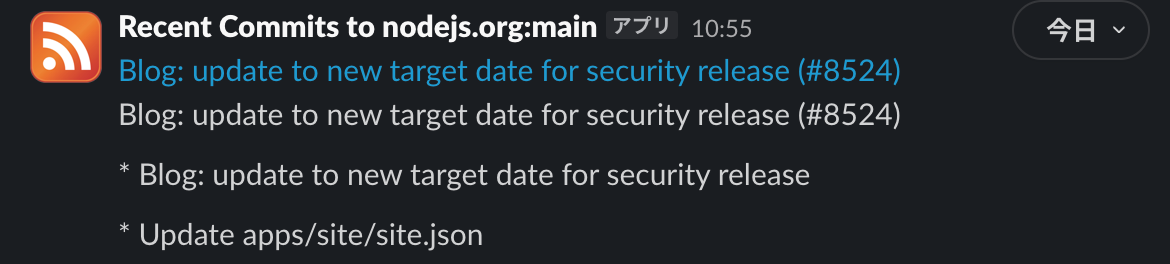
As an example, the GitHub feed displayed as follows:
By subscribing to this feed in Slack or your favorite RSS reader, you won't need to search for information yourself, so why not set this up?