The sample config files that can be downloaded differ depending on whether the routing option for AWS site-to-site VPN connection is dynamic or static

This page has been translated by machine translation. View original
Good evening, this is Chiba (Sachi).
As the title suggests, I had an opportunity to notice that the sample Config file you can download differs depending on whether the routing option for AWS site-to-site VPN connections is dynamic or static.
Specifically, when I executed the following command:
~ $ VPN_ID=vpn-0e4e28e7659efd2f9
~ $ DEVICE_ID=f8eac8fc
~ $ aws ec2 get-vpn-connection-device-sample-configuration \
>   --vpn-connection-id $VPN_ID \
>   --vpn-connection-device-type-id $DEVICE_ID

An error occurred (UnsupportedOperation) when calling the GetVpnConnectionDeviceSampleConfiguration operation: Parameter vpnConnectionDeviceTypeId=f8eac8fc with parameter vpnConnectionId of a VPN Connection with option staticRoutesOnly=false is not supported.
An error occurred (UnsupportedOperation) when calling the GetVpnConnectionDeviceSampleConfiguration operation: Parameter vpnConnectionDeviceTypeId=f8eac8fc with parameter vpnConnectionId of a VPN Connection with option staticRoutesOnly=false is not supported.
I'm running aws ec2 get-vpn-connection-device-sample-configuration to download a sample Config file for a site-to-site VPN connection. The required options include the site-to-site VPN connection ID and the device type ID. The device type consists of a combination of "vendor, platform, software" such as "Cisco Systems, Inc.'s ASA 5500 Series ASA 9.7+ VTI".
The error shown in the command result indicates that the device type ID does not support VPN connections with staticRoutesOnly=false, meaning it doesn't support "dynamic" routing option. So this device type supports only static routing, or conversely, some other device types might support only dynamic routing.
This is what I meant by "different" in the title. It might be more accurate to say "Device types have different support status for dynamic/static routing options".
Just as I was thinking about changing the title to avoid misunderstanding, I discovered that "even for device types that support both dynamic/static routing, the content of the downloaded sample Config file differs depending on whether the specified site-to-site VPN connection is dynamic or static".
It's complicated, but I decided to keep the original title.
I've pretty much covered what I wanted to say, but let me provide some additional information.
What This Blog Intends to Convey
- You can check the device type list with
aws ec2 get-vpn-connection-device-types- No site-to-site VPN connection is required when executing this command
- There is no difference in device types between regions, at least in default regions
- You can download sample Config files with
aws ec2 get-vpn-connection-device-sample-configuration- You need to specify the site-to-site VPN connection ID and device type ID when executing this command
- Each device type has different support for sample Config files in terms of:
- The routing type of the specified site-to-site VPN connection (dynamic or static)
- IKE version (v1 or v2)
- Sample type (compatibility or recommended)
- For device types that support both dynamic/static routing, the content of the sample Config files differs between the two options
AWS CLI Execution Environment for This Blog
The commands in this blog have been tested in AWS CloudShell. The version details are as follows:
- aws-cli/2.33.23 Python/3.13.11 Linux/6.1.161-183.298.amzn2023.x86_64 exec-env/CloudShell exe/x86_64.amzn.2023
About AWS Site-to-Site VPN Customer Devices and Config Files
For a refresher on the basics of customer gateway devices and sample Config files, please refer to the following blog I wrote previously:
It covers customer device requirements, best practices, and the purpose and content of sample Config files.
Checking the List of Sample Config-Compatible Device Types with AWS CLI
You can check the list of device types, which are combinations of vendor, platform, and software, using the following command:
This command doesn't require a site-to-site VPN connection ID. When executed, it returns results like this:
~ $ aws ec2 get-vpn-connection-device-types
{
    "VpnConnectionDeviceTypes": [
        {
            "VpnConnectionDeviceTypeId": "681ac807",
            "Vendor": "AXGate",
            "Platform": "NF",
            "Software": "aos 3.2+"
        },
        {
            "VpnConnectionDeviceTypeId": "9af4506c",
            "Vendor": "AXGate",
            "Platform": "UTM",
            "Software": "aos 2.1+"
        },
        {
            "VpnConnectionDeviceTypeId": "36ef5d04",
            "Vendor": "Barracuda",
            "Platform": "NextGen Firewall F-Series",
            "Software": "6.2+"
        },
 ......truncated
To make it easier to read, let's output it in CSV format:
echo "VpnConnectionDeviceTypeId,Vendor,Platform,Software" && \
aws ec2 get-vpn-connection-device-types \
  --query 'VpnConnectionDeviceTypes[*].[VpnConnectionDeviceTypeId,Vendor,Platform,Software]' \
  --output text | sed 's/\t/,/g'
Here's what the execution looks like:
~ $ echo "VpnConnectionDeviceTypeId,Vendor,Platform,Software" && \
> aws ec2 get-vpn-connection-device-types \
>   --query 'VpnConnectionDeviceTypes[*].[VpnConnectionDeviceTypeId,Vendor,Platform,Software]' \
>   --output text | sed 's/\t/,/g'
VpnConnectionDeviceTypeId,Vendor,Platform,Software
681ac807,AXGate,NF,aos 3.2+
9af4506c,AXGate,UTM,aos 2.1+
36ef5d04,Barracuda,NextGen Firewall F-Series,6.2+
feabc07e,Checkpoint,Gaia,R77.10+
1b270706,Checkpoint,Gaia,R80.10+
42ff1bfc,Cisco Meraki,MX Series,15.12+ (WebUI)
866e027c,Cisco Meraki,MX Series,9.0+ (WebUI)
6883834a,Cisco Systems, Inc.,ASA 5500 Series,ASA 8.2+
b556dcd1,Cisco Systems, Inc.,ASA 5500 Series,ASA 9.7+ VTI
78c1a727,Cisco Systems, Inc.,ASA 5500 Series,ASA 9.x
48548f98,Cisco Systems, Inc.,Cisco ASR 1000,IOS 12.4+
7b754310,Cisco Systems, Inc.,CSRv AMI,IOS 12.4+
ae4cefeb,Cisco Systems, Inc.,Firepower,v6.2.2+
b0adb196,Cisco Systems, Inc.,ISR Series Routers,IOS 12.4+
d995c2ab,Citrix,Netscaler CloudBridge,NS 11+
f8eac8fc,Cyberoam,CR15iNG,V 10.6.5 MR-1
56c86b54,F5 Networks, Inc.,BIG-IP,v12.0.0+
2b2c1a73,Fortinet,Fortigate 40+ Series,FortiOS 4.0+
980b2a2d,Fortinet,Fortigate 40+ Series,FortiOS 4.0+ (GUI)
9d9470de,Fortinet,Fortigate 40+ Series,FortiOS 5.0+
887cd1a5,Fortinet,Fortigate 40+ Series,FortiOS 5.0+ (GUI)
7125681a,Fortinet,Fortigate 40+ Series,FortiOS 6.4.4+ (GUI)
9005b6c1,Generic,Generic,Vendor Agnostic
670add1b,H3C,MSR800,Version 5.20
40b66cf5,IIJ,SEIL/B1,SEIL/B1 3.70+
a0c6b2f4,IIJ,SEIL/X1 and SEIL/X2,SEIL/X 3.70+
4b8b2ed4,IIJ,SEIL/x86,SEIL/x86 2.30+
8a961875,Juniper Networks, Inc.,J-Series Routers,JunOS 9.5+
1361227b,Juniper Networks, Inc.,SRX Routers,JunOS 11.0+
acabcac0,Juniper Networks, Inc.,SSG and ISG Series Routers,ScreenOS 6.1
631f834b,Juniper Networks, Inc.,SSG and ISG Series Routers,ScreenOS 6.2+
d36a4756,Juniper Networks, Inc.,SSG and ISG Series Routers,ScreenOS 6.2+ (GUI)
dd55903b,Microsoft,Windows Server,2008 R2
411e7147,Microsoft,Windows Server,2012 R2
2b5427d7,Mikrotik,RouterOS,6.36
37d8aff6,Mikrotik,RouterOS,6.47
6e62f3e3,Openswan,Openswan,Openswan 2.6.38+
754a6372,Palo Alto Networks,PA Series,PANOS 4.1.2+
9612cbed,Palo Alto Networks,PA Series,PANOS 4.1.2+ (GUI)
5fb390ba,Palo Alto Networks,PA Series,PANOS 7.0+
74671aaa,pfSense,pfSense,pfsense 2.2.5+(GUI)
4280e43e,SonicWall,NSA, TZ,OS 5.8
60ca5da1,SonicWall,NSA, TZ,OS 5.9
46154821,SonicWall,NSA, TZ,OS 6.2
fa2df246,SonicWall,NSA, TZ,OS 6.5
758d1557,Sophos,ASG,V8.300+
90f254e7,Sophos,Sophos Firewall,v19+
e5ec51ed,Sophos,UTM,V9
51cb26fd,Strongswan,Ubuntu 16.04,Strongswan 5.5.1+
f1647754,Vyatta,Vyatta Network OS,Vyatta Network OS 6.5+
a0745ade,WatchGuard, Inc.,XTM, Firebox,Fireware OS 11.11.4 (WebUI)
dbeffb53,WatchGuard, Inc.,XTM, Firebox,Fireware OS 11.12.2+ (WebUI)
e7a2d626,Yamaha,RTX Routers,Rev.10.01.16+
400e7aee,Zyxel,ZyWALL,ZLD 4.3+
1153d0d2,Zyxel,Zywall Series,Zywall 4.20+
As of February 26, 2026, the Tokyo region returned 55 results. Notably, the results were identical across all regions I checked. (I didn't check opt-in regions.)
Downloading Sample Config Files with AWS CLI
You can download sample Config files using the device type IDs identified above. The command to use is:
The following options are required:
--vpn-connection-id <value>
--vpn-connection-device-type-id <value>
The first is the site-to-site VPN connection ID, meaning you need an existing site-to-site VPN connection to run this command. The second is the device type ID from the list we checked earlier.
For this demonstration, I'll use the following device type ID (chosen randomly):
b556dcd1,Cisco Systems, Inc.,ASA 5500 Series,ASA 9.7+ VTI
First, I store the necessary information in environment variables, using information from an existing site-to-site VPN connection:
~ $ VPN_ID=vpn-0e4e28e7659efd2f9
~ $ DEVICE_ID=b556dcd1
Now I run the command:
aws ec2 get-vpn-connection-device-sample-configuration \
  --vpn-connection-id $VPN_ID \
  --vpn-connection-device-type-id $DEVICE_ID
The output looks like this:
~ $ aws ec2 get-vpn-connection-device-sample-configuration \
>   --vpn-connection-id $VPN_ID \
>   --vpn-connection-device-type-id $DEVICE_ID
{
    "VpnConnectionDeviceSampleConfiguration": "! Amazon Web Services\n! Virtual Private Cloud\n\n! AWS utilizes unique identifiers to manipulate the configuration of\n! a VPN Connection. Each VPN Connection is assigned an identifier and is\n! associated with two other identifiers, namely the\n! Customer Gateway Identifier and Virtual Private Gateway Identifier.\n!\n! Your VPN Connection ID                  : vpn-0e4e28e7659efd2f9\n! Your Virtual Private Gateway ID         : vgw-0c8ea7e66864631e1\n! Your Customer Gateway ID\t\t  : cgw-0b89acd1b93ef048d\n!\n!\n! This configuration consists of two tunnels. Both tunnels must be\n! configured on your Customer Gateway.\n!\n\n\n\n\n! --------------------------------------------------------------------------------\n! IPSec Tunnel #1\n! --------------------------------------------------------------------------------\n! #1: Internet Key Exchange (IKE) Configuration\n!\n! A policy is established for the supported ISAKMP encryption,\n! authentication, Diffie-Hellman, lifetime, and key parameters.\n! Please note, these sample configurations are for the minimum requirement of AES12
    ......truncated
k 192.168.100.0 mask 255.255.255.0\n    no auto-summary\n    no synchronization\n  exit-address-family\nexit\n!\n\n\n! Additional Notes and Questions\n!  - Amazon Virtual Private Cloud Getting Started Guide:\n!       http://docs.amazonwebservices.com/AmazonVPC/latest/GettingStartedGuide\n!  - Amazon Virtual Private Cloud Network Administrator Guide:\n!       http://docs.amazonwebservices.com/AmazonVPC/latest/NetworkAdminGuide\n"
}
To display just the content with escape sequences expanded and line breaks:
aws ec2 get-vpn-connection-device-sample-configuration \
  --vpn-connection-id $VPN_ID \
  --vpn-connection-device-type-id $DEVICE_ID \
  --query 'VpnConnectionDeviceSampleConfiguration' \
  --output text
Specifying IKE Version and Sample Type
The aws ec2 get-vpn-connection-device-sample-configuration command also accepts these optional parameters:
--internet-key-exchange-version- Specifies the IKE version. Possible values are
ikev1orikev2 - Default value is
ikev1if not specified
- Specifies the IKE version. Possible values are
--sample-type- Specifies the sample type. Possible values are
compatibilityorrecommended - Default value is likely
compatibility(or possibly "not specified" - details to be confirmed later)
- Specifies the sample type. Possible values are
(Note that IKEv2 is strongly recommended for site-to-site VPN connections.)
Be aware that not all device types support ikev2 or recommended options. In fact, most don't.
The following image, while not comprehensive, shows a previous check of compatibility from the AWS Management Console. It shows that less than half support ikev2, and only a few support recommended (shown as "推奨" in the table).
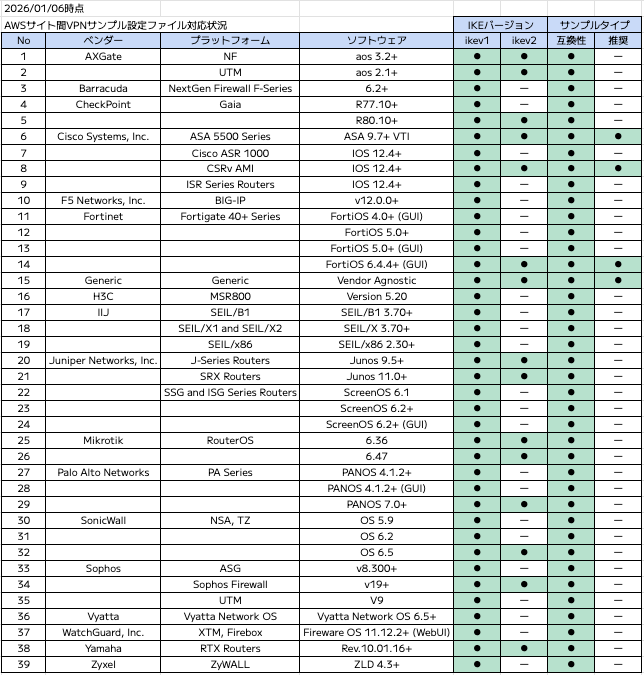
Image quoted from the blog mentioned at the beginning
Let's check what happens when we try to use a device type that doesn't support either option:
36ef5d04,Barracuda,NextGen Firewall F-Series,6.2+
Setting the environment variables:
~ $ VPN_ID=vpn-0e4e28e7659efd2f9
~ $ DEVICE_ID=36ef5d04
Trying with IKEv2:
~ $ aws ec2 get-vpn-connection-device-sample-configuration \
>   --vpn-connection-id $VPN_ID \
>   --vpn-connection-device-type-id $DEVICE_ID \
>   --internet-key-exchange-version ikev2

An error occurred (UnsupportedOperation) when calling the GetVpnConnectionDeviceSampleConfiguration operation: Parameter vpnConnectionDeviceTypeId=36ef5d04 with parameter internetKeyExchangeVersion=ikev2 is not supported.
Trying with the recommended sample type:
~ $ aws ec2 get-vpn-connection-device-sample-configuration \
>   --vpn-connection-id $VPN_ID \
>   --vpn-connection-device-type-id $DEVICE_ID \
>   --sample-type recommended

An error occurred (UnsupportedOperation) when calling the GetVpnConnectionDeviceSampleConfiguration operation: Parameter internetKeyExchangeVersion=ikev1 with parameter sampleType=recommended is not supported.
Differences Between AWS Management Console Results and CLI Results
In the AWS Management Console, you can download sample Config files by specifying the vendor, platform, software, etc., as shown below:
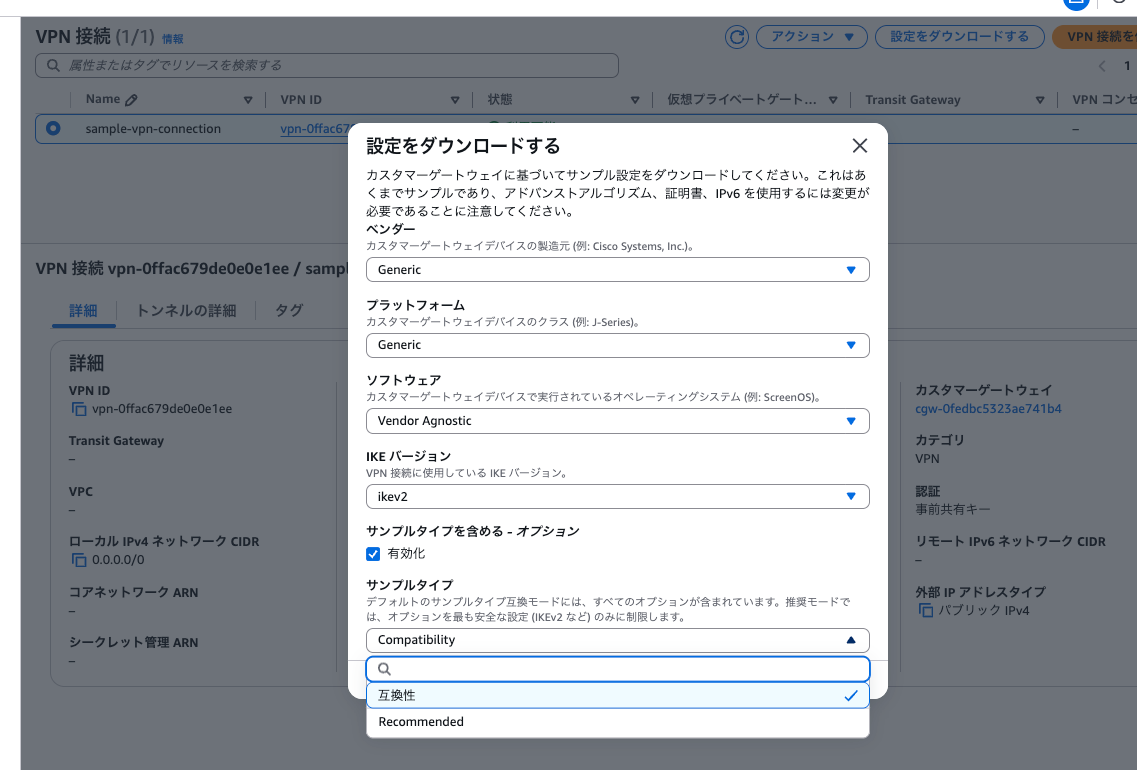
I noticed that the combinations available here seem different from the device type list we saw with AWS CLI.
Let's try to find this device type in the AWS Management Console:
f8eac8fc,Cyberoam,CR15iNG,V 10.6.5 MR-1
As shown below, the vendor name Cyberoam doesn't appear in the search results:
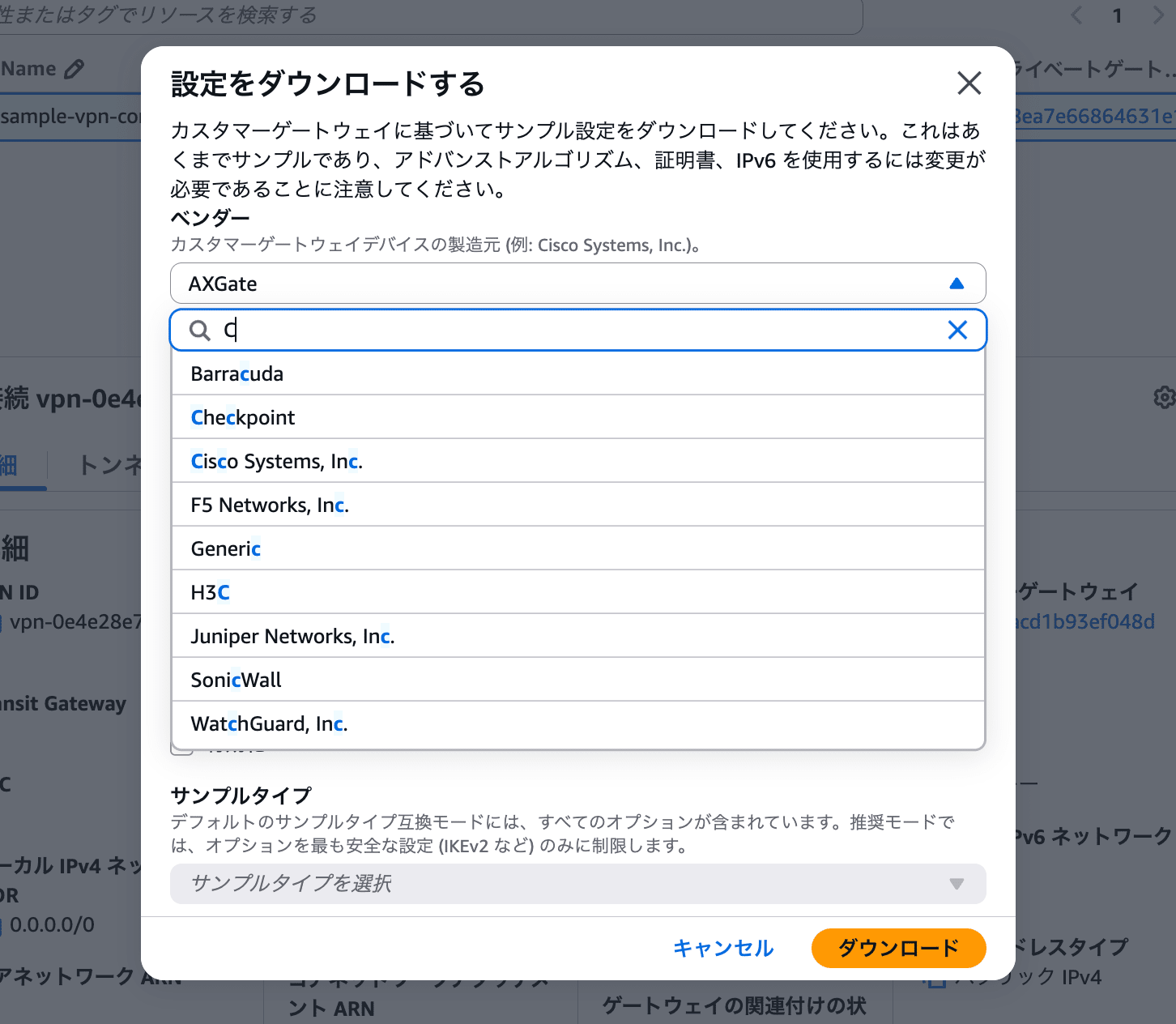
This made me wonder what was going on.
Using AWS CLI to Download Files for Device Types Not Appearing in the AWS Management Console
Let's try using AWS CLI to download a Config file for device type ID f8eac8fc, which wasn't available in the AWS Management Console.
This brings us back to the command we ran at the beginning. After setting the VPN_ID and DEVICE_ID, we got this error:
~ $ VPN_ID=vpn-0e4e28e7659efd2f9
~ $ DEVICE_ID=f8eac8fc
~ $ aws ec2 get-vpn-connection-device-sample-configuration \
>   --vpn-connection-id $VPN_ID \
>   --vpn-connection-device-type-id $DEVICE_ID

An error occurred (UnsupportedOperation) when calling the GetVpnConnectionDeviceSampleConfiguration operation: Parameter vpnConnectionDeviceTypeId=f8eac8fc with parameter vpnConnectionId of a VPN Connection with option staticRoutesOnly=false is not supported.
An error occurred (UnsupportedOperation) when calling the GetVpnConnectionDeviceSampleConfiguration operation: Parameter vpnConnectionDeviceTypeId=f8eac8fc with parameter vpnConnectionId of a VPN Connection with option staticRoutesOnly=false is not supported.
The target site-to-site VPN connection has a "dynamic" routing option. Generally, "dynamic" is recommended, and "static" is chosen only when the customer device doesn't support BGP.
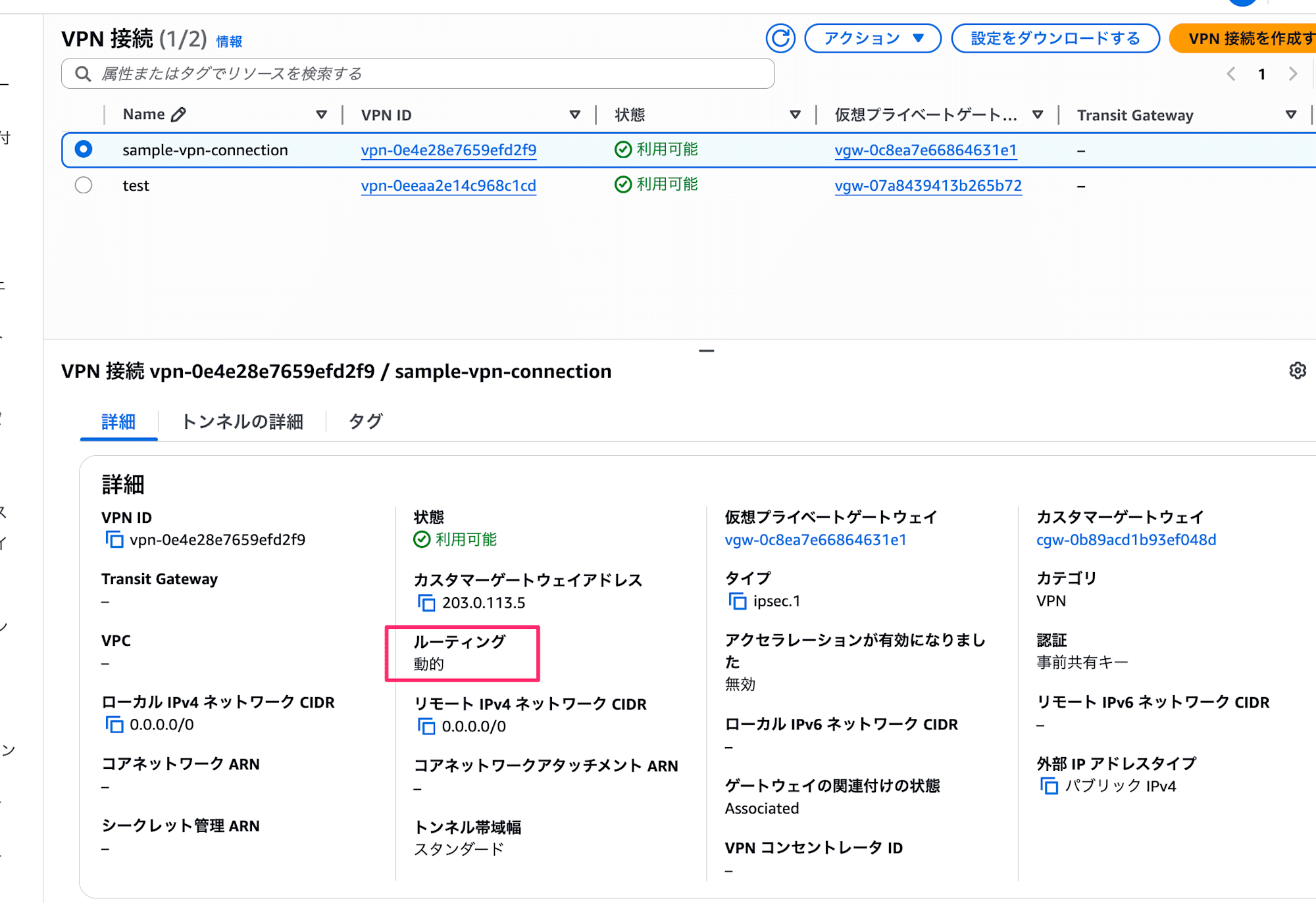
This routing option can be checked in AWS CLI as the StaticRoutesOnly parameter:
~ $ aws ec2 describe-vpn-connections \
>   --vpn-connection-ids vpn-0e4e28e7659efd2f9
{
    "VpnConnections": [
        {
            "Category": "VPN",
            "GatewayAssociationState": "associated",
            "Options": {
                "EnableAcceleration": false,
                "StaticRoutesOnly": false,
                "LocalIpv4NetworkCidr": "0.0.0.0/0",
                "RemoteIpv4NetworkCidr": "0.0.0.0/0",
                "OutsideIpAddressType": "PublicIpv4",
                "TunnelInsideIpVersion": "ipv4",
 ......truncated
Now I understand the error message: "not supported for VPN connections with staticRoutesOnly=false".
Trying with a Site-to-Site VPN Connection with "Static" Routing Option
I'm curious what would happen if we tried to download a Config file for the same device type with a site-to-site VPN connection that has a "static" routing option. Since we can't change the routing option of an existing VPN connection, I'll create a new one.
I'll skip the detailed creation steps, but when creating from the AWS Management Console, you define the routing option here:
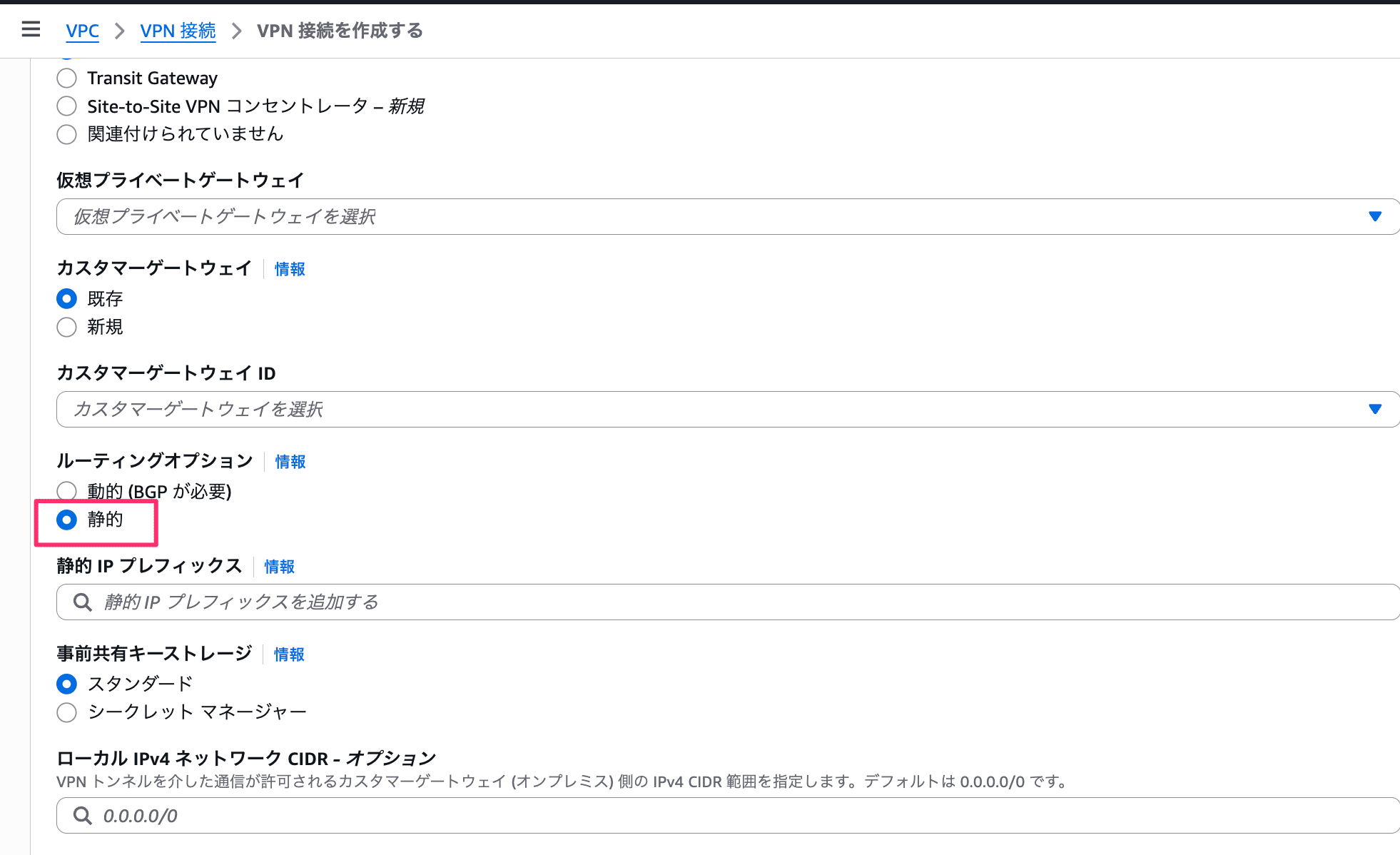
With the newly created "static" site-to-site VPN connection, we can see that the Cyberoam device type appears in the options:
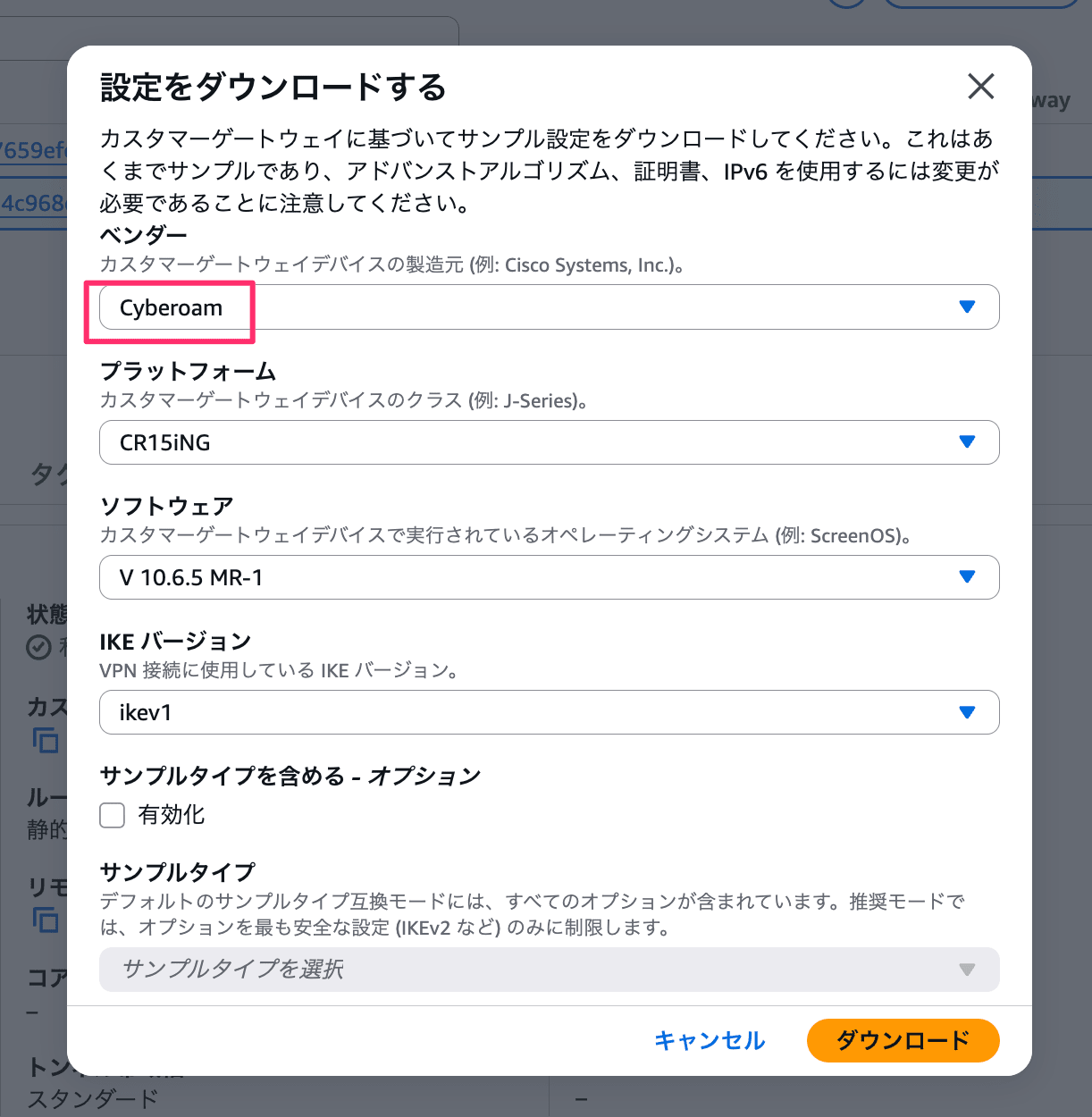
And the download works fine with AWS CLI:
~ $ VPN_ID=vpn-0eeaa2e14c968c1cd
~ $ DEVICE_ID=f8eac8fc
~ $ aws ec2 get-vpn-connection-device-sample-configuration \
>   --vpn-connection-id $VPN_ID \
>   --vpn-connection-device-type-id $DEVICE_ID
{
    "VpnConnectionDeviceSampleConfiguration": "\n! Amazon Web Services\n!\n! Virtual Private Cloud\n!\n! AWS utilizes unique identifiers to manipulate the configuration of\n! a VPN Connection. Each VPN Connection is assigned an identifier and is\n! associated with two other identifiers, namely the\n! Customer Gateway Identifier and Virtual Private Gateway Identifier.\n!\n! Your VPN Connection ID \t\t  : vpn-0eeaa2e14c968c1cd\n! Your Virtual Private Gateway ID         : vgw-07a8439413b265b72\n! Your Customer Gateway ID\t\t  : cgw-059a1d0be4681129e\n!\n!\n! This configuration consists of two tunnels. Both tunnels must be\n! configured on your Customer Gateway.\n\n! --------------------------------------------------------------------------------\n! IPSec Tunnel #1\n! --------------------------------------------------------------------------------\n\n#1:
    ......truncated
Some Device Types Only Support "Dynamic" Routing Option
Conversely, there might be device types that don't support the "static" routing option. Let's try with one that didn't appear in the AWS Management Console options:
36ef5d04,Barracuda,NextGen Firewall F-Series,6.2+
Let's try:
~ $ VPN_ID=vpn-0eeaa2e14c968c1cd
~ $ DEVICE_ID=36ef5d04
~ $ aws ec2 get-vpn-connection-device-sample-configuration \
>   --vpn-connection-id $VPN_ID \
>   --vpn-connection-device-type-id $DEVICE_ID

An error occurred (UnsupportedOperation) when calling the GetVpnConnectionDeviceSampleConfiguration operation: Parameter vpnConnectionDeviceTypeId=36ef5d04 with parameter vpnConnectionId of a VPN Connection with option staticRoutesOnly=true is not supported.
An error occurred (UnsupportedOperation) when calling the GetVpnConnectionDeviceSampleConfiguration operation: Parameter vpnConnectionDeviceTypeId=36ef5d04 with parameter vpnConnectionId of a VPN Connection with option staticRoutesOnly=true is not supported.
The error "not supported for VPN connections with staticRoutesOnly=true" confirms that the opposite pattern exists as well.
Download Sample Config Files for Device Types that Support Both Dynamic and Static Routing
I now understand that there are device types that only support either dynamic or static routing. Let's check whether there are differences in the sample config files for device types that support both options.
I'll confirm this with the following device type, which represents a generic device type:
9005b6c1,Generic,Generic,Vendor Agnostic
I created two Site-to-Site VPN connections - one with dynamic routing and one with static routing.
First, I'll save the sample config file for the dynamic routing connection:
~ $ VPN_ID=vpn-02ec0e3aec15b3e79
~ $ DEVICE_ID=9005b6c1
~ $ aws ec2 get-vpn-connection-device-sample-configuration \
>   --vpn-connection-id $VPN_ID \
>   --vpn-connection-device-type-id $DEVICE_ID \
>   --query 'VpnConnectionDeviceSampleConfiguration' \
>   --output text >> dynamic.txt
Next, for the static routing connection:
~ $ VPN_ID=vpn-0a8c7e1398e2be017
~ $ DEVICE_ID=9005b6c1
~ $ aws ec2 get-vpn-connection-device-sample-configuration \
>   --vpn-connection-id $VPN_ID \
>   --vpn-connection-device-type-id $DEVICE_ID \
>   --query 'VpnConnectionDeviceSampleConfiguration' \
>   --output text >> static.txt
The sample config files contain various IDs and IP addresses which are naturally different. Apart from these VPN connection-specific information, there was a difference in the routing configuration section.
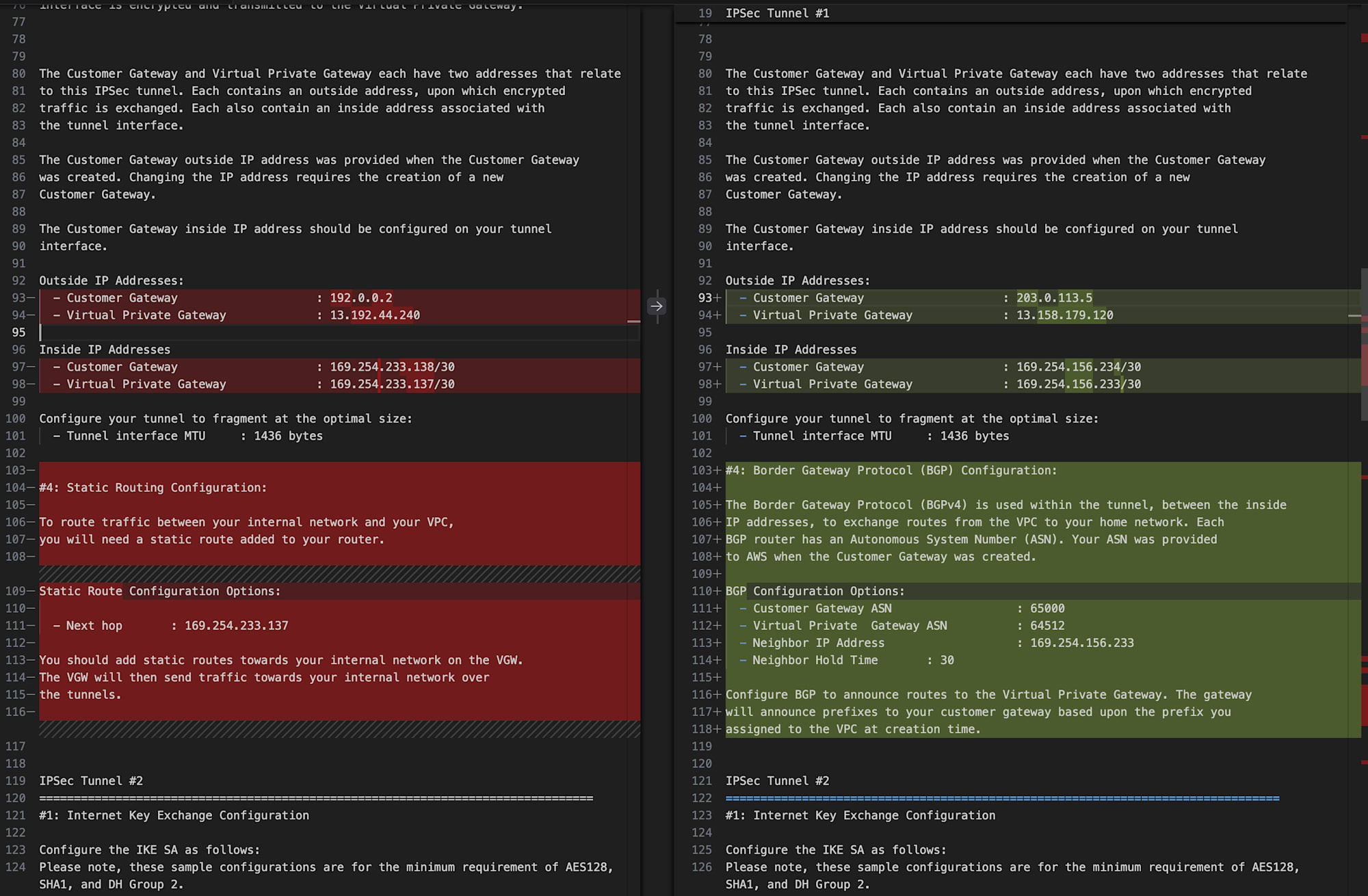
Left is for static, right is for dynamic
In the static version, the relevant section contains:
#4: Static Routing Configuration:

To route traffic between your internal network and your VPC,
you will need a static route added to your router.

Static Route Configuration Options:

  - Next hop       : 169.254.233.137

You should add static routes towards your internal network on the VGW.
The VGW will then send traffic towards your internal network over
the tunnels.
And in the dynamic version, the corresponding section says:
#4: Border Gateway Protocol (BGP) Configuration:

The Border Gateway Protocol (BGPv4) is used within the tunnel, between the inside
IP addresses, to exchange routes from the VPC to your home network. Each
BGP router has an Autonomous System Number (ASN). Your ASN was provided
to AWS when the Customer Gateway was created.

BGP Configuration Options:
  - Customer Gateway ASN                  : 65000
  - Virtual Private  Gateway ASN          : 64512
  - Neighbor IP Address                   : 169.254.156.233
  - Neighbor Hold Time       : 30

Configure BGP to announce routes to the Virtual Private Gateway. The gateway
will announce prefixes to your customer gateway based upon the prefix you
assigned to the VPC at creation time.
One sample config file includes definitions for two tunnels, and the routing configuration difference appears in two places, once for each tunnel.
I confirmed that for device types supporting both dynamic and static routing, there are differences in the sample config file content.
Key Points of This Blog (Recap)
- You can check the list of device types with
aws ec2 get-vpn-connection-device-types- No Site-to-Site VPN connection is required when executing this command
- There are no differences in device types between regions, at least in the default region
- You can download sample config files with
aws ec2 get-vpn-connection-device-sample-configuration- You need to specify both Site-to-Site VPN connection ID and device type ID when running the command
- Support for sample config files varies by device type in the following aspects:
- Routing type of the specified Site-to-Site VPN connection (dynamic or static)
- IKE version (v1 or v2)
- Sample type (compatibility or recommended)
- For device types that support both dynamic and static routing, the content of the sample config files differs between the two
Additionally, please note that there's no way to check the support status for each device type in a list format. You can only confirm by checking "whether it appears as an option in the AWS Management Console" or "whether an error occurs when executing the AWS CLI command."
Conclusion
This post discussed how downloadable sample config files differ depending on whether the routing option for AWS Site-to-Site VPN connections is dynamic or static.
Since I had never created a Site-to-Site VPN connection with "static" routing options, I had been wondering, "Aren't there too few device types available to select in the AWS Management Console?" Now the mystery is solved.
The key learning was that even for device types supporting both dynamic and static VPN connections, the file contents differ between the two. The sample config file for dynamic routing includes BGP-related settings, which are unnecessary for static routing - obvious in hindsight.
I hope this information is helpful to someone.
This has been Chiba Yuki (@batchicchi).