
Building Workload Identity Federation with Snowflake × Terraform × GitHub Actions

This page has been translated by machine translation. View original
Introduction
I'm kasama from the Data Business Department.
This time, I built an authentication infrastructure using Workload Identity Federation (WIF) with Snowflake × Terraform.
While traditional Key Pair authentication required managing a private key, WIF enables secure authentication without private keys. By combining GitHub Actions with AWS IAM Roles, we can implement safe operations using only temporary credentials.
Prerequisites
As a prerequisite, this article discusses the open-source version of Terraform, not HCP Terraform (cloud version).
I'll implement based on the architecture described in the following blog. The implementation creates modules by user type and calls them from main.tf for dev/prd environments. Terraform init, plan, and apply commands are executed via GitHub Actions.
Also, in the previous blog, I built a Storage Integration connecting Snowflake and AWS S3 using Terraform. This time, I'll apply Workload Identity Federation authentication to that configuration.
snowflake-terraform-sample % tree
.
├── .github
│   └── workflows
│       └── dev-snowflake-terraform-cicd.yml
├── cfn
│   └── create_state_gha_resources.yml
├── environments
│   └── dev
│       ├── backend.tf
│       ├── main.tf
│       ├── variable.tf
│       └── versions.tf
└── modules
    └── data_engineer
        ├── main.tf
        ├── outputs.tf
        ├── variables.tf
        └── versions.tf
I'm using Snowflake Provider version 2.11.0 for this implementation.
Traditional Authentication Method (Key Pair Authentication)
First, let me explain the traditional Key Pair authentication.
Key Pair authentication uses RSA public/private key pairs to authenticate with Snowflake. We registered the public key with a Snowflake user and stored the private key in GitHub Secrets to pass to the Terraform Provider for authentication.
provider "snowflake" {
  role              = "SYSADMIN"
  organization_name = var.snowflake_organization_name
  account_name      = var.snowflake_account_name
  user              = "TERRAFORM_USER"
  authenticator     = "SNOWFLAKE_JWT"
  private_key       = var.snowflake_private_key  # private key required
  warehouse         = "TERRAFORM_WH"
}
This method requires regular rotation and secure storage of private keys, which creates operational overhead.
What is Workload Identity Federation?
Workload Identity Federation (WIF) is a mechanism that authenticates to Snowflake using authentication features provided by each cloud provider. Specifically, it supports AWS IAM Roles, Microsoft Entra ID, and Google Cloud service accounts.
The major difference from traditional Key Pair authentication is that it uses only temporary credentials without private keys.
This authentication method was introduced in Snowflake Provider 2.10.0.
In this blog, I'll introduce an implementation example using AWS IAM Role for WIF.
How WIF Authentication Works
The WIF authentication flow works as follows:
- GitHub Actions requests an OIDC token, which GitHub OIDC Provider issues
- GitHub Actions uses the OIDC token to AssumeRole an AWS IAM Role
- AWS STS issues temporary credentials and sets them as environment variables
- Terraform Snowflake Provider automatically detects authentication information from environment variables
- Terraform Provider sends AWS IAM Role attestation to Snowflake
- Snowflake verifies the attestation and confirms that it's a pre-authorized IAM Role
For detailed mechanisms, I've written based on my understanding from Snowflake's official documentation and the following article. There may be errors as I couldn't find clear descriptions in the official Snowflake documentation.
Compared to Key Pair authentication, WIF has the following benefits:
- No private key management: No need to generate, store, or rotate private keys
- Automatic credential rotation: Temporary credentials are automatically invalidated after a short time
- Enhanced security: Greatly reduced risk of credential leakage
- Reduced operational overhead: No need to store private keys in GitHub Secrets, and configuration is simpler
- Activity logging: Activity can be logged and monitored using cloud provider services like AWS CloudTrail
Prerequisites
To use WIF authentication, the following preparations are necessary.
Creating AWS IAM Role
First, create an IAM Role that GitHub Actions can assume. When creating it with CloudFormation, it looks like this:
cfn/create_state_gha_resources.yml
AWSTemplateFormatVersion: 2010-09-09
Description: |-
  Terraform S3 & GitHub Actions Setup - Creates S3 bucket for Terraform state
  and IAM role for GitHub Actions with comprehensive configuration

Metadata:
  AWS::CloudFormation::Interface:
    ParameterGroups:
      - Label:
          default: "Project Configuration"
        Parameters:
          - ProjectName
          - EnvName
      - Label:
          default: "GitHub Configuration"
        Parameters:
          - GitHubAccountName
          - GitHubRemoteRepoName1
          - GitHubRemoteRepoName2
          - GitHubOIDCProviderArn

Parameters:
  ProjectName:
    Type: String
    Description: Project name used for resource naming
  EnvName:
    Type: String
    Default: dev
    AllowedValues:
      - dev
      - stg
      - prd
    Description: Environment name
  GitHubAccountName:
    Type: String
    Description: GitHub account name of the repository
  GitHubRemoteRepoName1:
    Type: String
    Description: First GitHub repository name
  GitHubRemoteRepoName2:
    Type: String
    Description: Second GitHub repository name
  GitHubOIDCProviderArn:
    Type: String
    Description: ARN of the existing GitHub OIDC Provider

Resources:
  # S3 Bucket for Terraform state
  TerraformStateBucket:
    Type: AWS::S3::Bucket
    Properties:
      BucketName: !Sub "${ProjectName}-${EnvName}-s3-terraform-state"
      VersioningConfiguration:
        Status: Enabled
      PublicAccessBlockConfiguration:
        BlockPublicAcls: true
        BlockPublicPolicy: true
        IgnorePublicAcls: true
        RestrictPublicBuckets: true
      BucketEncryption:
        ServerSideEncryptionConfiguration:
          - ServerSideEncryptionByDefault:
              SSEAlgorithm: AES256
      Tags:
        - Key: project
          Value: !Ref ProjectName
        - Key: environment
          Value: !Ref EnvName

  # IAM Role for GitHub Actions
  GitHubActionsRole:
    Type: AWS::IAM::Role
    Properties:
      RoleName: !Sub "${ProjectName}-${EnvName}-iamrole-gha"
      Path: /
      AssumeRolePolicyDocument:
        Version: 2012-10-17
        Statement:
          - Sid: TrustGitHubActionsOIDCProvider
            Effect: Allow
            Principal:
              Federated: !Ref GitHubOIDCProviderArn
            Action: sts:AssumeRoleWithWebIdentity
            Condition:
              StringLike:
                token.actions.githubusercontent.com:sub:
                  - !Sub "repo:${GitHubAccountName}/${GitHubRemoteRepoName1}:*"
                  - !Sub "repo:${GitHubAccountName}/${GitHubRemoteRepoName2}:*"
      Policies:
        - PolicyName: !Sub "${ProjectName}-${EnvName}-iampolicy-gha"
          PolicyDocument:
            Version: 2012-10-17
            Statement:
              # Terraform state S3 bucket permissions
              - Sid: TerraformS3StateBucketPolicy
                Effect: Allow
                Action:
                  - s3:ListBucket
                  - s3:GetBucketLocation
                  - s3:ListBucketMultipartUploads
                  - s3:ListBucketVersions
                  - s3:GetObject
                  - s3:GetObjectVersion
                  - s3:PutObject
                  - s3:DeleteObject
                Resource:
                  - !Sub "arn:aws:s3:::${TerraformStateBucket}"
                  - !Sub "arn:aws:s3:::${TerraformStateBucket}/*"
              # S3 bucket management for Terraform modules
              - Sid: ModuleS3BucketManagement
                Effect: Allow
                Action:
                  - s3:CreateBucket
                  - s3:DeleteBucket
                  - s3:PutBucketVersioning
                  - s3:GetBucketTagging
                  - s3:PutEncryptionConfiguration
                  - s3:GetEncryptionConfiguration
                  - s3:PutBucketTagging
                  - s3:PutBucketPolicy
                  - s3:GetBucketPolicy
                  - s3:DeleteBucketPolicy
                  - s3:GetBucketLocation
                  - s3:GetBucketAcl
                  - s3:GetBucketCORS
                  - s3:ListBucket
                  - s3:GetBucketWebsite
                  - s3:GetBucketVersioning
                  - s3:GetAccelerateConfiguration
                  - s3:GetBucketRequestPayment
                  - s3:GetBucketLogging
                  - s3:GetLifecycleConfiguration
                  - s3:GetReplicationConfiguration
                  - s3:GetBucketObjectLockConfiguration
                  - s3:PutBucketNotification
                  - s3:GetBucketNotification
                Resource:
                  - !Sub "arn:aws:s3:::${ProjectName}-${EnvName}-s3-*"
                  - !Sub "arn:aws:s3:::${ProjectName}-*"
              # IAM role management for Terraform modules
              - Sid: ModuleIamRoleManagement
                Effect: Allow
                Action:
                  - iam:CreateRole
                  - iam:DeleteRole
                  - iam:GetRole
                  - iam:TagRole
                  - iam:PutRolePolicy
                  - iam:GetRolePolicy
                  - iam:DeleteRolePolicy
                  - iam:ListRolePolicies
                  - iam:ListAttachedRolePolicies
                  - iam:ListInstanceProfilesForRole
                  - iam:UpdateAssumeRolePolicy
                  - iam:UntagRole
                Resource:
                  - !Sub "arn:aws:iam::${AWS::AccountId}:role/${ProjectName}-${EnvName}-iamrole-*"
                  - !Sub "arn:aws:iam::${AWS::AccountId}:role/${ProjectName}-*"
The Trust Policy trusts the GitHub OIDC Provider and allows AssumeRole only from specific GitHub repositories. This IAM Role is just for "GitHub Actions to run Terraform" and doesn't need Snowflake-specific settings. This implementation hasn't changed from the Key-pair approach.
Create a CloudFormation stack from the AWS Management Console.
Creating Snowflake User
Next, create a WIF-compatible service account in Snowflake. Use the IAM Role ARN obtained above.
-- 1. Create Terraform service account (WIF-enabled)
USE ROLE SECURITYADMIN;

CREATE USER TERRAFORM_BLOG_USER
    TYPE = SERVICE
    WORKLOAD_IDENTITY = (
      TYPE = AWS
      ARN = 'arn:aws:iam::<aws_account_id>:role/<your-iam-role-name>'
    )
    COMMENT = 'Terraform automation service account with Workload Identity Federation';

-- 2. Grant minimum roles (only three)
-- SYSADMIN: Create Database/Warehouse/Stage
-- ACCOUNTADMIN: Create Storage Integration
-- SECURITYADMIN: Grant operations
USE ROLE ACCOUNTADMIN;

GRANT ROLE SYSADMIN TO USER TERRAFORM_BLOG_USER;
GRANT ROLE ACCOUNTADMIN TO USER TERRAFORM_BLOG_USER;
GRANT ROLE SECURITYADMIN TO USER TERRAFORM_BLOG_USER;

-- 3. Check configuration
SHOW USER WORKLOAD IDENTITY AUTHENTICATION METHODS FOR USER TERRAFORM_BLOG_USER;
DESC USER TERRAFORM_BLOG_USER;

-- 4. Create warehouse
USE ROLE SYSADMIN;

CREATE OR REPLACE WAREHOUSE TERRAFORM_BLOG_WH
    WAREHOUSE_SIZE = XSMALL
    AUTO_RESUME = TRUE
    AUTO_SUSPEND = 60
    INITIALLY_SUSPENDED = TRUE
    STATEMENT_TIMEOUT_IN_SECONDS = 300
    COMMENT = 'For terraform automation only';
Create with TYPE = SERVICE and specify the AWS IAM Role ARN in WORKLOAD_IDENTITY. This makes the user login-able only with WIF authentication.
Setting GitHub Secrets
Set the following values in GitHub Secrets. The previously required SNOWFLAKE_PRIVATE_KEY is no longer needed.
SNOWFLAKE_ORG_NAME- Snowflake organization nameSNOWFLAKE_ACCOUNT_NAME- Snowflake account nameAWS_ROLE_ARN- AWS IAM role ARN (created with CloudFormation)
Implementation
Let's look at the actual Terraform implementation.
terraform {
  required_version = ">= 1.5.0"
  required_providers {
    snowflake = {
      source  = "snowflakedb/snowflake"
      version = "~> 2.11.0"
    }
    aws = {
      source  = "hashicorp/aws"
      version = "6.18.0"
    }
  }
}

# Snowflake provider with SYSADMIN role
provider "snowflake" {
  alias                      = "sysadmin"
  role                       = "SYSADMIN"
  organization_name          = var.snowflake_organization_name
  account_name               = var.snowflake_account_name
  user                       = "TERRAFORM_BLOG_USER"
  authenticator              = "WORKLOAD_IDENTITY"
  workload_identity_provider = "AWS"
  warehouse                  = "TERRAFORM_BLOG_WH"
  preview_features_enabled = [
    "snowflake_stage_resource"
  ]
}

# Snowflake provider with ACCOUNTADMIN role (for admin module)
provider "snowflake" {
  alias                      = "accountadmin"
  role                       = "ACCOUNTADMIN"
  organization_name          = var.snowflake_organization_name
  account_name               = var.snowflake_account_name
  user                       = "TERRAFORM_BLOG_USER"
  authenticator              = "WORKLOAD_IDENTITY"
  workload_identity_provider = "AWS"
  warehouse                  = "TERRAFORM_BLOG_WH"
  preview_features_enabled = [
    "snowflake_storage_integration_resource"
  ]
}

provider "aws" {
  region = "ap-northeast-1"
}
In Snowflake Provider 2.11.0, when you set authenticator = "WORKLOAD_IDENTITY", it automatically detects and uses the AWS temporary credentials (AWS_ACCESS_KEY_ID, AWS_SECRET_ACCESS_KEY, AWS_SESSION_TOKEN) set in environment variables.
variable "snowflake_organization_name" {
  type        = string
  description = "Snowflake organization name"
}

variable "snowflake_account_name" {
  type        = string
  description = "Snowflake account name"
}
Delete the snowflake_private_key variable that was required for JWT authentication.
It's now simply organization name and account name only.
name: "Snowflake Terraform CI/CD - DEV"

on:
  push:
    branches:
      - develop
    paths:
      - "environments/dev/**"
      - "modules/**"
      - ".github/workflows/dev-snowflake-terraform-cicd.yml"
  pull_request:
    branches:
      - develop
    paths:
      - "environments/dev/**"
      - "modules/**"
      - ".github/workflows/dev-snowflake-terraform-cicd.yml"

jobs:
  plan-dev:
    runs-on: ubuntu-latest
    timeout-minutes: 30
    environment: dev

    env:
      # Terraform
      TF_VERSION: "1.11.0"
      # Snowflake - TF_VAR_ prefix maps to Terraform variables
      TF_VAR_snowflake_organization_name: ${{ secrets.SNOWFLAKE_ORG_NAME }}
      TF_VAR_snowflake_account_name: ${{ secrets.SNOWFLAKE_ACCOUNT_NAME }}

    permissions:
      id-token: write # Required when using OIDC
      contents: read # Required for actions/checkout
      pull-requests: write # For posting PR comments

    steps:
      - uses: actions/checkout@08c6903cd8c0fde910a37f88322edcfb5dd907a8 # v5.0.0

      - uses: hashicorp/setup-terraform@b9cd54a3c349d3f38e8881555d616ced269862dd # v3.1.2
        with:
          terraform_version: ${{ env.TF_VERSION }}

      - name: Set up AWS credentials
        uses: aws-actions/configure-aws-credentials@a03048d87541d1d9fcf2ecf528a4a65ba9bd7838 # v5.0.0
        with:
          role-to-assume: ${{ secrets.AWS_ROLE_ARN }}
          aws-region: ap-northeast-1
          audience: sts.amazonaws.com

      - name: Terraform format
        run: terraform fmt -check -recursive
        working-directory: environments/dev

      - name: Terraform Init
        run: terraform init -upgrade -no-color
        working-directory: environments/dev

      - name: Terraform validate
        run: terraform validate -no-color
        working-directory: environments/dev

      - name: Setup TFLint
        uses: terraform-linters/setup-tflint@acd1575d3c037258ce5b2dd01379dc49ce24c6b7 # v6.2.0
        with:
          tflint_version: v0.58.0

      - name: Run TFLint
        run: tflint --init && tflint -f compact --minimum-failure-severity=error
        working-directory: environments/dev

      - name: Run Trivy Security Scan
        uses: aquasecurity/trivy-action@b6643a29fecd7f34b3597bc6acb0a98b03d33ff8 # 0.33.1
        with:
          scan-type: "config"
          scan-ref: "environments/dev"
          format: "table"
          exit-code: 1
          severity: CRITICAL,HIGH
          ignore-unfixed: true

      - name: Terraform Plan
        id: plan
        if: github.event_name == 'pull_request'
        run: |
          terraform plan -no-color -out=tfplan.binary
          terraform show -no-color tfplan.binary > tfplan.txt
        working-directory: environments/dev

      - name: Post Plan to PR
        if: github.event_name == 'pull_request' && steps.plan.outcome == 'success'
        uses: actions/github-script@ed597411d8f924073f98dfc5c65a23a2325f34cd
        with:
          script: |
            const fs = require('fs');
            const plan = fs.readFileSync('environments/dev/tfplan.txt', 'utf8');

            github.rest.issues.createComment({
              issue_number: context.issue.number,
              owner: context.repo.owner,
              repo: context.repo.repo,
              body: `### Terraform Plan - Dev

            <details>
            <summary>Show Plan</summary>

            \`\`\`terraform
            ${plan.substring(0, 65000)}
            \`\`\`

            </details>`
            });

      - name: Terraform Apply
        if: github.ref == 'refs/heads/develop' && github.event_name == 'push'
        run: terraform apply -auto-approve
        working-directory: environments/dev
GitHub Actions uses AWS OIDC authentication to assume the IAM Role.
The aws-actions/configure-aws-credentials action sets AWS temporary credentials as environment variables, which the Terraform Snowflake Provider automatically detects and uses.
Important Note on Storage Integration Implementation
This is unrelated to WIF, but I encountered an error with storage integration after version upgrade, so I'm leaving this note. In Snowflake Provider 2.5.0 and later, the storage_aws_external_id attribute of the snowflake_storage_integration resource must be accessed via describe_output.
// Incorrect implementation
resource "aws_iam_role" "snowflake_access" {
  assume_role_policy = jsonencode({
    Statement = [{
      Principal = {
        AWS = snowflake_storage_integration.s3_integ.storage_aws_iam_user_arn
      }
      Condition = {
        StringEquals = {
          # Direct access (error in Provider 2.5.0+)
          "sts:ExternalId" = snowflake_storage_integration.s3_integ.storage_aws_external_id
        }
      }
    }]
  })
}
// Correct implementation
resource "aws_iam_role" "snowflake_access" {
  name = var.aws_iam_role_name
  path = "/"

  # storage_aws_iam_user_arn: can be accessed directly
  # storage_aws_external_id: must be accessed via describe_output (Provider 2.5.0+ specification)
  assume_role_policy = jsonencode({
    Version = "2012-10-17"
    Statement = [
      {
        Sid    = "TrustIamUserOfSnowflakePolicy"
        Effect = "Allow"
        Principal = {
          AWS = snowflake_storage_integration.s3_integ.storage_aws_iam_user_arn
        }
        Action = "sts:AssumeRole"
        Condition = {
          StringEquals = {
            # Access via describe_output
            "sts:ExternalId" = snowflake_storage_integration.s3_integ.describe_output[0].storage_aws_external_id[0].value
          }
        }
      }
    ]
  })

  tags = var.aws_tags
}
describe_output is a structured representation of the result of Snowflake's DESCRIBE INTEGRATION command. In Provider 2.5.0 and later, storage_aws_external_id must be accessed this way. The official documentation also has the following note:
Currently, describe_output field is not used in all the relevant fields (only storage_aws_external_id is supported). This will be addressed during the resource rework.
Deployment
After completing the implementation, deploy via GitHub Actions.
※ Although we won't try it this time, if you want to deploy using the terraform command locally, I think you can do so by setting AWS_PROFILE and configuring Terraform variables (TF_VAR_snowflake_organization_name, TF_VAR_snowflake_account_name) as environment variables.
Implement in a feature branch and push.
git add .
git commit -m "feat(dev): Add Workload Identity Federation authentication"
git push
Create a Pull Request from the feature branch to the develop branch on GitHub.
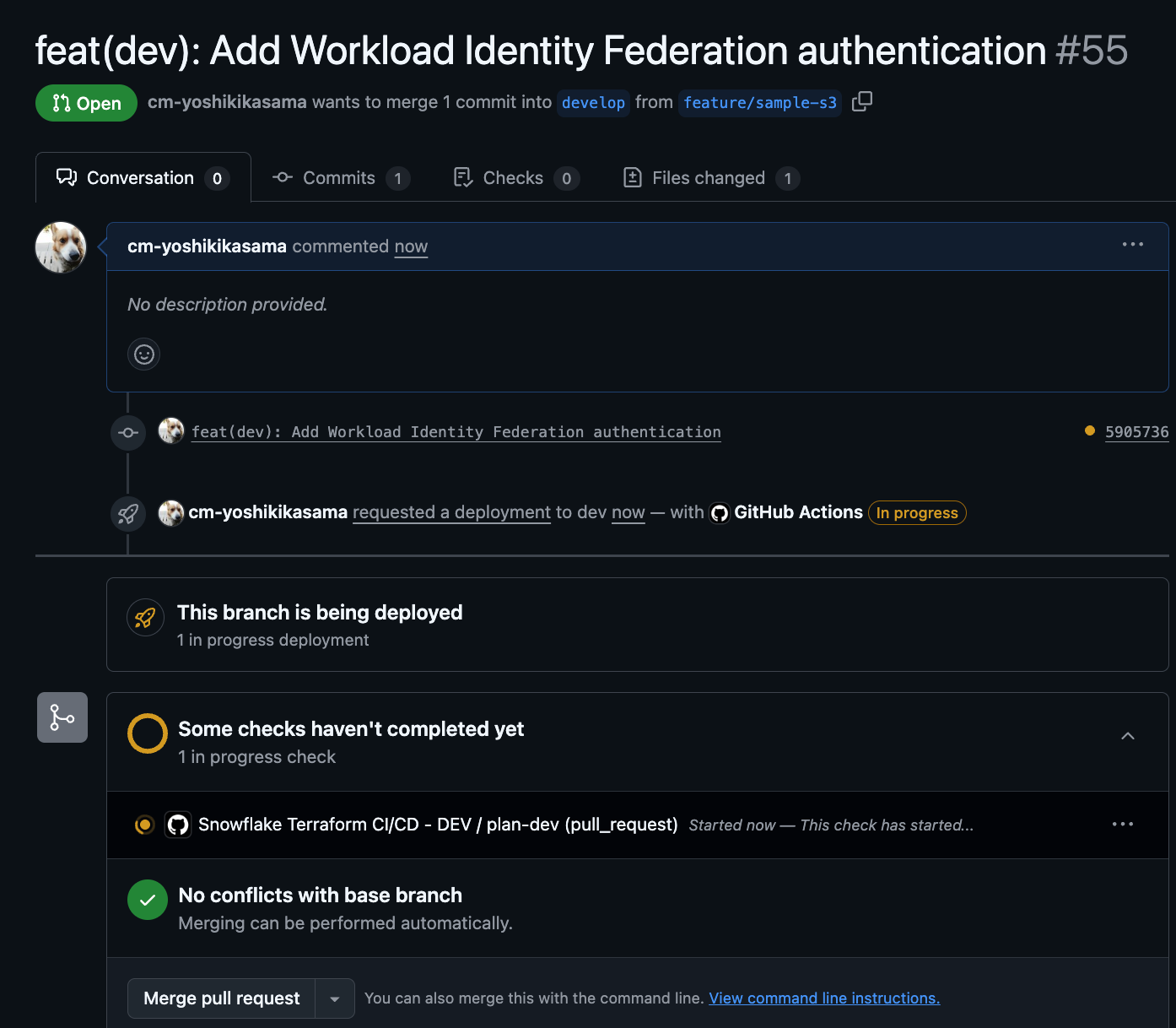
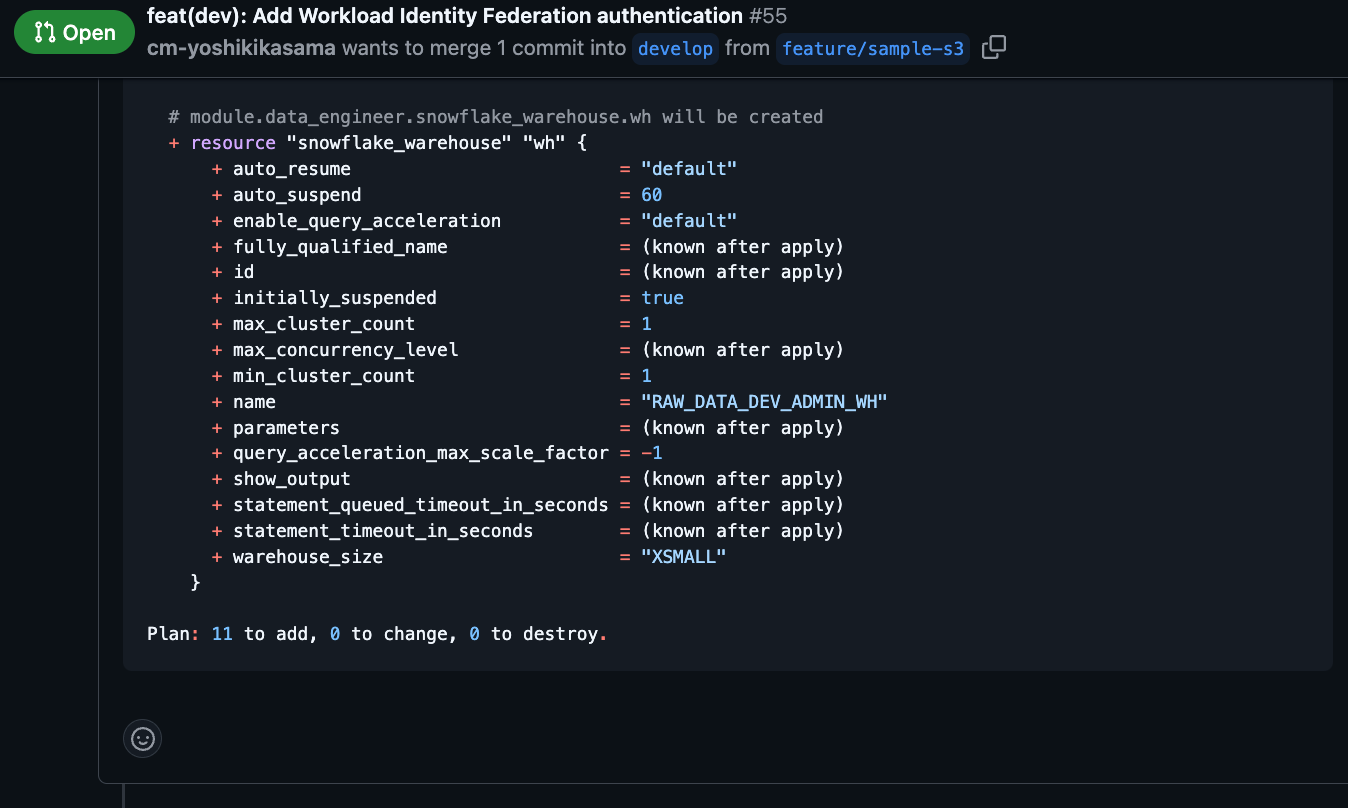
When the Pull Request is created, GitHub Actions will run automatically, and the results of terraform plan will be commented on the PR.
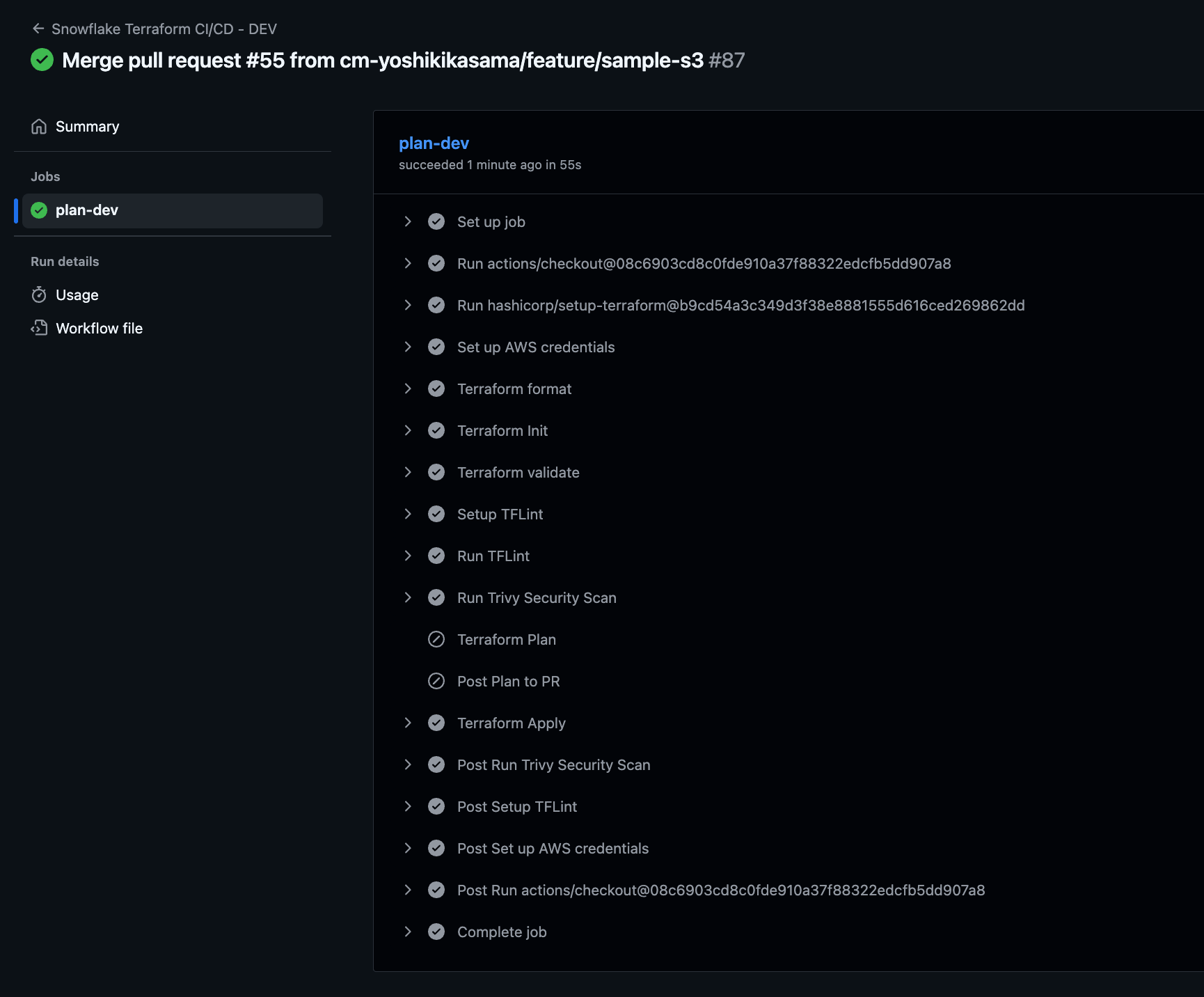
After approving and merging the PR, GitHub Actions will automatically run terraform apply and deploy the resources.
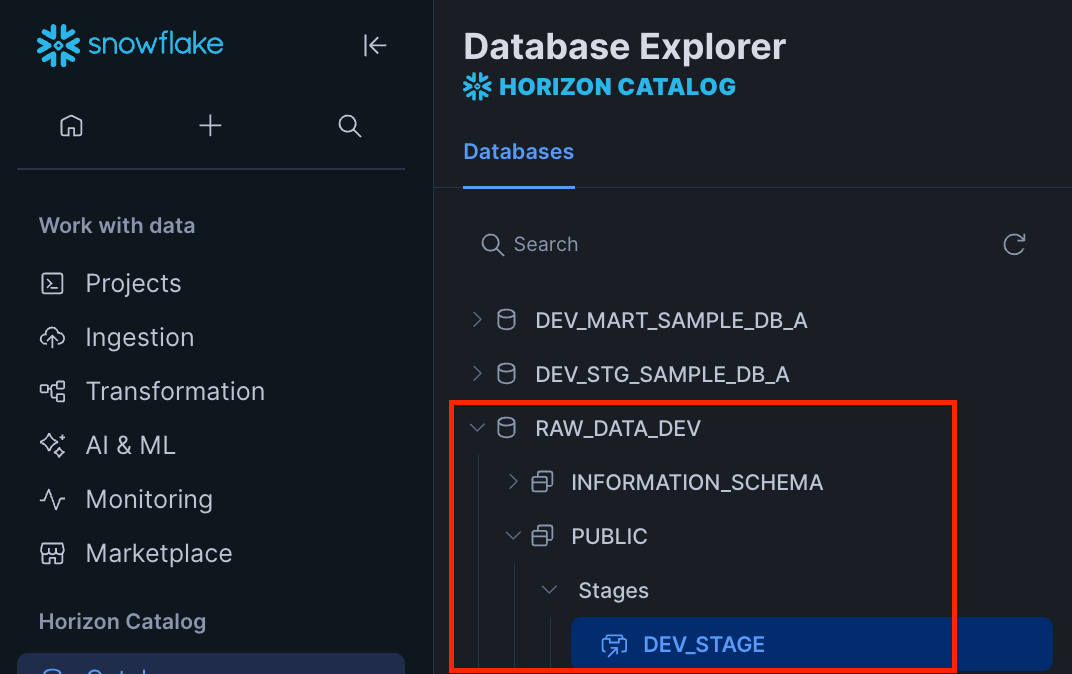
From the Snowflake interface, we can confirm the RAW_DATA_DEV database that we deployed.
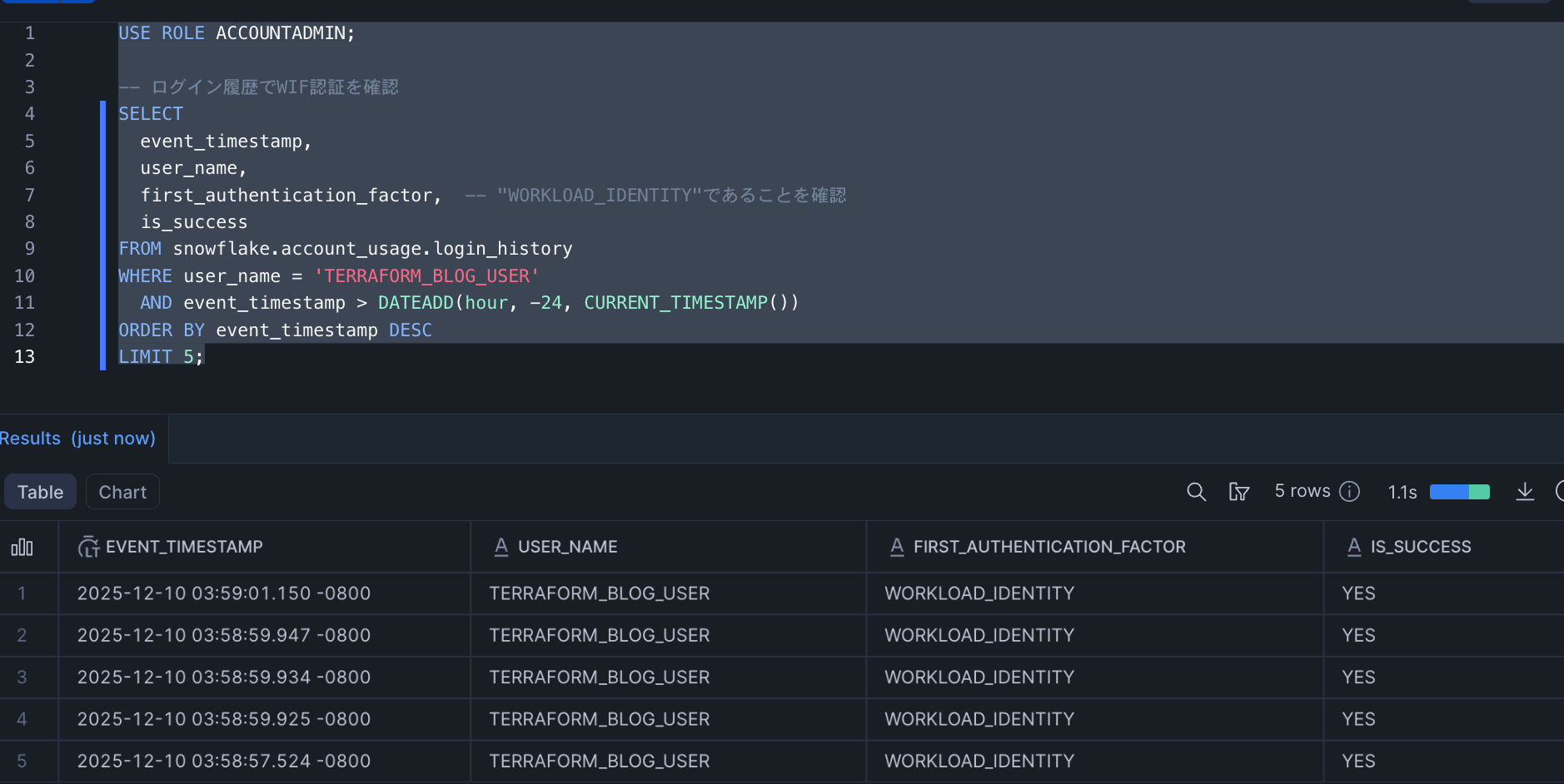
Using the login_history table, we can verify that the Terraform user is actually logging in with WIF authentication.
USE ROLE ACCOUNTADMIN;

-- Check login history for WIF authentication
SELECT
  event_timestamp,
  user_name,
  first_authentication_factor,  -- Verify this is "WORKLOAD_IDENTITY"
  is_success
FROM snowflake.account_usage.login_history
WHERE user_name = 'TERRAFORM_BLOG_USER'
  AND event_timestamp > DATEADD(hour, -24, CURRENT_TIMESTAMP())
ORDER BY event_timestamp DESC
LIMIT 5;
Since first_authentication_factor is WORKLOAD_IDENTITY, we can confirm that authentication is working as expected.
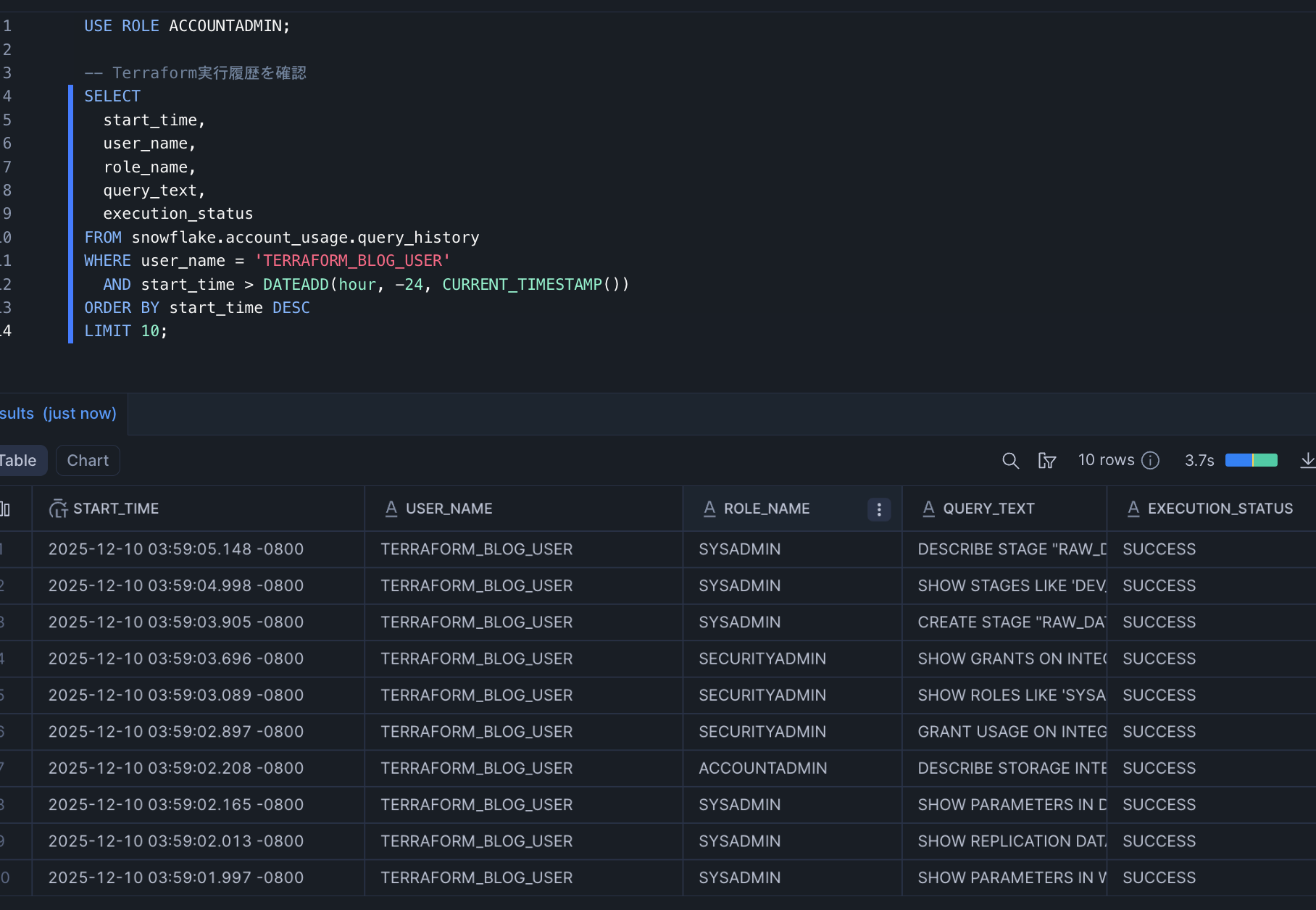
Using the query_history table, we can see the queries executed by Terraform Provider 2.11.0.
USE ROLE ACCOUNTADMIN;

-- Check Terraform execution history
SELECT
  start_time,
  user_name,
  role_name,
  query_text,
  execution_status
FROM snowflake.account_usage.query_history
WHERE user_name = 'TERRAFORM_BLOG_USER'
  AND start_time > DATEADD(hour, -24, CURRENT_TIMESTAMP())
ORDER BY start_time DESC
LIMIT 10;
We can see the DESCRIBE, CREATE, GRANT, and other queries executed by Terraform.
Conclusion
I hope this serves as a reference for those who are building with Snowflake × Terraform or considering migrating from existing key pairs to WIF.