
Troubleshooting when OpsItems from member accounts are not displayed in the delegated administrator with OpsCenter cross-account management

This page has been translated by machine translation. View original
Hello, I'm Nakano from Classmethod Technologies.
I'm spending my days trembling with excitement ahead of the Beppu-Oita Mainichi Marathon this weekend.
AWS has announced the end of new onboarding for AWS Systems Manager Incident Manager (hereafter "Incident Manager") in fall 2025.
In response to this, many of you may be considering or working on migrating to or consolidating with AWS Systems Manager OpsCenter (hereafter "OpsCenter") as a management foundation for organizational incident management and operational issues.
After careful consideration, AWS has decided to stop accepting new customers to AWS Systems Manager Incident Manager after November 7, 2025, and will not be adding new features or capabilities to Incident Manager going forward. AWS will continue to invest in Incident Manager's security and availability, and existing Incident Manager customers will be able to use the service as normal in accounts where Incident Manager is already enabled.
To manage operational issues with your AWS infrastructure, we recommend using AWS Systems Manager OpsCenter.
OpsCenter itself is a service released in 2019 and seems mature in terms of functionality.
Like Incident Manager, it enables centralized incident management in multi-account environments.
However, when actually building the environment, there were cases where items wouldn't display properly in the management console even though the settings seemed correct.
In this article, I'll share the display specifications that are easy to get stuck on in OpsCenter cross-account management, and their solutions.
3-Line Summary
- When managing cross-account in OpsCenter, there is a specification where OpsItems from accounts other than the delegated administrator account are not displayed in the list by default, even after setup is complete.
- The cause is not insufficient permissions, but a console and API specification that "explicit filtering is required to display other accounts."
- The solution is simply specifying an Account ID filter in the OpsCenter screen, which enables operations from the delegated administrator.
OpsItems from Member Accounts Not Visible from Delegated Administrator
Desired Operation
In an AWS Organizations environment, we wanted to centrally monitor and operate OpsItems from all member accounts from the delegated administrator account.
Similar to the operational experience with Incident Manager, we expected the following flow:
- The monitoring team logs into the delegated administrator account console (without switching roles to member accounts).
- In the OpsCenter list screen, they check OpsItems from all accounts.
- They update statuses according to responses and execute incident management.
We were trying to achieve centralized management of incidents across a multi-account environment from a single AWS account without missing anything.
Issue Encountered
We completed the cross-account setup using Quick Setup according to the AWS official documentation.
After that, even though there were no errors, we encountered the following situation:
- Explorer screen (dashboard): Aggregate values from all accounts were displayed.
- OpsCenter screen (OpsItem list): The list showed "0 items."
Although data was visible in "Explorer", nothing was displayed in the "OpsCenter" screen where the actual operations needed to be performed, making it impossible to check details or change statuses.
Cause
Console Filter Specification
The cause was a specification that explicit filtering is required to display cross-account OpsItems from the delegated administrator.
In the default "no filter" state, OpsItems from other accounts are not loaded into the list, even if you have the necessary permissions.
Technical Evidence
Checking the behavior with AWS CLI makes this specification clear:
# [WRONG] This only returns items from your own account (or empty)
aws ssm describe-ops-items

# [CORRECT] Specifying the Account ID explicitly allows retrieval
aws ssm describe-ops-items \
  --ops-item-filters Key=AccountId,Operator=Equal,Values=[Member account ID where OpsItem was created]
The management console also complies with this API behavior, operating on the principle that "unless an account ID is specified, data from other accounts is not retrieved."
Why It Was Hard to Notice
The tricky part of this problem is that there's compelling circumstantial evidence making it look like a configuration error:
- Visible in Explorer: This confirms data integration is successful, making it hard to suspect a console display specification issue.
- Other accounts selectable in creation screen: In the manual OpsItem creation screen of the delegated administrator account, the "Other accounts" option appears, making it seem like cross-account permissions are working normally.
- Documentation wording: The statement about "centralized management" leads to the expectation of all items being displayed without any action required, similar to Incident Manager.
These factors can lead to time spent investigating in the wrong direction, such as "Maybe there are insufficient permissions?" or "Maybe synchronization takes time?" (I spent time on these myself.)
Solution
The solution is very simple. Apply an "Account ID filter" in the console.
Steps
- Open the OpsCenter console in the delegated administrator account.
- Select the OpsItems tab.
- In the search filter field, specify:
- Filter key:
Account ID - Condition:
=(equals) - Value:
[Target member account ID](123456789012 as an example)
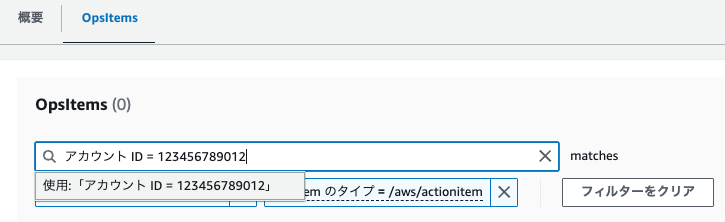
This will display the previously invisible OpsItems from member accounts.
Once displayed, you can check details and change statuses without any issues.
Considerations and Summary
When migrating from Incident Manager to OpsCenter, it's important to understand these OpsCenter console-specific quirks:
1. Difference in UI for "Centralized Management"
While Incident Manager aggregates by "incident" units, OpsCenter's cross-account display is designed to "actively specify which accounts you want to see."
If you expect "all account items arranged chronologically or by status in a timeline," you'll need to adjust your operational workflow.
2. Browser Reload Clears Filters
Due to the management console's specification, refreshing the screen or navigating through different tabs may reset the configured Account ID filter.
For operations, you'll need to either communicate the procedure to "check filters when items aren't displayed" or use bookmarked URLs with filters already applied.
Conclusion
OpsCenter is a flexible and convenient feature, but the UI around cross-account management has some quirks.
I hope this article helps you utilize OpsCenter more smoothly.
References