
Strands Agents' AgentCore Memory Session Manager is convenient when coordinating with AgentCore Memory

This page has been translated by machine translation. View original
Introduction
Hello, I'm Kanno from the Consulting Department, and I'm a big fan of La Mu supermarket.
I recently wrote a blog post about Episodic Memory and briefly used Strands Agents' AgentCore Memory Session Manager in that article.
This tool is actually very convenient, as it can significantly simplify the process when combining it with AgentCore Memory.
Today I'd like to share this convenience with you in this article.
AgentCore Memory Session Manager
This is a feature of Strands Agents that seamlessly integrates with AgentCore Memory.
What's great about it is that it requires much less code.
Once you create the config and Session Manager, you just pass it to the Agent as an argument to utilize short-term memory.
You can use it by writing code like this:
Implementation Example
import uuid
import boto3
from datetime import datetime
from strands import Agent
from bedrock_agentcore.memory.integrations.strands.config import AgentCoreMemoryConfig
from bedrock_agentcore.memory.integrations.strands.session_manager import AgentCoreMemorySessionManager

MEM_ID = os.environ.get("AGENTCORE_MEMORY_ID", "your-existing-memory-id")
ACTOR_ID = "test_actor_id_%s" % datetime.now().strftime("%Y%m%d%H%M%S")
SESSION_ID = "test_session_id_%s" % datetime.now().strftime("%Y%m%d%H%M%S")

# AgentCore Memory settings
agentcore_memory_config = AgentCoreMemoryConfig(
    memory_id=MEM_ID,
    session_id=SESSION_ID,
    actor_id=ACTOR_ID
)

# Create session manager
session_manager = AgentCoreMemorySessionManager(
    agentcore_memory_config=agentcore_memory_config,
    region_name="us-east-1"
)

# Set SessionManager in Agent arguments
agent = Agent(
    system_prompt="You are a helpful assistant. Use all you know about the user to provide helpful responses.",
    session_manager=session_manager,
)

# Interact with the agent (short-term memory is reflected)
agent("I like sushi with tuna")
agent("What should I buy for lunch today?")
Using Session Manager simplifies implementation. By just setting the SessionManager in the Agent's arguments, conversations are recorded and referenced without having to explicitly handle short-term memory, which is really convenient.
But what about long-term memory?
This is also simple - you just need to add the long-term memory settings to the retrieval_config in the configuration.
You specify the namespaces for the target long-term memory. Since you only need to specify the namespace, you can of course specify the latest long-term strategy, Episodic Memory. You can also set up multiple long-term memories.
Implementation Example
from datetime import datetime
from bedrock_agentcore.memory.integrations.strands.config import AgentCoreMemoryConfig, RetrievalConfig
from bedrock_agentcore.memory.integrations.strands.session_manager import AgentCoreMemorySessionManager
from strands import Agent

MEM_ID = os.environ.get("AGENTCORE_LTM_MEMORY_ID", "your-existing-ltm-memory-id")
ACTOR_ID = "test_actor_id_%s" % datetime.now().strftime("%Y%m%d%H%M%S")
SESSION_ID = "test_session_id_%s" % datetime.now().strftime("%Y%m%d%H%M%S")

# Set long-term memory namespaces in retrieval_config, multiple settings possible
config = AgentCoreMemoryConfig(
    memory_id=MEM_ID,
    session_id=SESSION_ID,
    actor_id=ACTOR_ID,
    retrieval_config={
        "/preferences/{actorId}": RetrievalConfig(
            top_k=5,
            relevance_score=0.7
        ),
      	"/facts/{actorId}": RetrievalConfig(
            top_k=10,
            relevance_score=0.3
        ),
        "/summaries/{actorId}/{sessionId}": RetrievalConfig(
            top_k=5,
            relevance_score=0.5
        )
    }
)

session_manager = AgentCoreMemorySessionManager(config, region_name='us-east-1')
ltm_agent = Agent(session_manager=session_manager)
At least when I wrote the article below, I had to retrieve memories and set them as conversation history, which required more work.
And for long-term memory, I had to implement it as a tool, but using AgentCore Memory Session Manager is much simpler.
Let's try it right away!!
Let's Try It
Prerequisites
I used the following versions and models:
- Python 3.13
- uv 0.6.12
- strands-agents 1.19.0
- strands-agents-tools 0.2.17
- Region used
- us-west-2
- Model used
- us.anthropic.claude-sonnet-4-5-20250929-v1:0
Creating a Memory
First, let's create a Memory.
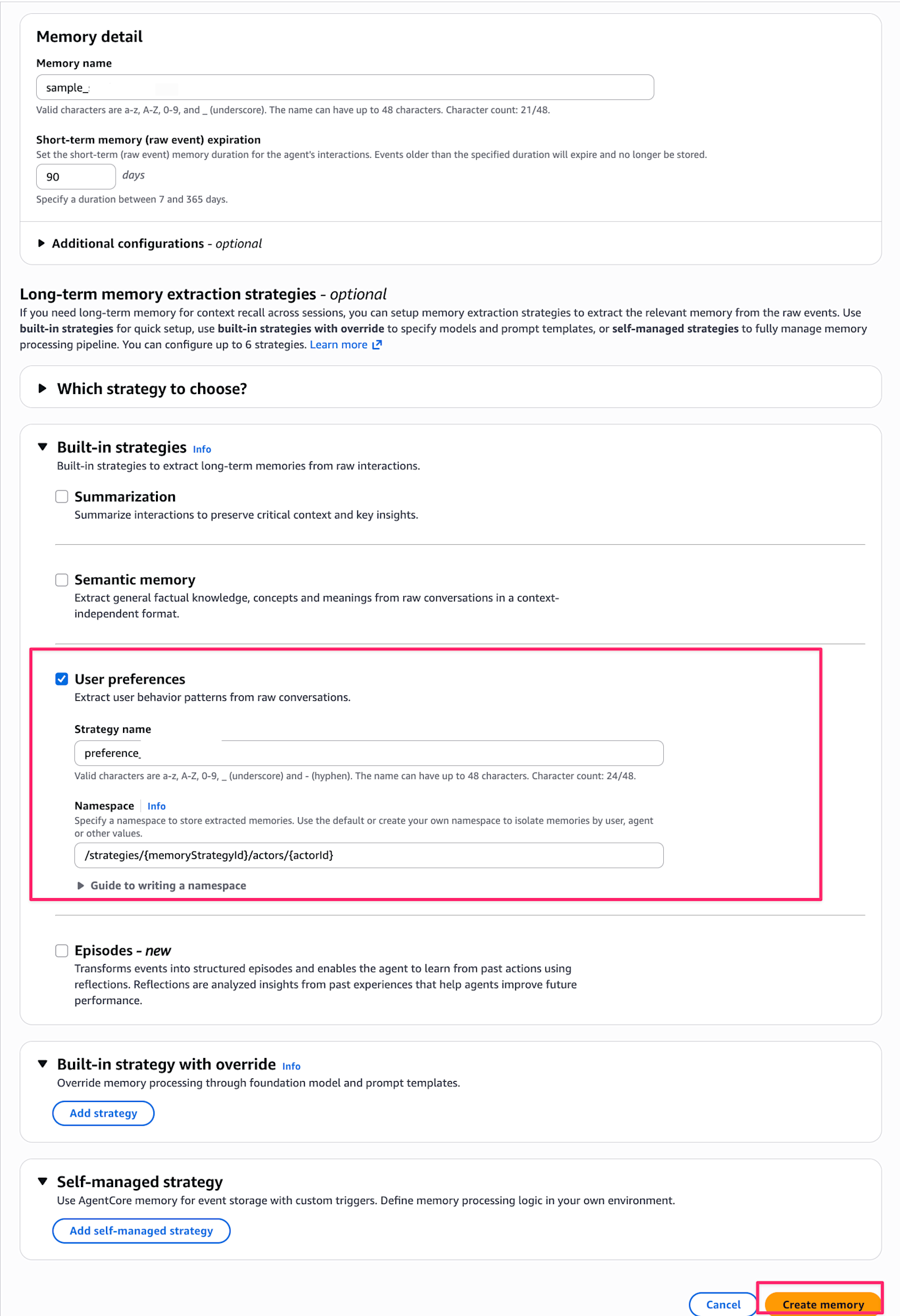
Navigate to the Amazon Bedrock AgentCore page in the AWS console, and select Memory from the left menu.
Click the Create memory button to proceed to the Memory creation screen.

Enter sample_session_memory for the Memory name.
For the long-term memory strategy, check User preference to remember user preferences.
The default Namespace /strategies/{memoryStrategyId}/actors/{actorId} is fine.
Once configured, click Create memory.
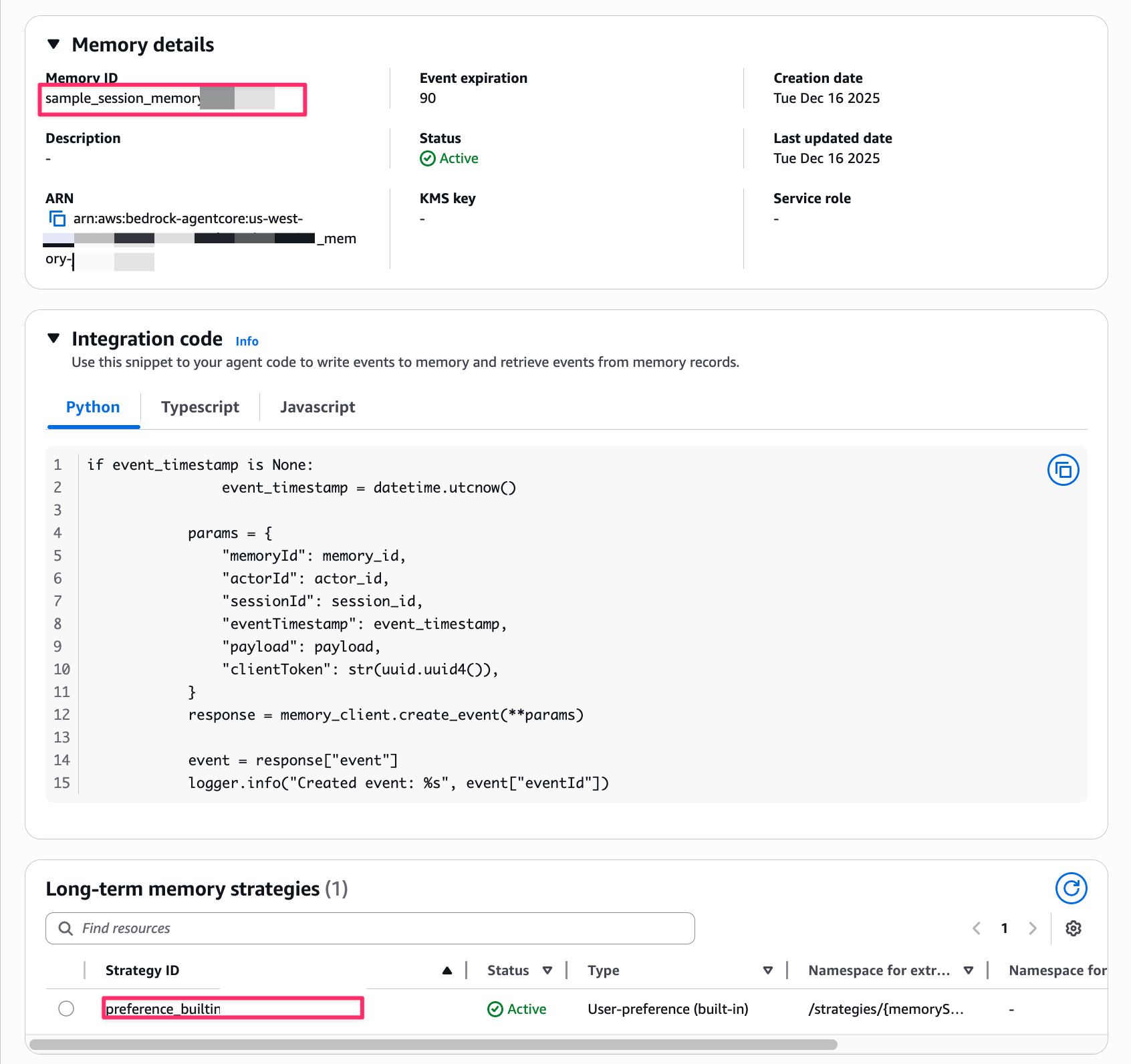
After creation, wait a moment until the Status becomes ACTIVE.
When it's ACTIVE, make note of the Memory ID and Strategy ID.
Setting Up the Local Environment
Now, let's run Strands Agents locally.
First, install the necessary packages.
# Initialize project
uv init memory-session
# Navigate to the project path
cd memory-session

# Install libraries
uv add strands-agents 'bedrock-agentcore[strands-agents]'
Testing Short-Term Memory
Let's first try short-term memory. Save the following code as stm_test.py.
Make sure to set the MEMORY_STRATEGY_ID and MEM_ID values obtained from the console.
This is just for simple verification so I'm hardcoding the values, but consider using environment variables when using this in production.
import os
from datetime import datetime

from bedrock_agentcore.memory.integrations.strands.config import AgentCoreMemoryConfig
from bedrock_agentcore.memory.integrations.strands.session_manager import (
    AgentCoreMemorySessionManager,
)
from strands import Agent
from strands.models import BedrockModel

# Set Memory ID and Memory Strategy ID
MEM_ID = "sample_session_memory-XXXXXXXXXXXX"
MEMORY_STRATEGY_ID = "preference_builtin_XXXXXX-XXXXXXXXXX"
ACTOR_ID = "user_XXXXXX"
SESSION_ID = "session_%s" % datetime.now().strftime("%Y%m%d%H%M%S")

# Create AgentCore Memory Config
agentcore_memory_config = AgentCoreMemoryConfig(
    memory_id=MEM_ID, session_id=SESSION_ID, actor_id=ACTOR_ID
)

# Create Session Manager
session_manager = AgentCoreMemorySessionManager(
    agentcore_memory_config=agentcore_memory_config, region_name="us-west-2"
)

# Use Sonnet 4.5
model = BedrockModel(
    model_id="us.anthropic.claude-sonnet-4-5-20250929-v1:0", region_name="us-west-2"
)

# Create Agent
agent = Agent(
    model=model,
    system_prompt="You are a helpful assistant. Please remember your conversations with the user.",
    session_manager=session_manager,
)

# Let's have a conversation
print("=== 1st statement ===")
response1 = agent("My name is Kanno. Nice to meet you!")

print("\n=== 2nd statement ===")
response2 = agent("My hobby is visiting supermarkets")

print("\n=== 3rd statement ===")
response3 = agent("Please tell me my name and hobby")
Let's run it.
uv run stm_test.py
Looking at the execution results, we can see that in the third statement, it remembers my name and hobby correctly.
This works because the conversation history is saved as short-term memory in AgentCore Memory with a consistent session ID, so it can recall the information.
=== 1st statement ===
Nice to meet you, Kanno-san!

I'm here to help. Please let me know if there's anything I can assist you with today.
=== 2nd statement ===
Visiting supermarkets is an interesting hobby!

Each supermarket has its own characteristics, and comparing them can lead to various discoveries, such as:

- **Product selection**: Unique items and regional specialties at each store
- **Layout**: How they design customer flow and organize departments
- **Pricing strategies**: Special deals and private label products
- **Atmosphere**: High-end, discount-oriented, etc.

What aspects do you focus on when visiting supermarkets, Kanno-san? Do you have any favorite stores or interesting discoveries you'd like to share?
=== 3rd statement ===
Of course!

**Your name**: Kanno-san

**Your hobby**: Visiting supermarkets

I remember clearly! I'd love to hear more details about your supermarket visits if you'd like to share!%
It's great how easily this can be implemented.
Testing Long-Term Memory (User Preference)
Next, let's test long-term memory. We'll use Memory configured with the User Preference strategy to see if user preferences are automatically extracted.
Save the following code as ltm_test.py.
The key implementation point is that you need to construct and set the namespace that you configured.
Make sure to set the MEMORY_STRATEGY_ID and MEM_ID values obtained from the console.
Also, use the same ACTOR_ID as the one used for short-term memory earlier.
Long-term memory is saved per ACTOR_ID, so past memories can be referenced as the same user even if the session changes.
Again, this is just for simple verification, so I'm hardcoding the values, but consider using environment variables when using this in production.
import logging
import os
from datetime import datetime

from bedrock_agentcore.memory.integrations.strands.config import (
    AgentCoreMemoryConfig,
    RetrievalConfig,
)
from bedrock_agentcore.memory.integrations.strands.session_manager import (
    AgentCoreMemorySessionManager,
)
from strands import Agent
from strands.models import BedrockModel

# Set Memory ID and Memory Strategy ID
MEM_ID = "sample_session_memory-XXXXXXXXXXXX"
MEMORY_STRATEGY_ID = "preference_builtin_XXXXXX-XXXXXXXXXX"
ACTOR_ID = "user_XXXXXX"
SESSION_ID = "session_%s" % datetime.now().strftime("%Y%m%d%H%M%S")

# Construct namespace: /strategies/{memoryStrategyId}/actors/{actorId}
NAMESPACE = f"/strategies/{MEMORY_STRATEGY_ID}/actors/{ACTOR_ID}"

agentcore_memory_config = AgentCoreMemoryConfig(
    memory_id=MEM_ID,
    session_id=SESSION_ID,
    actor_id=ACTOR_ID,
    retrieval_config={NAMESPACE: RetrievalConfig(top_k=5, relevance_score=0.5)},
)
session_manager = AgentCoreMemorySessionManager(
    agentcore_memory_config=agentcore_memory_config, region_name="us-west-2"
)

model = BedrockModel(
    model_id="us.anthropic.claude-sonnet-4-5-20250929-v1:0", region_name="us-west-2"
)

agent = Agent(
    model=model,
    system_prompt="You are a helpful assistant. Please remember your conversations with the user",
    session_manager=session_manager,
)
user_input = "Please tell me my preferences."

response = agent(user_input)
This uses a different session ID (generated with timestamp) from the previous one, so it won't remember short-term memory, but it will extract and respond using only long-term memory.
uv run ltm_test.py
When executed, despite being in a new session, it provides personal information extracted from past User Preferences!
From our previous conversations, I know the following about your preferences:

- **Your name**: Kanno-san
- **Your hobby**: Visiting supermarkets

I have recorded these two pieces of information. If you'd like to share any other preferences or interests, I'll remember those as well!
It remembers correctly!
Both short-term memory (conversation history) and long-term memory (User Preference) can be easily utilized just by passing the Session Manager to the Agent's arguments.
That's the convenient aspect of AgentCore Memory Session Manager.
Conclusion
Today we tried out Strands Agents' AgentCore Memory Session Manager.
It's a great advantage that you can quickly integrate with AgentCore Memory for both short-term and long-term memory just by defining a Session Manager.
I hope this article has been helpful. Thank you for reading to the end!!