Best practices for designing SCPs and permission sets

This page has been translated by machine translation. View original
Hello, I'm Suje.
For the project I was responsible for, I was tasked with designing an environment utilizing Organizations.
I've summarized the knowledge I gained through my research in a blog post to organize my thoughts.
The article explains the following:
- Core concepts of multi-account environment design
- Best practices for OU and SCP design
- Anti-patterns for OU and SCP design
- Overview of IAM Identity Center
- Best practices for IAM Identity Center user groups and permission set design
- Anti-patterns for IAM Identity Center user groups and permission set design
1. Core concepts of multi-account environment design
When an organization operates with multiple accounts, as the business grows, it becomes difficult to track who created which resources, whether security settings are appropriate, and which team is generating which costs.
To support this management, AWS provides various services including AWS Organizations, along with associated best practices.
However, many people tend to focus only on the technical "how" when implementing and operating Organizations, such as how to divide OUs and how to apply SCPs.
I would like to first explain three core concepts that should be understood when designing a multi-account environment, rather than the technical details.[1]
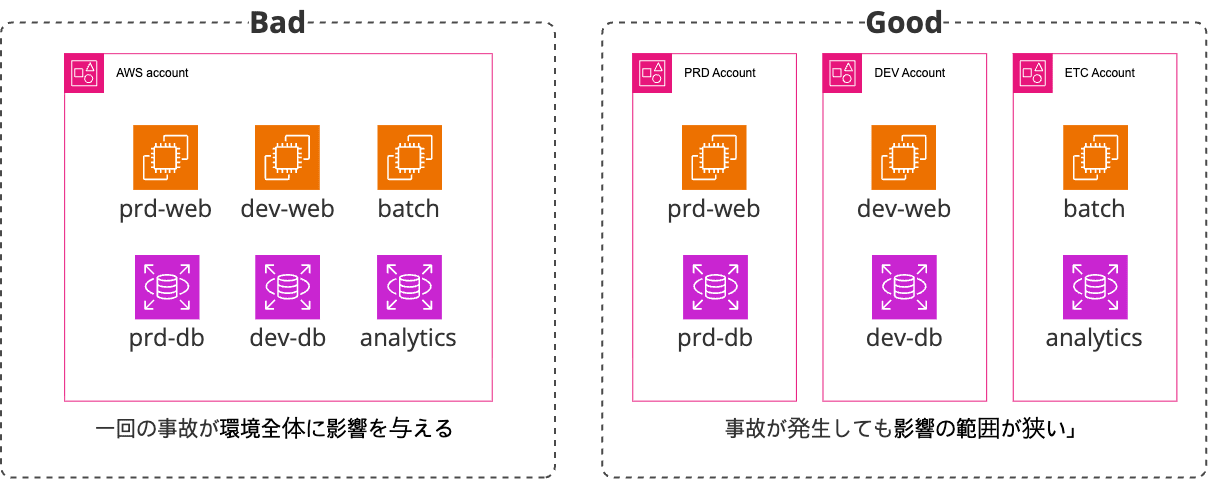
Concept 1: Minimizing Blast Radius
Separating accounts is the most effective first step in minimizing the impact radius of costs and security incidents
This is the most basic point.
What would happen if all production, development, and test environments were mixed in a single AWS account? A small mistake in the development environment could affect the production database, or forgotten test resources could cause unexpected cost overruns.
In other words, a single security incident would impact all company resources.
This is where setting the "Blast Radius" comes into play.
AWS accounts provide the strongest and clearest boundaries for security, cost, and resources.
Therefore, it is recommended to separate accounts according to workloads, environments, teams, and compliance requirements.
Concept 2: Defense in Depth
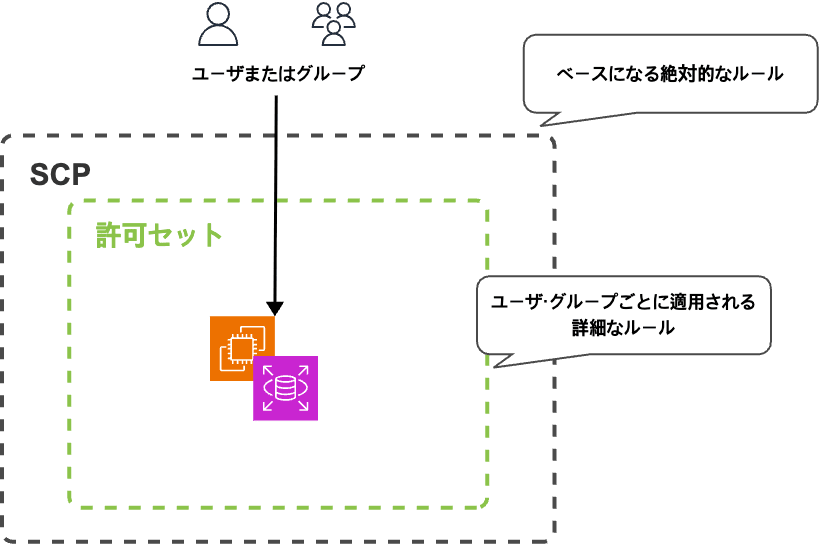
Create a multi-layered defense by guarding the broader framework with SCPs and granting users the minimum permissions necessary for their actual duties through IAM permission sets
"If we've restricted to only allowed services with SCPs, isn't it okay to give PowerUser permissions?"
This is one of the most common traps in multi-account design. Robust security consists of multiple layers of defense.
This model can be compared to a "castle":
-
Outer Wall = Service Control Policies (SCPs):
- This is the outermost solid wall surrounding the entire castle.
- This wall establishes the security baseline for the entire organization, and no one can break these rules.
-
Internal Access Card = IAM Permission Sets:
- Even after passing through the outer wall and entering the castle, not everyone can enter all buildings. Each individual receives an "access card" suited to their role.
- In other words, it's desirable for all users to access only the resources they need.
If you rely only on the outer wall (SCPs) and distribute a master key (PowerUserAccess) that allows everyone to enter all buildings, a small hole in the outer wall could lead to the entire castle being invaded.
Security is only ensured when both layers of defense—SCPs and IAM permission sets—work together.
Concept 3: Separation of Duties and Delegation of Authority
It is important to clearly separate roles by having the management account handle only minimal roles such as organization ownership and billing, while delegating actual service management to "delegated administrator" accounts.
When you create an Organization, you designate a management account to operate it.
This is like a super account that can handle all operations related to the Organization, but it is recommended not to use it for daily operations.
To make it easier to understand, it's similar to the relationship between a CEO and department heads.
- Management Account = CEO
- The ultimate authority who establishes the company (creates the organization), creates and dissolves departments (manages accounts and OUs), and manages the company's overall funds (consolidated billing).
- The CEO's seal (root user credentials) should be safely stored in a vault and used only in extremely limited cases.
- Delegated Administrator Account = Department Head
- The CEO delegates tasks to department heads who are experts in their respective fields.
- For example, "entrusting overall company security management to the security team leader" or "entrusting employee access card management to the HR team leader."
- Similarly, the management account can delegate ADMIN privileges for services such as GuardDuty, Security Hub, and IAM Identity Center to specific member accounts.
- For example, delegating security-related services to the
Security-Toolingaccount.
- For example, delegating security-related services to the
- Each delegated administrator autonomously handles daily operations for their assigned services.
- One delegated administrator can be designated for each service, and different accounts can be set as delegated administrators for different services.
- The CEO delegates tasks to department heads who are experts in their respective fields.
This model minimizes exposure of the management account to maximize security while allowing each team to operate efficiently by leveraging their expertise.
It's difficult to consider everything during actual implementation
I understand intellectually that "the core concepts explained above should be understood and considered during design."
However, in reality, it's difficult to reflect all of them from the beginning when designing and building an environment.[2]
With this in mind, I will also describe how to gradually build up a multi-account environment when setting it up for the first time.
2. Best Practices for OU and SCP Design
A robust OU structure is based on clear role separation and scalability.
When designing a multi-account environment, AWS recommends the following function-based OU structure as a starting point.
1. Design a function-based OU structure
Rather than simply arranging accounts by team name or project name, the structure should be designed based on what "function" each OU serves.
According to the AWS best practices blog, the following structure is recommended:
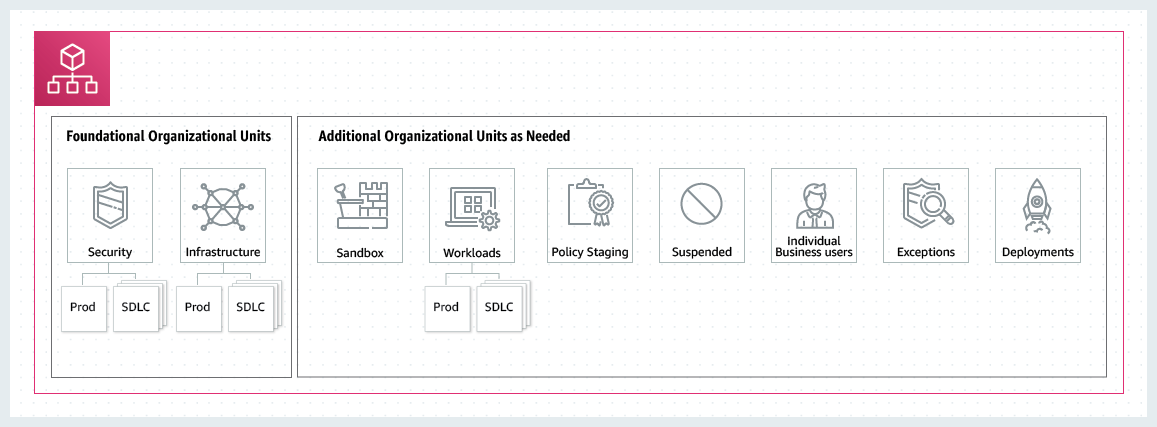
The highest priorities in organizational OU design are the Security OU and Infrastructure OU.
These two together are called the Foundation OU.
- Security OU: This is the "watchtower" responsible for the organization's security. It includes a
Log-Archiveaccount that centrally collects logs (CloudTrail) from all accounts, and aSecurity-Toolingaccount that manages security services (GuardDuty, Security Hub) and conducts audits. This OU requires the most stringent SCPs and access controls. - Infrastructure OU: This manages infrastructure services provided commonly across the organization. For example, it includes a
Networkaccount responsible for external network connections such as Transit Gateway, and aSharedInfraaccount that manages non-network services shared across all accounts.
After creating the foundation OUs, you create other OUs for use in other environments.
For example, you can create OUs such as:
- Workloads OU: This includes all accounts where actual services operate. It can be further divided into
Prod(production) andDev(development) sub-OUs, allowing stronger protection policies to be applied to the production environment. - Sandbox OU: This provides space for developers to freely experiment with and learn about new AWS services. It's important that accounts in this OU are completely isolated from the production network and have budget alerts set to prevent cost overruns.
- Policy Staging OU: This is used by organization administrators to test and validate OU settings and SCPs.
For more information on other recommended additional OUs, please refer to the official documentation.
2. Use SCPs as a "blacklist (deny list)"
This refers to the "blacklist (deny list)" approach, which means "allowing everything by default (FullAWSAccess) and explicitly denying (Deny) only dangerous actions that must never occur."
Why is the blacklist approach good?
- Agility: When new services or features are released on AWS, developers can try them immediately without changing SCPs. This doesn't hinder the organization's pace of innovation.
- Ease of management: It's much simpler and less error-prone to manage just a few important risks that should be prohibited rather than listing the many services that should be allowed.
Examples of Deny SCPs that should definitely be added:
- Protecting the organization's foundation:
- Preventing member accounts from leaving the organization without authorization (
organizations:LeaveOrganization) - Preventing central audit logs (CloudTrail) from being stopped or deleted (
cloudtrail:StopLogging,cloudtrail:DeleteTrail)
- Preventing member accounts from leaving the organization without authorization (
- Enforcing security best practices:
- Prohibiting the creation of access keys for root users (
iam:CreateAccessKeyon Root) - Forcing the use of intentionally designed VPCs rather than default VPCs (
ec2:DeleteVpcon Default VPC)
- Prohibiting the creation of access keys for root users (
- Region governance:
- Preventing resource creation in unauthorized regions (
*on Notaws:RequestedRegion)
It's desirable to apply and add these SCPs according to the characteristics of each OU.
For example, stricter rules can be applied to theProdOU and relatively more relaxed rules to theSandboxOU.
- Preventing resource creation in unauthorized regions (
Also, since the permissions available in an account are a combination of SCPs and IAM, it's important to understand the policy evaluation logic.
Understanding this logic reveals that SCPs do not grant permissions.
In other words, SCPs can be thought of as "filters" for checking permissions.
Also, to allow an operation, explicit permission is required in each of the following elements:
- The AWS account itself
- The OU above the AWS account
- The organization's root
In other words, without explicit permission, access is denied. This means that the permission model is denied by default (implicit denial).
Of course, if there is an explicit denial, it is denied even if permission is granted elsewhere (= explicit denial takes precedence).
(Supplementary) When SCP design is difficult
When actually setting up SCPs, there may be cases where you've restricted the recommended services but are unsure how to further modify them.
Also, as indicated in Concept 2, minimum privileges are recommended in AWS environments, so it's desirable to restrict unnecessary services.
However, since it can be difficult to determine which services are necessary and unnecessary, I recommend using IAM Access Analyzer for review.
I personally started by restricting permissions with SCPs for recommended items and clearly unnecessary services, then optimized the SCPs by gradually restricting unnecessary permissions during the verification phase while actually using the system.
When utilizing this in your organization, please also refer to the following article.
3. Anti-patterns for OU and SCP Design
Conversely, by understanding and avoiding anti-patterns, you can build a secure environment.
1. Flat OU structure
This is an approach where all accounts are placed directly under the Root.

The problems with this configuration are as follows:[3]
- Difficulty in policy management: If you want to apply different SCPs to production and development environments, you need to attach policies individually to each account. This becomes unmanageable as the number of accounts grows to dozens or hundreds.
- Lack of scalability: As new environments (e.g., Staging, QA) or departments are added, the overall structure becomes more complex.
2. Overly deep or complex OU structure
This is a case where the organization's departmental structure is directly reflected in the OUs, creating a structure with more than 10 levels of depth.
The problems with this configuration are as follows:
- Difficulty in solving permission issues: If a user cannot perform a specific operation, it's necessary to check all SCPs applied from Root to the relevant account one by one to identify the cause. This dramatically increases the time required to solve problems.
- Complication of management: Unnecessarily complex structures increase management points and lead to mistakes.
As a recommendation, it's desirable to keep the depth of OUs simple, not exceeding 3-4 levels.
3. Using SCPs as a "whitelist (allow list)"
The whitelist approach is also an SCP strategy.
This is the method of "prohibiting everything by default and explicitly allowing (Allow) only the services to be used."
The problems with the whitelist approach are as follows:
- Low agility: If developers want to use a new AWS service, they must always request the administrator to change the SCPs. This significantly hinders the organization's pace of technology adoption.
- Difficulty in maintenance: AWS constantly releases new features and services. It's practically impossible to keep track of all of them and continuously add them to the allowlist. Also, if you're not aware of hidden dependencies between services, problems can occur where services unexpectedly stop working.
- Misconception about security: While it may seem that an allowlist is safer, if an administrator accidentally allows a broad range (like
ec2:*), the security of all accounts to which that policy is applied collapses at once.
In other words, the maintenance cost becomes extremely high.
In particular, the situation of "unable to access an action that should be accessible due to missing entries" frequently occurs during actual operations.
4. IAM Identity Center Overview
What is IAM Identity Center?
IAM Identity Center (formerly AWS SSO) is a service that centrally manages human access in a multi-account environment.
To put it simply, it can be thought of as a "company building's integrated access card issuance center."
It's a system that issues integrated access cards to employees, specifying which floors (AWS accounts) they can enter and with what permissions.
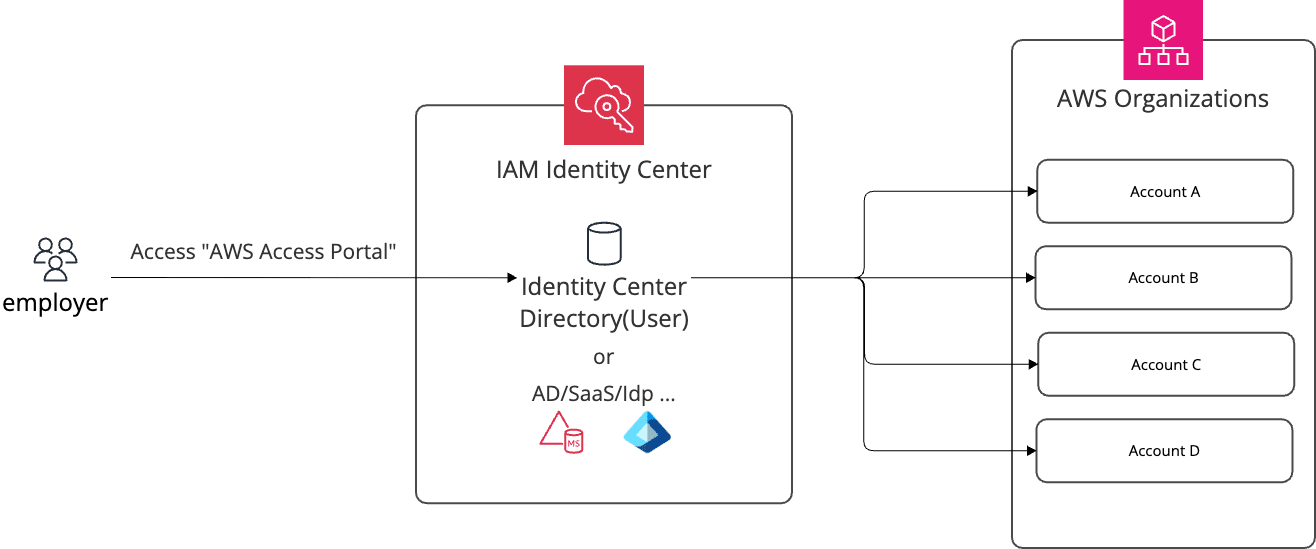
The main components are as follows:
| Component | Description |
|---|---|
| Identity Store / External IdP | Stores user information or integrates with external IdPs such as Okta or Azure AD |
| Users & Groups | Units for organizing users by role |
| Permission Sets | IAM policy templates defining "what permissions this role has" |
| Account Assignments | Connection settings specifying "allow this group, in this account, with this permission set" |
Instance Types: Organization Instance vs. Account Instance
IAM Identity Center has two types of instances.
In the context of this article dealing with multi-account environments, the organization instance is assumed.
| Category | Organization Instance | Account Instance |
|---|---|---|
| Enablement location | AWS Organizations management account | Single AWS account |
| AWS account access management | Supported | Not supported |
| SAML 2.0 applications | Supported | Not supported |
| Delegated administrator configuration | Possible | Not possible |
| Usage | Multi-account integrated access management | AWS managed apps (e.g., QuickSight) only |
The account instance is a type added in November 2023 and is used when only access to AWS managed applications like Amazon QuickSight is required in a standalone account. If the goal is multi-account access management, the organization instance must be used.
Identity Source Types
You can choose from three methods depending on where user information is obtained from.
| ID Source | Description | Features |
|---|---|---|
| Identity Center Directory | Built-in user store in IAM Identity Center | Can be used immediately without a separate IdP. Suitable for small-scale or initial setup |
| Active Directory | Integration with AWS Managed Microsoft AD or AD Connector | Can leverage existing on-premises AD as is |
| External IdP (SAML 2.0) | Integration with Okta, Microsoft Entra ID, Google Workspace, etc. | Can maintain corporate IdP as the central authentication source |
There are also two methods for synchronizing users and groups when integrating with an external IdP:
- Automatic provisioning (SCIM): User and attribute changes in the IdP are automatically synchronized to IAM Identity Center. Suitable for large organizations or those with frequent member changes.
- Manual provisioning: Manually creating the same users in IAM Identity Center as in the IdP. A method chosen for small-scale operations or when integration settings are complex.
Relationship between SCPs and IAM Identity Center
As summarized in Concept 2 of multi-account concepts, SCPs are "guardrails at the organizational level that define what is absolutely not allowed," while IAM Identity Center permission sets define "what this person can do" at the individual or group level.
These two layers work together to form a multi-layered defense.
5. Best Practices for User Group and Permission Set Design
1. Assign permissions to groups rather than individuals
If you assign permission sets directly to each individual user, manual work is required every time a member changes.
If you assign permissions to groups, onboarding and offboarding can be completed simply by changing group membership.
2. Design groups and permission sets based on job functions
By matching groups and permission sets according to job functions, it becomes immediately clear who has which permissions.
3. Differentiate permission levels according to environment (dev/stg/prod)
Even for the same "developer" role, flexible permissions can be granted in dev accounts, but the principle of least privilege must be strictly applied in prod accounts.
| Group | dev Account | stg Account | prod Account |
|---|---|---|---|
| Developer | PowerUser | ReadOnly | ReadOnly |
| Ops | PowerUser | PowerUser | LimitedAdmin |
| Security | SecurityAudit | SecurityAudit | SecurityAudit |
4. Prioritize using AWS Managed Policies for permission sets
Custom inline policies can create a large management burden.
A strategy of basing permission sets on AWS managed policies like PowerUserAccess, ReadOnlyAccess, and SecurityAudit, and supplementing with Customer Managed Policies only when necessary, is advantageous for maintenance.
Permission sets can be composed of the following four elements:
| Component | Description |
|---|---|
| AWS Managed Policies | Pre-defined policies managed by AWS |
| Customer Managed Policies | Self-created IAM policies within the account |
| Inline Policies | Policies directly included in the permission set (deleted along with the permission set when it's deleted) |
| Permission Boundaries | The maximum limit of permissions that this permission set can allow |
In particular, permission boundaries act as a safety mechanism that restricts actual permissions, even if a broad policy is attached to a permission set. For example, they can be used when granting PowerUserAccess to developers while restricting them to only specific regions or services through the permission boundary.
Note: Constrained by IAM Role policy attachment limits
Policies attached to permission sets are simultaneously constrained by both IAM Identity Center's limits and the limits of the actual IAM Roles provisioned.[4]
| Limitation Layer | Managed Policy Count | Inline Policy Size | Expandable? |
|---|---|---|---|
| Permission Set side | Maximum 25 | 10,240 characters (excluding whitespace) | ❌ Not possible |
| IAM Role side | Maximum 25 Default: 10 |
10,240 characters (excluding whitespace) | ✅ Possible |
Although Permission Sets allow up to 25 managed policies, the default limit of IAM Roles created when provisioning the permission set to target accounts is 10, so 10 becomes the practical limit. Attaching 11 or more managed policies will cause the provisioning itself to fail.
5. Set session times according to the environment
It's advisable to set shorter session times for prod accounts to reduce the risk of credential theft.
| Environment | Recommended Session Time |
|---|---|
| dev | 8 hours |
| stg | 4 hours |
| prod | 1 hour |
6. Separate permission sets for the management account when using delegated administrators
IAM Identity Center can, for security reasons, delegate management authority to an account other than the management account (e.g., a security-dedicated account).
However, there are two important limitations for delegated administrators:
Limitation 1: Delegated administrators cannot modify permission sets already provisioned in the management account.
(AWS original text: "The delegated administrator can't alter permission sets provisioned in the management account.")
Limitation 2: Only individual users, not groups, should be directly assigned to permission sets for the management account.
If groups are assigned, there's a risk that IdP administrators or AD administrators could inadvertently expand access permissions to the management account simply by changing group memberships.
Considering these two limitations, separating permission sets for the management account from those for general member accounts from the beginning makes operation much simpler.
| Permission Set Category | Assignment Method | Management Authority |
|---|---|---|
| Permission sets for management account | Direct assignment to individual users only | Can only be changed by management account administrators |
| Permission sets for member accounts | Group-based assignment recommended | Can be managed from the delegated administrator account |
6. Anti-patterns for User Group and Permission Set Design
1. Direct permission assignments to individuals
Accumulating exceptions like "just for this person..." makes it impossible to grasp the overall permission structure.
The more exceptions there are, the higher the risk of omissions during onboarding and offboarding, leading to incidents.
I hope you will make assignment through groups an operational principle.
2. Permission Set Sprawl
If you continue to create slightly different versions of similar permission sets,
you'll eventually lose track of what each permission set is for.
It's important to maintain permission sets at a minimum number with clear naming conventions.
3. Abuse of AdministratorAccess across all accounts
There are cases where everyone is given administrator privileges "to make work easier."
This creates a structure where everything is allowed internally, even if SCPs are carefully designed as guardrails.
The principle of least privilege begins with an organizational culture that prioritizes security over convenience.
4. Mismatch between OU structure and permission set assignments
If you're dividing accounts into dev/stg/prod with OUs but managing permission set assignments individually for each account, operational complexity increases dramatically.
The more aligned the OU structure and permission set assignment strategy are, the simpler operations become and the faster root causes can be identified when issues occur.
Summary
I believe that combining SCP design and IAM Identity Center design can achieve both security and operational efficiency in a multi-account environment.
While it's difficult to apply everything perfectly from the beginning, I hope this article helps when deciding on design policies.
Thank you for reading this long article.
I always welcome feedback on typos or content.
In other words, I want to explain the "why" ↩︎
If you expect very little change in the environment after implementation, it may be possible to design with all considerations from the start ↩︎
These are the same reasons why OUs are used ↩︎
For detailed information, please refer to the documentation. ↩︎