Using SwiftUI's `@Environment(\.openURL)` to open URLs in an in-app browser

This page has been translated by machine translation. View original
When using @Environment(\.openURL) in a SwiftUI app, it launches the Safari app by default when handling external links. To enhance user experience, we often want to open links in an in-app browser. I learned from Kinkuma's article "[SwiftUI] iOS 17以降の@Environmentまとめ" that we can customize the behavior of OpenURLAction.
This article explains how to display URLs in an in-app browser (SFSafariViewController) by utilizing SwiftUI's Environment Value.
Test Environment
- Xcode 16.2
- iPhone 16 Pro / iOS 18.3 (simulator)
Features Covered in This Article
This sample code implements the following features:
- Customize SwiftUI's
openURLEnvironment Value to open links in an in-app browser (SFSafariViewController) instead of an external browser (Safari app) - Make it work seamlessly when handling URLs with standard SwiftUI components like
ButtonandLink
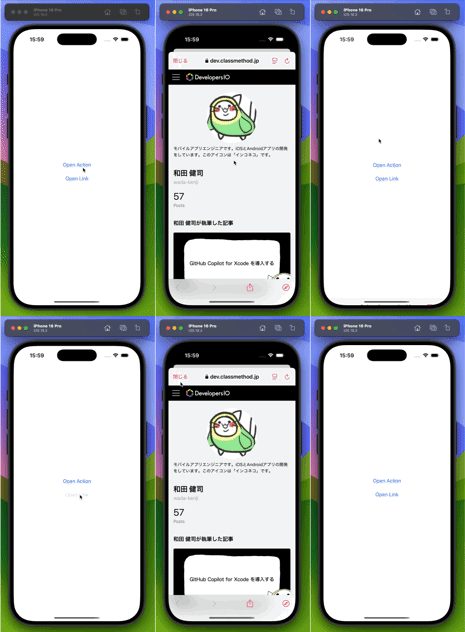
When running the sample program, you can open URLs in an in-app browser as shown in the following video.
Implementation Steps
1. Implementing SafariView
First, create a wrapper component to use UIKit's SFSafariViewController in SwiftUI. Use the UIViewControllerRepresentable protocol to utilize UIKit components from SwiftUI.
private struct SafariView: UIViewControllerRepresentable {
    let url: URL

    func makeUIViewController(context _: Context) -> SFSafariViewController {
        let vc = SFSafariViewController(url: url)
        vc.dismissButtonStyle = .close
        vc.preferredControlTintColor = .systemPink
        return vc
    }

    func updateUIViewController(_: SFSafariViewController, context _: Context) {
        // No update needed as SFSafariViewController manages its internal state
    }
}
Although not covered in this article, you might want to add an onFinish handler to SafariView to call onFinish when SFSafariViewController is closed.
2. Creating the IdentifiableURL Structure
To use the sheet(item:) modifier in SwiftUI, the displayed item must conform to the Identifiable protocol. Therefore, create a structure that wraps the URL.
/// Wrapper structure to make URL conform to Identifiable for sheet display
/// - Note: Necessary for use with sheet(item:)
struct IdentifiableURL: Identifiable {
    let id = UUID()
    let url: URL

    init(_ url: URL) {
        self.url = url
    }
}
3. Implementing SafariSheetModifier
Next, implement SafariSheetModifier which combines the customization of @Environment(\.openURL) and the logic to display SafariView as a sheet.
struct SafariSheetModifier: ViewModifier {
    @State private var identifiableURL: IdentifiableURL?

    func body(content: Content) -> some View {
        content
            .environment(\.openURL, OpenURLAction { url in
                // Fall back to standard behavior (open in browser, etc.) for non-HTTP/HTTPS schemes
                if url.scheme == "https" || url.scheme == "http" {
                    identifiableURL = IdentifiableURL(url)
                    return .handled
                } else {
                    return .systemAction
                }
            })
            .sheet(item: $identifiableURL) { identifiableURL in
                SafariView(url: identifiableURL.url)
            }
    }
}
This ViewModifier implements the following:
- Use
environment(\.openURL, ...)to customize the behavior when opening URLs - Use
sheet(item:)to display SafariView as a sheet when an HTTPS or HTTP scheme URL is opened
It checks the URL scheme and displays it internally as a sheet for HTTP or HTTPS, while delegating to the system's default behavior for other schemes (tel:, mailto:, etc.).
4. Implementing the View Extension
Create a View extension to easily apply the SafariSheetModifier.
extension View {
    /// Add Safari sheet display functionality to View
    /// Makes URLs opened in the app display in SFSafariViewController
    func safariSheet() -> some View {
        modifier(SafariSheetModifier())
    }
}
With this extension, you can customize URL handling within any view hierarchy by simply applying .safariSheet().
5. Practical Usage Example
Let's look at a practical example in an app. By applying it at the app level, URLs can be handled consistently throughout the app.
@main
struct SampleOpenUrlApp: App {
    var body: some Scene {
        WindowGroup {
            ContentView()
                .safariSheet() // Apply Safari sheet functionality to the entire app
        }
    }
}
Then, in the content view, get the openURL action from the Environment Value and use it to open URLs when a button is tapped. Also use Link to open URLs when tapped.
struct ContentView: View {
    @Environment(\.openURL) private var openURL

    private static let url = URL(string: "https://dev.classmethod.jp/author/wada-kenji/")!

    var body: some View {
        VStack(spacing: 24) {
            Button(action: openSampleURL) {
                VStack {
                    Text("Open Action")
                }
            }

            Link("Open Link", destination: ContentView.url)
        }
    }

    private func openSampleURL() {
        openURL(ContentView.url)
    }
}
With this implementation, when a button is tapped or a Link component is selected, SFSafariViewController is displayed as a sheet within the app without launching the Safari app.
Sample Code
All sample code used in this article has been uploaded to gist.
Conclusion
We've seen how SwiftUI's Environment Value can be leveraged to easily customize URL handling in an app.
Using this technique, users can browse web content without leaving the app, while maintaining compatibility with standard SwiftUI components. It also improves code reusability and maintainability, enabling flexible processing based on URL schemes. This pattern of combining OpenURLAction with SFSafariViewController is a practical and effective approach, especially for apps where content browsing and information delivery are key features.
References