
With EC2's new feature "AMI Ancestry," you can now see the complete genealogy of AMIs

This page has been translated by machine translation. View original
On November 20, 2025, AMI Ancestry was released as a new feature of Amazon EC2.
Previously, managing AMI derivatives (which AMIs were copied/created from) had to be done manually using tags, etc., but if the source AMI was deleted, tracking parent-child relationships could become difficult.
With this update, AWS now automatically records and maintains the genealogy of AMIs.
I tested whether it's possible to track even if a parent AMI is deleted in the middle of a 4-generation AMI lineage, and I'm sharing the results.
Test Scenario
I created a "family tree" with the following steps and attempted to verify if tracking is still possible after deleting an intermediate AMI:
- Creating the family tree: Starting from Base AMI (Amazon Linux 2023), I created 4 generations (Gen1-Gen4) by repeatedly copying.
- Verifying lineage: Checking if each AMI correctly points to its parent.
- Destructive testing: Deleting the intermediate Gen2.
- Tracking verification: Confirming if information about the deleted parent (Gen2) remains in the child Gen3 information.
Test Implementation
1. Creating 4 generations of AMIs
Using Amazon Linux 2023 (al2023-ami-2023.9.20251117.1...) in the Tokyo region as the base, I created successive copies using CLI.
# Test script image
export BASE_AMI_ID="ami-03852a41f1e05c8e4" # public AMI
aws ec2 copy-image --source-image-id $BASE_AMI_ID ... --name "Ancestry-Test-Gen1"
aws ec2 copy-image --source-image-id $GEN1_AMI_ID ... --name "Ancestry-Test-Gen2"
# ... repeated until Gen4
After creation, checking each AMI's SourceImageId reveals a clean chain:
--------------------------------------------------------------------------
|                             DescribeImages                             |
+-----------------------+----------------------+-------------------------+
|      CurrentAMI       |        Name          |        SourceImageId      |
+-----------------------+----------------------+-------------------------+
|  ami-xxxxxxxxxxxxx0a0f7|  Ancestry-Test-Gen2  |  ami-xxxxxxxxxxxxx2c21d  |
|  ami-xxxxxxxxxxxxx3a19e|  Ancestry-Test-Gen3  |  ami-xxxxxxxxxxxxx0a0f7  |
|  ami-xxxxxxxxxxxxx0ba6c6|  Ancestry-Test-Gen4  |  ami-xxxxxxxxxxxxx3a19e  |
|  ami-xxxxxxxxxxxxx2c21d|  Ancestry-Test-Gen1  |  ami-03852a41f1e05c8e4  |
+-----------------------+----------------------+-------------------------+
The parent of Gen1 is recorded as the original Amazon Linux 2023 (ami-03852a41f1e05c8e4).
An interesting discovery:
The original base AMI itself also had lineage information.
aws ec2 describe-images --image-ids ami-03852a41f1e05c8e4 \
  --query 'Images[0].{ImageId:ImageId, SourceImageId:SourceImageId, SourceImageRegion:SourceImageRegion}'
{
    "ImageId": "ami-03852a41f1e05c8e4",
    "SourceImageId": "ami-02b297871a94f4b42",
    "SourceImageRegion": "us-west-2"
}
It turns out that the Amazon Linux 2023 AMI in the Tokyo region was copied from us-west-2.
This shows that even AWS official AMIs are copied between regions, and their lineage is automatically recorded.
2. Deleting the intermediate AMI (Gen2)
Now I intentionally break the chain by deregistering (deleting) Gen2 (ami-xxxxxxxxxxxxx0a0f7).
3. Verifying lineage after deletion (this is important!)
I checked the information of Gen3 after its parent had been deleted.
aws ec2 describe-images --image-ids $GEN3_AMI_ID ...
Result:
--------------------------------------------------------------------------
|                             DescribeImages                             |
+-----------------------+----------------------+-------------------------+
|      CurrentAMI       |        Name          |      SourceImageId      |
+-----------------------+----------------------+-------------------------+
|  ami-xxxxxxxxxxxxx3a19e|  Ancestry-Test-Gen3  |  ami-xxxxxxxxxxxxx0a0f7  |
+-----------------------+----------------------+-------------------------+
The SourceImageId field of Gen3 still retained the ID of Gen2 (ami-xxxxxxxxxxxxx0a0f7) that was deleted earlier.
This confirms that we can systematically prove and track the fact that "this AMI was created from Gen2, which no longer exists."
How it appears in the Management Console
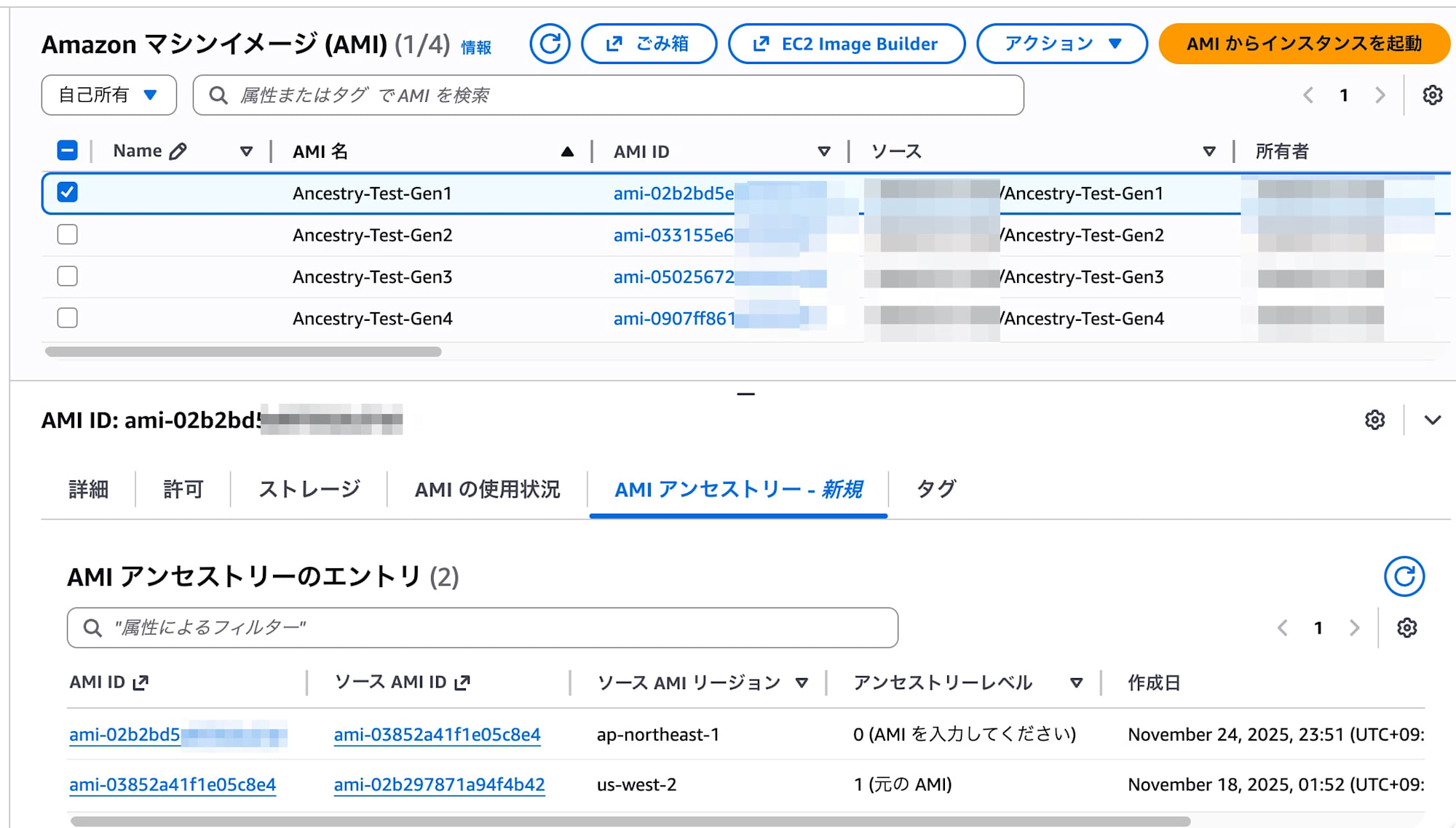
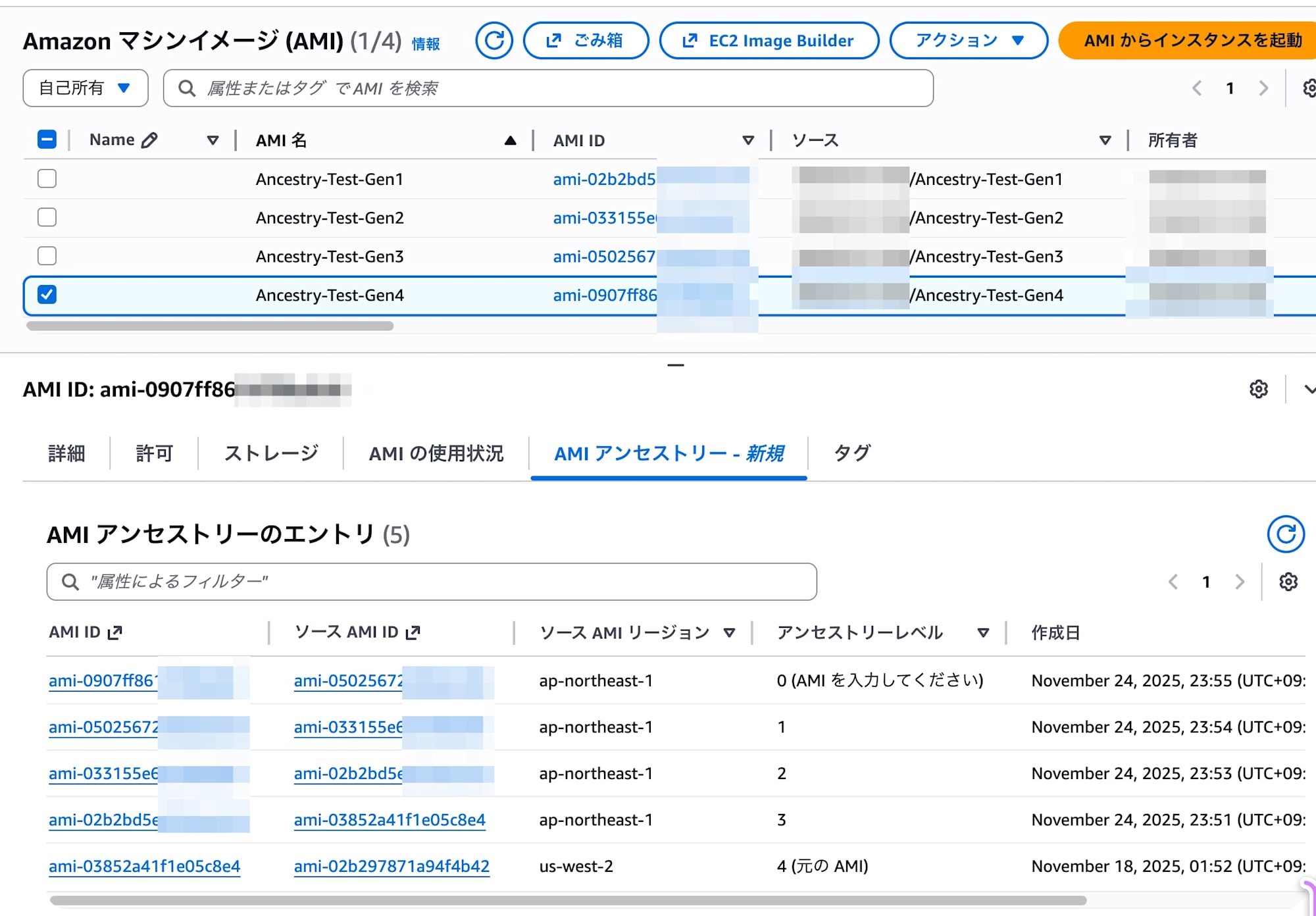
This lineage information can also be confirmed in the GUI.
A newly added "AMI Ancestry" tab in the AMI details screen shows the list.
- Gen1 selected
- Gen4 selected
- After deleting Gen2
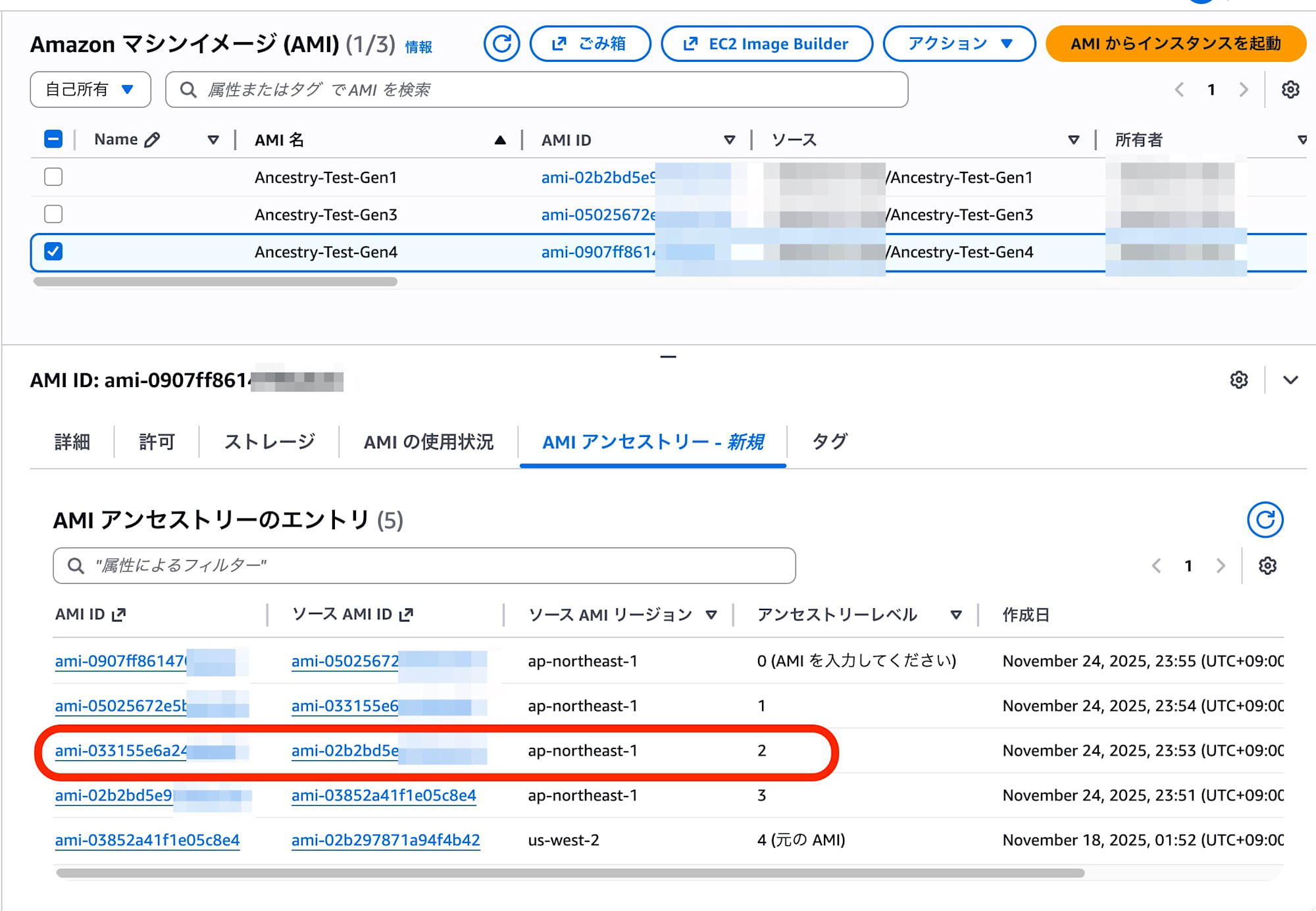
It was able to display information about the deleted Gen2 AMI and even the ID of the original AWS native AMI.
Conclusion: What's the benefit?
The biggest advantage of this feature is "transparency in security and governance":
- Security: You can identify all descendant AMIs derived from a specific version (e.g., a parent AMI where vulnerabilities were found) in a chain-like manner.
- Operations: You can prove that an AMI was created from an approved golden image rather than "an AMI someone created arbitrarily," as an AWS feature rather than relying on tag management.
- Organization: Since history can be traced even after deleting parent AMIs, you can confidently delete intermediate images that were kept only for lineage tracking, promoting cleanup and storage optimization in your AWS environment.
Though it may seem minor, this update is effective for solving AMI management challenges in enterprise environments.