
I tried automatic transcription of call recordings with Twilio Conversational Intelligence and Functions to obtain summaries and sentiment analysis

This page has been translated by machine translation. View original
Introduction
In this article, I will introduce the procedure to automatically transcribe voice call recordings, and obtain summaries, sentiment analysis, and custom classification results by combining Twilio Conversational Intelligence (hereinafter, Conversational Intelligence) and Twilio Functions.
What is Twilio
Twilio is a cloud communication platform that provides features such as voice calls, messaging, email, and contact centers as APIs. Developers can flexibly add features like calls, chat, and authentication to their own services by integrating Twilio's APIs.
Target Audience
- People who have used Twilio's Voice API or Twilio Studio and want to utilize call content as text
- People who want to structure and analyze contact center or campaign hotline calls in the form of summaries or sentiment analysis
- People who want to understand the overall picture of Conversational Intelligence and the actual API calls and Function configuration
References
Overview of Conversational Intelligence
Conversational Intelligence is a service that transcribes conversations from voice calls and messages, and makes them available as structured data through AI-based language analysis. A key feature is the ability to apply not just transcription, but also sentiment analysis, summarization, topic extraction, entity extraction, and other processing all at once. The analysis results can be retrieved from APIs in the form of Transcripts or Language Operators, and can be linked to existing business systems or dashboards.
Supported Channels and Data Flow
Conversational Intelligence ingests conversation data from the following channels:
- Voice (telephone)
- Twilio Recordings (recording files from Twilio Programmable Voice)
- External Recordings (audio files recorded by third parties)
- Calls (real-time transcription of ongoing calls)
- ConversationRelay (call logs with AI agents)
- Messaging (SMS)
- Twilio Conversations (SMS, WhatsApp, WebChat, etc.)
Developers create an Intelligence Service in their application and link the Service to target calls or messages. This allows voice and text flowing from Twilio Voice or Conversations API to be automatically stored as Transcripts, and analysis results from Language Operators (described later) can be obtained together.
Intelligence Service and Language Operator
In Conversational Intelligence, Intelligence Service is provided as the central configuration unit. An Intelligence Service has the following information:
- Target account
- Language to use (LanguageCode)
- Automatic transcription settings (AutoTranscribe)
- Automatic PII masking settings (AutoRedaction, MediaRedaction)
- Data logging settings
- Webhook URL and HTTP method
- Public key for encryption (EncryptionCredentialSid)
- List of Language Operators to link
Language Operator is the unit of analysis processing that is executed on a Transcript. The following Pre-built Operators are typically provided:
- Conversation Summary
- Sentiment Analysis
- Entity Extraction, etc.
Furthermore, using Generative Custom Operators allows developers to define arbitrary prompts and JSON schemas to perform flexible LLM-based analysis and classification.
Actually Using Twilio Conversational Intelligence
From here, I will introduce a configuration that creates an Intelligence Service and performs recording and analysis from Twilio Functions. In this validation, we will implement the following flow:
- When a call is made to a Twilio phone number, the Twilio Function plays guidance in Japanese and records the speech content
- From the callback at recording completion, the Conversational Intelligence Transcript API is called to send the recording to the Intelligence Service
- After transcript generation and analysis is complete, the Intelligence Service notifies the Twilio Function via Webhook
- Obtain the TranscriptSid from the Function logs and retrieve the Transcript itself and Language Operator results from a local Node.js script
Creating an Intelligence Service
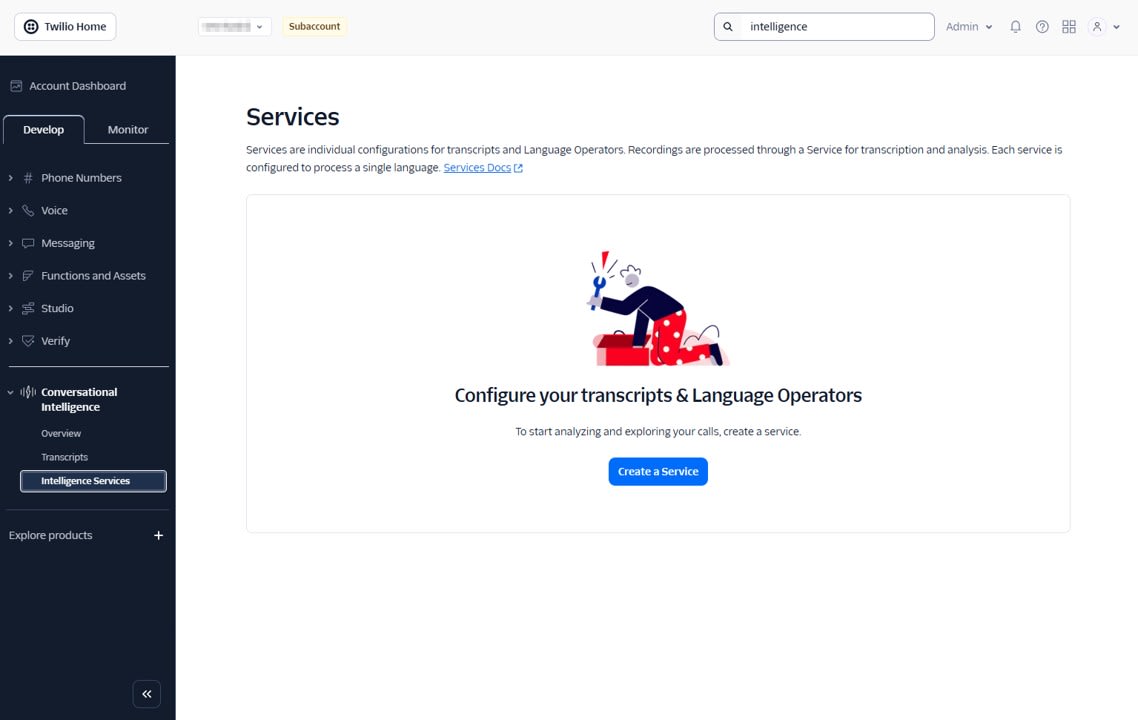
First, we create an Intelligence Service, which forms the foundation for Conversational Intelligence. From Conversational Intelligence > Intelligence Service, click Create a Service to create a Service.
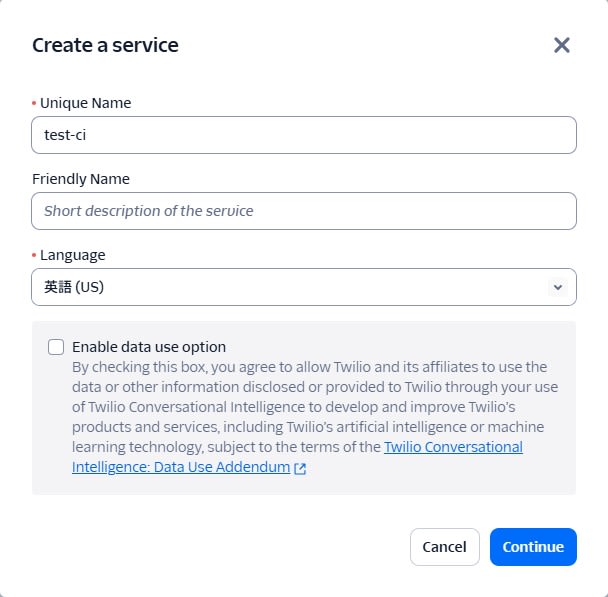
- Unique name: any identifier such as
test-ci - Language: English
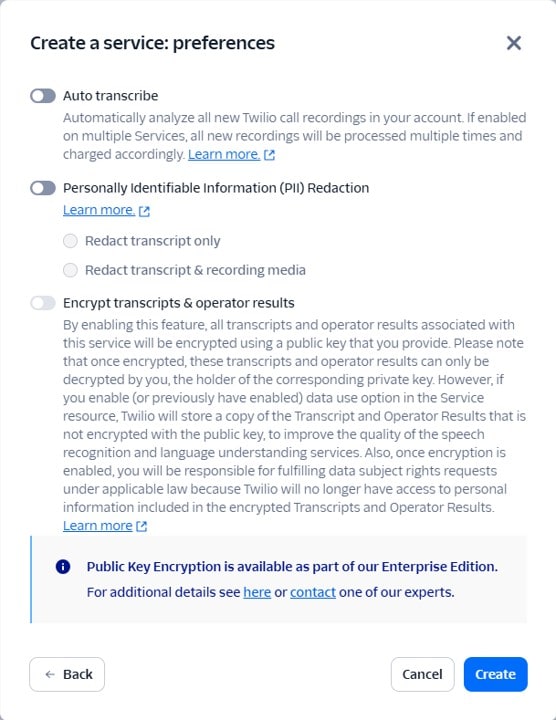
- Auto transcribe: Off as we will manually call the Transcript API when recording is complete
- PII Redaction: Off for testing purposes
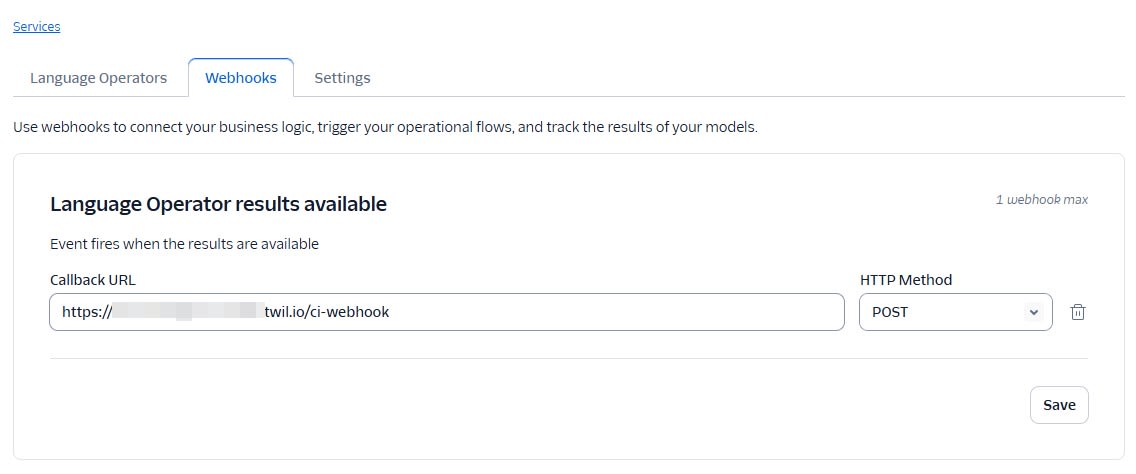
After creating the Service, configure the following settings in the Webhook tab.
- Webhook URL: The URL of the
/ci-webhookFunction described later - Webhook HTTP method:
POST
In the Language Operators tab, add Conversation Summary and Sentiment Analysis.
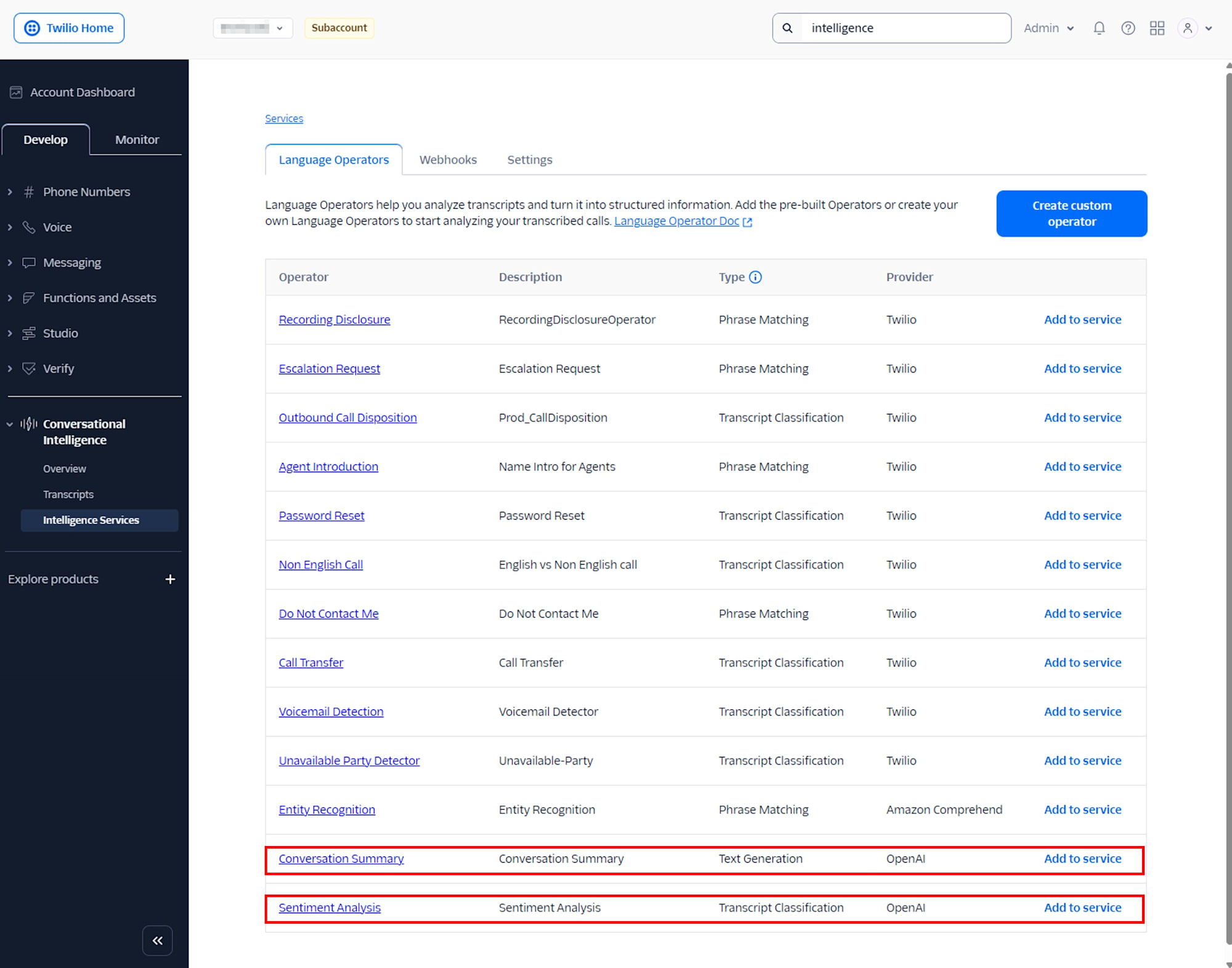
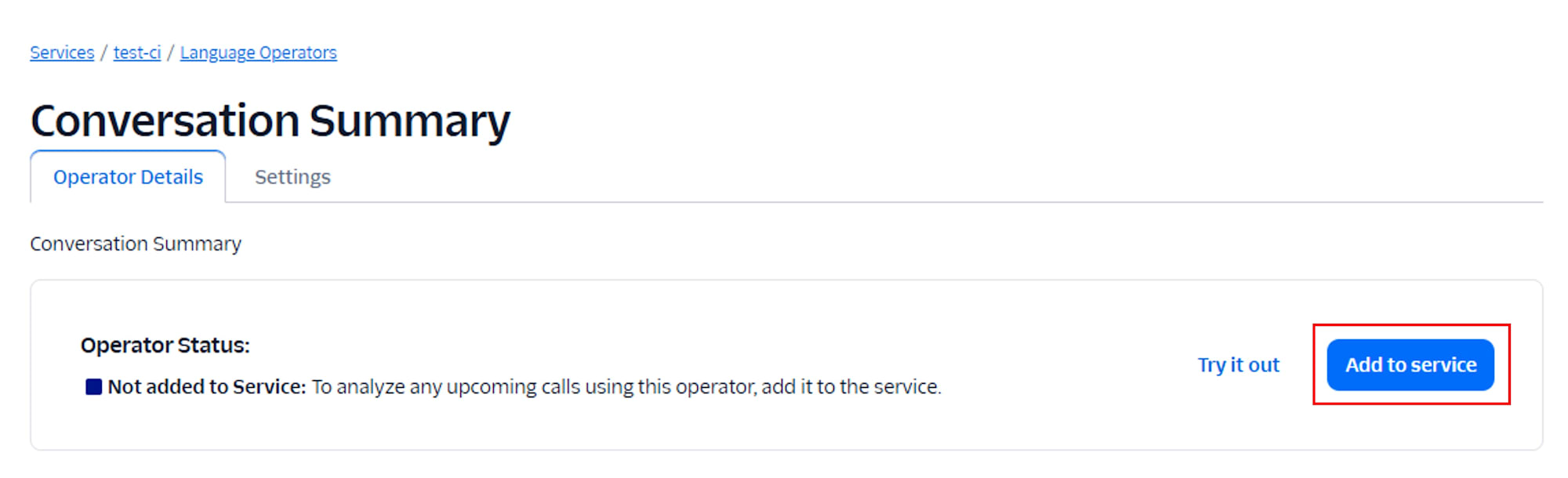
Once added, it will display Added to Service.

Next, click Create custom operator to create a custom operator.
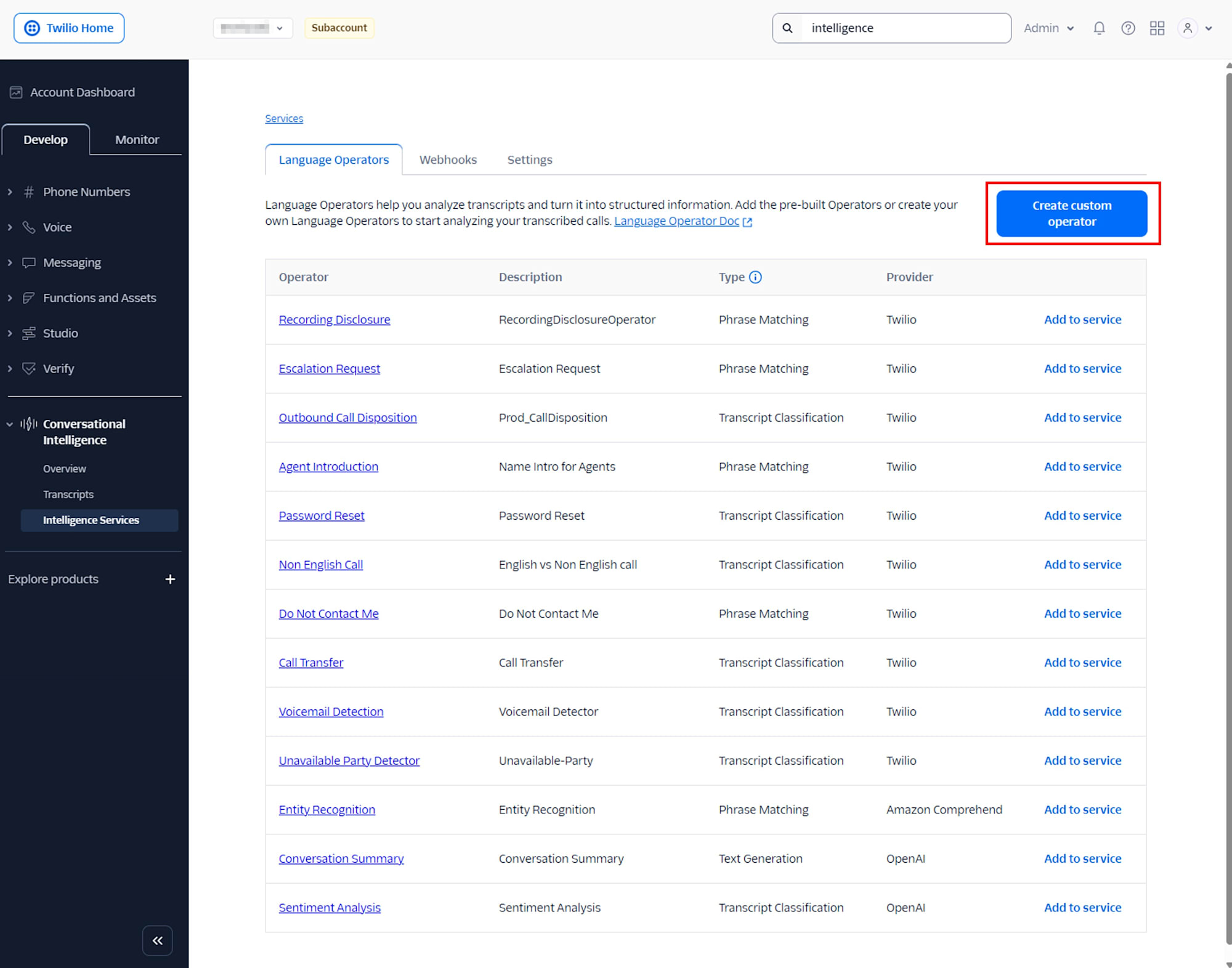
Select the Generative type and enter the following content in the prompt:
この会話は顧客からの製品に関する問合せです。 会話の内容から、フィードバックの種類を category として pricing / other のいずれかで分類してください。 ユーザーの感情を emotion として positive / neutral / negative のいずれかで分類してください。
Set the Output format to JSON and enter the following content:
{
  "type": "object",
  "properties": {
    "category": {
      "type": "string"
    },
    "emotion": {
      "type": "string"
    }
  }
}
Enter the following in Training examples:
| Example conversation | Expected output results |
|---|---|
| How much your product? | {"category":"pricing","emotion":"neutral"} |
| We cannot find your products. | {"category":"other","emotion":"negative"} |
By defining it this way, a JSON with two fields, category and emotion, will be returned for each Transcript.
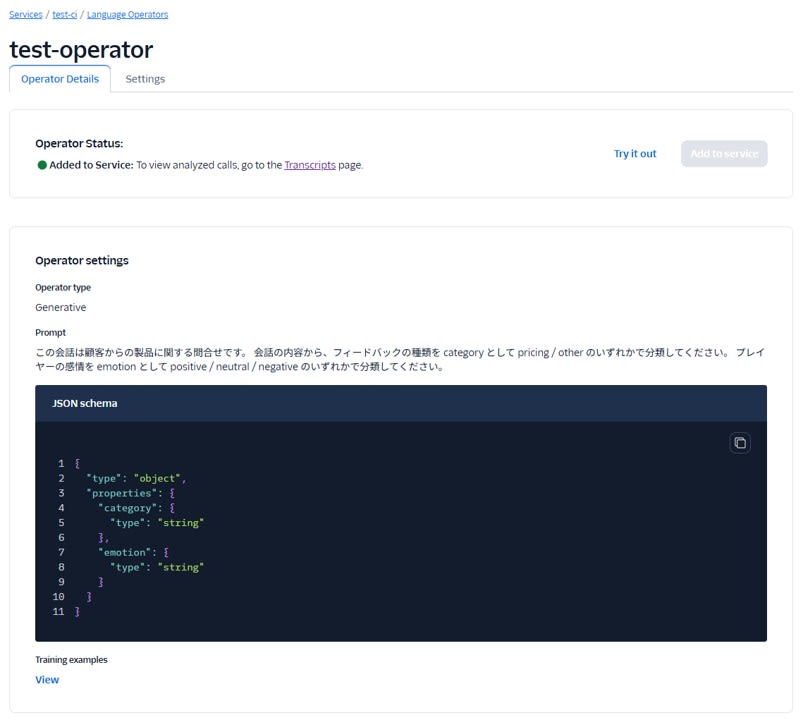
After creating the Service, make note of the Service SID (for example, GAxxxxxxxx...). It will be used as serviceSid in the Twilio Function described later.
Recording Calls with Twilio Function
Set the environment variables as follows:
| Variable Name | Value |
|---|---|
| RECORDING_STATUS_URL | Public URL of the /ci-create-transcript Function described later |
| INTELLIGENCE_SERVICE_SID | SID of Intelligence Service |
The first Function /incoming-call plays guidance for incoming calls and records the speech. To pass the RecordingSid to the next Function after recording is complete, it specifies recordingStatusCallback.
/incoming-call
exports.handler = function (context, event, callback) {
  const twiml = new Twilio.twiml.VoiceResponse();

  // If RecordingSid is provided, it means this is called again after recording is complete
  if (event.RecordingSid) {
    // On the second call, just thank the caller and hang up
    twiml.say(
      {
        language: "ja-JP",
        voice: "woman",
      },
      "ありがとうございました。"
    );
    twiml.hangup();
  } else {
    // On the first call, play guidance and start recording
    twiml.say(
      {
        language: "ja-JP",
      },
      "ピーという音のあとに話してください。"
    );

    twiml.record({
      // Callback to /ci-create-transcript (described later) when recording is complete
      recordingStatusCallback: context.RECORDING_STATUS_URL,
      recordingStatusCallbackEvent: ["completed"],
      recordingChannels: "dual",
      timeout: 5,
      maxLength: 120,
      playBeep: true,
    });
  }

  return callback(null, twiml);
};
- By specifying
recordingChannels: "dual", it creates a recording with separate channels for each speaker. Conversational Intelligence can generate transcripts with speaker identification from dual-channel recordings. maxLengthandtimeoutare set short for testing purposes. Adjust according to your use case in a production environment.
After creating the Function, register it as A call comes in in the Voice Configuration of your Twilio purchased number.

Function to Create Transcript from Completed Recording
The next Function /ci-create-transcript calls the Transcript API from the recording completion callback.
/ci-create-transcript
exports.handler = async function (context, event, callback) {
  const client = context.getTwilioClient();

  // Values passed from Voice recordingStatusCallback
  const recordingSid = event.RecordingSid; // Example: REXXXXXXXXXXXXXXXXXXXXXXXXXXXXXXXX
  const callSid = event.CallSid;

  console.log("RecordingSid:", recordingSid, "CallSid:", callSid);

  try {
    const transcript = await client.intelligence.v2.transcripts.create({
      serviceSid: context.INTELLIGENCE_SERVICE_SID,
      channel: {
        media_properties: {
          // Pass Twilio Recording to Conversational Intelligence
          source_sid: recordingSid,
        },
      },
      // Add arbitrary key for easier search later
      customerKey: callSid,
    });

    console.log("Queued transcript:", transcript.sid, "status:", transcript.status);

    // An empty response is sufficient for Twilio Function
    return callback(null, {});
  } catch (err) {
    console.error("Failed to create transcript", err);
    return callback(err);
  }
};
- By specifying RecordingSid in
channel.media_properties.source_sid, it passes the Twilio recording file to Conversational Intelligence - By putting CallSid in
customerKey, it makes it easier to search for the Transcript later or link it to external systems
This call is asynchronous, and the analysis is not yet complete when the return value's status is queued. When the Transcript generation and Language Operator execution are complete, an event is sent to the Webhook set in the Intelligence Service.
Function to Receive TranscriptSid from Webhook
The final Function /ci-webhook is registered as the Webhook URL for the Intelligence Service and is called when the Transcript analysis is complete.
/ci-webhook
exports.handler = async function (context, event, callback) {
  const eventType = event.event_type;

  // When Transcript is complete, voice_intelligence_transcript_available is sent
  if (eventType === "voice_intelligence_transcript_available") {
    console.log("[CI] Transcript available.");
    console.log("  TranscriptSid:", event.transcript_sid);
    console.log("  CustomerKey  :", event.customer_key);
    return callback(null, { ok: true });
  }

  console.log("[CI] Unhandled event_type:", eventType);
  return callback(null, { ok: true });
};
- A guard is in place to process only when
event_typeisvoice_intelligence_transcript_available - This Function only outputs TranscriptSid and CustomerKey to logs, while the actual retrieval of Transcript / OperatorResults is done from local Node.js
Operation Verification Flow
-
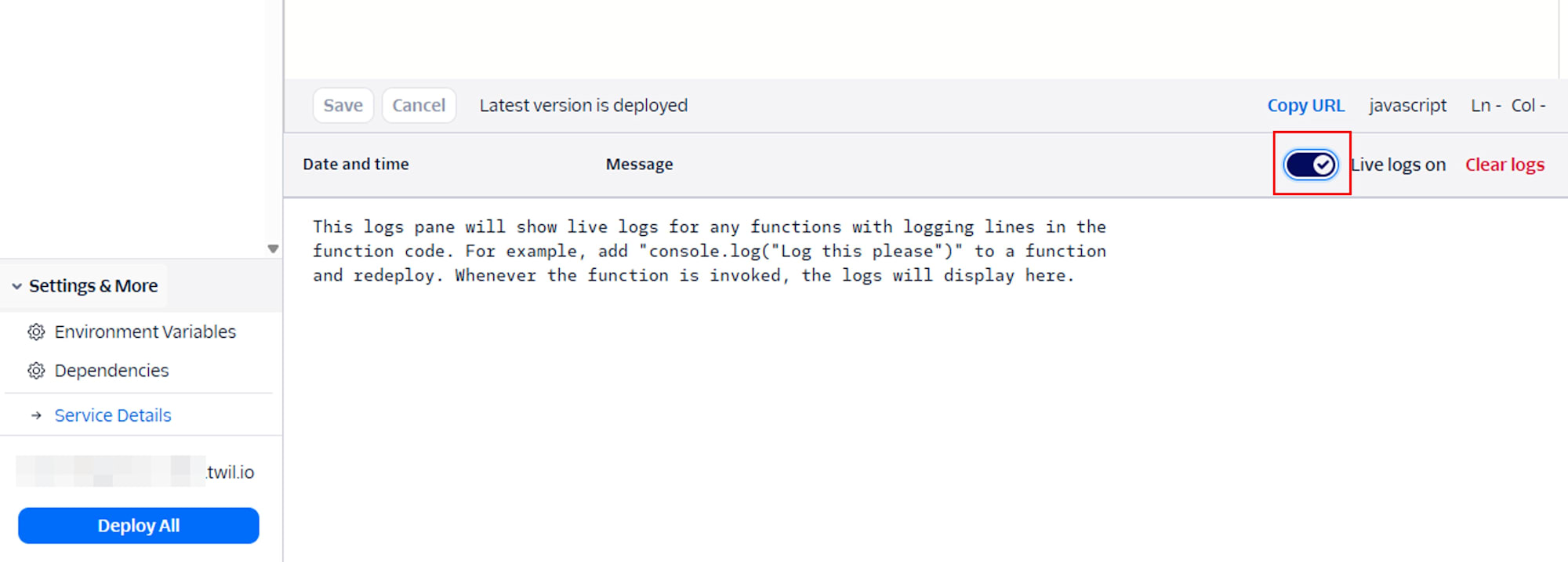
Turn ON Live logs for Functions
-
Make an actual phone call, follow the guidance, speak, and end the call
Example speech:We cannot log in to your account system. -
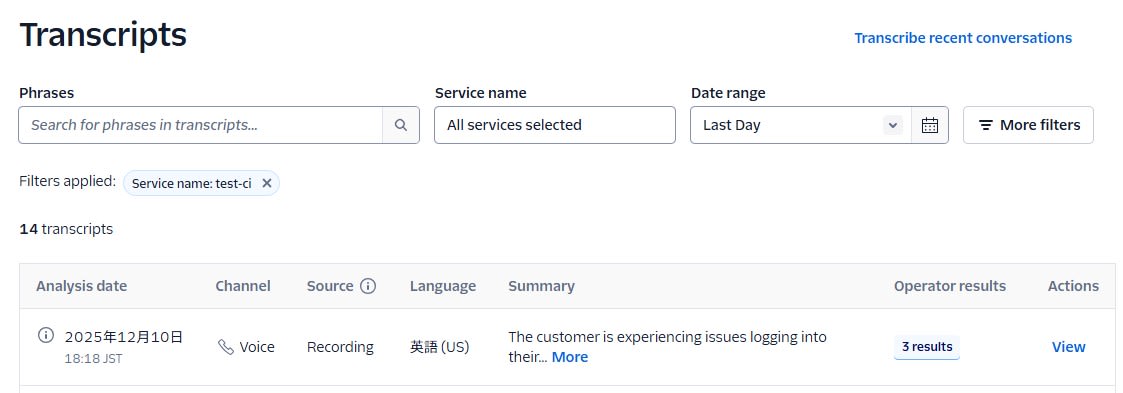
Confirm that a Transcript has been generated in the Conversational Intelligence screen of the Twilio console
-
Confirm that
TranscriptSidis output in the Function's Live logsDec 10, 2025, 07:15:44 PM Fetching content for /ci-webhook Dec 10, 2025, 07:16:03 PM Execution started... Dec 10, 2025, 07:16:09 PM [CI] Transcript available. Dec 10, 2025, 07:16:09 PM TranscriptSid: GT**** ← Use this Dec 10, 2025, 07:16:09 PM CustomerKey : CA**** Dec 10, 2025, 07:16:09 PM Execution ended in 4.8ms using 107MB -
Run the following script from your local environment to confirm that Transcript and OperatorResults metadata can be retrieved.
ci-dump-operator-results.js
require("dotenv").config();

const twilio = require("twilio");

const accountSid = process.env.TWILIO_ACCOUNT_SID;
const authToken = process.env.TWILIO_AUTH_TOKEN;
const transcriptSid = process.env.TRANSCRIPT_SID;  // Set the TranscriptSid from earlier here

if (!accountSid || !authToken) {
  console.error("TWILIO_ACCOUNT_SID / TWILIO_AUTH_TOKEN are not set.");
  process.exit(1);
}

const client = twilio(accountSid, authToken);

async function main() {
  console.log("Target TranscriptSid:", transcriptSid);

  // First check the Transcript summary
  try {
    const transcript = await client.intelligence.v2
      .transcripts(transcriptSid)
      .fetch();

    console.log("=== Transcript info ===");
    console.log("sid:", transcript.sid);
    console.log("status:", transcript.status);
    console.log("customerKey:", transcript.customerKey);
    console.log("serviceSid:", transcript.serviceSid);
    console.log("url:", transcript.url);
  } catch (err) {
    console.error("Failed to fetch transcript:", err);
    process.exit(1);
  }

  // Then get all OperatorResults and output line by line
  try {
    const operatorResults = await client.intelligence.v2
      .transcripts(transcriptSid)
      .operatorResults.list({ limit: 20 });

    console.log("OperatorResults count:", operatorResults.length);

    operatorResults.forEach((r, i) => {
      console.log(`\n--- OperatorResult[${i}] ---`);
      console.log("operatorType:", r.operatorType);
      console.log("name:", r.name);
      console.log("operatorSid:", r.operatorSid);

      console.log("extractMatch:", r.extractMatch);
      console.log("matchProbability:", r.matchProbability);
      console.log("normalizedResult:", r.normalizedResult);
      console.log("utteranceMatch:", r.utteranceMatch);

      console.log("predictedLabel:", r.predictedLabel);
      console.log("predictedProbability:", r.predictedProbability);

      console.log(
        "labelProbabilities:",
        r.labelProbabilities
          ? JSON.stringify(r.labelProbabilities, null, 2)
          : r.labelProbabilities
      );

      console.log(
        "extractResults:",
        r.extractResults
          ? JSON.stringify(r.extractResults, null, 2)
          : r.extractResults
      );

      console.log(
        "utteranceResults:",
        r.utteranceResults
          ? JSON.stringify(r.utteranceResults, null, 2)
          : r.utteranceResults
      );

      console.log(
        "textGenerationResults:",
        r.textGenerationResults
          ? JSON.stringify(r.textGenerationResults, null, 2)
          : r.textGenerationResults
      );

      console.log(
        "jsonResults:",
        r.jsonResults ? JSON.stringify(r.jsonResults, null, 2) : r.jsonResults
      );

      console.log("transcriptSid:", r.transcriptSid);
      console.log("url:", r.url);
    });
  } catch (err) {
    console.error("Failed to fetch operator results:", err);
    process.exit(1);
  }
}

main();
Example of execution results
Target TranscriptSid: GT****
=== Transcript info ===
sid: GT****
status: completed
customerKey: CA****
serviceSid: GA****
url: https://intelligence.twilio.com/v2/Transcripts/GT****
OperatorResults count: 3

--- OperatorResult[0] ---
operatorType: json
name: test-operator
operatorSid: LY****
extractMatch: null
matchProbability: null
normalizedResult: null
utteranceMatch: null
predictedLabel: null
predictedProbability: null
labelProbabilities: {}
extractResults: {}
utteranceResults: []
textGenerationResults: null
jsonResults: {
  "category": "other",
  "emotion": "negative"
}
transcriptSid: GT****
url: https://intelligence.twilio.com/v2/Transcripts/GT****/OperatorResults/LY****

--- OperatorResult[1] ---
operatorType: text-generation
name: Conversation Summary
operatorSid: LY****
extractMatch: null
matchProbability: null
normalizedResult: null
utteranceMatch: null
predictedLabel: null
predictedProbability: null
labelProbabilities: {}
extractResults: {}
utteranceResults: []
textGenerationResults: {
  "format": "text",
  "result": "The customer is experiencing issues logging into their account. The call center agent informs the customer that they are unable to access the account system. The conversation revolves around troubleshooting the login problem."
}
jsonResults: null
transcriptSid: GT****
url: https://intelligence.twilio.com/v2/Transcripts/GT****/OperatorResults/LY****

--- OperatorResult[2] ---
operatorType: conversation-classify
name: Sentiment Analysis
operatorSid: LY****
extractMatch: null
matchProbability: null
normalizedResult: null
utteranceMatch: null
predictedLabel: neutral
predictedProbability: 1.0
labelProbabilities: {
  "neutral": 1
}
extractResults: {}
utteranceResults: []
textGenerationResults: null
jsonResults: null
transcriptSid: GT****
url: https://intelligence.twilio.com/v2/Transcripts/GT****/OperatorResults/LY****
Summary
In this article, I introduced a simple configuration that combines Twilio Conversational Intelligence and Twilio Functions to automatically analyze voice call recordings. By linking Language Operators to an Intelligence Service, you can obtain insights such as summaries, sentiment analysis, and custom classifications all at once just by providing a recording file.
While this article focused primarily on retrieving OperatorResults for Transcripts from local Node.js, in the future, you could further leverage the value of Conversational Intelligence by trying detailed analysis using sentence-level data from Transcripts, or workflow automation combining other Twilio products (ConversationRelay, Studio, SendGrid, etc.).