
Twilio Official Example Based Basic Authentication When Providing Public Functions

This page has been translated by machine translation. View original
Introduction
When you are forced to provide Twilio Function as Public, it becomes more susceptible to unauthorized access from third parties. This article explains how to implement Basic authentication in Twilio Function based on the Twilio official documentation.
What is Twilio
Twilio is a cloud service that provides communication features such as SMS and voice calls as APIs. Twilio Function is a serverless execution environment provided by Twilio that can receive HTTP requests and execute Node.js code.
What is Basic Authentication
Basic authentication is an authentication method that includes a username and password in the Authorization header of an HTTP request. The header contains a Base64 encoded value of the username and password, but since it's not encrypted, it should be used with HTTPS.
Target Audience
- Those who need to operate Twilio Function as
Public - Those who call Twilio Function via HTTP from external systems
- Those who want to add minimal authentication to Twilio Function
References
- Protect your Function with Basic Auth
- Function Execution (invocation)
- Limitations (headers and cookies)
- Understanding Visibility of Functions and Assets
Implementation
When a Twilio Function is set to Public, third parties who know the URL can access it. Therefore, we will authenticate by verifying the Authorization header using the same method as in the official Twilio Basic authentication implementation example.
Notifications from external systems can come with both QueryString and JSON body. In Twilio Function, parameters from GET and POST are consolidated into the event object. The JSON body from POST is also consolidated into the event object. Since authentication is determined by the Authorization header, there's no need to implement different authentication methods based on the request format.
Storing Authentication Information in Environment Variables
Writing usernames and passwords in code increases the impact in case of a leak. The Twilio official documentation also recommends storing authentication information as environment variables and referencing them from Functions.
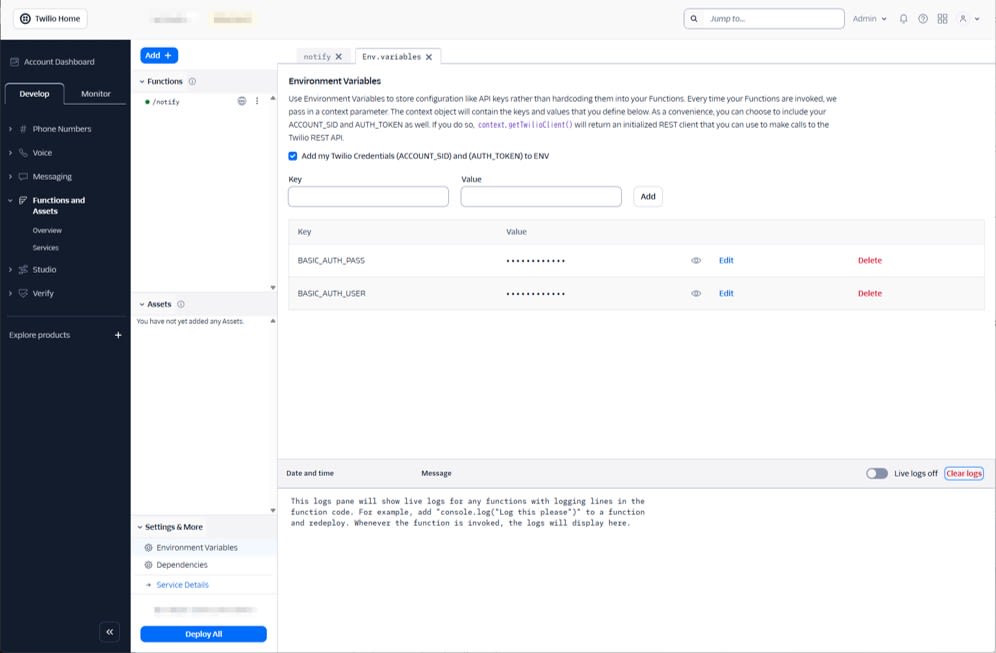
Add the following to the Environment Variables menu in the Twilio Console's Functions Editor:
BASIC_AUTH_USERBASIC_AUTH_PASS
Twilio Function Code Example
The following sample code verifies Basic authentication and returns 200 only if authentication is successful. If authentication fails, it returns 401 with a WWW-Authenticate header.
/**
 * Twilio Function: Basic 認証で保護する例
 * 認証できたら 200 を返す
 */
exports.handler = (context, event, callback) => {
  const response = new Twilio.Response();

  const username = context.BASIC_AUTH_USER;
  const password = context.BASIC_AUTH_PASS;

  const unauthorized = () => {
    response.setStatusCode(401);
    response.setBody("Unauthorized");
    response.appendHeader("WWW-Authenticate", "Basic realm=twilio-function");
    return callback(null, response);
  };

  if (!username || !password) {
    response.setStatusCode(500);
    response.setBody("Server misconfigured: BASIC_AUTH_USER / BASIC_AUTH_PASS is missing");
    return callback(null, response);
  }

  // headers は小文字で参照する
  const authHeader = event?.request?.headers?.authorization;
  if (!authHeader) return unauthorized();

  const [authType, credentials] = authHeader.split(" ");
  if (!authType || authType.toLowerCase() !== "basic" || !credentials) return unauthorized();

  let decoded;
  try {
    decoded = Buffer.from(credentials, "base64").toString("utf8");
  } catch {
    return unauthorized();
  }

  const idx = decoded.indexOf(":");
  if (idx < 0) return unauthorized();

  const reqUser = decoded.slice(0, idx);
  const reqPass = decoded.slice(idx + 1);

  if (reqUser !== username || reqPass !== password) return unauthorized();

  // 認証できたら 200
  response.setStatusCode(200);
  response.appendHeader("Content-Type", "application/json");
  response.setBody({ ok: true });
  return callback(null, response);
};
Setting Function to Public
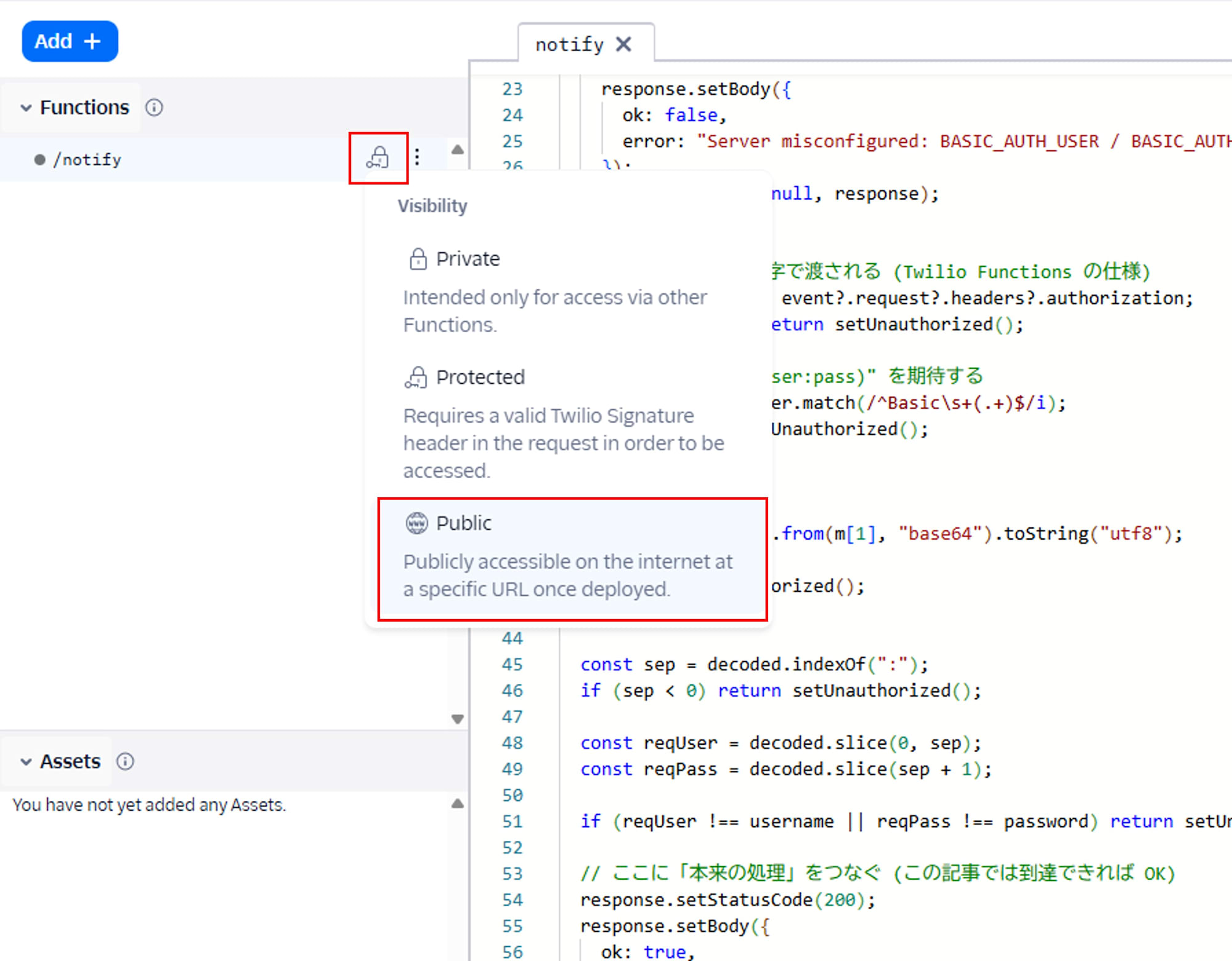
Set the Function's Visibility to Public and deploy it.
Verification
In authentication verification, we confirm that responses vary depending on whether an authentication header is present and valid. Additionally, we verify that the Function can be reached using both GET QueryString and POST JSON body methods.
First, set up environment variables for authentication. Note that these environment variables are separate from Twilio's Environment Variables and are for reference in the curl execution environment.
export BASIC_AUTH_USER="your-user"
export BASIC_AUTH_PASS="your-pass"
QueryString (GET) Example
# 認証なし (401)
curl -i "https://YOUR_DOMAIN.twil.io/notify?message=hello&severity=warn"

# 認証あり (200)
curl -i \
  -u "${BASIC_AUTH_USER}:${BASIC_AUTH_PASS}" \
  "https://YOUR_DOMAIN.twil.io/notify?message=hello&severity=warn"

# 認証情報が不正 (401)
curl -i \
  -u "${BASIC_AUTH_USER}:wrong-pass" \
  "https://YOUR_DOMAIN.twil.io/notify?message=hello&severity=warn"
A 401 is returned when there is no Authorization header.
HTTP/2 401
www-authenticate: Basic realm=twilio-function
(略)

Unauthorized
A 401 is also returned when the Authorization header is invalid.
HTTP/2 401
www-authenticate: Basic realm=twilio-function
(略)

Unauthorized
A 200 is returned when the Authorization header is correct.
HTTP/2 200
content-type: application/json
(略)

{"ok":true}
JSON Body (POST) Example
Twilio Functions support application/json, and the JSON body is normalized into the event object.
Using -d with curl makes it a POST request, but we also include -X POST here to make the intent clear.
# 認証なし (401)
curl -i \
  -X POST \
  -H "Content-Type: application/json" \
  -d '{"message":"hello","severity":"warn"}' \
  "https://YOUR_DOMAIN.twil.io/notify"

# 認証あり (200)
curl -i \
  -X POST \
  -H "Content-Type: application/json" \
  -u "${BASIC_AUTH_USER}:${BASIC_AUTH_PASS}" \
  -d '{"message":"hello","severity":"warn"}' \
  "https://YOUR_DOMAIN.twil.io/notify"

# 認証情報が不正 (401)
curl -i \
  -X POST \
  -H "Content-Type: application/json" \
  -u "${BASIC_AUTH_USER}:wrong-pass" \
  -d '{"message":"hello","severity":"warn"}' \
  "https://YOUR_DOMAIN.twil.io/notify"
A 401 is returned when there is no Authorization header.
HTTP/2 401
www-authenticate: Basic realm=twilio-function
(略)

Unauthorized
A 401 is also returned when the Authorization header is invalid.
HTTP/2 401
www-authenticate: Basic realm=twilio-function
(略)

Unauthorized
A 200 is returned when the Authorization header is correct.
HTTP/2 200
content-type: application/json
(略)

{"ok":true}
Summary
When a Twilio Function is set to Public, it can be accessed directly from outside, so operating without authentication is dangerous. By adding Basic authentication based on the official Twilio example, you can implement minimal security measures even for calls from external systems. However, due to constraints that prevent handling source IP within Twilio Functions, IP address restrictions must be controlled by a proxy in front if needed.