
I've summarized the concept of Claude API rate limits and spend limits

This page has been translated by machine translation. View original
Good evening, this is Chiba (Koh).
When considering using Claude API, I was concerned about rate limits.
Claude API has the following limits:
- Spend limits: Limits on maximum monthly cost
- Rate limits: Limits on API requests within defined periods
Since this was difficult to understand at first glance, I'll summarize various aspects of Claude API in a roundabout way.
Summary First
- When using Claude API, you need to create an account in Claude Console (separate from Claude subscription)
- Claude Console has concepts of organizations, workspaces, and members
- Claude API has Service tiers: Priority, Standard, and Batch
- Claude API usage follows a deposit system (purchase credits in advance)
- Usage Tier is closely related to the following Claude API limits:
- Spend limits: Limits on maximum monthly cost
- Rate limits: Limits on API requests within defined periods
Claude and Claude API have different pricing structures and rates
It's easier to understand that Claude and Claude API are separate entities.
Claude has paid subscription plans like Pro, Max, Team, and Enterprise. Selecting a higher-priced plan allows access to more features and relaxed limits.
For Claude API, pricing and limits are different.
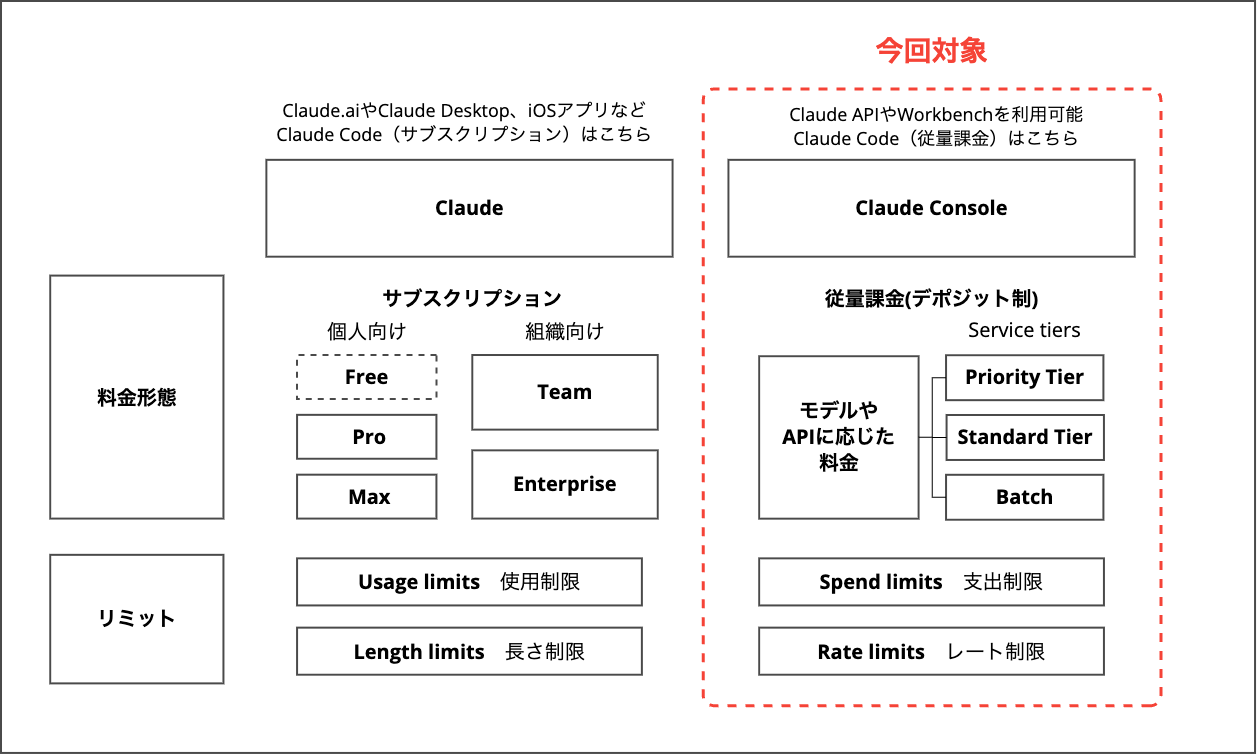
When using Claude API, you'll use Claude Console. This blog covers pricing and limits on the Claude Console side, not Claude subscriptions.
For Claude subscription pricing and limits, please refer to:
- Pricing | Claude
- Usage Limit Best Practices | Anthropic Help Center
- About Usage and Length Limits | Anthropic Help Center
Understanding Claude Console for API Usage
To use Claude API, you create a Claude Console account. Claude Console is a platform for creating API keys, managing users and billing, and testing Claude in Workbench.
Reference: How can I access Claude API? | Anthropic Help Center
You create a Claude Console organization as the outermost container, then create one or more workspaces within it. Within workspaces, you add members and issue/manage API keys.
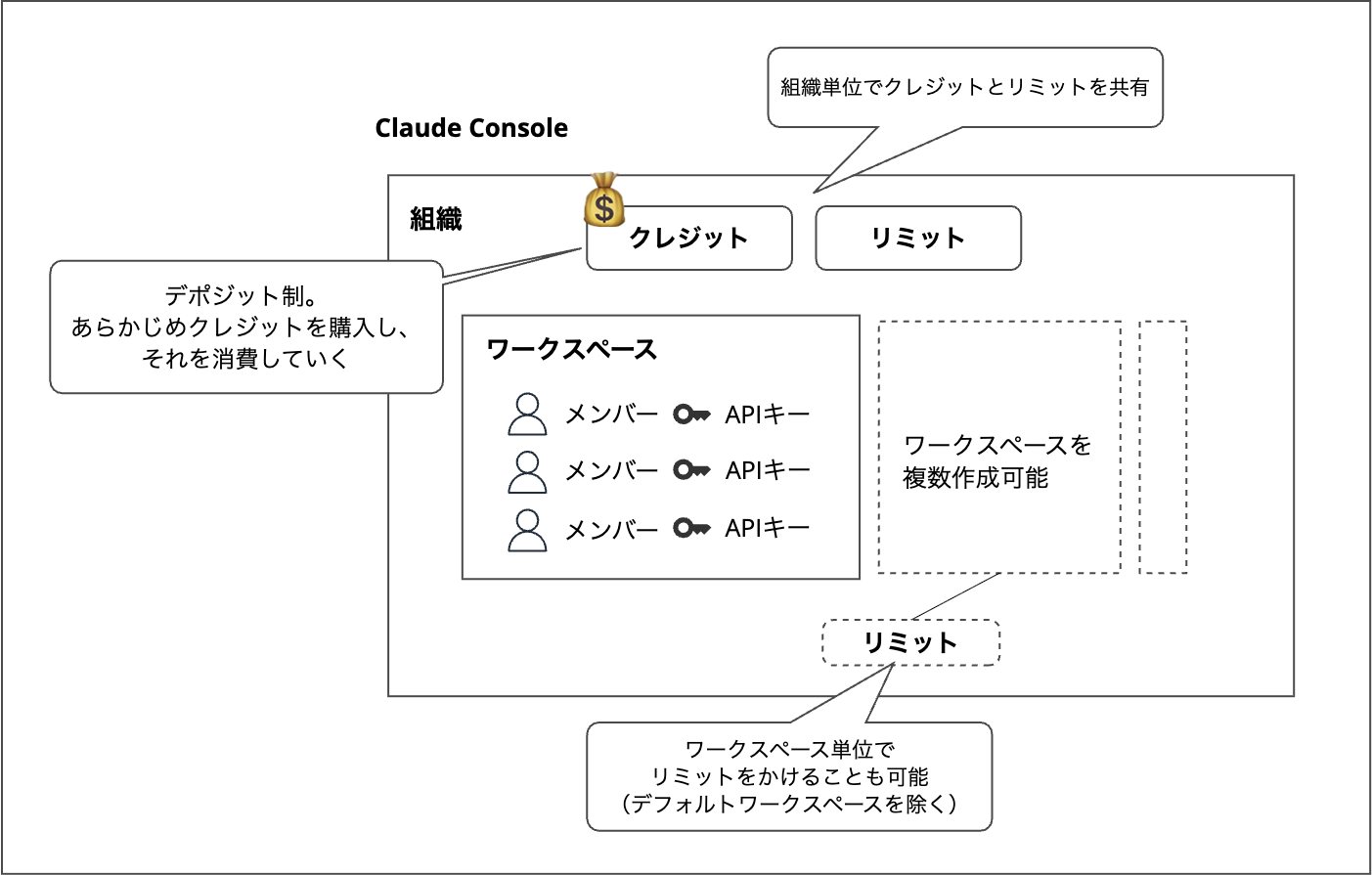
Claude Console organization image
Before using Claude API, you need to purchase credits (Usage Credit) in your Claude Console organization. It's a deposit system where you consume purchased credits as you use the API.
Reference: How do I pay for Claude API usage? | Anthropic Help Center
Credits and limits are shared across the Claude Console organization. You can also set limits at the narrower workspace level (except for the default workspace).
Service tiers in Claude API
Claude API has Service tiers that define service levels. Be careful not to confuse this with Usage Tier, which is a different concept that we'll cover later when discussing limits.
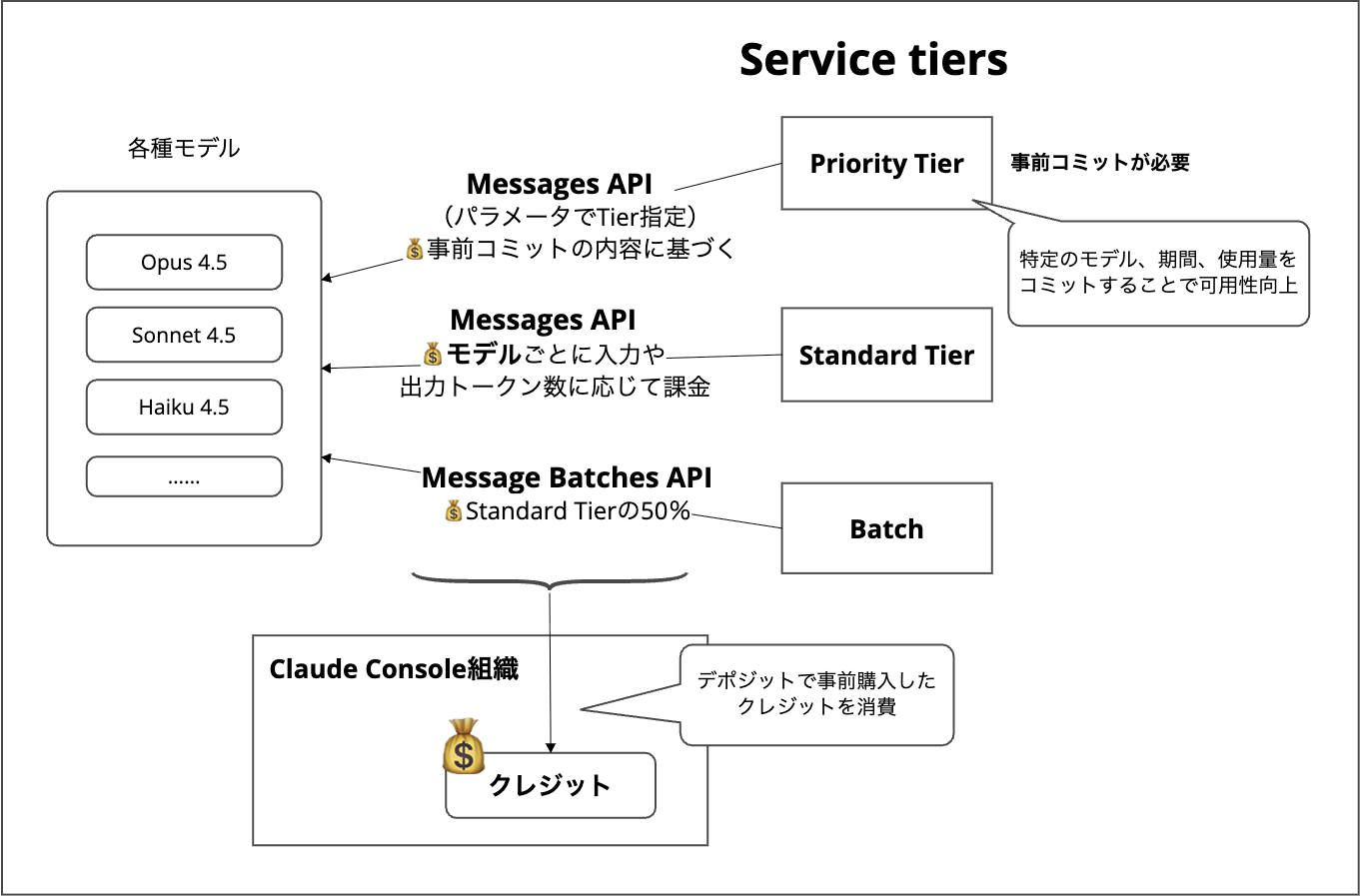
Service tiers image
Service tiers consist of:
- Priority Tier
- Standard Tier
- Batch
Only Priority Tier requires pre-commitment. Committing to usage period, model, and input/output tokens per minute means your requests are prioritized. This minimizes server overload errors and improves availability.
Which tier is used can be controlled in API requests to the model. Priority Tier has its own pricing, while Standard Tier/Batch pricing can be seen in the price table at:
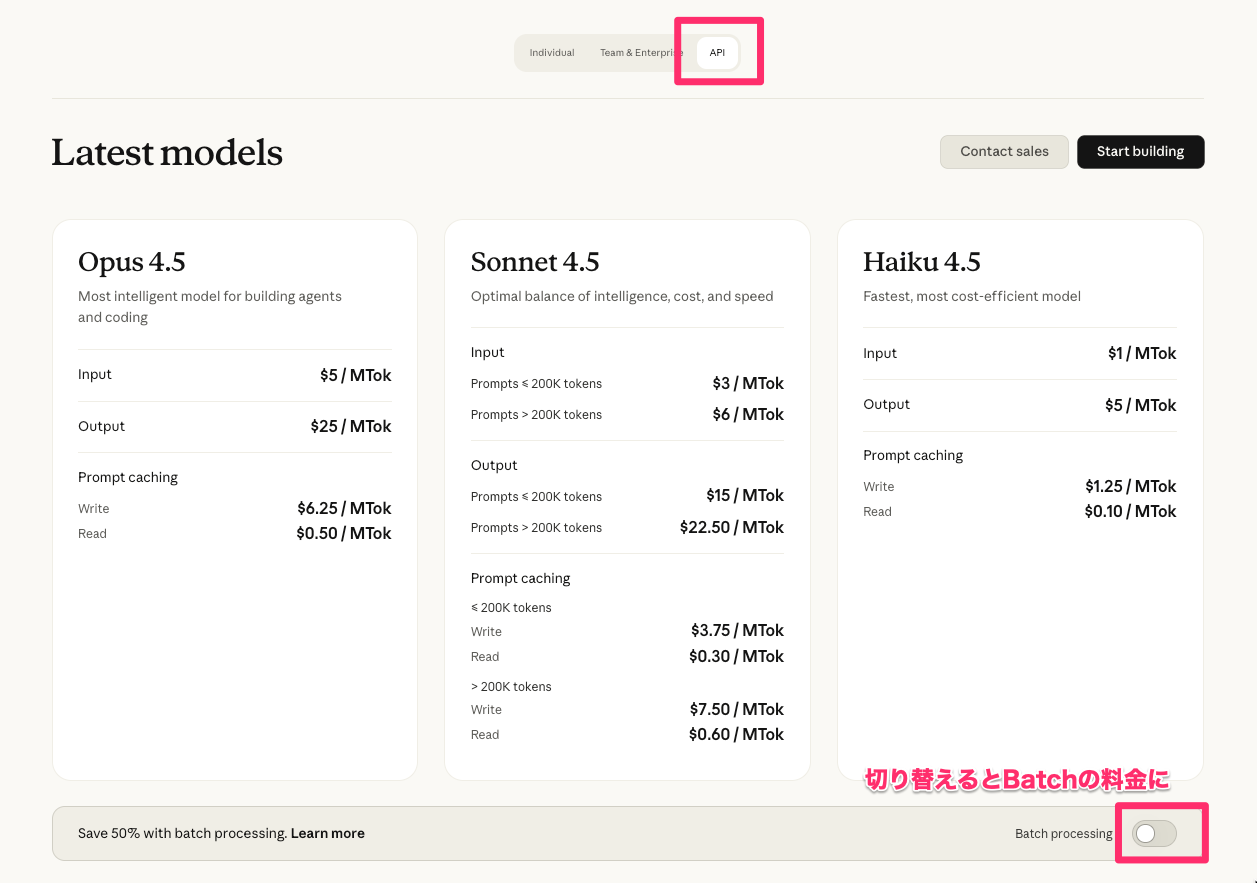
Pricing is defined for each model based on input/output token counts. The screen shows Standard Tier pricing, and toggling the switch at the bottom shows Batch pricing, which is set at 50% of Standard Tier.
Credits purchased in advance for your Claude Console organization are consumed according to charges incurred through Priority Tier, Standard Tier, and Batch usage.
Claude API Rate Limits
Finally, the main topic of this post. There are the following restrictions:
- Spend limits: Limits on maximum monthly cost
- Rate limits: Limits on API requests within defined periods
The concept of Usage Tier is important for these limits. Usage Tier is defined by the amount of credits deposited.
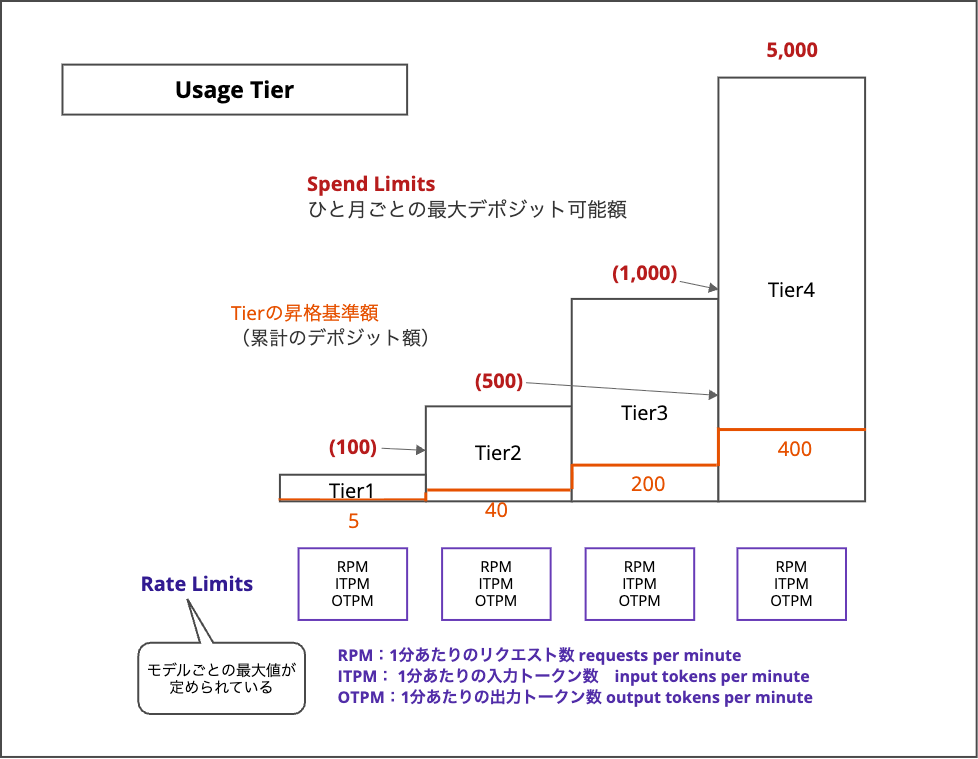
Usage Tier image
Each Tier has a maximum amount that can be deposited. For example, Tier 4 allows up to $5,000 monthly (as of December 9, 2025). This deposit limit becomes the Spend limit for the Claude Console organization, and smaller limits can be set for non-default workspaces.
Depositing a certain amount upgrades you to the next Tier. Previously, a waiting period of several days was required, but as of December 2025, upgrades appear to be immediate. For Tier 2, a maximum monthly deposit of $500 is allowed, which would skip Tier 3 and upgrade directly to Tier 4.
The "Spend limits" and "Tier upgrade threshold amounts" can be found in the documentation as "Credit Purchase" and "Max Credit Purchase."
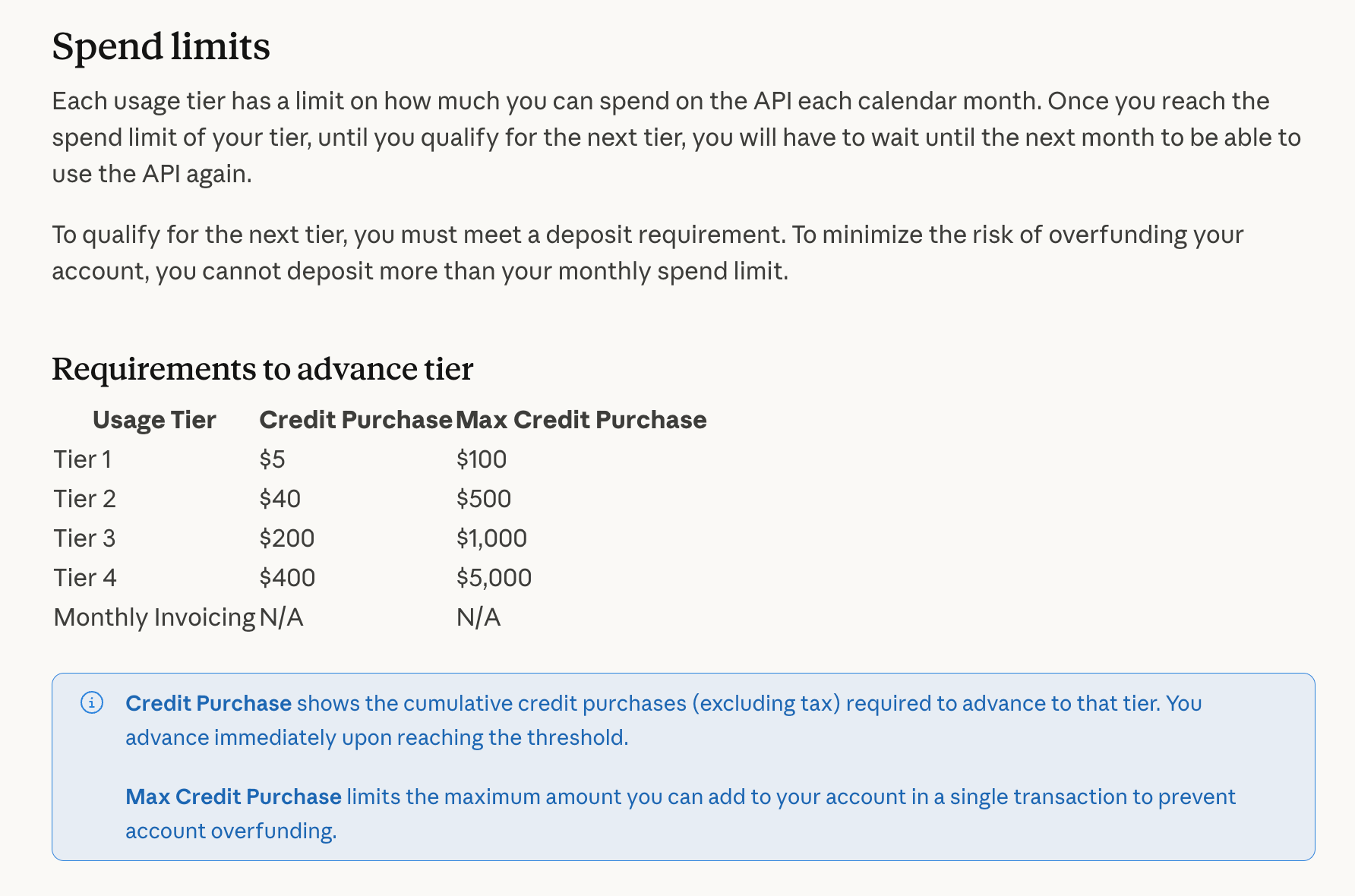
Previously, this document apparently had a column showing waiting periods for Tier upgrades.
Each Tier defines maximum values for the following metrics for each model:
- RPM: Requests per minute
- ITPM: Input tokens per minute
- OTPM: Output tokens per minute
This can also be confirmed in the documentation:
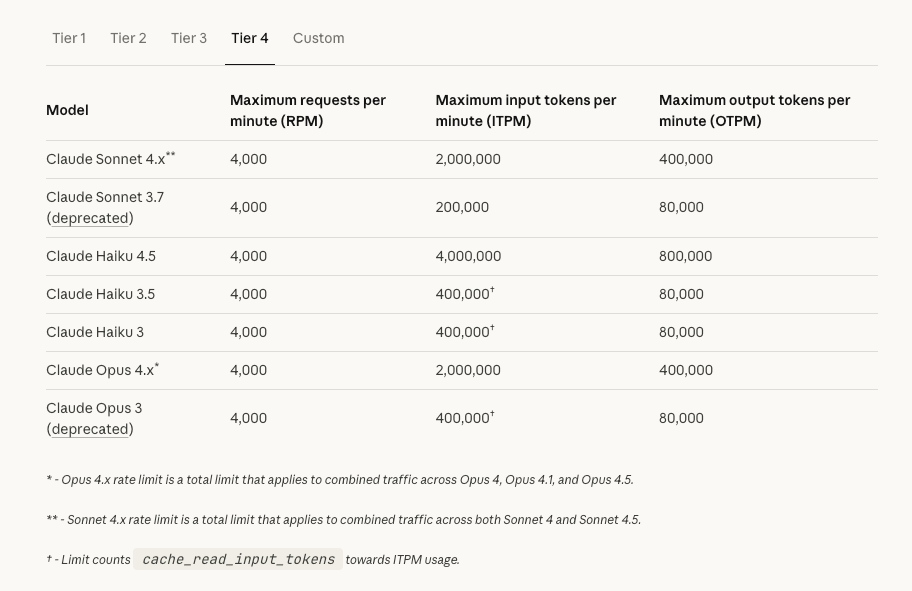
Limits for each model in Standard Tier as of December 9, 2025. The image shows Tier 4 selected
All limits can be customized. The documentation notes that it's possible to set limits higher than Tier 4, in which case you should contact sales. While Priority Tier is for improving service level, it may have different limits than Standard Tier. If the limits in the documentation don't meet your requirements, consider individual customization.
- The limits outlined below are our standard tier limits. If you're seeking higher, custom limits or Priority Tier for enhanced service levels, contact sales through the Claude Console.
Reference: Rate limits - Claude Docs
Pricing and Quotas when using Claude through Amazon Bedrock
As a bonus, let's look at pricing and quotas when using Claude foundation models through Amazon Bedrock.
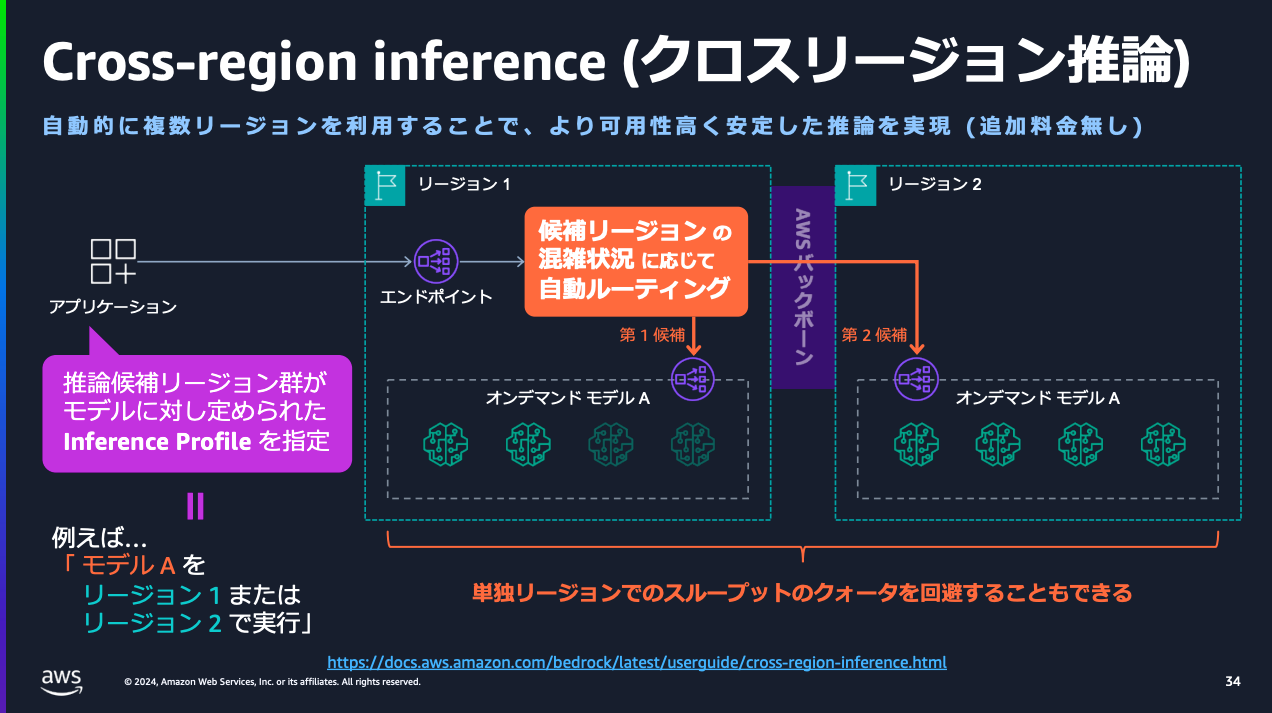
Amazon Bedrock Cross-Region Inference
As background knowledge, Amazon Bedrock has a mechanism called cross-region inference that allows use of foundation models across multiple regions. Newer models often can't be used within a single region. Cross-region inference is divided into specific region group combinations and global ones. Keep these in mind when checking pricing and quotas.
Pricing for Claude through Amazon Bedrock
The Amazon Bedrock pricing page is:
Tabs are separated by model provider. Selecting Anthropic shows pricing details for various Claude foundation models. Pricing based on input/output tokens is displayed alongside pricing for batch inference and when cache is utilized.

👆Pricing and available models may differ by region. Some foundation models may only support global cross-region inference.
Quotas for Claude through Amazon Bedrock
Limits for using Claude foundation models through Amazon Bedrock can be checked in AWS documentation or the AWS Management Console.
Let's check the documentation:
Quotas are set for each foundation model, so filter to find what you're looking for.
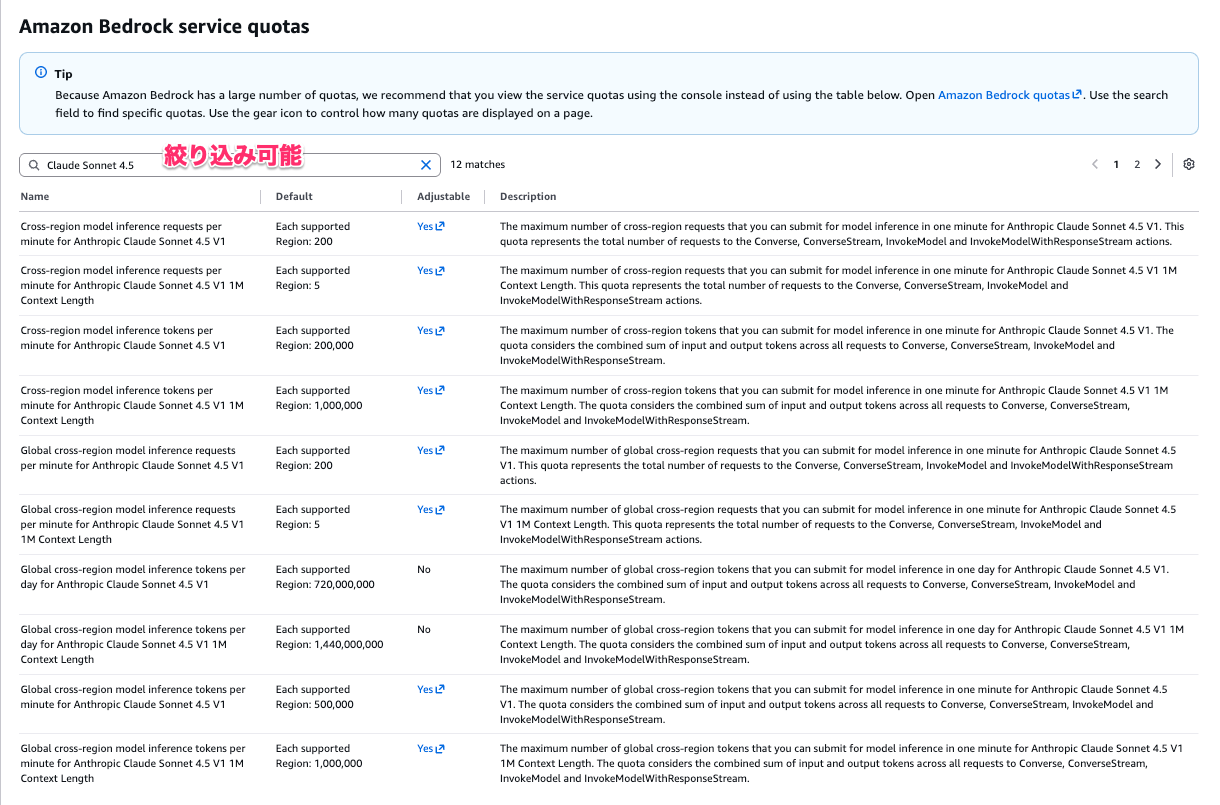
This shows default values and whether they can be increased. Some AWS accounts may have values lower than the default. Quotas generally include:
- Requests per minute
- Tokens per minute (no distinction between input/output)
- Tokens per day (no distinction between input/output)
Quotas are further divided based on factors like "whether it's global cross-region inference" and "whether it has 1M context length."
To request increases, use the Service Quotas screen in the AWS Management Console. Approval depends on AWS Support's evaluation of your use case and projected future usage.
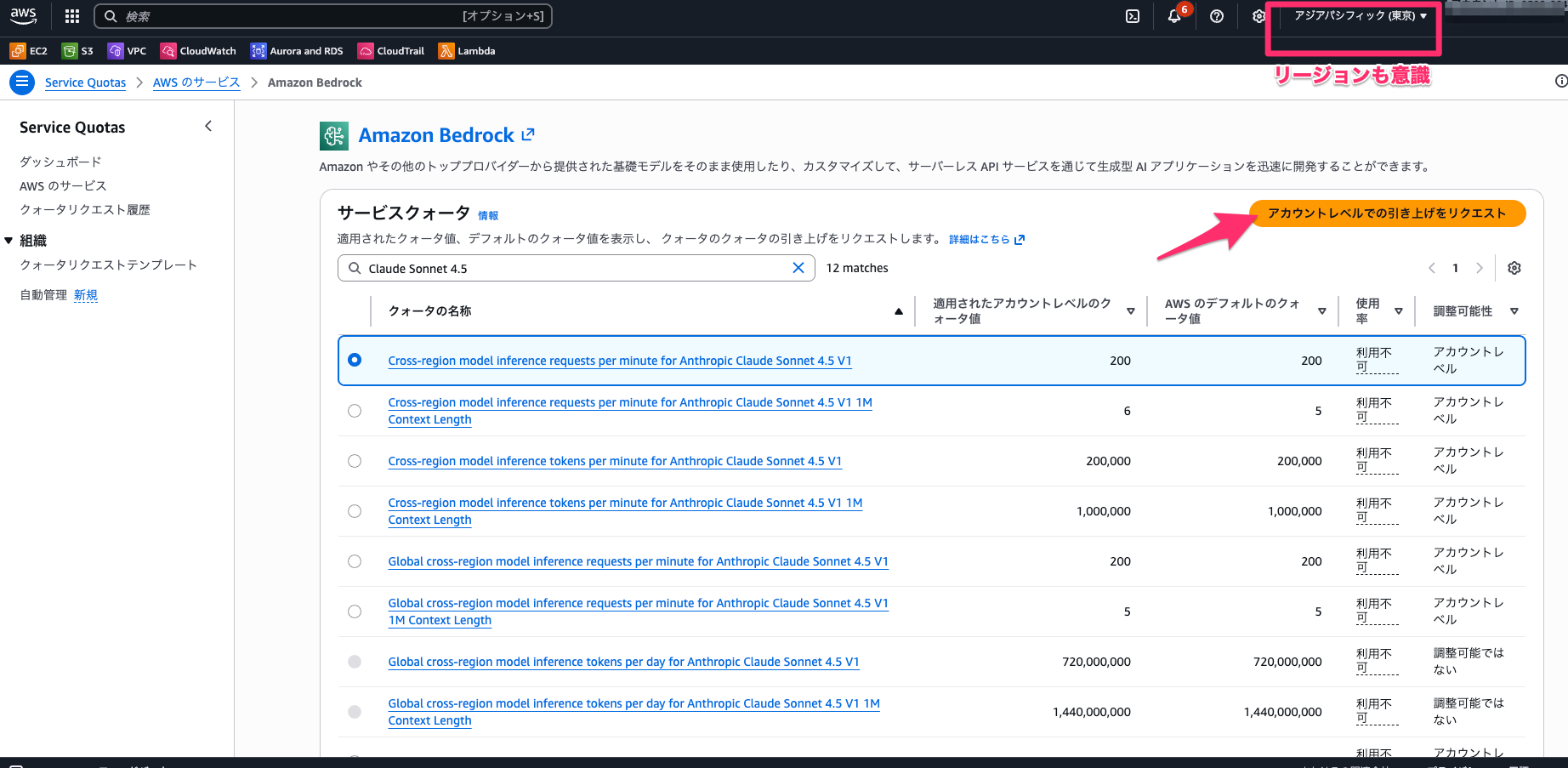
Reference: Amazon Bedrock quotas - Amazon Bedrock
Amazon Bedrock Reserved Tier
At the end of November 2025, Amazon Bedrock Reserved Tier was announced.
From the documentation:
Reserved Tier
The Reserved tier provides the ability to reserve prioritized compute capacity for your mission-critical applications that cannot tolerate any downtime. You have the flexibility to allocate different input and output tokens-per-minute capacities to match the exact requirements of your workload and control cost. When your application needs more tokens-per-minute capacity than what you reserved, the service automatically overflows to the Standard tier, ensuring uninterrupted operations. The Reserved tier targets 99.5% uptime for model response. Customers can reserve capacity for 1 month or 3 month duration. Customers pay a fixed price per 1K tokens-per-minute and are billed monthly.
To get access to the Reserved tier, please contact your AWS account team.
Reference: Service tiers for optimizing performance and cost - Amazon Bedrock
This seems similar to Claude API's Priority Tier concept.
As of December 9, 2025, some Claude Sonnet 4.5 models support Reserved Tier.
Summary (Repeated)
- When using Claude API, you need to create an account in Claude Console (separate from Claude subscription)
- Claude Console has concepts of organizations, workspaces, and members
- Claude API has Service tiers: Priority, Standard, and Batch
- Claude API usage follows a deposit system (purchase credits in advance)
- Usage Tier is closely related to the following Claude API limits:
- Spend limits: Limits on maximum monthly cost
- Rate limits: Limits on API requests within defined periods
Conclusion
I've examined Claude API's Rate limits and Spend limits.
Since there were many new concepts, I summarized them starting with the basics. I hope this is helpful for those considering using Claude API.
This has been Chiba Yuki (@batchicchi).
References
- About Claude's Rate Limits - 429 Error #AI - Qiita
- Approach to Claude API Rate Limits | Anthropic Help Center
- Using Claude Code with Pro or Max Plan | Anthropic Help Center
- Using Claude Code with Team or Enterprise Plan | Anthropic Help Center
- About Usage and Length Limits | Anthropic Help Center
- Anthropic Help Center
- Claude Code on AWS Pattern Explanation – Amazon Bedrock / AWS Marketplace | Amazon Web Services Blog