![[Update] Amazon S3 now supports account regional namespaces](https://images.ctfassets.net/ct0aopd36mqt/wp-thumbnail-066beb776f0c57ce64255fadcc072f60/82b2f6687ab5774cd73f9176dcac7855/amazon-s3?w=3840&fm=webp)
[Update] Amazon S3 now supports account regional namespaces

This page has been translated by machine translation. View original
Introduction
Hello everyone, I'm Akai.
Have you ever tried to create an S3 bucket only to find out "this bucket name is already taken...!"?
I have. Many times.
S3 bucket names need to be globally unique,
and it's an S3 common experience that when you try to give a simple name, it's usually already taken by someone else.
In this context, a new feature called Account Regional namespace has been added.
In this article, I'll cover this new feature from its overview to creation methods using AWS CLI and CloudFormation, and even enforcing it with IAM policies.
Overview of the Update
Let me first clarify a point that might cause confusion.
This feature does not mean "bucket names no longer need to be globally unique."
S3 bucket names still need to be globally unique.
I completely misunderstood this based on the following statement at the beginning:
You can now create Amazon S3 general purpose buckets in your own reserved namespace, eliminating the need to find globally unique bucket names and making it easier to build workloads that utilize a bucket per customer, team, or dataset.
So what has changed? A naming convention has been introduced that adds a suffix -{AWS account ID}-{region}-an to bucket names, allowing you to use your own reserved area within the global namespace (=account regional namespace).
It's not a physically separate namespace, but rather a mechanism that prevents conflicts with other accounts by enforcing a naming convention that includes account ID and region within the global namespace.
Bucket Naming Convention
Account Regional namespace bucket names follow this format:
{bucket-name-prefix}-{AWS-account-ID}-{region}-an
Here's a concrete example:
test-XXXXXXXXXXXX-ap-northeast-1-an
Note that the maximum length for S3 bucket names remains at 63 characters, so the remaining characters after subtracting the suffix can be used for the prefix.
For example, in the Tokyo region (ap-northeast-1), the suffix is 31 characters (-XXXXXXXXXXXX-ap-northeast-1-an), so the prefix can be up to 32 characters.
(Please note that this varies depending on the length of the region code)
How to Create Buckets
Management Console
Creating from the console is the simplest approach.
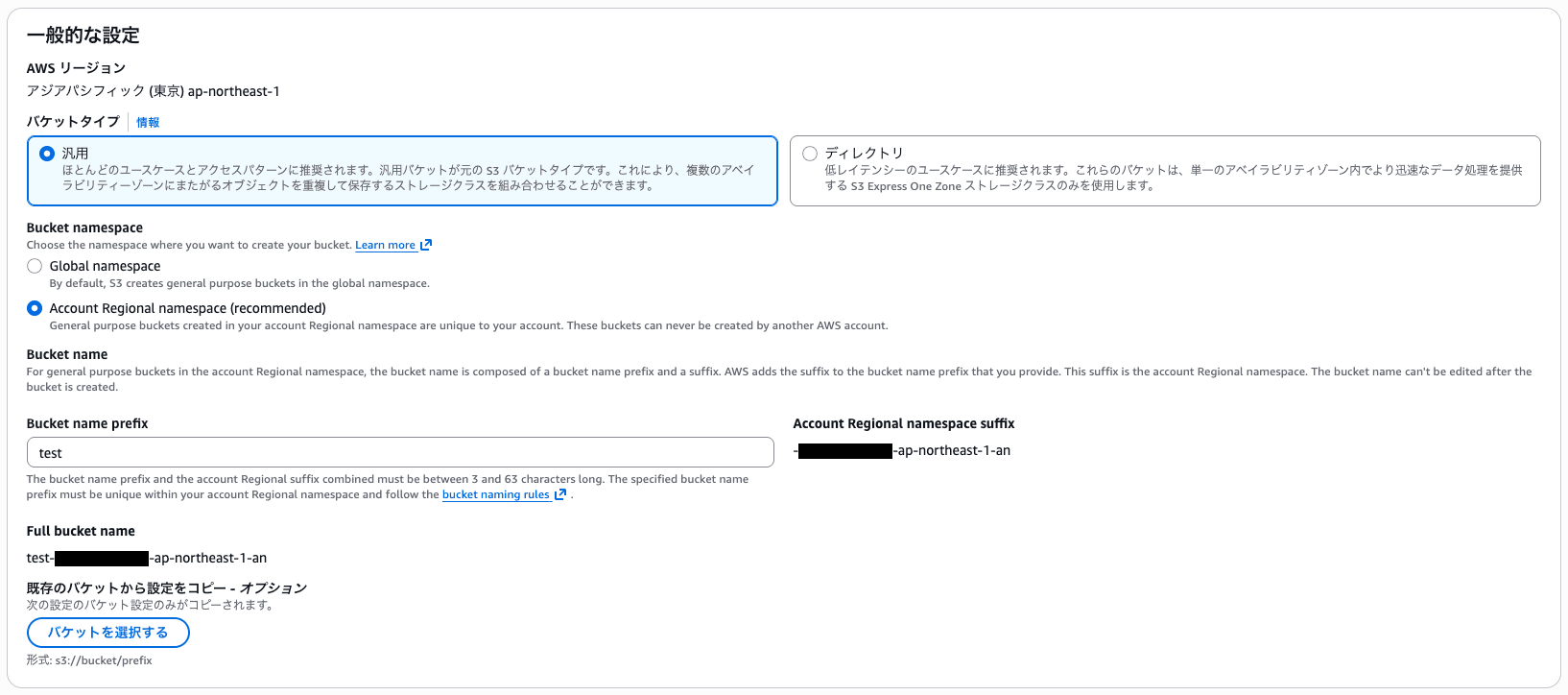
In the bucket creation screen, select "Account Regional namespace (recommended)" for the Bucket namespace, and the AWS account ID and region suffix will be automatically appended.
Then just enter the "Bucket name prefix" and you're good to go.
By the way, if you try to create a bucket name ending with -an in the traditional namespace (Global namespace), you'll get the following error:
General purpose buckets created in the global namespace must not include an account Regional namespace suffix in their names. If you meant to create a general purpose bucket in your account Regional namespace, choose Account Regional namespace under Bucket namespace. Otherwise, provide a new name for your general purpose bucket, and then try again.
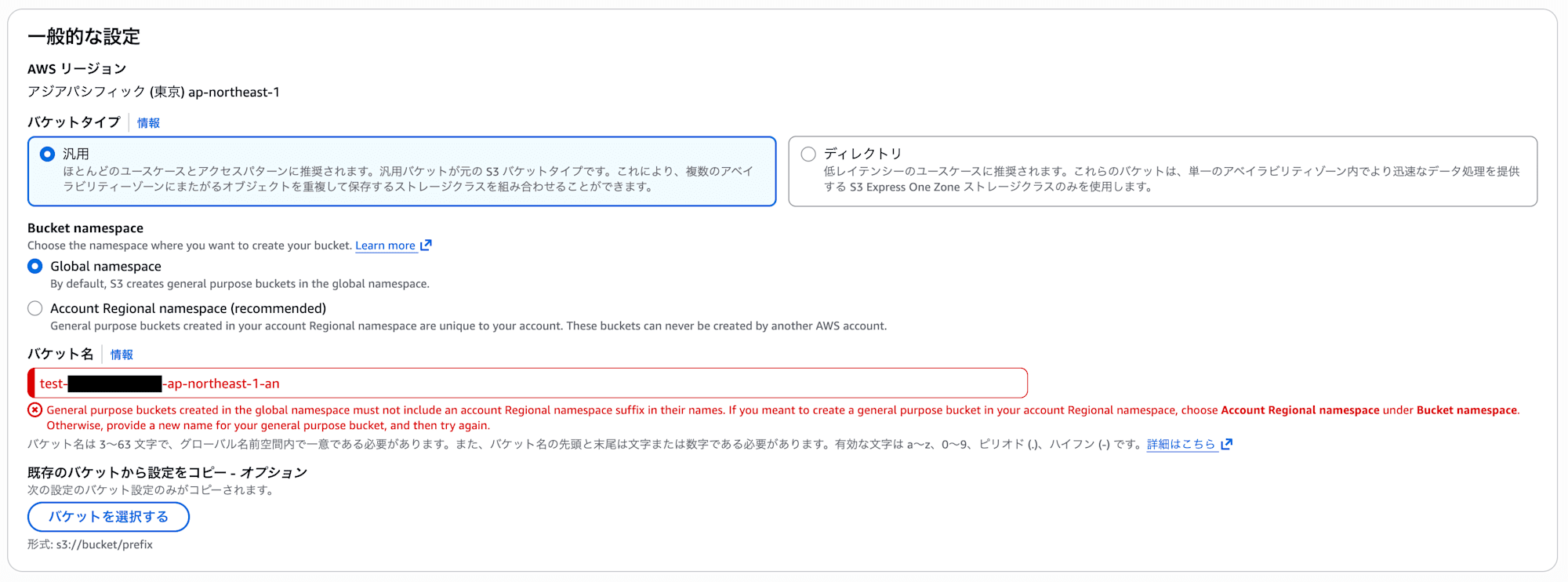
From reading the documentation, it seems that with this update, the -an suffix has been reserved exclusively for the account regional namespace, so bucket names ending with -an can no longer be created in the global namespace.
This means that going forward, it seems there won't be conflicts where a bucket with the same name is created first in the global namespace.
Bucket names can only end with the suffix -an when you are creating buckets in your account regional namespace.
https://docs.aws.amazon.com/AmazonS3/latest/userguide/bucketnamingrules.html
Also, this restriction probably didn't exist before the update, so it seems to be a new limitation added with this feature.
Therefore, conversely, if buckets ending with -an were created before the update, there might be potential conflicts.
AWS CLI
With AWS CLI, specify account-regional for the --bucket-namespace option.
aws s3api create-bucket \
    --bucket test-XXXXXXXXXXXX-ap-northeast-1-an \
    --bucket-namespace account-regional \
    --region ap-northeast-1 \
    --create-bucket-configuration LocationConstraint=ap-northeast-1
You need to specify the complete name including account ID, region, and -an suffix in the bucket name.
Unlike the console, there's no auto-completion, so you have to manually construct the full name.
So ultimately, you'll likely need to build and pass variables with account ID and region just like before.
ACCOUNT_ID=$(aws sts get-caller-identity --query Account --output text)
REGION="ap-northeast-1"
BUCKET_PREFIX="test"
BUCKET_NAME="${BUCKET_PREFIX}-${ACCOUNT_ID}-${REGION}-an"

aws s3api create-bucket \
    --bucket "${BUCKET_NAME}" \
    --bucket-namespace account-regional \
    --region "${REGION}" \
    --create-bucket-configuration LocationConstraint="${REGION}"
By the way, if you specify a bucket name that doesn't follow the naming convention, you'll get an error.
This seems good as it prevents the creation of buckets that don't follow the naming convention.
An error occurred (InvalidNamespaceHeader) when calling the CreateBucket operation:
The requested bucket name did not include the account-regional namespace suffix,
but the provided x-amz-bucket-namespace header value is account-regional.
Specify -[accountId]-[region]-an as the bucket name suffix to create a bucket
in your account-regional namespace, or remove the header.
CloudFormation
In CloudFormation, you use the BucketNamespace property.
There are two methods.
Note that at the time of writing this blog, the BucketNamespace property is not yet reflected in the AWS::S3::Bucket schema, resulting in the following error during deployment:
VALIDATION_FAILED
Properties validation failed for resource MyBucket with message: [#: extraneous key [BucketNamespace] is not permitted]
Since it's also not documented in the AWS::S3::Bucket documentation, it should become available once the schema is updated.
Method 1: Using BucketName and Sub function
Use !Sub to dynamically embed the account ID and region.
However, honestly, this method only adds the BucketNamespace property, but the way of constructing the name itself hasn't changed from the conventional approach.
If you want to feel the benefit of the new feature, Method 2 described below is recommended.
AWSTemplateFormatVersion: '2010-09-09'
Description: S3 Bucket with Account Regional Namespace

Resources:
  MyBucket:
    Type: AWS::S3::Bucket
    Properties:
      BucketName: !Sub "test-${AWS::AccountId}-${AWS::Region}-an"
      BucketNamespace: "account-regional"
      BucketEncryption:
        ServerSideEncryptionConfiguration:
          - ServerSideEncryptionByDefault:
              SSEAlgorithm: AES256
      PublicAccessBlockConfiguration:
        BlockPublicAcls: true
        BlockPublicPolicy: true
        IgnorePublicAcls: true
        RestrictPublicBuckets: true

Outputs:
  BucketName:
    Description: Name of the S3 bucket
    Value: !Ref MyBucket
  BucketArn:
    Description: ARN of the S3 bucket
    Value: !GetAtt MyBucket.Arn
Method 2: Using BucketNamePrefix (recommended)
Using BucketNamePrefix, the suffix (-{accountID}-{region}-an) is automatically appended.
This is simpler and recommended.
AWSTemplateFormatVersion: '2010-09-09'
Description: S3 Bucket with Account Regional Namespace (using BucketNamePrefix)

Resources:
  MyBucket:
    Type: AWS::S3::Bucket
    Properties:
      BucketNamePrefix: "test"
      BucketNamespace: "account-regional"
      BucketEncryption:
        ServerSideEncryptionConfiguration:
          - ServerSideEncryptionByDefault:
              SSEAlgorithm: AES256
      PublicAccessBlockConfiguration:
        BlockPublicAcls: true
        BlockPublicPolicy: true
        IgnorePublicAcls: true
        RestrictPublicBuckets: true

Outputs:
  BucketName:
    Description: Name of the S3 bucket
    Value: !Ref MyBucket
  BucketArn:
    Description: ARN of the S3 bucket
    Value: !GetAtt MyBucket.Arn
Enforcing Account Regional Namespace with IAM Policies
If you want to enforce the use of account regional namespace across the organization, you can control it with IAM policies or SCPs.
Use the condition key s3:x-amz-bucket-namespace.
IAM Policy Example
The following policy denies bucket creation outside the account regional namespace:
{
  "Version": "2012-10-17",
  "Statement": [
    {
      "Sid": "RequireAccountRegionalBucketCreation",
      "Effect": "Deny",
      "Action": "s3:CreateBucket",
      "Resource": "*",
      "Condition": {
        "StringNotEquals": {
          "s3:x-amz-bucket-namespace": "account-regional"
        }
      }
    }
  ]
}
SCP (Service Control Policy) Example
If you're using AWS Organizations, you can enforce it across the organization with SCPs.
{
  "Version": "2012-10-17",
  "Statement": [
    {
      "Sid": "RequireAccountRegionalBucketCreation",
      "Effect": "Deny",
      "Action": "s3:CreateBucket",
      "Resource": "*",
      "Condition": {
        "StringNotEquals": {
          "s3:x-amz-bucket-namespace": "account-regional"
        }
      }
    }
  ]
}
By enforcing it across the organization with SCPs, new bucket creation is automatically limited to the account regional namespace, preventing inconsistencies in naming conventions.
Conclusion
That concludes the summary of Amazon S3's account regional namespace.
I believe this neatly solves the subtle but rather troublesome problem of "can't create a bucket because the name is already taken."
Especially in multi-account and multi-region environments, this is a welcome update for both unifying naming conventions and enhancing security.
I hope this helps with your future S3 designs.