
Introduction to "v0" - An AI UI Generation Tool for Practical Use on Site ~ Basic Functions and How to Incorporate It into Local Development Environment ~

This page has been translated by machine translation. View original
Introduction
In recent years, the rapid construction of UI/UX and the reduction of communication costs in divided work systems have become major challenges in SaaS and web application development. In traditional development workflows, repetitive interactions between designers and engineers, as well as implementing and modifying UI, typically required significant effort.
To solve these field challenges, Vercel's AI-driven UI generation tool "v0" has been attracting attention. v0 proposes a new approach called "prompt-driven UI development" and generates high-quality frontend UI with just natural language instructions. Through this article, we will introduce the practical benefits of prompt-driven UI development using v0 and the potential for workplace transformation through its implementation, along with specific implementation examples.
Target Audience
- Engineers involved in UI/UX development for SaaS and web services
- Field staff who feel limited by no-code/low-code solutions
- Product managers who want to solve coordination issues between designers and engineers
- Project leaders in charge of MVP and new business launches, PoCs
- Developers interested in modern frontend technologies such as Tailwind CSS and Next.js
What is v0
v0 is an AI tool that can automatically generate high-quality frontend UI components directly from natural language prompts (e.g., "Display a user list in card format") (official documentation). Traditionally, frontend UI development required specialized design and coding knowledge, but v0 provides a new development experience that allows anyone, engineer or non-engineer, to intuitively design and output UI through a chat-based interface.
The generated code conforms to modern and versatile technology stacks such as React (TypeScript) + Tailwind CSS + shadcn/ui. This allows components generated with v0 to be easily integrated into existing projects without disrupting engineers' usual development workflows. The generated code is designed with accessibility and security in mind, emphasizing quality that can withstand use in production environments.
Through this design, v0 provides an experience optimized for modern development environments: "quickly visualize UI and obtain practical code that can be used directly in the field."
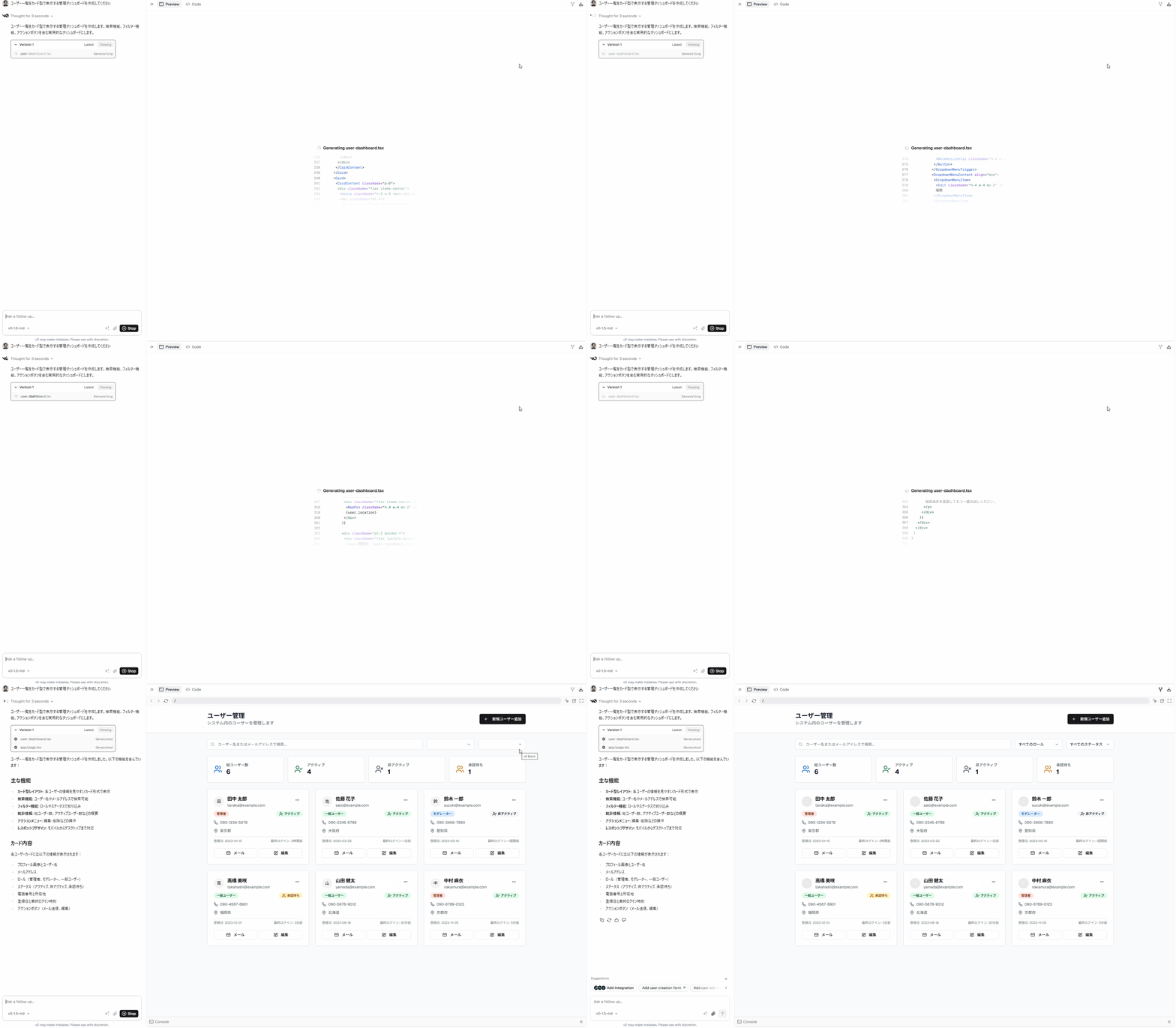
v0 operation image (16x speed)
What v0 Can Achieve
-
UI Generation Using Natural Language Prompts
Example: Automatically generates React + Tailwind CSS-based UI components from instructions like "Create a SaaS management dashboard" or "Display a list of user information." -
Flexible UI Customization
Allows customization of generated UI with further instructions like "Add search function," "Change layout to 2 columns," or "Apply dark theme." -
Integration with Existing Designs
Can incorporate design parts created in tools like Figma, demonstrating high compatibility with existing workflows. -
Immediate Utilization of Generated Code
The output React components or HTML/CSS code can be incorporated directly into projects like Next.js and used consistently from prototype to production environment. -
Project Management and Team Collaboration
Allows organization and management of multiple projects on v0, streamlining team collaboration.
Differences from Other Tools
-
Difference from No-code/Low-code
v0 generates React/Tailwind CSS code of implementation quality, making it easy to integrate into actual development workflows. It doesn't have the platform dependencies typical of no-code tools, allowing product expansion with standard technologies. -
Strengths of Prompt-Driven Development
UI can be designed intuitively through natural language operations, enabling non-engineers to actively participate in requirements definition and screen design. Additionally, generated code can be manually customized down to the details. -
Compatibility with Modern Development Environments
A major advantage is that the output is immediately compatible with technology stacks commonly used in SaaS development, such as Next.js, Tailwind CSS, and shadcn/ui.
Expected Use Cases
- Rapid prototyping of SaaS product dashboards and management screens
- Early proposal and consensus building for UI images with clients and internal stakeholders
- Efficient implementation from Figma designs
- Cost reduction in UI implementation during MVP or PoC launches
- Active participation of non-engineer members in the product development process
Basic Usage of v0
In this section, we'll explain the process of generating UI with v0, using actual screens and prompt examples.
Prerequisites
- v0 account created
- Node.js and npm (or yarn/pnpm) installed
1. UI Generation through Prompt Input
-
Open the v0 management screen or chat screen.
-
In the prompt field, enter the requirements for the UI you want to generate in natural language.
Example:Create a management dashboard that displays user lists in card format -
Within seconds, a React (TypeScript) + Tailwind CSS + shadcn/ui based UI code will be automatically generated.
2. Code Review and Customization
- The "Preview" tab shows the generated page result.
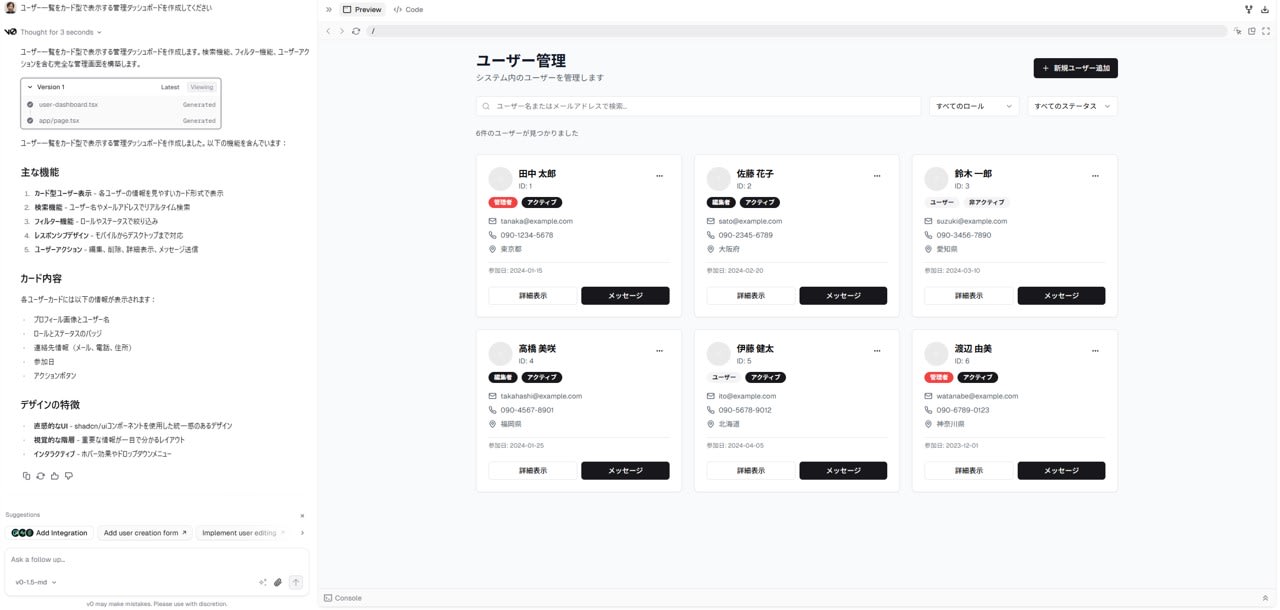
- Source code can be viewed from the "Code" tab.
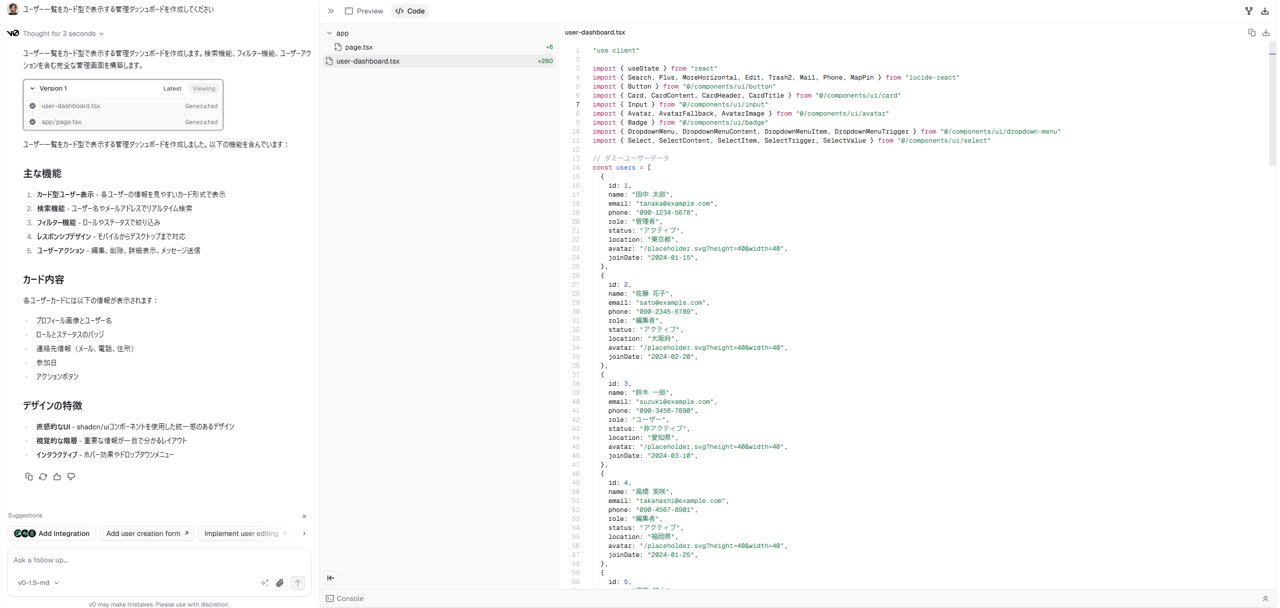
- If you want to fine-tune the appearance or structure of the UI, you can flexibly customize by entering additional prompts like "Add search functionality" or "Make layout 2 columns."
- In the "Code" tab, you can also manually edit the source code as needed.
3. Verification in Local Environment
-
Click the Download button in the upper right of the screen and copy the command starting with npx.
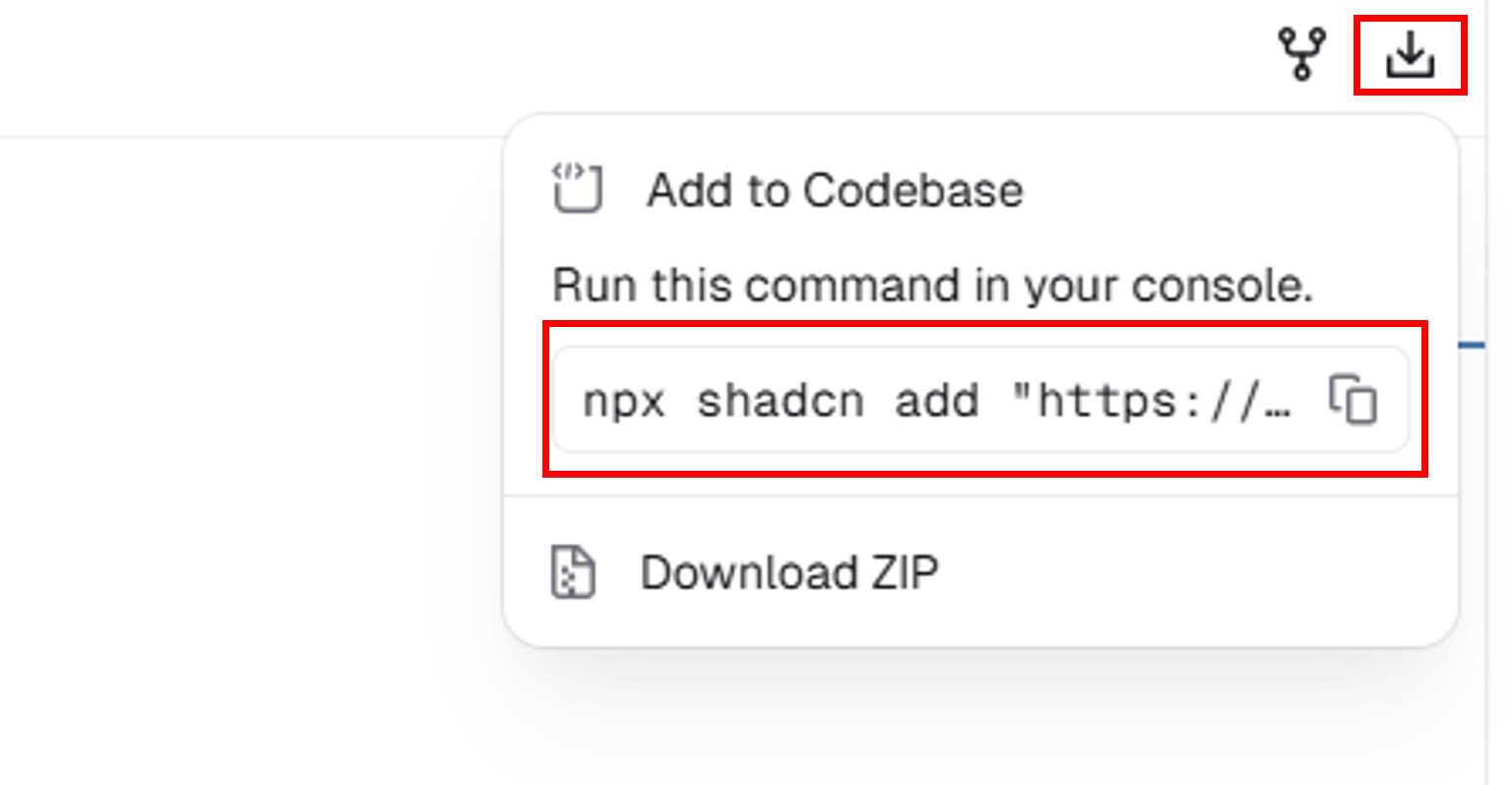
-
Run the command in any directory in your local environment.
$ npx shadcn@latest add "https://v0.dev/chat/b/YOUR_DOWNLOAD_URL" ? What is your project named? ... test-v0-app # Please name your project as you like Creating a new Next.js project. ? Which color would you like to use as the base color? » Neutral # Customize as appropriate Writing components.json. Checking registry. Installing dependencies. It looks like you are using React 19. Some packages may fail to install due to peer dependency issues in npm (see https://ui.shadcn.com/react-19). How would you like to proceed? » Use --legacy-peer-deps # This is the recommended setting Installing dependencies. The file page.tsx already exists. Would you like to overwrite? ... yes # Answer y Created 8 files: - hooks\user-dashboard.tsx - components\ui\button.tsx - components\ui\card.tsx - components\ui\input.tsx - components\ui\avatar.tsx - components\ui\badge.tsx - components\ui\dropdown-menu.tsx - components\ui\select.tsx i Updated 1 file: - app\page.tsx Please review v0-generated code before incorporating it into your project to ensure completeness and accuracy. -
Run the following command and access
localhost:3000to verify that the page renders correctly$ cd test-v0-app # The project name you set earlier $ npm run dev # Start the development server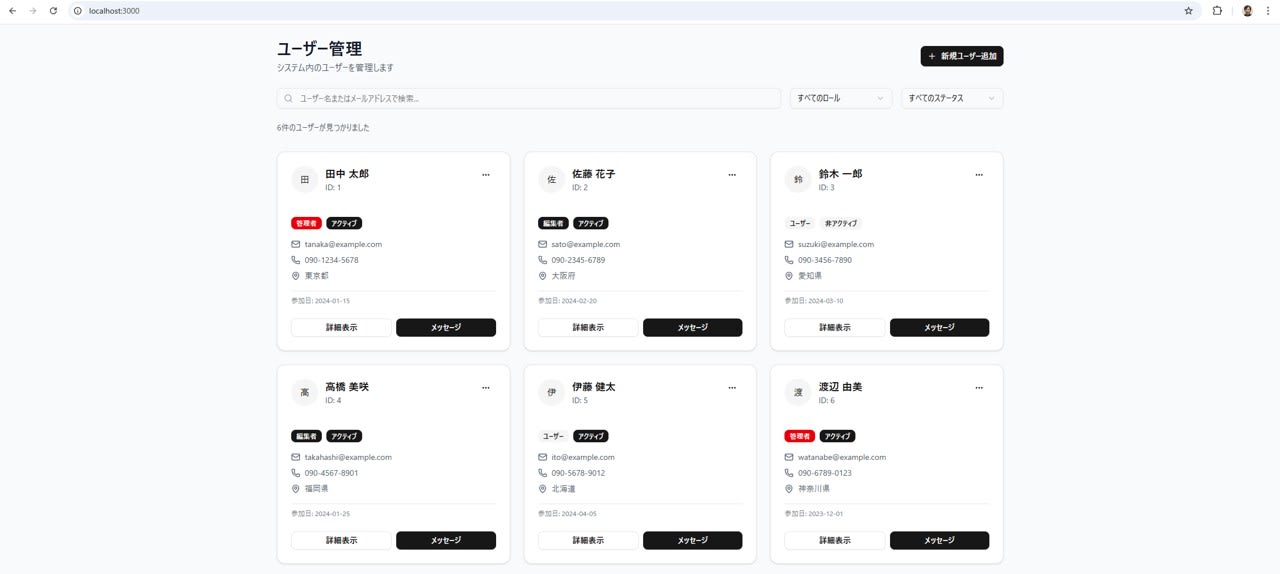
Summary
In this article, we explained how to use the AI-driven UI generation tool "v0" to automatically generate production-quality dashboards from prompts and how to quickly reflect them in a local environment through shadcn/ui integration.
In traditional frontend development, design and implementation often involved many reworks and significant effort, but with v0's "prompt-driven UI development," anyone can participate in UI design using natural language and instantly obtain "working UI" as practical React + Tailwind CSS code.
Furthermore, the series of steps involving "bouncing ideas off the AI," "immediate reflection of output code," and "quick verification in a local environment" will be powerful tools in various development phases in the field, such as:
- Initial development of PoCs or new products
- Alignment between designers and engineers
- Mass production of UI or iterative prototyping
However, at this point, manual adjustments or additional dialogue with AI are essential for complex overall screen compositions or customization before production deployment. As integration features and automation accuracy continue to evolve, "collaborative UI development" will accelerate even further.
Future Outlook
In the future, we plan to publish articles on more practical know-how and application examples for utilizing v0.
-
Production Deployment Know-how
Design and operation points for incorporating UI generated with v0 into actual services -
Integration with Figma and Existing Design Tools
Automated UI generation workflow leveraging design data -
Connection Examples with Backend API and Business Data
Implementation patterns for integration with actual business systems -
Field Implementation Cases and Tips
Challenges and issues during implementation and their solutions, real voices from the field -
Latest Trends in v0 and Related Ecosystem
Explanation of new features and trends in peripheral tools
In upcoming articles, we will continue to provide easy-to-understand information that can serve as hints for UI development and collaboration in the AI era. Please look forward to it.