
What is streaming processing after all? The true nature of audio blocks and sampleOffset as seen from VST3 AGain logs

This page has been translated by machine translation. View original
Introduction
In this article, we'll observe the data exchange between the host and plugin using AGain, an official VST3 plugin sample. In particular, we'll focus on how the process function receives audio blocks of 1,024 samples each.
Goals of This Article
By the end of this article, you should have a general understanding of:
- What kind of data is sent to the VST3 plugin's
processfunction - Why audio is processed in blocks of 1,024 samples
I hope you'll gain a sense of streaming processing by seeing "what specific logs appear inside AGain."
Target Audience
- Those who want to write VST3 plugins in C++ but don't know much about audio fundamentals
- Engineers who need to work with VST in game or application development contexts
- Those who want concrete examples to visualize terms like "streaming processing" and "buffer size"
Why I Decided to Do This Investigation
I once had to write a VST plugin for a game development project. At that time, I didn't fully understand what a VST plugin was, how audio data was delivered, and why processing 1-second of audio (44,100 samples) in chunks of 1,024 samples works without issues. Even looking at the official samples didn't help me grasp these concepts.
This investigation started with the motivation to write an article that could have helped my past self. It's not aimed at VST or audio engineering experts, but rather at game or application engineers who:
- "Suddenly have to write a VST plugin"
- "Can't visualize concepts like streaming processing or buffers"
The goal is to provide a starting point for understanding the internal flow of data.
What is a VST Plugin?
VST (Virtual Studio Technology) is a common interface that connects host applications like DAWs with audio plugins such as effects and synthesizers.
Think of it as an agreement where:
- The host passes audio buffers, events, and parameters to the plugin
- The plugin processes these and returns the results to the host
About VST3 SDK's MIT License
In October 2025, Steinberg released the VST 3.8 SDK and changed the license to MIT (reference). Previously, Steinberg's proprietary license (and sometimes individual contracts) was required, but now you can freely use it even in commercial products by following the MIT license. The main requirement is to include the copyright notice and license text. Please check the license text for details.
However, the handling of the VST logo and "VST" trademark is separate. If you want to display these, you need to follow the VST Usage Guidelines included in the SDK. It's good to remember that "code licensing has become quite liberal, but there are rules for brand display."
References
What is Passed to the process Function in VST3 Plugins?
Audio processing in VST3 plugins starts with the AudioEffect::process function.
tresult PLUGIN_API AGain::process (ProcessData& data)
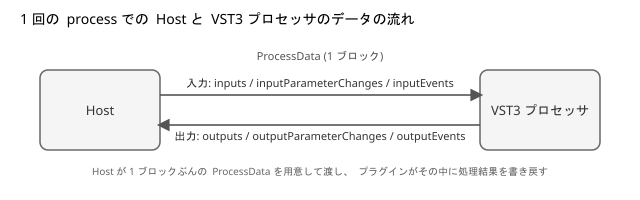
This ProcessData mainly contains three types of information:
- Audio buffers (inputs / outputs)
- Parameter changes (inputParameterChanges / outputParameterChanges)
- Events like note on / note off (inputEvents / outputEvents)
Why is Audio Processed in Blocks of 1,024 Samples?
Before modifying the AGain code, let's briefly understand why audio is processed in blocks rather than one sample at a time.
Digital Audio Basics
Digital audio is a sequence of numbers sampled at regular intervals from air vibrations. Each individual value is called a sample, and the number of samples taken per second is called the sample rate. In our test environment, the audio interface was set to sample rate: 44.1 kHz, meaning we're handling 44,100 samples per second.

Why We Don't Process One Sample at a Time in Real-Time
So, are we really passing these 44,100 samples one by one to the plugin? Actually, no. Operating systems and CPUs aren't very good at calling process for each individual sample. Instead, processing is done in chunks of a certain size. In audio, we call this chunk size the buffer size.

This is similar to how games redraw the entire screen each frame. In game processing too, we don't draw one pixel at a time at different moments, but process everything together in frames.
Buffer Size and Latency Trade-off
In our environment, the ASIO driver setting was Buffer Size: 1,024 samples. Buffer size involves the following trade-offs:
-
Small buffers (e.g., 64 samples, 128 samples)
- Lower latency from input to output because each block is shorter
- Need to process more frequently in short intervals, increasing CPU load
- More prone to audio dropouts depending on load or driver compatibility
-
Large buffers (e.g., 1,024 samples, 2,048 samples)
- Higher latency as each block takes longer
- More time to process each block, generally more stable
For our settings (44.1 kHz, 1,024 samples), the length of one block is:
Time for 1 block [ms] = 1000 × 1024 / 44100 ≒ 23.22 ms
Plugins Process "One Block at a Time"
VST3 plugins receive one audio block at a time via ProcessData. Near the beginning of AGain's process function, there are comments like:
// 3) Process the gain of the input buffer to the output buffer
// 4) Write the new VUmeter value to the output Parameters queue
Here, data.numSamples means "the number of samples in this block." In our environment, the logs consistently showed:
[again] block=8749, numSamples=1024, duration=23.220 ms, processMode=0
[again] block=8750, numSamples=1024, duration=23.220 ms, processMode=0
[again] block=8751, numSamples=1024, duration=23.220 ms, processMode=0
...
The audio interface's buffer setting was 1,024 samples, and the host was calling process with that unit, which is reflected in numSamples=1024. AGain itself doesn't determine the number 1,024. It's easier to understand if you think of it as audio data flowing in units determined by the external audio system settings.
Test Environment and Preparation
Here's a summary of the steps I took to add logging to AGain and observe its behavior.
Test Environment
- OS: Windows 11 (64 bit)
- Visual Studio 2022 (MSVC)
- VST3 SDK 3.8 series
- Steinberg VST3PluginTestHost
- ASIO-compatible audio interface
- sample rate: 44.1 kHz
- buffer size: 1,024 samples
Regarding ASIO driver selection, behavior can vary significantly depending on the environment. In my case, the generic Realtek ASIO driver didn't work well, so I used the dedicated ASIO driver for my audio interface.
Getting and Building the SDK
First, let's get the VST3 SDK and build the official samples.
-
Clone the VST3 SDK from GitHub.
git clone --recursive https://github.com/steinbergmedia/vst3sdk.git cd vst3sdk -
Create a build directory and generate a Visual Studio project using CMake.
mkdir build cd build cmake -G "Visual Studio 17 2022" -A x64 .. -DSMTG_CREATE_PLUGIN_LINK=OFF -
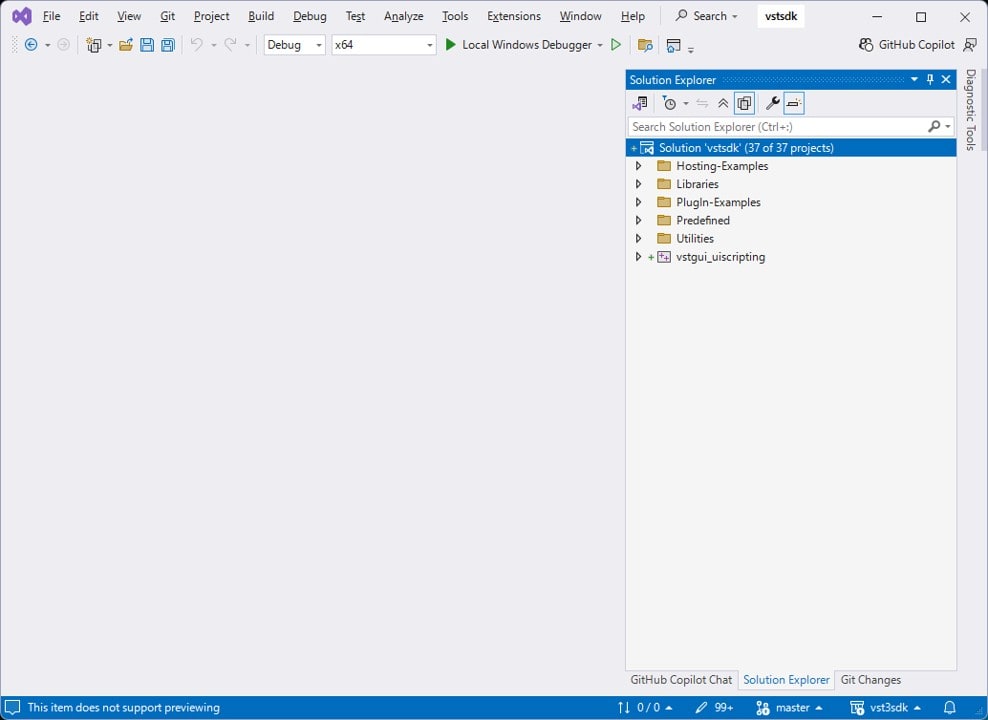
Open the generated
vstsdk.slnin Visual Studio.
-
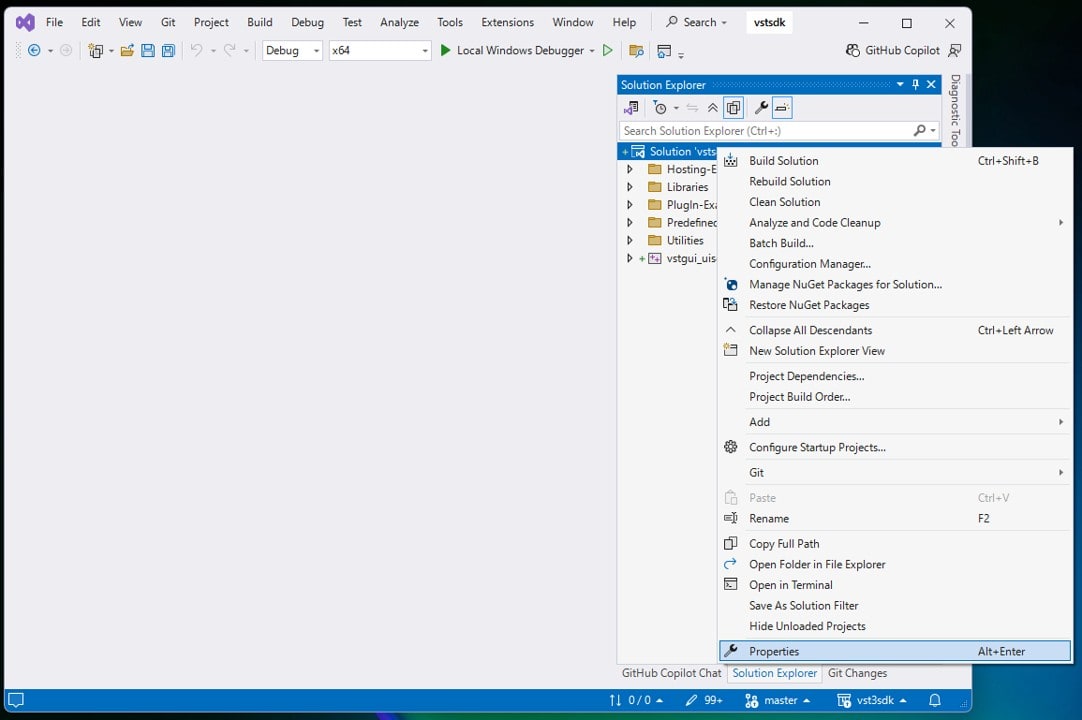
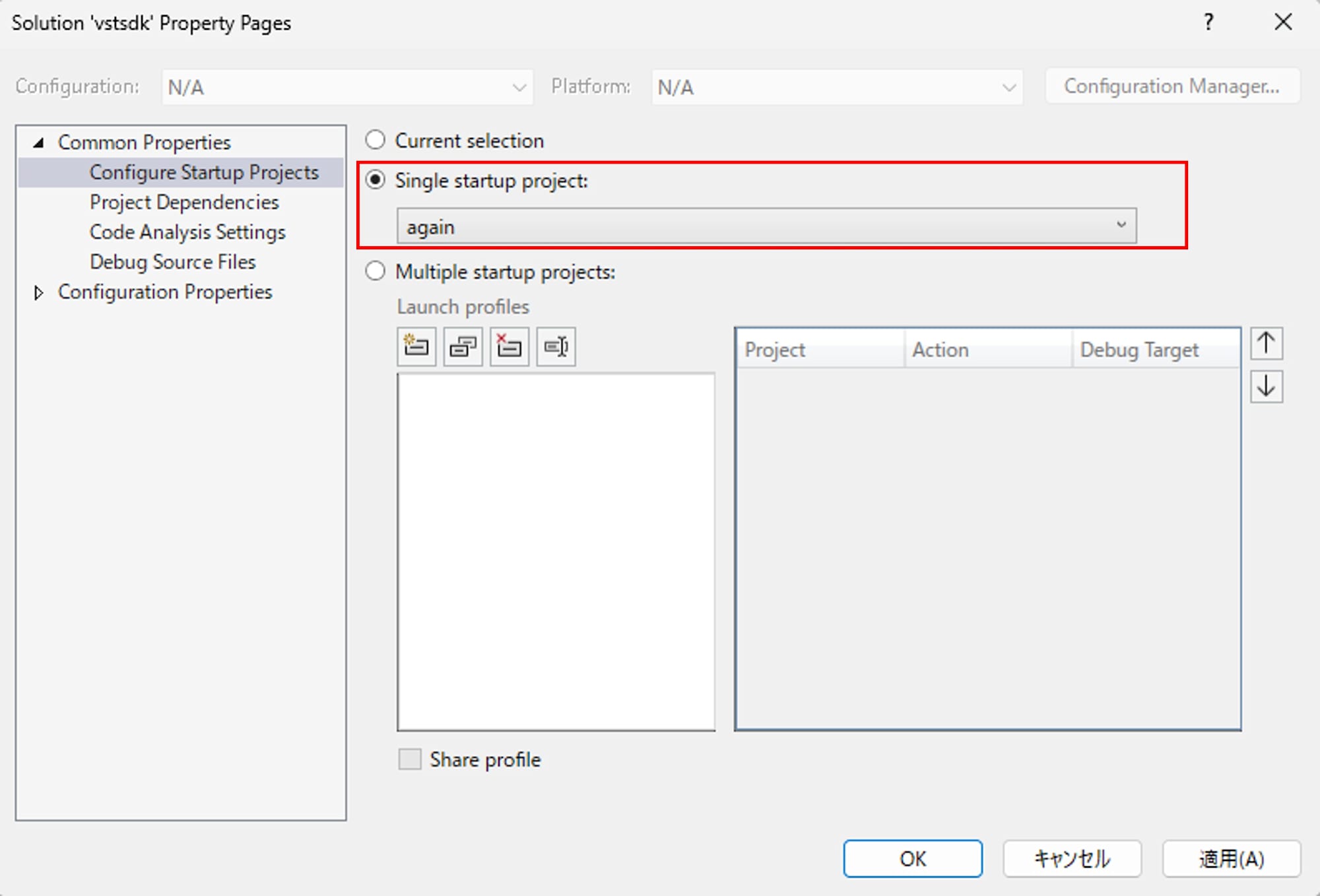
Open the solution properties, and set
Common Properties > Configure Startup ProjectstoSingle startup project > again.
-
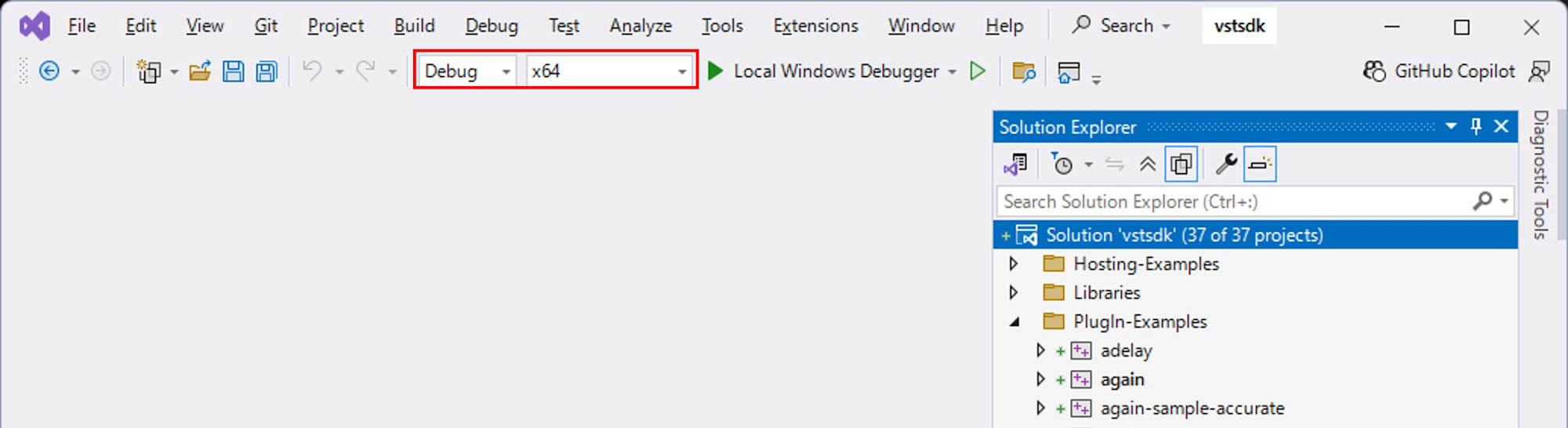
Close the properties window with OK. Ensure that the configuration is
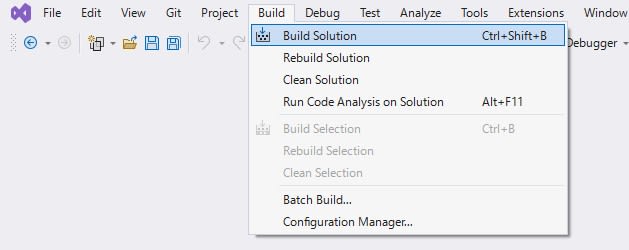
Debugand the platform isx64. Build the files with Build > Build Solution.
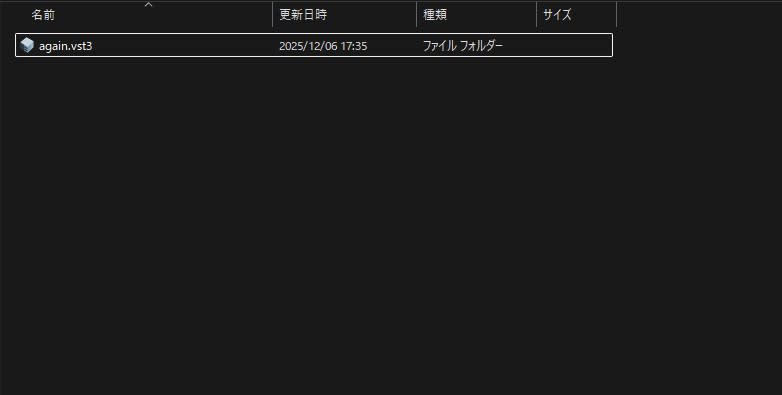
When the build succeeds, again.vst3 is generated in build/VST3/Debug.
Preparing VST3PluginTestHost
VST3PluginTestHost is provided as part of the full VST3 SDK. Get the full SDK zip from the official site. After extracting, find and extract VST3PluginTestHost_x64_Installer_x.xx.xx.zip from the following path:
VST_SDK/
  vst3sdk/
    bin/
      Windows_x64/
        VST3PluginTestHost_x64_Installer_x.xx.xx.zip
Running the extracted VST3PluginTestHost_x64.msi will install VST3PluginTestHost.

Launching and Debugging from Visual Studio
To observe AGain's behavior, we'll launch VST3PluginTestHost from Visual Studio and monitor logs from OutputDebugString with the debugger attached.
-
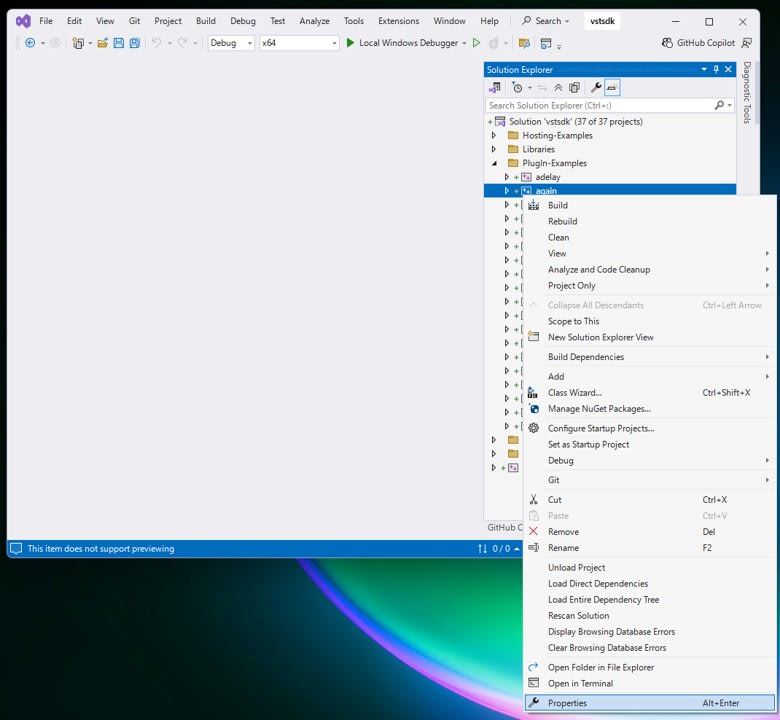
In Visual Studio's Solution Explorer, right-click on the
Plugin-Examples > againproject and open "Properties".
-
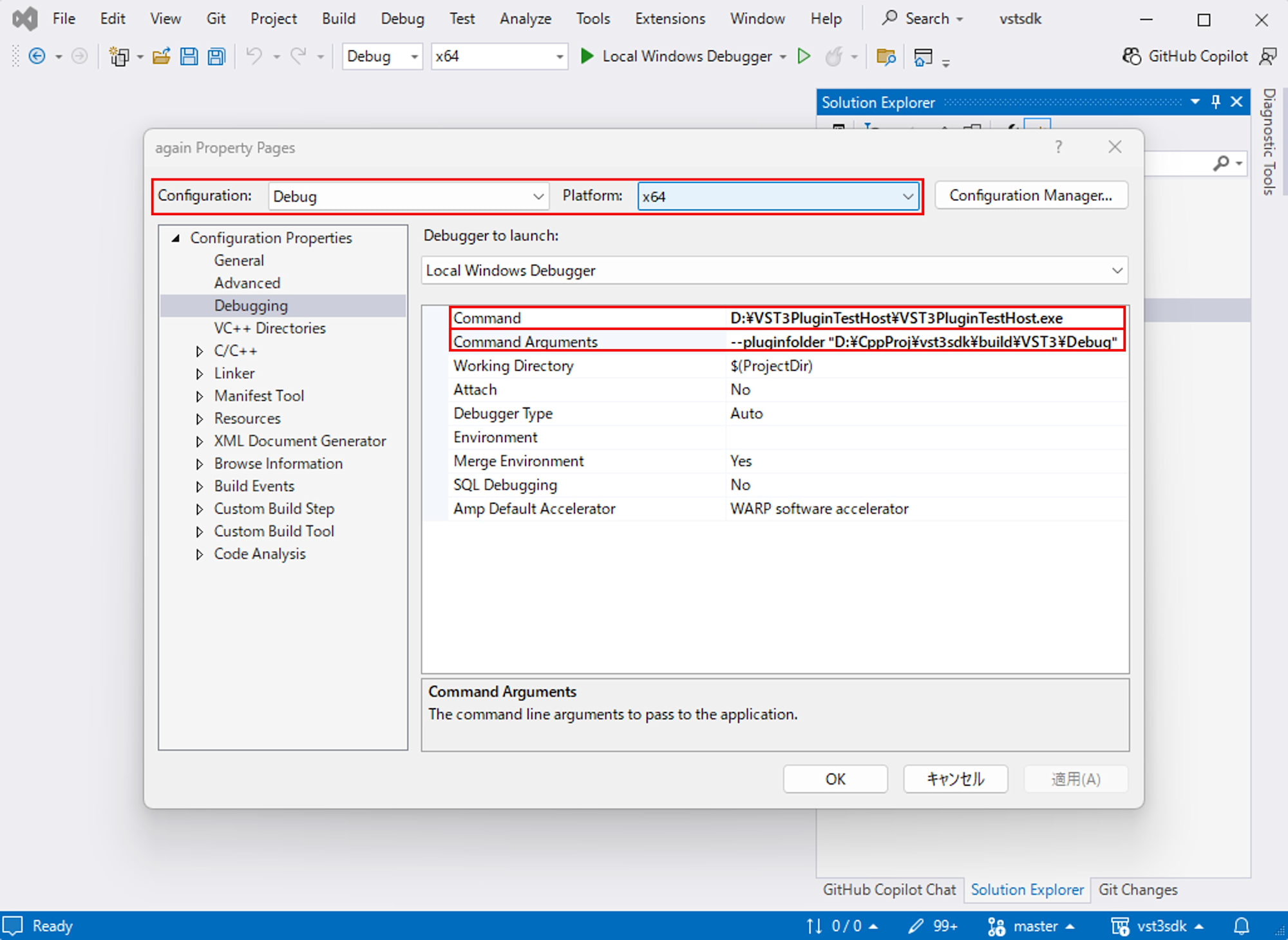
Make sure
Configuration: DebugandPlatform: x64are selected, then go to "Configuration Properties > Debugging" and set:- Command:
C:\path\to\VST3PluginTestHost.exe(path to the VST3PluginTestHost.exe you installed) - Command Arguments:
--pluginfolder "C:\path\to\build\VST3\Debug"(folder containing the again.vst3 you built)
- Command:
-
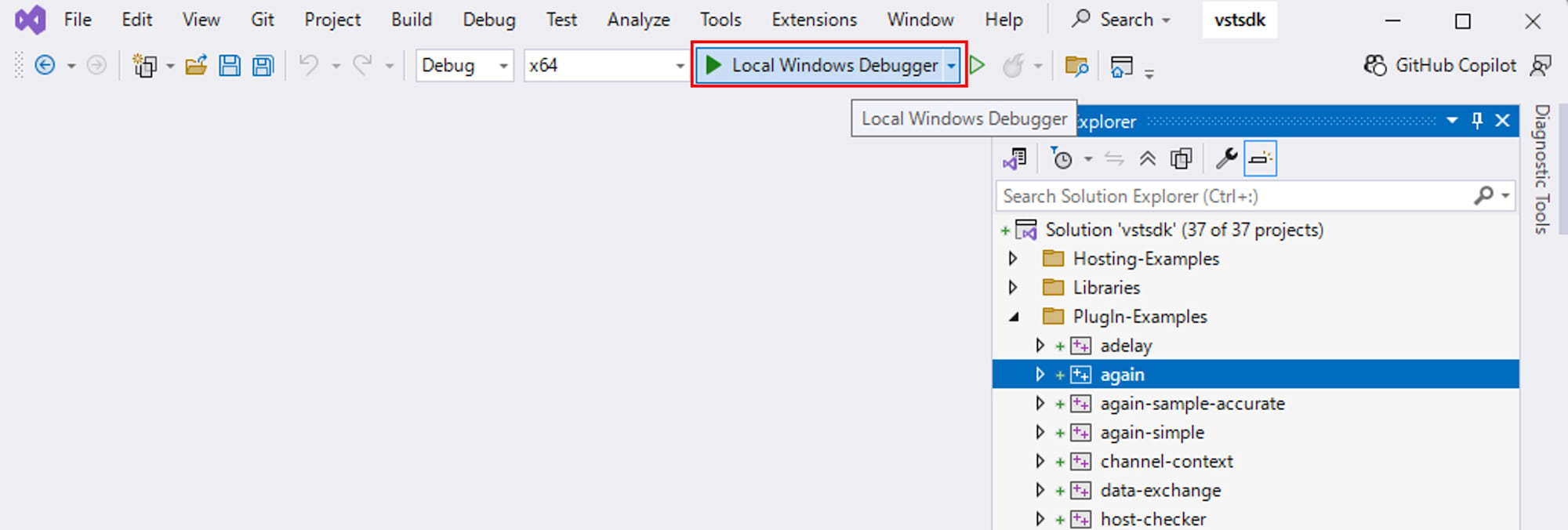
Close the properties window with OK, and with the configuration as
Debug x64, pressLocal Windows Debuggeror F5 to launch VST3PluginTestHost with the debugger.
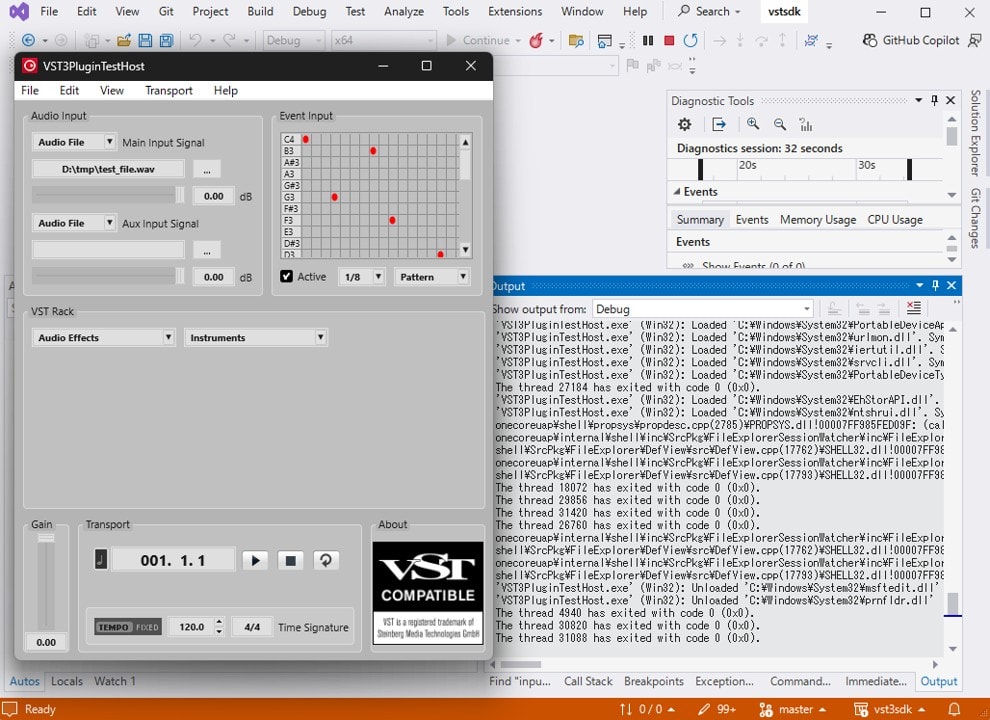
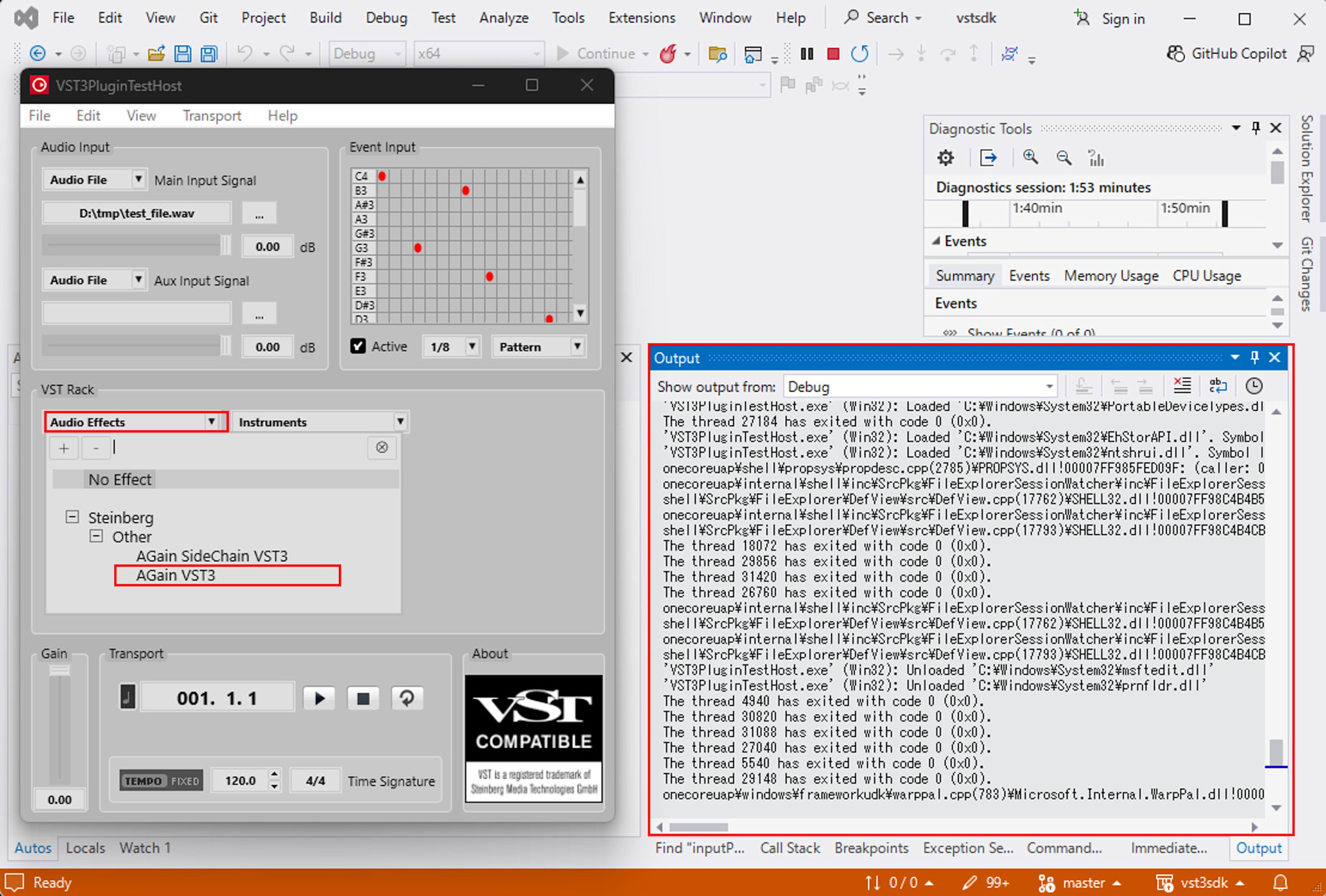
With this setup, when you load AGain and start playback, any content output by OutputDebugStringA from AGain's code will appear in the Output window of Visual Studio.
Adding Logs to AGain to Observe Block Flow
Now for the main task: we'll slightly modify AGain's source code to log "which block we're on" and "how many samples and milliseconds the block contains" each time process is called.
Adding a debugLog Helper Function
First, let's add a helper function for debug logs near the beginning of again.cpp:
#include <cstdio>

#if SMTG_OS_WINDOWS
#include <windows.h>
#endif

namespace {

    inline void debugLog (const char* msg)
    {
    #if defined (SMTG_OS_WINDOWS) && defined (_DEBUG)
        ::OutputDebugStringA (msg);
    #else
        (void)msg;
    #endif
    }

} // anonymous namespace
Now we can output logs to the Output window during _DEBUG builds using debugLog.
Adding a Block Counter
Next, let's add a counter to track block numbers to the AGain class. Add these fields to the member variable definitions in again.h:
Steinberg::int64 blockCounter_ = 0;
double sampleRate_ = 0.0;
Then save the sample rate in setupProcessing:
tresult PLUGIN_API AGain::setupProcessing (ProcessSetup& newSetup)
{
    sampleRate_ = newSetup.sampleRate;
    currentProcessMode = newSetup.processMode;
    return AudioEffect::setupProcessing (newSetup);
}
Logging Block Information in process
In AGain::process, add block information logging just before the comment that says:
//---3) Process Audio---------------------
Here's what to add:
//--- ----------------------------------
//---3) Process Audio---------------------
//--- ----------------------------------
if (data.numInputs == 0 || data.numOutputs == 0)
{
    // nothing to do
    return kResultOk;
}

// --- debug: block info ---------------------------------------------------
#if defined (_DEBUG)
const double blockMs =
    (sampleRate_ > 0.0)
        ? (1000.0 * static_cast<double> (data.numSamples) / sampleRate_)
        : 0.0;

char buf[256];
std::snprintf (
    buf, sizeof (buf),
    "[again] block=%lld, numSamples=%d, duration=%.3f ms, processMode=%d\n",
    static_cast<long long> (blockCounter_++),
    static_cast<int> (data.numSamples),
    blockMs,
    static_cast<int> (currentProcessMode));
debugLog (buf);
#endif
// -------------------------------------------------------------------------
Build in Debug mode and play through VST3PluginTestHost, and you'll see logs like these in the Output window:
[again] block=8749, numSamples=1024, duration=23.220 ms, processMode=0
[again] block=8750, numSamples=1024, duration=23.220 ms, processMode=0
[again] block=8751, numSamples=1024, duration=23.220 ms, processMode=0
...
From this, we can tell:
data.numSamplesis consistently 1,024durationis consistently about 23.22 msblockCounter_increases as 0, 1, 2, ...
In other words, we've empirically confirmed that AGain's process is being called approximately every 23 ms, with the buffer size (1,024 samples) determined by the host and audio interface.
Observing the sampleOffset of Note Events
Now let's look at another important part of ProcessData: events. In AGain's code, inputEvents is used to receive note on/off events, and their velocity is used for gain attenuation.
Original Event Processing Code
AGain's process already includes the following event processing:
//---2) Read input events-------------
if (IEventList* eventList = data.inputEvents)
{
    int32 numEvent = eventList->getEventCount ();
    for (int32 i = 0; i < numEvent; i++)
    {
        Event event {};
        if (eventList->getEvent (i, event) == kResultOk)
        {
            switch (event.type)
            {
                case Event::kNoteOnEvent:
                    // use the velocity as gain modifier
                    fGainReduction = event.noteOn.velocity;
                    break;

                case Event::kNoteOffEvent:
                    // noteOff reset the reduction
                    fGainReduction = 0.f;
                    break;
            }
        }
    }
}
Let's insert logging here to observe "at which position in which block note events arrive."
Adding Event Content Logging
Add logs right after getEvent succeeds in the for loop:
if (eventList->getEvent (i, event) == kResultOk)
{
#if defined (_DEBUG)
    {
        char buf[256];

        const char* typeStr = "";
        switch (event.type)
        {
            case Event::kNoteOnEvent:  typeStr = "NoteOn ";  break;
            case Event::kNoteOffEvent: typeStr = "NoteOff";  break;
            default:                   typeStr = "Other  ";  break;
        }

        // Read from the correct union field based on event type
        int32 channel = 0;
        int32 pitch   = 0;

        switch (event.type)
        {
            case Event::kNoteOnEvent:
                channel = event.noteOn.channel;
                pitch   = event.noteOn.pitch;
                break;

            case Event::kNoteOffEvent:
                channel = event.noteOff.channel;
                pitch   = event.noteOff.pitch;
                break;

            default:
                // Leave channel / pitch as 0 for other events
                break;
        }

        std::snprintf (
            buf, sizeof (buf),
            "[again] event[%d]: %s sampleOffset=%d, channel=%d, pitch=%d\n",
            static_cast<int> (i),
            typeStr,
            static_cast<int> (event.sampleOffset),
            static_cast<int> (channel),
            static_cast<int> (pitch));
        debugLog (buf);
    }
#endif

    switch (event.type)
    {
        case Event::kNoteOnEvent:
            // use the velocity as gain modifier
            fGainReduction = event.noteOn.velocity;
            break;

        case Event::kNoteOffEvent:
            // noteOff reset the reduction
            fGainReduction = 0.f;
            break;
    }
}
Build again, place a few notes in VST3PluginTestHost's event editor, and play. The Output window should show logs like:
[again] event[0]: NoteOff sampleOffset=526, channel=0, pitch=53
[again] event[1]: NoteOn  sampleOffset=526, channel=0, pitch=38, velocity=0.750
[again] block=8749, numSamples=1024, duration=23.220 ms, processMode=0
[again] block=8750, numSamples=1024, duration=23.220 ms, processMode=0
...
[again] event[0]: NoteOff sampleOffset=287, channel=0, pitch=38
[again] event[1]: NoteOn  sampleOffset=287, channel=0, pitch=41, velocity=0.750
[again] block=8760, numSamples=1024, duration=23.220 ms, processMode=0
...
Key observations:
- When notes change,
NoteOffandNoteOnevents arrive in pairs sampleOffsetis between 0 and 1,023- Looking at the
blocknumbers together, we can tell which sample in which block the event occurred
So, sampleOffset indicates "how many samples from the start of this audio block (1,024 samples)" the event occurs. By changing note positions in the test host grid, we confirmed that sampleOffset changes - smaller values for notes closer to the beginning of a block, and larger values for notes closer to the end.
Viewing Streaming and Batching from a VST3 Perspective
Based on our observations, VST3's process has a dual nature:
- From the outside, it "processes a stream in real-time"
- From the plugin's perspective, it "repeatedly batch processes fixed-size buffers"
Streaming from the Outside
From a user's perspective, audio plays continuously without interruption. A DAW's timeline also progresses continuously along the time axis. In this sense, audio is a classic streaming process. The critical requirement of an audio system is to maintain this continuity - new sound is continuously recorded and output through speakers without interruption.
Batch Processing from the Plugin's Perspective
On the other hand, AGain's process function is more discrete. Each time, a buffer of data.numSamples samples is passed, and when that buffer is finished, the next buffer arrives. So the plugin has a structure of continuously handling small batch processes where it's told "here's a batch of numSamples samples and events, please process and return them."
In a game engine, you might often see a loop structure that calls update and render for each frame. In audio, this appears as calling process for each block (e.g., 1,024 samples).
Our log observation revealed concrete numbers for:
- How the block size and sample rate combination determines the time duration of each
processcall - How a note event's
sampleOffsetindicates its relative position within that block
Summary
In this article, we added a bit of logging to the VST3 SDK's AGain sample and observed the following aspects of the process function in actual numbers:
- How audio blocks are delivered in specific units
- What the
sampleOffsetof note events means
While streaming processing might sound complicated, from a VST3 plugin's perspective, it has a straightforward structure: "from the outside it's a continuous flow of sound, but internally it's continuously batch-processing fixed-size buffers." With this understanding, even when game or application engineers suddenly need to write a VST plugin, they can approach the code calmly, thinking "let's first understand it one block at a time."
I hope this investigation provides a first foothold for those who, like my past self, suddenly find themselves in the VST3 world.