
Understanding parameter updates in VST3 plugins through logs - Examining ProcessData::inputParameterChanges and sampleOffset in AGain

This page has been translated by machine translation. View original
Introduction
When starting to write a VST3 plugin, many people encounter the following obstacle: while a simple plugin that just applies gain works fine, they suddenly get confused when trying to make it interact with the DAW's faders or automation.
You might experience volume changing in steps even though you're moving the fader smoothly, or notice a slight delay in the timing when automation starts to take effect. Reading the VST3 SDK documentation reveals terms like ParamID, ProcessData, inputParameterChanges, IParamValueQueue, and sampleOffset, but understanding how they all connect is not straightforward at first glance.
This article aims to clarify how parameter operations from the DAW flow into the process function of VST3 plugins for those who have such questions. We'll examine the flow by adding logging to the AGain sample plugin from the VST3 SDK, and investigate how fader operations and automation appear in ProcessData using actual logs as our guide.
What is a VST Plugin?
VST (Virtual Studio Technology) is a common interface for connecting host applications such as DAWs with audio plugins like effects and synthesizers.
In October 2025, Steinberg published the VST 3.8 SDK and changed the license to the MIT license (reference). Previously, Steinberg's proprietary license (and sometimes individual contracts) was required, but now it can be freely used, including in commercial products, by following the MIT license. The main conditions are keeping the copyright notice and license text. Please check the license text for details.
Goal of This Article
The goal of this article is to help you visualize how DAW fader operations and automation flow into the VST3 plugin's ProcessData::inputParameterChanges, and how they are represented as sampleOffset and value in IParamValueQueue.
Target Audience
- Those who have started writing VST3 plugins in C++ but haven't fully grasped the parameter mechanisms
- Engineers whose main work is game or application development, but who occasionally need to handle DAW integration or VST3 support
- Those who want to verify how fader and automation operations are delivered to plugins as parameter updates based on actual measurements
References
Background and Prerequisites
Why Not Understanding "Parameter Flow" Causes Problems
When writing VST3 plugins, you might notice these issues:
- Volume changes in steps even though the fader moves smoothly
- Automation seems to take effect slightly later or earlier than expected
These phenomena typically occur when "what you see on the DAW screen" doesn't match "what the plugin sees in the process function". Even if you move a fader, the plugin might only read values at block boundaries, or might not be referencing the sampleOffset at all. This creates a discrepancy between when the DAW intends a change to happen and when the sound actually changes.
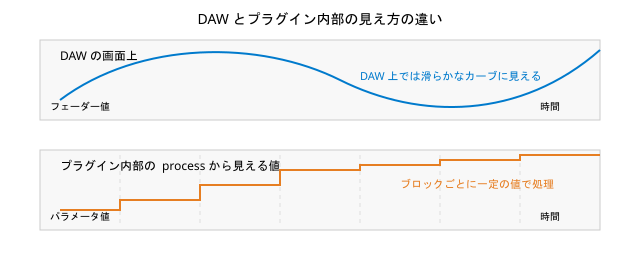
The causes can be broken down into two main points:
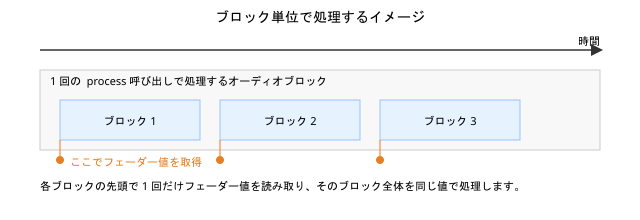
The first is that audio processing happens in blocks. Each time process is called, it receives a batch of samples to process all at once. If your implementation only reads the fader value "once at the beginning of each block," you'll inevitably end up with step-like changes between blocks.
The second is not utilizing the sampleOffset in ProcessData::inputParameterChanges. Multiple parameter changes can occur within a single block, but if you ignore sampleOffset, all changes are treated as if they happened at the beginning of the block. This results in timing discrepancies between what you hear and what was intended.
Reviewing Audio Blocks and sampleOffset
Why Process in Blocks Instead of Sample by Sample?
Audio signals are handled as sequences of discrete samples. For example, at 48 kHz, there are 48,000 samples per second.
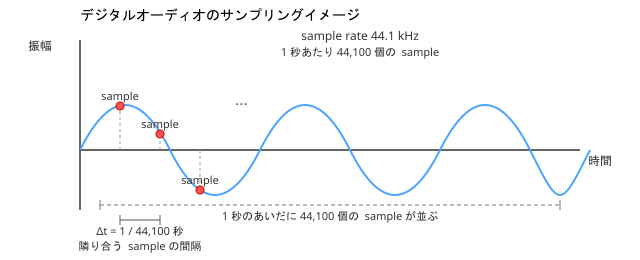
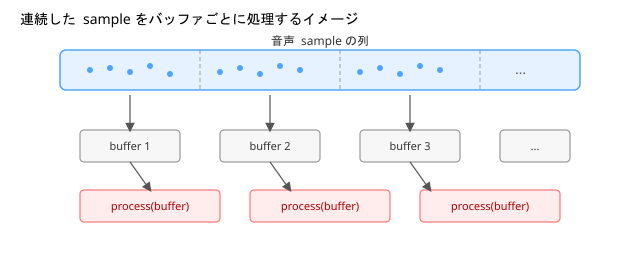
Passing these to process one sample at a time would result in too many function calls, making both implementation and overhead impractical. Therefore, processing typically happens in "blocks" of a fixed number of samples.
For example, with a sample rate of 48 kHz and a buffer size of 1,024 samples, each block is approximately 21 ms long. Every 21 ms, process is called, and the plugin processes a chunk of 1,024 samples.
How VST3 Sees "One Block of Sound"
The process function in VST3 receives a ProcessData structure. Within this, numSamples indicates the length of the current block to process.
From the DAW's perspective, audio flows according to the audio device's buffer settings. From the plugin's perspective, each process call delivers "the current batch of samples (inputs/outputs)" and "events that occurred during that time (inputEvents/outputEvents)".
Plugins are designed to complete processing for each block independently. They don't directly access samples from other blocks but work within the context of "the block currently being passed".
Event sampleOffset is "Position Within the Block"
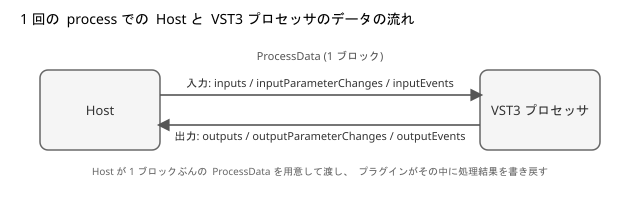
ProcessData also contains fields for events like note-on and note-off. The sampleOffset used here represents "how many samples from the beginning of the current block".
For example, in a block where numSamples = 1024, you might have a note-on at sampleOffset = 0, a parameter change at sampleOffset = 256, and a note-off at sampleOffset = 900. By correctly handling sampleOffset, you can recreate the temporal relationships within the block.
This concept applies directly to parameter changes as well, since inputParameterChanges also uses sampleOffset in the same way.
Parameter Pathways in VST3
In VST3, understanding parameter flow becomes easier when you distinguish between these three roles:
- Host: The DAW side, which has faders and automation curves, and sends parameter values to the plugin based on user operations.
- Controller: The plugin's controller class, responsible for parameter definitions, string representations, and editor UI.
- Processor: The processor class that handles audio in the
processfunction and applies parameter values to the sound.
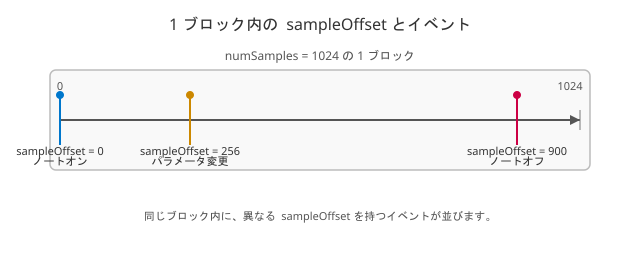
A simplified relationship diagram looks like this:
The Host communicates parameter values to both Controller and Processor using the same ParamID as a key. For the Controller, setParamNormalized is called to update internal state and UI. For the Processor, information about which ParamID changed to what value at what timing is stored in ProcessData::inputParameterChanges passed to process.
Test Environment and Setup
I added logging to the AGain plugin provided as a sample in the official SDK to observe its behavior.
Test Environment
- OS: Windows 11 (64 bit)
- Visual Studio 2022 (MSVC)
- VST3 SDK 3.8 series
- Steinberg VST3PluginTestHost
- ASIO-compatible audio interface
- sample rate: 44.1 kHz
- buffer size: 1,024 samples
Note that behavior can vary significantly depending on the ASIO driver selection. In my environment, the generic Realtek ASIO driver didn't work well, so I used the dedicated ASIO driver for my audio interface.
Getting and Building the SDK
First, let's get the VST3 SDK and set up the official samples for building:
-
Clone the VST3 SDK from GitHub:
git clone --recursive https://github.com/steinbergmedia/vst3sdk.git cd vst3sdk -
Create a build directory and generate Visual Studio project files using CMake:
mkdir build cd build cmake -G "Visual Studio 17 2022" -A x64 .. -DSMTG_CREATE_PLUGIN_LINK=OFF -
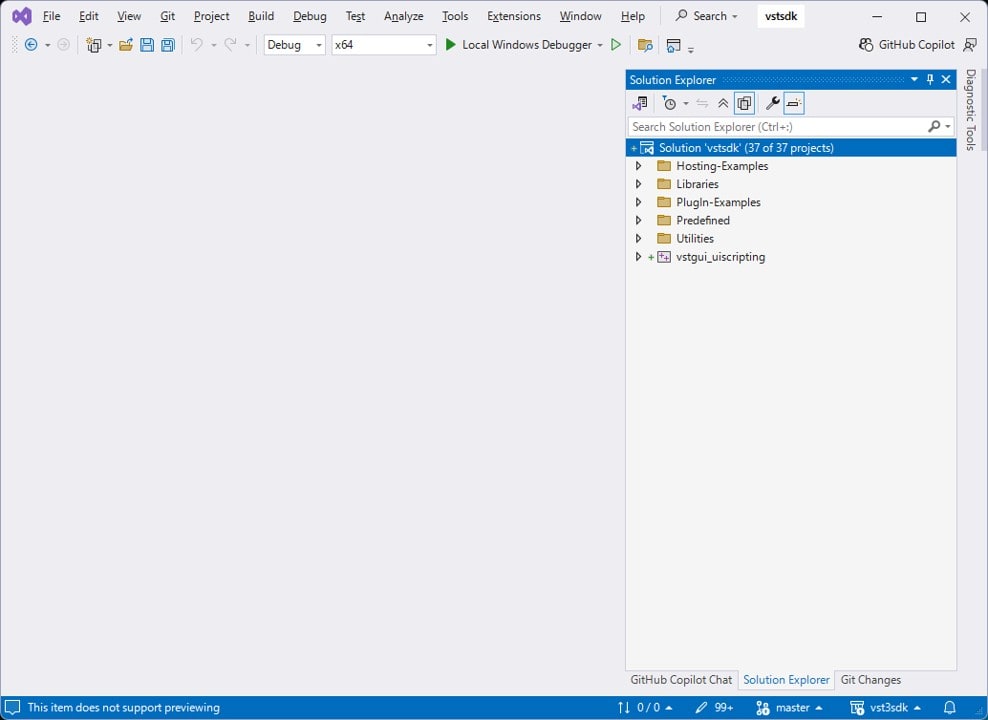
Open the generated
vstsdk.slnin Visual Studio.
-
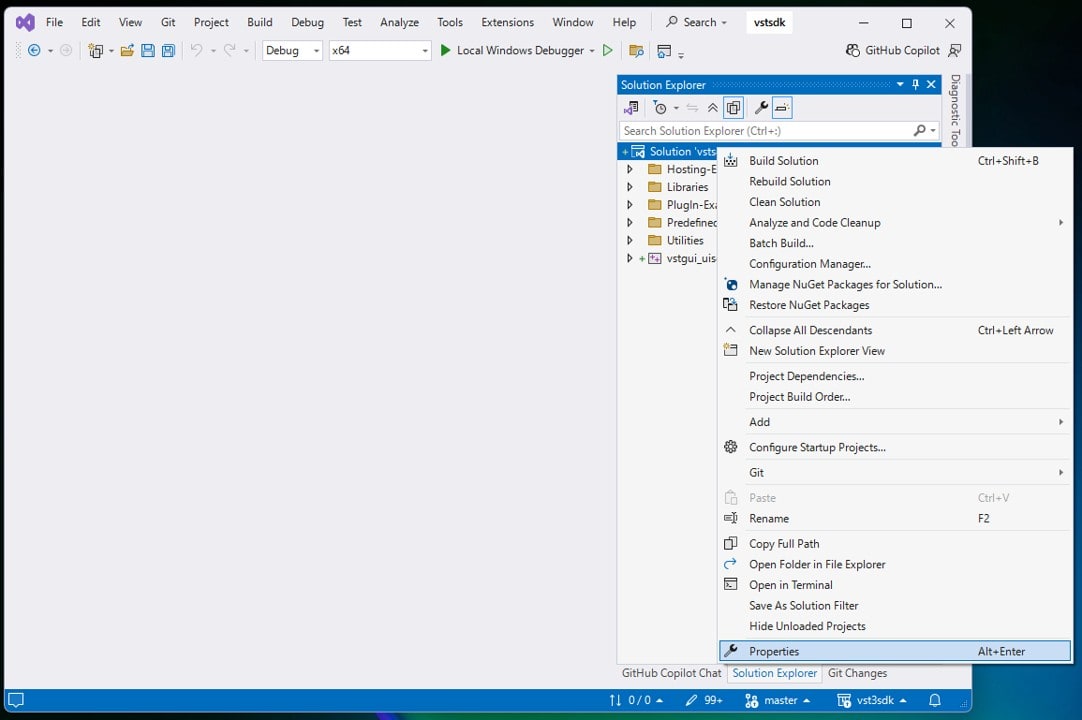
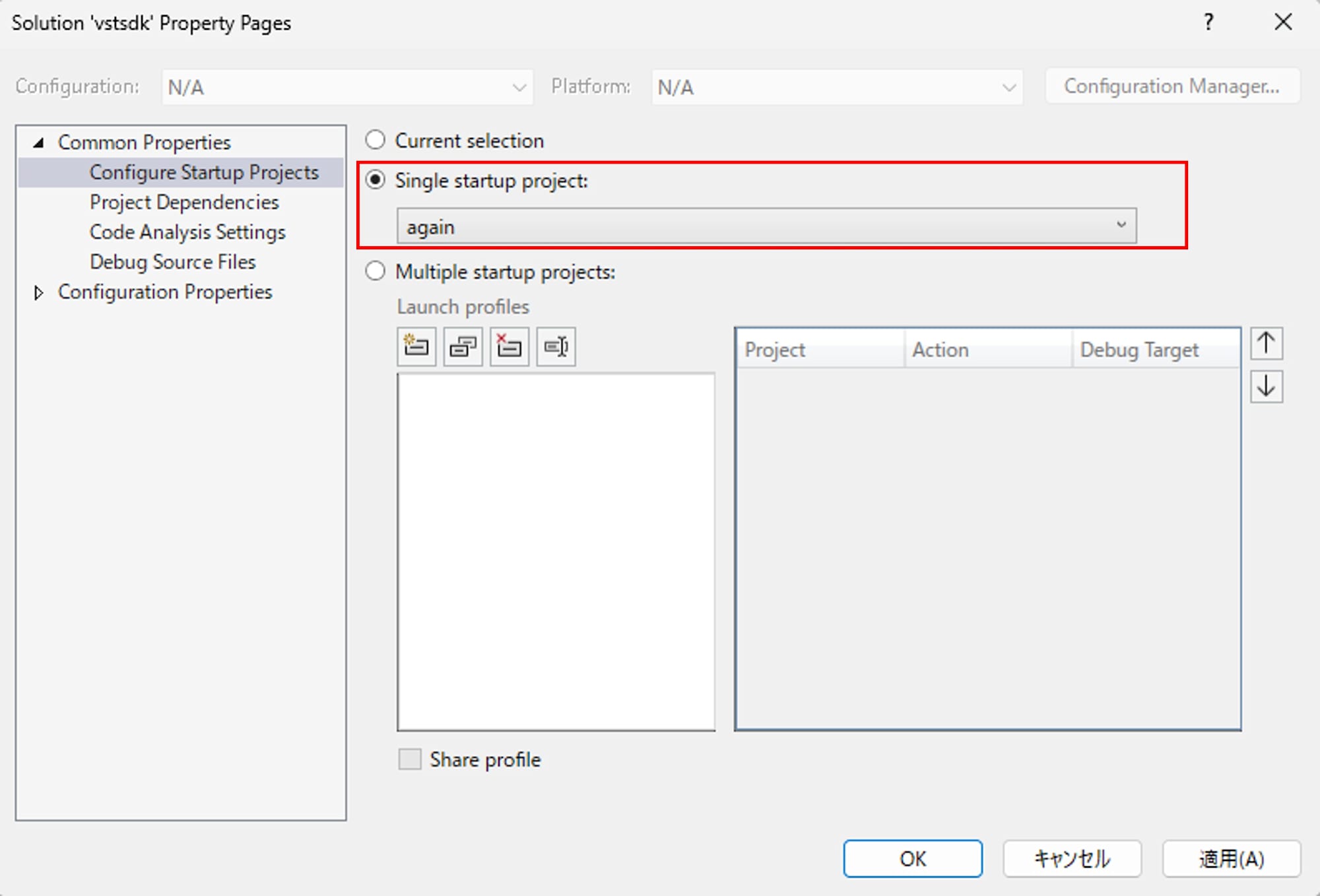
Open solution properties and set
Common Properties > Configure Startup ProjectstoSingle startup project > again.
-
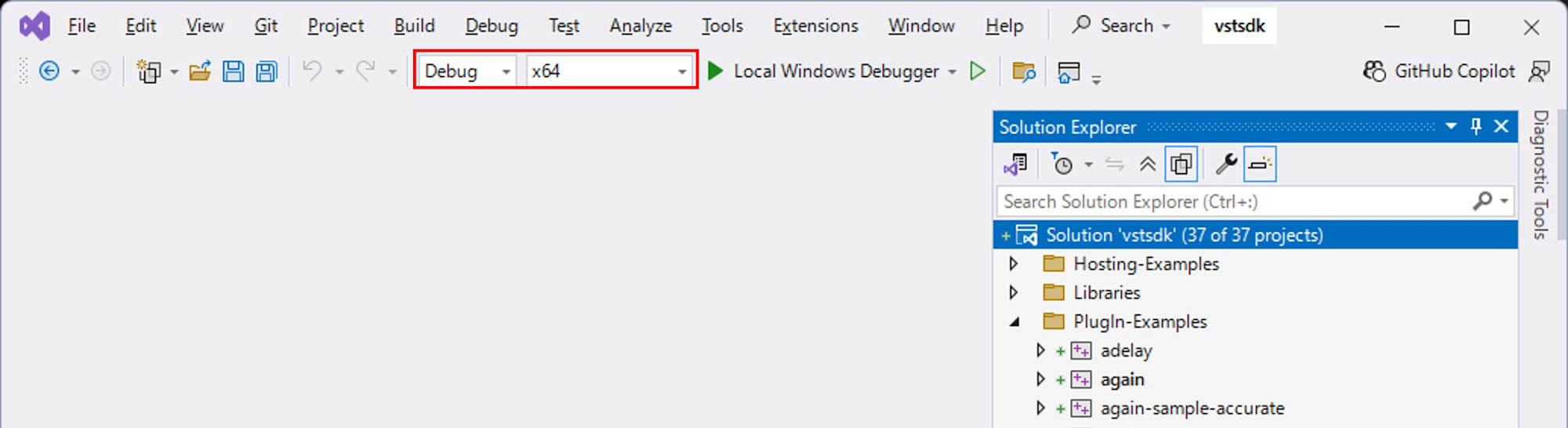
Close the properties window with OK. Ensure the configuration is set to
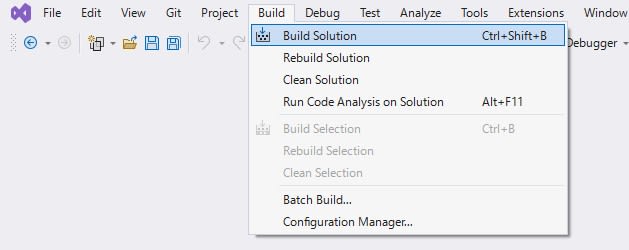
Debugand the platform tox64. Build the solution with Build > Build Solution.
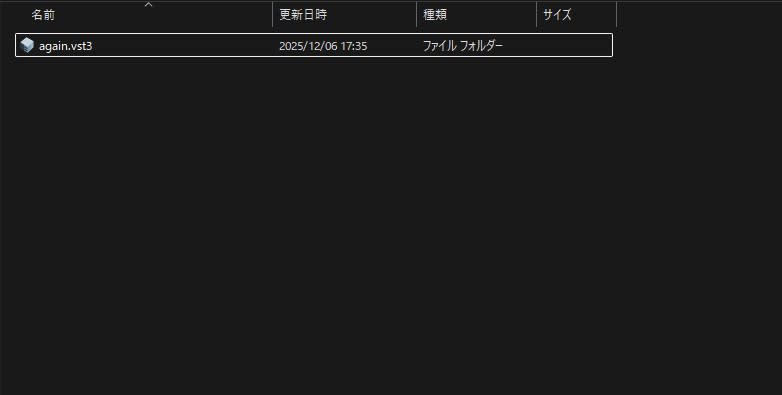
After a successful build, again.vst3 will be generated in build/VST3/Debug.
Setting Up VST3PluginTestHost
VST3PluginTestHost is included in the full VST3 SDK. Download the full SDK ZIP from the official site. After extracting, locate and extract VST3PluginTestHost_x64_Installer_x.xx.xx.zip from this path:
VST_SDK/
  vst3sdk/
    bin/
      Windows_x64/
        VST3PluginTestHost_x64_Installer_x.xx.xx.zip
Run the extracted VST3PluginTestHost_x64.msi to install VST3PluginTestHost.

Launching the Host from Visual Studio for Debugging
To observe AGain's behavior, we'll launch VST3PluginTestHost from Visual Studio with the debugger attached to view logs via OutputDebugString.
-
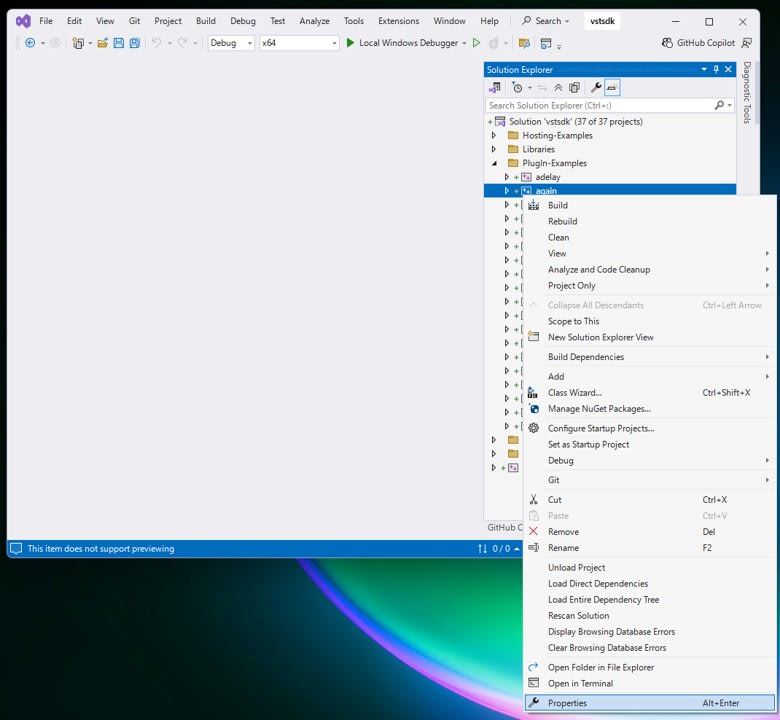
In Visual Studio's Solution Explorer, right-click the
Plugin-Examples > againproject and open "Properties".
-
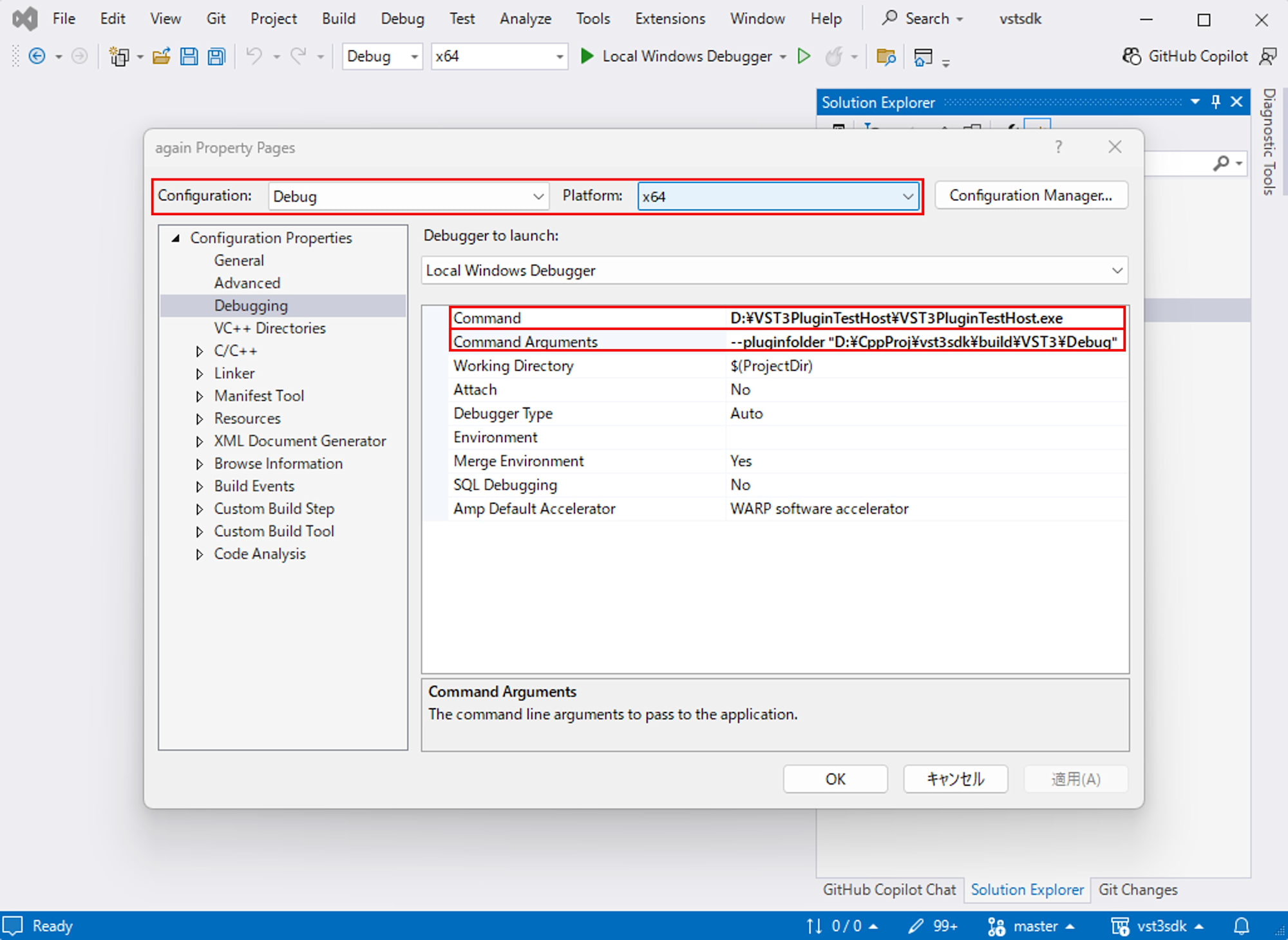
Ensure
Configuration: DebugandPlatform: x64are selected, then go to "Configuration Properties > Debugging" and set:- Command:
C:\path\to\VST3PluginTestHost.exe(path to the VST3PluginTestHost.exe you installed) - Command Arguments:
--pluginfolder "C:\path\to\build\VST3\Debug"(folder containing the built again.vst3)
- Command:
-
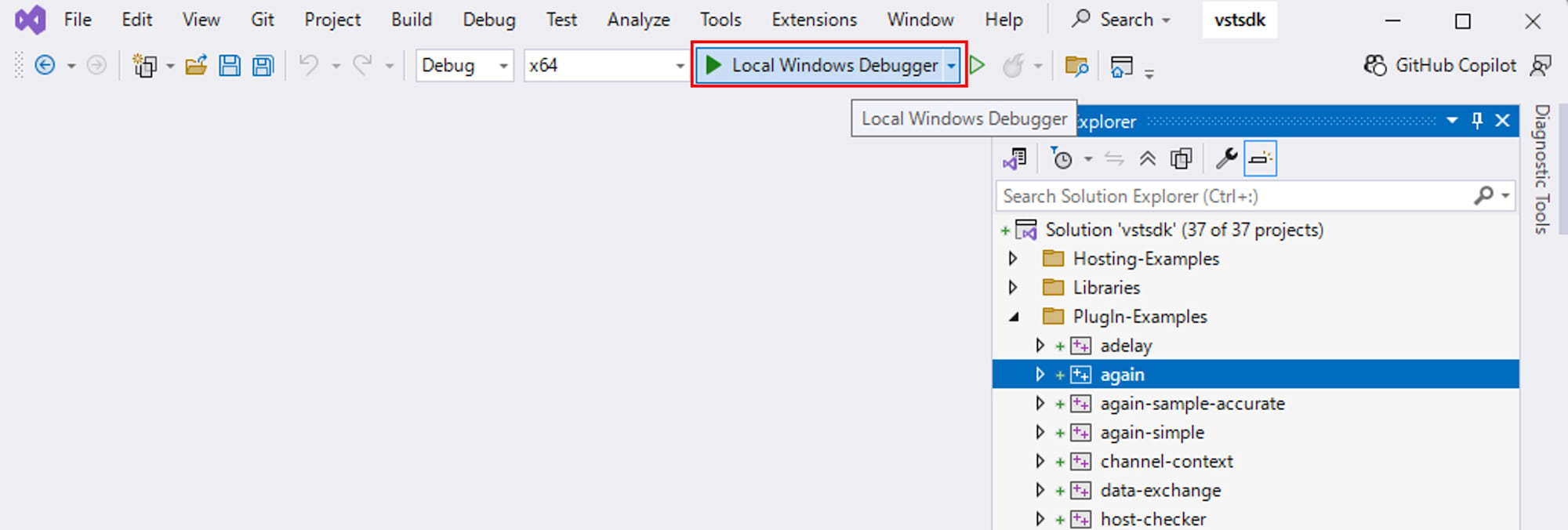
Close the properties window with OK, set the configuration to
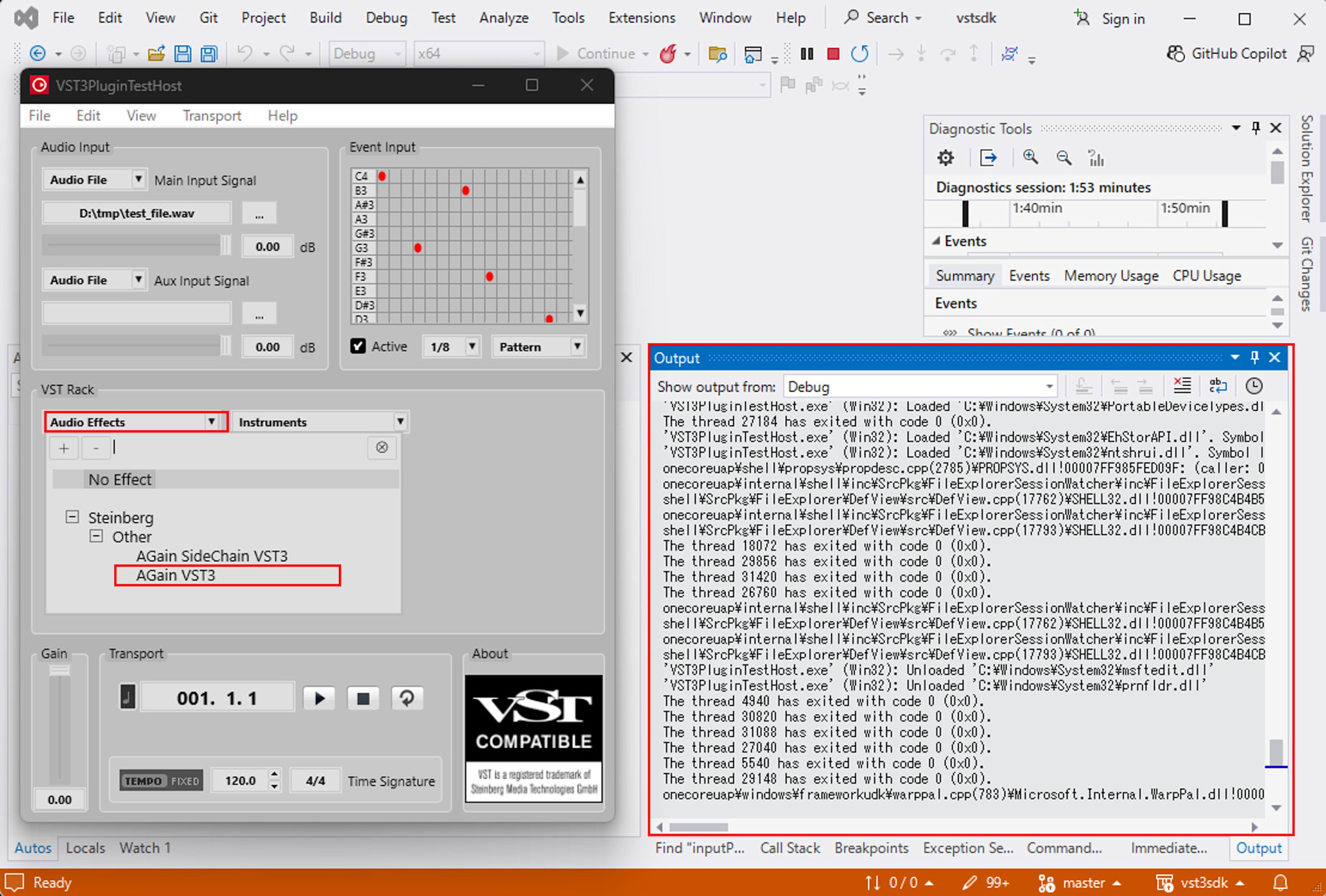
Debug x64, and pressLocal Windows Debuggeror F5 to launch VST3PluginTestHost with the debugger attached.
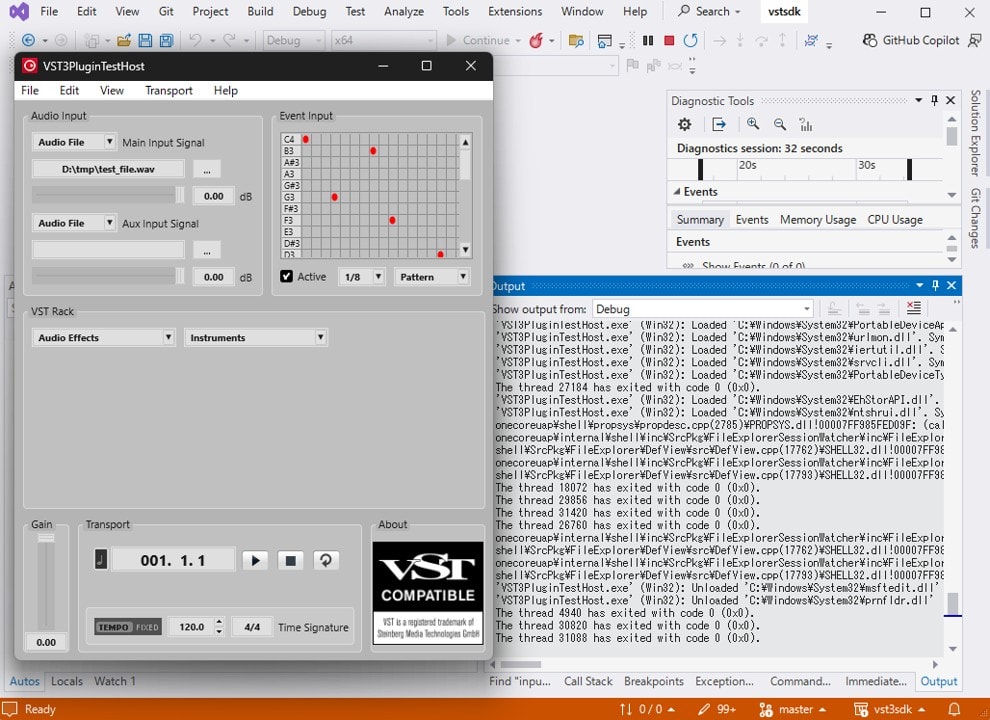
Now when you load AGain and start playback, content output with OutputDebugStringA from AGain's code will appear in Visual Studio's Output window.
Testing and Analysis
In the AGain code, to communicate the Processor's state to the Controller, AGainController::setComponentState reads gain values from a stream and calls setParamNormalized(kGainId, savedGain). This synchronizes the Controller's display with the parameter state saved by the Processor.
AGain's parameters.addParameter and ParamID
Parameters like gain and bypass are registered in AGainController::initialize. Gain is defined using a GainParameter class rather than the generic Parameter.
GainParameter::GainParameter (int32 flags, int32 id)
{
    Steinberg::UString (info.title, USTRINGSIZE (info.title)).assign (USTRING ("Gain"));
    Steinberg::UString (info.units, USTRINGSIZE (info.units)).assign (USTRING ("dB"));

    info.flags = flags;
    info.id = id;
    info.stepCount = 0;
    info.defaultNormalizedValue = 0.5f;
    info.unitId = kRootUnitId;

    setNormalized (1.f);
}
Here we see that the display name is Gain, the unit is dB, info.id contains the ParamID, and defaultNormalizedValue holds the default value.
AGainController::initialize registers not only the GainParameter but also Vu meter and bypass parameters:
tresult PLUGIN_API AGainController::initialize (FUnknown* context)
{
    tresult result = EditControllerEx1::initialize (context);
    if (result != kResultOk)
    {
        return result;
    }

    //---Gain parameter---
    auto* gainParam = new GainParameter (ParameterInfo::kCanAutomate, kGainId);
    parameters.addParameter (gainParam);
    gainParam->setUnitID (1);

    //---VuMeter parameter---
    parameters.addParameter (STR16 ("VuPPM"), nullptr, 0, 0,
                             ParameterInfo::kIsReadOnly, kVuPPMId);

    //---Bypass parameter---
    parameters.addParameter (STR16 ("Bypass"), nullptr, 1, 0,
                             ParameterInfo::kCanAutomate | ParameterInfo::kIsBypass, kBypassId);

    return result;
}
ParamID values like kGainId, kVuPPMId, and kBypassId are defined as integers in againparamids.h and used as common keys between Host, Controller, and Processor. The Host sends "which ParamID should be set to what normalized value" based on user actions, the Controller updates its internal state and UI via setParamNormalized, and the Processor reads the same ParamID in ProcessData::inputParameterChanges to determine which parameter changed at what timing.
Examining inputParameterChanges in ProcessData with Logging
Parameter Changes
ProcessData is passed to AGain::process. Within this, inputParameterChanges represents "how parameters changed during this block."
tresult PLUGIN_API AGain::process (ProcessData& data)
{
    // omitted
    IParameterChanges* paramChanges = data.inputParameterChanges;
    // omitted
}
Inside inputParameterChanges, there's one IParamValueQueue per parameter. Each queue contains pairs of sampleOffset and value. sampleOffset represents "how many samples from the beginning of the current block," while value is a normalized value between 0.0 and 1.0. Parameters are distinguished by ParamID.
This only contains "points where changes occurred." If a fader's value doesn't change throughout a block, nothing will be included for that block.
Adding Simple Logging to AGain
To see what's inside inputParameterChanges, let's add minimal logging to AGain.
First, add a helper function for debug logging near the top of again.cpp:
#include <cstdio>

#if SMTG_OS_WINDOWS
#include <windows.h>
#endif

namespace {

    inline void debugLog (const char* msg)
    {
    #if defined (SMTG_OS_WINDOWS) && defined (_DEBUG)
        ::OutputDebugStringA (msg);
    #else
        (void)msg;
    #endif
    }

} // anonymous namespace
Next, add a block counter to the AGain class. Add this field to the member variable definitions in again.h:
class AGain : public AudioEffect
{
public:
    // omitted

protected:
    Steinberg::uint64 blockCounter_ {0};
};
Then, at the beginning of AGain::process, increment the counter for each block and log the contents of inputParameterChanges:
tresult PLUGIN_API AGain::process (ProcessData& data)
{
    ++blockCounter_;

    if (IParameterChanges* paramChanges = data.inputParameterChanges)
    {
        int32 numParamsChanged = paramChanges->getParameterCount ();
        for (int32 i = 0; i < numParamsChanged; i++)
        {
            if (IParamValueQueue* paramQueue = paramChanges->getParameterData (i))
            {
                ParamID pid = paramQueue->getParameterId ();
                int32 numPoints = paramQueue->getPointCount ();

                // Debug: enumerate all points received in this block
                for (int32 j = 0; j < numPoints; ++j)
                {
                    int32 sampleOffset = 0;
                    ParamValue value = 0.0;

                    if (paramQueue->getPoint (j, sampleOffset, value) == kResultTrue)
                    {
                        char buf[256];
                        std::snprintf (
                            buf,
                            sizeof (buf),
                            "[again][Processor] block=%llu, paramId=%d, point=%d, "
                            "offset=%d, value=%.3f\n",
                            static_cast<unsigned long long> (blockCounter_),
                            static_cast<int> (pid),
                            static_cast<int> (j),
                            static_cast<int> (sampleOffset),
                            value);
                        debugLog (buf);
                    }
                }

                // For actual parameter values, use only "the last point" as in the original implementation
                ParamValue value = 0.0;
                int32 sampleOffset = 0;

                if (numPoints > 0 &&
                    paramQueue->getPoint (numPoints - 1, sampleOffset, value) == kResultTrue)
                {
                    switch (pid)
                    {
                        case kGainId:
                            fGain = static_cast<float> (value);
                            break;

                        case kBypassId:
                            bBypass = (value > 0.5f);
                            break;
                    }
                }
            }
        }
    }

    // (Everything below is the same as the original AGain: event processing, audio processing, Vu meter updates, etc.)
    // ...

    return kResultOk;
}
When you run in debug mode in Visual Studio and slowly move the AGain gain knob, logs from the plugin will appear in the Output window among host and DLL loading messages.
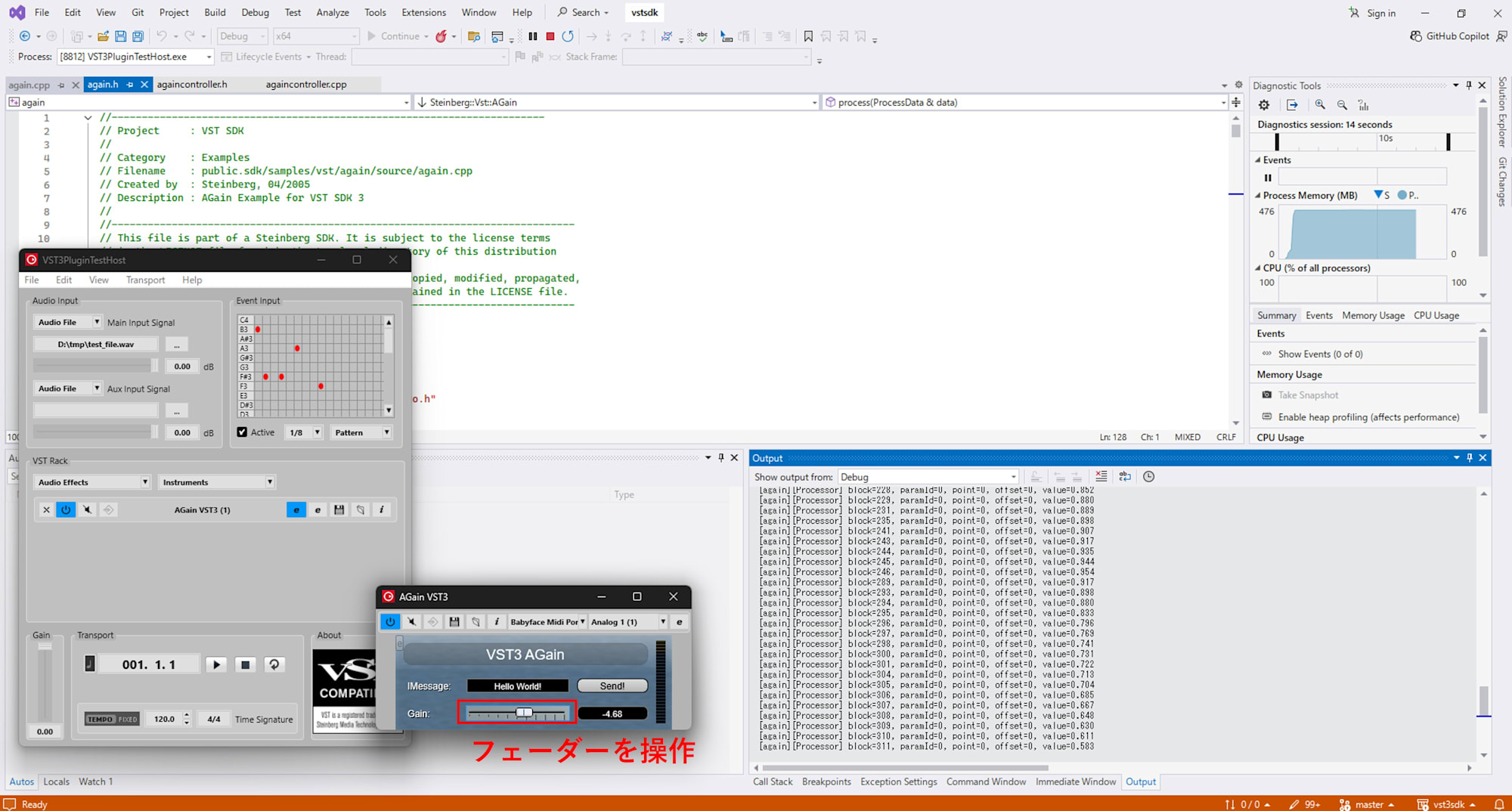
Lines output from debugLog start with [again][Processor]:
[again][Processor] block=208, paramId=0, point=0, offset=0, value=0.806
[again][Processor] block=209, paramId=0, point=0, offset=0, value=0.815
[again][Processor] block=210, paramId=0, point=0, offset=0, value=0.833
[again][Processor] block=211, paramId=0, point=0, offset=0, value=0.843
...
Here, paramId=0 corresponds to kGainId, block is the number of process calls, and value represents the normalized value effective in that block.
In this environment, all lines have offset=0, indicating that the host updates parameters by "sending a single point at the beginning of each block." While some hosts might include multiple (sampleOffset, value) pairs within the same block, this "one point per block" approach is also common.
By examining actual logs of block, ParamID, sampleOffset, and normalized values, you can better visualize "how DAW fader operations appear in ProcessData::inputParameterChanges and at what granularity."
Plugin-Side Differentiation
Parameters Where Only the Block's Initial Value Matters
For parameters like mix ratio, on/off switches, or mode selections, where "processing with this setting throughout the block is sufficient," it's often practical to just read the value at the beginning of each block.
Even when moving a fader rapidly, the audible impression may only register changes at the block level: "setting A during this block" then "setting B during the next block." In such cases, an implementation like AGain's that only picks up the last point from IParamValueQueue to update internal state is sufficient.
Parameters That Need More Careful Handling
On the other hand, parameters like volume fades can sound unnatural if values change abruptly. For these parameters, it's better if the volume changes more closely match the original automation curve.
In this case, you might design your plugin to process while being aware of sampleOffset and value pairs within the IParamValueQueue throughout the block. For example, you could interpolate between multiple points internally and apply gain smoothly across the sample array.
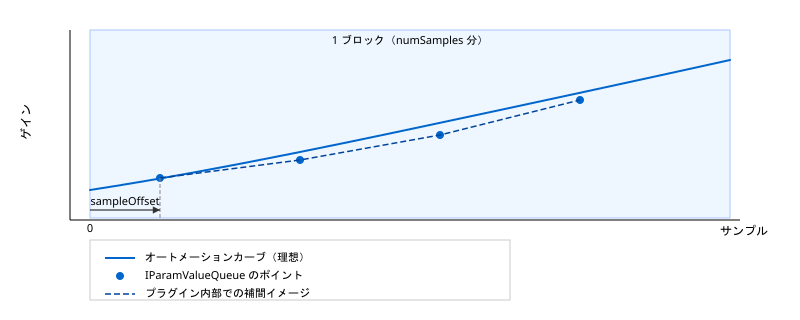
While this article doesn't delve into specific interpolation algorithms, understanding that "looking only at the block's initial value can leave steps" and that "sampleOffset allows you to correct timing within a block" makes it easier to design which parameters need more careful handling.
Summary
This article has clarified how DAW fader operations and automation reach the process function in VST3 plugins. Parameters operated on the Host side use the ParamID defined in the Controller as a key, ultimately being passed to the Processor side in ProcessData::inputParameterChanges as pairs of sampleOffset and value in IParamValueQueue.
From the plugin's perspective, "blocks of audio samples" and "parameter changes that occurred during that block" are passed together to process. Understanding that DAW curves don't arrive as sample-by-sample values but as a two-tier structure of block-based processing and event sequences within blocks helps explain why faders might sound stepped or automation timing might feel off.