
Checking VST3 plugin UI parameter synchronization and editor View creation/destruction through logs

This page has been translated by machine translation. View original
Introduction
In the implementation of VST3 UI, there are several aspects we need to clarify as design decisions.
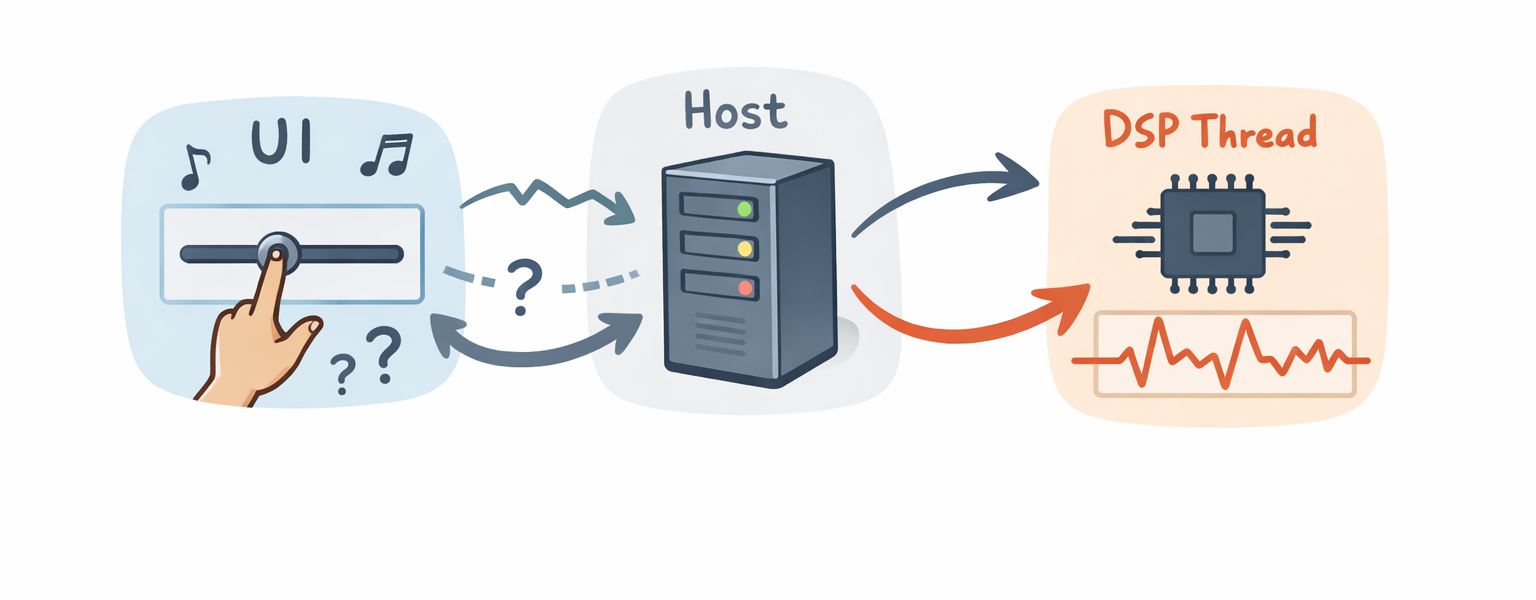
For example, when a slider in the UI is moved, we need to have a clear explanation from an implementation perspective about when that value reaches the DSP and which API is used to communicate it to the host. If it remains ambiguous whether the UI should directly access the DSP state or notify the host to pass it to the processing thread, synchronization methods may become fragile when they increase.
Additionally, since the editor View is shown and hidden by the host, we need to structure our implementation with the assumption that it only exists while being displayed. Clarifying whether the View is destroyed when the display is closed, and whether parameter synchronization can continue after destruction, will make initialization and release more stable in environments where opening and closing are repeated.
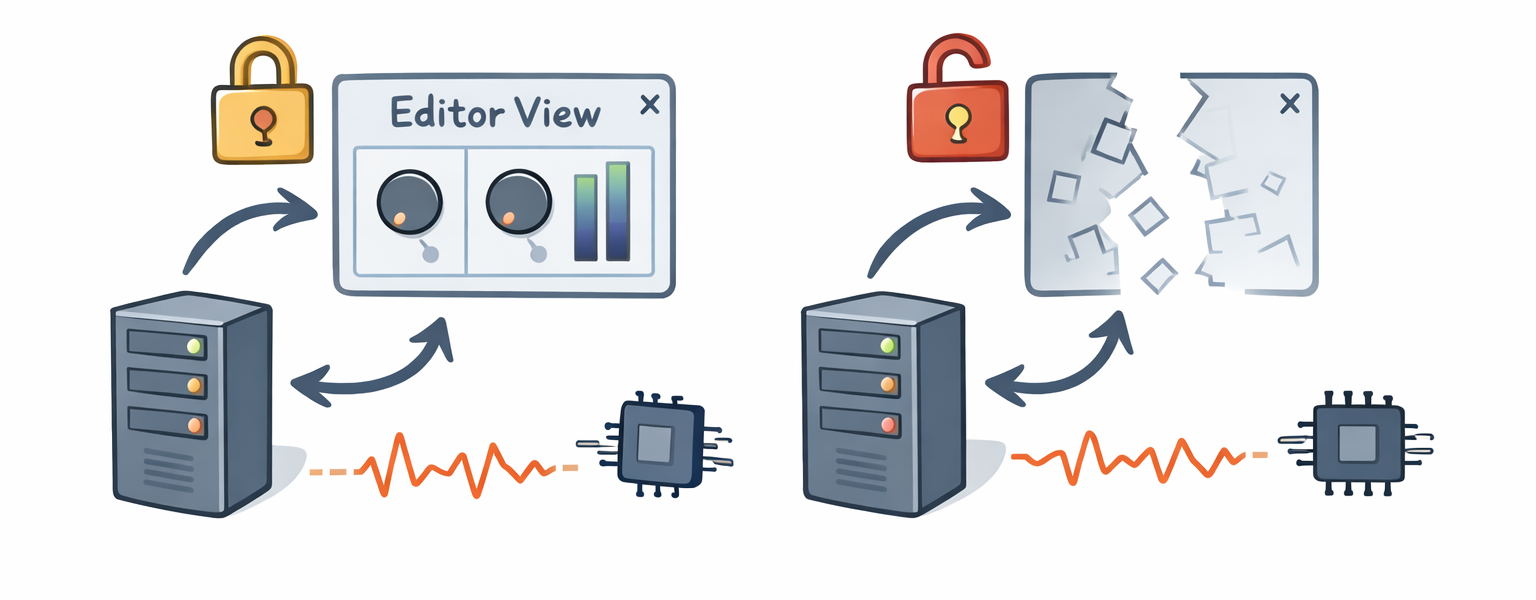
In this article, we will examine through logs the following two points that are particularly challenging in VST3 UI design:
- Where are UI and DSP values synchronized
- Who controls the creation and destruction of the editor View
What is a VST Plugin?
VST (Virtual Studio Technology) is a common interface for connecting host applications like DAWs with audio plugins such as effects and synthesizers.
In October 2025, Steinberg released the VST 3.8 SDK and changed its license to MIT license at the same time (reference). Previously, a Steinberg proprietary license (+ possibly individual contracts) was required, but now it can be freely used, including incorporation into commercial products, by following the MIT license. The main conditions are to retain copyright notices and the license text. Please check the license text for details.
Target Audience
- Developers of VST3 plugins who want to understand the synchronization path between UI and DSP from an implementation perspective
- Those who want to confirm initialization and release specifications in environments where editors are repeatedly opened and closed
References
Test Environment and Preparation
I added logging to the AGain plugin provided as a sample in the official SDK for observation.
Test Environment
- OS: Windows 11 (64 bit)
- Visual Studio 2022 (MSVC)
- VST3 SDK 3.8 series
- Steinberg VST3PluginTestHost
- ASIO compatible audio interface
- sample rate: 44.1 kHz
- buffer size: 1,024 samples
Regarding ASIO driver selection, behavior can vary significantly depending on the environment. In my environment, the generic Realtek ASIO driver didn't work properly, so I used a dedicated ASIO driver for the audio interface.
Getting and Building the SDK
First, let's get the VST3 SDK and prepare to build the official samples.
-
Clone the VST3 SDK from GitHub.
git clone --recursive https://github.com/steinbergmedia/vst3sdk.git cd vst3sdk -
Create a build directory and generate a Visual Studio project using CMake.
mkdir build cd build cmake -G "Visual Studio 17 2022" -A x64 .. -DSMTG_CREATE_PLUGIN_LINK=OFF -
Open the generated
vstsdk.slnin Visual Studio.
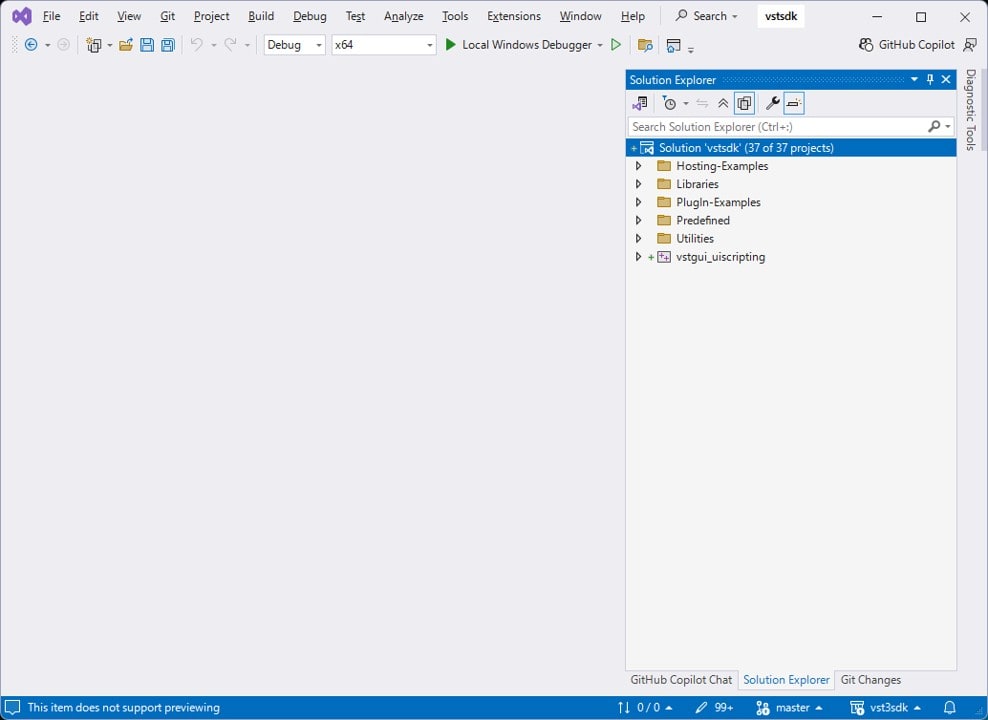
-
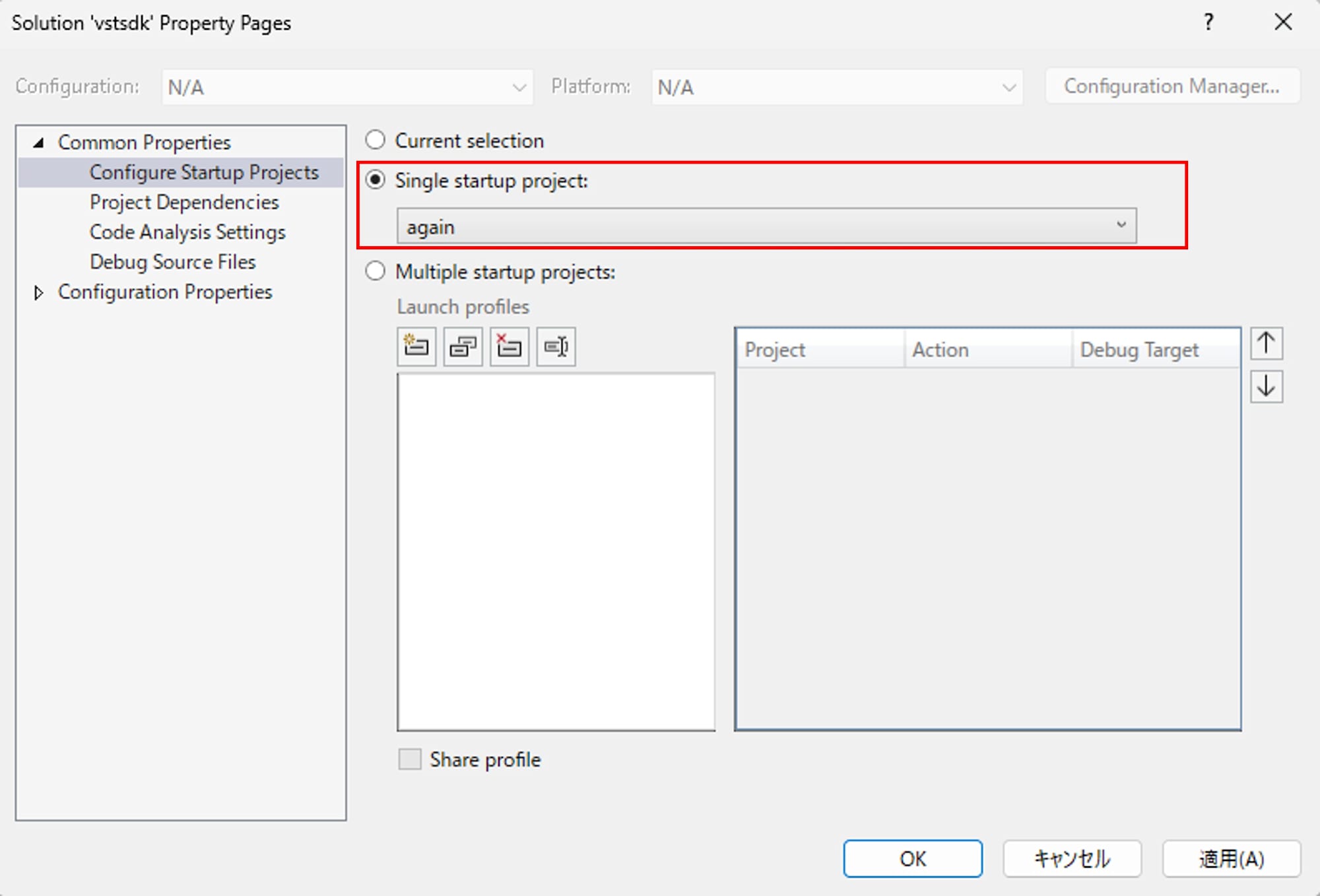
Open solution properties and set
Common Properties > Configure Startup ProjectstoSingle startup project > again.
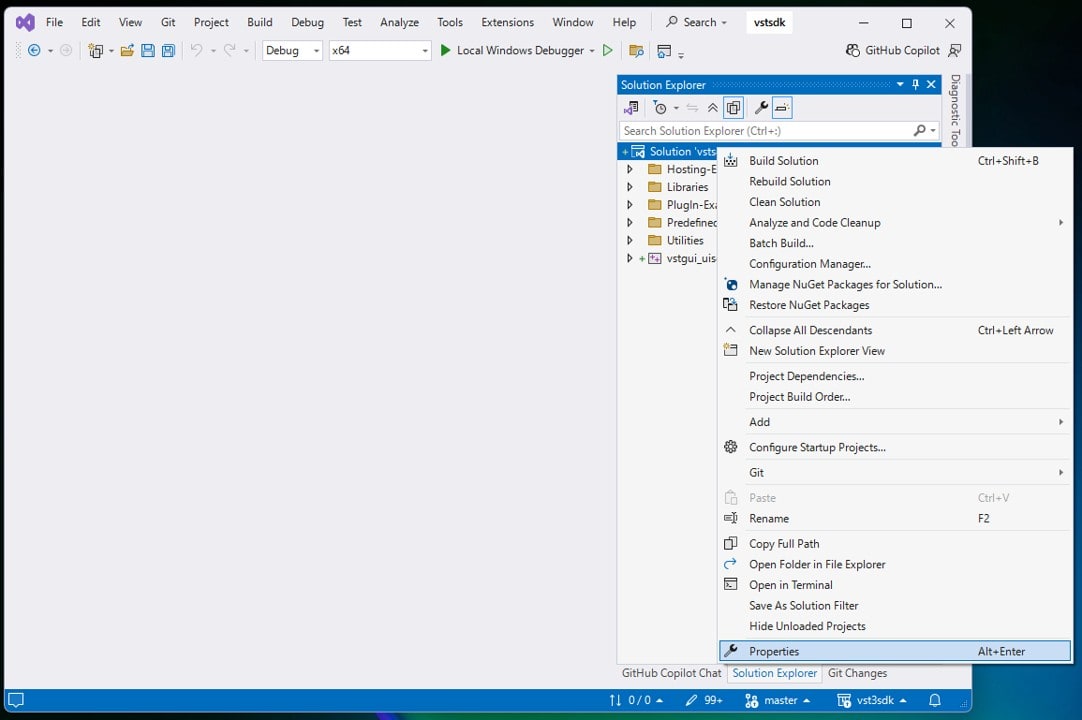
-
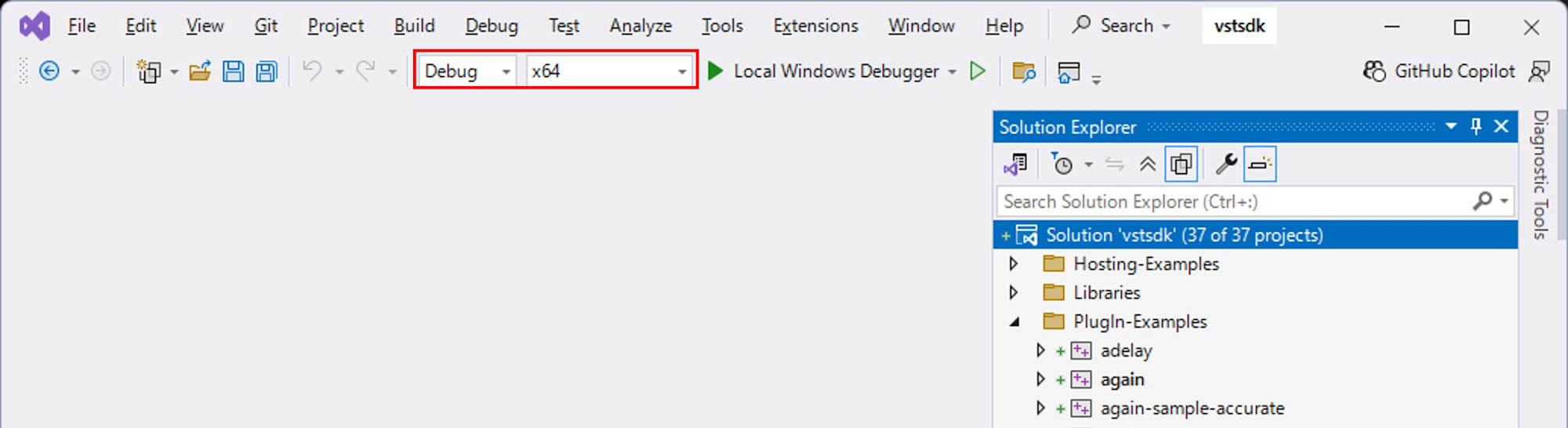
Close the properties window with OK. Make sure the configuration is
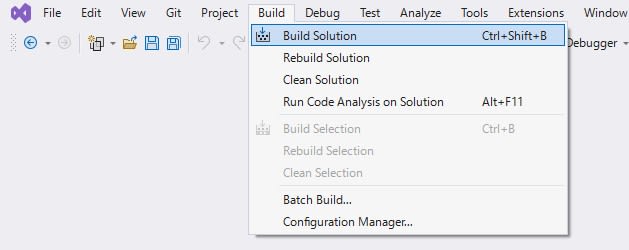
Debugand the platform isx64. Build the files with Build > Build Solution.
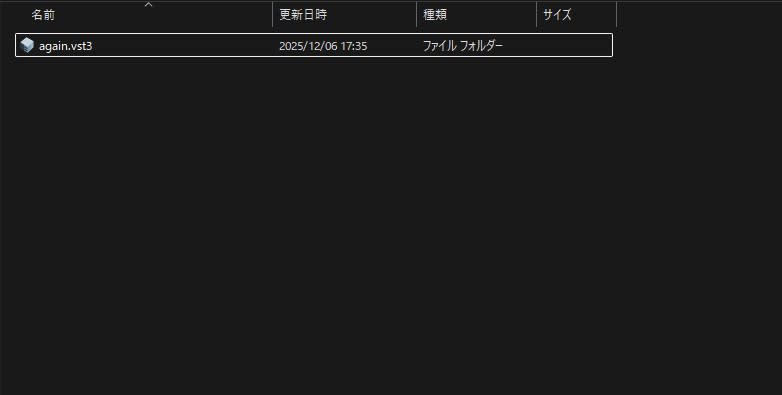
After a successful build, again.vst3 will be generated in build/VST3/Debug.
Preparing VST3PluginTestHost
VST3PluginTestHost is provided as part of the full VST3 SDK. Download the full SDK zip from the official site. After extracting, find and extract VST3PluginTestHost_x64_Installer_x.xx.xx.zip from the following path:
VST_SDK/
  vst3sdk/
    bin/
      Windows_x64/
        VST3PluginTestHost_x64_Installer_x.xx.xx.zip
Running the extracted VST3PluginTestHost_x64.msi will install VST3PluginTestHost.

Launching the Host from Visual Studio for Debugging
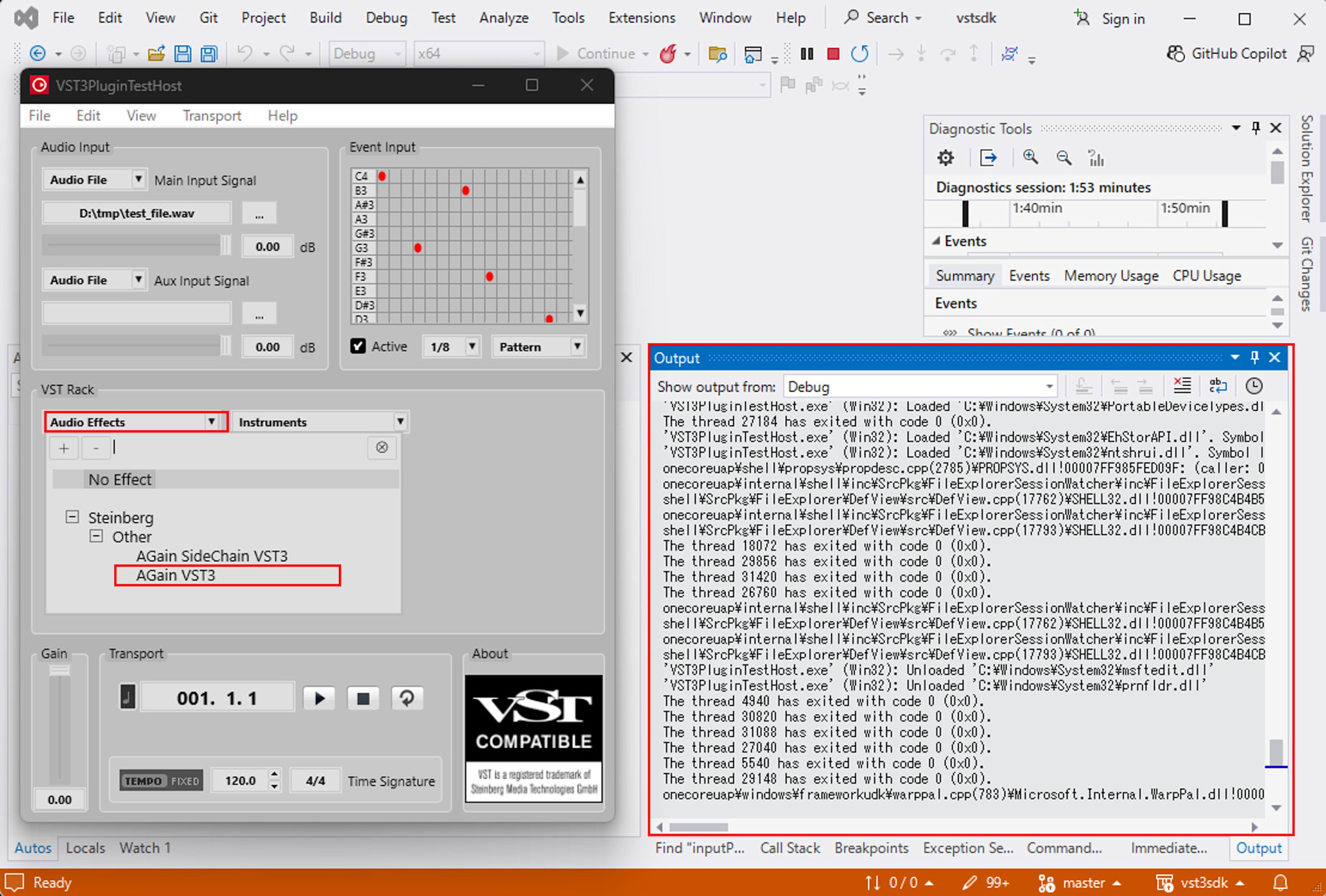
To observe AGain's behavior, we'll launch VST3PluginTestHost from Visual Studio with the debugger attached, and view logs through OutputDebugString.
-
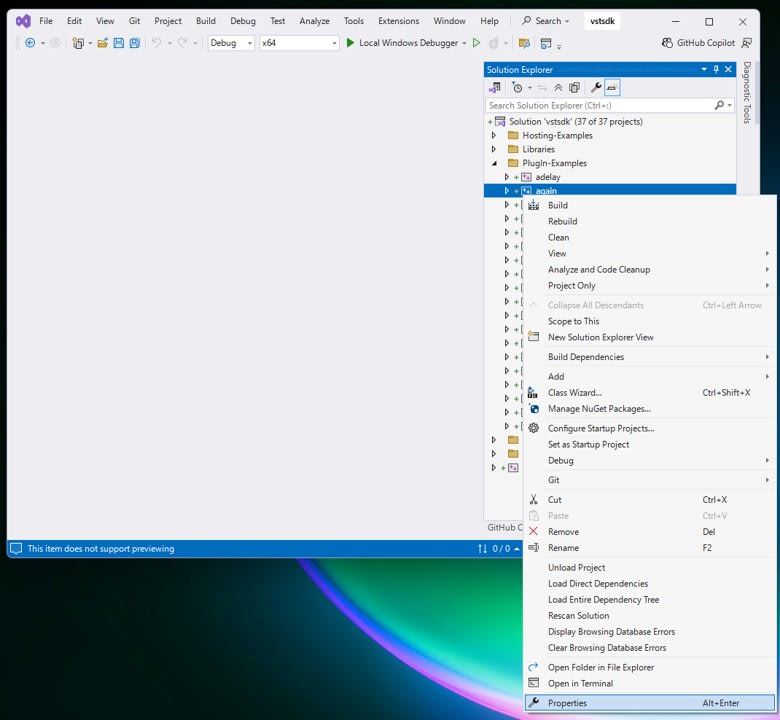
In Visual Studio's Solution Explorer, right-click on the
Plugin-Examples > againproject and open its properties.
-
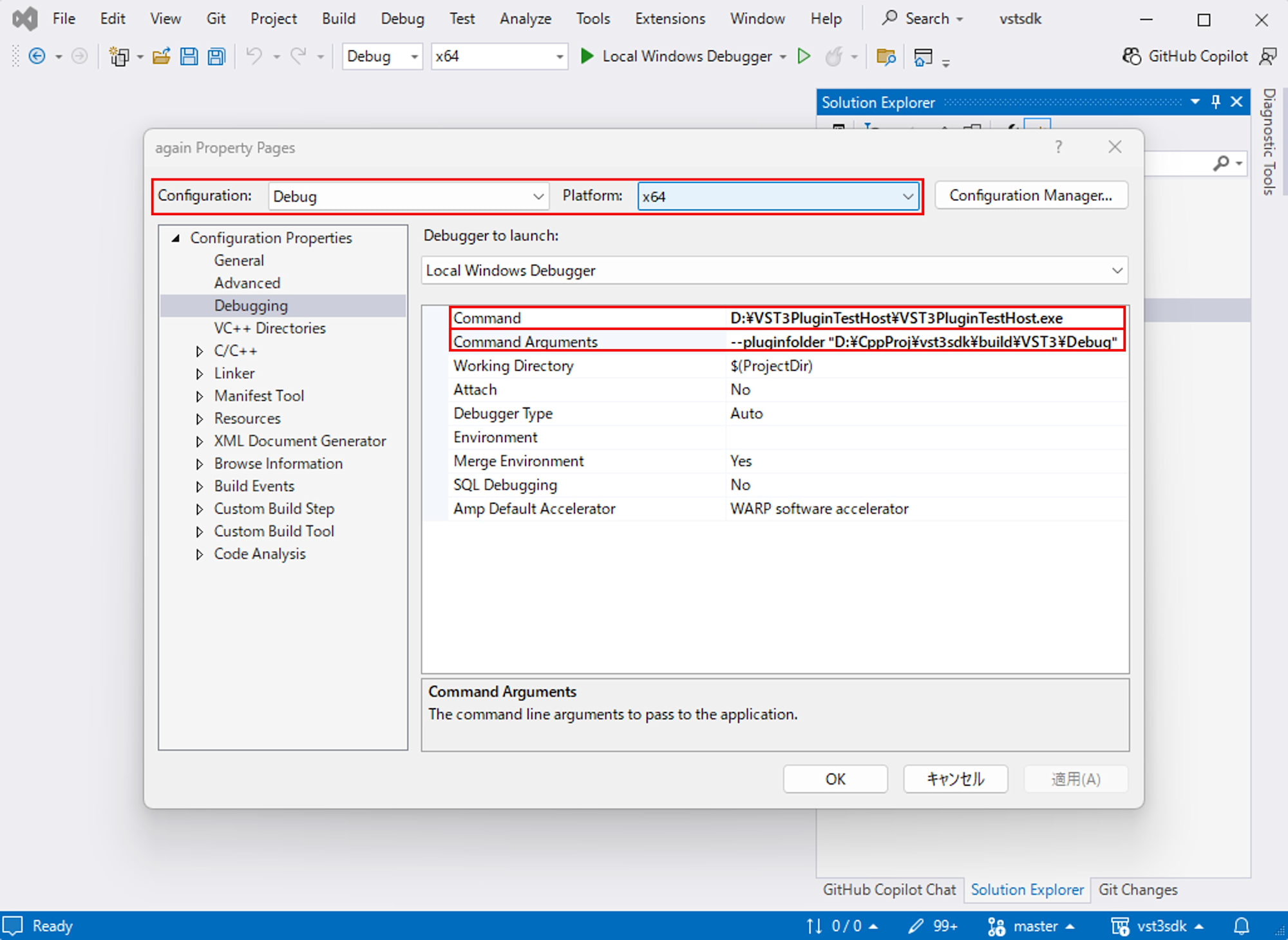
Verify that
Configuration: DebugandPlatform: x64are selected, then go to "Configuration Properties > Debugging" and set the following:- Command:
C:\path\to\VST3PluginTestHost.exe(path to the VST3PluginTestHost.exe installed earlier) - Command Arguments:
--pluginfolder "C:\path\to\build\VST3\Debug"(folder containing the built again.vst3)
- Command:
-
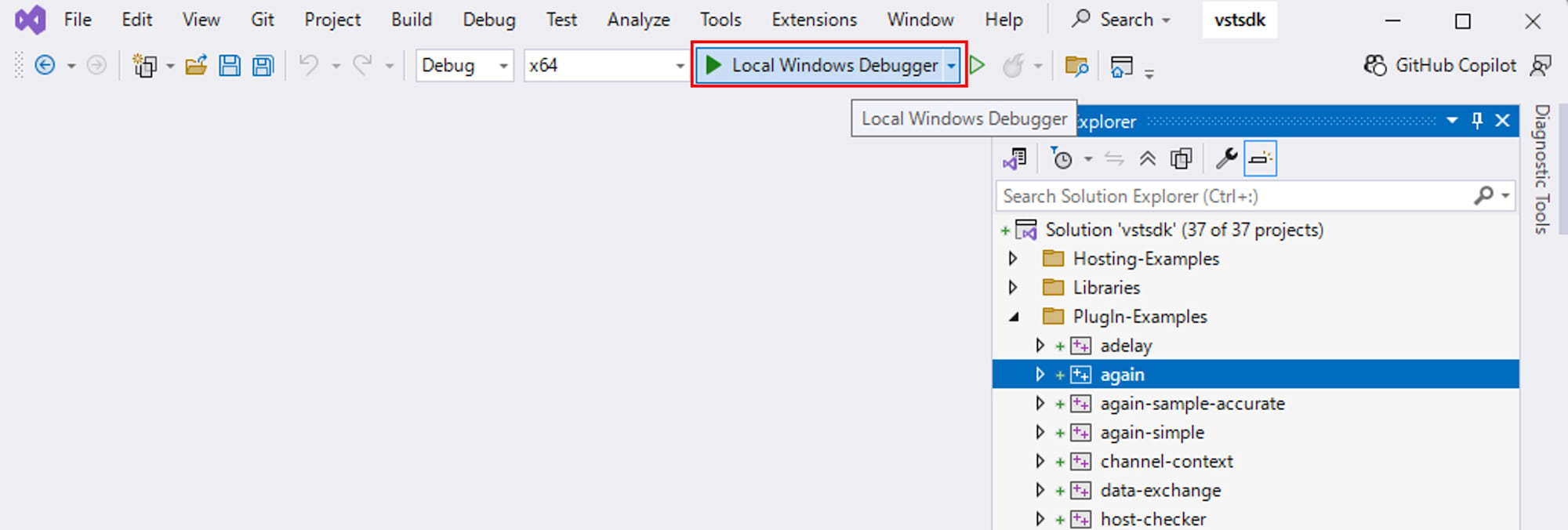
Close the properties window with OK, and with configuration set to
Debug x64, pressLocal Windows Debuggeror F5 to launch VST3PluginTestHost with the debugger attached.
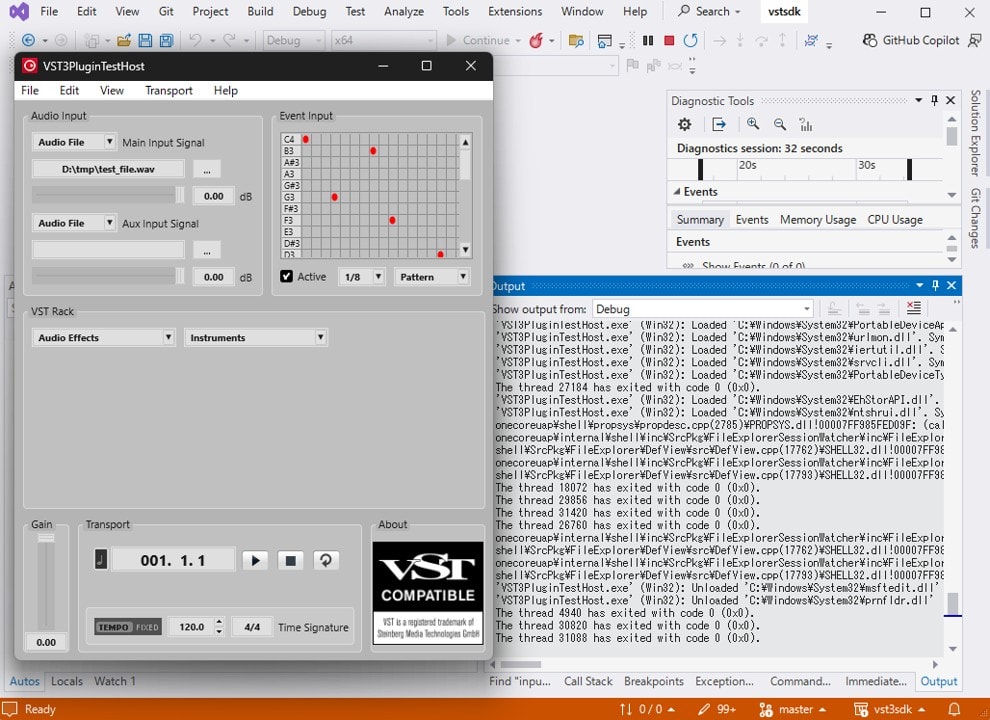
In this state, when you load AGain and start playback, content output from AGain's code via OutputDebugStringA will appear in Visual Studio's Output window.
Where are UI and DSP Values Synchronized?
In VST3, parameter synchronization doesn't happen directly between UI and DSP, but is relayed through the host.
- The UI side calls
beginEdit,performEdit, andendEditfrom the Controller to notify the host - The DSP side receives
inputParameterChangesinprocess()and applies it to processing - If the DSP side returns values such as meter readings to the host, it uses
outputParameterChanges - Returned values are notified to the Controller as
setParamNormalizedfrom the host
Common Logging Function
To verify the above specifications through logs, I introduced the following logging functions in again.cpp and againcontroller.cpp:
Logging Functions
#if defined(_WIN32) && defined(_DEBUG)
#include <windows.h>
#include <cstdarg>

static void DbgPrintf(const char* fmt, ...)
{
	char buf[1024];
	va_list args;
	va_start(args, fmt);
	vsnprintf(buf, sizeof(buf), fmt, args);
	va_end(args);
	OutputDebugStringA(buf);
}

static DWORD Tid()
{
	return GetCurrentThreadId();
}
#else
static void DbgPrintf(const char*, ...) {}
static unsigned long Tid() { return 0; }
#endif
Verifying UI to DSP Synchronization with Logs
First, let's look at the path from UI operations to DSP.
I added logs to beginEdit, performEdit, and endEdit in againcontroller.cpp. What I want to confirm here is that "performEdit is called during UI operations."
Excerpt from againcontroller.cpp
tresult PLUGIN_API AGainController::beginEdit(ParamID tag)
{
	DbgPrintf("[AGain][C] beginEdit tag=%u tid=%lu\n",
		static_cast<unsigned>(tag), static_cast<unsigned long>(Tid()));
	return EditControllerEx1::beginEdit(tag);
}

tresult PLUGIN_API AGainController::performEdit(ParamID tag, ParamValue valueNormalized)
{
	DbgPrintf("[AGain][C] performEdit tag=%u value=%.9f tid=%lu\n",
		static_cast<unsigned>(tag),
		static_cast<double>(valueNormalized),
		static_cast<unsigned long>(Tid()));
	return EditControllerEx1::performEdit(tag, valueNormalized);
}

tresult PLUGIN_API AGainController::endEdit(ParamID tag)
{
	DbgPrintf("[AGain][C] endEdit tag=%u tid=%lu\n",
		static_cast<unsigned>(tag), static_cast<unsigned long>(Tid()));
	return EditControllerEx1::endEdit(tag);
}
Next, I added logs to the section in again.cpp where inputParameterChanges is read in process(). In the modified files, logs are output only when the values for Gain and Bypass change significantly. If this log appears after the UI's performEdit, it will show both in implementation and logs that UI operations are reflected on the DSP side through the host.
Excerpt from again.cpp
case kGainId:
{
	const float newGain = static_cast<float>(value);
	// Log only when it actually changes meaningfully.
	if (std::fabs(newGain - sLastLoggedGain) > 1e-7f)
	{
		sLastLoggedGain = newGain;
		DbgPrintf("[AGain][P] inputParameterChanges tag=%u points=%d lastOffset=%d value=%.9f tid=%lu\n",
			static_cast<unsigned>(pid),
			static_cast<int>(numPoints),
			static_cast<int>(sampleOffset),
			static_cast<double>(newGain),
			static_cast<unsigned long>(Tid()));
	}
	fGain = newGain;
	break;
}

case kBypassId:
{
	const bool newBypass = (value > 0.5f);
	if (newBypass != sLastLoggedBypass)
	{
		sLastLoggedBypass = newBypass;
		DbgPrintf("[AGain][P] inputParameterChanges tag=%u points=%d lastOffset=%d value=%d tid=%lu\n",
			static_cast<unsigned>(pid),
			static_cast<int>(numPoints),
			static_cast<int>(sampleOffset),
			newBypass ? 1 : 0,
			static_cast<unsigned long>(Tid()));
	}
	bBypass = newBypass;
	break;
}
Verifying DSP to Controller Synchronization with Logs
Next, let's check the path where the DSP side returns values and the Controller is updated. AGain returns a parameter for the VU meter, so I added logs there.
I modified outputParameterChanges in again.cpp:
Excerpt from again.cpp
#if defined(_WIN32) && defined(_DEBUG)
	// [Verification 2] Processor -> Host output queue logging
	DbgPrintf("[AGain][P] outputParameterChanges tag=%u offset=%d value=%.9f tid=%lu\n",
		static_cast<unsigned>(kVuPPMId),
		0,
		static_cast<double>(fVuPPM),
		static_cast<unsigned long>(Tid()));
#endif
I added logs to setParamNormalized in againcontroller.cpp. If these two appear as a pair in the observations, it will show that the output from the DSP side is returned to the Controller through the host.
Excerpt from againcontroller.cpp
tresult PLUGIN_API AGainController::setParamNormalized(ParamID tag, ParamValue value)
{
#if defined(_WIN32) && defined(_DEBUG)
	// [Verification 2] Host -> Controller update logging (VuMeter only, to avoid spam)
	if (tag == kVuPPMId)
	{
		static ParamValue sLastLogged = -1.0;
		if (std::fabs(value - sLastLogged) > 1e-12)
		{
			sLastLogged = value;
			DbgPrintf("[AGain][C] setParamNormalized tag=%u value=%.9f tid=%lu\n",
				static_cast<unsigned>(tag),
				static_cast<double>(value),
				static_cast<unsigned long>(Tid()));
		}
	}
#endif
	// called from host to update our parameters state
	return EditControllerEx1::setParamNormalized(tag, value);
}
Log Output Results and Analysis
First, I opened AGain's editor in VST3PluginTestHost and operated the Gain bar. An excerpt of the logs observed during operation is as follows:
[AGain][P] process first call tid=25828
[AGain][C] beginEdit tag=0 tid=17052
[AGain][C] performEdit tag=0 value=0.194444448 tid=17052
[AGain][P] inputParameterChanges tag=0 points=1 lastOffset=0 value=0.194444448 tid=5552
[AGain][C] performEdit tag=0 value=0.203703701 tid=17052
[AGain][P] inputParameterChanges tag=0 points=1 lastOffset=0 value=0.203703701 tid=5552
...
[AGain][C] endEdit tag=0 tid=17052
beginEditandendEditrepresent a single operation unit, withperformEditcalled repeatedly in between- The
valueinperformEditmatches thevalueobserved ininputParameterChangeson the Processor side, showing that UI operation values are passed to the processing thread via the host - Looking at
tid, the Controller logs and Processor logs have different values, indicating that UI processing and audio processing can run on separate threads
From the above, we can organize that the reflection from UI to DSP is notified from the Controller's performEdit to the host, and then passed to the Processor side as inputParameterChanges in process().
Who Controls the Creation and Destruction of the Editor View?
In VST3, the host calls the Controller's createView and passes editor as the requested ViewType. The fact that ViewType::kEditor is editor is documented in the documentation. Therefore, when to create and when to destroy the editor View is strongly influenced by the host's UI operations.
The host calls createView to generate the View, calls attached when displaying it, and removed when hiding it. Next, I'll confirm with logs that creation and destruction are repeated when opening and closing repeatedly.
Implementation to Track View Creation and Destruction in Logs
I observe the moment when the View is attached to the host's window and detached from it with attached and removed. Additionally, I placed a log in the destructor to check if destruction is reached. I also used GetWindowThreadProcessId to check the thread owner of the parent window. This function is described in the documentation as "retrieve the identifier of the thread that created the specified window."
I changed createView in againcontroller.cpp as follows:
Excerpt from againcontroller.cpp
IPlugView* PLUGIN_API AGainController::createView(const char* _name)
{
	DbgPrintf("[AGain][UI] createView name=%s tid=%lu\n",
		_name ? _name : "(null)", static_cast<unsigned long>(Tid()));

	ConstString name(_name);
	if (name == ViewType::kEditor)
	{
		auto* view = new LoggingVST3Editor(this, "view", "again.uidesc");
		DbgPrintf("[AGain][UI] createView -> editor view=%p\n", view);
		return view;
	}

	DbgPrintf("[AGain][UI] createView -> nullptr (not editor)\n");
	return nullptr;
}
I also modified LoggingVST3Editor as follows:
Excerpt from againcontroller.cpp
class LoggingVST3Editor final : public VST3Editor
{
public:
	using VST3Editor::VST3Editor;

	tresult PLUGIN_API attached(void* parent, const char* type) SMTG_OVERRIDE
	{
		DbgPrintf("[AGain][UI] attached type=%s parent=%p tid=%lu\n",
			type ? type : "(null)", parent, static_cast<unsigned long>(Tid()));

#if defined(_WIN32) && defined(_DEBUG)
		if (type && strcmp(type, kPlatformTypeHWND) == 0)
		{
			HWND hwnd = reinterpret_cast<HWND>(parent);
			DbgPrintf("[AGain][UI] parent HWND=%p IsWindow=%d\n", hwnd, IsWindow(hwnd) ? 1 : 0);

			DWORD pid = 0;
			DWORD ownerTid = GetWindowThreadProcessId(hwnd, &pid);
			DbgPrintf("[AGain][UI] parent HWND ownerTid=%lu currentTid=%lu pid=%lu\n",
				static_cast<unsigned long>(ownerTid),
				static_cast<unsigned long>(Tid()),
				static_cast<unsigned long>(pid));
		}
#endif
		return VST3Editor::attached(parent, type);
	}

	tresult PLUGIN_API removed() SMTG_OVERRIDE
	{
		DbgPrintf("[AGain][UI] removed tid=%lu\n", static_cast<unsigned long>(Tid()));
		return VST3Editor::removed();
	}

	~LoggingVST3Editor() override
	{
		DbgPrintf("[AGain][UI] ~LoggingVST3Editor tid=%lu\n", static_cast<unsigned long>(Tid()));
	}
};
Does Creation and Destruction Occur Every Time When Opening and Closing Repeatedly?
I opened and closed the editor display in VST3PluginTestHost multiple times and checked the logs.
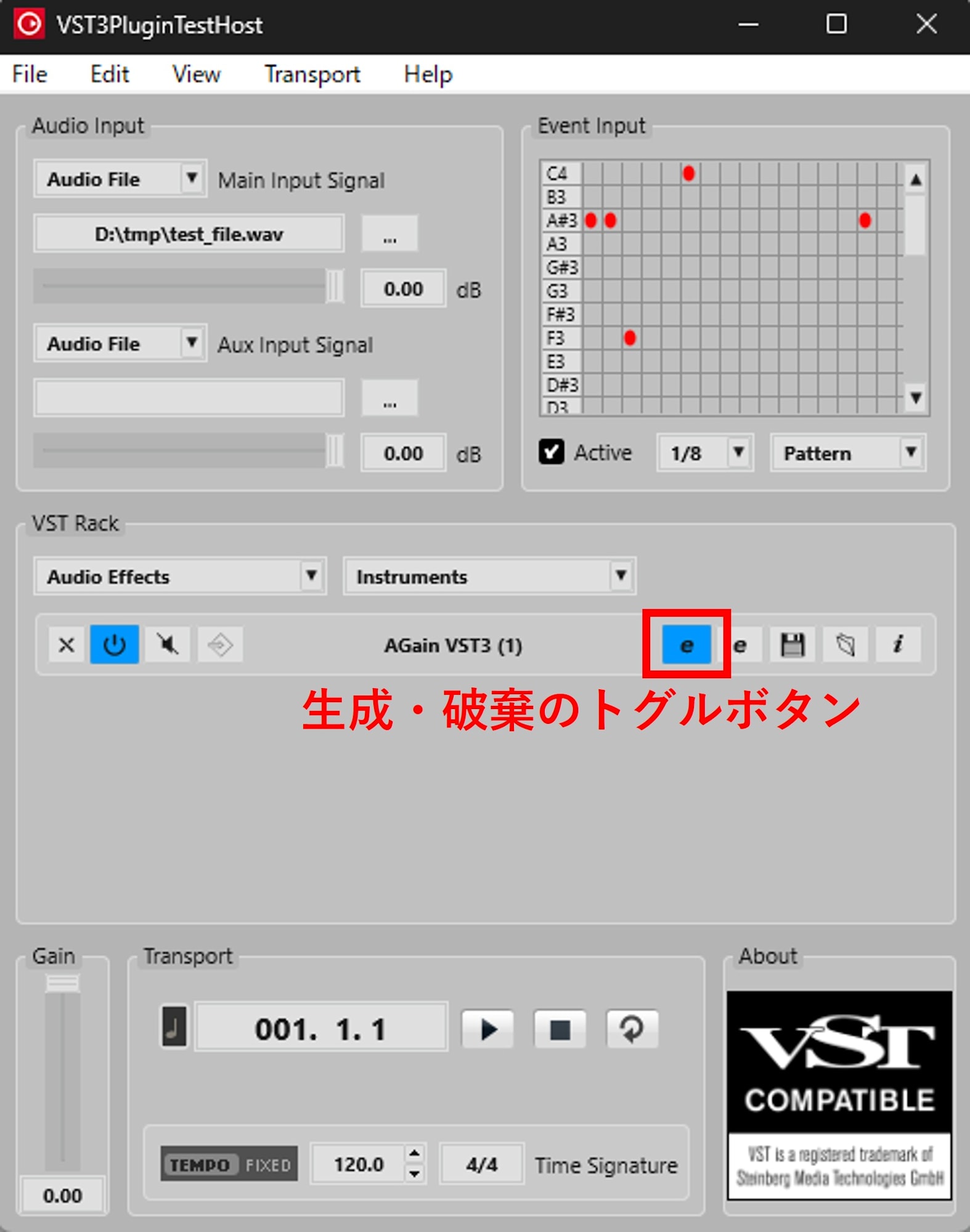
An excerpt of the logs is as follows:
[AGain][UI] createView name=editor tid=15000
[AGain][UI] attached type=HWND parent=... tid=15000
[AGain][UI] removed tid=15000
[AGain][UI] ~LoggingVST3Editor tid=15000

[AGain][UI] createView name=editor tid=15000
[AGain][UI] attached type=HWND parent=... tid=15000
[AGain][UI] removed tid=15000
[AGain][UI] ~LoggingVST3Editor tid=15000

[AGain][UI] createView name=editor tid=15000
[AGain][UI] attached type=HWND parent=... tid=15000
[AGain][UI] removed tid=15000
[AGain][UI] ~LoggingVST3Editor tid=15000
The logs show that createView is called each time the editor is opened, and removed and the destructor are called corresponding to closing operations. At least with this operation in VST3PluginTestHost, we observe that the editor View is not retained and reused, but created for each display and destroyed upon hiding.
In the logs, at least the following sequence is repeatedly observed every time the editor is opened and closed:
createViewattachedremoved~LoggingVST3Editor
From this result, we can see that, at least with this operation in VST3PluginTestHost, the editor View is not reused but is created each time it is opened and destroyed each time it is closed.
In terms of design, it's safer to write with the assumption that initialization and release are repeated following opening and closing rather than assuming the View is resident.
Do Controller Updates and DSP Updates Continue After Closing the Editor?
After closing the plugin's editor, I changed the Gain using the host's Generic Editor.
The observed logs were as follows:
[AGain][UI] removed tid=27288
[AGain][UI] ~LoggingVST3Editor tid=27288
...
[AGain][P] inputParameterChanges tag=0 ... tid=26564
...
[AGain][P] outputParameterChanges tag=1 ... tid=26564
[AGain][C] setParamNormalized tag=1 ... tid=27288
This result indicates the need to design parameter synchronization separately from the presence of the View. Even when the View is closed, the host can pass parameters to the DSP. And the output from the DSP side can return as setParamNormalized to the Controller.
- The editor View is detached
- The View's destructor is called
- The DSP side's
inputParameterChangescontinues after that - The DSP side's
outputParameterChangescontinues after that - The Controller side's
setParamNormalizedcontinues after that
The important point is that the following two are separate things:
- Whether the editor View exists
- Whether parameter synchronization is performed
Even when the View does not exist, we can confirm that the host continues to pass parameters to the DSP, the DSP continues to return values to the host, and the Controller continues to be updated.
Conclusion
I confirmed through observation of actual logs that VST3 parameter synchronization is not direct communication between UI and DSP but notification through the host. By mapping beginEdit, performEdit, endEdit, and process()'s inputParameterChanges in logs, we can explain when UI operation values are passed to the processing thread. Also, I observed that while the editor View can be repeatedly created and destroyed following opening and closing, parameter synchronization can continue even when the View is closed. Designing with the View lifecycle and synchronization paths separated will form the foundation for UI implementations that are robust to opening and closing and host integration.