Exploring the Potential of Amazon Verified Permissions as a Web API Access Controller

This page has been translated by machine translation. View original
Amazon Verified Permissions (AVP) has been generally available for about 2 years, but there aren't many technical articles or practical examples in Japanese.
I myself only recently discovered its existence by chance, became interested, and decided to try it out.
In this article, I'd like to introduce the possibilities of AVP as a service for implementing access control for Web APIs, based on my hands-on experience, including technical aspects and impressions!
What is AVP?
AVP (Amazon Verified Permissions) is a cloud-based access control service provided by Amazon.
It offers key features to flexibly and powerfully implement the access control portion of application authorization processes.
- Policy language (Cedar) for flexible rule description
- Policy store (centralized policy management and versioning)
- Policy engine (fast evaluation and decision processing)
The main feature of AVP is the ability to implement fine-grained access control based on policies (PBAC: Policy-Based Access Control) using Cedar.
Cedar is a policy language developed by Amazon, characterized by its ability to describe access control rules in a human-readable format.
As a policy language from Amazon, it has a structure similar to IAM policies.
While IAM policies are specialized for AWS service access control, Cedar is designed as a more general-purpose policy language.
Cedar itself is released as open source, and AVP is an access control service based on Cedar.
If you want to get a feel for AVP, check out the tutorial in the video below:
https://www.youtube.com/watch?v=OBrSrzfuWhQ
What is Cedar?
Cedar is a policy language and evaluation engine developed by Amazon.
The main feature of Cedar is that access control rules (policies) can be described in a human-readable format while being mechanically verifiable.
By describing policies in Cedar language and evaluating them with the Cedar engine, flexible and robust access control is achieved.
The basic structure of Cedar consists of three elements:
- Principal: The entity requesting access (users, groups, etc.)
- Action: The operation being performed (type of operation or method)
- Resource: The target resource for access (target resource or data)
For example, you can write Cedar policies like this:
permit (
  principal in PhotoFlash::User::"Alice",
  action in PhotoFlash::Action::"SharePhotoLimitedAccess",
  resource in PhotoFlash::Photo::"VacationPhoto94.jpg"
);
In this example, "permit" allows the user "Alice" (principal) to perform the "SharePhotoLimitedAccess" operation (action) on the photo "VacationPhoto94.jpg" (resource).
Through these combinations, Cedar can implement various access control models:
- RBAC (Role-Based Access Control): Access control based on user roles
- ABAC (Attribute-Based Access Control): Access control based on user or resource attributes
- ReBAC (Relationship-Based Access Control): Access control based on relationships between users
In recent years, other FGAC (Fine-Grained Access Control) solutions like OpenFGA, which was open-sourced by Auth0, have also gained attention.
Looking at these trends, I get the impression that there's a need for a separate layer of access control beyond what authentication platforms like Cognito or Auth0 can provide.
Hands-on Implementation
Let's now look at implementing Web API access control using AVP.
I envisioned the following use case:
- Use Case
- A multi-tenant application providing Web APIs
- One user can belong to multiple tenants
- Access control for resources linked to each tenant
- Users can only access resources of tenants they belong to
- Access control for machine-to-machine (M2M) communications using client credentials flow
Specifically, I prepared the following Web API endpoints:
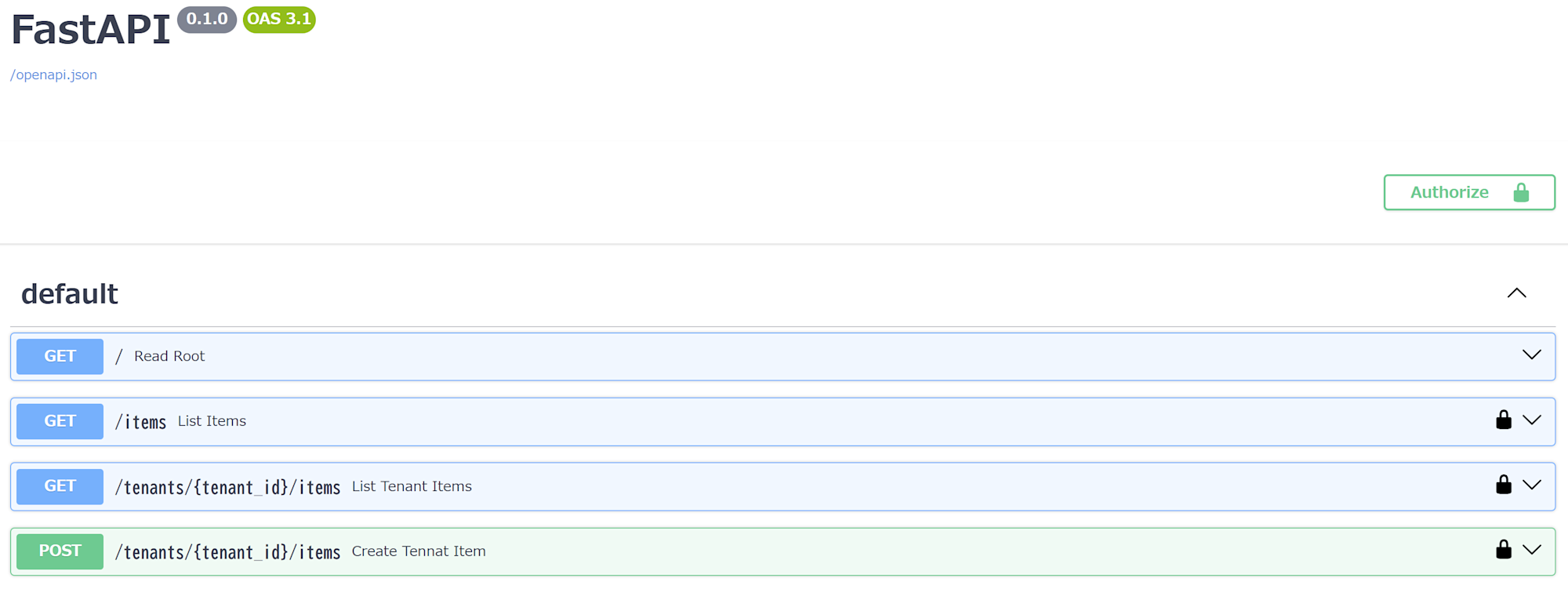
GET /items- API to retrieve a list of all items
- Accessible to all users/clients (but limited to the scope of their affiliated tenants)
GET /tenants/{tenant_id}/items- API to retrieve a list of items for a specific tenant
- Accessible only if affiliated with the specified tenant ID
tenant_id
POST /tenants/{tenant_id}/items- API to add an item to a specific tenant
- Accessible only if affiliated with the specified tenant ID
tenant_id
Preparation
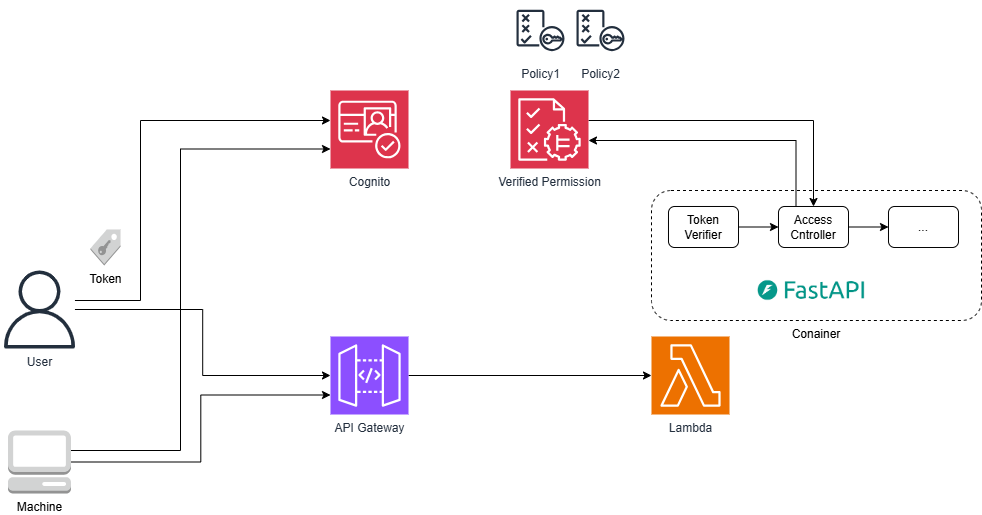
For this implementation, I adopted a configuration using API Gateway (REST API) + Lambda function container + AVP + Cognito User Pool, and used Terraform for infrastructure provisioning.
I also used FastAPI as the application framework and implemented it in Python.
For a complete deployment of all resources and code, refer to this GitHub repository.
Here, I'll focus on introducing the key components such as Cedar schema and policy definitions, FastAPI code, and Terraform configuration files.
Cedar Schema
First, let's define the Cedar schema.
The schema defines the types of entities and actions used in Cedar policies for the policy store.
I'm not sure if this is the correct explanation, but it's like a DB table schema.
For this implementation, I defined the following schema based on information from AVP demos:
Points to note:
- Defining parent-child relationships between
UserandTenantinentityTypes - Defining API paths directly in
actions - Not using Resources for the most part
As I'll explain later, in our policies, we don't really use Resources but instead control access based on Action paths.
{
  "FastapiApp": {
    "commonTypes": {
      "PersonType": {
        "type": "Record",
        "attributes": {
          "email": {
            "type": "String"
          }
        }
      },
      "ContextType": {
        "type": "Record",
        "attributes": {
          "authenticated": {
            "type": "Boolean",
            "required": true
          }
        }
      }
    },
    "entityTypes": {
      "User": {
        "shape": {
          "type": "Record",
          "attributes": {
            "sub": {
              "type": "String"
            },
            "personInformation": {
              "type": "PersonType"
            }
          }
        },
        "memberOfTypes": [
          "Tenant"
        ]
      },
      "Client": {
        "shape": {
          "type": "Record",
          "attributes": {}
        }
      },
      "Tenant": {
        "shape": {
          "type": "Record",
          "attributes": {}
        }
      },
      "Application": {
        "shape": {
          "type": "Record",
          "attributes": {}
        },
        "memberOfTypes": [
          "Tenant"
        ]
      }
    },
    "actions": {
      "get /tenants/{tenant_id}/items": {
        "appliesTo": {
          "principalTypes": [
            "Tenant",
            "Client"
          ],
          "resourceTypes": [
            "Application"
          ],
          "context": {
            "type": "ContextType"
          }
        }
      },
      "post /tenants/{tenant_id}/items": {
        "appliesTo": {
          "principalTypes": [
            "Tenant",
            "Client"
          ],
          "resourceTypes": [
            "Application"
          ],
          "context": {
            "type": "ContextType"
          }
        }
      },
      "get /items": {
        "appliesTo": {
          "principalTypes": [
            "Tenant",
            "Client"
          ],
          "resourceTypes": [
            "Application"
          ],
          "context": {
            "type": "ContextType"
          }
        }
      }
    }
  }
}
Code: https://github.com/seiichi1101/avp-sample-with-fastapi/blob/main/terraform/cedar/cedarschema.json
Policy1
After defining the schema, let's register policies.
This policy allows authenticated users to access the get /items API:
permit (
  principal,
  action in FastapiApp::Action::"get /items",
  resource
);
Code: https://github.com/seiichi1101/avp-sample-with-fastapi/blob/main/terraform/cedar/policy1.cedar
Policy2
Next, a policy that allows users belonging to the specific tenant classmethod to perform specific operations (listing and adding) on that tenant's resources.
While the when clause may seem redundant, the part resource in FastapiApp::Tenant::"classmethod" is important as it ensures users belonging to the classmethod tenant cannot access resources of other tenants.
permit (
  principal in FastapiApp::Tenant::"classmethod",
  action in
    [FastapiApp::Action::"get /tenants/{tenant_id}/items",
     FastapiApp::Action::"post /tenants/{tenant_id}/items"],
  resource
)
when
{
  principal in FastapiApp::Tenant::"classmethod" &&
  resource in FastapiApp::Tenant::"classmethod"
};
Code: https://github.com/seiichi1101/avp-sample-with-fastapi/blob/main/terraform/cedar/policy2.cedar
Policy3
Similar to Policy2, this policy allows users belonging to the specific tenant annotation to perform specific operations (listing and adding) on that tenant's resources.
permit (
  principal in FastapiApp::Tenant::"annotation",
  action in
    [FastapiApp::Action::"get /tenants/{tenant_id}/items",
     FastapiApp::Action::"post /tenants/{tenant_id}/items"],
  resource
)
when
{
  principal in FastapiApp::Tenant::"annotation" &&
  resource in FastapiApp::Tenant::"annotation"
};
Code: https://github.com/seiichi1101/avp-sample-with-fastapi/blob/main/terraform/cedar/policy3.cedar
Policy4 by Policy Template
Here, we use AVP's policy template feature to register a policy for access using the client credentials flow (Machine to Machine).
?principal is a placeholder in the policy template, which is replaced with actual values when registering the policy.
In this case, I set the clientId of the M2M client issued by Cognito.
Policies associated with policy templates can reflect changes from the template side.
As you can see from the template below, I've configured ReadOnly access for M2M access.
- template
permit (
  principal == ?principal,
  action in [FastapiApp::Action::"get /tenants/{tenant_id}/items"],
  resource
);
Below is the actual policy created from the template:
- policy
permit (
    principal == FastapiApp::Client::"6tpsbt0o9hbjrso9at1m59g74j",
    action in [FastapiApp::Action::"get /tenants/{tenant_id}/items"],
    resource
);
Code: https://github.com/seiichi1101/avp-sample-with-fastapi/blob/main/terraform/cedar/template1.cedar
Python Code (Access Control Part)
The FastAPI code for actual access control is implemented as follows:
The key point is that when requesting access evaluation from AVP, we include the parent-child relationship information between users and tenants in the entities parameter.
This indicates that AVP or Cedar itself doesn't have functionality to manage entity information like users and tenants, so we need a separate mechanism (referred to as an entity store) to provide the necessary information to AVP.
In this case, we're using Cognito User Pool's users and groups information, so part of Cognito functions as the entity store, but there are no specific restrictions.
You could also design your own entity store independently of your ID platform's access control and provide the necessary information to AVP.
        # action_id is dynamically set based on the API request path
        action_id = f"{request.method.lower()} {request.scope["route"].path}"
        # Get tenant ID from the path
        path_tenant_id = request.path_params.get("tenant_id")
        # Determine if it's a user access or client access from the verified token payload
        is_user_access = payload.get("username")

        if is_user_access:
            # User access control
            avp_input = {
                "policyStoreId": POLICY_STORE_ID,
                "principal": {
                    "entityType": "FastapiApp::User",
                    "entityId": payload.get("sub"),
                },
                "action": {
                    "actionType": "FastapiApp::Action",
                    "actionId": action_id
                },
                "resource": {
                    "entityType": "FastapiApp::Application",
                    "entityId": "Any"
                },
                "entities": { # Pass parent-child relationship information between users and tenants to AVP
                    "entityList": [
                        {
                            "identifier": {
                                "entityType": "FastapiApp::User",
                                "entityId": payload.get("sub")
                            },
                            "parents": list(map(
                                lambda tenant_id: {
                                    "entityType": "FastapiApp::Tenant",
                                    "entityId": tenant_id
                                },
                                payload.get("cognito:groups", [])
                            ))
                        },
                        {
                            "identifier": {
                                "entityType": "FastapiApp::Application",
                                "entityId": "Any" # Fixed to Any since we're not explicitly specifying the Resource
                            },
                            "parents": [
                                {
                                    "entityType": "FastapiApp::Tenant",
                                    "entityId": path_tenant_id # Set the tenant ID from the request path as the parent of the resource
                                }] if path_tenant_id else []
                        }
                    ]
                }
            }
            avp_result = avp_client.is_authorized(**avp_input) # Send access control request to AVP
            if avp_result.get("decision") != "ALLOW":
                raise HTTPException(
                    status_code=status.HTTP_403_FORBIDDEN,
                    detail="Not authorized",
                    headers={"WWW-Authenticate": "Bearer"}
                )
            return User(
                sub=payload.get("sub"),
                tenants=payload.get("cognito:groups", [])
            )
        else:
            # Client access control
            avp_input = {
                "policyStoreId": POLICY_STORE_ID,
                "principal": {
                    "entityType": "FastapiApp::Client",
                    "entityId": payload.get("client_id"),
                },
                "action": {
                    "actionType": "FastapiApp::Action",
                    "actionId": action_id
                },
                "resource": {
                    "entityType": "FastapiApp::Application",
                    "entityId": "Any"
                }
            }
            avp_result = avp_client.is_authorized(**avp_input)
            if avp_result.get("decision") != "ALLOW":
                raise HTTPException(
                    status_code=status.HTTP_403_FORBIDDEN,
                    detail="Not authorized",
                    headers={"WWW-Authenticate": "Bearer"}
                )
            return Client(
                id=payload.get("client_id")
            )
...
Code: https://github.com/seiichi1101/avp-sample-with-fastapi/blob/main/app/auth.py
Cognito User Pool Configuration
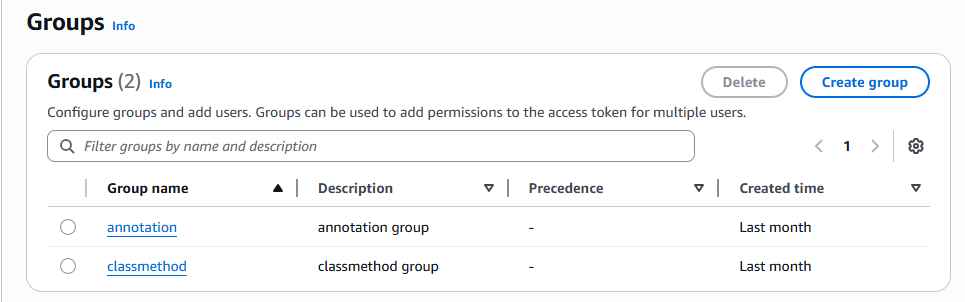
We use Cognito User Pool's group functionality to create users and groups, and associate users with groups.
Verifying Access Control
Let's verify if access control based on tenant and user attributes works for each use case.
Access by users belonging to the specific tenant classmethod
- For
GET /items, can retrieve the list of items for their tenantclassmethod
curl -X 'GET' \
  'https://example.execute-api.ap-northeast-1.amazonaws.com/items' \
  -H 'accept: application/json' \
  -H 'Authorization: Bearer <token>'

[
  {
    "id": 1,
    "tenant_id": "classmethod"
  },
  {
    "id": 2,
    "tenant_id": "classmethod"
  },
  {
    "id": 3,
    "tenant_id": "classmethod"
  }
]
- Can retrieve items list with
GET /tenants/classmethod/items
curl -X 'GET' \
  'https://example.execute-api.ap-northeast-1.amazonaws.com/tenants/classmethod/items' \
  -H 'accept: application/json' \
  -H 'Authorization: Bearer <token>'

[
  {
    "id": 1,
    "tenant_id": "classmethod"
  },
  {
    "id": 2,
    "tenant_id": "classmethod"
  },
  {
    "id": 3,
    "tenant_id": "classmethod"
  }
]
- Cannot access
GET /tenants/annotation/items
curl -X 'GET' \
  'https://example.execute-api.ap-northeast-1.amazonaws.com/tenants/annotation/items' \
  -H 'accept: application/json' \
  -H 'Authorization: Bearer <token>'

{
  "detail": "Not authorized"
}
- Can add items with
POST /tenants/classmethod/items
curl -X 'POST' \
  'https://example.execute-api.ap-northeast-1.amazonaws.com/tenants/classmethod/items' \
  -H 'accept: application/json' \
  -H 'Authorization: Bearer <token>' \
  -d ''

{
  "id": 7,
  "tenant_id": "classmethod"
}
M2M Client Access Control
- For
GET /items, can retrieve the list of all items
curl -X 'GET' \
  'https://example.execute-api.ap-northeast-1.amazonaws.com/items' \
  -H 'accept: application/json' \
  -H 'Authorization: Bearer <token>'

[
  {
    "id": 1,
    "tenant_id": "classmethod"
  },
  {
    "id": 2,
    "tenant_id": "classmethod"
  },
  {
    "id": 3,
    "tenant_id": "classmethod"
  },
  {
    "id": 4,
    "tenant_id": "annotation"
  },
  {
    "id": 5,
    "tenant_id": "annotation"
  },
  {
    "id": 6,
    "tenant_id": "annotation"
  },
  {
    "id": 7,
    "tenant_id": "classmethod"
  }
]
- Can retrieve items list with
GET /tenants/classmethod/items
curl -X 'GET' \
  'https://example.execute-api.ap-northeast-1.amazonaws.com/tenants/classmethod/items' \
  -H 'accept: application/json' \
  -H 'Authorization: Bearer <token>'

[
  {
    "id": 1,
    "tenant_id": "classmethod"
  },
  {
    "id": 2,
    "tenant_id": "classmethod"
  },
  {
    "id": 3,
    "tenant_id": "classmethod"
  },
  {
    "id": 7,
    "tenant_id": "classmethod"
  }
]
- Cannot access
POST /tenants/classmethod/items
curl -X 'POST' \
  'https://example.execute-api.ap-northeast-1.amazonaws.com/tenants/classmethod/items' \
  -H 'accept: application/json' \
  -H 'Authorization: Bearer <token>' \
  -d ''

{
  "detail": "Not authorized"
}
Impressions
Here are some thoughts after actually using AVP and Cedar.
Design Skills Required
Cedar is a very flexible policy language that can express complex business logic and conditional access control.
However, its high degree of freedom demands good design skills.
For example, in this implementation, I set static values (paths) in policy Actions and didn't particularly set Resources, following AVP's demo examples.
This made the policy design relatively simple and easy to understand.
However, in practice, it might be more common to explicitly separate resources into Resources and actions into Actions.
Whether to set restricted resources in Actions or in Resources is a design consideration.
Although I didn't use it this time, you can write more abstract policies like this:
permit (
  principal,
  action in
    [FastapiApp::Action::"get /tenants/{tenant_id}/items",
     FastapiApp::Action::"post /tenants/{tenant_id}/items"],
  resource
)
when { principal in resource };
Here, the Actions are constrained by the policy, but as long as the condition "principal in resource" is met, it can apply to any resource.
In other words, if the principal and resource have the same parent, access is allowed for any resource.
Therefore, in this case, tenant membership verification logic is not evaluated on Cedar, so it needs to be explicitly implemented on the client side.
This policy simply states "if the parent is the same, allow for the following Actions."
In any case, since the access control part is difficult to change once implemented, it needs to be designed carefully with extensibility in mind, which requires strong design skills.
Here are some use case samples worth reviewing:
Entity Store Consideration Needed
AVP provides policy management and an evaluation engine, but information related to actual entities (users, resources) requires an external store.
As in this implementation, you can use authentication platform features as a pseudo-entity store, but for more flexible access control, it seems better to have your own entity store.
Especially when considering use in a microservice environment, the access control layer would likely sit above each service.
Since it significantly impacts the entire system, a mechanism for high availability and flexible integration needs to be considered.
What comes to mind immediately are data stores like DynamoDB or Moment that can handle high access with low latency, but sufficient verification including load testing seems necessary.
Policy Template Constraints
In policy templates, only principal and resource can be placeholders, not actions.
Also, there are certain constraints on templates, such as not being able to use ?principal in the when clause of a template policy.
I wanted to create a template like this, but it's not currently possible:
I need to deepen my understanding of Cedar itself to better understand these design principles.
permit (
  principal in ?principal,
  action in
    [FastapiApp::Action::"get /tenants/{tenant_id}/items",
     FastapiApp::Action::"post /tenants/{tenant_id}/items"],
  resource
)
when
{
  principal in ?principal &&
  resource in ?principal
};
https://docs.cedarpolicy.com/policies/templates.html
Operational Challenges
Creating policies can be difficult for those unfamiliar with Cedar language.
For instance, it would be challenging for non-engineers to directly add or edit policies (access control) from the AVP console.
Depending on the operational approach, if there's a use case involving non-engineers, some UI or tool wrapper might be needed.
Other Considerations
IsAuthorizedWithTokenusage might be questionable
Although I didn't use it this time, by adding IdP settings to AVP, AVP's IsAuthorizedWithToken can handle both "token validation" and "access control determination" when used.
This could be used like an introspection endpoint, but the lack of detailed information in failure responses makes it difficult to generate responses for clients on the application side.
Also, it's unclear how well it scales.
- AVP's automatic custom authorizer creation is useful as a tutorial
AWS Verified Permissions has an automatic setup feature that creates a Policy Store, Policies, and Lambda for API Gateway custom authorizers (including token verification and ACL) from API Gateway and IdP information.
However, in actual projects, resource and code management would be done with respective tools, and authorization code would need to handle various failure responses, so this might not be practical.
Still, it's great for understanding how to use AVP.
https://www.youtube.com/watch?v=OBrSrzfuWhQ
Conclusion
Cedar itself is a versatile policy language with high flexibility, but this also demands design skills.
In this use case, not using Resources made it relatively easy to understand, but if Resources were used seriously, policy design would become significantly more challenging.
For users who haven't deeply considered access control, it might be difficult to know where to start.
If you're one of them, please consider consulting with Classmethod!
I'm also looking forward to future updates and ecosystem development.