
Navigation Stack's onAppear fires at unexpected times in apps built with Xcode 16.3 or later

This page has been translated by machine translation. View original
Currently, I am developing an app using Xcode 16.2 and investigating how to update the development environment to Xcode 16.4.
However, I discovered an issue where onAppear fires at unexpected times during screen transitions using SwiftUI's NavigationStack in apps built with Xcode 16.3 or later. This article introduces the phenomenon and workarounds for the problem.
Problem Overview
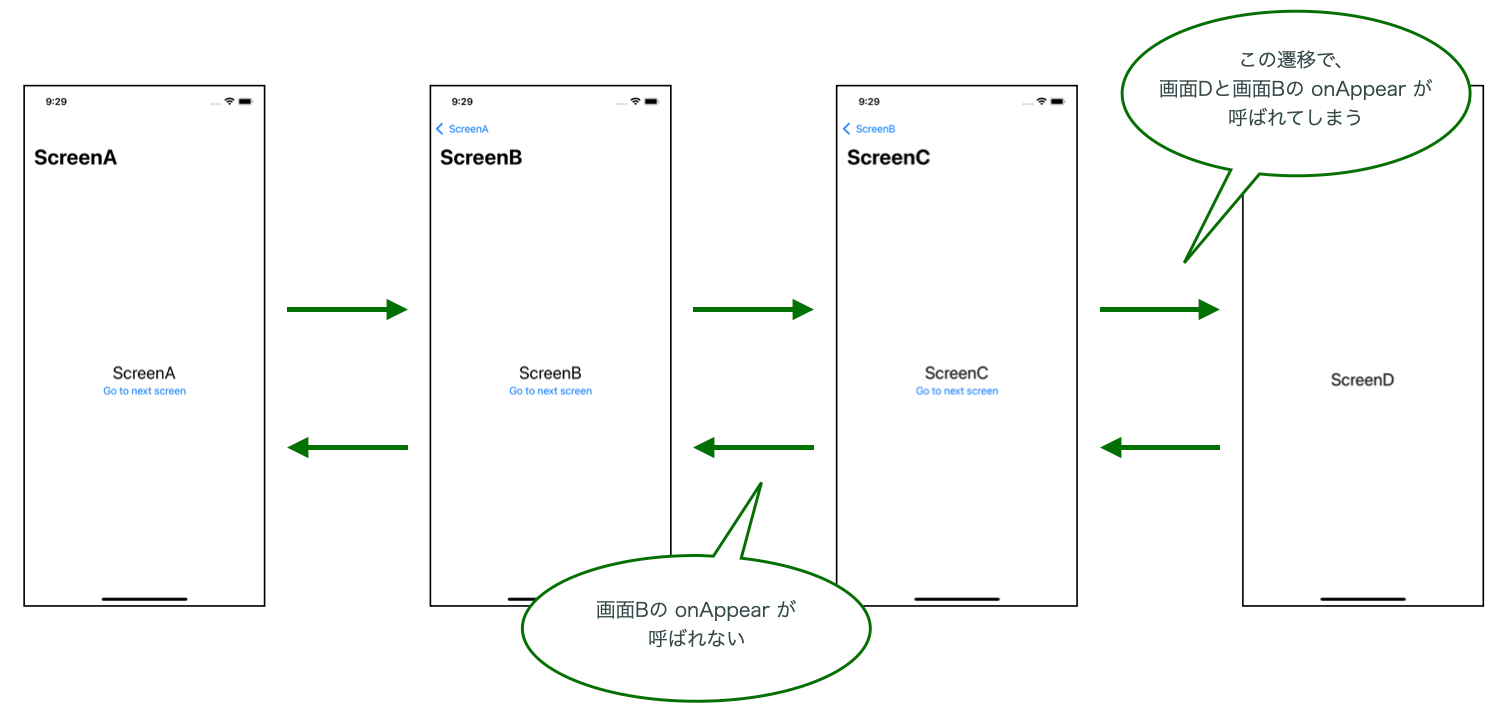
When using a custom Binding with NavigationStack, the following abnormal behaviors occur in apps built with Xcode 16.3 or later:
- Unexpected
onAppearcalls on intermediate screens- When transitioning to deep hierarchies,
onAppearis called on unrelated intermediate screens
- When transitioning to deep hierarchies,
- Skipped
onAppearduring back navigation- When navigating back toward the root,
onAppearis not called on some screens
- When navigating back toward the root,
This is difficult to understand with just text, so I've illustrated it.
Test Environment and Results
- MacBook Pro (16-inch, 2023), Apple M2 Pro
- Sequoia 15.5 (25F74)
Tests were conducted using iPhone 16e / iOS 18.5, running identical code across multiple Xcode versions. The results were as follows:
| Xcode Version | Custom Binding (Before Fix) | Direct Binding (After Fix) | Supported iOS SDK |
|---|---|---|---|
| Xcode 16.2 | ✅ Normal | ✅ Normal | iOS 18.2 |
| Xcode 16.3 | ❌ Abnormal | ✅ Normal | iOS 18.4 |
| Xcode 16.4 | ❌ Abnormal | ✅ Normal | iOS 18.5 |
| Xcode 26.0 Beta 2 | ❌ Abnormal | ✅ Normal | iOS 26.0 (Beta) |
These results reveal that there was an internal specification change in NavigationStack at iOS 18.4 SDK (Xcode 16.3), which continues through the latest Xcode version.
Test Code
I created a minimal project to reproduce the issue. The problem can be reproduced with the following code:
enum Route: Hashable {
    case screenA
    case screenB
    case screenC
    case screenD
}

class Router: ObservableObject {
    @Published
    private(set) var path = NavigationPath()

    func setPath(path: NavigationPath) {
        self.path = path
    }

    func present(route: Route) {
        path.append(route)
    }

    func pop() {
        path.removeLast()
    }

    func popToRoot() {
        path.removeLast(path.count)
    }
}

struct ContentView: View {
    @StateObject
    private var router = Router()

    var body: some View {
        NavigationStack(path: .init(
            get: { router.path },
            set: { router.setPath(path: $0) }
        )) {
            DummyScreen(screenName: "ScreenA") {
                router.present(route: .screenB)
            }
            .navigationDestination(for: Route.self) { route in
                switch route {
                case .screenA:
                    DummyScreen(screenName: "ScreenA") {
                        router.present(route: .screenB)
                    }
                case .screenB:
                    DummyScreen(screenName: "ScreenB") {
                        router.present(route: .screenC)
                    }
                case .screenC:
                    DummyScreen(screenName: "ScreenC") {
                        router.present(route: .screenD)
                    }
                case .screenD:
                    DummyScreen(screenName: "ScreenD", action: nil)
                }
            }
        }
        .environmentObject(router)
    }
}
For the complete source code, please check the following gist:
Test Results
The test procedure is very simple: navigate from root A sequentially to screen D.
- A → B → C → D
Then press the back button from D to return to root A.
- D → C → B → A
Despite this simple screen navigation, apps built with Xcode 16.3 or later exhibited abnormal behavior.
Normal Operation (Xcode 16.2)
In apps built with Xcode 16.2, onAppear is called when a screen is displayed. The following log output shows the expected behavior:
// A → B → C → D navigation
ScreenA's onAppear
ScreenB's onAppear
ScreenC's onAppear
ScreenD's onAppear

// Return from D to A
ScreenC's onAppear
ScreenB's onAppear
ScreenA's onAppear
Abnormal Operation (Xcode 16.3 and later)
In contrast, when displaying screen D in apps built with Xcode 16.3 or later, both "ScreenD's onAppear" and "ScreenB's onAppear" fired. Also, when returning to screen B, "ScreenB's onAppear" did not fire.
// A → B → C → D navigation
ScreenA's onAppear
ScreenB's onAppear
ScreenC's onAppear
ScreenD's onAppear
ScreenB's onAppear  ← Unexpected call!

// Return from D to A
ScreenC's onAppear
ScreenA's onAppear  ← ScreenB was skipped!
Root Cause Analysis
The cause of the problem appears to be the use of a custom Binding.
// Problematic code
NavigationStack(path: .init(
    get: { router.path },
    set: { router.setPath(path: $0) }
)) {
    // ...
}
This code worked fine until Xcode 16.2.
Starting with Xcode 16.3 (iOS 18.4 SDK), the internal implementation of NavigationStack changed, causing a desynchronization between the View lifecycle and NavigationPath when using a custom Binding. Since this isn't explicitly documented by Apple, the following is speculative:
- NavigationStack reuses screen instances at unexpected times
- Indirect binding through
get/setclosures causes synchronization issues - Internal optimizations during screen transitions are incompatible with custom Bindings
Solution
The solution is very simple: stop using custom Bindings and directly bind to the @Published property.
Before Fix (Problematic Code)
The current implementation encapsulates path and binds it indirectly through setter/getter:
class Router: ObservableObject {
    @Published
    private(set) var path = NavigationPath()

    func setPath(path: NavigationPath) {
        self.path = path
    }

    // Other methods...
}

// Custom Binding
NavigationStack(path: .init(
    get: { router.path },
    set: { router.setPath(path: $0) }
)) {
After Fix (Solved Code)
Stop encapsulation and modify NavigationStack to directly bind to path:
class Router: ObservableObject {
    @Published
    var path = NavigationPath()  // changed to public

    // setPath method is no longer needed

    func present(route: Route) {
        path.append(route)
    }

    func pop() {
        path.removeLast()
    }

    func popToRoot() {
        path.removeLast(path.count)
    }
}

// Direct Binding
NavigationStack(path: $router.path) {
Verification
The fixed code demonstrated expected normal behavior in all Xcode versions:
// A → B → C → D navigation
ScreenA's onAppear
ScreenB's onAppear
ScreenC's onAppear
ScreenD's onAppear

// Return from D to A
ScreenC's onAppear
ScreenB's onAppear
ScreenA's onAppear
Conclusion
- In Xcode 16.3 and later, custom Bindings with NavigationStack cause abnormal
onAppearfiring timings - This issue is likely due to internal implementation changes in NavigationStack in Xcode 16.3
This issue still occurs in the latest Xcode version, Xcode 26.0 Beta 2, and it's unclear if there are plans to fix it in future Xcode versions. However, since it reproduces in Xcode 16.3, 16.4, and 26.0 Beta 2, it's more appropriate to consider this a specification change in NavigationStack.