Xcode 16.4 + macOS 26.0 environment bundle install fails in Xcode Cloud

This page has been translated by machine translation. View original
Currently, I am developing with Xcode 16.4 across multiple projects while preparing to migrate to Xcode 26.0. Having experienced numerous bugs with past Xcode updates, I've been cautious about updating development environments and continue to operate with the existing version.
However, when I ran CI on Xcode Cloud in mid-September, builds that had been working fine suddenly started failing. Upon checking the error logs, I discovered that failures were occurring during CocoaPods installation. In another project, fastlane installation was failing. After investigating these issues, I found that the cause was Xcode Cloud's default environment switching to macOS 26.0.
In this article, I'll explain the Ruby native extension build problems that occur with the combination of Xcode 16.4 and macOS 26.0, and how to work around them.
Problem Details
When using Xcode 16.4 in a macOS 26.0 environment, errors occur during the building of native extensions included in Ruby gems like fastlane and CocoaPods. This problem is caused by SDK path inconsistencies, where the system tries to reference a non-existent MacOSX15.5.sdk.
When trying to install fastlane by running bundle install on Xcode Cloud, the following error occurred. This error prevents fastlane from being installed, which is necessary for automation in the CI environment, and stops the entire build process.
Error Log (during fastlane installation)
2025-09-23T01:24:43.534255739Z	🔎 Ruby: ruby 2.6.10p210 (2022-04-12 revision 67958) [universal.x86_64-darwin25]
...
Gem::Ext::BuildError: ERROR: Failed to build gem native extension.

make: *** No rule to make target
`/Applications/Xcode.app/Contents/Developer/Platforms/MacOSX.platform/Developer/SDKs/MacOSX15.5.sdk/System/Library/Frameworks/Ruby.framework/Versions/2.6/usr/include/ruby-2.6.0/universal-darwin25/ruby/config.h',
needed by `nkf.o'.  Stop.

make failed, exit code 2
...
An error occurred while installing nkf (0.2.0), and Bundler cannot continue.
The full error log is as follows:
Full Error Log
2025-09-23T01:24:43.533867052Z	🔎 Ruby executable: /usr/bin/ruby
2025-09-23T01:24:43.534255739Z	🔎 Ruby: ruby 2.6.10p210 (2022-04-12 revision 67958) [universal.x86_64-darwin25]
2025-09-23T01:24:46.574056478Z	🔎 RubyGems: 3.0.3.1
2025-09-23T01:25:20.682852952Z	Successfully installed bundler-2.4.22
2025-09-23T01:25:20.683138750Z	1 gem installed
2025-09-23T01:25:20.754261191Z	✅ Bundler 2.4.22 installed
2025-09-23T01:25:21.278291010Z	Your RubyGems version (3.0.3.1) has a bug that prevents `required_ruby_version` from working for Bundler. Any scripts that use `gem install bundler` will break as soon as Bundler drops support for your Ruby version. Please upgrade RubyGems to avoid future breakage and silence this warning by running `gem update --system 3.2.3`
2025-09-23T01:25:40.972848395Z	Gem::Ext::BuildError: ERROR: Failed to build gem native extension.
2025-09-23T01:25:40.973284859Z
2025-09-23T01:25:40.973551509Z	    current directory: /Users/local/.gem/gems/nkf-0.2.0/ext/nkf
2025-09-23T01:25:40.973794286Z	/System/Library/Frameworks/Ruby.framework/Versions/2.6/usr/bin/ruby -I
2025-09-23T01:25:40.973915436Z	/System/Library/Frameworks/Ruby.framework/Versions/2.6/usr/lib/ruby/2.6.0 -r
2025-09-23T01:25:40.974156051Z	./siteconf20250922-5089-1wqzuir.rb extconf.rb
2025-09-23T01:25:40.974288284Z	creating Makefile
2025-09-23T01:25:40.974592096Z
2025-09-23T01:25:40.974765996Z	current directory: /Users/local/.gem/gems/nkf-0.2.0/ext/nkf
2025-09-23T01:25:40.974884226Z	make "DESTDIR=" clean
2025-09-23T01:25:40.975063331Z
2025-09-23T01:25:40.975192922Z	current directory: /Users/local/.gem/gems/nkf-0.2.0/ext/nkf
2025-09-23T01:25:40.975377325Z	make "DESTDIR="
2025-09-23T01:25:40.975473662Z	make: *** No rule to make target
2025-09-23T01:25:40.975786747Z	`/Applications/Xcode.app/Contents/Developer/Platforms/MacOSX.platform/Developer/SDKs/MacOSX15.5.sdk/System/Library/Frameworks/Ruby.framework/Versions/2.6/usr/include/ruby-2.6.0/universal-darwin25/ruby/config.h',
2025-09-23T01:25:40.975949060Z	needed by `nkf.o'.  Stop.
2025-09-23T01:25:40.976097242Z
2025-09-23T01:25:40.976209576Z	make failed, exit code 2
2025-09-23T01:25:40.976454163Z
2025-09-23T01:25:40.976790146Z	Gem files will remain installed in /Users/local/.gem/gems/nkf-0.2.0 for
2025-09-23T01:25:40.976940475Z	inspection.
2025-09-23T01:25:40.977194202Z	Results logged to
2025-09-23T01:25:40.977332234Z	/Users/local/.gem/extensions/universal-darwin-25/2.6.0/nkf-0.2.0/gem_make.out
2025-09-23T01:25:40.977470696Z
2025-09-23T01:25:40.977669710Z	/System/Library/Frameworks/Ruby.framework/Versions/2.6/usr/lib/ruby/2.6.0/rubygems/ext/builder.rb:99:in
2025-09-23T01:25:40.977901680Z	`run'
2025-09-23T01:25:40.978041601Z	/System/Library/Frameworks/Ruby.framework/Versions/2.6/usr/lib/ruby/2.6.0/rubygems/ext/builder.rb:51:in
2025-09-23T01:25:40.978216705Z	`block in make'
2025-09-23T01:25:40.978346457Z	/System/Library/Frameworks/Ruby.framework/Versions/2.6/usr/lib/ruby/2.6.0/rubygems/ext/builder.rb:43:in
2025-09-23T01:25:40.978593581Z	`each'
2025-09-23T01:25:40.978717292Z	/System/Library/Frameworks/Ruby.framework/Versions/2.6/usr/lib/ruby/2.6.0/rubygems/ext/builder.rb:43:in
2025-09-23T01:25:40.978822095Z	`make'
2025-09-23T01:25:40.978918846Z	/System/Library/Frameworks/Ruby.framework/Versions/2.6/usr/lib/ruby/2.6.0/rubygems/ext/ext_conf_builder.rb:62:in
2025-09-23T01:25:40.979050915Z	`block in build'
2025-09-23T01:25:40.979260343Z	/System/Library/Frameworks/Ruby.framework/Versions/2.6/usr/lib/ruby/2.6.0/tempfile.rb:295:in
2025-09-23T01:25:40.979378700Z	`open'
2025-09-23T01:25:40.979493862Z	/System/Library/Frameworks/Ruby.framework/Versions/2.6/usr/lib/ruby/2.6.0/rubygems/ext/ext_conf_builder.rb:29:in
2025-09-23T01:25:40.979578455Z	`build'
2025-09-23T01:25:40.979731320Z	/System/Library/Frameworks/Ruby.framework/Versions/2.6/usr/lib/ruby/2.6.0/rubygems/ext/builder.rb:185:in
2025-09-23T01:25:40.979870923Z	`block in build_extension'
2025-09-23T01:25:40.980024786Z	/System/Library/Frameworks/Ruby.framework/Versions/2.6/usr/lib/ruby/2.6.0/monitor.rb:235:in
2025-09-23T01:25:40.980170835Z	`mon_synchronize'
2025-09-23T01:25:40.980282377Z	/System/Library/Frameworks/Ruby.framework/Versions/2.6/usr/lib/ruby/2.6.0/rubygems/ext/builder.rb:181:in
2025-09-23T01:25:40.980384213Z	`build_extension'
2025-09-23T01:25:40.980489640Z	/System/Library/Frameworks/Ruby.framework/Versions/2.6/usr/lib/ruby/2.6.0/rubygems/ext/builder.rb:229:in
2025-09-23T01:25:40.980595031Z	`block in build_extensions'
2025-09-23T01:25:40.980805060Z	/System/Library/Frameworks/Ruby.framework/Versions/2.6/usr/lib/ruby/2.6.0/rubygems/ext/builder.rb:226:in
2025-09-23T01:25:40.980933319Z	`each'
2025-09-23T01:25:40.981093977Z	/System/Library/Frameworks/Ruby.framework/Versions/2.6/usr/lib/ruby/2.6.0/rubygems/ext/builder.rb:226:in
2025-09-23T01:25:40.981244484Z	`build_extensions'
2025-09-23T01:25:40.981351038Z	/System/Library/Frameworks/Ruby.framework/Versions/2.6/usr/lib/ruby/2.6.0/rubygems/installer.rb:830:in
2025-09-23T01:25:40.981556311Z	`build_extensions'
2025-09-23T01:25:40.981693546Z	/Users/local/.gem/gems/bundler-2.4.22/lib/bundler/rubygems_gem_installer.rb:76:in
2025-09-23T01:25:40.981859306Z	`build_extensions'
2025-09-23T01:25:40.981992500Z	/Users/local/.gem/gems/bundler-2.4.22/lib/bundler/rubygems_gem_installer.rb:28:in
2025-09-23T01:25:40.984643722Z	`install'
2025-09-23T01:25:40.984799247Z	/Users/local/.gem/gems/bundler-2.4.22/lib/bundler/source/rubygems.rb:203:in
2025-09-23T01:25:40.984995937Z	`install'
2025-09-23T01:25:40.985179991Z	/Users/local/.gem/gems/bundler-2.4.22/lib/bundler/installer/gem_installer.rb:54:in
2025-09-23T01:25:40.985451863Z	`install'
2025-09-23T01:25:40.985573734Z	/Users/local/.gem/gems/bundler-2.4.22/lib/bundler/installer/gem_installer.rb:16:in
2025-09-23T01:25:40.994813735Z	`install_from_spec'
2025-09-23T01:25:40.995000836Z	/Users/local/.gem/gems/bundler-2.4.22/lib/bundler/installer/parallel_installer.rb:130:in
2025-09-23T01:25:40.995198079Z	`do_install'
2025-09-23T01:25:40.995385801Z	/Users/local/.gem/gems/bundler-2.4.22/lib/bundler/installer/parallel_installer.rb:121:in
2025-09-23T01:25:40.995626546Z	`block in worker_pool'
2025-09-23T01:25:40.995953333Z	  /Users/local/.gem/gems/bundler-2.4.22/lib/bundler/worker.rb:62:in `apply_func'
2025-09-23T01:25:40.996199552Z	/Users/local/.gem/gems/bundler-2.4.22/lib/bundler/worker.rb:57:in `block in
2025-09-23T01:25:40.996353416Z	process_queue'
2025-09-23T01:25:40.996467253Z	  /Users/local/.gem/gems/bundler-2.4.22/lib/bundler/worker.rb:54:in `loop'
2025-09-23T01:25:40.996582086Z	/Users/local/.gem/gems/bundler-2.4.22/lib/bundler/worker.rb:54:in
2025-09-23T01:25:40.996729795Z	`process_queue'
2025-09-23T01:25:40.996851138Z	/Users/local/.gem/gems/bundler-2.4.22/lib/bundler/worker.rb:90:in `block (2
2025-09-23T01:25:40.996999646Z	levels) in create_threads'
2025-09-23T01:25:40.997253309Z
2025-09-23T01:25:40.997409501Z	An error occurred while installing nkf (0.2.0), and Bundler cannot continue.
2025-09-23T01:25:40.997643544Z
2025-09-23T01:25:40.997762545Z	In Gemfile_CI:
2025-09-23T01:25:40.997870246Z	  fastlane was resolved to 2.228.0, which depends on
2025-09-23T01:25:40.998018495Z	    simctl was resolved to 1.6.10, which depends on
2025-09-23T01:25:40.998243134Z	      CFPropertyList was resolved to 3.0.7, which depends on
2025-09-23T01:25:40.998361597Z	        nkf
Error with Xcode 26.0 + macOS 15.6 Combination
Interestingly, when using Xcode 26.0 with macOS 15.6, a reverse SDK inconsistency error occurs. Notable here is the difference in Darwin version and expected SDK path.
🔎 Ruby: ruby 2.6.10p210 (2022-04-12 revision 67958) [universal.x86_64-darwin24]
...
Gem::Ext::BuildError: ERROR: Failed to build gem native extension.

make: *** No rule to make target
`/Applications/Xcode.app/Contents/Developer/Platforms/MacOSX.platform/Developer/SDKs/MacOSX26.0.sdk/System/Library/Frameworks/Ruby.framework/Versions/2.6/usr/include/ruby-2.6.0/universal-darwin24/ruby/config.h',
needed by `nkf.o'.  Stop.

make failed, exit code 2
...
An error occurred while installing nkf (0.2.0), and Bundler cannot continue.
In this case, Xcode 26.0 expects MacOSX26.0.sdk, but that SDK doesn't exist in the macOS 15.6 (darwin24) environment. This creates a reverse inconsistency.
Root Cause Analysis
Detailed Analysis of the Error
Comparing both error messages reveals the cause of the problem.
For Xcode 16.4 + macOS 26.0:
make: *** No rule to make target
`/Applications/Xcode.app/Contents/Developer/Platforms/MacOSX.platform/Developer/SDKs/MacOSX15.5.sdk/System/Library/Frameworks/Ruby.framework/Versions/2.6/usr/include/ruby-2.6.0/universal-darwin25/ruby/config.h',
needed by `nkf.o'.  Stop.
For Xcode 26.0 + macOS 15.6:
make: *** No rule to make target
`/Applications/Xcode.app/Contents/Developer/Platforms/MacOSX.platform/Developer/SDKs/MacOSX26.0.sdk/System/Library/Frameworks/Ruby.framework/Versions/2.6/usr/include/ruby-2.6.0/universal-darwin24/ruby/config.h',
needed by `nkf.o'.  Stop.
fastlane Dependency Chain
The error is occurring deep in fastlane's dependency chain:
- fastlane (2.228.0) - iOS/Android automation tool
- simctl (1.6.10) - Simulator control library (dependency of fastlane)
- CFPropertyList (3.0.7) - Property List processing library (dependency of simctl)
- nkf (0.2.0) - Character encoding conversion library (dependency of CFPropertyList)
The build of the native extension in nkf, the last component in this dependency chain, is failing.
SDK Inconsistency Issue
The root cause was identified as an SDK path mismatch due to inconsistency between Xcode and macOS versions. Our testing revealed the following combination patterns:
| Combination | Expected SDK | Darwin Version | Build Result |
|---|---|---|---|
| Xcode 16.4 + macOS 26.0 | MacOSX15.5.sdk | darwin25 | ❌ Fail |
| Xcode 26.0 + macOS 15.6 | MacOSX26.0.sdk | darwin24 | ❌ Fail |
| Xcode 16.4 + macOS 15.6 | MacOSX15.5.sdk | darwin24 | ✅ Success |
| Xcode 26.0 + macOS 26.0 | MacOSX26.0.sdk | darwin25 | ✅ Success |
In other words, when the major versions of Xcode and macOS don't match, native extension compilation fails due to SDK path inconsistencies. This problem affects all Ruby gems with native extensions, not just fastlane.
Building Ruby gem native extensions involves:
- SDK included with Xcode: MacOSX[version].sdk
- macOS Darwin version: System kernel version
- Ruby header file path: Determined by the combination of SDK path and Darwin version
When Xcode and macOS versions don't match, the expected SDK path differs from the actual SDK path, causing compilation to fail due to missing header files.
Solutions
Based on our findings, either of the following combinations should work well:
- Xcode 16.4 + macOS 15.6 (continue with existing projects)
- Xcode 26.0 + macOS 26.0 (migrate to the latest environment)
Troubleshooting
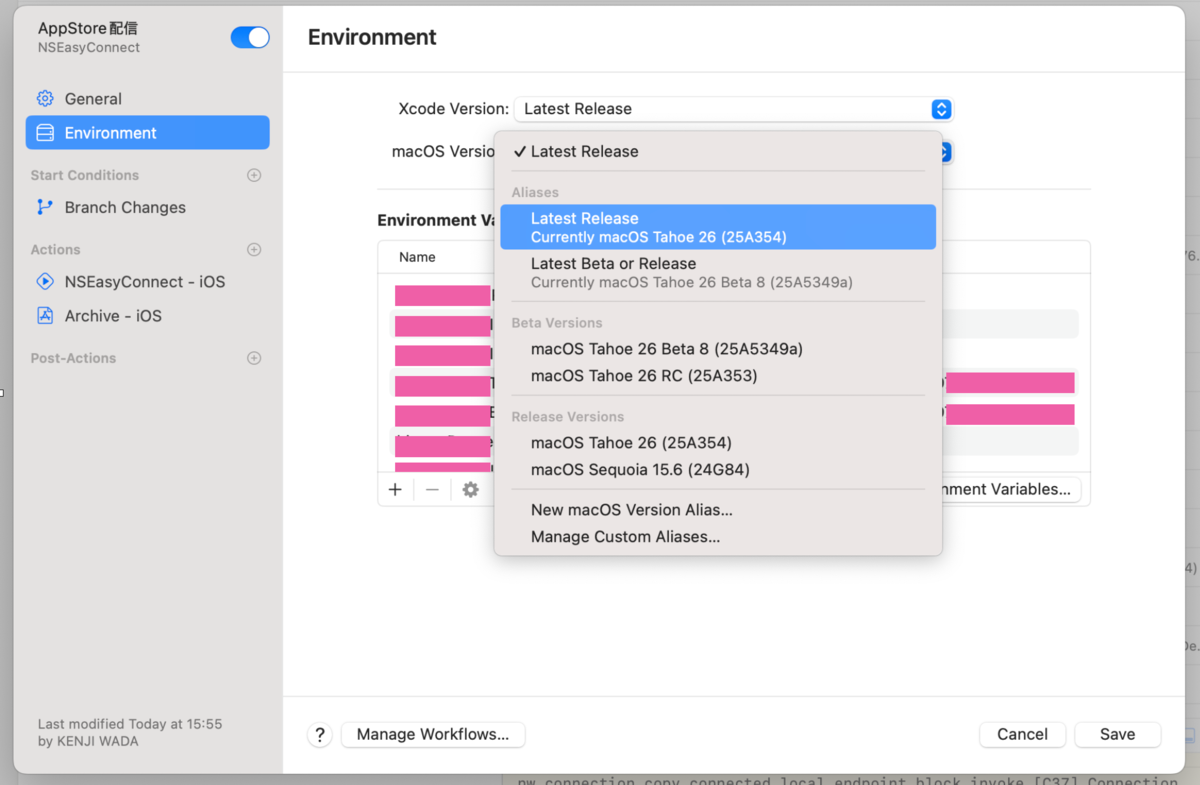
How to Change Settings in Xcode Cloud
Step 1: Open Workflow Settings
- Log in to App Store Connect
- Open the Xcode Cloud section for your target app
- Click "Settings" for the relevant workflow
Step 2: Change Environment Settings
- Expand the "Environment" section
- Select "15.6" from the "macOS Version" dropdown
- Confirm that "Xcode Version" is set to "16.4"
Step 3: Save Settings and Run
- Click the "Save" button
- Re-run the workflow
Long-term Solution: Migrate to SPM
The most reliable way to fundamentally resolve these environment inconsistency issues is to migrate from CocoaPods to Swift Package Manager (SPM).
According to the CocoaPods official blog, trunk will become read-only from December 2, 2026, meaning new Pods or new versions can't be added. While existing dependencies will remain available, it's highly unlikely that a fixed version of CocoaPods will be released to address the current macOS 26.0 compatibility issues.
Migrating to SPM offers several benefits:
- Native Xcode integration: No additional tools required
- Elimination of environment dependencies: No reliance on Ruby environment or native extensions
- Future-proof: Officially supported by Apple with continuous improvements
- Stability in CI/CD environments: Better compatibility with Xcode Cloud, less prone to environment inconsistencies
For instructions on migrating from specific Pods to SPM, my previous article Preparing for the End of CocoaPods: Migrating from cocoapods-keys to Arkana + SPM may be helpful.
For fastlane, it's also advisable to either limit its use to local environments only or consider migrating to alternative tools.
Conclusion
The switch of Xcode Cloud's default environment to macOS 26.0 has exposed compatibility issues with legacy tools. Our investigation revealed that this problem stems from the combination of Ruby 2.6 and native extensions, caused by SDK path inconsistencies.
After trial and error, we found that explicitly specifying macOS 15.6 in Xcode Cloud is an effective temporary workaround. However, this is just a stopgap solution. In the long term, migrating from CocoaPods to SPM and moving away from Ruby-dependent tool chains is recommended. Building a development environment that relies solely on Xcode will fundamentally avoid such compatibility issues.
(2025/09/30 Update) Differences with Local Environment
In local environments, the combination of Xcode 26.0.1 + macOS 15.6 worked without issues. Locally, I'm using Ruby 3.2.1 with rbenv.
This suggests that SDK reference paths are hardcoded in the built-in Ruby 2.6.10 in macOS, while SDK path resolution is more flexible in Ruby 3.x series.
Since Xcode Cloud uses the system Ruby 2.6.10 by default, it may be possible to avoid Xcode/macOS version combination constraints by installing Ruby 3.x series using rbenv or similar tools. For information on using custom Ruby versions in Xcode Cloud, please refer to the article below.