
Prompt Injection Countermeasures in Amazon Q Custom Chat Agents

This page has been translated by machine translation. View original
This is Ishikawa from the Cloud Business Division. When deploying Amazon Quick custom chat agents internally, one concern is countermeasures against prompt injection. Based on AWS official documentation and my own experience, I will explain the guardrails that Amazon Quick provides as standard, as well as the countermeasures that administrators and agent creators can each implement, from the perspective of defense in depth.
What Are Amazon Quick Chat Agents?
Amazon Quick has two types of chat agents: the system chat agent (default), which is automatically prepared when a subscription is created, and custom chat agents, which are created with unique instructions (personas) and knowledge sources configured for specific teams and use cases.
Custom chat agents can be linked to spaces, dashboards, topics, files, and other knowledge sources, integrated with action connectors (Slack, Outlook, Jira, etc.), and shared within the organization. While convenient, since they are chat applications incorporating an LLM, it is necessary to design them with consideration for the risks of prompt injection.
What Is Prompt Injection?
The AWS Security Blog Safeguard your generative AI workloads from prompt injections classifies prompt injection into two main types.
- Direct prompt injection: An attack where a user explicitly enters instructions such as "ignore all previous instructions" to attempt to override the agent's original instructions
- Indirect prompt injection: An attack where malicious instructions are embedded in external sources referenced by the agent (such as uploaded documents or web pages), causing unintended behavior when the agent processes them. An example is introduced where hidden instructions are planted in a document using white text on a white background
Since custom chat agents both "interact with users" and "reference knowledge sources," countermeasures are needed for both of these pathways.
Overview of Countermeasures
Prompt injection countermeasures in Amazon Quick can be organized into the following 4 layers.
Layer 1 : Default Guardrails (Automatically Applied)
The first thing to understand is that all Amazon Quick chat agents (system and custom) and flows have default guardrails and safety controls built in from the start.
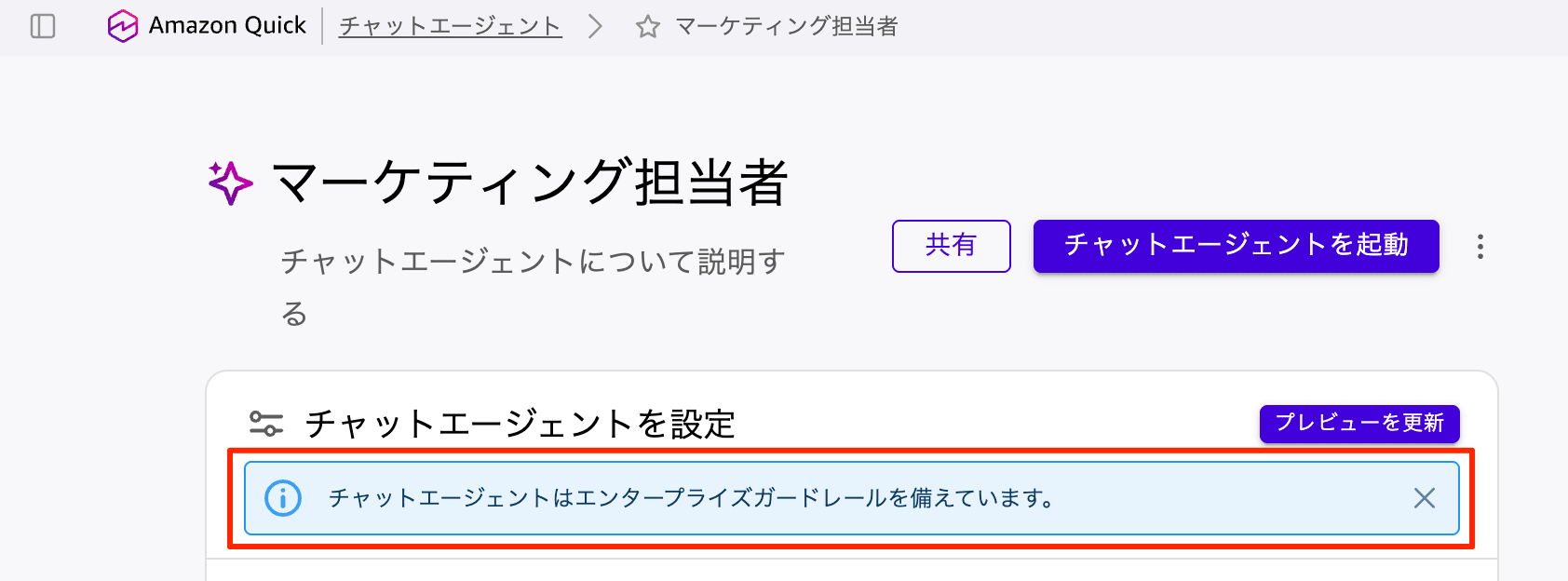
The official documentation Chat agent customization in Amazon Quick lists the following three:
- Prompt leak protection: Automatically enabled, prevents prompt injection and other attacks that cause LLMs to break down
- Prompt safety: Protects against common security threats, such as malicious instructions or instructions like "ignore the guardrails"
- Blocked words and phrases: Protects both chat requests and responses from inappropriate content such as insults, hate speech, sexual content, violence, and misconduct
These are standard protections that are applied by default without any activation work on the part of users. The fact that you do not need to build and configure guardrails yourself, as you would with Amazon Bedrock Guardrails, is a benefit unique to managed services.
Layer 2 : Instance-Wide Settings by Administrators
Adding Blocked Words and Phrases
Administrators can define up to 50 blocked words and phrases that apply to all chat agents and flows within the instance. Words and phrases that are configured will no longer appear in responses. Since nothing is configured by default, if there are words you do not want output based on your company's policies, add them explicitly. However, as of the time of writing (2026/07/17), entering Japanese results in an error and cannot be registered.
Configuration is done from the management console.
- Log in to the Amazon Quick console and select "Manage account"
- From the left navigation menu, select "Customization" → "Agent customization"
- Under "Guardrails and safety controls" in "Blocked words and phrases," press the [Add] button to add words and phrases
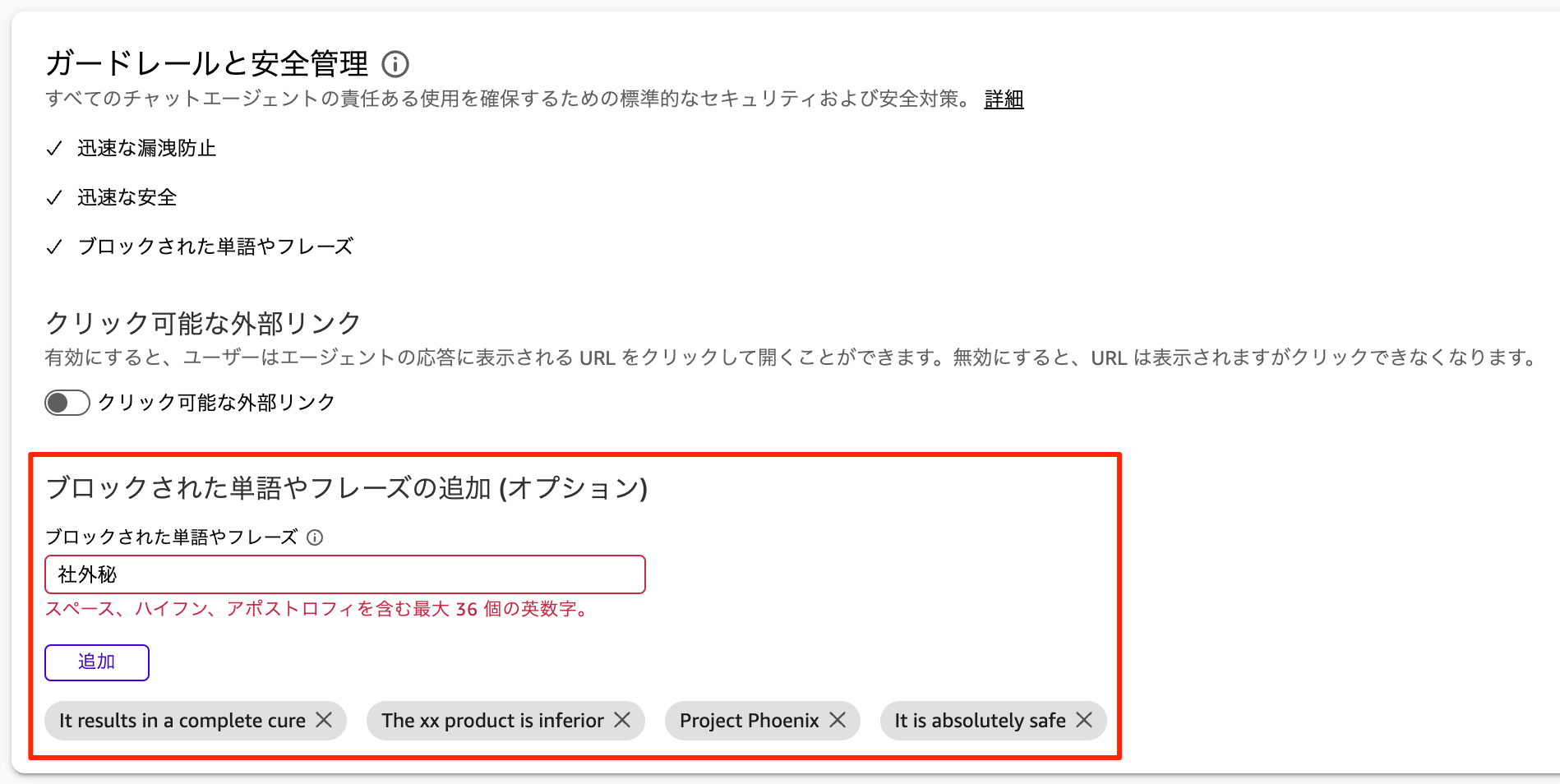
Since the limit of 50 entries is small, given that the default guardrails cover general inappropriate content, the practical approach is to concentrate the 50 slots on "words that can only be filtered out with company-specific domain knowledge."
External Link Click Control
Administrators can control whether URLs in chat responses are displayed as clickable hyperlinks or as plain text. This setting applies to all chat agents and flows within the instance.
In indirect prompt injection, a possible technique is to include malicious links in responses to lure users. Therefore, if hyperlinks are not needed for the requirements, displaying them as plain text (toggling off) reduces the risk associated with clicks.
Layer 3 : Countermeasures in Agent Design
Place Instructions You Don't Want Changed in Reference Documents
As means of defining the behavior of custom chat agents, the official documentation Chat agent context sources and best practices lists three options: Persona instructions, Reference documents, and Spaces, each with different characteristics.
| Method | Characteristics |
|---|---|
| Persona instructions | High-level guidelines that the generative AI interprets and extends to optimize |
| Reference documents | The written content is retained as-is and becomes the agent's persistent context |
| Spaces | A dynamic knowledge repository searched and referenced during conversations |
From a security perspective, what is important is that persona instructions may have their original wording and structure modified by the AI's enhancement processing. The official documentation explicitly states that "important guidelines that must not be changed should instead be placed in reference documents."
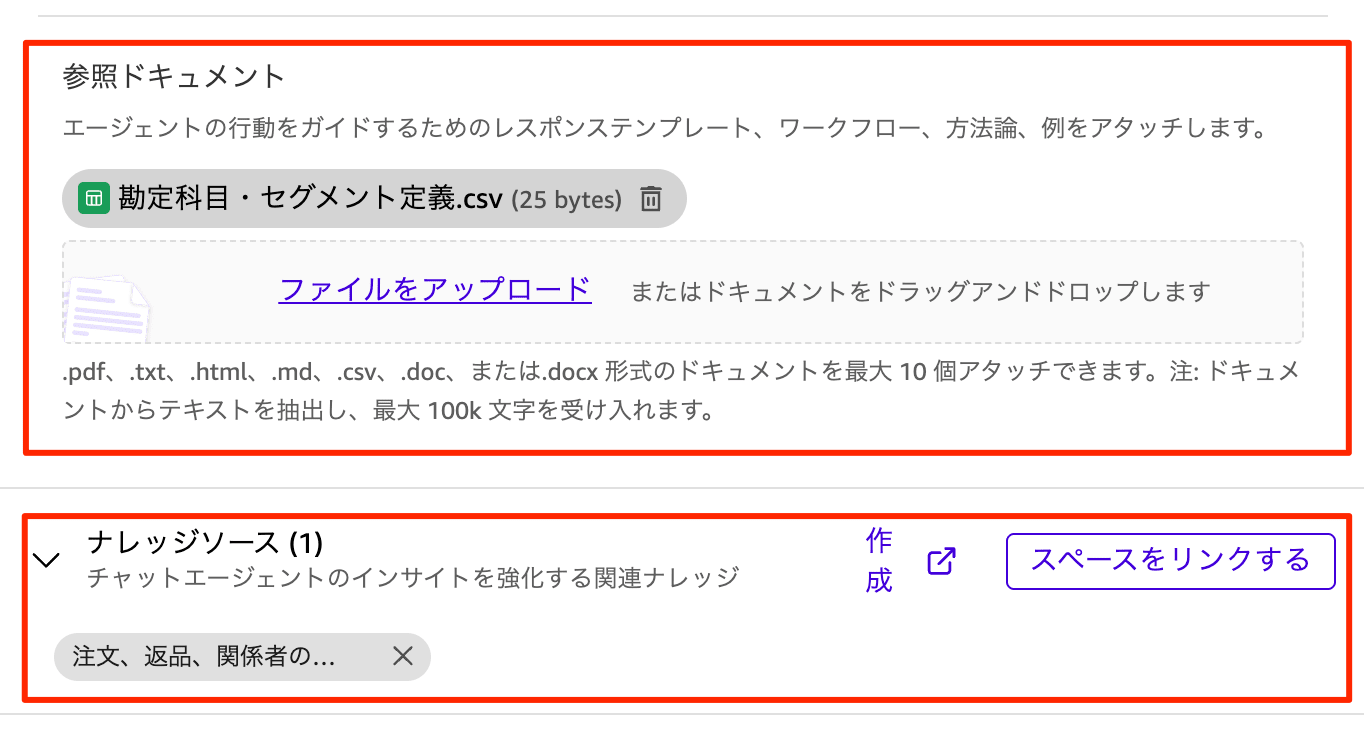
Furthermore, regarding reference documents, it is stated that "behavioral frameworks and reference data from files remain effective even if the user attaches different content." Fixing the business rules and response policies you want the agent to follow as reference documents serves as a defense against overwriting instructions through user input (direct prompt injection). However, note that response template formatting may be temporarily adjusted if a user provides conflicting formatting instructions.
Explicitly Scope Knowledge Sources and Actions
According to the official documentation "Create, customize, and deploy AI-powered chat agents in Amazon Quick," when a custom chat agent is created with explicit settings for resources (spaces and action connectors), by default it uses only those configured resources to answer questions and orchestrate actions. Conversely, if no resources are configured, all spaces and actions accessible to the user during chat may become available.
The AWS Prescriptive Guidance Mapping to OWASP top 10 for LLM applications also lists "limiting the attack surface through agent scope determination" as a countermeasure against LLM01 (Prompt Injection) in the OWASP Top 10 for LLM Applications. When creating custom chat agents, by linking only the trusted spaces and actions needed for the use case, you can narrow down both the entry points for indirect prompt injection and the scope of impact if an attack succeeds.
Layer 4 : Permission Management
Response Filtering by User Permissions
Custom chat agents access content using the permissions of the calling user themselves, not the agent's own permissions. Since spaces maintain security boundaries through Amazon Quick's permission system, even if an agent's behavior is manipulated through prompt injection, the design ensures that data the user could not originally access will not be included in responses.
Feature Restrictions via Custom Permissions
In the Enterprise Edition, custom permissions profiles can be used to restrict features at the account, role, and user level. For chat agent-related controls, the following are possible:
- Restricting Create Chat Agents: Allows interaction with agents while restricting only new creation. The official documentation also recommends using only this restriction when you want to keep interaction with the system agent while stopping creation
- Restricting Use internet to enhance results: Restricts internet access used to enhance results. Since web content is a typical pathway for indirect prompt injection, this restriction can be considered depending on requirements
- Restricting Chat Agents: Disables the entire chat agent functionality, including interaction with the system agent.
※ If the purpose is to prevent users from using agents at all, it is more cost-effective to not assign the PRO role, so this setting is actually useful when there are users/roles that "need other PRO features like dashboard creation but want only chat agents disabled," or when you want to temporarily shut everything down until a security review is complete
By limiting the users who can create agents to a trusted range, and managing sharing with two permission types — Owner and Viewer — you can prevent agents with unintended settings from spreading within the organization.
Usage Notes
Even though default guardrails are built in, there is no single countermeasure that can prevent prompt injection 100% of the time. The AWS Security Blog also recommends taking a multi-layered approach rather than relying on a single defense. In addition to combining the four layers introduced in this article, it is recommended to also establish a management process for documents incorporated into spaces (operations to prevent mixing in untrusted files).
Closing
Amazon Quick chat agents have three guardrails built in as standard — prompt leak protection, prompt safety, and blocking inappropriate content — providing basic protection against prompt injection without additional configuration. On top of that, by combining administrator controls for blocked words and link display, agent design utilizing reference documents, and feature restrictions via custom permissions, you can construct a multi-layered defense.
When proceeding with the internal deployment of custom chat agents, why not start by understanding the content of the default guardrails and then consider the Layer 2 through 4 settings tailored to your company's policies?

