![[Update] Custom asset types are now available in IAM-based domains of Amazon SageMaker Unified Studio, so I tried cataloging Amazon QuickSight dashboards](https://images.ctfassets.net/ct0aopd36mqt/wp-thumbnail-4e6e510f2f74e1cc7d0ec360f38d138a/c00e9d7f4e47022543b37632bc20bcc0/amazon-sagemaker?w=3840&fm=webp)
[Update] Custom asset types are now available in IAM-based domains of Amazon SageMaker Unified Studio, so I tried cataloging Amazon QuickSight dashboards

This page has been translated by machine translation. View original
This is Ishikawa from the Cloud Business Division. The "custom asset type" feature that allows registering assets in any format to the Amazon SageMaker Unified Studio (hereinafter SMUS) catalog is now available in IAM-based domains as well, so I actually tried cataloging an Amazon QuickSight dashboard.
SMUS is a service that integrates data, analytics, and AI/ML work into a single portal. Its core catalog is based on Amazon DataZone, enabling governed discovery and subscription of "assets" such as tables, BI dashboards, and ML models.
In this update, "custom asset types" were added to the catalog of IAM-based domains. This allows domain administrators to register assets in any format that SMUS does not natively support (such as medical image files on Amazon S3, revenue dashboards created with PowerBI, PDF reports generated by third-party platforms, etc.) in the catalog and include them in the same metadata management, discovery, and subscription workflows as other catalog assets.
What Are Custom Asset Types
An asset type is a schema that defines "how a specific kind of asset is represented in the catalog." It has one or more metadata form types (required or optional) and is version-controlled. When creating an asset, validation is performed against the asset type schema, and creation fails if the structure is invalid.
Custom asset types allow domain administrators to freely define these asset types. According to the official documentation, the intended use cases are as follows:
- Cataloging proprietary formats not natively supported by SMUS (internal report systems, proprietary file formats, third-party exports, etc.)
- Providing a unified discovery experience for all assets within an organization regardless of format
- Providing governed subscription workflows for assets whose fulfillment (actual data delivery) is managed outside SMUS
The key point is that "fulfillment must be provided by the user." With a standard table asset subscription, Lake Formation permissions are automatically granted upon approval, but with a custom asset subscription, SMUS only grants access to discovery and metadata—providing access to the actual data is handled by the asset owner's own mechanisms.
Note that the ability to manage custom asset types in the SMUS console is newly added in this update, but the underlying entities are DataZone asset types, form types, and assets. Therefore, in this article, I will deliberately use the AWS CLI (aws datazone) to build the entire flow and verify the behavior.
※ Supplement: Fulfillment refers to the process of actually providing the subscriber with access to the real data after a subscription request is approved—i.e., "fulfilling" the subscription.
Let's Try It
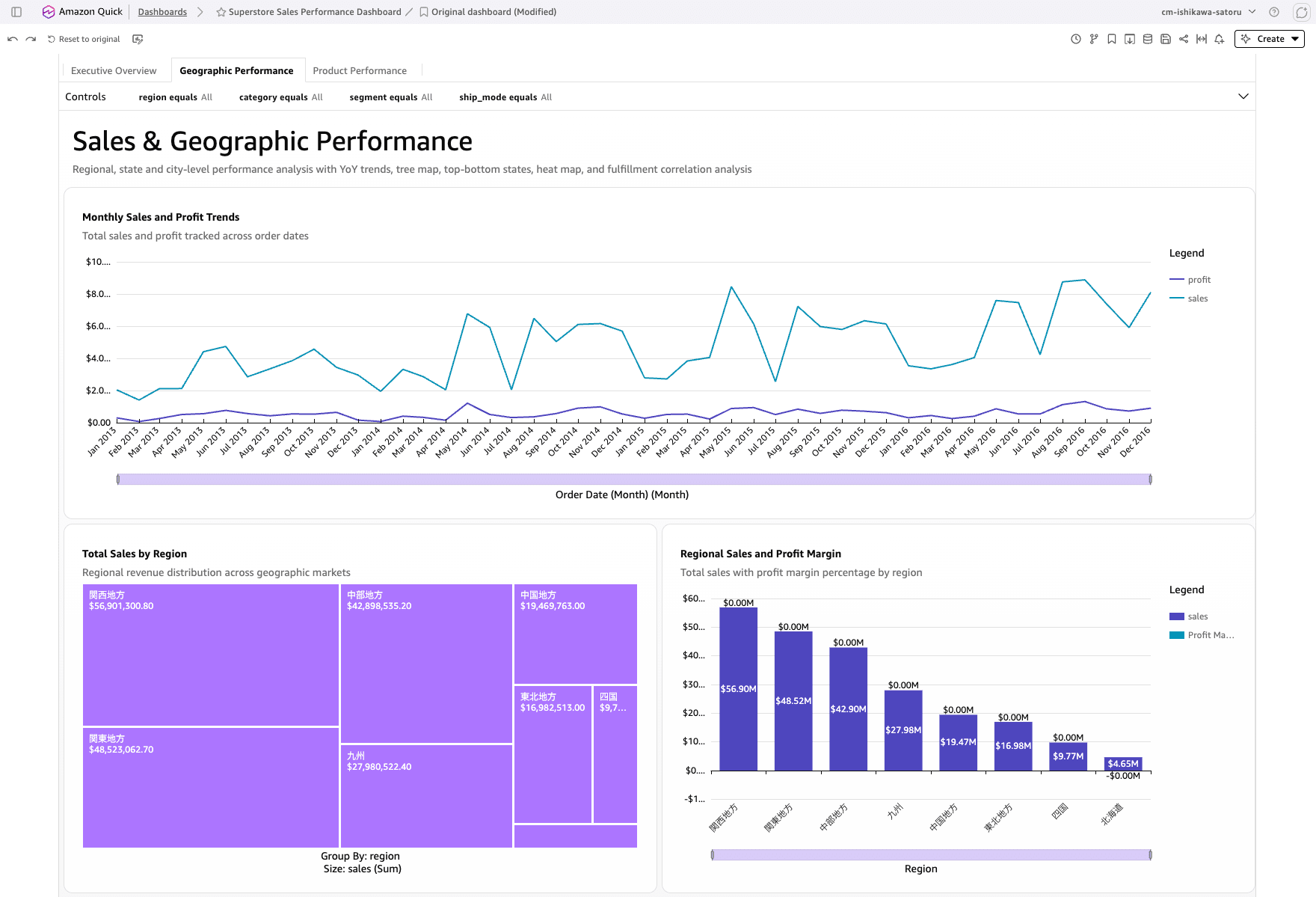
This time, I will catalog an Amazon QuickSight dashboard, "Superstore Sales Performance Dashboard", as a custom asset.
Although QuickSight dashboards are an AWS service, they are not included in SMUS's system asset types (AWS Glue tables, Amazon Redshift tables, Amazon S3 object collections, SageMaker models, etc.). In other words, they are "assets not natively supported by SMUS," making them a perfect use case for custom asset types.
Verification Flow
The overall flow is as follows:
Prerequisites
- An IAM-based SMUS V2 domain (a domain with
singleSignOnset toDISABLED) must already be created - A project that owns asset types, form types, and assets (in this case, the
admin-projectgenerated when the domain is created) - The QuickSight dashboard to be cataloged must already be created (in this case, "Superstore Sales Performance Dashboard")
- Verification environment
- Region:
ap-northeast-1 - AWS CLI v2 (2.35.21)
- Region:
First, confirm that the target domain is IAM-based. IAM-based domains have singleSignOn.type set to DISABLED.
% aws datazone get-domain --identifier dzd-d3w2uawk8vo7a1 \
  --query '{name:name, version:domainVersion, sso:singleSignOn.type}' \
  --region ap-northeast-1
{
    "name": "Default_05252026_Domain",
    "version": "V2",
    "sso": "DISABLED"
}
From here, the domain ID will be referred to as $DOMAIN and the owning project ID as $PROJECT.
export DOMAIN=dzd-d3w2uawk8vo7a1
export PROJECT=c778yzrdr7zy55
Creating a Metadata Form Type
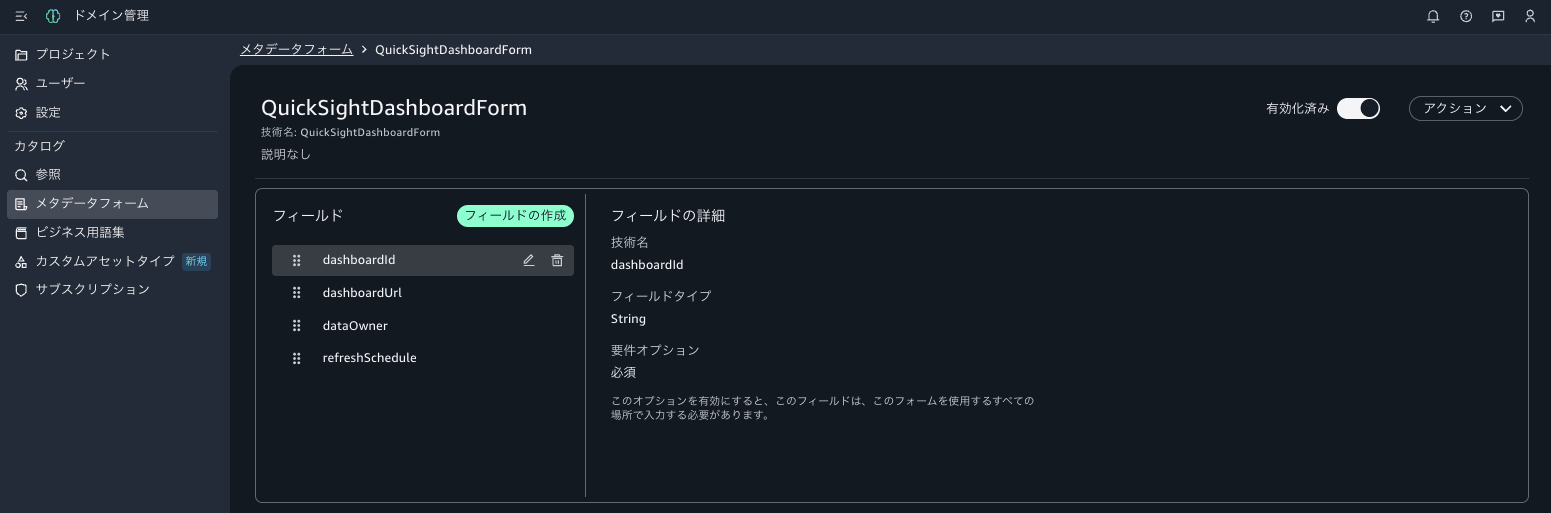
First, create the metadata form to be associated with the custom asset type. Here, as a form representing a QuickSight dashboard, we define the dashboard ID (required), dashboard URL, data owner, and refresh schedule. The form schema is written in Smithy notation and passed as a JSON with a smithy key to --model.
% SMITHY='structure QuickSightDashboardForm {
@required
dashboardId: String
dashboardUrl: String
dataOwner: String
refreshSchedule: String
}'
% MODEL=$(jq -nc --arg s "$SMITHY" '{smithy:$s}')
% aws datazone create-form-type \
  --domain-identifier "$DOMAIN" \
  --name QuickSightDashboardForm \
  --model "$MODEL" \
  --owning-project-identifier "$PROJECT" \
  --status ENABLED \
  --region ap-northeast-1
{
    "domainId": "dzd-d3w2uawk8vo7a1",
    "name": "QuickSightDashboardForm",
    "revision": "5"
}
The form type was created as revision 5. Simply add @required to any field you want to make mandatory.
Creating a Custom Asset Type
Next, create a custom asset type with the previously created form associated as required. --forms-input is not a list but rather a "map with form names as keys," where each value specifies typeIdentifier, typeRevision, and required.
$ FORMS='{"QuickSightDashboardForm":{"typeIdentifier":"QuickSightDashboardForm","typeRevision":"5","required":true}}'

$ aws datazone create-asset-type \
  --domain-identifier "$DOMAIN" \
  --name CustomQuickSightDashboard \
  --description "An Amazon Quick Sight sales dashboard cataloged for governed discovery" \
  --forms-input "$FORMS" \
  --owning-project-identifier "$PROJECT" \
  --region ap-northeast-1
{
    "domainId": "dzd-d3w2uawk8vo7a1",
    "name": "CustomQuickSightDashboard",
    "revision": "3",
    "description": "An Amazon Quick Sight sales dashboard cataloged for governed discovery",
    "formsOutput": {
        "AssetCommonDetailsForm": {
            "typeName": "amazon.datazone.AssetCommonDetailsFormType",
            "typeRevision": "8",
            "required": false
        },
        "QuickSightDashboardForm": {
            "typeName": "QuickSightDashboardForm",
            "typeRevision": "5",
            "required": true
        }
    }
}
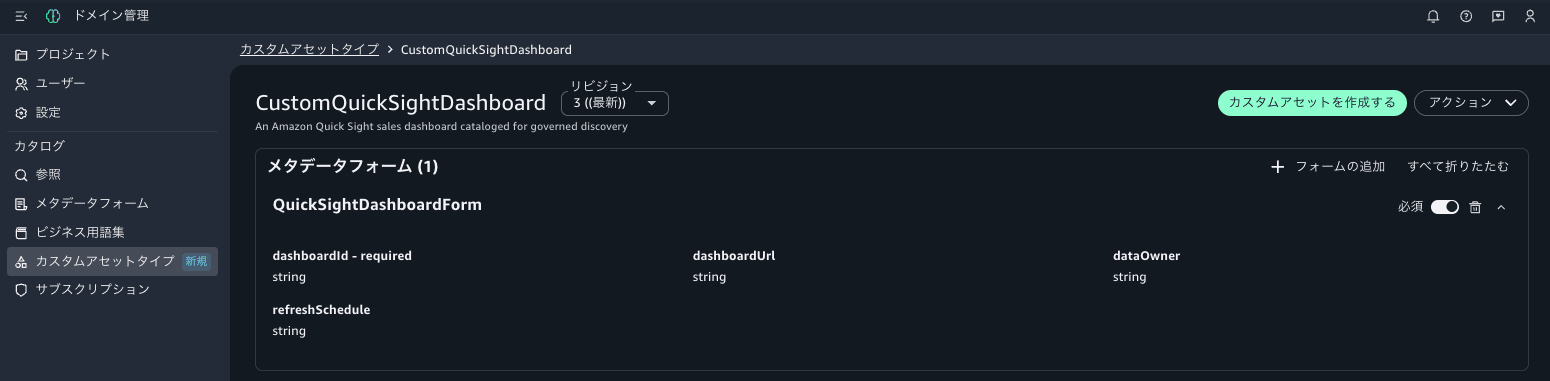
The specified QuickSightDashboardForm is associated with required: true, and additionally the built-in AssetCommonDetailsForm (optional) is automatically included.
Creating a Glossary and Terms
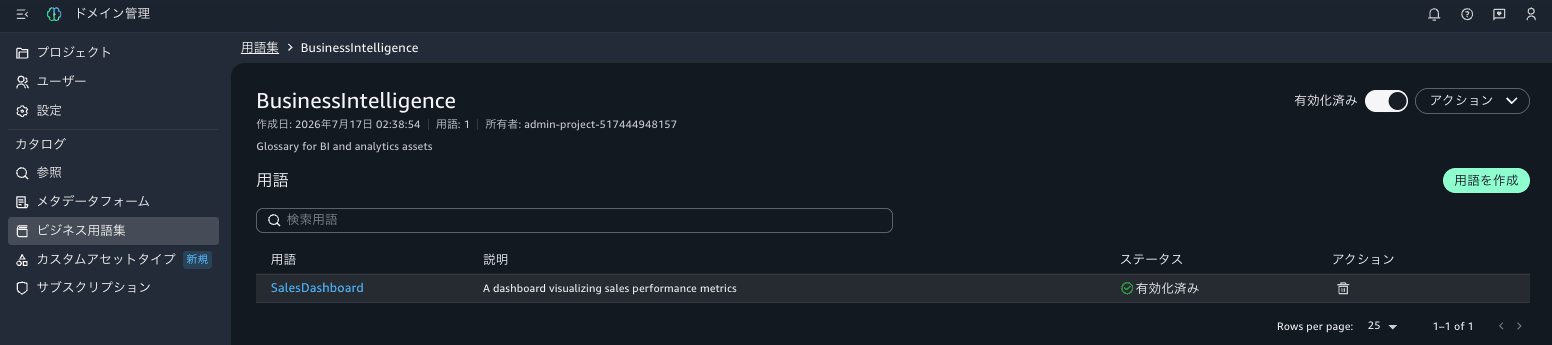
Create a glossary and terms to improve discoverability. By attaching these terms to an asset, it becomes possible to discover assets later by searching with those terms as keys.
% aws datazone create-glossary \
  --domain-identifier "$DOMAIN" \
  --name BusinessIntelligence \
  --description "Glossary for BI and analytics assets" \
  --owning-project-identifier "$PROJECT" \
  --status ENABLED \
  --region ap-northeast-1
{
    "domainId": "dzd-d3w2uawk8vo7a1",
    "id": "5tw3jvbuknlok9",
    "name": "BusinessIntelligence",
    "owningProjectId": "c778yzrdr7zy55",
    "description": "Glossary for BI and analytics assets",
    "status": "ENABLED"
}
Specify the ID of the created glossary and add a term.
% aws datazone create-glossary-term \
  --domain-identifier "$DOMAIN" \
  --glossary-identifier 5tw3jvbuknlok9 \
  --name SalesDashboard \
  --short-description "A dashboard visualizing sales performance metrics" \
  --status ENABLED \
  --region ap-northeast-1
{
    "id": "d97scm3meiuf15",
    "domainId": "dzd-d3w2uawk8vo7a1",
    "glossaryId": "5tw3jvbuknlok9",
    "name": "SalesDashboard",
    "status": "ENABLED",
    "shortDescription": "A dashboard visualizing sales performance metrics"
}
Creating a Custom Asset
Now it's time to create the custom asset. Specify the created asset type in --type-identifier, the metadata form input in --forms-input, and the term in --glossary-terms. Note that --type-revision is a string "1", not a number. Pass the form content as a JSON string in the content field of --forms-input.
% FORMS_INPUT=$(jq -nc --arg c "$CONTENT" '[{formName:"QuickSightDashboardForm",typeIdentifier:"QuickSightDashboardForm",typeRevision:"5",content:$c}]')

% aws datazone create-asset \
  --domain-identifier "$DOMAIN" \
  --name "Superstore-Sales-Performance-Dashboard" \
  --description "Superstore sales performance dashboard built in Amazon Quick Sight, external fulfillment" \
  --type-identifier CustomQuickSightDashboard --type-revision "3" \
  --owning-project-identifier "$PROJECT" \
  --forms-input "$FORMS_INPUT" \
  --glossary-terms d97scm3meiuf15 \
  --region ap-northeast-1
{
    "id": "3svczzdy7akcnt",
    "name": "Superstore-Sales-Performance-Dashboard",
    "typeIdentifier": "CustomQuickSightDashboard",
    "typeRevision": "3",
    "revision": "1",
    "description": "Superstore sales performance dashboard built in Amazon Quick Sight, external fulfillment",
    "createdAt": "2026-07-17T02:51:01.226000+09:00",
    "createdBy": "7cf1da49-6b49-4cf9-aa3a-2398ed6794a9",
    "firstRevisionCreatedAt": "2026-07-17T02:51:01.226000+09:00",
    "firstRevisionCreatedBy": "7cf1da49-6b49-4cf9-aa3a-2398ed6794a9",
    "glossaryTerms": [
        "d97scm3meiuf15"
    ],
    "owningProjectId": "c778yzrdr7zy55",
    "domainId": "dzd-d3w2uawk8vo7a1",
    "formsOutput": [
        {
            "formName": "QuickSightDashboardForm",
            "typeName": "QuickSightDashboardForm",
            "typeRevision": "5",
            "content": "{\"dashboardId\":\"e0fcec7c-fc9f-459a-a975-105b5ccd9b68\",\"dashboardUrl\":\"https://ap-northeast-1.quicksight.aws.amazon.com/sn/dashboards/e0fcec7c-fc9f-459a-a975-105b5ccd9b68\",\"dataOwner\":\"bi-team@example.com\",\"refreshSchedule\":\"Direct query (no SPICE refresh)\"}"
        }
    ],
    "readOnlyFormsOutput": []
}
The actual QuickSight dashboard ID and URL are stored directly in dashboardId and dashboardUrl. Now that the asset has been created, let's use get-asset to verify that the contents of the metadata form have been saved.
% aws datazone get-asset --domain-identifier "$DOMAIN" --identifier 3svczzdy7akcnt \
  --query 'formsOutput[?formName==`QuickSightDashboardForm`].content' --output text \
  --region ap-northeast-1
{"dashboardUrl":"https://ap-northeast-1.quicksight.aws.amazon.com/sn/dashboards/e0fcec7c-fc9f-459a-a975-105b5ccd9b68","dashboardId":"e0fcec7c-fc9f-459a-a975-105b5ccd9b68","dataOwner":"bi-team@example.com","refreshSchedule":"Direct query (no SPICE refresh)"}
The entered content was persisted as-is (the order of keys may differ from the input).
Verifying Schema Validation Behavior
To verify the specification that "creation fails with an invalid structure," I tried to create an asset with the required field dashboardId missing, just to see what would happen.
% BAD_CONTENT='{"dashboardUrl":"https://ap-northeast-1.quicksight.aws.amazon.com/sn/dashboards/only-url","dataOwner":"nobody@example.com"}'

% BAD_FORMS=$(jq -nc --arg c "$BAD_CONTENT" '[{formName:"QuickSightDashboardForm",typeIdentifier:"QuickSightDashboardForm",typeRevision:"5",content:$c}]')

% aws datazone create-asset \
  --domain-identifier "$DOMAIN" \
  --name "Invalid-Dashboard-NoId" \
  --type-identifier CustomQuickSightDashboard --type-revision "3" \
  --owning-project-identifier "$PROJECT" \
  --forms-input "$BAD_FORMS" \
  --region ap-northeast-1

aws: [ERROR]: An error occurred (ValidationException) when calling the CreateAsset operation: $.QuickSightDashboardForm.dashboardId: is missing but it is required
The above error was returned and creation was rejected. We confirmed that the required constraint defined in the asset type is properly enforced.
Publishing to the Catalog and Discovering
Immediately after creation, the asset exists in the project's inventory. First, let's confirm it can be found via inventory search.
% aws datazone search \
  --domain-identifier "$DOMAIN" \
  --owning-project-identifier "$PROJECT" \
  --search-scope ASSET \
  --search-text "Superstore" \
  --region ap-northeast-1 \
  --query '{items: items[].assetItem.{identifier:identifier, name:name, typeIdentifier:typeIdentifier}, totalMatchCount: totalMatchCount}'
{
    "items": [
        {
            "identifier": "4ruxgtt71v2pzt",
            "name": "superstore_joined",
            "typeIdentifier": "amazon.datazone.GlueTableAssetType"
        },
        {
            "identifier": "3svczzdy7akcnt",
            "name": "Superstore-Sales-Performance-Dashboard",
            "typeIdentifier": "CustomQuickSightDashboard"
        }
    ],
    "totalMatchCount": 2
}
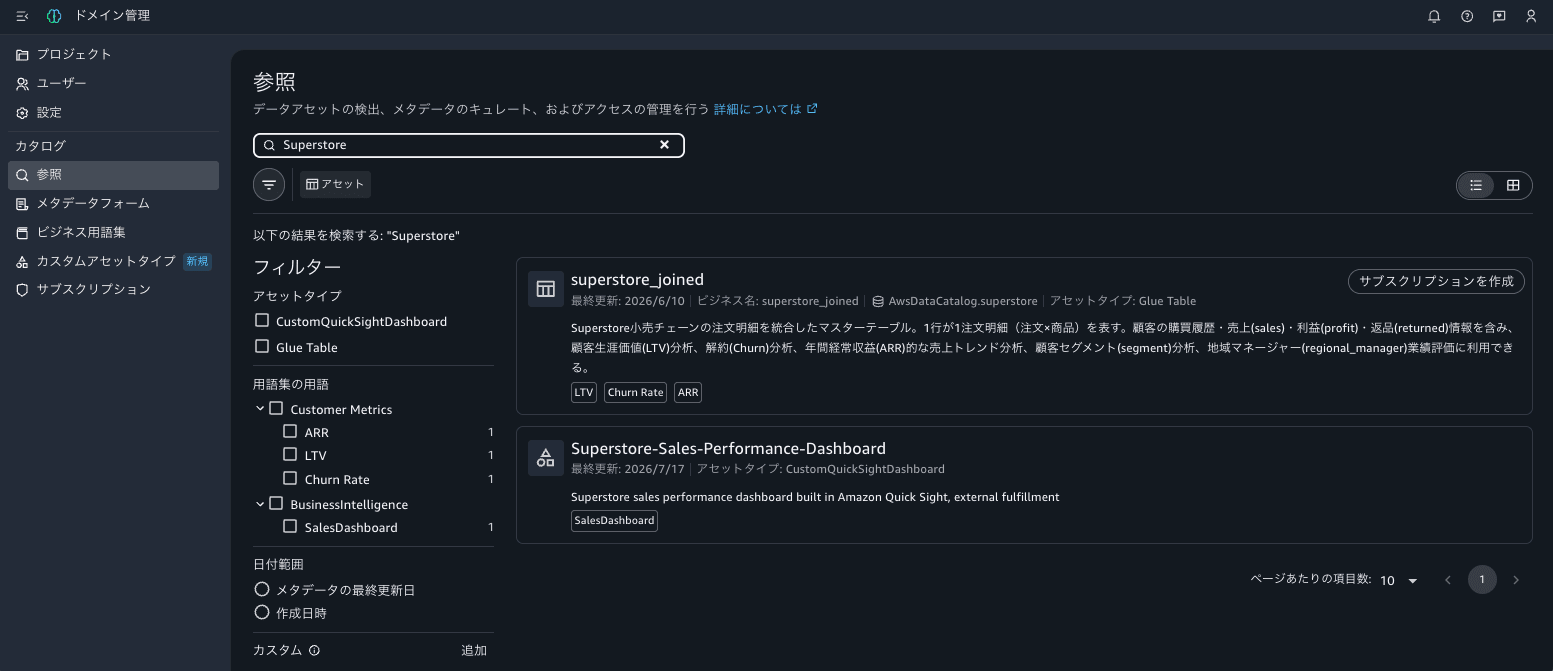
In addition to the custom asset created this time, the Glue table superstore_joined (a native system asset type) that is the source data for this dashboard also appeared in the results. Assets with different formats—a table and a dashboard—were found together in the same search.
Simply being found in the inventory is not enough for other users to discover and subscribe from the catalog. To publish to the catalog (issue a listing), use create-listing-change-set.
% aws datazone create-listing-change-set \
  --domain-identifier "$DOMAIN" \
  --entity-identifier 3svczzdy7akcnt \
  --entity-type ASSET \
  --action PUBLISH \
  --region ap-northeast-1
{
    "listingId": "5f1w8c8znff95l",
    "listingRevision": "1"
}
Successfully published. Let's verify it can be discovered via catalog (listing) search.
% aws datazone search-listings \
  --domain-identifier "$DOMAIN" \
  --search-text "Superstore" \
  --region ap-northeast-1 \
  --query 'items[].assetListing.{name:name, type:entityType, listingId:listingId}'
[
    {
        "name": "superstore_joined",
        "type": "GlueTableAssetType",
        "listingId": "awlq30o3e85dw9"
    },
    {
        "name": "Superstore-Sales-Performance-Dashboard",
        "type": "CustomQuickSightDashboard",
        "listingId": "5f1w8c8znff95l"
    }
]
The custom asset type asset is now discoverable in the catalog alongside a native asset (Glue table). This directly demonstrates the use case mentioned at the beginning: "a unified discovery experience for all assets within an organization regardless of format."
Checking the Console View
I also verified how the objects created via CLI appear in the SMUS portal console. After signing into the portal and opening "Domain Administration" at the bottom left, "Custom Asset Types" (the newly added feature in this update) appears under "Catalog" in the left navigation.

Opening CustomQuickSightDashboard from the list shows the associated metadata form QuickSightDashboardForm displayed with the "Required" toggle ON, and the fields dashboardId - required, dashboardUrl, dataOwner, and refreshSchedule are all visible. You can see that the schema defined via CLI is reflected directly in the console.
Furthermore, searching for "Superstore" from the top search bar in the portal displays the published custom asset alongside the Glue table on the Discover screen. The asset type CustomQuickSightDashboard and the term SalesDashboard are shown as tags alongside it, providing the "discovery by name, type, and term" experience described in the What's New announcement.
Analysis
Here is a summary of what I learned from going through the entire flow.
- The "Custom Asset Types" in the console are, in substance, DataZone form types, asset types, and assets. Therefore, they can be automated directly with the various
aws datazoneAPIs, and objects created via CLI are immediately reflected in the console. This seems well-suited for cases where you want to automate catalog maintenance through IaC or scripts. - There are dependencies in the creation order. You must proceed in the order of "form types and glossaries, asset types, assets, publication."
- Schema validation is reliably enforced. If a required field is missing, asset creation fails with a
ValidationException, allowing you to maintain a consistent level of catalog quality. - Deletion requires the extra step of disabling (DISABLED). Terms, glossaries, and form types cannot be deleted while in the ENABLED state. Additionally, an asset type cannot be deleted while assets created from that type still exist, and a form type cannot be deleted while the asset type referencing it still exists. Furthermore, even after deletion, revision numbers are carried over for types with the same name, so scripts that hardcode revision numbers will break upon re-execution. When designing cleanup or re-execution procedures, these dependency relationships and state transitions must be taken into account.
- In terms of permissions, specifying the owning project is mandatory (
owning-project-identifier), and the principal performing the operations must be a member (owner/contributor) of that project. According to the official documentation, only domain unit owners and project owners can edit the usage permissions of an asset type; contributors have read-only access. - Subscribing to a custom asset only provides access to discovery and metadata. Unlike standard table assets, Lake Formation permissions are not automatically granted, and the delivery of actual data (fulfillment) must be arranged by the asset owner. For a QuickSight dashboard like the one in this example, a possible operation would be for the owner to grant viewing permissions to the subscriber using
aws quicksight update-dashboard-permissionsafter subscription approval is received (automation may be possible using subscription events published by DataZone to EventBridge). This is something to keep in mind as an operational design consideration when introducing this feature.
As something to look forward to in the future, I felt that having a dedicated state-change API would make things more intuitive, for example in the area of needing to re-issue create-form-type to disable a form type.
In Closing
I tried the full flow of cataloging the Amazon QuickSight dashboard "Superstore Sales Performance Dashboard" as a custom asset type in an IAM-based domain of Amazon SageMaker Unified Studio, through to publication and discovery.
Even for assets in arbitrary formats not natively supported by SMUS, the ability to define a schema using metadata forms, add meaning with terms, and place them in a governed discovery and subscription workflow is a significant advantage. In fact, I was able to confirm that the source Glue table (native asset) and the QuickSight dashboard (custom asset) appeared side by side in the same search results. While it is a given that providing actual data must be arranged on your own, this brings you closer to a state where "all data assets within the organization can be discovered from a single catalog."
Operations can be performed from the console, or automated via the aws datazone APIs as shown in this article. If you are considering cataloging your organization's BI dashboards or reports, I encourage you to give it a try. I hope this article is helpful to someone.
