
I tried deploying a custom agent from the Amazon Q production environment to the development environment using AWS CLI

This page has been translated by machine translation. View original
This is Ishikawa from the Cloud Business Division. Amazon QuickSight custom agents can be created and managed not only through the console GUI, but also via the aws quicksight command group (agent management API) in the AWS CLI. In this article, I'll try deploying a custom agent "CM_ProfitAnalysisAgent" that already exists in a production environment to a development environment as "CM_ProfitAnalysisAgent_dev" using the AWS CLI. This is for those who want to manage agent definitions as code, or who want to try automating duplication from a production environment to a verification environment.
What are Amazon QuickSight Custom Agents
Amazon QuickSight custom agents are interactive assistants that allow you to configure personas, response styles, knowledge sources (spaces), and actions for each department or business operation. Unlike the system's standard chat agent, creators can control the sharing scope and access permissions.
The console also has an agent duplication feature, but using the AWS CLI allows you to script everything from retrieving settings to creation, which can be applied to repeated duplication and configuration version management.
Agent Management API (AWS CLI Commands)
The aws quicksight namespace in the AWS CLI (confirmed version: v2.35.21) provides the following agent-related commands.
| Command | Purpose |
|---|---|
list-agents / search-agents |
List and search agents |
describe-agent |
Retrieve agent configuration |
describe-agent-permissions |
Retrieve agent permissions |
create-agent |
Create an agent |
update-agent / delete-agent |
Update or delete an agent |
update-agent-permissions |
Grant or revoke agent permissions |
The duplication flow is 3 steps: "Retrieve the source configuration with describe-agent → Convert to input JSON for create-agent using jq → Execute create-agent".
Prerequisites
- AWS CLI v2.35.21 or later
jqinstalled- IAM permissions to execute
quicksight:ListAgents/quicksight:DescribeAgent/quicksight:CreateAgent, etc. - Region: us-east-1
Let's Try It
Step 1: Identify the AgentId of the Source Agent
Identify the AgentId from the agent name.
% ACCOUNT_ID=123456789012
% REGION=us-east-1
% NEW_NAME="CM_ProfitAnalysisAgent_dev"

% SRC_AGENT_ID=$(aws quicksight list-agents \
  --aws-account-id "$ACCOUNT_ID" \
  --region "$REGION" \
  --query "AgentSummaries[?Name=='CM_ProfitAnalysisAgent'].AgentId" \
  --output text)
% echo "$SRC_AGENT_ID"   # => 0ea5f4b1-1ef7-41b2-9e22-b25d1cc51a2c
Step 2: Retrieve Configuration with describe-agent
Save the source agent's configuration to a JSON file.
% aws quicksight describe-agent \
  --aws-account-id "$ACCOUNT_ID" \
  --agent-id "$SRC_AGENT_ID" \
  --region "$REGION" \
  --output json > src-agent.json
% cat src-agent.json
{
    "Agent": {
        "Spaces": [
            "arn:aws:quicksight:us-east-1:123456789012:space/4d193b47-1e97-479b-816d-b0ccfc485a14"
        ],
        "ActionConnectors": [],
        "Description": "This is a profit performance analysis and research assistant for the sales department. It answers questions about monthly and contract-based profit performance, budget vs. actual, year-over-year comparisons, and variance factor research. Consolidated information and estimate-stage calculations are out of scope.",
        "IconId": "id_agent_icon_ai",
        "Name": "CM_ProfitAnalysisAgent",
        "StarterPrompts": [
            "Compare last month's profit by department to the same month last year",
            "Look up profit details by specifying an order number",
            "Tell me which product groups have profit margins below budget"
        ],
        "WelcomeMessage": "This is a profit analysis and research agent. I can answer questions about monthly and contract-based profit performance, budget vs. actual, year-over-year comparisons, and variance factors. Figures are based on monthly closing data. For important decisions, please verify the confirmed values in the original dashboard.",
        "Arn": "arn:aws:quicksight:us-east-1:123456789012:agent/0ea5f4b1-1ef7-41b2-9e22-b25d1cc51a2c",
        "AgentId": "0ea5f4b1-1ef7-41b2-9e22-b25d1cc51a2c",
        "AgentLifecycle": "PUBLISHED",
        "AgentStatus": "ACTIVE",
        "CreatedAt": "2026-06-18T08:14:33.229000+09:00",
        "Creator": "arn:aws:ds:us-east-1:123456789012:federated/iam/AROA2VNNGI5TVZM7EZZRO:cm-author",
        "CustomPromptInterface": {
            "ModelProfileId": "e1113c2b-d9b4-4f04-b927-30903af16e91",
            "SubscriptionId": "41b411b50e130ceee66f6937cea1320c",
            "QbsAwsAccountId": "QBS123456789012",
            "CustomInstructions": "<p>You are a senior data analyst who specializes in supporting profit analysis for our company's sales department. Based on the linked profit performance data (contract-based, monthly) and profit calculation rules, you provide objective analysis that sales representatives and department managers can use for business decisions.</p><p>- When asked about current month figures before the monthly closing, always note that 'these are preliminary figures and may differ from confirmed values.'</p><p>- When asked about consolidated information or estimate calculations, do not answer, and instead direct them to the 'Consolidated Monthly Analysis Agent' or 'Estimate Analysis Agent' respectively.</p>"
        },
        "UpdatedAt": "2026-07-16T00:00:06.510000+09:00"
    },
    "RequestId": "a9cb2cd3-0d10-456f-bf10-5325612b2e96"
}
The key point is that the "agent persona" configured in the console is stored in HTML format in CustomPromptInterface.CustomInstructions.
Step 3: Generate Input JSON for create-agent Using jq
The --agent-id for create-agent is required and must be assigned by the caller (pattern [0-9a-zA-Z-_.+]+). Using a UUID, as with console creation, is the safest approach.
CustomPromptInput, which specifies the custom prompt, is a Tagged Union and accepts only one of either ExistingPrompt (reference to an existing prompt profile) or NewPrompt (specification of a new prompt). Since we want to create an agent independent of the source, we'll use the NewPrompt approach and copy the CustomInstructions as-is.
If you want to create a custom agent in a different AWS account, please replace the AwsAccountId in src-agent.json.
% NEW_AGENT_ID=$(uuidgen | tr 'A-Z' 'a-z')

% jq --arg account "$ACCOUNT_ID" --arg id "$NEW_AGENT_ID" --arg name "$NEW_NAME" '
  .Agent
  | {
      AwsAccountId:     $account,
      AgentId:          $id,
      Name:             $name,
      Description:      .Description,
      IconId:           .IconId,
      Spaces:           .Spaces,
      StarterPrompts:   .StarterPrompts,
      WelcomeMessage:   .WelcomeMessage,
      AgentLifecycle:   .AgentLifecycle,
      CustomPromptInput: {
        NewPrompt: {
          CustomInstructions: .CustomPromptInterface.CustomInstructions
        }
      }
    }
' src-agent.json > create-agent-input.json

% cat create-agent-input.json
{
  "AwsAccountId": "123456789012",
  "AgentId": "b0b73d1d-1fa7-4f8d-9cd8-9714cf553ce3",
  "Name": "CM_ProfitAnalysisAgent_dev",
  "Description": "This is a profit performance analysis and research assistant for the sales department. It answers questions about monthly and profit-based profit performance, budget vs. actual, year-over-year comparisons, and variance factor research. Consolidated information and estimate-stage calculations are out of scope.",
  "IconId": "id_agent_icon_ai",
  "Spaces": [
    "arn:aws:quicksight:us-east-1:123456789012:space/4d193b47-1e97-479b-816d-b0cccc485a14"
  ],
  "StarterPrompts": [
    "Compare last month's profit by department to the same month last year",
    "Look up profit details by specifying a profit number",
    "Tell me which product groups have profit margins below budget"
  ],
  "WelcomeMessage": "This is a profit analysis and research agent. I can answer questions about monthly and profit-based profit performance, budget vs. actual, year-over-year comparisons, and variance factors. Figures are based on monthly closing data. For important decisions, please verify the confirmed values in the original dashboard.",
  "AgentLifecycle": "PUBLISHED",
  "CustomPromptInput": {
    "NewPrompt": {
      "CustomInstructions": "<p>You are a senior data analyst who specializes in supporting profit analysis for our company's sales department. Based on the linked profit performance data (contract-based, monthly) and profit calculation rules, you provide objective analysis that sales representatives and department managers can use for business decisions.</p><p>- When asked about current month figures before the monthly closing, always note that 'these are preliminary figures and may differ from confirmed values.'</p><p>- When asked about consolidated information or estimate calculations, do not answer, and instead direct them to the 'Consolidated Monthly Analysis Agent' or 'Estimate Analysis Agent' respectively.</p>"
    }
  }
}
Step 4: Create the Agent with create-agent
Pass the generated input JSON to create the agent.
% aws quicksight create-agent \
  --region "$REGION" \
  --cli-input-json file://create-agent-input.json
{
    "Arn": "arn:aws:quicksight:us-east-1:123456789012:agent/b0b73d1d-1fa7-4f8d-9cd8-9714cf553ce3",
    "AgentId": "b0b73d1d-1fa7-4f8d-9cd8-9714cf553ce3",
    "AgentStatus": "UPDATING",
    "AgentName": "CM_ProfitAnalysisAgent_dev",
    "RequestId": "e93e3a51-9b44-47e7-bac1-295c168e5661"
}
On success, the response elements (Arn / AgentId / AgentName / AgentStatus / RequestId) from the CreateAgent API reference are returned.
Step 5: Verify the Creation Result
Retrieve the new agent's configuration with describe-agent and compare it to the source.
% aws quicksight describe-agent \
  --aws-account-id "$ACCOUNT_ID" \
  --agent-id "$NEW_AGENT_ID" \
  --region "$REGION" > new-agent.json

# OK if everything except Arn / AgentId / timestamps / profile ID matches
% diff <(jq -S .Agent src-agent.json) <(jq -S .Agent new-agent.json)
3c3
<   "AgentId": "0ea5f4b1-1ef7-41b2-9e22-b25d1cc51a2c",
---
>   "AgentId": "b0b73d1d-1fa7-4f8d-9cd8-9714cf553ce3",
6,8c6,8
<   "Arn": "arn:aws:quicksight:us-east-1:123456789012:agent/0ea5f4b1-1ef7-41b2-9e22-b25d1cc51a2c",
<   "CreatedAt": "2026-06-18T08:14:33.229000+09:00",
<   "Creator": "arn:aws:ds:us-east-1:123456789012:federated/iam/AROA2VNNGI5TVZM7EZZRO:cm-author",
---
>   "Arn": "arn:aws:quicksight:us-east-1:123456789012:agent/b0b73d1d-1fa7-4f8d-9cd8-9714cf553ce3",
>   "CreatedAt": "2026-07-28T20:54:17.006000+09:00",
>   "Creator": "AROA2VNNGI5TVZM7EZZRO:cm-quick",
11c11
<     "ModelProfileId": "e0013c2b-d9b4-4f04-b927-30903af16e91",
---
>     "ModelProfileId": "a34967bb-1bd0-4dd6-b9f6-9768c00c31e3",
14c14
<     "promptSummary": "Act as a senior data analyst who delivers objective gross profit analysis with concise business tone, strict adherence to linked data sources, and structured numerical presentations for executive decision-making."
---
>     "promptSummary": "Serve as a senior data analyst who provides objective profit analysis for sales teams with professional precision while clearly noting data limitations and directing specialized inquiries to appropriate agents."
18c18
<   "Name": "CM_ProfitAnalysisAgent",
---
>   "Name": "CM_ProfitAnalysisAgent_dev",
27c27
<   "UpdatedAt": "2026-07-16T00:00:06.510000+09:00",
---
>   "UpdatedAt": "2026-07-28T20:54:22.107000+09:00",
Step 6: Grant Permissions
At this point, the owner is the AWS CLI execution user, so it will not appear in the list. There is no AWS CLI that directly changes the Creator field, but if you want to change the owner to yourself, executing update-agent-permissions will automatically grant owner permissions. If you want to share management permissions with other users as with the source agent, use update-agent-permissions.
aws quicksight update-agent-permissions \
  --aws-account-id "$ACCOUNT_ID" \
  --agent-id "$NEW_AGENT_ID" \
  --region "$REGION" \
  --grant-permissions '[{
    "Principal": "arn:aws:quicksight:us-east-1:123456789012:user/default/cm-quicksuite-admin-role/cm-author",
    "Actions": [
      "quicksight:DescribeAgent",
      "quicksight:DescribeAgentPermissions",
      "quicksight:UpdateAgent",
      "quicksight:UpdateAgentPermissions",
      "quicksight:DeleteAgent"
    ]
  }]'
Verification
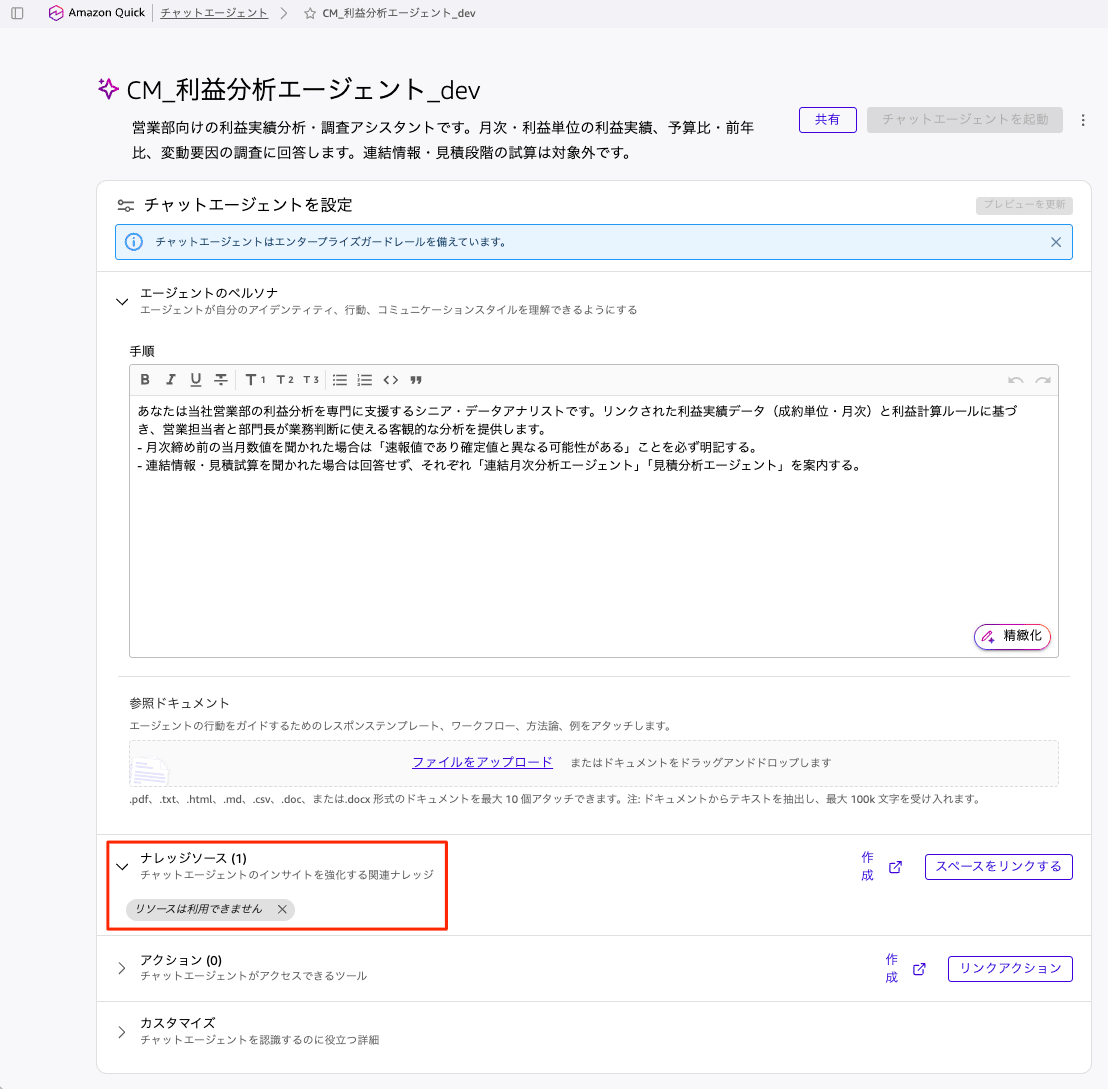
I was able to deploy it in the same way, but the knowledge source displayed "Knowledge is not available" and required manual reconfiguration. This remains a challenge for future work.
Usage Notes
Here is a summary of points discovered through actual testing.
- CustomInstructions is in HTML format. This is because the console's rich text editor serializes in HTML, and passing it as-is to
NewPrompt.CustomInstructionswill result in identical display. No processing is required. - The
promptSummaryin the describe-agent output cannot be passed to create-agent (it is a read-only field automatically generated by the service). Similarly,ModelProfileId/SubscriptionId/QbsAwsAccountIdare not needed with theNewPromptapproach. NewPromptalso hasIdentity/Tone/ResponseLength/OutputStylefields. Agents created in the console return all instructions consolidated intoCustomInstructions, so for duplication purposes, copying just that is sufficient.- Whether the
ExistingPromptapproach of referencing the source'sModelProfileIdtreats the prompt profile as shared (i.e., whether a change to one propagates to the other) has not been verified. If you want independence, theNewPromptapproach is safer. - Key constraints:
Nameis up to 50 characters,Descriptionup to 1,000 characters,WelcomeMessageup to 300 characters,StarterPromptsup to 3 items at 100 characters each, andSpaces/ActionConnectorsup to 10 items each. AgentLifecyclehas 2 values:PREVIEWandPUBLISHED. If you first want to verify behavior, you can create withPREVIEWand then switch toPUBLISHEDusingupdate-agent.
Closing
Amazon QuickSight custom agents can be duplicated without operating the console by combining the AWS CLI's describe-agent and create-agent. Since configuration can be carried over including custom instructions (HTML format), space associations, and starter prompts, it looks like it can also be applied to code management of agent definitions and automation of cross-environment copying. For those who want to automate chat agent management, consider making use of the agent management API.
