Recommendation for PM Record Keeping: Rebuilding My Method for Organizing Notes
This page has been translated by machine translation. View original
Introduction
In recent years, with the development of AI, the value of recording everything in Markdown has increased. Especially since I started using tools like Claude Code that directly read local Markdown files, I've developed a stronger sense that "records = assets for AI." So I started recording various things, but what troubled me was "where to put things, and in what hierarchy." Meeting notes, ideas, research, daily todos... I always got stuck figuring out how to categorize these.
Obsidian is a tool that can manage local Markdown files as-is, and lets you grow a knowledge network by linking notes together. Since the files themselves are local Markdown, it's also easy to have AI editors like Claude Code read them directly. For this kind of setup where you accumulate Markdown in Obsidian and have AI editors read it, "From Simple Notes to Intellectual Assets: An Intellectual Production System Built with Obsidian in Cursor" (Shoto Vimmer) is well known, and I was also using this setup as a base with Cursor replaced by Claude Code. However, as I used it, I started thinking, "If AI is going to read it anyway, maybe I can change the entire axis of classification?"
In this article, I'll introduce the challenges I felt with Zettelkasten-based operation, and the new structure "PM-style Note-taking" that I switched to in order to resolve them.
Zettelkasten
What is Zettelkasten?
Zettelkasten is a knowledge management and note-taking system that means "slip box" in German. It functions not just as a way to record and store information, but as a "second brain" for nurturing ideas and generating new discoveries.
It is famous for being practiced by German sociologist Niklas Luhmann, who used this note-taking method to write over 70 books and more than 400 papers in his lifetime.
While conventional note-taking "classifies and stores information by category or folder," the greatest feature of Zettelkasten is that it "connects pieces of information in a network, like synapses in a brain."
As the number of notes increases, links intersect in complex ways, so ideas that seemed unrelated end up connecting in unexpected ways, and new ideas and natural writing structures begin to emerge.
Based on Zettelkasten operations, I had organized my own folder structure as follows:
raw/: Primary materials such as meeting notes and lecture notesoutput/: Project documents created based on raw materialspermanentNote/: Abstracted knowledgewiki/: Reference materials independent of projectsdaily/: Daily logs
Advantages
The most demanding and labor-intensive part of producing any kind of output is fact-checking. Previously, managing reference materials for fact-checking was surprisingly difficult, and I often lost track of "what I wrote where." After adopting Zettelkasten, I developed the habit of writing source references in Literature Notes, making it easier to find "what information is where."
Disadvantages
On the other hand, the "decision cost" before writing was a concern.
First, Fleeting/Literature/Permanent is an axis of "how processed the note is." Every time I wrote something, I needed to think about "which type of note is this?", which slowed down daily operations.
The most troublesome thing in my workflow was distinguishing between raw and output. The boundaries between folders were often ambiguous, and this became a cause of getting stuck.
Also, pure Zettelkasten is a way of thinking where structure naturally emerges from links, so it doesn't have an explicit unit like a "project." I also felt some incompatibility with folder-based management in this regard.
Additionally, Literature Notes themselves didn't work as well as expected. Even if I kept a book title for methodology, there were few situations where specific evidence was required, making it less meaningful to keep notes with source references. In actual practice, the only cases where keeping source references was valuable were factual data used for fact-checking, and there was almost no need to write citations for methodology notes.
PM-style Note-taking
What resolved this problem was the basics of project management. The characteristics commonly cited for projects are "temporary nature (having a beginning and an end)" and "uniqueness (not the same as usual)." Conversely, a project can be described as "something you don't normally do." Looking at things from this perspective, you start to think "couldn't almost everything be a project?" What isn't a project would be just sudden thoughts or daily habitual activities. Here I realized that daily records should be divided by "things done every day / things not done every day." From this idea, I started calling the new structure "PM-style Note-taking" on my own.
Another push came from the existence of AI. Thinking about what information actually needs to be given to AI, I arrived at these two things:
- Unique context: Information that AI cannot know from training data or web searches, such as meeting contents, project history, and things about yourself
- Reliable knowledge: Information that exists in the world, but that I want to tell AI "among all the available sources, this is what I trust"
If passing these two things is the purpose of record-keeping, then how folders are divided is not a big issue for AI. Since AI reads across folders, it doesn't matter if raw and output are mixed together — in fact, having related information nearby is easier to handle. In other words, "what to record" is determined by AI requirements, and "where to put it" can be decided purely based on human convenience. Based on these two insights, I restructured the folder layout.
What Changed and How?
I reorganized the folder structure into the following three:
permanentNote/: A place for reliable knowledge. General knowledge that doesn't depend on any project or organization, and is useful to anyone, is gathered here. The oldwiki/is integrated here, and theAboutMe/(context about myself) I had initially considered is also consolidated into permanentNotedaily/: A place for habitual unique context. Todos, ideas, temporary notes, and daily records go hereproject/: A place for project-related unique context. Everything project-unit, such as meeting notes and review materials, goes here
The classification has two levels. First, divide by whether it's "reliable knowledge" or "unique context," then within unique context, divide into daily and project by "done every day / not done every day."
The correspondence between old and new structures is as follows:
| Old structure | New structure | Changes |
|---|---|---|
daily/ |
daily/ |
Expanded role (daily log → also Todos, ideas, temporary notes) |
raw/ + output/ |
project/ |
Merged. Classification judgment abolished |
permanentNote/ + wiki/ |
permanentNote/ |
Merged. Context about oneself also goes here |
There are four changes from Zettelkasten, each corresponding to the disadvantages mentioned earlier:
- Changed the axis from "processing stage" to "reliable knowledge or unique context" and "done every day / not done every day." This is to make it an axis that's less confusing when writing
- Stopped separating raw and output. If AI reads across folders by default, this judgment is unnecessary
- Explicitly introduced the concept of a project unit. For folder-based management, having an explicit unit is more practical
- The role of Literature Notes was merged into permanentNote and discontinued as a standalone category. This is because there's little point in keeping citations for methodology, and source management for factual data can be handled within permanentNote
Division of Roles Between Humans and AI
These three folders also roughly determine whether humans or AI will primarily interact with them.
daily/andproject/are folders that humans directly interact with. Since these are places for jotting down todos, taking rough meeting notes, and keeping daily records, humans are the primary actors for both writing and readingpermanentNote/is basically a place where I have AI like Claude Code write. Knowledge that I want to abstract and keep long-term is often organized through conversation, and it comes together more naturally when left to AI
project/ is sometimes written directly by humans, but the common practice is for AI to format rough meeting notes before storing them, so in reality it has become a folder where "humans start writing and AI finishes." Conversely, daily/ is almost entirely written directly by humans.
Links Between Folders
daily/, project/, and permanentNote/ may sometimes contain related information. For example, while writing project notes, you might discover generalized knowledge that can be applied to other projects. In this case, that knowledge is extracted into permanentNote, and both are connected with links.
This is a form that retained Zettelkasten's philosophy of "growing a knowledge network through links" as cross-folder cross-references. Even though AI reads across folders, links are still effective as clues for when humans navigate.
How It Works in Practice
The flow when writing is as follows:
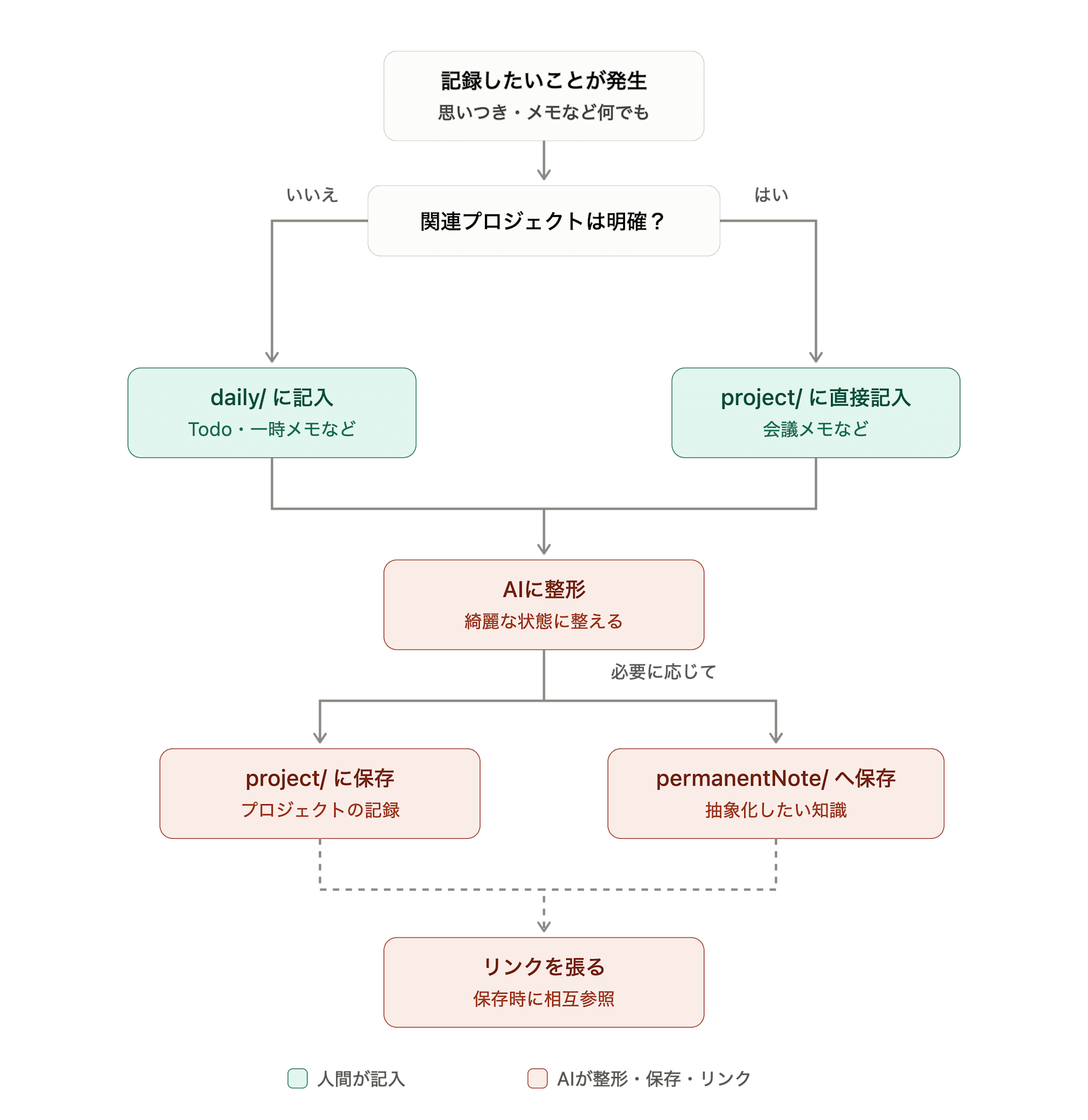
- When editing directly
- Sudden thoughts and todos are written in
daily/. If the related project is clear, write directly inproject/ - Have AI format what was entered in step 1 and store it in
project/. At this point, any knowledge worth abstracting and keeping is saved in permanentNote. Also, if there are related descriptions inproject/ordaily/, add links
This method has the advantage of being able to organize notes before passing them to AI, compared to having AI edit them directly.
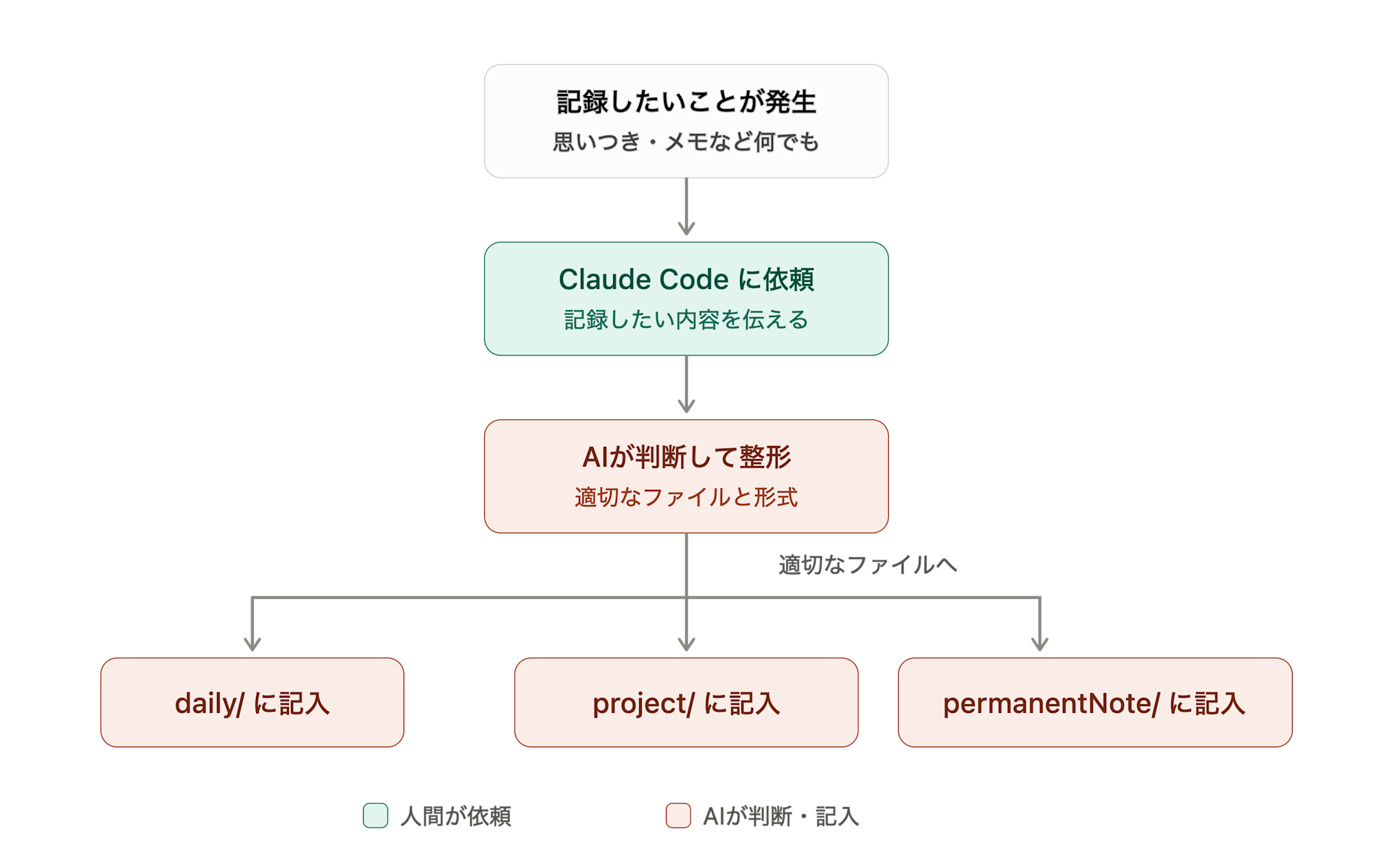
- When having AI edit
- Talk to Claude Code and have it write in the appropriate file in the appropriate format
There are two patterns when reading:
- Ask Claude Code to pick up information across folders
- Open that day's
daily/directly, or navigate fromproject/
Advantages
There are three advantages I've actually experienced from doing this:
- The number of places to check daily has been reduced to one. Previously I had to look in multiple places, like "where did I write that todo?" or "was that note in raw or output?", but now all I need to open daily is
daily/ - I no longer agonize over where to record things. The friction before starting to write has decreased, and I no longer worry about "where to put it" issues with Google Drive and the like
- I became more conscious of "what the note is for" before taking it. When putting something in the project folder, you inevitably have to choose "which project's note is this?" This extra step makes you conscious before writing about "what is this record even for?", which prevents information from piling up with an unclear purpose
Future Outlook
- Since it's hard to ask questions from a smartphone, I'd like to look into configuring Obsidian extensions
Closing
What you give to AI is "unique context" and "reliable knowledge." Where to store it is divided by "reliable knowledge or unique context" and "done every day / not done every day" based on human convenience. Humans primarily interact with daily and project, while permanentNote is written by AI. This is the organization I arrived at this time.
Note that the integration with external storage such as Google Drive, which I had listed as a disadvantage, was achieved by using the MCP server provided by Anthropic from Claude Code on VSCode, so there was no need to set it up separately. Going forward, I plan to work on improving usage from smartphones.
