
I tried adding CloudFront to a browser-only Claude Code environment (EC2 + code-server + Bedrock) and making it possible to install extensions too

This page has been translated by machine translation. View original
Hello, I'm Hayashi.
Last time, I set up an environment with code-server on EC2 running Claude Code via Bedrock.
This configuration had some limitations. Because code-server runs HTTPS using a self-signed certificate it generates itself, the browser displays warnings and extension installations also fail.
This time, I placed CloudFront in front of EC2 to resolve these limitations.
Since CloudFront's default domain (xxxxxxxx.cloudfront.net) comes with a browser-trusted certificate out of the box, there is no need to prepare your own certificate.
Configuration
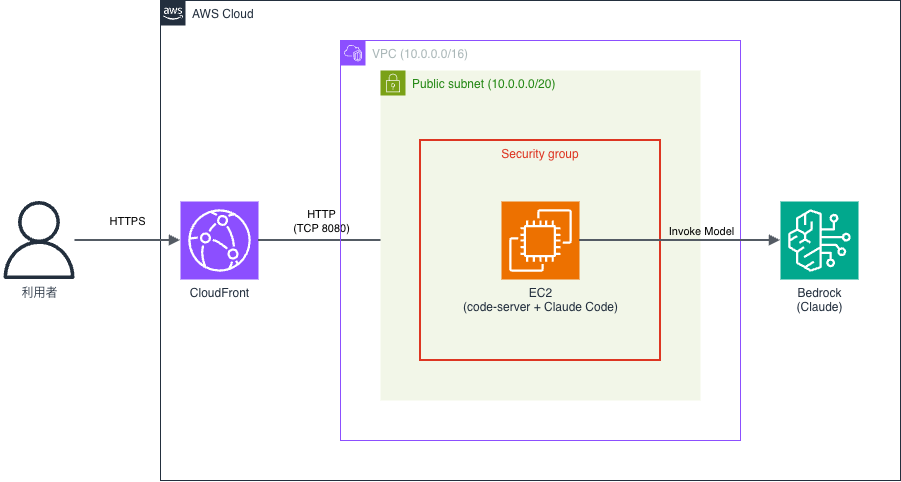
The difference from last time is that CloudFront is placed in front of EC2, and TLS termination moves to the CloudFront side.
The code-server on EC2 runs over HTTP without encryption, and direct access to EC2 from the internet is blocked.
The VPC and IAM role are the same as last time.
Since this article only covers the changes, please refer to the previous article for preliminary steps (enabling Bedrock model access, creating IAM roles, and creating a VPC).
Changing the EC2 Security Group
Last time, TCP port 50443 for code-server was allowed only from my own source IP.
This time, I remove that rule and instead allow TCP port 8080 only from the CloudFront managed prefix list.
| Type | Port Range | Source |
|---|---|---|
| Custom TCP | 8080 | com.amazonaws.global.cloudfront.origin-facing (prefix list) |
The ID you actually specify for the source is in the format pl-xxxxxxxx and differs by region. In the inbound rule editing screen of the security group, if you type com.amazonaws.global.cloudfront.origin-facing in the source field, it will appear as a suggestion, and selecting it will automatically fill in the ID for that region.
Since this ID differs by region, the CloudFormation template described later uses Mappings to provide a region-by-region lookup table.
Even if you place CloudFront in front, leaving EC2 directly accessible defeats the purpose.
By restricting the route to the origin to CloudFront only, even though it listens over unencrypted HTTP, it becomes unreachable from the internet.
Changing the code-server Configuration
Since TLS is terminated on the CloudFront side, code-server on EC2 runs over unencrypted HTTP.
Of the config.yaml created in the user data, only the following two lines change.
bind-addr: 0.0.0.0:8080
cert: false
Last time it was bind-addr: 0.0.0.0:50443 and cert: true.
The Claude Code installation part (creating ~/.claude/settings.json, etc.) is exactly the same as last time.
Adding an EIP and CloudFront Distribution
For the CloudFront origin, you specify the EC2 instance's public DNS name.
Since this DNS name changes when you stop and start EC2, first associate an EIP to fix the DNS name, then create the distribution.
Allocate an EIP from Elastic IP in the EC2 console and associate it with the target EC2 instance.
This ensures that the public IP and public DNS name do not change even when the instance is stopped and started.
The main settings for the distribution are as follows.
| Item | Setting |
|---|---|
| Origin domain | EC2 public DNS name |
| Origin protocol policy | HTTP only |
| HTTP port | 8080 |
| Viewer protocol policy | Redirect HTTP to HTTPS |
| Allowed HTTP methods | GET, HEAD, OPTIONS, PUT, POST, PATCH, DELETE |
| Cache policy | CachingDisabled |
| Origin request policy | AllViewer |
Both CachingDisabled and AllViewer are CloudFront managed policies.
Since code-server is a dynamic application whose responses change with every operation, caching is disabled, and AllViewer forwards all headers, cookies, and query strings to the origin. Note that if you restrict HTTP methods to only GET/HEAD, you will be unable to save files or install extensions.
In the CloudFormation template described later, these policies are specified by ID.
Since CloudFront is a global service without regions, these IDs are fixed regardless of region or account, unlike prefix list IDs.
Automated Build with CloudFormation
Here is the CloudFormation template reflecting all the changes made so far.
Ubuntu 24.04 Full Template
AWSTemplateFormatVersion: 2010-09-09
Description: code-server + Claude Code (Amazon Bedrock) behind CloudFront on Ubuntu 24.04
Metadata:
  AWS::CloudFormation::Interface:
    ParameterGroups:
      - Label:
          default: Set basic information.
        Parameters:
          - SystemName
      - Label:
          default: Set your EC2 instance settings.
        Parameters:
          - InstanceType
          - AMIID
Parameters:
  SystemName:
    Description: "Prefix of each resource name."
    Type: String
    Default: "code-server"
  InstanceType:
    Description: "EC2 instance type."
    Type: String
    Default: "t3.medium"
  AMIID:
    Description: "Ubuntu 24.04 AMI ID."
    Type: AWS::SSM::Parameter::Value<AWS::EC2::Image::Id>
    Default: /aws/service/canonical/ubuntu/server/24.04/stable/current/amd64/hvm/ebs-gp3/ami-id
Mappings:
  # CloudFront managed prefix list ID (per region)
  # Reference: https://aws.amazon.com/jp/blogs/news/limit-access-to-your-origins-using-the-aws-managed-prefix-list-for-amazon-cloudfront/
  AWSRegions2PrefixListID:
    ap-northeast-1:
      PrefixList: pl-58a04531
    ap-northeast-2:
      PrefixList: pl-22a6434b
    ap-northeast-3:
      PrefixList: pl-31a14458
    ap-south-1:
      PrefixList: pl-9aa247f3
    ap-southeast-1:
      PrefixList: pl-31a34658
    ap-southeast-2:
      PrefixList: pl-b8a742d1
    ca-central-1:
      PrefixList: pl-38a64351
    eu-central-1:
      PrefixList: pl-a3a144ca
    eu-north-1:
      PrefixList: pl-fab65393
    eu-west-1:
      PrefixList: pl-4fa04526
    eu-west-2:
      PrefixList: pl-93a247fa
    eu-west-3:
      PrefixList: pl-75b1541c
    sa-east-1:
      PrefixList: pl-5da64334
    us-east-1:
      PrefixList: pl-3b927c52
    us-east-2:
      PrefixList: pl-b6a144df
    us-west-1:
      PrefixList: pl-4ea04527
    us-west-2:
      PrefixList: pl-82a045eb
Resources:
  VPC:
    Type: AWS::EC2::VPC
    Properties:
      CidrBlock: 10.0.0.0/16
      EnableDnsHostnames: true
      EnableDnsSupport: true
      Tags:
        - Key: Name
          Value: !Sub "${SystemName}-vpc"
  InternetGateway:
    Type: AWS::EC2::InternetGateway
    Properties:
      Tags:
        - Key: Name
          Value: !Sub "${SystemName}-igw"
  AttachGateway:
    Type: AWS::EC2::VPCGatewayAttachment
    Properties:
      VpcId: !Ref VPC
      InternetGatewayId: !Ref InternetGateway
  PublicSubnet:
    Type: AWS::EC2::Subnet
    Properties:
      AvailabilityZone: !Select [0, !GetAZs ""]
      VpcId: !Ref VPC
      CidrBlock: 10.0.1.0/24
      Tags:
        - Key: Name
          Value: !Sub "${SystemName}-public-subnet"
  PublicRouteTable:
    Type: AWS::EC2::RouteTable
    Properties:
      VpcId: !Ref VPC
      Tags:
        - Key: Name
          Value: !Sub "${SystemName}-public-rtb"
  PublicRoute:
    Type: AWS::EC2::Route
    Properties:
      RouteTableId: !Ref PublicRouteTable
      DestinationCidrBlock: 0.0.0.0/0
      GatewayId: !Ref InternetGateway
  PublicRouteTableAssociation:
    Type: AWS::EC2::SubnetRouteTableAssociation
    Properties:
      RouteTableId: !Ref PublicRouteTable
      SubnetId: !Ref PublicSubnet

  CodeServerSecurityGroup:
    Type: AWS::EC2::SecurityGroup
    Properties:
      GroupName: !Sub "${SystemName}-sg"
      GroupDescription: "Security group for code-server (HTTP on 8080, from CloudFront only)"
      VpcId: !Ref VPC
      SecurityGroupIngress:
        - IpProtocol: tcp
          FromPort: 8080
          ToPort: 8080
          SourcePrefixListId: !FindInMap [AWSRegions2PrefixListID, !Ref "AWS::Region", PrefixList]
      Tags:
        - Key: Name
          Value: !Sub "${SystemName}-sg"

  CodeServerRole:
    Type: AWS::IAM::Role
    Properties:
      RoleName: !Sub
        - "${SystemName}-role-${Suffix}"
        - Suffix: !Select [4, !Split ["-", !Select [2, !Split ["/", !Ref "AWS::StackId"]]]]
      AssumeRolePolicyDocument:
        Version: "2012-10-17"
        Statement:
          - Effect: "Allow"
            Principal:
              Service:
                - "ec2.amazonaws.com"
            Action:
              - "sts:AssumeRole"
      ManagedPolicyArns:
        - "arn:aws:iam::aws:policy/AmazonSSMManagedInstanceCore"
      Policies:
        - PolicyName: "BedrockInvokeAnthropicModels"
          PolicyDocument:
            Version: "2012-10-17"
            Statement:
              - Sid: "BedrockInvokeAnthropicModels"
                Effect: "Allow"
                Action:
                  - "bedrock:InvokeModel"
                  - "bedrock:InvokeModelWithResponseStream"
                Resource:
                  - "arn:aws:bedrock:*::foundation-model/anthropic.*"
                  - !Sub "arn:aws:bedrock:*:${AWS::AccountId}:inference-profile/*.anthropic.*"
  CodeServerInstanceProfile:
    Type: AWS::IAM::InstanceProfile
    Properties:
      Roles:
        - !Ref CodeServerRole

  CodeServerEC2:
    Type: AWS::EC2::Instance
    Properties:
      ImageId: !Ref AMIID
      InstanceType: !Ref InstanceType
      BlockDeviceMappings:
        - DeviceName: /dev/sda1
          Ebs:
            Encrypted: true
            VolumeSize: 16
            VolumeType: gp3
            DeleteOnTermination: true
      NetworkInterfaces:
        - AssociatePublicIpAddress: true
          DeviceIndex: "0"
          SubnetId: !Ref PublicSubnet
          GroupSet:
            - !Ref CodeServerSecurityGroup
      IamInstanceProfile: !Ref CodeServerInstanceProfile
      Tags:
        - Key: Name
          Value: !Ref SystemName
      UserData:
        Fn::Base64: |
          #!/bin/bash
          set -eux

          # Install code-server
          apt update
          apt install -y jq curl openssl

          CODER_VERSION=$(curl -s https://api.github.com/repos/coder/code-server/releases/latest | jq -r .tag_name | sed 's/v//')
          curl -fOL "https://github.com/coder/code-server/releases/download/v${CODER_VERSION}/code-server_${CODER_VERSION}_amd64.deb"
          apt install -y ./code-server_${CODER_VERSION}_amd64.deb
          rm -f code-server_${CODER_VERSION}_amd64.deb

          mkdir -p /home/ubuntu/.config/code-server/
          cat > /home/ubuntu/.config/code-server/config.yaml << EOF
          bind-addr: 0.0.0.0:8080
          auth: password
          password: $(openssl rand -hex 16)
          cert: false
          EOF
          chown -R ubuntu:ubuntu /home/ubuntu/.config
          systemctl enable --now code-server@ubuntu

          # Install Claude Code
          sudo -u ubuntu bash -c 'curl -fsSL https://claude.ai/install.sh | bash'

          mkdir -p /home/ubuntu/.claude
          cat > /home/ubuntu/.claude/settings.json << 'EOF'
          {
            "env": {
              "CLAUDE_CODE_USE_BEDROCK": "1",
              "AWS_REGION": "ap-northeast-1",
              "ANTHROPIC_MODEL": "jp.anthropic.claude-sonnet-4-6"
            }
          }
          EOF
          chown -R ubuntu:ubuntu /home/ubuntu/.claude

          # Add PATH
          sudo -u ubuntu bash -c 'grep -q ".local/bin" /home/ubuntu/.bashrc || echo "export PATH=\"$HOME/.local/bin:\$PATH\"" >> /home/ubuntu/.bashrc'

  CodeServerEIP:
    Type: AWS::EC2::EIP
    Properties:
      InstanceId: !Ref CodeServerEC2
      Tags:
        - Key: Name
          Value: !Ref SystemName

  CodeServerDistribution:
    Type: AWS::CloudFront::Distribution
    DependsOn: CodeServerEIP
    Properties:
      DistributionConfig:
        Enabled: true
        Comment: !Ref SystemName
        Origins:
          - Id: "code-server"
            DomainName: !GetAtt CodeServerEC2.PublicDnsName
            CustomOriginConfig:
              OriginProtocolPolicy: "http-only"
              HTTPPort: 8080
        DefaultCacheBehavior:
          TargetOriginId: "code-server"
          ViewerProtocolPolicy: "redirect-to-https"
          AllowedMethods:
            - "GET"
            - "HEAD"
            - "OPTIONS"
            - "PUT"
            - "POST"
            - "PATCH"
            - "DELETE"
          # CachingDisabled
          CachePolicyId: "4135ea2d-6df8-44a3-9df3-4b5a84be39ad"
          # AllViewer
          OriginRequestPolicyId: "216adef6-5c7f-47e4-b989-5492eafa07d3"

Outputs:
  CloudFrontDomain:
    Description: "code-server URL. Access it at https://<CloudFrontDomain>"
    Value: !GetAtt CodeServerDistribution.DomainName
Amazon Linux 2023 Full Template
AWSTemplateFormatVersion: 2010-09-09
Description: code-server + Claude Code (Amazon Bedrock) behind CloudFront on Amazon Linux 2023
Metadata:
  AWS::CloudFormation::Interface:
    ParameterGroups:
      - Label:
          default: Set basic information.
        Parameters:
          - SystemName
      - Label:
          default: Set your EC2 instance settings.
        Parameters:
          - InstanceType
          - AMIID
Parameters:
  SystemName:
    Description: "Prefix of each resource name."
    Type: String
    Default: "code-server"
  InstanceType:
    Description: "EC2 instance type."
    Type: String
    Default: "t3.medium"
  AMIID:
    Description: "Amazon Linux 2023 AMI ID."
    Type: AWS::SSM::Parameter::Value<AWS::EC2::Image::Id>
    Default: /aws/service/ami-amazon-linux-latest/al2023-ami-kernel-6.1-x86_64
Mappings:
  # CloudFront managed prefix list ID (per region)
  # Reference: https://aws.amazon.com/jp/blogs/news/limit-access-to-your-origins-using-the-aws-managed-prefix-list-for-amazon-cloudfront/
  AWSRegions2PrefixListID:
    ap-northeast-1:
      PrefixList: pl-58a04531
    ap-northeast-2:
      PrefixList: pl-22a6434b
    ap-northeast-3:
      PrefixList: pl-31a14458
    ap-south-1:
      PrefixList: pl-9aa247f3
    ap-southeast-1:
      PrefixList: pl-31a34658
    ap-southeast-2:
      PrefixList: pl-b8a742d1
    ca-central-1:
      PrefixList: pl-38a64351
    eu-central-1:
      PrefixList: pl-a3a144ca
    eu-north-1:
      PrefixList: pl-fab65393
    eu-west-1:
      PrefixList: pl-4fa04526
    eu-west-2:
      PrefixList: pl-93a247fa
    eu-west-3:
      PrefixList: pl-75b1541c
    sa-east-1:
      PrefixList: pl-5da64334
    us-east-1:
      PrefixList: pl-3b927c52
    us-east-2:
      PrefixList: pl-b6a144df
    us-west-1:
      PrefixList: pl-4ea04527
    us-west-2:
      PrefixList: pl-82a045eb
Resources:
  VPC:
    Type: AWS::EC2::VPC
    Properties:
      CidrBlock: 10.0.0.0/16
      EnableDnsHostnames: true
      EnableDnsSupport: true
      Tags:
        - Key: Name
          Value: !Sub "${SystemName}-vpc"
  InternetGateway:
    Type: AWS::EC2::InternetGateway
    Properties:
      Tags:
        - Key: Name
          Value: !Sub "${SystemName}-igw"
  AttachGateway:
    Type: AWS::EC2::VPCGatewayAttachment
    Properties:
      VpcId: !Ref VPC
      InternetGatewayId: !Ref InternetGateway
  PublicSubnet:
    Type: AWS::EC2::Subnet
    Properties:
      AvailabilityZone: !Select [0, !GetAZs ""]
      VpcId: !Ref VPC
      CidrBlock: 10.0.1.0/24
      Tags:
        - Key: Name
          Value: !Sub "${SystemName}-public-subnet"
  PublicRouteTable:
    Type: AWS::EC2::RouteTable
    Properties:
      VpcId: !Ref VPC
      Tags:
        - Key: Name
          Value: !Sub "${SystemName}-public-rtb"
  PublicRoute:
    Type: AWS::EC2::Route
    Properties:
      RouteTableId: !Ref PublicRouteTable
      DestinationCidrBlock: 0.0.0.0/0
      GatewayId: !Ref InternetGateway
  PublicRouteTableAssociation:
    Type: AWS::EC2::SubnetRouteTableAssociation
    Properties:
      RouteTableId: !Ref PublicRouteTable
      SubnetId: !Ref PublicSubnet

  CodeServerSecurityGroup:
    Type: AWS::EC2::SecurityGroup
    Properties:
      GroupName: !Sub "${SystemName}-sg"
      GroupDescription: "Security group for code-server (HTTP on 8080, from CloudFront only)"
      VpcId: !Ref VPC
      SecurityGroupIngress:
        - IpProtocol: tcp
          FromPort: 8080
          ToPort: 8080
          SourcePrefixListId: !FindInMap [AWSRegions2PrefixListID, !Ref "AWS::Region", PrefixList]
      Tags:
        - Key: Name
          Value: !Sub "${SystemName}-sg"

  CodeServerRole:
    Type: AWS::IAM::Role
    Properties:
      RoleName: !Sub
        - "${SystemName}-role-${Suffix}"
        - Suffix: !Select [4, !Split ["-", !Select [2, !Split ["/", !Ref "AWS::StackId"]]]]
      AssumeRolePolicyDocument:
        Version: "2012-10-17"
        Statement:
          - Effect: "Allow"
            Principal:
              Service:
                - "ec2.amazonaws.com"
            Action:
              - "sts:AssumeRole"
      ManagedPolicyArns:
        - "arn:aws:iam::aws:policy/AmazonSSMManagedInstanceCore"
      Policies:
        - PolicyName: "BedrockInvokeAnthropicModels"
          PolicyDocument:
            Version: "2012-10-17"
            Statement:
              - Sid: "BedrockInvokeAnthropicModels"
                Effect: "Allow"
                Action:
                  - "bedrock:InvokeModel"
                  - "bedrock:InvokeModelWithResponseStream"
                Resource:
                  - "arn:aws:bedrock:*::foundation-model/anthropic.*"
                  - !Sub "arn:aws:bedrock:*:${AWS::AccountId}:inference-profile/*.anthropic.*"
  CodeServerInstanceProfile:
    Type: AWS::IAM::InstanceProfile
    Properties:
      Roles:
        - !Ref CodeServerRole

  CodeServerEC2:
    Type: AWS::EC2::Instance
    Properties:
      ImageId: !Ref AMIID
      InstanceType: !Ref InstanceType
      BlockDeviceMappings:
        - DeviceName: /dev/xvda
          Ebs:
            Encrypted: true
            VolumeSize: 16
            VolumeType: gp3
            DeleteOnTermination: true
      NetworkInterfaces:
        - AssociatePublicIpAddress: true
          DeviceIndex: "0"
          SubnetId: !Ref PublicSubnet
          GroupSet:
            - !Ref CodeServerSecurityGroup
      IamInstanceProfile: !Ref CodeServerInstanceProfile
      Tags:
        - Key: Name
          Value: !Ref SystemName
      UserData:
        Fn::Base64: |
          #!/bin/bash
          set -eux

          # Install code-server
          dnf install -y jq openssl

          CODER_VERSION=$(curl -s https://api.github.com/repos/coder/code-server/releases/latest | jq -r .tag_name | sed 's/v//')
          curl -fOL "https://github.com/coder/code-server/releases/download/v${CODER_VERSION}/code-server-${CODER_VERSION}-amd64.rpm"
          dnf install -y ./code-server-${CODER_VERSION}-amd64.rpm
          rm -f code-server-${CODER_VERSION}-amd64.rpm

          mkdir -p /home/ec2-user/.config/code-server/
          cat > /home/ec2-user/.config/code-server/config.yaml << EOF
          bind-addr: 0.0.0.0:8080
          auth: password
          password: $(openssl rand -hex 16)
          cert: false
          EOF
          chown -R ec2-user:ec2-user /home/ec2-user/.config
          systemctl enable --now code-server@ec2-user

          # Install Claude Code
          sudo -u ec2-user bash -c 'curl -fsSL https://claude.ai/install.sh | bash'

          mkdir -p /home/ec2-user/.claude
          cat > /home/ec2-user/.claude/settings.json << 'EOF'
          {
            "env": {
              "CLAUDE_CODE_USE_BEDROCK": "1",
              "AWS_REGION": "ap-northeast-1",
              "ANTHROPIC_MODEL": "jp.anthropic.claude-sonnet-4-6"
            }
          }
          EOF
          chown -R ec2-user:ec2-user /home/ec2-user/.claude

          # Add PATH
          sudo -u ec2-user bash -c 'grep -q ".local/bin" /home/ec2-user/.bashrc || echo "export PATH=\"$HOME/.local/bin:\$PATH\"" >> /home/ec2-user/.bashrc'

  CodeServerEIP:
    Type: AWS::EC2::EIP
    Properties:
      InstanceId: !Ref CodeServerEC2
      Tags:
        - Key: Name
          Value: !Ref SystemName

  CodeServerDistribution:
    Type: AWS::CloudFront::Distribution
    DependsOn: CodeServerEIP
    Properties:
      DistributionConfig:
        Enabled: true
        Comment: !Ref SystemName
        Origins:
          - Id: "code-server"
            DomainName: !GetAtt CodeServerEC2.PublicDnsName
            CustomOriginConfig:
              OriginProtocolPolicy: "http-only"
              HTTPPort: 8080
        DefaultCacheBehavior:
          TargetOriginId: "code-server"
          ViewerProtocolPolicy: "redirect-to-https"
          AllowedMethods:
            - "GET"
            - "HEAD"
            - "OPTIONS"
            - "PUT"
            - "POST"
            - "PATCH"
            - "DELETE"
          # CachingDisabled
          CachePolicyId: "4135ea2d-6df8-44a3-9df3-4b5a84be39ad"
          # AllViewer
          OriginRequestPolicyId: "216adef6-5c7f-47e4-b989-5492eafa07d3"

Outputs:
  CloudFrontDomain:
    Description: "code-server URL. Access it at https://<CloudFrontDomain>"
    Value: !GetAtt CodeServerDistribution.DomainName
The VPC and IAM role sections are identical to the previous version, and there are 7 differences in the template.
- Removed the
AllowedIPparameter
Since access to EC2 is now restricted to CloudFront, there is no longer a need to specify your own IP address.
- AllowedIP:
-   Description: "Your access source IP in CIDR notation (e.g. 203.0.113.10/32)."
-   Type: String
- Added
Mappingsto look up CloudFront managed prefix list IDs per region
+ Mappings:
+   AWSRegions2PrefixListID:
+     ap-northeast-1:
+       PrefixList: pl-58a04531
+     ap-northeast-2:
+       PrefixList: pl-22a6434b
+     # ...(17 regions in total. See the full template below for details)
CodeServerSecurityGrouphas the port and allowed source changed
        SecurityGroupIngress:
          - IpProtocol: tcp
-           FromPort: 50443
-           ToPort: 50443
-           CidrIp: !Ref AllowedIP
+           FromPort: 8080
+           ToPort: 8080
+           SourcePrefixListId: !FindInMap [AWSRegions2PrefixListID, !Ref "AWS::Region", PrefixList]
- The part of
CodeServerEC2UserData that generatesconfig.yamlalso changes
          cat > /home/ubuntu/.config/code-server/config.yaml << EOF
-         bind-addr: 0.0.0.0:50443
+         bind-addr: 0.0.0.0:8080
          auth: password
          password: $(openssl rand -hex 16)
-         cert: true
+         cert: false
          EOF
CodeServerEIPandCodeServerDistributionare newly added resources
  CodeServerEIP:
    Type: AWS::EC2::EIP
    Properties:
      InstanceId: !Ref CodeServerEC2
      Tags:
        - Key: Name
          Value: !Ref SystemName

  CodeServerDistribution:
    Type: AWS::CloudFront::Distribution
    DependsOn: CodeServerEIP
    Properties:
      DistributionConfig:
        Enabled: true
        Comment: !Ref SystemName
        Origins:
          - Id: "code-server"
            DomainName: !GetAtt CodeServerEC2.PublicDnsName
            CustomOriginConfig:
              OriginProtocolPolicy: "http-only"
              HTTPPort: 8080
        DefaultCacheBehavior:
          TargetOriginId: "code-server"
          ViewerProtocolPolicy: "redirect-to-https"
          AllowedMethods:
            - "GET"
            - "HEAD"
            - "OPTIONS"
            - "PUT"
            - "POST"
            - "PATCH"
            - "DELETE"
          # CachingDisabled
          CachePolicyId: "4135ea2d-6df8-44a3-9df3-4b5a84be39ad"
          # AllViewer
          OriginRequestPolicyId: "216adef6-5c7f-47e4-b989-5492eafa07d3"
- Changed
Outputsfrom the EC2 public IP to the CloudFront domain.
- PublicIP:
-   Description: "code-server public IP. Access it at https://<PublicIP>:50443"
-   Value: !GetAtt CodeServerEC2.PublicIp
+ CloudFrontDomain:
+   Description: "code-server URL. Access it at https://<CloudFrontDomain>"
+   Value: !GetAtt CodeServerDistribution.DomainName
Deployment and Operation Verification
The deployment command is as follows.
Aside from AllowedIP being removed, it is the same format as last time.
aws cloudformation create-stack --stack-name temp-code-server-cloudfront \
    --template-body file://./code-server-cloudfront-ubuntu.yaml \
    --capabilities CAPABILITY_NAMED_IAM
For the Amazon Linux 2023 version, change --template-body to code-server-cloudfront-al2023.yaml.
If you want to change the model being used, rewrite ANTHROPIC_MODEL in ~/.claude/settings.json inside the template's user data.
Once deployment is complete, the CloudFront domain (xxxxxxxx.cloudfront.net) will be output in Outputs. Since creating the distribution takes a few minutes, please wait a moment for it to become active before proceeding.
The method for checking the password via Session Manager is the same as last time.
# For Ubuntu
sudo cat /home/ubuntu/.config/code-server/config.yaml | grep password:

# For Amazon Linux 2023
sudo cat /home/ec2-user/.config/code-server/config.yaml | grep password:
Access the CloudFront domain in your browser. There are two differences from last time.
First, no certificate warning will appear. Since we are using CloudFront's default domain, you can access it with a certificate trusted by your browser.
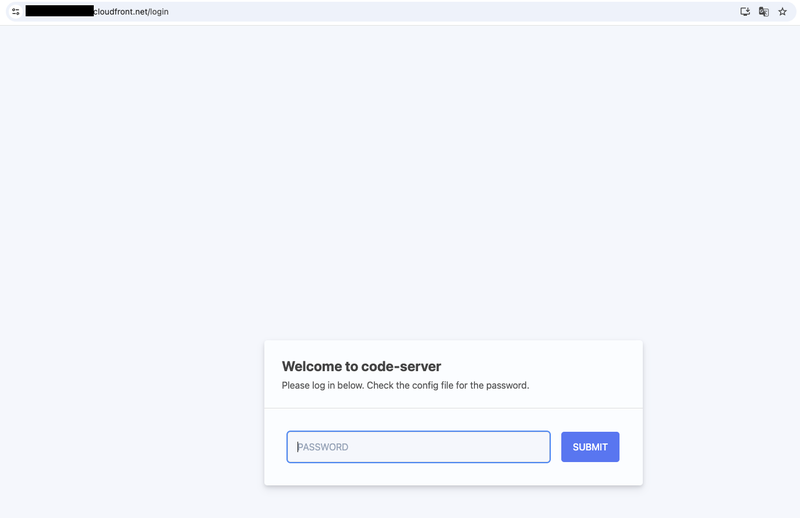
And the main point — whether extensions can be installed. I tried installing two extensions: "Japanese Language Pack for Visual Studio Code" for localization, and "Claude Code for VS Code".


Both installed without any issues. The Japanese language pack takes effect by following the restart prompt that appears after installation. I was also able to confirm that the menus were actually displayed in Japanese.
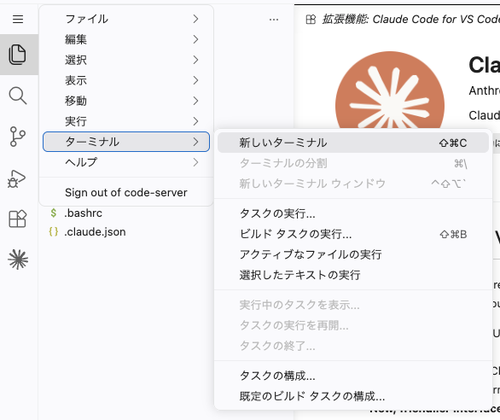
I also verified that the terminal and file saving work without issues even through CloudFront. Since code-server communicates via WebSocket, if this doesn't work, it cannot be used as an editor.

Both launching the terminal and executing commands worked without issues, and I was able to confirm the Bedrock login status using claude auth status.
Operational Notes
With the addition of CloudFront and EIP, costs will be higher than the previous configuration.
Since EIPs are subject to charges even when attached to an instance, please delete the entire stack when you are done using it.
CloudFront's default domain is a string that is difficult to guess, but anyone who knows the URL can access it. Since authentication relies solely on the code-server password, consider combining it with Cognito authentication or similar measures for long-term use.
Closing
By placing CloudFront in front, we were able to resolve the certificate-related constraints of code-server.
Since it only requires adding three elements to the previous console procedure and CloudFormation template — a security group, code-server configuration, and an EIP and CloudFront distribution — applying this to an existing environment should not be difficult.
I hope this article proves useful to someone. Thank you for reading to the end!
References
