
I built a Claude Code environment usable only in a browser using EC2 + code-server + Bedrock

This page has been translated by machine translation. View original
Hello, I'm Hayashi.
I tried setting up a web IDE (code-server) on EC2 that can be used with just a browser, and created an environment where Claude Code via Bedrock can be used within it. This can be useful when you want to distribute temporary development environments for training sessions or hands-on workshops.
For Claude Code authentication, I use the IAM role attached to EC2 instead of an API key. Users can use Claude Code simply by opening a URL in their browser, without any authentication configuration.
The setup is done through the AWS console, but I've also included a CloudFormation template with the same configuration at the end of the article.
The code-server setup procedure was referenced from the following article.
Configuration
Here is the configuration diagram of the environment we'll be creating.
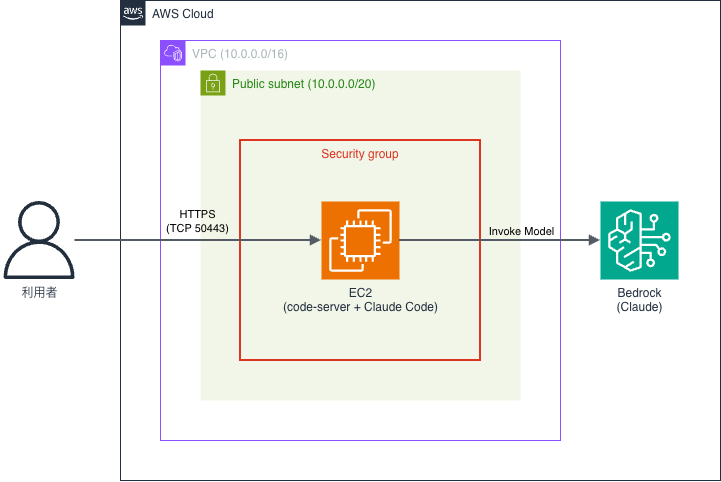
We run code-server on EC2 placed in a public subnet and access it directly from a browser.
Claude Code is also installed on the same EC2, and calls Bedrock using the permissions of the IAM role attached to EC2.
Enable Bedrock Model Access
When using Anthropic models for the first time, you need to submit a use case form.
Open Amazon Bedrock (region: Tokyo) in the AWS console, select an Anthropic Claude model from Model catalog, and submit the use case form. It will be available for use immediately after submission.
You just need to do this from the console with your own IAM user, etc.
The role attached to EC2 does not need permissions to perform this operation (submitting the use case form).
Create an IAM Role
Prepare an IAM role to attach to EC2.
Since we want to avoid placing strong permissions on an EC2 that users will touch, we'll limit it to only the Bedrock model invocations that are needed.
Select EC2 as the trusted entity and create the role (e.g., code-server-role).
There are two permissions to grant. Add the managed policy AmazonSSMManagedInstanceCore and the following Bedrock invocation policy as an inline policy.
AmazonSSMManagedInstanceCore is required for logging in via Session Manager,
and with this attached, you don't need to open the port for SSH.
{
  "Version": "2012-10-17",
  "Statement": [
    {
      "Sid": "BedrockInvokeAnthropicModels",
      "Effect": "Allow",
      "Action": [
        "bedrock:InvokeModel",
        "bedrock:InvokeModelWithResponseStream"
      ],
      "Resource": [
        "arn:aws:bedrock:*::foundation-model/anthropic.*",
        "arn:aws:bedrock:*:<AccountID>:inference-profile/*.anthropic.*"
      ]
    }
  ]
}
Replace <AccountID> with your own AWS account ID (12-digit number).
This policy allows Anthropic Claude models in general. This setting is convenient if you may want to switch models during use.
Note: If you want to restrict to a specific model
There may be reasons such as cost management where you want to fix which models can be called.
In that case, replace Resource as follows (example: limiting to jp.anthropic.claude-sonnet-4-6).
[
  "arn:aws:bedrock:*:<AccountID>:inference-profile/jp.anthropic.claude-sonnet-4-6",
  "arn:aws:bedrock:ap-northeast-1::foundation-model/anthropic.claude-sonnet-4-6",
  "arn:aws:bedrock:ap-northeast-3::foundation-model/anthropic.claude-sonnet-4-6"
]
The reason three ARNs are needed for a single model is because cross-region inference profiles are being used.
The first is the ARN of the inference profile itself, which corresponds to the model ID specified by Claude Code.
The second and third are the ARNs of the foundation-models to which the inference profile distributes processing.
Since the jp. profile routes to Tokyo and Osaka, you also need to allow these two destination regions, or calls will fail.
Additionally, align ANTHROPIC_MODEL in ~/.claude/settings.json created in the user data described later to the same model ID.
If the model permitted in the IAM policy and the model actually called by Claude Code don't match, you'll get an AccessDeniedException.
Create a VPC
To access code-server from a browser, EC2 needs to be placed in a public subnet reachable from the internet. Since this isn't the main focus today, we'll create everything at once using the VPC → Create VPC → VPC and more wizard.
| Item | Setting |
|---|---|
| Auto-generate name tag | code-server (example) |
| IPv4 CIDR block | 10.0.0.0/16 (default) |
| Number of Availability Zones | 1 |
| Number of public subnets | 1 |
| Number of private subnets | 0 |
| NAT Gateway | None |
| VPC Endpoints | None |
This creates the VPC, public subnet, internet gateway, and route table all at once.
We won't create private subnets since they're not needed this time. NAT Gateway is also unnecessary (since it charges just for being running, please don't create one).
You can also reuse an existing VPC or the default VPC. In that case, make sure the subnet where EC2 will be placed is a public subnet (has a route to the internet gateway).
Launch an EC2 Instance
Create a Security Group
Prepare a security group before launching EC2 (e.g., code-server-sg).
For inbound, allow TCP port 50443 (where code-server listens) only from your own source IP.
| Type | Port Range | Source |
|---|---|---|
| Custom TCP | 50443 | My IP |
When you select My IP as the source, your global IP is automatically filled in as a /32 CIDR.
Since code-server authentication is password-only, avoid opening it to the entire internet (0.0.0.0/0).
We won't open TCP port 22 for SSH. We'll use Session Manager to log in to EC2.
Leave outbound settings as default (allow all). Outbound communication is required for installing code-server and Claude Code, Claude Code auto-updates, and calling the Bedrock API.
Launch the Instance
Launch an EC2 instance using the IAM role and security group you prepared.
Configure the following items.
| Item | Setting |
|---|---|
| Name | code-server (example) |
| AMI | Ubuntu Server 24.04 LTS |
| Instance type | t3.medium |
| Key pair | Proceed without a key pair (not needed since we use Session Manager) |
| Network | code-server-vpc and its public subnet,enable auto-assign public IP |
| Security group | code-server-sg (select existing security group) |
| Storage | 16GiB · gp3 |
| IAM instance profile | code-server-role (under Advanced details) |
| User data | Script below (under Advanced details) |
While code-server itself is lightweight, considering that Claude Code and editor extensions will also run together, t3.micro (1GiB memory) or t3.small (2GiB) tend to run out of memory.
Therefore, we're using t3.medium with 2vCPU and 4GiB. We haven't verified operation on smaller sizes.
Storage has also been increased from the default 8GiB to 16GiB.
The OS, code-server, and Claude Code together use several GBs, so this is set with enough margin to account for repository clones and package installations. Adjust as needed for your use case along with the instance type.
User data is at the very bottom after opening Advanced details.
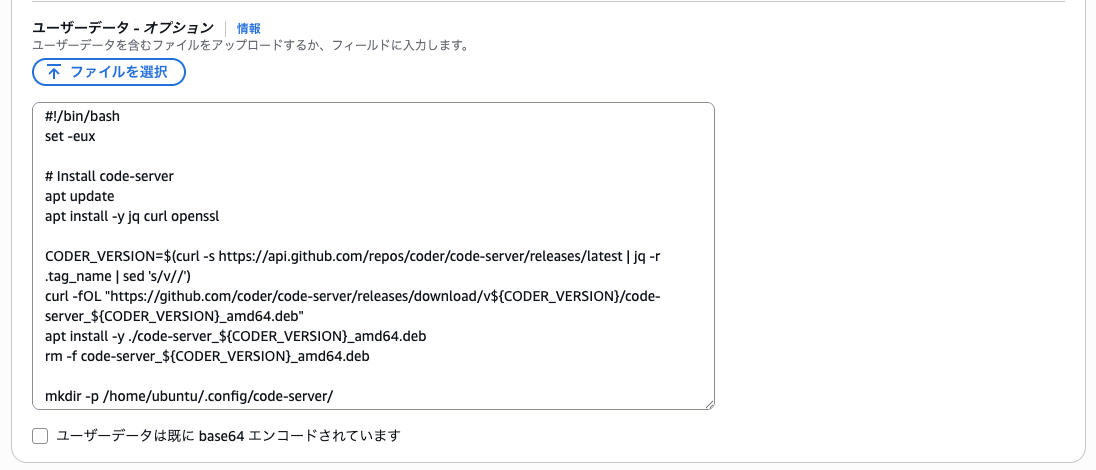
Paste the following script here (for Ubuntu 24.04).
This performs code-server and Claude Code installation, and Bedrock connection configuration at startup.
#!/bin/bash
set -eux

# Install code-server
apt update
apt install -y jq curl openssl

CODER_VERSION=$(curl -s https://api.github.com/repos/coder/code-server/releases/latest | jq -r .tag_name | sed 's/v//')
curl -fOL "https://github.com/coder/code-server/releases/download/v${CODER_VERSION}/code-server_${CODER_VERSION}_amd64.deb"
apt install -y ./code-server_${CODER_VERSION}_amd64.deb
rm -f code-server_${CODER_VERSION}_amd64.deb

mkdir -p /home/ubuntu/.config/code-server/
cat > /home/ubuntu/.config/code-server/config.yaml << EOF
bind-addr: 0.0.0.0:50443
auth: password
password: $(openssl rand -hex 16)
cert: true
EOF
chown -R ubuntu:ubuntu /home/ubuntu/.config
systemctl enable --now code-server@ubuntu

# Install Claude Code
sudo -u ubuntu bash -c 'curl -fsSL https://claude.ai/install.sh | bash'

mkdir -p /home/ubuntu/.claude
cat > /home/ubuntu/.claude/settings.json << 'EOF'
{
  "env": {
    "CLAUDE_CODE_USE_BEDROCK": "1",
    "AWS_REGION": "ap-northeast-1",
    "ANTHROPIC_MODEL": "jp.anthropic.claude-sonnet-4-6"
  }
}
EOF
chown -R ubuntu:ubuntu /home/ubuntu/.claude

# Add PATH
sudo -u ubuntu bash -c 'grep -q ".local/bin" /home/ubuntu/.bashrc || echo "export PATH=\"$HOME/.local/bin:\$PATH\"" >> /home/ubuntu/.bashrc'
For Amazon Linux 2023
Select Amazon Linux 2023 AMI for the AMI.
Use the following script for user data.
The differences are the package manager (apt→dnf), default user (ubuntu→ec2-user), and package format (.deb→.rpm).
#!/bin/bash
set -eux

# Install code-server
dnf install -y jq openssl

CODER_VERSION=$(curl -s https://api.github.com/repos/coder/code-server/releases/latest | jq -r .tag_name | sed 's/v//')
curl -fOL "https://github.com/coder/code-server/releases/download/v${CODER_VERSION}/code-server-${CODER_VERSION}-amd64.rpm"
dnf install -y ./code-server-${CODER_VERSION}-amd64.rpm
rm -f code-server-${CODER_VERSION}-amd64.rpm

mkdir -p /home/ec2-user/.config/code-server/
cat > /home/ec2-user/.config/code-server/config.yaml << EOF
bind-addr: 0.0.0.0:50443
auth: password
password: $(openssl rand -hex 16)
cert: true
EOF
chown -R ec2-user:ec2-user /home/ec2-user/.config
systemctl enable --now code-server@ec2-user

# Install Claude Code
sudo -u ec2-user bash -c 'curl -fsSL https://claude.ai/install.sh | bash'

mkdir -p /home/ec2-user/.claude
cat > /home/ec2-user/.claude/settings.json << 'EOF'
{
  "env": {
    "CLAUDE_CODE_USE_BEDROCK": "1",
    "AWS_REGION": "ap-northeast-1",
    "ANTHROPIC_MODEL": "jp.anthropic.claude-sonnet-4-6"
  }
}
EOF
chown -R ec2-user:ec2-user /home/ec2-user/.claude

# Add PATH
sudo -u ec2-user bash -c 'grep -q ".local/bin" /home/ec2-user/.bashrc || echo "export PATH=\"$HOME/.local/bin:\$PATH\"" >> /home/ec2-user/.bashrc'
Notes on User Data
Since code-server runs as the default user for each OS, Claude Code is also installed as the same user using sudo -u.
The Bedrock connection settings are written in the env section of ~/.claude/settings.json. While there's also a method of writing environment variables in .bashrc, that approach doesn't work for startup methods that don't go through bash.
Setting CLAUDE_CODE_USE_BEDROCK to 1 makes it use AWS credentials (the instance profile in this case) to call Bedrock instead of an API key. AWS_REGION is the region to call, and ANTHROPIC_MODEL specifies the model to use. Since the IAM policy broadly permits Anthropic models, you can change the model by rewriting ANTHROPIC_MODEL.
For ANTHROPIC_MODEL, specify a cross-region inference profile ID with a prefix like jp.. Relatively new models like Claude Sonnet 4.6 don't support on-demand calls with a direct model ID without a prefix, and you'll get an on-demand throughput not supported error.
Verification
First, check the code-server password that was auto-generated in the user data.
Select the instance in the EC2 console, and log in via Connect → Session Manager tab → Connect.
# For Ubuntu
sudo cat /home/ubuntu/.config/code-server/config.yaml | grep password:

# For Amazon Linux 2023
sudo cat /home/ec2-user/.config/code-server/config.yaml | grep password:
Access https://<instance public IPv4 address>:50443 in your browser (the public IPv4 address is shown in the instance details screen). Due to the self-signed certificate, you'll see a warning like the following.
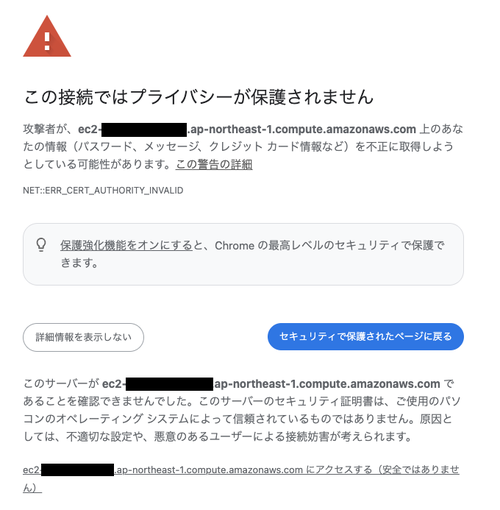
Click "Advanced" and a link will appear at the bottom saying "Proceed to <hostname> (unsafe)". Follow that link and log in with your password.
Open a terminal in code-server (from the menu: Terminal → New Terminal) and run the claude command. Since credentials are automatically obtained via the instance profile, if Claude Code launches without setting an API key, you've succeeded.
Try sending an actual message, and if a response comes back from the specified model, the Bedrock integration is also working.
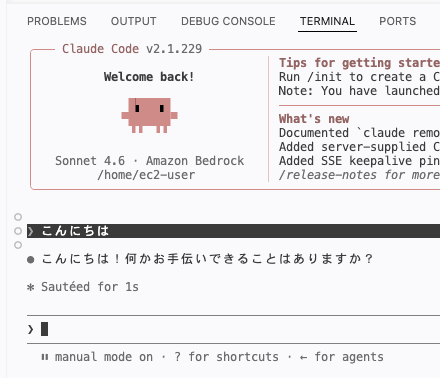
If the startup header shows Sonnet 4.6 · Amazon Bedrock, it's running via Bedrock.
If you just want to check the authentication status, you can also use the claude auth status command.
Common Errors and Solutions
These basically won't occur if you follow the steps correctly, but I'll list them as clues when things don't go well.
| Symptom | Cause and Solution |
|---|---|
claude: command not found |
~/.local/bin is not in PATHReopen the terminal or re-run the command to set the PATH |
AccessDeniedException |
Check the Resource and account ID in the IAM policy, whether the Bedrock invocation policy is attached to the role, and also verify the use case form submission |
| on-demand throughput error | The model ID is specified directly Change to an inference profile ID with a prefix like jp. |
| Region-related error | AWS_REGION and the profile region (jp. / apac. / us.) don't matchAlign them to the same region |
| User data didn't run | Log in via Session Manager and check the log with sudo cat /var/log/cloud-init-output.log |
| Cannot log in via Session Manager | Check if the instance is "Running" and whether AmazonSSMManagedInstanceCore is attached to the IAM role |
Extensions Cannot Be Installed in This Configuration
code-server can install extensions from Open VSX (an extension marketplace) just like VS Code.
However, in this configuration, installation fails with an error like the following. This isn't limited to Claude Code extensions; it happens with all extensions installed from Open VSX.
IDE: ✘ Error installing VS Code extension: Command failed with ERR_STREAM_PREMATURE_CLOSE
I believe this is due to running code-server over HTTPS with a self-signed certificate.
Claude Code itself has not only a CLI version used from the terminal, but also an extension version that can be embedded as a side panel. This allows you to have conversations while viewing files and check changes in the editor, but for the same reason, it cannot be installed in this environment.
If you also want to use extensions (not just for Claude Code), you'll need to place CloudFront in front or set things up so that access is possible with a certificate trusted by the browser.
Automated Setup with CloudFormation
I have also prepared a CloudFormation template that can create all the configurations covered so far (VPC, Security Group, IAM Role, EC2) at once. They are separated by OS.
Ubuntu 24.04 Template (Full)
AWSTemplateFormatVersion: 2010-09-09
Description: code-server + Claude Code (Amazon Bedrock) on Ubuntu 24.04
Metadata:
  AWS::CloudFormation::Interface:
    ParameterGroups:
      - Label:
          default: Set basic information.
        Parameters:
          - SystemName
      - Label:
          default: Set your EC2 instance settings.
        Parameters:
          - InstanceType
          - AllowedIP
          - AMIID
Parameters:
  SystemName:
    Description: "Prefix of each resource name."
    Type: String
    Default: "code-server"
  InstanceType:
    Description: "EC2 instance type."
    Type: String
    Default: "t3.medium"
  AllowedIP:
    Description: "Your access source IP in CIDR notation (e.g. 203.0.113.10/32)."
    Type: String
  AMIID:
    Description: "Ubuntu 24.04 AMI ID."
    Type: AWS::SSM::Parameter::Value<AWS::EC2::Image::Id>
    Default: /aws/service/canonical/ubuntu/server/24.04/stable/current/amd64/hvm/ebs-gp3/ami-id
Resources:
  VPC:
    Type: AWS::EC2::VPC
    Properties:
      CidrBlock: 10.0.0.0/16
      EnableDnsHostnames: true
      EnableDnsSupport: true
      Tags:
        - Key: Name
          Value: !Sub "${SystemName}-vpc"
  InternetGateway:
    Type: AWS::EC2::InternetGateway
    Properties:
      Tags:
        - Key: Name
          Value: !Sub "${SystemName}-igw"
  AttachGateway:
    Type: AWS::EC2::VPCGatewayAttachment
    Properties:
      VpcId: !Ref VPC
      InternetGatewayId: !Ref InternetGateway
  PublicSubnet:
    Type: AWS::EC2::Subnet
    Properties:
      AvailabilityZone: !Select [0, !GetAZs ""]
      VpcId: !Ref VPC
      CidrBlock: 10.0.1.0/24
      Tags:
        - Key: Name
          Value: !Sub "${SystemName}-public-subnet"
  PublicRouteTable:
    Type: AWS::EC2::RouteTable
    Properties:
      VpcId: !Ref VPC
      Tags:
        - Key: Name
          Value: !Sub "${SystemName}-public-rtb"
  PublicRoute:
    Type: AWS::EC2::Route
    Properties:
      RouteTableId: !Ref PublicRouteTable
      DestinationCidrBlock: 0.0.0.0/0
      GatewayId: !Ref InternetGateway
  PublicRouteTableAssociation:
    Type: AWS::EC2::SubnetRouteTableAssociation
    Properties:
      RouteTableId: !Ref PublicRouteTable
      SubnetId: !Ref PublicSubnet

  CodeServerSecurityGroup:
    Type: AWS::EC2::SecurityGroup
    Properties:
      GroupName: !Sub "${SystemName}-sg"
      GroupDescription: "Security group for code-server (HTTPS on 50443)"
      VpcId: !Ref VPC
      SecurityGroupIngress:
        - IpProtocol: tcp
          FromPort: 50443
          ToPort: 50443
          CidrIp: !Ref AllowedIP
      Tags:
        - Key: Name
          Value: !Sub "${SystemName}-sg"

  CodeServerRole:
    Type: AWS::IAM::Role
    Properties:
      RoleName: !Sub
        - "${SystemName}-role-${Suffix}"
        - Suffix: !Select [4, !Split ["-", !Select [2, !Split ["/", !Ref "AWS::StackId"]]]]
      AssumeRolePolicyDocument:
        Version: "2012-10-17"
        Statement:
          - Effect: "Allow"
            Principal:
              Service:
                - "ec2.amazonaws.com"
            Action:
              - "sts:AssumeRole"
      ManagedPolicyArns:
        - "arn:aws:iam::aws:policy/AmazonSSMManagedInstanceCore"
      Policies:
        - PolicyName: "BedrockInvokeAnthropicModels"
          PolicyDocument:
            Version: "2012-10-17"
            Statement:
              - Sid: "BedrockInvokeAnthropicModels"
                Effect: "Allow"
                Action:
                  - "bedrock:InvokeModel"
                  - "bedrock:InvokeModelWithResponseStream"
                Resource:
                  - "arn:aws:bedrock:*::foundation-model/anthropic.*"
                  - !Sub "arn:aws:bedrock:*:${AWS::AccountId}:inference-profile/*.anthropic.*"
  CodeServerInstanceProfile:
    Type: AWS::IAM::InstanceProfile
    Properties:
      Roles:
        - !Ref CodeServerRole

  CodeServerEC2:
    Type: AWS::EC2::Instance
    Properties:
      ImageId: !Ref AMIID
      InstanceType: !Ref InstanceType
      BlockDeviceMappings:
        - DeviceName: /dev/sda1
          Ebs:
            Encrypted: true
            VolumeSize: 16
            VolumeType: gp3
            DeleteOnTermination: true
      NetworkInterfaces:
        - AssociatePublicIpAddress: true
          DeviceIndex: "0"
          SubnetId: !Ref PublicSubnet
          GroupSet:
            - !Ref CodeServerSecurityGroup
      IamInstanceProfile: !Ref CodeServerInstanceProfile
      Tags:
        - Key: Name
          Value: !Ref SystemName
      UserData:
        Fn::Base64: |
          #!/bin/bash
          set -eux

          # Install code-server
          apt update
          apt install -y jq curl openssl

          CODER_VERSION=$(curl -s https://api.github.com/repos/coder/code-server/releases/latest | jq -r .tag_name | sed 's/v//')
          curl -fOL "https://github.com/coder/code-server/releases/download/v${CODER_VERSION}/code-server_${CODER_VERSION}_amd64.deb"
          apt install -y ./code-server_${CODER_VERSION}_amd64.deb
          rm -f code-server_${CODER_VERSION}_amd64.deb

          mkdir -p /home/ubuntu/.config/code-server/
          cat > /home/ubuntu/.config/code-server/config.yaml << EOF
          bind-addr: 0.0.0.0:50443
          auth: password
          password: $(openssl rand -hex 16)
          cert: true
          EOF
          chown -R ubuntu:ubuntu /home/ubuntu/.config
          systemctl enable --now code-server@ubuntu

          # Install Claude Code
          sudo -u ubuntu bash -c 'curl -fsSL https://claude.ai/install.sh | bash'

          mkdir -p /home/ubuntu/.claude
          cat > /home/ubuntu/.claude/settings.json << 'EOF'
          {
            "env": {
              "CLAUDE_CODE_USE_BEDROCK": "1",
              "AWS_REGION": "ap-northeast-1",
              "ANTHROPIC_MODEL": "jp.anthropic.claude-sonnet-4-6"
            }
          }
          EOF
          chown -R ubuntu:ubuntu /home/ubuntu/.claude

          # Add PATH
          sudo -u ubuntu bash -c 'grep -q ".local/bin" /home/ubuntu/.bashrc || echo "export PATH=\"$HOME/.local/bin:\$PATH\"" >> /home/ubuntu/.bashrc'

Outputs:
  PublicIP:
    Description: "code-server public IP. Access it at https://<PublicIP>:50443"
    Value: !GetAtt CodeServerEC2.PublicIp
Amazon Linux 2023 Template (Full)
AWSTemplateFormatVersion: 2010-09-09
Description: code-server + Claude Code (Amazon Bedrock) on Amazon Linux 2023
Metadata:
  AWS::CloudFormation::Interface:
    ParameterGroups:
      - Label:
          default: Set basic information.
        Parameters:
          - SystemName
      - Label:
          default: Set your EC2 instance settings.
        Parameters:
          - InstanceType
          - AllowedIP
          - AMIID
Parameters:
  SystemName:
    Description: "Prefix of each resource name."
    Type: String
    Default: "code-server"
  InstanceType:
    Description: "EC2 instance type."
    Type: String
    Default: "t3.medium"
  AllowedIP:
    Description: "Your access source IP in CIDR notation (e.g. 203.0.113.10/32)."
    Type: String
  AMIID:
    Description: "Amazon Linux 2023 AMI ID."
    Type: AWS::SSM::Parameter::Value<AWS::EC2::Image::Id>
    Default: /aws/service/ami-amazon-linux-latest/al2023-ami-kernel-6.1-x86_64
Resources:
  VPC:
    Type: AWS::EC2::VPC
    Properties:
      CidrBlock: 10.0.0.0/16
      EnableDnsHostnames: true
      EnableDnsSupport: true
      Tags:
        - Key: Name
          Value: !Sub "${SystemName}-vpc"
  InternetGateway:
    Type: AWS::EC2::InternetGateway
    Properties:
      Tags:
        - Key: Name
          Value: !Sub "${SystemName}-igw"
  AttachGateway:
    Type: AWS::EC2::VPCGatewayAttachment
    Properties:
      VpcId: !Ref VPC
      InternetGatewayId: !Ref InternetGateway
  PublicSubnet:
    Type: AWS::EC2::Subnet
    Properties:
      AvailabilityZone: !Select [0, !GetAZs ""]
      VpcId: !Ref VPC
      CidrBlock: 10.0.1.0/24
      Tags:
        - Key: Name
          Value: !Sub "${SystemName}-public-subnet"
  PublicRouteTable:
    Type: AWS::EC2::RouteTable
    Properties:
      VpcId: !Ref VPC
      Tags:
        - Key: Name
          Value: !Sub "${SystemName}-public-rtb"
  PublicRoute:
    Type: AWS::EC2::Route
    Properties:
      RouteTableId: !Ref PublicRouteTable
      DestinationCidrBlock: 0.0.0.0/0
      GatewayId: !Ref InternetGateway
  PublicRouteTableAssociation:
    Type: AWS::EC2::SubnetRouteTableAssociation
    Properties:
      RouteTableId: !Ref PublicRouteTable
      SubnetId: !Ref PublicSubnet

  CodeServerSecurityGroup:
    Type: AWS::EC2::SecurityGroup
    Properties:
      GroupName: !Sub "${SystemName}-sg"
      GroupDescription: "Security group for code-server (HTTPS on 50443)"
      VpcId: !Ref VPC
      SecurityGroupIngress:
        - IpProtocol: tcp
          FromPort: 50443
          ToPort: 50443
          CidrIp: !Ref AllowedIP
      Tags:
        - Key: Name
          Value: !Sub "${SystemName}-sg"

  CodeServerRole:
    Type: AWS::IAM::Role
    Properties:
      RoleName: !Sub
        - "${SystemName}-role-${Suffix}"
        - Suffix: !Select [4, !Split ["-", !Select [2, !Split ["/", !Ref "AWS::StackId"]]]]
      AssumeRolePolicyDocument:
        Version: "2012-10-17"
        Statement:
          - Effect: "Allow"
            Principal:
              Service:
                - "ec2.amazonaws.com"
            Action:
              - "sts:AssumeRole"
      ManagedPolicyArns:
        - "arn:aws:iam::aws:policy/AmazonSSMManagedInstanceCore"
      Policies:
        - PolicyName: "BedrockInvokeAnthropicModels"
          PolicyDocument:
            Version: "2012-10-17"
            Statement:
              - Sid: "BedrockInvokeAnthropicModels"
                Effect: "Allow"
                Action:
                  - "bedrock:InvokeModel"
                  - "bedrock:InvokeModelWithResponseStream"
                Resource:
                  - "arn:aws:bedrock:*::foundation-model/anthropic.*"
                  - !Sub "arn:aws:bedrock:*:${AWS::AccountId}:inference-profile/*.anthropic.*"
  CodeServerInstanceProfile:
    Type: AWS::IAM::InstanceProfile
    Properties:
      Roles:
        - !Ref CodeServerRole

  CodeServerEC2:
    Type: AWS::EC2::Instance
    Properties:
      ImageId: !Ref AMIID
      InstanceType: !Ref InstanceType
      BlockDeviceMappings:
        - DeviceName: /dev/xvda
          Ebs:
            Encrypted: true
            VolumeSize: 16
            VolumeType: gp3
            DeleteOnTermination: true
      NetworkInterfaces:
        - AssociatePublicIpAddress: true
          DeviceIndex: "0"
          SubnetId: !Ref PublicSubnet
          GroupSet:
            - !Ref CodeServerSecurityGroup
      IamInstanceProfile: !Ref CodeServerInstanceProfile
      Tags:
        - Key: Name
          Value: !Ref SystemName
      UserData:
        Fn::Base64: |
          #!/bin/bash
          set -eux

          # Install code-server
          dnf install -y jq openssl

          CODER_VERSION=$(curl -s https://api.github.com/repos/coder/code-server/releases/latest | jq -r .tag_name | sed 's/v//')
          curl -fOL "https://github.com/coder/code-server/releases/download/v${CODER_VERSION}/code-server-${CODER_VERSION}-amd64.rpm"
          dnf install -y ./code-server-${CODER_VERSION}-amd64.rpm
          rm -f code-server-${CODER_VERSION}-amd64.rpm

          mkdir -p /home/ec2-user/.config/code-server/
          cat > /home/ec2-user/.config/code-server/config.yaml << EOF
          bind-addr: 0.0.0.0:50443
          auth: password
          password: $(openssl rand -hex 16)
          cert: true
          EOF
          chown -R ec2-user:ec2-user /home/ec2-user/.config
          systemctl enable --now code-server@ec2-user

          # Install Claude Code
          sudo -u ec2-user bash -c 'curl -fsSL https://claude.ai/install.sh | bash'

          mkdir -p /home/ec2-user/.claude
          cat > /home/ec2-user/.claude/settings.json << 'EOF'
          {
            "env": {
              "CLAUDE_CODE_USE_BEDROCK": "1",
              "AWS_REGION": "ap-northeast-1",
              "ANTHROPIC_MODEL": "jp.anthropic.claude-sonnet-4-6"
            }
          }
          EOF
          chown -R ec2-user:ec2-user /home/ec2-user/.claude

          # Add PATH
          sudo -u ec2-user bash -c 'grep -q ".local/bin" /home/ec2-user/.bashrc || echo "export PATH=\"$HOME/.local/bin:\$PATH\"" >> /home/ec2-user/.bashrc'

Outputs:
  PublicIP:
    Description: "code-server public IP. Access it at https://<PublicIP>:50443"
    Value: !GetAtt CodeServerEC2.PublicIp
Specify your access source IP in AllowedIP and deploy.
aws cloudformation create-stack --stack-name temp-code-server \
    --template-body file://./code-server-ubuntu.yaml \
    --parameters "ParameterKey=AllowedIP,ParameterValue=<your access source IP>/32" \
    --capabilities CAPABILITY_NAMED_IAM
For the Amazon Linux 2023 version, change --template-body to code-server-al2023.yaml.
Verification steps are the same as when created via the console.
If you want to change the model being used, edit ANTHROPIC_MODEL in ~/.claude/settings.json within the template's user data.
Closing
I built an environment running Claude Code via Bedrock on code-server on EC2, using the AWS console.
Authentication is handled by the IAM role attached to the EC2 instance, so there is no need to distribute API keys to users. The permissions granted to the role can also be limited to only Bedrock model invocations.
Please give it a try if you cannot install Claude Code on your local machine, or if you simply want to try it out easily.
I hope this article is helpful to someone. Thank you for reading to the end!
References
