
I tried out Amazon OpenSearch Service now that it supports OpenSearch 3.7

This page has been translated by machine translation. View original
This is Ishikawa from the Cloud Business Division. OpenSearch 3.7 has become available on Amazon OpenSearch Service, so I actually set up a domain and tried out the new features.
The areas highlighted in the announcement are vector search performance, Search Relevance, and Query Insights.
Specifically, these include vector compression via 1-bit scalar quantization with the Faiss and Lucene engines, faster vector retrieval using doc values instead of document source (_source), and additions to Query Insights: automatic query recommendations, a finished query cache, and Amazon S3 export of top queries.
Since all of these directly relate to "what to do with existing indexes," I actually created a domain with a single t3.small.search node to see how much I could reproduce.
What's New in OpenSearch 3.7
Here is a brief summary of the features added in this update. Of these, I verified the first two.
1-bit scalar quantization is a method that compresses vectors stored as 32-bit floating point to 1 bit per dimension. It is enabled by specifying the sq encoder in method.parameters.encoder of the knn_vector field and setting bits to 1. According to the OpenSearch documentation, 1-bit quantization was introduced in 3.6 and achieves 32x compression with both the Faiss and Lucene engines.
Vector retrieval via doc values is the highlight feature of 3.7. By specifying a vector field in docvalue_fields in a search request, vectors can be retrieved without going through the _source expansion and deserialization pipeline. The OpenSearch 3.7 release notes state that it achieves up to 5.5x faster latency for k=1000 with 768-dimensional vectors, and that no reindexing is required.
Query Insights enhancements added automatic recommendations for top N queries, a finished query cache for viewing recently completed queries, and Amazon S3 export of top query data. This is outside the scope of this article. I touch on the reason in the discussion section.
Trying It Out
This time, I will proceed mainly through operations in the AWS Management Console and OpenSearch Dashboards.
Prerequisites
- Verification region: ap-northeast-1 (Tokyo)
- Domain configuration: t3.small.search × 1 node, EBS gp3 10 GB, encryption at rest and node-to-node encryption enabled, public endpoint, Fine-Grained Access Control (FGAC) enabled with internal user database master user
- Test data: 5,000 records of 768-dimensional vectors (HNSW: m=16, ef_construction=256, ef_search=1000)
OpenSearch Dashboards does not natively support IAM users or roles. With a configuration using only IAM-based access policies, opening the Dashboards URL will only display a non-functional sign-in page. Fine-Grained Access Control (FGAC) and an internal user database master user are enabled in order to use Dev Tools.
Requests to the REST API are executed from Dev Tools in OpenSearch Dashboards. Since Dev Tools authenticates via the browser login session, SigV4 signing is not required.
Note that the actual verification was performed using the AWS CLI and scripts, and this article translates those procedures into operations via the Management Console and OpenSearch Dashboards. All elapsed times, store sizes, and benchmark figures shown are actual measured values from CLI/script execution.
Step 1: Create a Domain
First, create an OpenSearch 3.7 domain. Open Amazon OpenSearch Service in the AWS Management Console, set the region to Asia Pacific (Tokyo) ap-northeast-1, then click Create domain from Domains in the navigation pane. The configuration values are as follows.
| Wizard Item | Setting |
|---|---|
| Domain Name | blog-os37 |
| Domain creation method | Standard create |
| Use cases | Vector search |
| Templates | Dev/test |
| Deployment option(s) | Domain without standby |
| Engine options | 3.7 (latest) - recommended |
| Instance family | General purpose |
| Instance type | t3.small.search |
| Number of data nodes | 1 |
| Storage type | Amazon EBS |
| EBS volume type | General Purpose (SSD) - gp3 |
| EBS storage size per node | 10 GiB |
| Network | Public access |
| Fine-grained access control | Enable fine-grained access control/Create master user (username / password) |
| Access policy | Only use fine-grained access control |
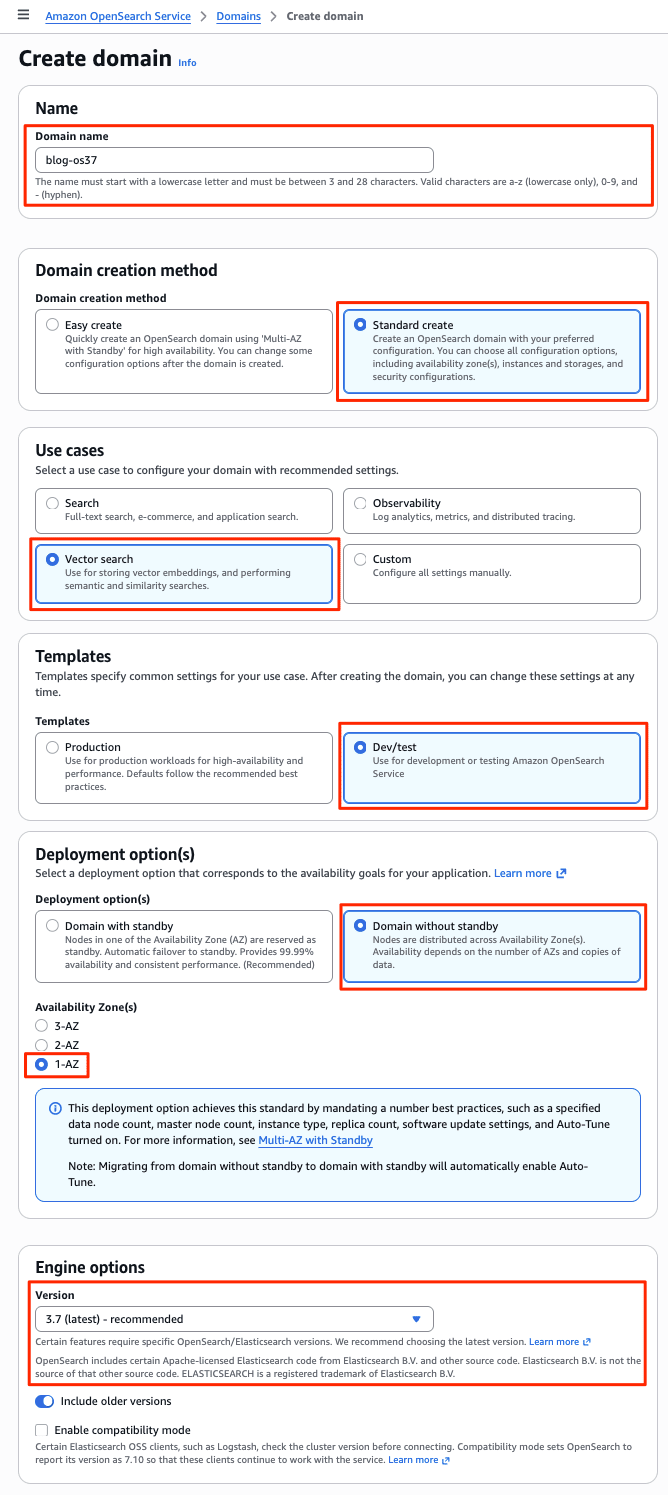
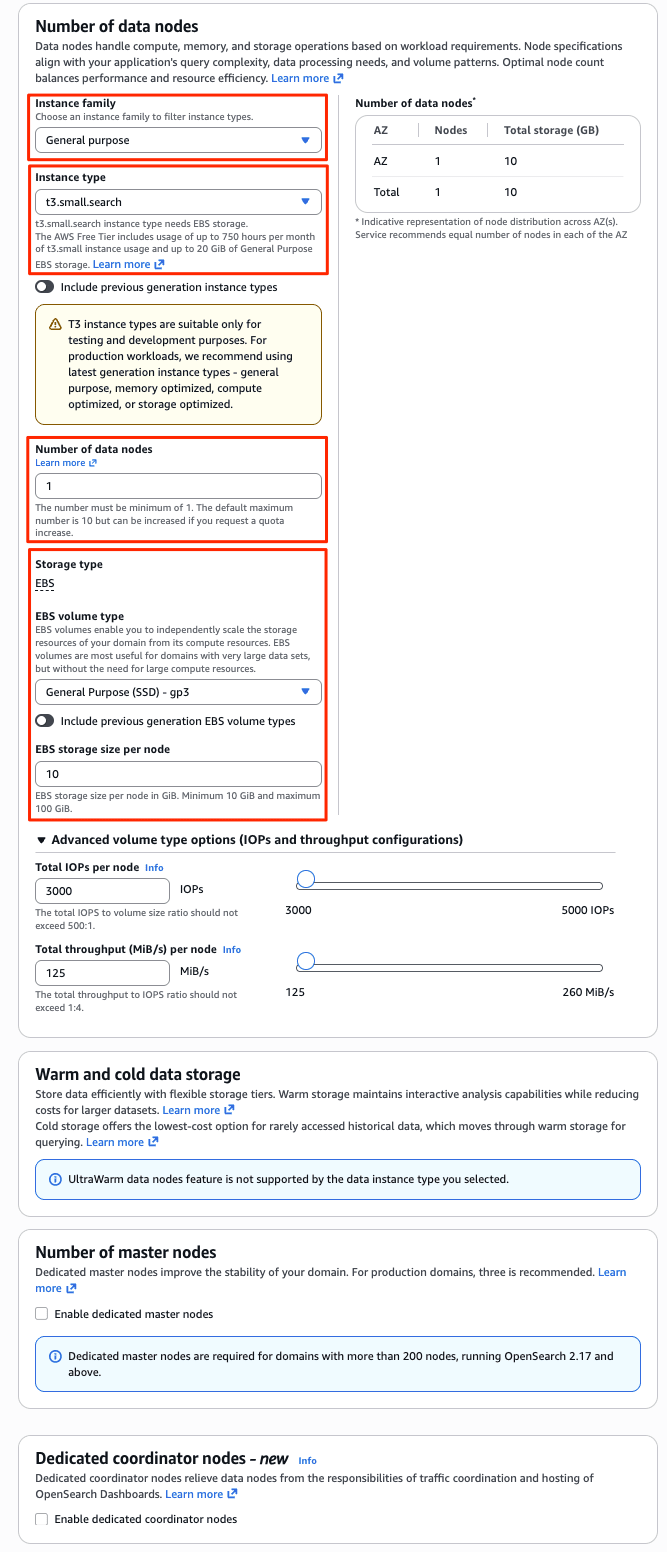
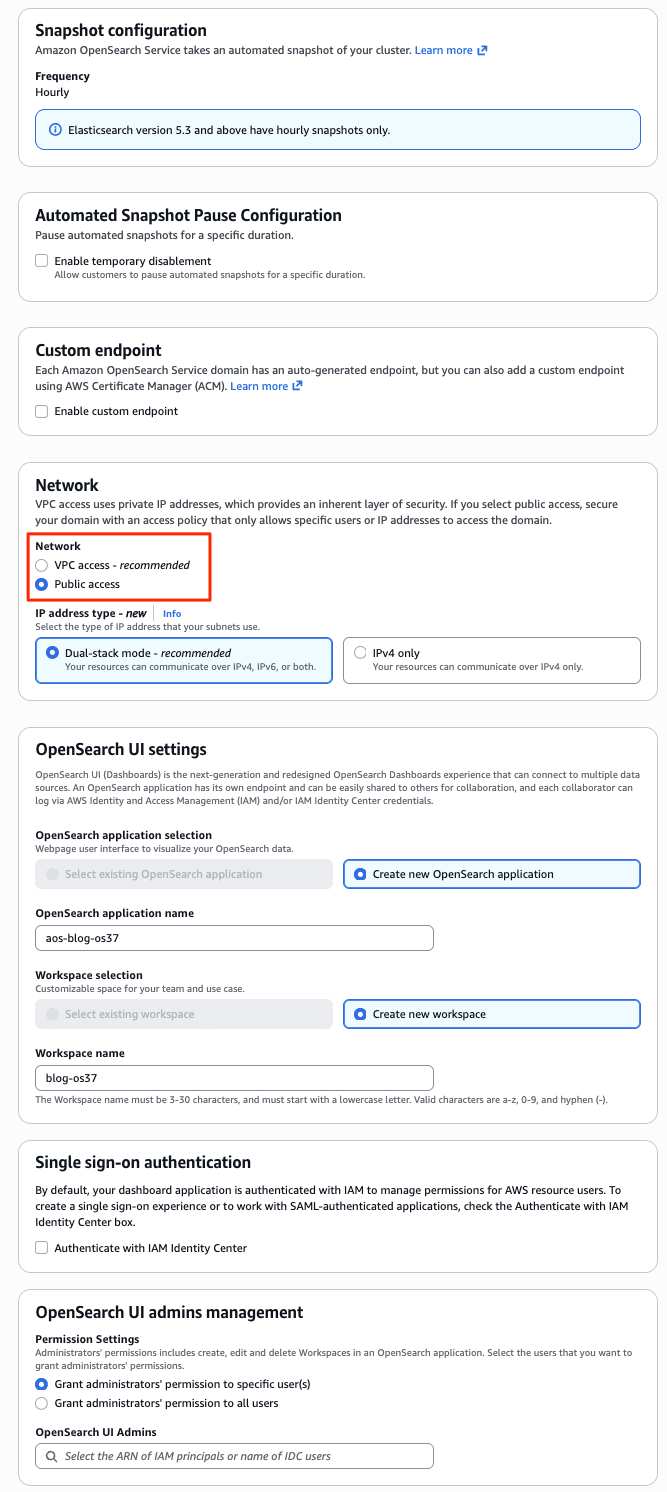
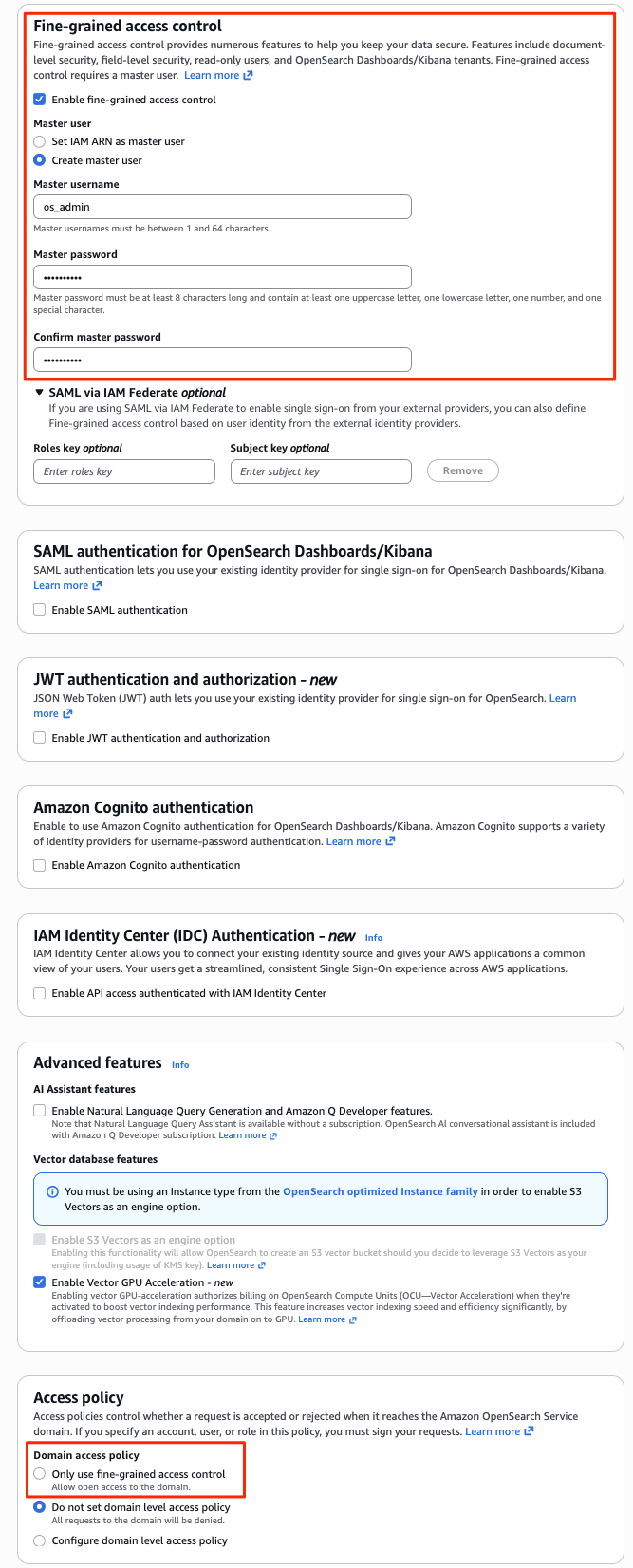
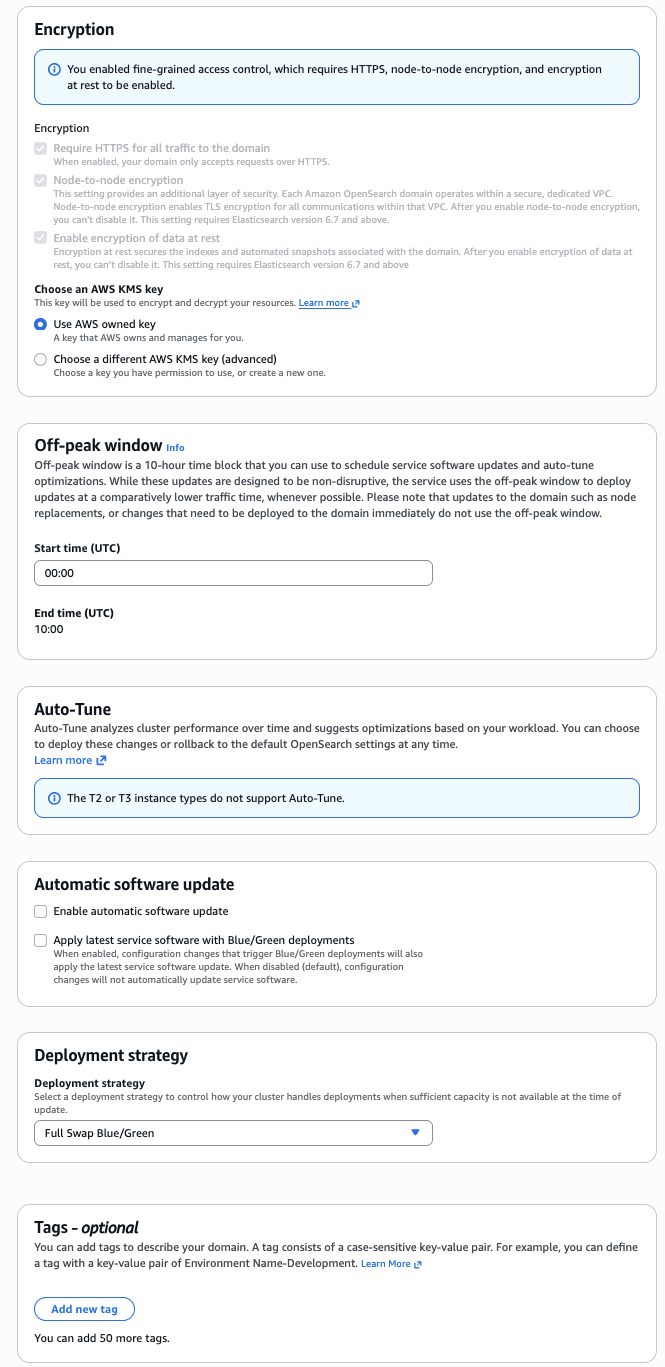
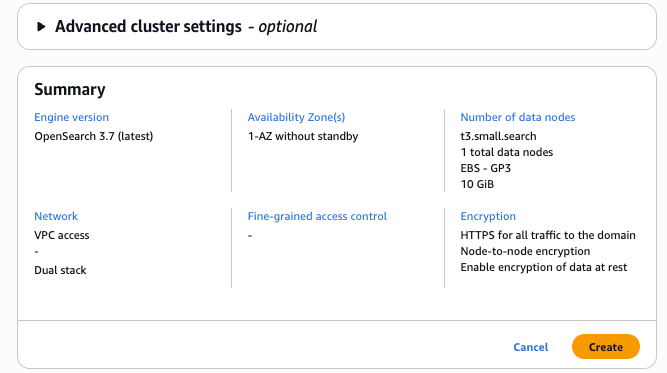
Fine-grained access control cannot be selected unless encryption at rest, node-to-node encryption, and HTTPS enforcement are all enabled. Make sure to enable the encryption settings in the wizard first. Also note that once enabled, it cannot be disabled later.
Step 2: Verify Version and Plugins in Dev Tools
Open the OpenSearch Dashboards URL from the domain details page and log in with the master user configured in the wizard. Select Dev Tools from the left navigation menu to open a console where you can execute REST API calls directly.
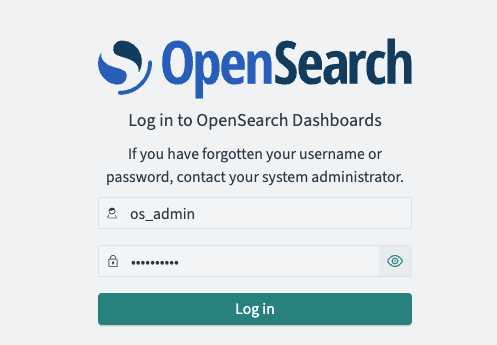
Dev Tools has a split screen, with requests entered in the left pane and responses displayed in the right pane. After entering a request, you can send it by clicking the triangle icon (▶) that appears in the upper right, or by pressing Ctrl + Enter (or Cmd + Enter on macOS). Unlike cURL, there is no need to write the endpoint URL or credentials—you only need the HTTP method and path.
First, hit the root endpoint to check the version. Enter the following in the left pane and execute it.
GET /
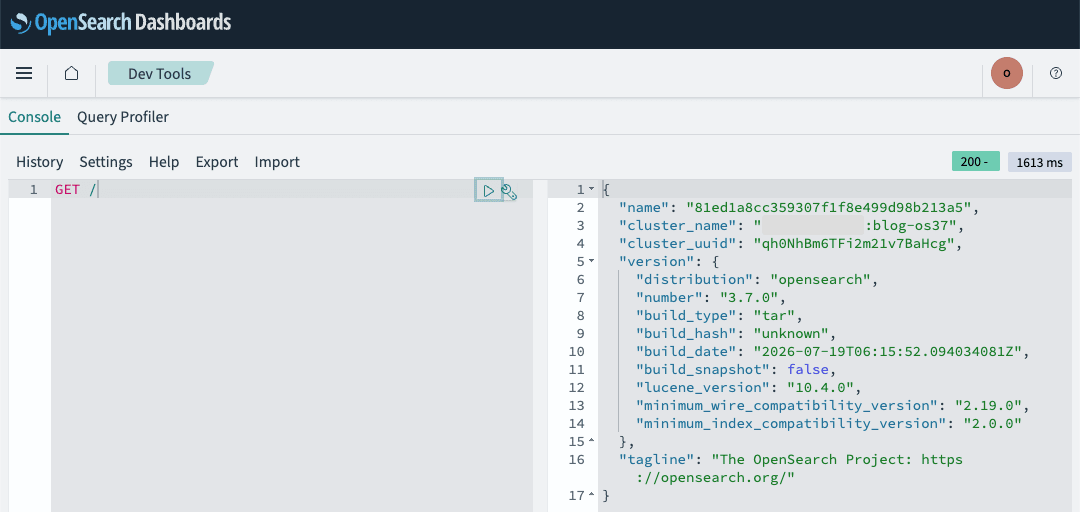
The version was OpenSearch 3.7.0 with Lucene 10.4.0. The fact that minimum_index_compatibility_version is 2.0.0 corresponds to the upgrade constraints described later.
Let's also check the installed plugins.
GET /_cat/plugins?v=true
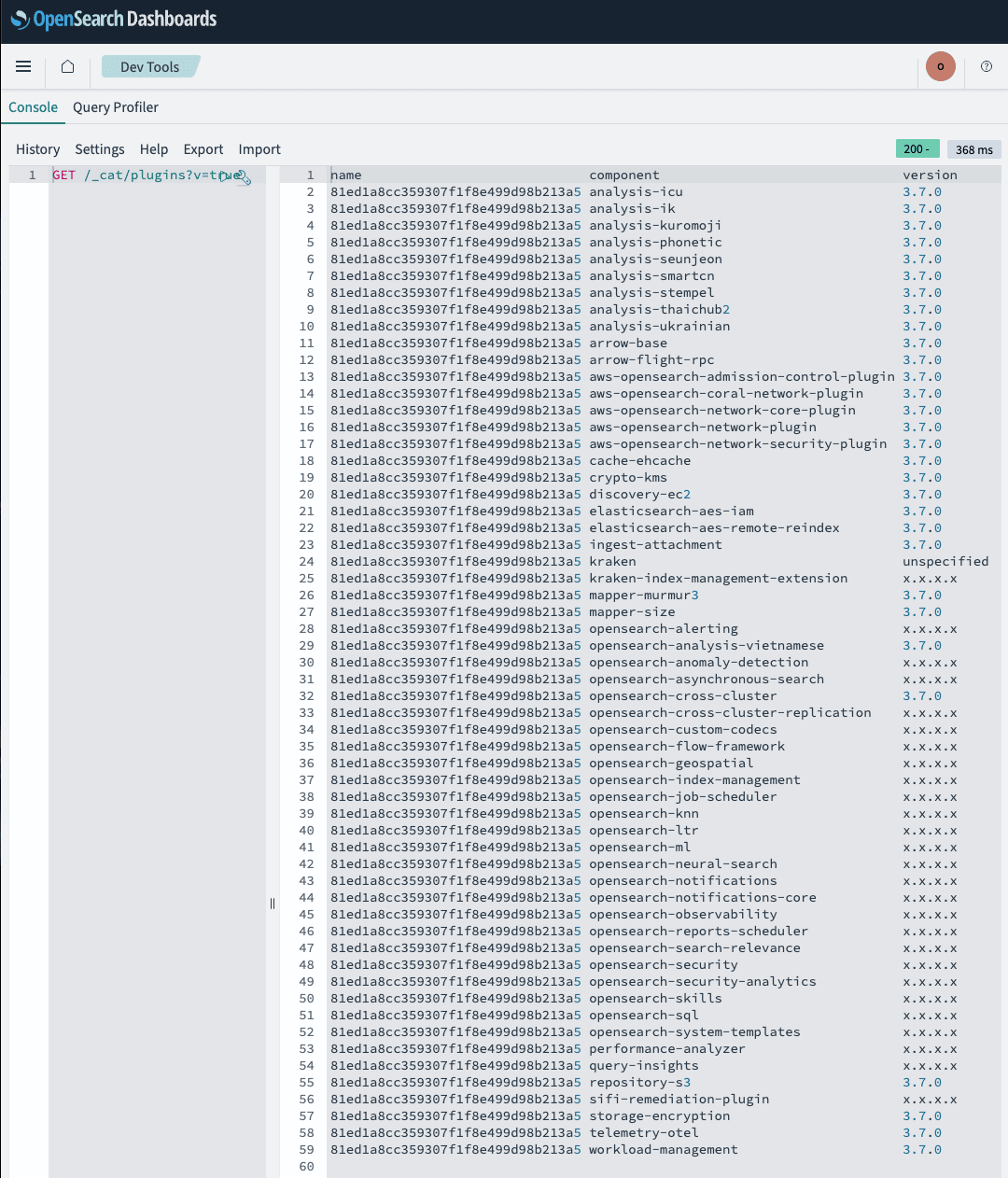
In addition to opensearch-knn, which we will verify this time, query-insights and opensearch-search-relevance—the entity behind the Search Relevance Workbench—are all installed from the start.
Step 3: Create Indexes with 1-Bit Scalar Quantization
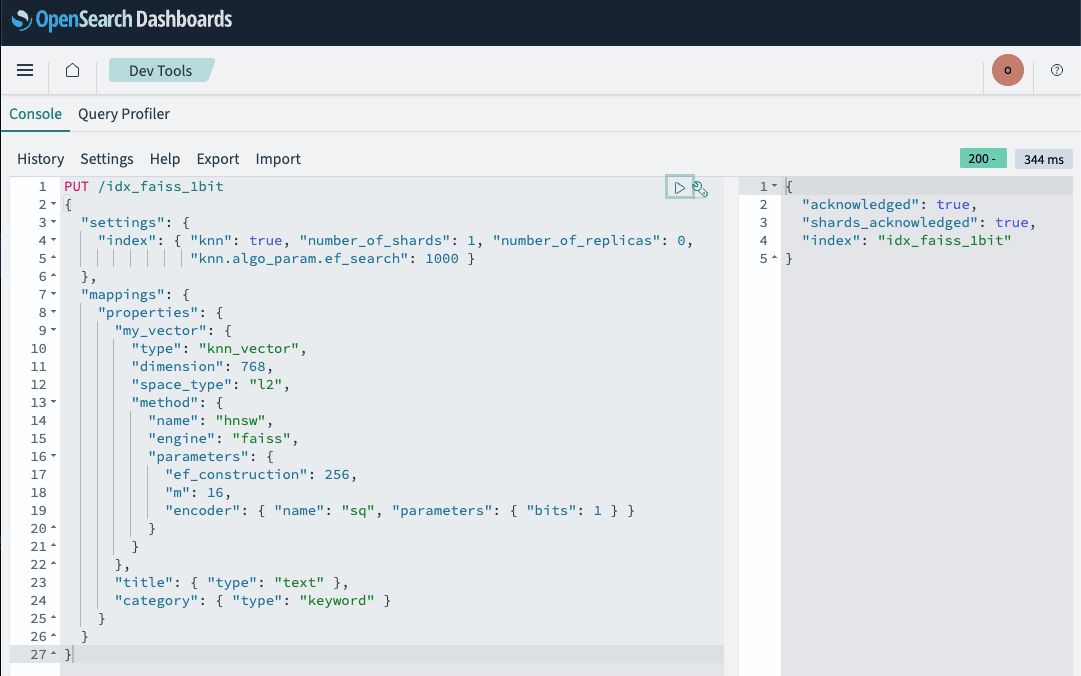
Create indexes specifying 1 for bits in the sq encoder for both the Lucene and Faiss engines. An uncompressed (float32) Faiss index is also prepared for comparison.
Indexes can also be created from Index Management in Dashboards, but nested parameters like method.parameters.encoder for knn_vector cannot be specified in the form. From here on, paste requests into Dev Tools and execute them.
The mapping for the Lucene engine is as follows. In addition to the my_vector vector field, title and category are also defined for verifying search results.
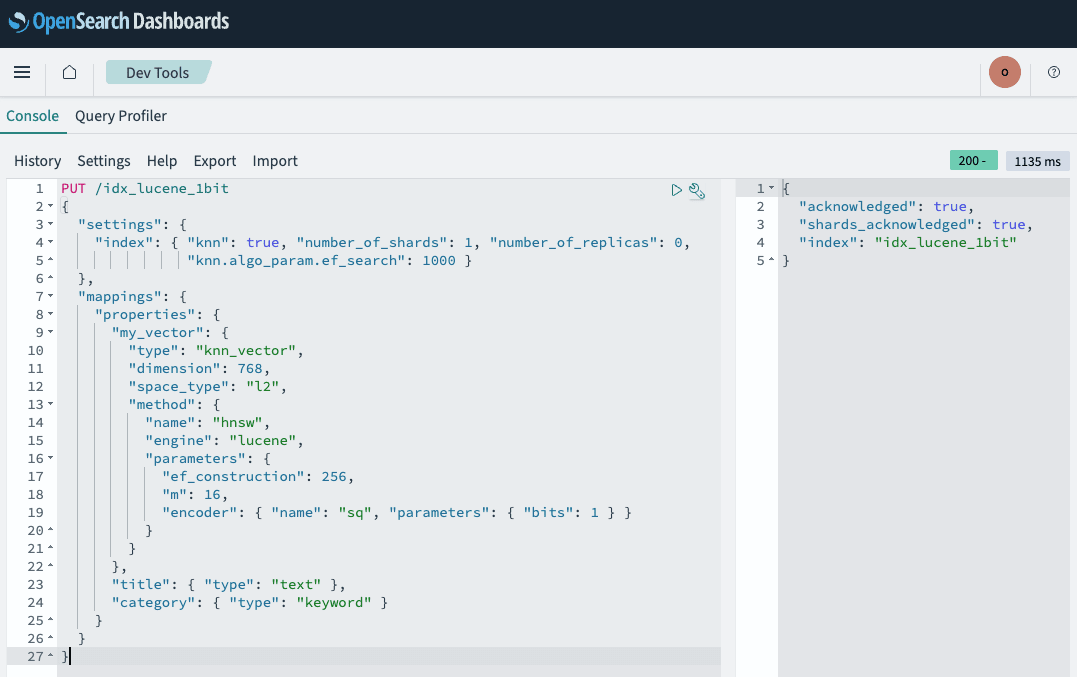
Next, create idx_faiss_1bit with engine changed to faiss.
For the uncompressed (float32) comparison index idx_faiss_float, simply omit the encoder.
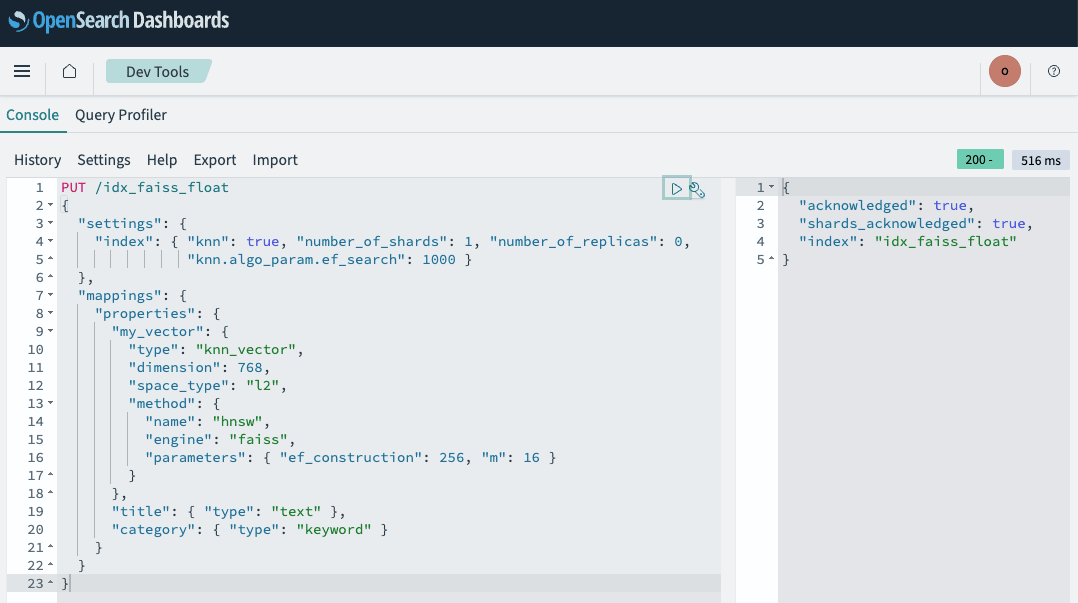
All three returned 200. This confirms that the 1-bit scalar quantization introduced in 3.6 works as-is on a 3.7 managed domain.
Note that executing PUT when an index with the same name already exists will return a resource_already_exists_exception. If you need to recreate them, delete them first.
DELETE /idx_lucene_1bit,idx_faiss_1bit,idx_faiss_float
Load 5,000 records of 768-dimensional vectors into each index using _bulk. A _bulk request for 5,000 records becomes NDJSON exceeding 10,000 lines, making it impractical to paste into Dev Tools. Only this step was performed using a script.
scripts/bulk_load_basic.py
#!/usr/bin/env python3
"""Split NDJSON and load it into _bulk using Basic authentication.

For domains with FGAC (internal user database) enabled.
See bulk_load.py for the SigV4 version.

Environment variables:
  OS_ENDPOINT  Domain endpoint (https://search-xxx.ap-northeast-1.es.amazonaws.com)
  OS_USER      Master username
  OS_PASSWORD  Master user password

Usage:
  python3 scripts/bulk_load_basic.py <index> <ndjson> [chunk_docs]
"""
import os
import sys
import time

import requests

ENDPOINT = os.environ["OS_ENDPOINT"].rstrip("/")
AUTH = (os.environ["OS_USER"], os.environ["OS_PASSWORD"])

def send(index: str, payload: bytes):
    return requests.post(
        f"{ENDPOINT}/{index}/_bulk",
        auth=AUTH,
        headers={"Content-Type": "application/x-ndjson"},
        data=payload,
        timeout=180,
    )

def main():
    index, path = sys.argv[1], sys.argv[2]
    # t3.small.search has an HTTP payload limit of 10 MiB. Around 250 documents is safe for 768 dimensions * 5,000 records.
    chunk_docs = int(sys.argv[3]) if len(sys.argv) > 3 else 250
    lines = open(path, "rb").read().splitlines(keepends=True)
    pairs = [lines[i:i + 2] for i in range(0, len(lines), 2)]
    total, errors, t0 = 0, 0, time.time()
    for i in range(0, len(pairs), chunk_docs):
        payload = b"".join(b"".join(p) for p in pairs[i:i + chunk_docs])
        r = send(index, payload)
        if not r.ok:
            print(f"  HTTP {r.status_code}: {r.text[:400]}")
            return 1
        body = r.json()
        if body.get("errors"):
            errors += sum(1 for it in body["items"] if it.get("index", {}).get("error"))
            first = next(it for it in body["items"] if it.get("index", {}).get("error"))
            print(f"  bulk error sample: {first['index']['error']}")
            return 1
        total += len(pairs[i:i + chunk_docs])
    print(f"{index}: indexed={total} errors={errors} elapsed={time.time() - t0:.1f}s")
    return 0

if __name__ == "__main__":
    sys.exit(main())
for idx in idx_lucene_1bit idx_faiss_1bit idx_faiss_float; do
  python3 scripts/bulk_load_basic.py "$idx" payloads/bulk.ndjson 250
done

idx_lucene_1bit: indexed=5000 errors=0 elapsed=33.1s
idx_faiss_1bit: indexed=5000 errors=0 elapsed=15.6s
idx_faiss_float: indexed=5000 errors=0 elapsed=22.7s
Even with the same data, the 1-bit quantized index took more than twice as long to load as the uncompressed one. It is worth knowing in advance that quantization processing adds cost at index time.
Step 4: Compare Store Sizes
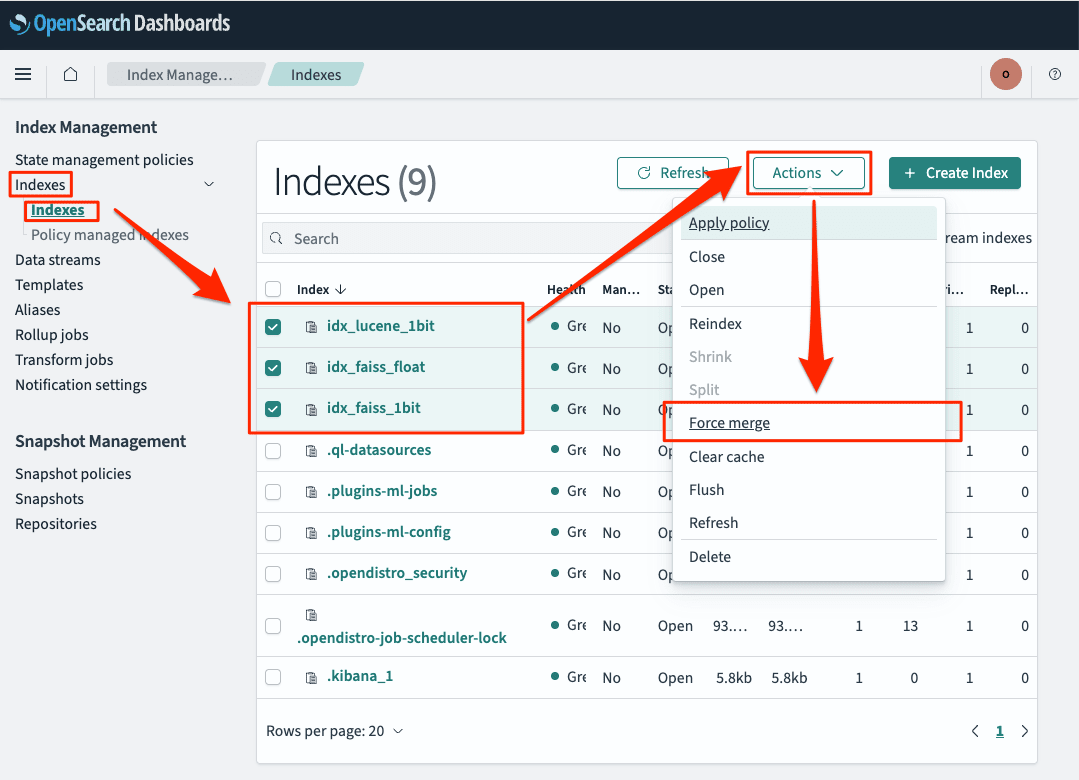
To eliminate the effect of segment count, merge to a single segment using force merge before comparing sizes. Force merge can be executed from Index Management in Dashboards.
- From the Dashboards left menu, open Index Management → Indices
- Select all three:
idx_lucene_1bit,idx_faiss_1bit, andidx_faiss_float - Choose Actions → Force merge
- On the Force merge screen, confirm that the target indexes appear in Select source indexes or data streams
- Expand Advanced settings at the bottom of the screen and enter
1in Max number of segments - Click Force merge
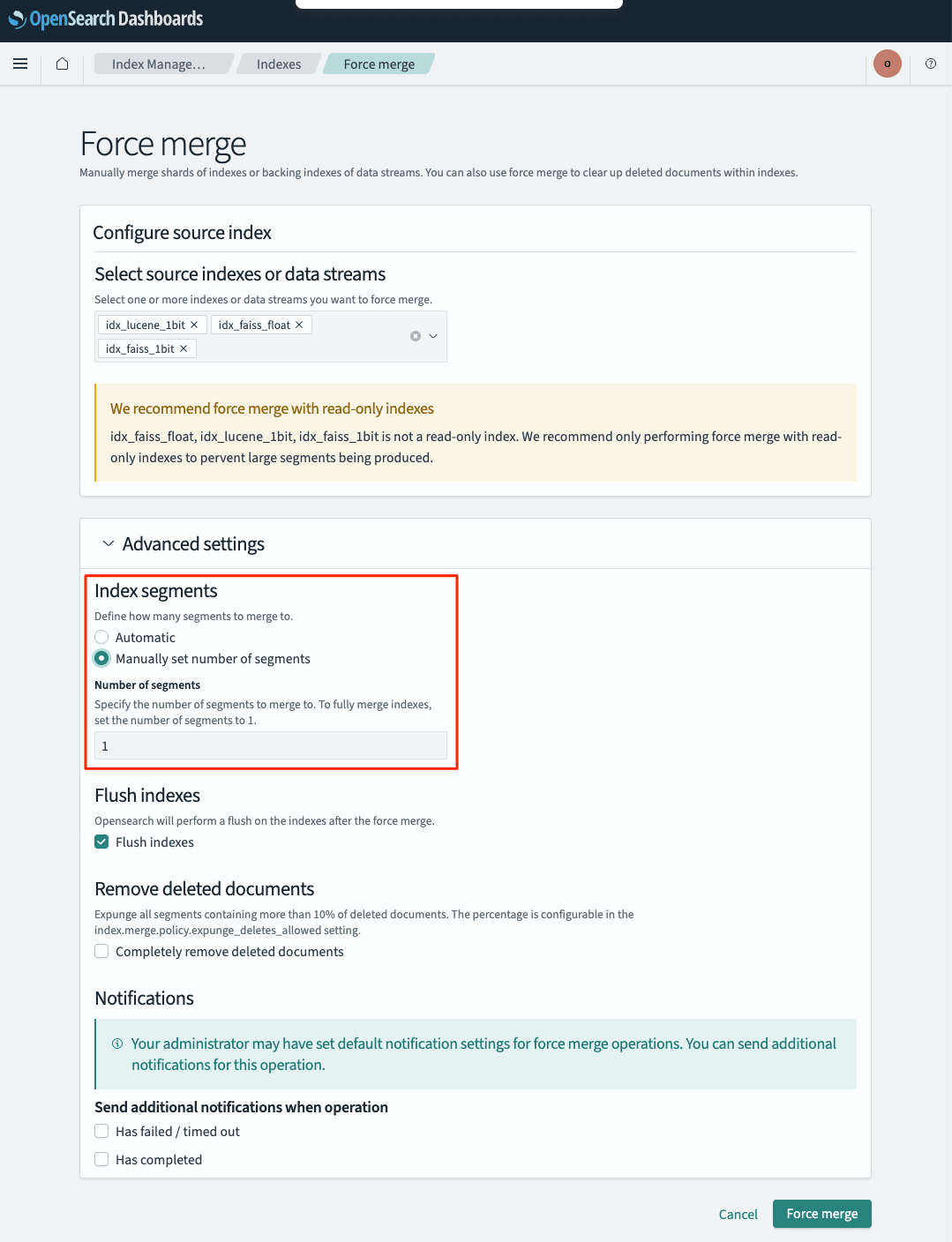
Max number of segments is inside Advanced settings, which is collapsed by default and not visible just by opening the screen. Be careful not to miss this, as you won't be able to specify the segment count without it.
Store sizes can also be checked in the Total size / Size of primaries columns in the same Indices list.
The same operation can be performed from Dev Tools. This is more convenient when you want to see exact values in bytes.
POST /idx_lucene_1bit,idx_faiss_1bit,idx_faiss_float/_forcemerge?max_num_segments=1
GET  /_cat/indices?v=true
health status index            pri rep docs.count store.size pri.store.size
green  open   idx_faiss_float    1   0       5000     30.1mb         30.1mb
green  open   idx_lucene_1bit    1   0       5000     15.5mb         15.5mb
green  open   idx_faiss_1bit     1   0       5000       16mb           16mb
The exact byte counts were as follows.
| Index | Store Size (bytes) | vs. float32 |
|---|---|---|
| idx_faiss_float (uncompressed) | 31,614,360 | 1.00x |
| idx_faiss_1bit | 16,817,832 | 0.53x |
| idx_lucene_1bit | 16,304,671 | 0.52x |
Disk usage was reduced to approximately half. However, this cannot be read as "32x compression." Store size includes the original vector JSON stored in _source and the inverted index, and the quantization effect only applies to the HNSW graph portion of that. The Lucene documentation also states that quantization stores both the raw and quantized vectors, so disk usage may actually increase slightly.
Step 5: Compare k-NN Graph Memory
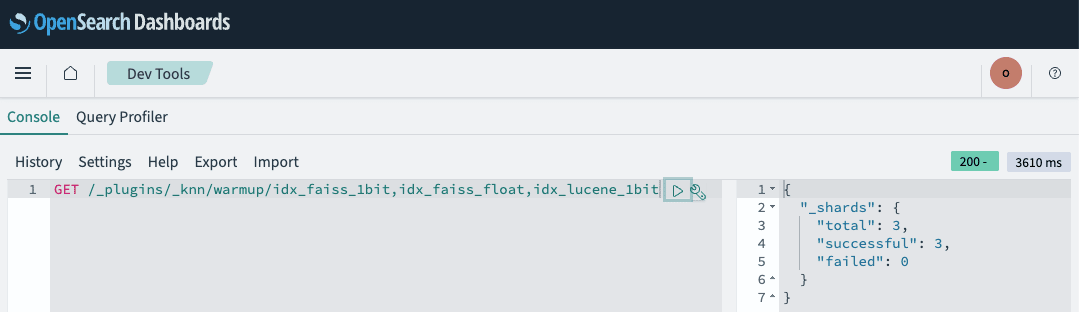
To correctly measure the compression effect, you need to look at k-NN graph memory rather than disk. Since there is no corresponding UI for this, check it from Dev Tools. First, warm up all indexes to load them into cache.
Then check the graph memory.
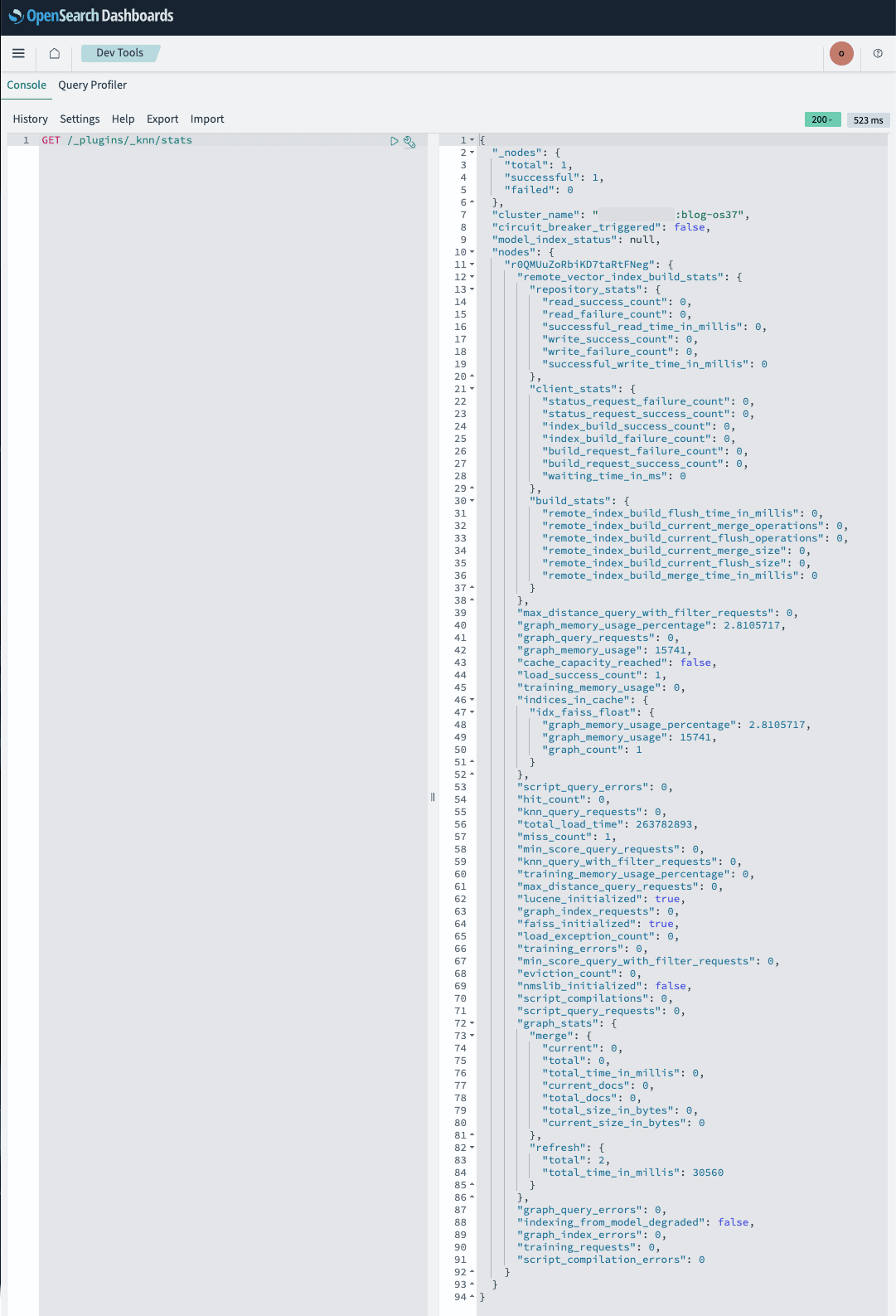
Contrary to expectations, only the uncompressed idx_faiss_float was loaded into cache; the two 1-bit quantized indexes did not appear. Even after running 41 k-NN searches and remeasuring, the result was the same.
The 15,741 KB (approximately 15.4 MB) for idx_faiss_float closely matches the 16.8 MB calculated by applying the HNSW memory estimation formula published by OpenSearch, 1.1 * (dimension * bits_per_dimension / 8 + 8 * m) bytes/vector, with 768 dimensions, 32 bits, m=16, and 5,000 records. Plugging in 1 bit gives 1.2 MB, meaning the 1-bit quantized side is practically negligible in size on the cache as well.
For the Lucene engine, the fact that it does not appear in the cache stats is expected, since the _plugins/_knn/stats cache statistics are metrics intended for native libraries such as Faiss. On the other hand, regarding why the Faiss 1-bit quantized index was also not counted, I could not find a clear statement in the official documentation (please refer to future official documentation for details).
Step 6: Verify That Search Results Match
Verify how much the search results change due to quantization by using the same query vector. This is also done from Dev Tools.
POST /idx_faiss_float/_search
{
  "size": 3,
  "_source": ["title", "category"],
  "query": { "knn": { "my_vector": { "vector": [0.212, 0.461, ...], "k": 3 } } }
}
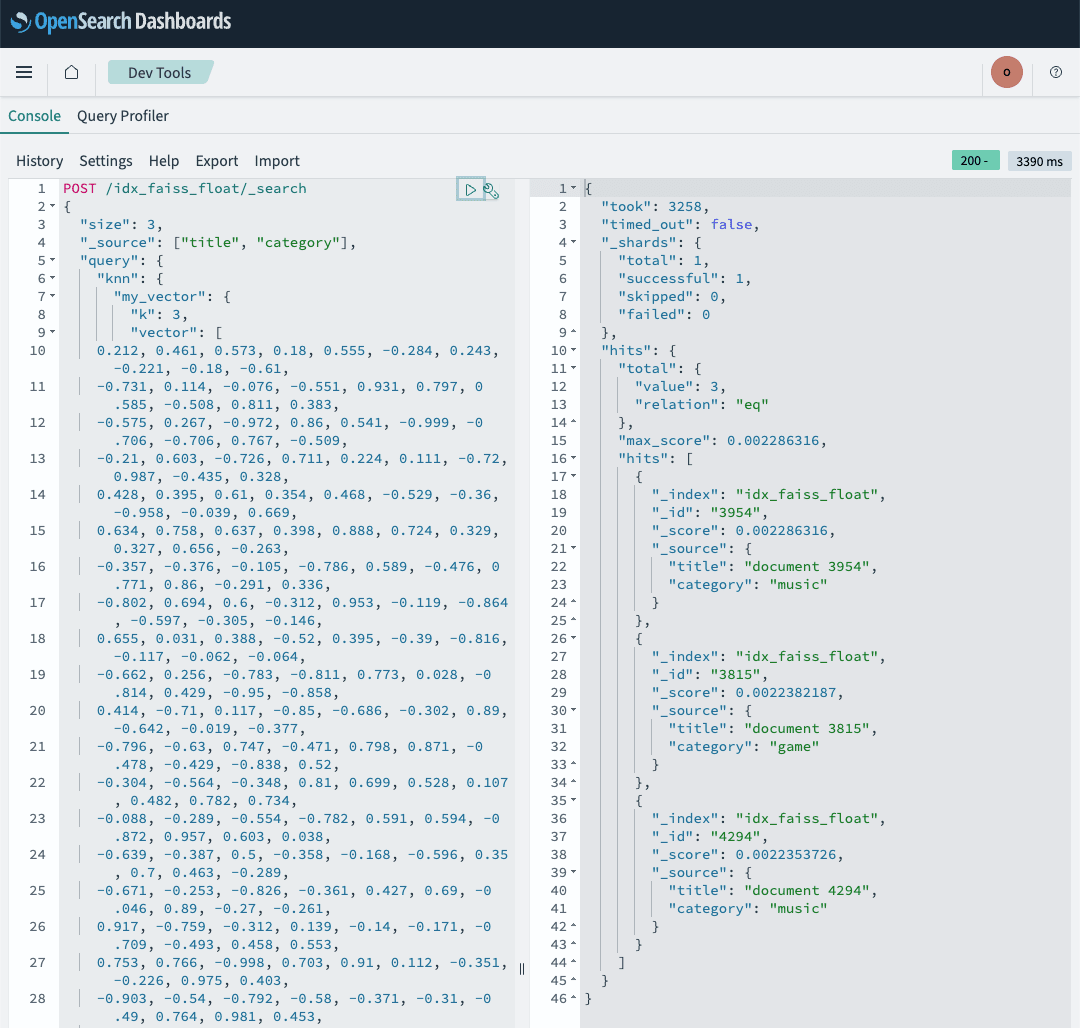
Similarly, retrieve results from idx_faiss_1bit and idx_lucene_1bit.
POST /idx_faiss_1bit/_search
{
  "size": 3,
  "_source": ["title", "category"],
  "query": { "knn": { "my_vector": { "vector": [0.212, 0.461, ...], "k": 3 } } }
}
POST /idx_lucene_1bit/_search
{
  "size": 3,
  "_source": ["title", "category"],
  "query": { "knn": { "my_vector": { "vector": [0.212, 0.461, ...], "k": 3 } } }
}
Since showing everything in full would be lengthy, the results from the three indexes were as follows.
=== idx_faiss_float ===
took: 338 ms
  _id=3954  _score=0.002286  {'title': 'document 3954', 'category': 'music'}
  _id=3815  _score=0.002238  {'title': 'document 3815', 'category': 'game'}
  _id=4294  _score=0.002235  {'title': 'document 4294', 'category': 'music'}

=== idx_faiss_1bit ===
took: 531 ms
  _id=3954  _score=0.002286  {'title': 'document 3954', 'category': 'music'}
  _id=3815  _score=0.002238  {'title': 'document 3815', 'category': 'game'}
  _id=4294  _score=0.002235  {'title': 'document 4294', 'category': 'music'}

=== idx_lucene_1bit ===
took: 604 ms
  _id=3954  _score=0.002286  {'title': 'document 3954', 'category': 'music'}
  _id=3815  _score=0.002238  {'title': 'document 3815', 'category': 'game'}
  _id=4294  _score=0.002235  {'title': 'document 4294', 'category': 'music'}
The order and scores of the top 3 results matched perfectly. However, this is the result under the condition of 5,000 random vectors and does not guarantee recall with real data. Note that took was larger for the 1-bit quantized side, but this includes first-run measurements where cache state was not aligned and is not a value that can be treated as a latency comparison.
Step 7: Retrieve Vectors Using docvalue_fields
This is the highlight of 3.7. First, try retrieving vectors using docvalue_fields.
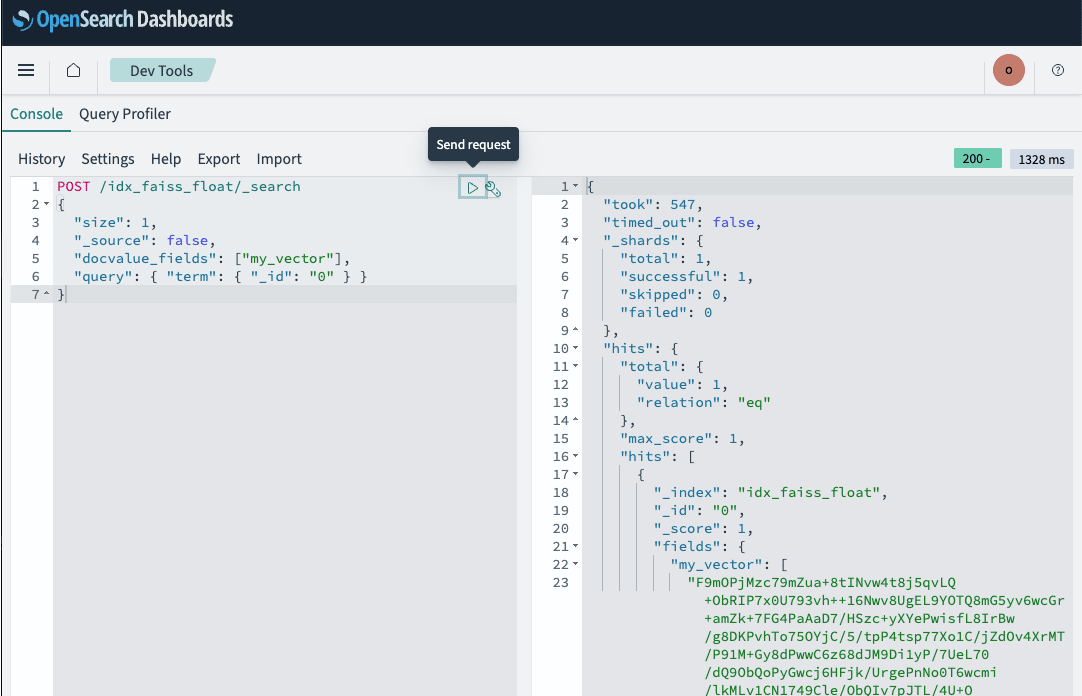
A 768-dimensional vector was returned not as an array of 768 elements, but as a single base64 string of 4,096 characters. Since 768 dimensions × 4 bytes = 3,072 bytes encoded in base64 yields 4,096 characters, this is a format where float32 in little-endian is encoded directly.
For comparison, also retrieve it using _source.
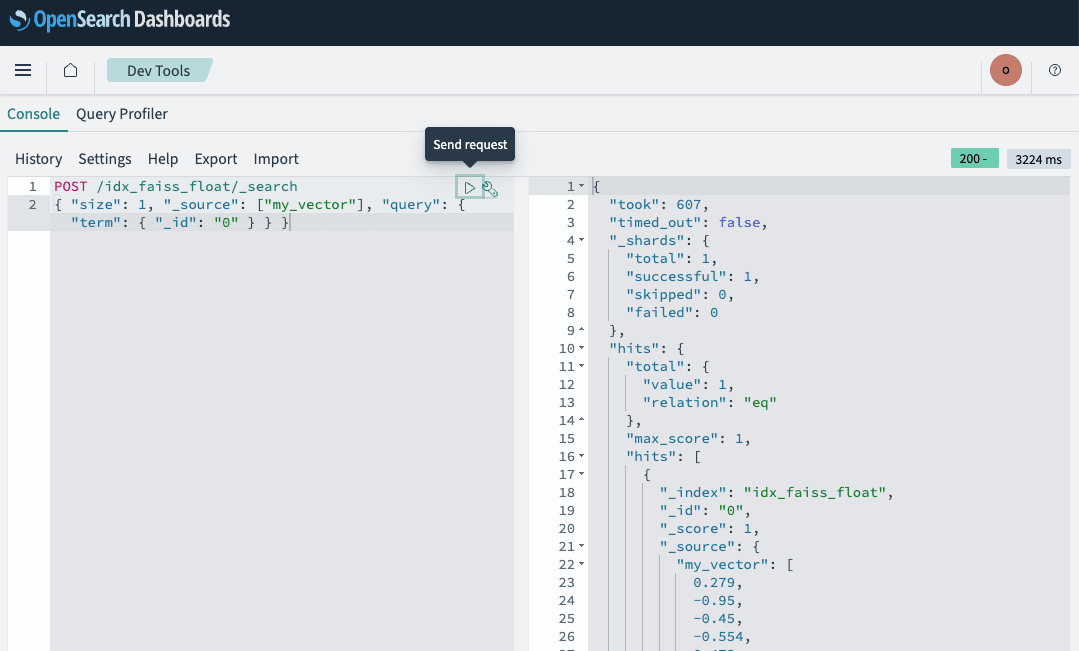
This returns the conventional numeric array. When using docvalue_fields, it is important to note that the application side will need to process the base64 decoding. If you want to visually inspect the values, you can explicitly specify the format like {"field": "my_vector", "format": "array"}.
Step 8: Benchmarking docvalue_fields and _source
After 1 warm-up run, each query was executed 6 times with the same query vector, and the medians were compared. While you can check the took value in the response from Dev Tools, you cannot measure the median of 6 runs, the actual end-to-end time from the client side, or the response size — so this comparison is run from a script.
bench_retrieval_basic.py
#!/usr/bin/env python3
"""Benchmark comparing vector retrieval via docvalue_fields and _source under identical conditions (Basic Auth version).

Measures end-to-end performance of vector retrieval via docvalue_fields
(added in OpenSearch 3.7) compared to retrieval via _source.

For domains with FGAC (internal user database) enabled.
See bench_retrieval.py for the SigV4 version.

Environment variables:
  OS_ENDPOINT  Domain endpoint (https://search-xxx.ap-northeast-1.es.amazonaws.com)
  OS_USER      Master username
  OS_PASSWORD  Master user password

Usage:
  python3 scripts/bench_retrieval_basic.py <index> [k] [iterations]
"""
import json
import os
import statistics
import sys
import time

import requests

ENDPOINT = os.environ["OS_ENDPOINT"].rstrip("/")
AUTH = (os.environ["OS_USER"], os.environ["OS_PASSWORD"])

def search(index: str, body: dict):
    url = f"{ENDPOINT}/{index}/_search"
    data = json.dumps(body).encode()
    t0 = time.perf_counter()
    r = requests.post(url, auth=AUTH, headers={"Content-Type": "application/json"},
                      data=data, timeout=180)
    wall = (time.perf_counter() - t0) * 1000
    r.raise_for_status()
    return r.json(), wall, len(r.content)

def main():
    index = sys.argv[1]
    k = int(sys.argv[2]) if len(sys.argv) > 2 else 1000
    iterations = int(sys.argv[3]) if len(sys.argv) > 3 else 6
    qv = json.load(open("payloads/query_vector.json"))

    knn = {"knn": {"my_vector": {"vector": qv, "k": k}}}
    cases = {
        "_source":         {"size": k, "query": knn, "_source": ["my_vector"]},
        "docvalue_fields": {"size": k, "query": knn, "_source": False,
                            "docvalue_fields": ["my_vector"]},
    }

    results = {}
    for label, body in cases.items():
        search(index, body)  # Warm-up (excluded from measurement)
        walls, tooks, size = [], [], 0
        for _ in range(iterations):
            resp, wall, size = search(index, body)
            walls.append(wall)
            tooks.append(resp["took"])
        hits = len(resp["hits"]["hits"])
        results[label] = {
            "hits": hits,
            "took_ms_median": statistics.median(tooks),
            "wall_ms_median": round(statistics.median(walls), 1),
            "wall_ms_min": round(min(walls), 1),
            "response_bytes": size,
        }
        print(f"{label:16s} hits={hits} took(median)={results[label]['took_ms_median']}ms "
              f"wall(median)={results[label]['wall_ms_median']}ms "
              f"resp={size / 1024 / 1024:.1f}MB")

    s, d = results["_source"], results["docvalue_fields"]
    print(f"\n--- k={k}, iterations={iterations}, index={index} ---")
    print(f"took ratio  (_source / docvalue_fields): "
          f"{s['took_ms_median'] / max(d['took_ms_median'], 1):.2f}x")
    print(f"wall ratio  (_source / docvalue_fields): "
          f"{s['wall_ms_median'] / d['wall_ms_median']:.2f}x")
    print(f"size ratio  (_source / docvalue_fields): "
          f"{s['response_bytes'] / d['response_bytes']:.2f}x")
    # Do not overwrite the original verification evidence (payloads/bench_result.json)
    out = f"payloads/bench_result_k{k}.json"
    json.dump({"index": index, "k": k, "iterations": iterations, "results": results},
              open(out, "w"), indent=2)
    print(f"\nResults saved to {out}.")

if __name__ == "__main__":
    main()
Results for k=1000.
% python3 scripts/bench_retrieval_basic.py idx_faiss_float 100 6
_source          hits=1000 took(median)=915.5ms wall(median)=1962.3ms resp=4.8MB
docvalue_fields  hits=1000 took(median)=433.0ms wall(median)=1729.2ms resp=4.0MB

took ratio  (_source / docvalue_fields): 2.11x
wall ratio  (_source / docvalue_fields): 1.13x
size ratio  (_source / docvalue_fields): 1.19x
Results for k=100.
% python3 scripts/bench_retrieval_basic.py idx_faiss_float 100 6
_source          hits=100 took(median)=71.5ms wall(median)=357.1ms resp=0.5MB
docvalue_fields  hits=100 took(median)=6.0ms  wall(median)=302.7ms resp=0.4MB

took ratio  (_source / docvalue_fields): 11.92x
wall ratio  (_source / docvalue_fields): 1.18x
size ratio  (_source / docvalue_fields): 1.19x
The server-side processing time took improved by 2.11x for k=1000 and up to 11.92x for k=100. On the other hand, the end-to-end actual time as seen from the client remained at 1.13–1.18x. This is because the time to transfer approximately 4 MB of response from the Tokyo region domain to the local environment is dominant, meaning that the improvement in took will translate more directly in environments with lower network latency.
The response size reduction was 1.19x. OpenSearch documentation states that the base64 format is about 60% smaller than JSON arrays, but since we used vectors with up to 3 decimal places in this case, the JSON array side was shorter, which likely narrowed the gap.
Discussion
Here is a summary of what we found through this verification.
- The effect of 1-bit scalar quantization cannot be measured by store size alone. In this case, disk usage was reduced by about half, but this is for the total including
_source. The true effect of quantization is in memory: looking at k-NN graph memory, only the uncompressed side consumed 15,741 KB, while the 1-bit quantized side was not loaded into cache. When evaluating, it is reliable to check_plugins/_knn/stats. - 1-bit quantization increases the cost at index time. For the same 5,000 document ingestion, it took 31.8 seconds / 34.5 seconds compared to 15.1 seconds for uncompressed. If write throughput is a requirement, prior measurement is necessary.
docvalue_fieldsis a feature with a large server-side effect.tookimproved by 11.92x for k=100 and 2.11x for k=1000. On the other hand, the improvement seen from the client remained at 1.13–1.18x, where response transfer time was dominant. When placing this feature upstream of an API that returns large numbers of vectors, it is worth reviewing the network path as well.- The return value of
docvalue_fieldsis a base64 string. If you switch existing client code that assumes_sourcedirectly, parsing will fail. You need to either add decoding processing or specifyarrayforformat. - The boundary between what can be done entirely in the console and what requires a script is clear. Domain creation is done in the Management Console, index creation / k-NN search / graph memory confirmation in Dev Tools, force merge and store size confirmation in Index Management — each is self-contained. On the other hand, bulk ingestion of 5,000 documents and a benchmark taking the median of 6 runs cannot be accomplished in the console.
- If you use Dashboards, fine-grained access control is practically a prerequisite. You cannot open Dashboards from a browser with only an IAM-based access policy. Enabling it requires encryption at rest, node-to-node encryption, and HTTPS enforcement — all of which must be enabled, and once enabled cannot be disabled. Additionally, cluster management APIs such as
_forcemergeand_plugins/_knn/warmuprequirecluster:adminpermissions (which the master user holds).
Let me also mention constraints when upgrading an existing domain to 3.7. According to the official documentation, migrating from OpenSearch 1.3 or 2.x to 3.x requires going through 2.19 first. Also, indexes created with OpenSearch 1.3 or Elasticsearch 7.10 or earlier require reindexing regardless of whether they are placed in hot, UltraWarm, or cold storage. The fact that the minimum_index_compatibility_version of the domain created this time was 2.0.0 is consistent with this constraint.
Let me also touch on areas that were not verified this time.
Query Insights was set aside. _insights/top_queries only retains queries within a certain time window, which was about 5 minutes in the range I tested. Moreover, most of that window was filled with background queries that Dashboards sends to its own indexes (.query_execution_request_*, .kibana, etc.) at 60-second intervals. To reliably capture k-NN searches I submitted myself, it would require work such as retrieving immediately after submitting the query, or adjusting cluster settings for window size and top-N count — and simply calling the API did not yield observations suitable for publication. Since thorough verification is needed, I will leave this for a separate article.
Search Relevance Workbench CSV judgment upload and hybrid search optimization were also set aside. These belong to the separate topic of search relevance evaluation, which is outside the scope of this time (vector search compression and retrieval). The Amazon S3 export of top queries was also out of scope this time, as it requires snapshot repository registration as a prerequisite.
Closing
With OpenSearch 3.7 becoming available on Amazon OpenSearch Service, we confirmed that vector compression via 1-bit scalar quantization and vector retrieval using docvalue_fields work on managed domains without any additional configuration.
In particular, docvalue_fields can be applied to existing indexes by changing just one line in the search request, with no reindexing required. For use cases that return vectors themselves to clients — such as re-ranking or configurations that maintain their own vector cache — it is well worth verifying the effect.
On the other hand, since 1-bit scalar quantization is a feature that impacts memory rather than disk, increases indexing cost, and requires measuring the impact on recall with real data, we recommend evaluating it with your own dataset before applying it in production. A verification domain can be created with a single t3.small.search node, and creation took about 19 minutes in our case. Everything from domain creation, index creation, force merge, and graph memory confirmation — except for large-scale data ingestion and benchmarking — can be tried through the Management Console and OpenSearch Dashboards alone. Why not start small and give it a try?
