![[Update] I tried natural language queries on four datasets using Amazon QuickSight's multi-dataset topics](https://images.ctfassets.net/ct0aopd36mqt/2x7muHjvW69fxuVNSKWZHp/b37e05a972fc8125e9214abd764928fa/amazon-quick.png?w=3840&fm=webp)
[Update] I tried natural language queries on four datasets using Amazon QuickSight's multi-dataset topics

This page has been translated by machine translation. View original
This is Ishikawa from the Cloud Business Division. Since Amazon Quick Sight topics now support runtime joins across multiple datasets, I tried out natural language queries on multi-dataset topics in the Management Console.
Previously, to perform analysis spanning multiple tables in Amazon Quick Sight, you had to manually build JOIN logic during the data preparation stage and pre-join everything into a single dataset. With this update, you can keep each dataset at its original granularity and define relationships (join keys) on the topic side, so only the necessary joins are assembled at query execution time.
You can add up to 12 datasets to a single topic, and the same semantic model is used both when creating visuals on analysis sheets and when doing natural language Q&A in Amazon Quick Chat. Row-level security (RLS) and column-level security (CLS) are inherited directly from the existing dataset permissions.
Note that Amazon QuickSight has evolved into Amazon Quick, and the BI functionality is now called Amazon Quick Sight.
What Are Multi-Dataset Topics
A Topic is a multi-dataset semantic layer that brings together multiple enriched datasets into a single unified data model.
The differences from the previous approach are as follows.
In the official documentation, a topic is described as consisting of four layers.
The "Relationships" element enclosed by dashed lines cannot be configured via API including CloudFormation and is console-only. We will verify this point later.
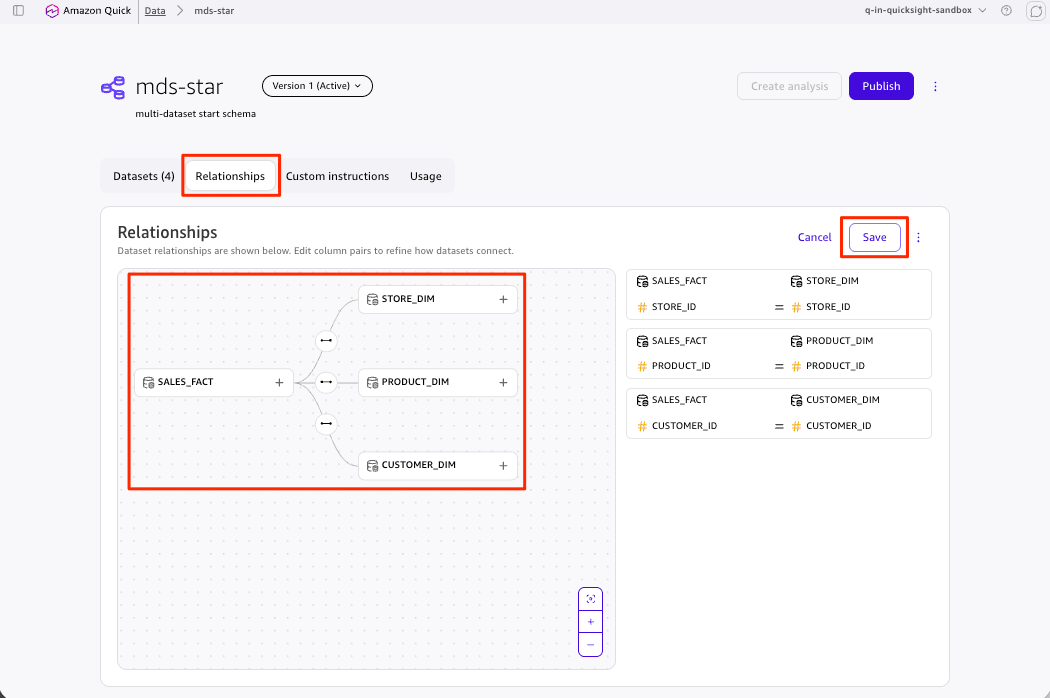
Relationships are defined by uploading a JSON file that describes dataset pairs and the column names used for joining. The official documentation Defining relationships between datasets in a Topic includes an example of a star schema that joins a central sales fact table to each dimension table.
{
  "datasetPairs": [
    {
      "datasetLeft": { "datasetName": "SALES_FACT", "joinColumnNames": ["CUSTOMER_ID"] },
      "datasetRight": { "datasetName": "CUSTOMER_DIM", "joinColumnNames": ["CUSTOMER_ID"] }
    },
    {
      "datasetLeft": { "datasetName": "SALES_FACT", "joinColumnNames": ["PRODUCT_ID"] },
      "datasetRight": { "datasetName": "PRODUCT_DIM", "joinColumnNames": ["PRODUCT_ID"] }
    },
    {
      "datasetLeft": { "datasetName": "SALES_FACT", "joinColumnNames": ["STORE_ID"] },
      "datasetRight": { "datasetName": "STORE_DIM", "joinColumnNames": ["STORE_ID"] }
    }
  ]
}
The limitations described in the official documentation are as follows.
- The relationship graph must be acyclic (DAG); circular joins are not supported
- Self-relationships (associating a dataset with itself) are not supported
- SPICE and Direct Query cannot be mixed within a single topic
Key Changes
- You can now add up to 12 datasets to a single topic and define join keys (relationships) between dataset pairs
- When you create a visual using fields from multiple datasets on an analysis sheet, Amazon Quick Sight automatically generates a runtime inner join
- In Amazon Quick Chat, an LLM-based chat agent traverses relationships and generates SQL spanning datasets to provide answers. The generated SQL can be reviewed
- Custom instructions allow you to persistently define business rules in natural language, such as fiscal year definitions, metric calculation logic, and disambiguation of terminology
- Existing dataset permissions are inherited, with support for row-level security (RLS) and column-level security (CLS). RLS is applied per dataset during runtime joins
- Topics created before this release are classified as legacy Topics and continue to work as before
Eliminating the need for pre-joining means you no longer have to recreate datasets every time a use case changes, and it also reduces excessive SPICE capacity consumption. Another major benefit is that both humans and agents reference the same semantic model, enabling consistent application of data governance across cross-dataset visuals.
Supported Regions
Generally available (GA) in all AWS Regions where Amazon Quick is available, including the Tokyo Region (ap-northeast-1). Note that Amazon Quick Sight topics require Enterprise Edition.
Trying It Out
Prerequisites
- Amazon Quick Sight Enterprise Edition account
- QuickSight user role: ADMIN_PRO
- Verification region: ap-northeast-1 (Tokyo)
The edition was confirmed as follows.
% aws quicksight describe-account-subscription \
  --aws-account-id "${ACCOUNT_ID}" \
  --query 'AccountInfo' --output json
{
    "AccountName": "q-in-quicksight-sandbox",
    "Edition": "ENTERPRISE",
    "NotificationEmail": "ishikawa@example.com",
    "AuthenticationType": "IDENTITY_POOL",
    "AccountSubscriptionStatus": "ACCOUNT_CREATED"
}
Note that resource names below have been shortened to the mds- prefix for readability. In the actual verification, names with execution IDs were used.
Preparing SPICE Datasets with a Star Schema
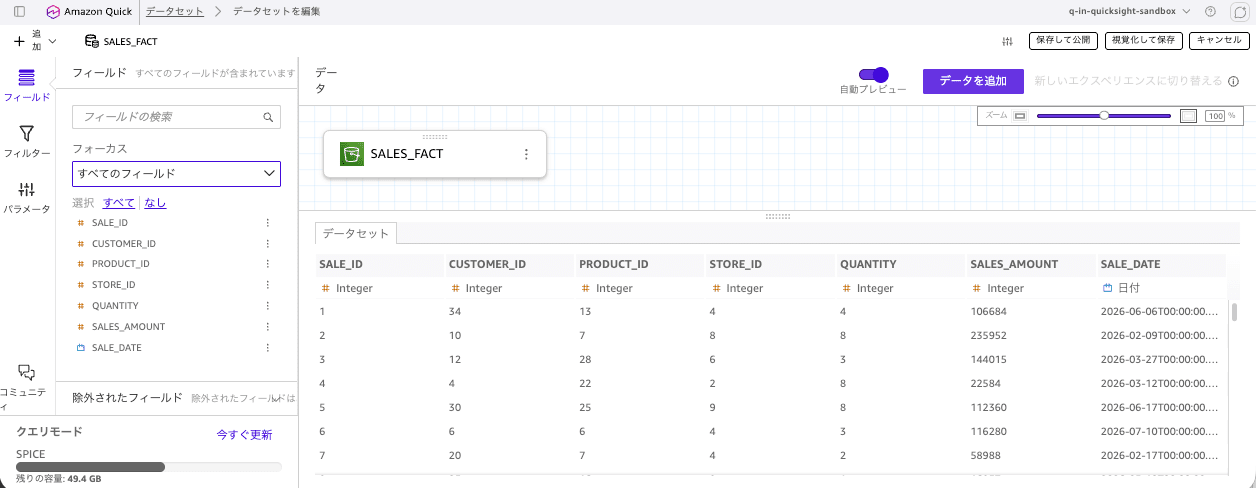
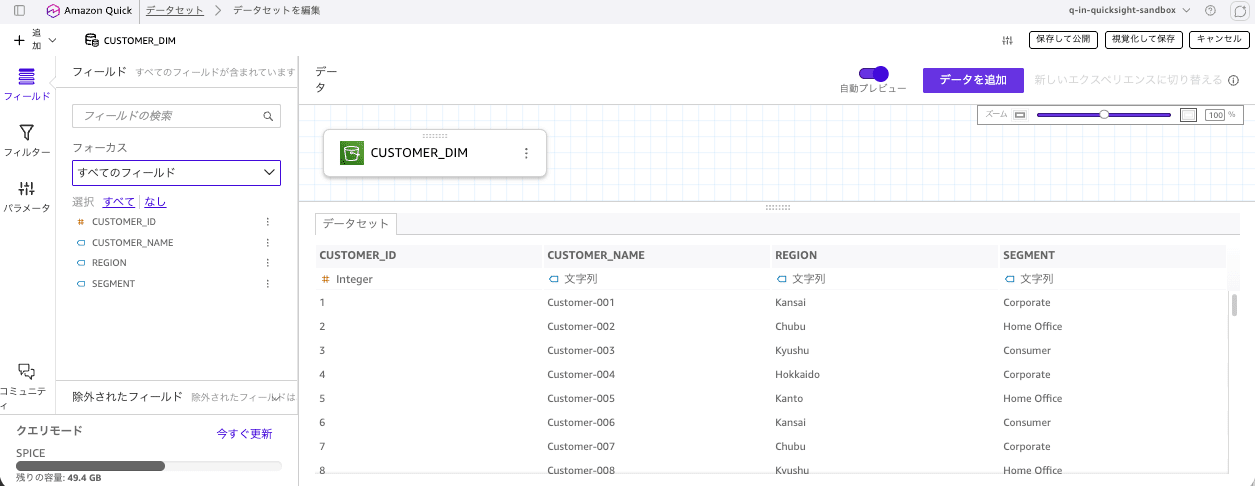
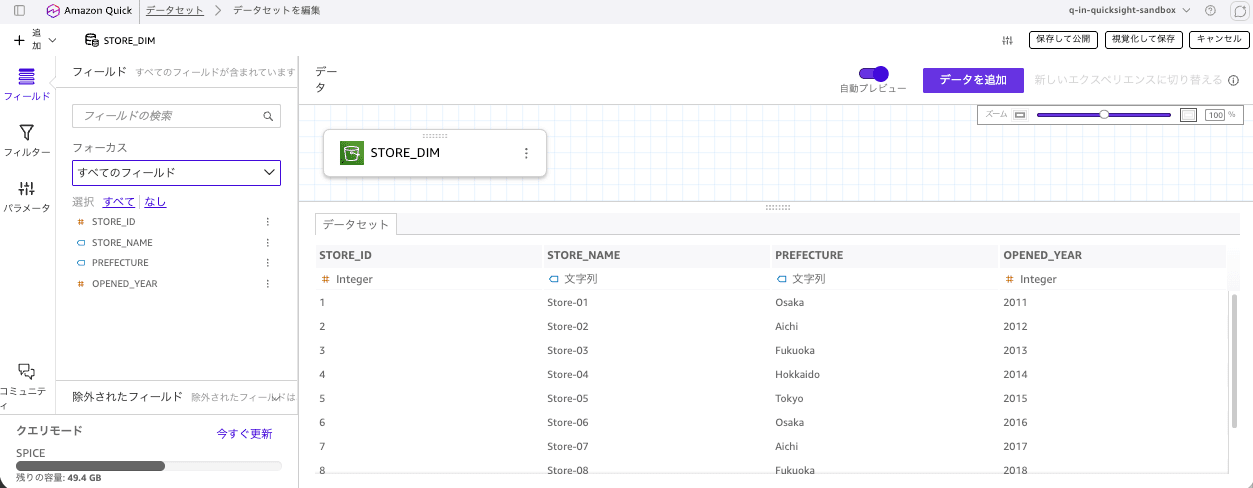
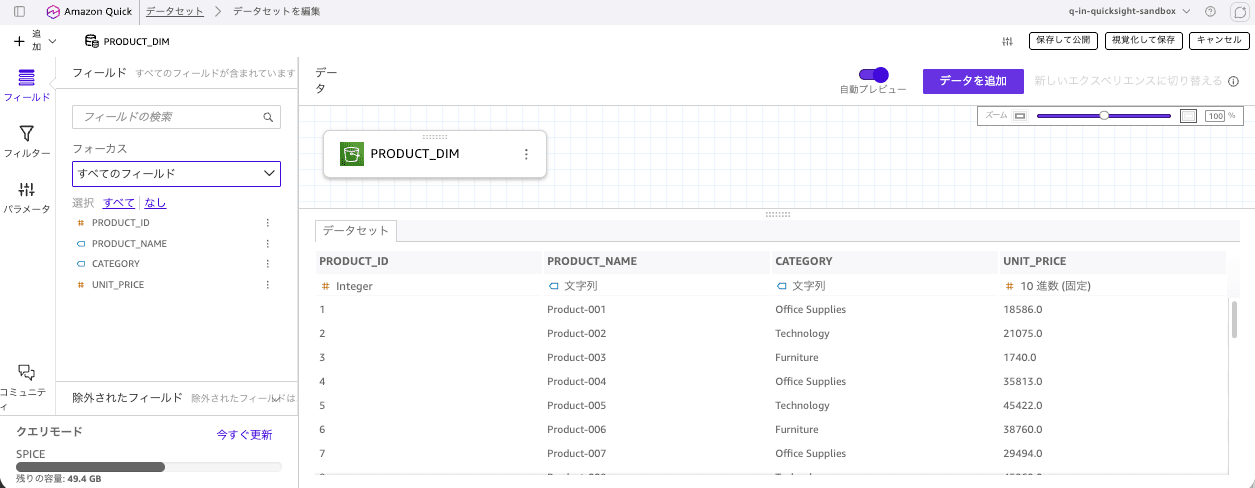
Following the JSON example in the official documentation, I created a star schema in CSV with SALES_FACT at the center and CUSTOMER_DIM / PRODUCT_DIM / STORE_DIM as dimensions, placed them in S3, and made them into SPICE datasets.
SALES_FACT
CUSTOMER_DIM
STORE_DIM
PRODUCT_DIM
Creating a Multi-Dataset Topic
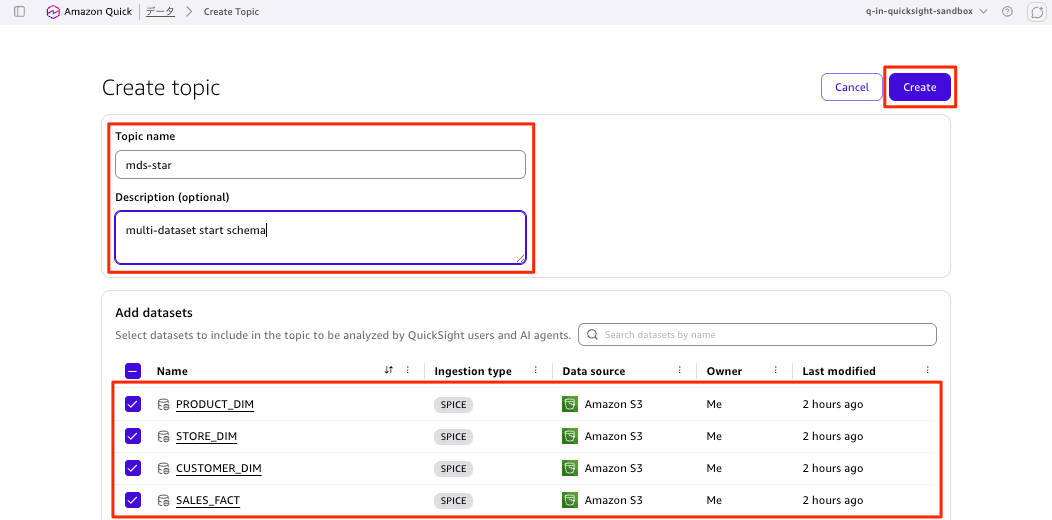
Select 4 DataSets and create a topic (mds-star).
On the next screen, configure the relationships between the selected datasets in the [Relationships] tab.
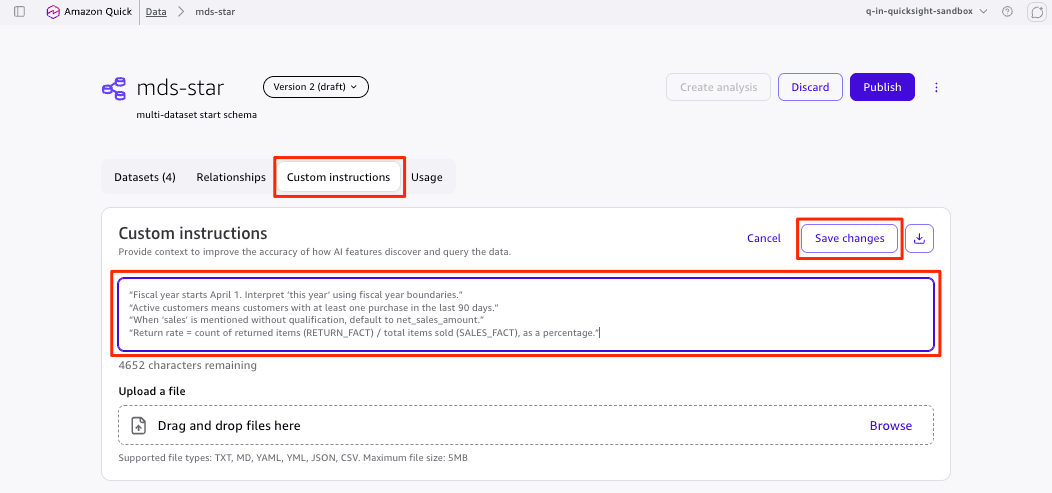
Next, in the [Custom Instructions] tab, register business rules in natural language.
- "Fiscal year starts April 1. Interpret 'this year' using fiscal year boundaries."
- "Active customers means customers with at least one purchase in the last 90 days."
- "When 'sales' is mentioned without qualification, default to net_sales_amount."
- "Return rate = count of returned items (RETURN_FACT) / total items sold (SALES_FACT), as a percentage."
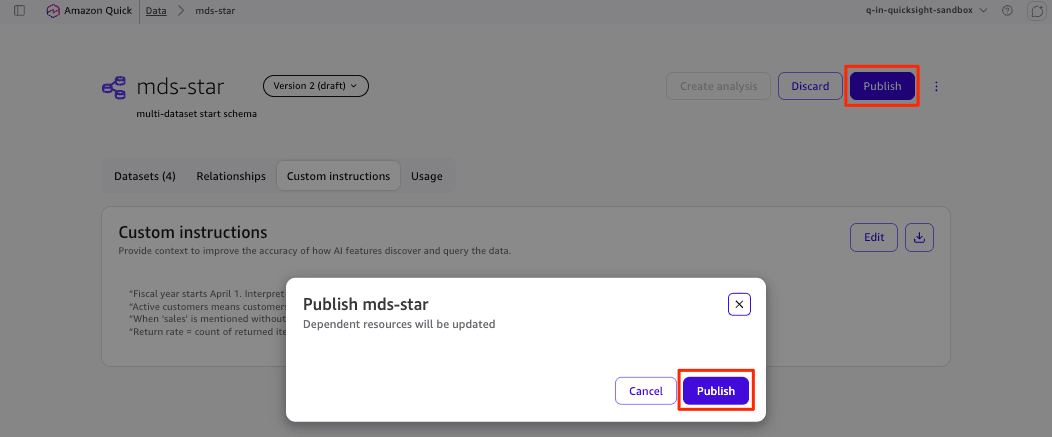
Finally, publish (share) the configured topic.
Selecting the Topic to Query
Select "New Chat" from the left navigation menu and choose the topic to query.
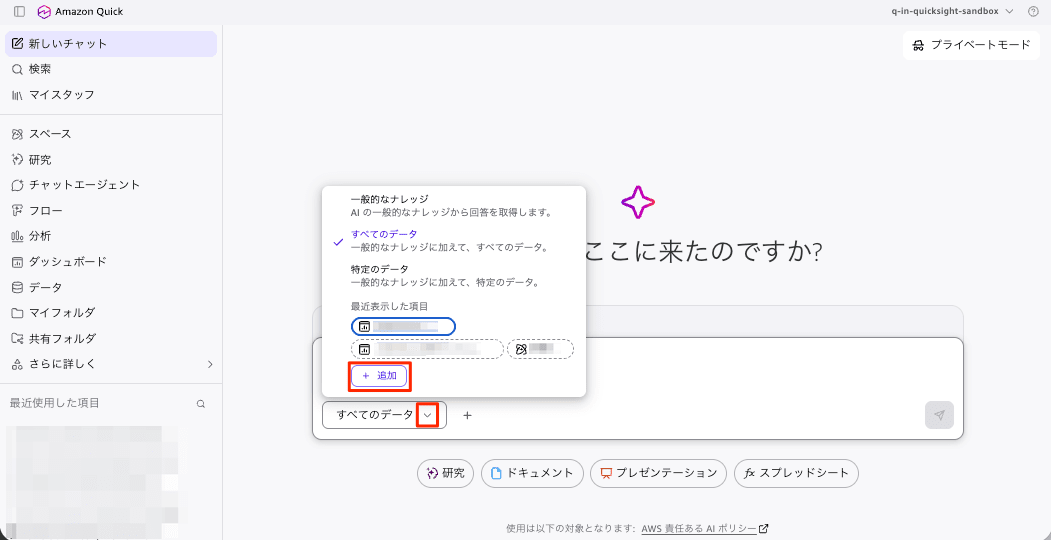
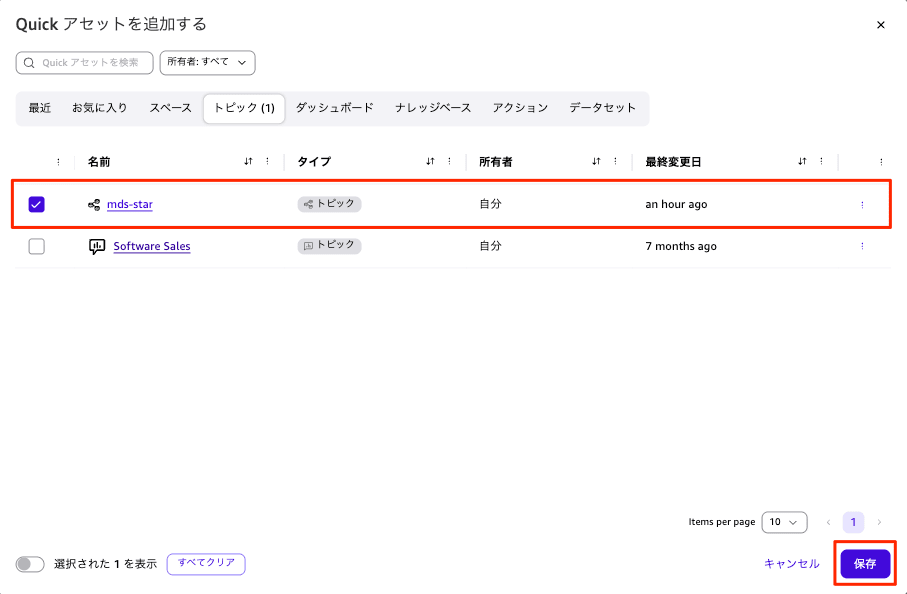
Select the multi-dataset topic you created (mds-star).
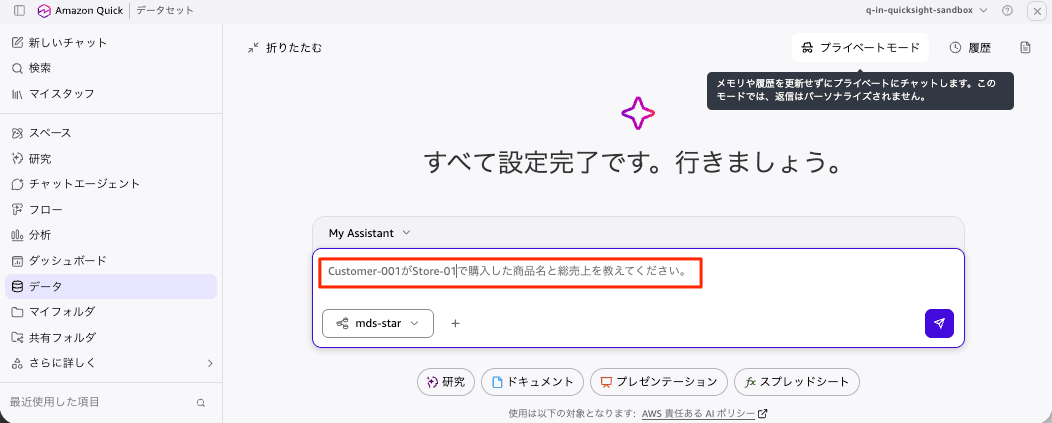
Querying the Multi-Dataset Topic in Natural Language
Ask a question using analysis dimensions: "Please tell me the product names and total sales that Customer-001 purchased at Store-01." Without joining the fact table (SALES_FACT dataset) with each dimension (CUSTOMER_DIM dataset, STORE_DIM dataset, PRODUCT_DIM dataset), a correct answer should not be possible.
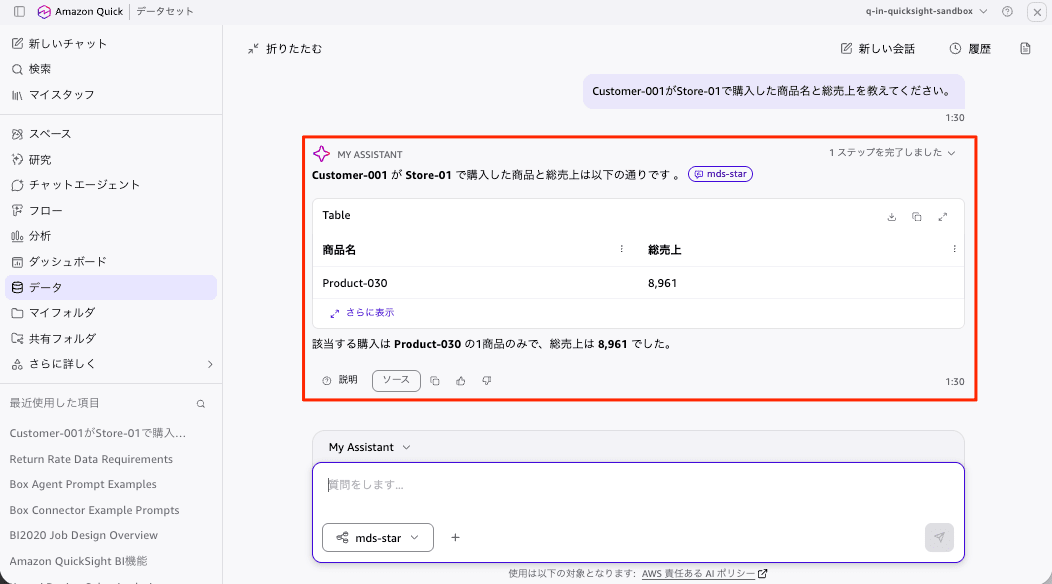
The product name "Product-030," the records, and the total sales were all retrieved correctly.
Supplement: Can SPICE and Direct Query Really Not Be Mixed?
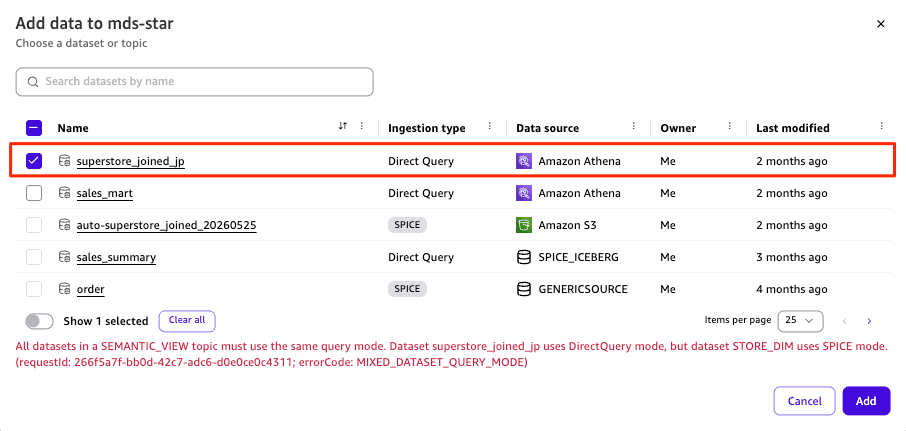
I also tested the limitation stating "SPICE and Direct Query cannot be mixed within a single topic." When I tried adding the SPICE SALES_FACT created this time and an existing Direct Query dataset superstore_joined_jp together, it resulted in an error as expected.
All datasets in a SEMANTIC_VIEW topic must use the same query mode.
Dataset superstore_joined_jp uses DirectQuery mode, but dataset STORE_DIM uses SPICE mode.
(errorCode: MIXED_DATASET_QUERY_MODE)
Discussion
Here is a summary of the findings obtained from this verification.
Cross-Dataset Questions Were Answered Without Pre-Joining
The question "what product names and total sales did Customer-001 purchase at Store-01" cannot be answered without spanning one fact table and three dimension tables. Previously, you would have needed to prepare a single dataset with all four tables pre-joined, but by simply defining relationships in the topic, the product name, records, and total sales all returned correct values.
Since each dataset can be kept at its original granularity, there is no longer a need to recreate pre-joined datasets every time a new use case arises. The total SPICE consumption for the 4 datasets in this verification was about 51 KB, which is more efficient compared to maintaining a separately pre-joined dataset.
The Console Blocks Query Mode Mixing
When attempting to place SPICE STORE_DIM and Direct Query superstore_joined_jp in the same topic, it was rejected with the dedicated error code MIXED_DATASET_QUERY_MODE. This confirms that the constraint documented is properly enforced at the UI level.
The term SEMANTIC_VIEW appearing in the error message also reveals that the new topic type is internally treated as a semantic view.
Relationship Definition Is Console-Only
This is the part shown with dashed lines in the diagram at the beginning. The keys returned by describe-topic in the Topic object are only four: Name / Description / UserExperienceVersion / DataSets, and there is no field corresponding to Relationships.
Star Schema Is the Standard Starting Point for Design
The official documentation recommends modeling with a star schema that joins one or more central fact tables to shared dimension tables. Use integer surrogate keys for join keys wherever possible, and make sure to verify data type consistency on both sides, removal of NULLs (NULLs do not match in inner joins), and referential integrity.
For snowflake structures where sub-dimensions hang off dimensions, it is recommended to flatten them into a single dimension dataset to reduce join hops. Since the relationship graph must be acyclic (DAG), if a cycle would be created, drop one of the paths and denormalize.
The following are areas where future improvements would be welcome.
- Adding
RelationshipstoTopicDetails(IaC support via CloudFormation / API) - Validation of dataset count limits and query mode mixing in
CreateTopic/UpdateTopic - Support for outer joins on analysis sheets
Conclusion
Amazon Quick Sight topics have become a multi-dataset semantic layer capable of defining relationships across up to 12 datasets and performing runtime joins. Since there is no need to create pre-joined flat datasets, you can analyze data while keeping a normalized data model, reducing both data preparation effort and SPICE capacity.
When actually trying it out, simply selecting 4 datasets from the console and configuring relationships was enough to correctly answer natural language questions spanning multiple datasets. The fact that both analysis sheets and natural language chat share the same semantic model is also a major advantage from a governance perspective.
If you have an environment where pre-joined datasets keep proliferating every time a new use case arises, why not consider migrating with star schema modeling in mind?
