
Claude Code v2.1.238~v2.1.239 Major Updates - Focused Improvements to Remote Control and Addition of keybindingFlavor Setting

This page has been translated by machine translation. View original
This is Ishikawa from the Cloud Business Division. I'll be summarizing the Claude Code v2.1.238 ~ v2.1.239 updates. Remote Control reliability has been improved, and these 2 versions contain a concentrated set of Remote Control-related changes that, while understated, I feel will make a real difference in day-to-day work. Today, I tried out Remote Control and will walk you through it step by step.
The previous update article is here.
Update Summary
This covers 2 versions (v2.1.238 ~ v2.1.239, August 20 ~ 21, 2026), with a total of 98 changes. The breakdown is 59 fixes, 20 improvements, 8 new features, 8 security, 2 performance, and 1 breaking change — a composition leaning more toward stability of existing features than new ones. In terms of themes, changes are concentrated in 3 areas: Remote Control and cross-session messaging, fullscreen mode, and the plugin marketplace.
The official X account (@ClaudeDevs) also posted that, since Remote Control was the top thing users wanted fixed last month, they've been working on improving its reliability.
Notable Updates
Removal of double-press Ctrl+L / Cmd+K triggering /clear in fullscreen (v2.1.238)
This is the only breaking change in the covered range. Ctrl+L and Cmd+K in fullscreen mode have been changed to always perform only a screen redraw.
If you had this as a habit, I'd suggest getting used to /clear before updating. The before/after comparison is described in the "Breaking Changes" section below.
Concentrated improvements to Remote Control connectivity (v2.1.238 / v2.1.239)
Remote Control connection resilience has been improved, now tolerating temporary HTTP 403 rejections from network edges, VPNs, and proxies for up to 3 minutes, and naming the source of the block if it persists (v2.1.238). A bug where brief network interruptions caused delayed sign-in renewal, resulting in disconnection with "login expired," has also been fixed (v2.1.238).
For those using Remote Control on networks prone to dropping connections, I feel this fix will make a noticeably tangible difference.
Additionally, a set of bugs where operations from smartphones or the web weren't reaching or being reflected on the terminal side have been resolved together in v2.1.238 (individual details are listed in the "Fixes" section below).
If you rely on continuing work from a smartphone, it would be worth confirming that model selection and task stopping now work as expected.
Fix for double billing on Bedrock streaming (v2.1.239)
A bug has been fixed where, via a proxy that strips Content-Type headers from responses, Bedrock streaming was re-executing as non-streaming every turn, silently doubling the billable API calls. Also related to Bedrock, a bug causing startup hangs when using an SSO profile and awsAuthRefresh under an HTTPS proxy has been fixed (the pre-check for credentials now respects HTTPS_PROXY).
In environments using Bedrock via a proxy, there's a possibility that billing was silently inflating without anyone noticing, so I feel it's worth considering an early update.
Addition of keybindingFlavor setting (v2.1.238 / v2.1.239)
A keybindingFlavor setting has been added. Setting it to "readline" makes Ctrl+W in the prompt delete back to the previous whitespace, just like in Bash (v2.1.238). The default is "classic", and its behavior is unchanged. In v2.1.239, the scope was expanded to word-based key operations: Alt+F and Ctrl/Option+→ stop at the end of a word, Alt+D deletes up to that point (retrievable with Ctrl+Y), and punctuation is treated as a word boundary.
The more accustomed you are to Bash key operations, the more I think a single line of configuration will reduce input friction.
The setting is written in ~/.claude/settings.json as follows:
{
  "keybindingFlavor": "readline"
}
The official documentation introduces a way to verify this: type fix the bug in src/utils/foo.ts in the prompt and press Ctrl+W — with "readline", src/utils/foo.ts is deleted, while with "classic", only foo.ts is deleted.
Security fixes for masked input and fullscreen operations (v2.1.239)
Bugs have been fixed where text in masked input fields (password-style), such as login code fields, could be pasted elsewhere with Ctrl+Y, or saved to the prompt history when cleared with a double Esc press. Also fixed is a bug where simply clicking the terminal to bring the window back into focus in fullscreen mode would answer a permission prompt or press a button. The issue where requests rejected by an organization's policy check were being resent before the rejection was displayed has also been resolved.
For those using fullscreen mode, I feel this fix will reduce unintended operations.
headersHelper for the plugin marketplace (v2.1.238)
You can now specify headersHelper for URL marketplaces and catalog entries. The specified command generates HTTP headers (such as short-lived tokens) used for catalog retrieval and same-origin archive retrieval. The headersHelper for a catalog entry is executed only during installation/update of that plugin, after displaying the command content, and claude plugin install/update prompts with [y/N] for confirmation (can be skipped with -y).
Since this is a change that affects both plugin distributors and users, I feel that anyone operating an internal marketplace will want to verify the behavior.
Trying out /remote-control
Being able to monitor a session running on my Mac from my iPhone feels useful when running long builds or tests. Combined with push notifications in particular, it should help reduce the time spent waiting in front of the terminal. Here I'll walk through the steps for enabling /remote-control from Claude Code on Mac and connecting from the Claude app on iPhone.
Requirements
Once connected, the steps themselves are only a few, but I think the requirements are where you're more likely to hit a snag. Let me confirm these upfront.
| Item | Condition |
|---|---|
| Plan | Pro / Max / Team / Enterprise. API key authentication is not supported. For Team / Enterprise, the Owner must enable the Remote Control toggle in the admin panel |
| Authentication | Sign-in to claude.ai via /login. Long-lived tokens from claude setup-token or CLAUDE_CODE_OAUTH_TOKEN cannot be used to connect |
| Endpoint | Direct connection to api.anthropic.com only. Amazon Bedrock / Google Cloud Agent Platform / Microsoft Foundry, and configurations where ANTHROPIC_BASE_URL points to another host are not supported |
| Environment Variables | DISABLE_TELEMETRY / DO_NOT_TRACK / CLAUDE_CODE_DISABLE_NONESSENTIAL_TRAFFIC / DISABLE_GROWTHBOOK must not be set (as all of these stop feature flag evaluation) |
| Workspace Trust | Run claude once in the project directory and approve the trust dialog |
Note that if you want to disable Remote Control entirely, use the disableRemoteControl setting, and if you want to auto-connect for all interactive sessions, use the remoteControlAtStartup setting.
Steps to connect from Mac to iPhone
My PC is a MacBook and my phone is an iPhone, but the process shouldn't be much different for a Windows and Android combination. If you've already installed the Claude app on your smartphone and logged in, start from step 3.
- If the Claude app is not on your iPhone, install it from the Apple Store.
For Android, you should also be able to download and use it similarly from the store.
-
After installing, launch the Claude app and log in. In my case, entering my email address caused an email with the subject
Your secure link to Claude.ai is hereto arrive, and I could log in by entering the number displayed after pressing the [Sign in] button in the email body into the Claude app. -
Launch
claudein your project directory on Mac. On first run, approve the workspace trust dialog. In the example below, theclaudecommand is launched in the Mac terminal.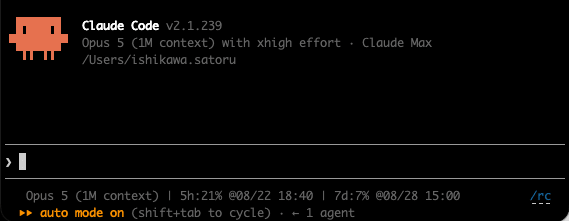
-
Run the
/remote-controlcommand (abbreviated as/rc) in the Mac terminal.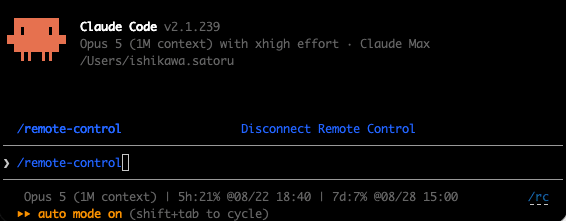
-
A menu is displayed. Use the ↓ key to select
Show QR codeand press Enter.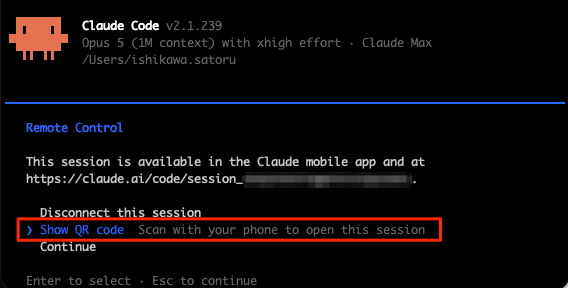
A status panel with the session URL and QR code opens.
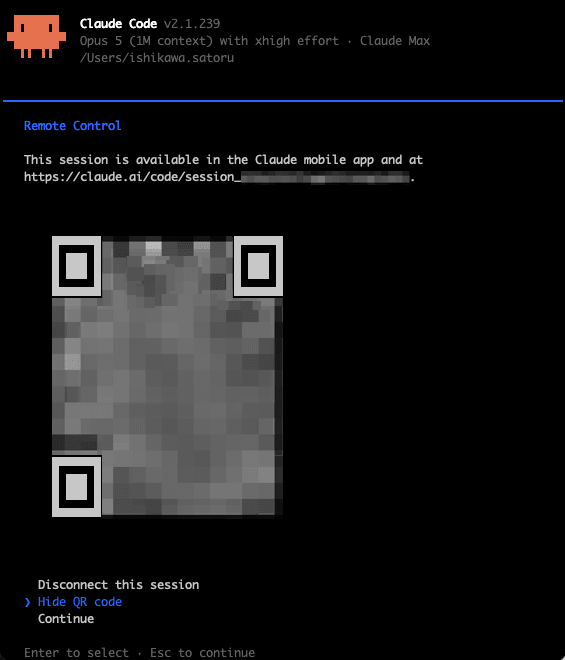
-
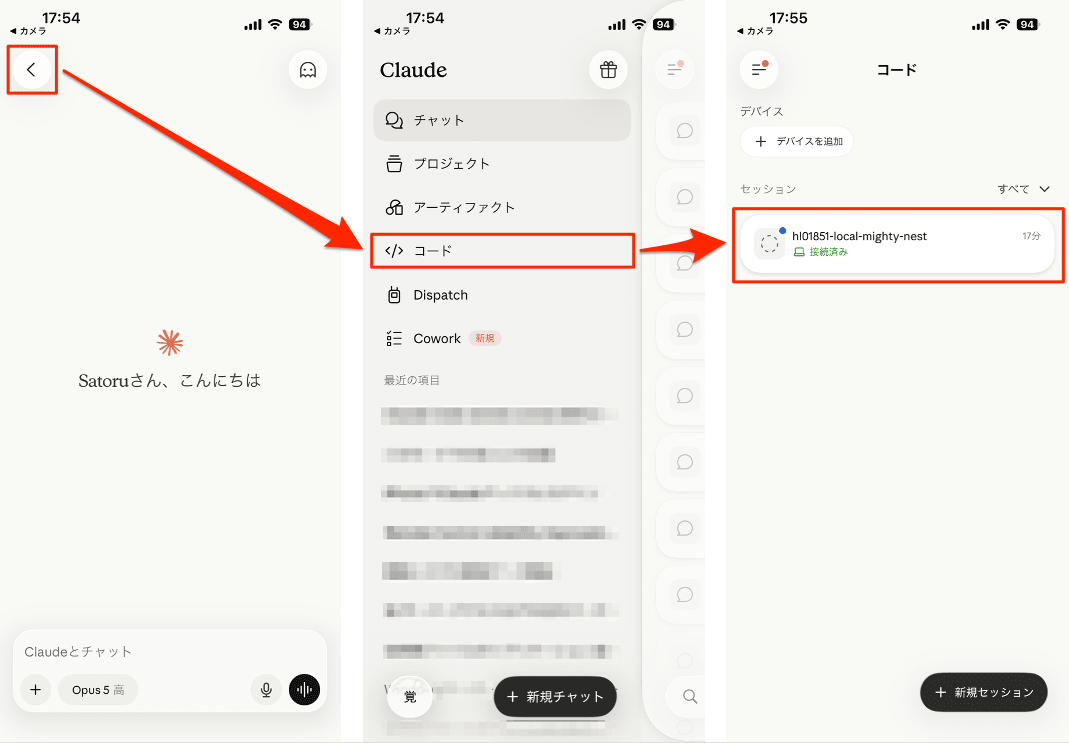
Scan the QR code with the iPhone's camera app. Open the Code tab in the Claude app and select your session by name from the session list. Online sessions have a computer icon and a green dot.
-
Send a prompt from the iPhone. Here I send "Create a Tower of Hanoi program." This is immediately reflected on the Claude Code screen in the Mac terminal.
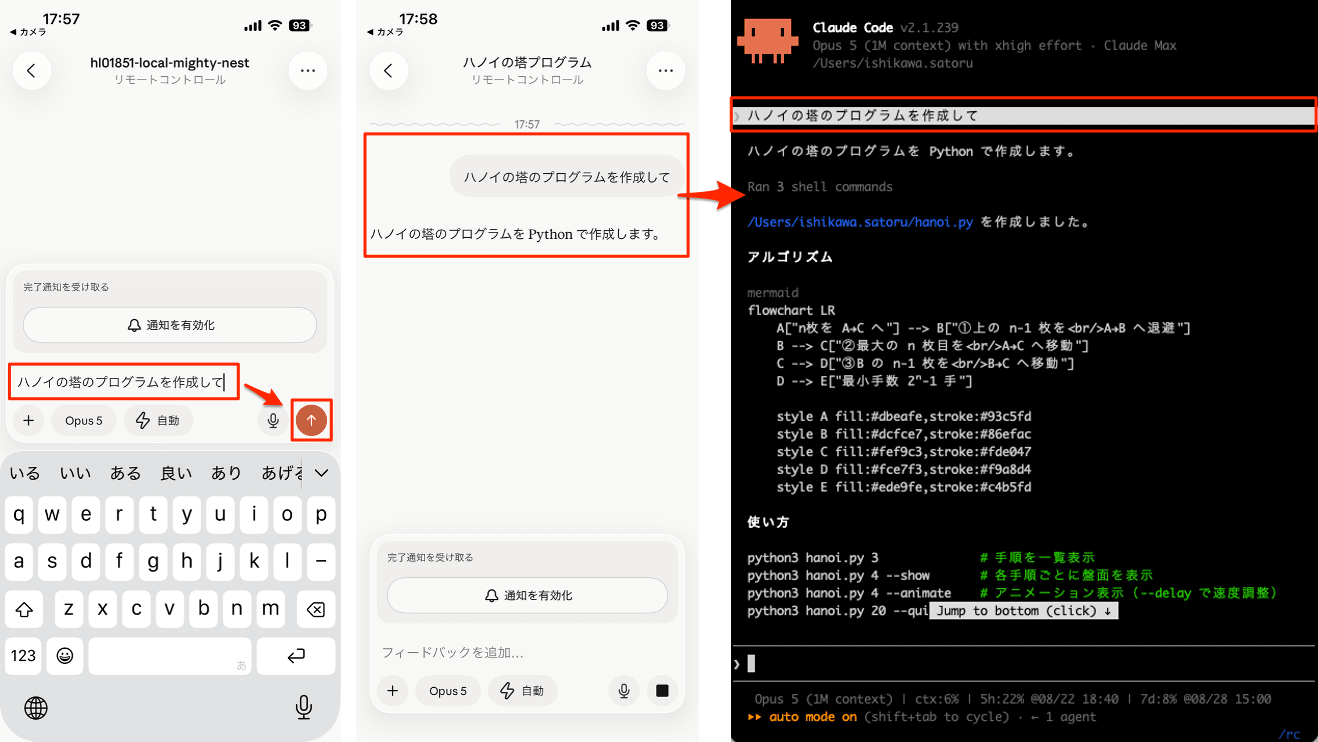
To use push notifications, open
/configon the Mac side and enable Push when Claude decides (notifications at Claude's discretion) and Push when actions required (notifications for permission prompts and questions).
Notes
Remote Control runs as a local process, so if you close the terminal or stop the claude process, the session will go offline. To maintain a session on a machine connected via SSH, launch it inside tmux or screen.
Note that the connectivity issues covered here were intensively addressed in these 2 versions. Individual details are listed in the "Fixes" section below.
Target Versions and Period
| Version | Release Date |
|---|---|
| v2.1.238 | 2026-08-20 |
| v2.1.239 | 2026-08-21 |
New Features
- The
keybindingFlavorsetting has been added. Setting it to"readline"makesCtrl+Win the prompt delete back to the previous whitespace, just like in Bash. The default"classic"behavior is unchanged (v2.1.238) - In the plugin marketplace, you can now specify
headersHelperfor URL marketplaces and catalog entries. The specified command generates HTTP headers (such as short-lived tokens) used for catalog retrieval and same-origin archive retrieval (v2.1.238) claude self-hosted-runner --defer-shutdown-max-min <minutes>has been added. Even upon receiving SIGTERM, it continues processing connected sessions, then evacuates any remaining sessions after the specified number of minutes before exiting (v2.1.238)claude self-hosted-runner --proxy-authorization-command/--proxy-authorization-filehave been added. These support egress proxies that require a newProxy-Authorizationheader per connection (v2.1.238)/claude-api upgradehas been added, enabling migration of Python projects fromanthropic0.x to 1.x. The skill's Python reference has also been updated for 1.x (useanthropic.Timeoutinstead ofhttpx.Timeoutfor timeouts) (v2.1.239)- Cross-session messaging is now available on Windows. Just like on macOS and Linux, Claude Code sessions across multiple machines can send messages to each other with
SendMessageand discover each other withListAgents(v2.1.239) - The first-run introduction to the fullscreen renderer is now shown for configurations that were previously excluded, such as Bedrock, Vertex, and Foundry. New installations in these environments will launch in fullscreen (v2.1.239)
- In cloud sessions, plugins synced from claude.ai are now displayed as
name@synced. They can be managed withclaude plugin enable/disable <name>@syncedand will not overwrite a same-named plugin you installed yourself (v2.1.239)
Security
- The
headersHelperfor catalog entries is now executed only during installation/update of that plugin, after displaying the command content.claude plugin install/updateprompts with[y/N]for confirmation (can be skipped with-y) (v2.1.238) - The MCP
headersHelperin a project's.mcp.json, and inline MCP servers in project or--add-diragent files, now require that the trust dialog for that folder has been approved (claude -pincluded) (v2.1.238) - MCP
headersHelperoriginating from a project's.mcp.json, plugins, or agent files are now executed without inheriting credential environment variables. User, managed, and claude.ai scope helpers run from Claude's configuration directory (v2.1.238) - Bash tool permission checks have been improved for zsh-specific syntax in shell conditional expressions (v2.1.238)
- Fixed a bug where text in masked input fields (password-style), such as login code fields, could be pasted elsewhere with
Ctrl+Y, or saved to the prompt history when cleared with a doubleEscpress (v2.1.239) - Fixed a bug in fullscreen mode where simply clicking the terminal to bring the window back into focus would answer a permission prompt or press a button (v2.1.239)
- Fixed a bug where requests rejected by an organization's policy check were being resent before the rejection was displayed (v2.1.239)
- In Claude Code on the web, requests from tools like Bash to non-API Anthropic hosts (www, docs, etc.) now go through the session's network proxy. The environment's allowed domain settings are applied (v2.1.239)
Improvements
- Remote Control connection resilience has been improved. Temporary HTTP 403 rejections from network edges, VPNs, and proxies are now tolerated for up to 3 minutes, and the source of the block is named if it persists (v2.1.238)
- The message shown when Remote Control is not enabled on an account and the wording in
claude doctorhave been clarified (v2.1.239) - Remote sessions now continue sending keepalives during long-running
SessionStartorSetuphook executions. Containers will no longer be idle-reclaimed mid-hook (v2.1.239) - In remote sessions, images uploaded from mobile now include the destination file path. They can be copied to files created by Claude (v2.1.239)
keybindingFlavor: "readline"now matches Bash for word-based key operations.Alt+FandCtrl/Option+→stop at the end of a word,Alt+Ddeletes up to that point (retrievable withCtrl+Y), and punctuation is treated as a word boundary (v2.1.239)- In cross-session messaging, when sending to a session on the same machine that is configured to refuse reception (such as
crossSessionInbound: "refuse"), the sender now receives a "refused" response. Previously, it appeared to succeed silently (v2.1.238) - In cross-session messaging, the sending session is now notified when the receiving side discards a message (due to rate limiting or a full queue). Previously, messages disappeared silently (v2.1.238)
ListAgentsnow returns the session's own name (the name peers use to send it messages). Also,SendMessageaddressed to one's own name now returns an appropriate message instead of "no agent named …" (v2.1.239)ListAgentsand/list-agentsnow also list active teammates. Previously, only sub-agents and other sessions were shown, making reachable teammates appear absent (v2.1.239)claude mcp listandclaude mcp getnow display⊘ Disabledfor disabled servers instead of connecting to them for a health check (v2.1.238)- Cost estimates (
/cost, status line,--max-budget-usd) now include the US-only-inference 1.1x premium for data residency workspaces (v2.1.239) - Persistent retry mode (
CLAUDE_CODE_RETRY_WATCHDOG) now fails immediately on organization spending limit errors and credit depletion errors, rather than waiting indefinitely for a reset (v2.1.239) - The reminder displayed after compaction has been improved so that a skill's original arguments are not re-executed as a new request (v2.1.239)
- The repeated check-ins for long-running background tasks in
/goalnow use progressively increasing intervals (30 minutes → 1 hour → every 2 hours thereafter) instead of a fixed 30-minute interval (v2.1.239) - Active
/goalgoals are now restored when resuming a session from theclaude --resumepicker (v2.1.239) - Startup has been improved;
claudewith no arguments now launches faster on macOS (v2.1.238) - Startup responsiveness has been improved. Auto-update checks now run approximately 10 seconds after startup instead of competing with startup for CPU (v2.1.238)
- Additional minor improvements include center-truncation of long file paths in tool execution lines, adding reset times to usage limit messages, tab group cleanup for Claude in Chrome, updates to the bundled
claude-apiskill, and adjustments to the usage limit banner display in VSCode (v2.1.238 / v2.1.239)
Fixes (Key Items)
A selection focusing on fixes related to stability and usability.
- Fixed Remote Control disconnecting on brief network interruptions: Fixed a bug where brief network interruptions causing delayed sign-in renewal resulted in disconnection with "login expired." It now retries to maintain the connection (v2.1.238)
- Fixed Remote Control model selection not being reflected in the terminal: Fixed a bug where the Remote Control model selected on a smartphone or the web was not reflected in the terminal's display (v2.1.238)
- Fixed per-task Stop in Remote Control not working: Fixed a bug where per-task Stop from the task panel had no effect on CLI host sessions (v2.1.238)
- Fixed Remote Control messages disappearing from transcripts: Fixed a bug where messages sent from Web or Desktop while Claude was responding disappeared from the transcript after the turn ended (v2.1.238)
- Fixed crashed Remote Control sessions being unusable: Fixed a bug where a Remote Control session whose process had crashed remained unusable until
claude remote-controlwas restarted. It can now be reused the next time a message is sent (v2.1.238) - Fixed environment variable inheritance in Remote Control sessions: Fixed a bug where sessions started with
claude remote-controlinherited session-scoped environment variables from the launching shell (v2.1.238) - Fixed
ListAgents/SendMessagenot finding Remote Control peers in server mode: Fixed a bug where sessions running inclaude remote-control(server mode) or Desktop/IDE hosts reported "Remote Control is not connected" (v2.1.238) - Fixed runaway session title sync to Remote Control: Fixed a bug (regression from v2.1.232) where title sync ran away when two Claude Code processes shared the state of one background job. Title updates are now deduplicated and rate-limited (v2.1.239)
- Fixed memory growth in long-running sessions: Fixed a bug where memory grew without bound in long interactive sessions. Sub-agent tool results are now freed once they scroll out of the most recent display window (v2.1.238)
- Fixed double billing on Bedrock streaming: Fixed a bug where, via a proxy that strips Content-Type headers from responses, Bedrock streaming re-executed as non-streaming every turn, silently doubling billable API calls (v2.1.239)
- Fixed startup hang with Bedrock + SSO + HTTPS proxy: The pre-check for credentials now respects
HTTPS_PROXY(v2.1.239) - Fixed output style reverting to default: Fixed a bug where custom/project/plugin output styles reverted to the default tone mid-session (v2.1.238)
- Fixed race condition between Esc and queued prompts: Fixed a bug where pressing Esc with a prompt queued caused the next turn to be treated as an early termination, making the session appear idle even while Claude was still working, with the same operation repeating on later resubmission (v2.1.239)
- Fixed WebFetch page content being retained for the entire session: Fixed a bug where expired page content was retained in memory for the entire session instead of the intended 15 minutes (v2.1.239)
- Fixed
claude -cpicking up sessions from different directories: Fixed a bug where sessions from paths differing only in characters like_,-, and.were picked up (v2.1.239) - Fixed git commands breaking in the Linux sandbox: Fixed a bug where making the non-existent
.git/config.worktreeunreadable broke all git commands under the sandbox in repositories withextensions.worktreeConfigset (v2.1.239) - A quietly welcome fix: Fixed a bug where agents, skills, and commands with
.mdfiles starting with a UTF-8 BOM were silently ignored (v2.1.239). This is the kind of bug that's easy to hit with files created on the Windows side, and the kind where the cause is hard to notice. - Additional numerous minor bug fixes have been made in areas including
/resumeand session management, MCP server connectivity and dialog display, fullscreen mode rendering, key input and text editing, hook execution, and theme display.
Breaking Changes
Ctrl+L and Cmd+K in fullscreen mode have been changed to always perform only a screen redraw. The /clear shortcut via double-press has been removed. Additionally, the automatic /clear loop that occurred in a 1-line nvim terminal will no longer happen (v2.1.238).
Before the change (~ v2.1.237)
Press Ctrl+L (or Cmd+K) in fullscreen mode
  → 1st press: Redraws the screen
  → 2nd press (pressed again immediately): Clears the conversation (equivalent to /clear)
After the change (v2.1.238 ~)
Press Ctrl+L (or Cmd+K) in fullscreen mode
  → Screen redraw only, no matter how many times it is pressed
  → To clear the conversation, run /clear
Note that no deprecation notices were included in the covered range.
Closing
These were 2 versions where Remote Control felt like it had entered practical usability. Bugs of the "you'll definitely hit these if you keep using it" variety — disconnection on brief interruptions, models selected on smartphones not reflecting in the terminal, Stop in the task panel not working — have been resolved together, and I think those who tried it once and moved on will find it worth revisiting.
If any of the changes catch your interest, why not update and check them out in your own environment?
References
