![[Update] AWS Glue 6.0 is now generally available with 30% price reduction and Apache Iceberg v3 support added, so I tried it out](https://images.ctfassets.net/ct0aopd36mqt/wp-thumbnail-545ba5dfbc8fa4c7760dd9872ef835f9/665944e579f487b4434cb289305767b3/aws-glue?w=3840&fm=webp)
[Update] AWS Glue 6.0 is now generally available with 30% price reduction and Apache Iceberg v3 support added, so I tried it out

This page has been translated by machine translation. View original
This is Ishikawa from the Cloud Business Division. AWS Glue 6.0 is now generally available (GA). Along with a 30% price reduction, full support for Apache Iceberg v3 and a runtime upgrade to Apache Spark 4.1 are being provided simultaneously.
This is an attractive update that offers both cost savings and new data types, but it also includes breaking changes associated with the Apache Spark major version upgrade. Please use this as reference material when considering migration. I tried out the Glue ETL Job (Python) and Glue Interactive Session (Python) in Glue 6.0.
AWS Glue 6.0 Update Details
The main changes in AWS Glue 6.0 are as follows.
- 30% price reduction
- Full support for Apache Iceberg v3 (Iceberg 1.11.0)
- Updates to Apache Hudi 1.1.1 and Delta Lake 4.2.0
- Runtime upgrade to Apache Spark 4.1.1, Python 3.13, and Scala 2.13.17
- Declarative pipeline definition with Spark Declarative Pipelines (SDP)
- Sub-second latency with Real-Time Mode streaming
- PySpark performance improvements via Arrow-native Python UDF/UDTF
30% Price Reduction
The most impactful change in this update is the price reduction. AWS's announcement explicitly states "30% price reduction." For environments that routinely run large-scale ETL and batch processing, this figure directly affects operational costs.
The billing structure itself has not changed — a 30% price reduction from $0.308 per DPU-hour has been applied. The conditions of pay-per-use per DPU-hour, per-second billing, and a 1-minute minimum billing period remain the same as before.
- $0.308 per DPU-hour for each Apache Spark or Spark Streaming job, billed per second with a 1-minute minimum (Glue version 6.0 and above)
Full Support for Apache Iceberg v3
AWS Glue 6.0 updates Apache Iceberg to 1.11.0 and provides full support for Iceberg table specification version 3 (format-version 3). The main features added are as follows.
- VARIANT data type: A data type for handling semi-structured data. Variant shredding (automatic shredding) internally expands JSON-like data into a columnar format to speed up reads.
- Nanosecond-precision timestamps: In addition to the traditional microsecond precision, nanosecond-precision timestamps can now be stored.
- Geospatial data types (Geometry / Geography): Location-based workloads can now be natively expressed.
- Flexible schema evolution: The UNKNOWN data type and DEFAULT column values make it easier to change schemas while maintaining backward compatibility.
One additional note here: while AWS's announcement also highlights "deletion vectors" as a key feature of Iceberg v3, the migration guide explicitly states that deletion vectors (merge-on-read stored as Roaring Bitmaps in Puffin files) and row lineage tracking via first-row-id metadata are already supported as of AWS Glue 5.1 and later. For those currently using 5.1, the genuinely new additions in 6.0 are more accurately understood as the VARIANT type, nanosecond timestamps, geospatial types, and schema evolution improvements.
Runtime Upgrade
In AWS Glue 6.0, the Spark engine and its surrounding components have been significantly updated. The main dependency versions are as follows.
| Dependency | AWS Glue 6.0 | AWS Glue 5.1 | AWS Glue 5.0 | AWS Glue 4.0 |
|---|---|---|---|---|
| Java | 17 | 17 | 17 | 8 |
| Apache Spark | 4.1.1 | 3.5.6 | 3.5.4 | 3.3.0-amzn-1 |
| Hadoop | 3.4.2 | 3.4.1 | 3.4.1 | 3.3.3-amzn-0 |
| Scala | 2.13.17 | 2.12.18 | 2.12.18 | 2.12 |
| Python | 3.13 | 3.11 | 3.11 | 3.10 |
| Boto3 | 1.42.84 | 1.40.61 | 1.34.131 | 1.26 |
| Arrow | 18.3.0 | 12.0.1 | 12.0.1 | 7.0.0 |
| AWS SDK for Java | 2.44.6 (v2 only) | 2.35.5 | 2.29.52 | 1.12 |
| Apache Iceberg | 1.11.0 | 1.10.0 | 1.7.1 | 1.0.0 |
| Apache Hudi | 1.1.1 | 1.0.2 | 0.15.0 | 0.12.1 |
| Delta Lake | 4.2.0 | 3.3.2 | 3.3.0 | 2.1.0 |
Note that Spark moves from the 3.5 series to the 4.1 series, and Scala from 2.12 to 2.13 — both are updates that cross major versions. Many of the breaking changes described later stem from these two.
New Features to Improve Developer Productivity
Spark Declarative Pipelines (SDP)
SDP is a declarative pipeline construction framework available starting with AWS Glue 6.0. By preparing a YAML manifest (spark-pipeline.yml) along with SQL or Python transformation files, it infers the DAG from table references to resolve dependencies and executes independent branches in parallel. The advantage is that you don't need to write boilerplate code for reading, writing, catalog registration, or execution order.
The manifest describes the output destination database and the location of transformation files.
name: my_analytics_pipeline
catalog: spark_catalog
database: analytics_db
storage: s3://my-bucket/pipeline-storage/
libraries:
  - glob:
      include: transformations/**
database is the database where output tables are registered, and storage is the Amazon S3 path where checkpoints and metadata are stored. Note that these two serve different roles.
Within transformation files, you define the output of each processing stage in the pipeline as a "dataset." SDP datasets come in the following 3 types, and which one you choose determines the recomputation behavior.
- Streaming tables: Process only new data since the last run and maintain state with checkpoints. Suitable for ingestion and CDC.
- Materialized views: Fully recomputed on every run. Suitable for aggregation and reporting (incremental refresh is not supported in the current version).
- Temporary views: Session-scoped and not persisted or registered in the catalog. Suitable for intermediate processing.
For example, with SQL, you can simply write the following to define a materialized view, and SDP automatically resolves the dependency between bronze_sales and silver_sales.
CREATE MATERIALIZED VIEW silver_sales AS
SELECT *, UPPER(region) as clean_region
FROM bronze_sales
WHERE amount > 0;
On the job side, set --enable-spark-declarative-pipeline to true and specify the pipeline definition zip or Amazon S3 prefix in ScriptLocation.
aws glue create-job \
  --name my-sdp-pipeline \
  --role arn:aws:iam::123456789012:role/MyGlueRole \
  --glue-version 6.0 \
  --worker-type G.1X --number-of-workers 2 \
  --command '{"Name":"glueetl","ScriptLocation":"s3://my-bucket/pipelines/my_pipeline.zip"}' \
  --default-arguments '{
      "--enable-spark-declarative-pipeline": "true",
      "--enable-glue-datacatalog": "true"
  }'
Note that Iceberg tables are required for incremental processing across runs with streaming tables (Hive-managed streaming tables are not supported).
One more point that is easy to get tripped up on is specifying the storage location for output tables. To persist tables with SDP, you need to specify the Amazon S3 path as the storage destination using one of the following methods.
- Set an S3 path in
spark.sql.warehouse.dir - Specify the output destination database in the
databasefield of the YAML manifest mentioned earlier, and set an S3 path in theLocationUriof that AWS Glue database
If you choose the latter, tables cannot be created if LocationUri is not set on the target database. AWS Glue databases created from the Management Console often have LocationUri left empty, so it is recommended to verify this in advance. If it is not set, create it with the storage destination explicitly specified as follows.
aws glue create-database --database-input '{
  "Name":"my_pipeline_db",
  "LocationUri":"s3://my-bucket/warehouse/my_pipeline_db"
}'
Real-Time Mode Streaming
This is a new execution mode for Spark Structured Streaming that reduces end-to-end latency to sub-second (less than 1 second). For workloads that meet the conditions, millisecond-level latency is also achievable.
This "sub-second" is best understood in contrast to the lower bound of the default micro-batch mode. Micro Batch Mode repeatedly cycles through launching tasks at each interval, reading accumulated data, processing it, committing a checkpoint, and terminating the task. Due to this repeated overhead, the minimum latency is approximately 1–2 seconds at the lower bound.
Real-Time Mode, on the other hand, launches tasks once and keeps them running for the duration of the batch window (default 5 minutes), processing records as they arrive. Because it doesn't wait for data to accumulate, it can break below the 1–2 second lower bound of micro-batch.
Opt-in is required via the --enable-real-time-mode job argument, and writeStream with Trigger.RealTime should be used instead of forEachBatch. However, due to the following current limitations, the workloads it can be applied to are quite limited.
- Job type must be Spark Streaming (
gluestreaming) - Source is Apache Kafka only (Amazon Kinesis is not supported in Real-Time Mode in AWS Glue 6.0)
- Stateless processing only (stateful operations such as aggregations, joins, deduplication, and windowing are not supported)
- Scala only (PySpark support requires waiting until Spark 4.2)
- Output mode is Update only (specifying Append results in
OUTPUT_MODE_NOT_SUPPORTED) - Auto Scaling is not supported (must operate with a fixed number of workers)
There is one more behavior that, if overlooked in operations, can be painful: if task slots cannot cover all partitions of the source, unassigned partitions are silently skipped without error. You need to ensure a fixed number of workers equal to or greater than the number of Kafka partitions in the source topic.
If your processing includes aggregations, if your source is Amazon Kinesis, if you are writing in PySpark, if you are using forEachBatch or the GlueContext streaming API, or if you want to rely on Auto Scaling, you will continue to use micro-batch mode. The primary target is stateless transformations requiring low latency, such as filtering or routing from Kafka to Kafka.
Other Productivity Improvements
- Arrow-native Python UDF/UDTF: Natively uses Apache Arrow's columnar format to improve the performance of Python user-defined functions.
- Spark Connect for Interactive Sessions: Enables connection to AWS Glue Interactive Sessions from a thin client via the Spark Connect protocol, supporting remote development workflows.
--python-virtual-env: Allows you to attach a self-built Python virtual environment to Spark drivers/executors, giving you full control over dependencies. When migrating existing jobs to 6.0, AWS Glue automatically generates a virtual environment as needed.
Supported Regions
AWS Glue 6.0 is available in all AWS commercial regions, AWS GovCloud (US), and AWS China regions.
Migration Considerations
This is where the practical substance begins. Because AWS Glue 6.0 involves migrating to Spark 4.1 and Scala 2.13, existing jobs are not guaranteed to work as-is.
Breaking Changes
The breaking changes listed in the migration guide are as follows.
- ANSI mode enabled by default: In Spark 4.1, ANSI mode is ON by default. Integer overflows, invalid casts, and out-of-bounds array accesses now throw exceptions instead of returning NULL as before. To revert to the previous behavior, set
spark.sql.ansi.enabled=false. - EMRFS removed: The S3 filesystem is now S3A only.
com.amazon.ws.emr.hadoop.fs.EmrFileSystemis no longer available.s3://paths automatically use S3A. EMRFS-specific settings such asfs.s3.consistent.*must be removed. - AWS SDK for Java v1 removed: Only v2 (2.44.6) is available. Jobs that import
com.amazonaws.services.*need to be migrated tosoftware.amazon.awssdk.services.*. Note that Python's boto3 can still be used as-is. - Scala 2.12 to 2.13 upgrade: Custom JARs compiled with Scala 2.12 will not work. Recompilation with 2.13.17 is required.
JavaConversionshas been removed, so replace it withCollectionConverters; replaceMutableListwithListBuffer. - Spark 4.1 API changes:
SQLContexthas been removed, so useSparkSessiondirectly. Several deprecated APIs have also been removed. getResolvedOptionsbehavior change: Prefix matching (abbreviations) for arguments is now disabled by default (allow_abbrev=False). Specify argument names in full without abbreviation, or passallow_abbrev=Trueto revert to the previous behavior.- CreateSession API validation strengthened: Validation has been added for session parameters in Interactive Sessions, and configurations that were previously accepted implicitly may now result in errors.
Known Limitations
The limitations around Iceberg v3 are particularly easy to overlook.
- Iceberg v3 tables cannot be read from Athena SQL (
Cannot read unsupported version 3error). If compatibility with other engines including Athena is required, continue operating with Iceberg v2. - New data types in Iceberg v3 are only available in Spark DataFrames. They do not work with DynamicFrame.
- AWS Glue Studio's Visual ETL does not support the new data types in Iceberg v3. If you want to use the new features with visual ETL, migration to Amazon SageMaker Unified Studio is recommended.
- VARIANT columns are not supported with FGAC (fine-grained access control). Check the impact in environments with data governance requirements.
- Native table encryption keys for Iceberg and multi-argument transforms are not supported.
It is not uncommon for BI tools or other teams' analytics infrastructure to reference the same tables via Athena. To avoid the incident of "upgrading to Glue 6.0 and then being unable to query from Athena," special care is needed when specifying format-version during new Iceberg table creation.
Migration Checklist
The checklist listed in the migration guide is as follows.
- Scala
- Recompile custom JARs with Scala 2.13.17. Replace
JavaConversionswithCollectionConverters.
- Recompile custom JARs with Scala 2.13.17. Replace
- Python
- Update code for Python 3.13 compatibility. Stop using removed modules such as
imp,cgi, andcgitb. - Update boto3 references from the 1.40 series to the 1.42 series.
- Update code for Python 3.13 compatibility. Stop using removed modules such as
- Spark SQL
- Check the impact of ANSI mode query by query. Add
spark.sql.ansi.enabled=falseif necessary.
- Check the impact of ANSI mode query by query. Add
- SDK
- Replace AWS SDK v1 (
com.amazonaws.*) imports with v2 (software.amazon.awssdk.*).
- Replace AWS SDK v1 (
- S3
- Remove EMRFS-specific settings.
- Dependencies
- Update
--extra-jarsto builds targeting Scala 2.13 / Spark 4.1.
- Update
Guidelines for Migration Decisions
Organizing the flow of migration decisions based on everything covered so far gives the following.
Tools to Support Migration
The migration guide introduces Generative AI upgrades for Apache Spark (Spark Upgrades) as a means of upgrading existing ETL jobs to the new version. This feature scans job code, generates an upgrade plan, and automates the validation run.
However, the Spark Upgrades documentation notes limitations such as: it is limited to PySpark jobs, it assumes code without dependencies on external libraries, concurrent execution is limited to 10 jobs per account, and there are notes on the range of supported versions. Please check the documentation before running to verify whether your jobs are eligible.
Trying It Out
How to Use
For new jobs, select 6.0 as the Glue version at creation time.
- Console: Select
Spark 4.1.1, Python 3 (Glue Version 6.0)orSpark 4.1.1, Scala 2 (Glue Version 6.0) - AWS Glue Studio: Select
Glue 6.0 - Supports Spark 4.1.1, Scala 2, Python 3 - API: Specify
6.0in theGlueVersionparameter ofCreateJob
For existing jobs, change the Glue version in the job settings to 6.0, or specify 6.0 in the GlueVersion parameter of the UpdateJob API.
The AWS CLI version is 2.36.29, the latest at the time of writing.
% aws --version
aws-cli/2.36.29 Python/3.14.6 Darwin/25.5.0 exe/arm64
Example of a Glue ETL Job (Python) with Glue 6.0
Here is an example of a Glue ETL Job (Python) with Glue 6.0. Select Glue 6.0 - Supports Spark 4.1.1, Scala 2, Python 3 for the Glue Version.
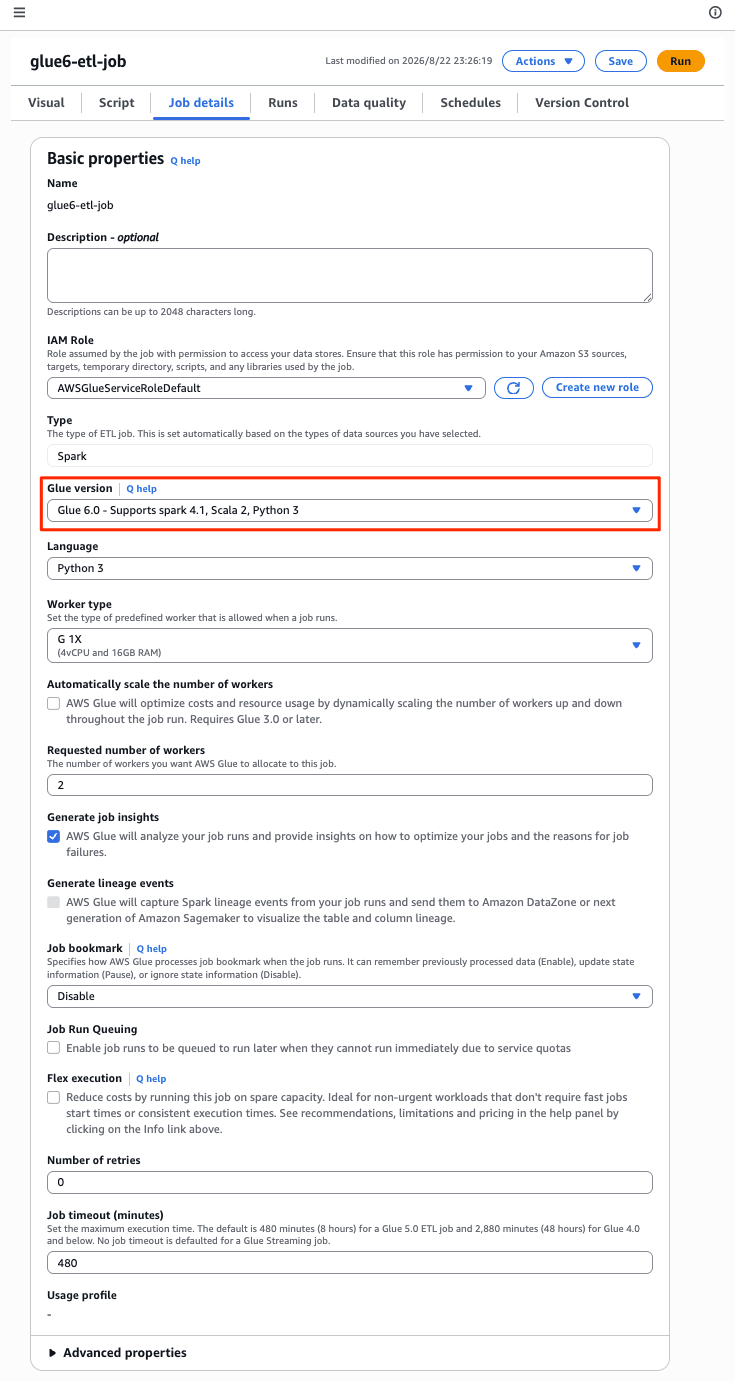
Running it as-is resulted in an error. The cause was that the source data was not registered in a Lake Formation data location. I granted the necessary permissions.
% aws lakeformation grant-permissions --principal DataLakePrincipalIdentifier=arn:aws:iam::123456789012:role/AWSGlueServiceRoleDefault --resource '{"Database":{"Name":"superstore"}}' --permissions DESCRIBE && aws lakeformation grant-permissions --principal DataLakePrincipalIdentifier=arn:aws:iam::123456789012:role/AWSGlueServiceRoleDefault --resource '{"Table":{"DatabaseName":"superstore","Name":"superstore_joined"}}' --permissions SELECT DESCRIBE
It ran without any particular differences from before.
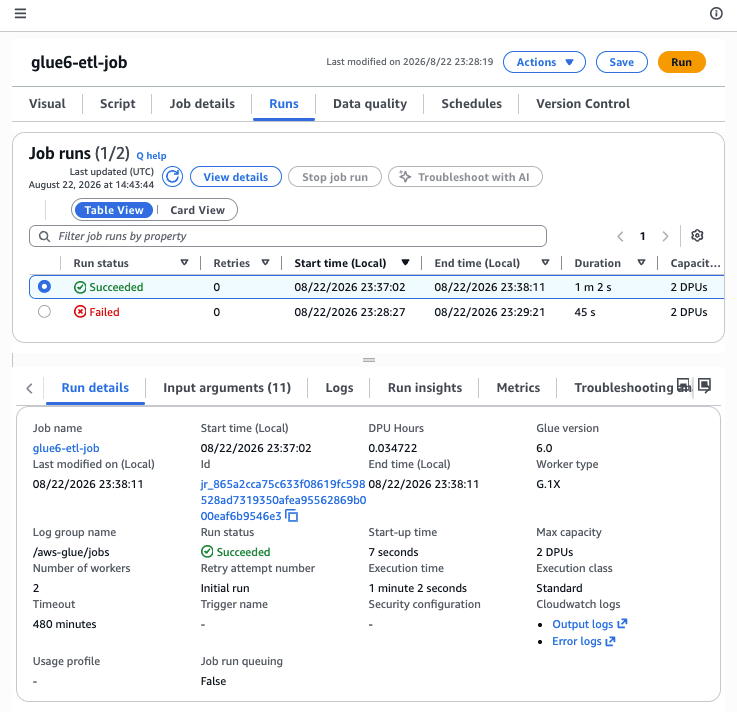
Note that when creating a new job with the AWS CLI, specify 6.0 in --glue-version.
aws glue create-job \
  --name glue6-etl-job \
  --role arn:aws:iam::123456789012:role/AWSGlueServiceRoleDefault \
  --glue-version 6.0 \
  --worker-type G.1X --number-of-workers 2 \
  --command '{"Name":"glueetl","ScriptLocation":"s3://my-bucket/scripts/my_job.py"}'
Example of a Glue Interactive Session (Python)
Since Interactive Sessions cannot be created from the Management Console, I used the AWS CLI to create one.
% aws glue create-session \
  --id glue6-interactive-session \
  --role arn:aws:iam::123456789012:role/AWSGlueServiceRoleDefault \
  --command '{"Name":"glueetl","PythonVersion":"3"}' \
  --glue-version 6.0 \
  --number-of-workers 2 --worker-type G.1X \
  --idle-timeout 30
{
    "Session": {
        "Id": "glue6-interactive-session",
        "CreatedOn": "2026-08-22T23:56:58.593000+09:00",
        "Status": "PROVISIONING",
        "Role": "arn:aws:iam::123456789012:role/AWSGlueServiceRoleDefault",
        "Command": {
            "Name": "glueetl",
            "PythonVersion": "3"
        },
        "DefaultArguments": {},
        "Progress": 0.02,
        "MaxCapacity": 2.0,
        "GlueVersion": "6.0",
        "NumberOfWorkers": 2,
        "WorkerType": "G.1X",
        "ExecutionTime": 0.0,
        "DPUSeconds": 0.0,
        "IdleTimeout": 30,
        "SessionType": "LIVY"
    }
}
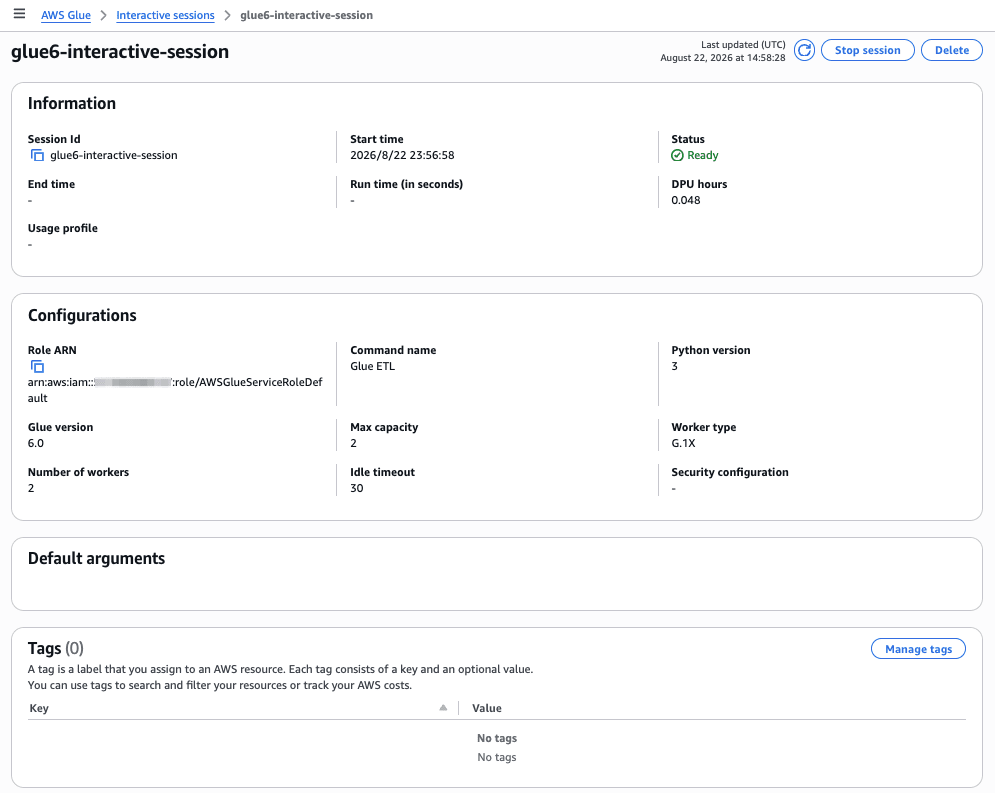
A 2-DPU Interactive Session was successfully created.

The details are as follows.
Closing Thoughts
AWS Glue 6.0 is a release that includes three major changes at once: a 30% price reduction, full support for Apache Iceberg v3, and a runtime upgrade to Apache Spark 4.1.1. Features that fundamentally change pipeline development itself, such as Spark Declarative Pipelines and Real-Time Mode, have also been added.
On the other hand, there are also quite a few breaking changes that affect existing jobs, such as ANSI mode being enabled by default, migration to Scala 2.13, and the removal of EMRFS and AWS SDK for Java v1. In particular, the inability to read Iceberg v3 tables from Athena SQL has the potential to impact the entire downstream analytics infrastructure, making advance verification essential.
A smooth approach is to start by switching non-production jobs to 6.0 and identifying the scope of impact from ANSI mode and custom JARs. Since this is an update with significant cost savings, why not take this opportunity to consider migration?
