
Key Updates in Claude Code v2.1.282–v2.1.283 - Addition of /doctor prompt-audit and Auto Mode Becoming the Default

This page has been translated by machine translation. View original
I'm Ishikawa from the Cloud Business Division. This is a roundup of the Claude Code updates for v2.1.282 to v2.1.283 (2026-09-24 to 2026-09-25). Today, I tried the newly added /doctor prompt-audit, which lets you check whether your CLAUDE.md and skills still contain phrasing written for older models.
The previous update article is here.
Update Summary
This covers 2 versions (v2.1.282 to v2.1.283, 2026-09-24 to 2026-09-25), with a total of 180 CHANGELOG items (86 in v2.1.282 and 94 in v2.1.283). In this article's classification, fixes account for the majority at 106 items, followed by 26 improvements, 18 new features, and 11 security items. There are also 9 breaking changes that affect existing settings and operations, so if any of them might apply to you, please also check the "Breaking Changes" section.
Featured Updates
New Feature: /doctor prompt-audit added (v2.1.283)
/doctor prompt-audit was added to audit CLAUDE.md, skills, agents, and commands for prompt patterns written for older models. It can also be run with /checkup prompt-audit (/checkup is an alias for /doctor). In the same v2.1.283, the report was improved so that outdated paths, outdated commands, and conflicting instruction files come first, and the thinking keywords that Claude Code documents are now left in place.
I feel that the longer you have been running CLAUDE.md and skills, the more it is worth running this once and checking what it points out.
New Feature: managed settings to restrict models added (v2.1.283)
The following two settings were added to managed settings for administrators.
deniedModels: Lets you block specific models even if they are allowed byavailableModels.availableModelsMatch: When set to"exact", entries inavailableModelsallow only the model versions listed, and new releases are blocked until you add them to the list.
For administrators who govern which models their organization uses, I feel the big benefit is avoiding a situation where a new model becomes available unintentionally when it is released.
Bug Fix: 400 error for conversations containing undecryptable web search results fixed (v2.1.282)
Fixed an issue where, in conversations whose history contained web search results that the API could not decrypt (for example, when a mid-conversation response was received through a third-party gateway), every request for that conversation resulted in a 400 error.
I see this as a fix that resolves the situation where people using web search through a third-party gateway could no longer continue the same conversation.
Security: Fixed an issue where one invalid value in managed settings caused the entire settings block to be ignored (v2.1.282 / v2.1.283)
In managed settings permissions, autoMode, worktree, and attribution (v2.1.282) and sandbox (v2.1.283), an issue where a single invalid nested value caused the entire block to be ignored was fixed, and the remaining values are now applied. Invalid sandbox values fail closed (treated on the safe side). Also, when an incorrect value is written for a boolean lock-type key such as disableClaudeAiConnectors or allowManagedPermissionRulesOnly, it is no longer ignored and the lock is applied, and the key name is now shown at startup (v2.1.282).
Settings values that were previously ignored may start taking effect after the update, so administrators who distribute managed settings would do well to check the startup warnings.
Security: Fixed pre-approval via allowed-tools under allowManagedPermissionRulesOnly (v2.1.282)
Fixed an issue where, in environments with managed allowManagedPermissionRulesOnly enabled, skills and commands from the repository, user, and --add-dir, as well as plugin manifests in the skills directory, could pre-approve their own tools through allowed-tools.
For organizations that limit permission rules to administrators with allowManagedPermissionRulesOnly, I feel it is important that repository-side skills can no longer pre-approve their own tools.
Security: Fixed an issue where drive roots and similar could be deleted with the Windows PowerShell tool (v2.1.283)
Fixed an issue in the Windows PowerShell tool where drive roots, home folders, and the like, which Remove-Item would refuse to delete, could be deleted with cmd /c rd, rmdir, del, and erase.
I feel this is a fix that people using the PowerShell tool on Windows should consider updating for early.
Target Versions and Period
| Version | Release date | CHANGELOG items |
|---|---|---|
| v2.1.282 | 2026-09-24 | 86 |
| v2.1.283 | 2026-09-25 | 94 |
New Features
Model Control / For Administrators
- Added managed settings
deniedModelsandavailableModelsMatch(v2.1.283. See Featured Updates) - Added managed setting
allowClaudeInChromeWithManagedMcp, which allowsclaude --chrometo be used together with an exclusivemanaged-mcp.json. This setting name is shown in the error when Chrome is blocked (v2.1.282) - [Claude Tag] Added the admin setting "Channels Claude can search", which limits Claude's Slack search to public channels that Claude has been added to. It can be configured per organization, workspace, and channel (v2.1.283)
Telemetry / Gateway
- Added a startup notice and entries in
/statusandclaude doctorthat list telemetry variables that were ignored in the project's settings files or that disabled telemetry (v2.1.282) - When
OTEL_LOG_TOOL_CONTENT=1, the output of MCP tools, WebFetch, and WebSearch is now included in the OpenTelemetrytool.outputspan event (v2.1.283) - Added
x-claude-code-prompt-idto the gateway hint headers. LLM gateways can group the requests that correspond to a single user prompt. Opt in withCLAUDE_CODE_GATEWAY_HINT_HEADERS=1(v2.1.283) - Added an upstream provider
mantlefor Amazon Bedrock's Mantle endpoint to the Claude apps gateway (v2.1.283) - Added an opt-in
load_test_modeblock to the Claude apps gateway configuration. Requests are built and signed but not sent upstream, and a canned response is returned to the client, so it can be used for load testing deployments (v2.1.283) - Added
store.readiness_grace_secondsto the Claude apps gateway. It can keep/readyzready during brief Postgres outages such as database failovers (v2.1.282)
Display / Other
- Added the
maxProseWidthsetting, which caps the display width of Claude's prose on wide terminals. Tables and code blocks are still shown at full width (v2.1.282) - Added
/doctor prompt-audit(/checkup prompt-audit) (v2.1.283. See Featured Updates) - [Cloud sessions] Repositories owned by a different GitHub owner, such as a fork's upstream, can now be added to a running cloud session that already has a repository (including sessions started from Slack) (v2.1.282)
- [Cloud sessions] Settings › Connectors › GitHub now shows the status of the Claude GitHub App (whether it is installed and reachable on your account, and the steps to connect, install, and reconnect) (v2.1.282)
- In addition, the following were added: click-to-expand for truncated messages from other sessions in fullscreen mode, a
pathfor entries that failed to load from--plugin-dirinplugin_errorsof the stream-jsonsystem/init, [Cloud sessions] repository links for non-GitHub Git servers, and a [Claude Tag] "Back to Slack" button.
Improvements
Performance
- Reduced the time it takes to resume very large sessions (including those that have never been compacted) (v2.1.282)
- Improved startup.
claude -pand Claude Code Remote no longer load the interactive UI, and the auto mode classifier rules and the Artifact tool are loaded on first use rather than at startup (v2.1.283) - Reuses pre-connected API connections to improve the latency of the first request (v2.1.283)
- Pattern compilation that used to run at the end of a session's first response now runs while the response is streaming, improving first-response latency (v2.1.283)
MCP / CLI
- Images returned by MCP tools are now also saved to files and can be opened by tools such as Bash and Read (v2.1.283)
- In the
/mcptool list, more tools are shown at once, you can scroll with the page keys and the mouse, and a warning icon is attached to tools blocked by the organization (v2.1.283) --system-promptand--append-system-promptcan now take both a text value and a-fileform at the same time. The file contents come first (v2.1.283)
Usability
- Pickers such as
/help,/hooks,/copy,/chrome,/memory,/ide,/release-notes,/rewind,/diff,/remote-env, and/pluginnow support page keys, the mouse wheel, and clicking in their lists (v2.1.283) - [Cloud sessions] Private repositories that your GitHub account can read but cannot push to can now be added to a running cloud session for read-only use (v2.1.283)
- In addition, minor improvements were made to list displays such as
/tasksand/artifacts, the compaction spinner, the wording of the/modelpicker, how often prompt suggestions appear, and the contents of theclaude-apiskill.
Security
In addition to the 3 items introduced in the featured updates, there are other changes related to permissions and administrative settings.
- Fixed an issue where a mid-rule
:*in Bash permission rules was skipped in settings files: Bash permission rules containing:*in the middle worked with--allowedToolsbut were skipped in settings files. They now work from every settings source, and a startup warning about how matching works is shown (v2.1.282) - Changed when managed settings apply on Windows/WSL: When an administrator policy (HKLM,
managed-settings.json) exists but is invalid or unreadable, the user-writable HKCU and WSL/etc/claude-codeare no longer applied (v2.1.282) - Fixed an issue where an approved command ran twice: When a worker restarted in a remote session, a command approved through a restored permission prompt was run twice (v2.1.282)
- Expanded the scope of Skill deny rules: A
Skill(anthropic-skills:<name>)deny rule now also blocks skills delivered as plugins from Claude Desktop, and aSkill(skill:<name>)deny rule now also matches a skill's aliases and display names (v2.1.283) - Added a notice to the
/ultrareviewlaunch dialog: When reviewing a local branch, it now states that uncommitted changes to tracked files may be uploaded (v2.1.283) - [VS Code] Fixed a permission mode display mismatch: After an automatic switch from auto / bypass mode failed, the display showed Default even though the session was still running in auto / bypass mode. It now retries until the switch succeeds (v2.1.283)
- In addition, for self-hosted runners, how git is handled in lifecycle hooks (the Git LFS
pre-pushhook, a writable systemcore.hooksPath, and commit signing) and howGIT_SSL_CAINFOandGIT_SSL_NO_VERIFYare handled under Anthropic-managed git have changed (v2.1.283).
Fixes (Major Ones)
This is an excerpt focused on fixes related to stability and usability.
- Fixed extended thinking being lost or every response failing: Fixed cases where earlier reasoning and extended thinking were lost in sessions continued or resumed with
--continueor--resume, with immediately executed slash commands used mid-task such as/model,/rename, and/artifacts, and on restarts with--toolsthat excluded built-in tools that had been available partway through the conversation. When every response fails with "Invaliddatainredacted_thinkingblock", the conversation's thinking blocks are now discarded and it retries once (v2.1.282) - Fixed compaction failing when the summary is refused: When a summary request is refused, it now retries with a fallback model (v2.1.282)
- Fixed a login error caused by a process exiting during a sign-in refresh: Fixed an issue where, after another Claude Code process exited or was killed while refreshing sign-in information, requests failed for up to 1 minute with the "another Claude Code process is refreshing it" error (v2.1.282)
- Fixed multi-line pastes being sent one line at a time: This occurred after the terminal's bracketed paste mode was reset in the middle of a session (v2.1.282)
- Fixed missing display and features on Bedrock and Vertex AI: On Amazon Bedrock and Bedrock Mantle, the request ID and message ID are now shown in safeguard block messages. On Vertex AI, web search is now provided for models that Claude Code does not yet recognize, such as newly released models (v2.1.282)
- Fixed MCP server connection and progress issues: Fixed an issue where a temporary HTTP 404 from a stateless remote MCP server (such as a proxy being redeployed) left it shown as connected but unusable until the session ended, an issue where a stdio MCP server stayed running if the session ended during its startup, and an issue where progress notifications for long-running MCP tool calls that moved to the background were discarded (v2.1.283)
- Fixed MCP configuration and counting issues: Fixed
/contextnot counting MCP server instructions (they now appear as a separate row and are included in the total), andclaude mcp add,add-json, andremovereporting success even when they could not write to the settings file (v2.1.283) - Fixed plugin information being lost: Fixed an issue where, when there were two plugins whose IDs differed only in letter case and the specified one had no
enabledPluginsentry in that scope,claude plugin uninstalldeleted the other one along with its options and secrets. Also fixed an issue whereinstalled_plugins.jsoncontaining records that this version cannot read was rewritten and the records were lost (v2.1.283) - Fixed auto-memory edits being blocked as writes to sensitive files: This occurred when Claude Code was started in a subdirectory of a git repository (v2.1.283)
- Fixed Remote Control being unavailable when telemetry is disabled: Fixed an issue where Remote Control was unavailable on paid plans when telemetry was disabled with
DISABLE_TELEMETRYorDO_NOT_TRACK(v2.1.283) - Fixed tool calls and results being lost in SDK sessions: Fixed pending tool calls and completed tool results being lost when a response ended midway, pending approval prompts being lost after a worker restart, and
result.usagebeing lost in the non-streaming fallback (v2.1.283) - [Cloud sessions] Fixed duplicate execution of completed steps: Fixed an issue where, after recovering from a server-side restart, completed steps such as posting comments or pushing could be redone and duplicated (v2.1.283)
- A quietly welcome fix: Fixed an issue where stale characters remained in the last column of a diff when CJK characters or emoji on a redrawn line wrapped onto the next line (v2.1.282). I feel this is a welcome fix for people who often look at diffs of files containing Japanese.
- In addition, many other minor bugs were fixed in areas such as vim mode, list displays like
/skills, keybindings, plugin management commands, the VS Code extension, Claude Tag (Slack), and Code Review.
Breaking Changes
These are changes that may affect existing settings and operations. The configuration examples below were created based on the CHANGELOG and the official documentation.
Auto mode as the default with third-party providers or when telemetry is disabled (v2.1.282 / v2.1.283)
- In interactive sessions when using a third-party provider or when telemetry is disabled, the session now starts in auto mode if no permission mode is set. A
permissions.defaultModesetting still takes precedence (v2.1.283) - When telemetry is off, auto mode now uses the server-side classifier by default on direct connections to the Anthropic API. You can opt out with
CLAUDE_CODE_AUTO_MODE_SERVER=0. What you opt out of is the use of the server-side classifier, not auto mode itself (v2.1.282)
Before (up to v2.1.282): Example of starting via a third-party provider (such as Amazon Bedrock) without setting permissions.defaultMode
claude # Starts in Manual (default) mode
The reason for treating the previous default as Manual (default) is that the official documentation's table of starting modes lists the built-in default for providers such as Amazon Bedrock as default (as of 2026-09-26; this table does not yet reflect the v2.1.283 change).
After (v2.1.283 onward):
claude # Starts in auto mode
If you want to keep starting in Manual mode as before, set permissions.defaultMode explicitly (example for ~/.claude/settings.json).
{
  "permissions": {
    "defaultMode": "default"
  }
}
The official documentation explains that default is the setting value for Manual mode, and that values other than auto and bypassPermissions take effect from any settings file, including project settings.
Example for telemetry disabled with a direct connection to the Anthropic API, where you do not want to use the server-side classifier (v2.1.282 onward):
export CLAUDE_CODE_AUTO_MODE_SERVER=0
OpenTelemetry variables ignored in project settings and local settings (v2.1.282)
OpenTelemetry variables that enable export, set endpoints, or capture content (such as CLAUDE_CODE_ENABLE_TELEMETRY and OTEL_LOG_*) are now ignored in project settings and local settings. Variables ignored in the project's settings files can be checked in the startup notice and in /status and claude doctor.
Before (up to v2.1.281): Example of project settings (.claude/settings.json). This configuration enabled telemetry.
{
  "env": {
    "CLAUDE_CODE_ENABLE_TELEMETRY": "1",
    "OTEL_LOG_TOOL_CONTENT": "1"
  }
}
After (v2.1.282 onward): The configuration above is ignored in project settings. The official documentation directs you to set these variables in managed settings, in each developer's shell, or in ~/.claude/settings.json (example for ~/.claude/settings.json).
{
  "env": {
    "CLAUDE_CODE_ENABLE_TELEMETRY": "1"
  }
}
Note that, according to the official documentation, settings that stop a signal by setting an exporter specification such as OTEL_LOGS_EXPORTER to none remain effective from project settings as well, unless overridden by managed settings or similar.
Handling of sandbox.excludedCommands under managed settings (v2.1.282)
When allowUnsandboxedCommands: false is set in managed settings or via --settings, or when allowManagedDomainsOnly: true is set in managed settings, entries for sandbox.excludedCommands in project settings and local settings are now ignored.
Before (up to v2.1.281): Example of project settings (.claude/settings.json)
{
  "sandbox": {
    "excludedCommands": ["docker"]
  }
}
After (v2.1.282 onward): If the managed settings look like the following, the entry in the project settings above is ignored (example of managed settings).
{
  "sandbox": {
    "allowUnsandboxedCommands": false
  }
}
Reserved anthropic-skills namespace (v2.1.282. The claude-ai reservation was withdrawn in v2.1.283)
In v2.1.282, the names anthropic-skills and claude-ai were reserved for skills synced from claude.ai, but the claude-ai reservation was withdrawn in v2.1.283. As of v2.1.283, what remains in effect is anthropic-skills.
- Skill folders, command files, and workflow commands in the
anthropic-skillsnamespace are no longer loaded. Plugins of the same name are loaded, but if a name collides with a synced skill, the synced skill takes precedence (v2.1.282) - MCP servers configured with the name
anthropic-skillsno longer list their skills and prompts (their tools continue to work). To list them again, change the server name in the MCP configuration (v2.1.282) - Allow rules of
Skill(anthropic-skills:*)now apply only to skills synced from claude.ai, and no longer apply to plugins or other skills that merely use the same name (v2.1.282) - Skills, commands, and workflows named
claude-ai, and MCP server skills and prompts, are loaded again in v2.1.283, andSkill(claude-ai:*)rules return to being ordinary prefix rules (v2.1.283)
Before (up to v2.1.281): Example of MCP configuration. The server's skills and prompts were listed.
{
  "mcpServers": {
    "anthropic-skills": { /* Server settings */ }
  }
}
After (v2.1.282 onward): The tools work, but the skills and prompts are not listed. To list them, change the server name (configuration example).
{
  "mcpServers": {
    "my-skills": { /* Server settings */ }
  }
}
git 2.31 or later now required for claude plugin eval (v2.1.283)
When git is installed, claude plugin eval now requires git 2.31 or later. With an older git, execution is refused and a message showing the version is displayed.
Example for before (up to v2.1.282) and after (v2.1.283 onward):
git --version
# Example: an environment with git version 2.30.x
claude plugin eval ...   # Up to v2.1.282: runs / v2.1.283 onward: execution is refused and a message showing the git version is displayed
Trying /doctor prompt-audit
/doctor prompt-audit is a command that audits CLAUDE.md, skills, agents, and commands for prompt patterns written for older models (added in Claude Code v2.1.283). In this hands-on, we create a throwaway sample project with deliberately outdated phrasing and check what the audit report points out.
Prerequisites
- Claude Code v2.1.283 or later (check with
claude --version) - It takes about 3 minutes. The time the audit takes varies depending on the model and environment you use.
- The sample is created in
/tmp. It does not touch the CLAUDE.md of your own projects.
Overall Flow
Step 1: Create the sample project
Paste the following commands into your terminal all at once.
cd /tmp
mkdir -p prompt-audit-handson && cd prompt-audit-handson
mkdir -p .claude/rules .claude/skills/review scripts

cat > CLAUDE.md <<'EOF'
# CLAUDE.md

You are a helpful assistant.

## 開発ルール

- IMPORTANT: YOU MUST ALWAYS run the tests before committing!!
- CRITICAL: NEVER skip lint.
- Be thorough. Do not be lazy. Do not stop early.

## プロジェクト構成

- API のハンドラは `src/handlers/api.ts` にあります。
- テストは `npm run test:unit` で実行します。

## コミット

- コミットメッセージは英語で書きます。

## 運用

- `scripts/reset-db.sh` は本番データベースを初期化するため、実行しないでください。
EOF

cat > .claude/rules/commit.md <<'EOF'
# コミットのルール

- コミットメッセージは日本語で書きます。
EOF

cat > .claude/skills/review/SKILL.md <<'EOF'
---
name: review
description: コードレビューを行うときに使う
---

CRITICAL: You MUST follow these steps exactly.
Take a deep breath and plan before acting.

STEP 1: 変更されたファイルを一覧にする
STEP 2: 各ファイルを読む
STEP 3: 問題点を列挙する
STEP 4: 重要度の順に並べる
STEP 5: まとめを書く

Keep the review to at most 300 words (workaround for claude-3 truncation).
EOF

cat > package.json <<'EOF'
{
  "name": "prompt-audit-handson",
  "private": true,
  "scripts": {
    "test": "node --test"
  }
}
EOF

cat > scripts/reset-db.sh <<'EOF'
#!/bin/sh
echo "dummy: this script would reset the production database"
EOF
This creates the following 5 files.
% tree -a
.
├── .claude
│   ├── rules
│   │   └── commit.md
│   └── skills
│       └── review
│           └── SKILL.md
├── CLAUDE.md
├── package.json
└── scripts
    └── reset-db.sh
The sample deliberately includes the following content.
| Planted content | Location | Intent |
|---|---|---|
IMPORTANT / YOU MUST / CRITICAL / !! |
CLAUDE.md, SKILL.md | Excessive emphasis with capital letters and exclamation marks |
Be thorough. Do not be lazy. Do not stop early. |
CLAUDE.md | Reminders aimed at older models |
src/handlers/api.ts |
CLAUDE.md | A nonexistent path (an outdated path) |
npm run test:unit |
CLAUDE.md | A script not in package.json (an outdated command) |
| Commit messages in English / Japanese | CLAUDE.md and .claude/rules/commit.md |
Conflict between instruction files |
Do not run scripts/reset-db.sh (with a reason) |
CLAUDE.md | An example of content that should be kept (a prohibition with a reason) |
Take a deep breath and plan before acting. |
SKILL.md | A planning instruction that is unnecessary for current models |
STEP 1 to STEP 5 |
SKILL.md | Fixed procedures for work that requires judgment |
at most 300 words (workaround for claude-3 truncation) |
SKILL.md | A workaround for an older model and a word limit |
CLAUDE.md is both the target of the audit and also loaded as instructions for the session in which you start claude. For that reason, instructions that change the length or format of responses are placed in SKILL.md, whose body is loaded only when the skill is used.
Step 2: Start Claude Code
claude
Since this is a directory you are opening for the first time, a prompt asking whether to trust the folder is shown. The sample is content you created yourself, so trust it and proceed.
Step 3: Run the audit
You can run it with just /doctor prompt-audit, but user-level settings in ~/.claude/ (CLAUDE.md, skills, and so on) may also be included in the audit target, making it hard to distinguish them from the findings about the content planted in the sample. If you write a target directory after prompt-audit, you can narrow the scope of the audit to it.
Since this is a verification with the sample, enter the following prompt.
/doctor prompt-audit /tmp/prompt-audit-handson 配下のファイルだけを対象にしてください
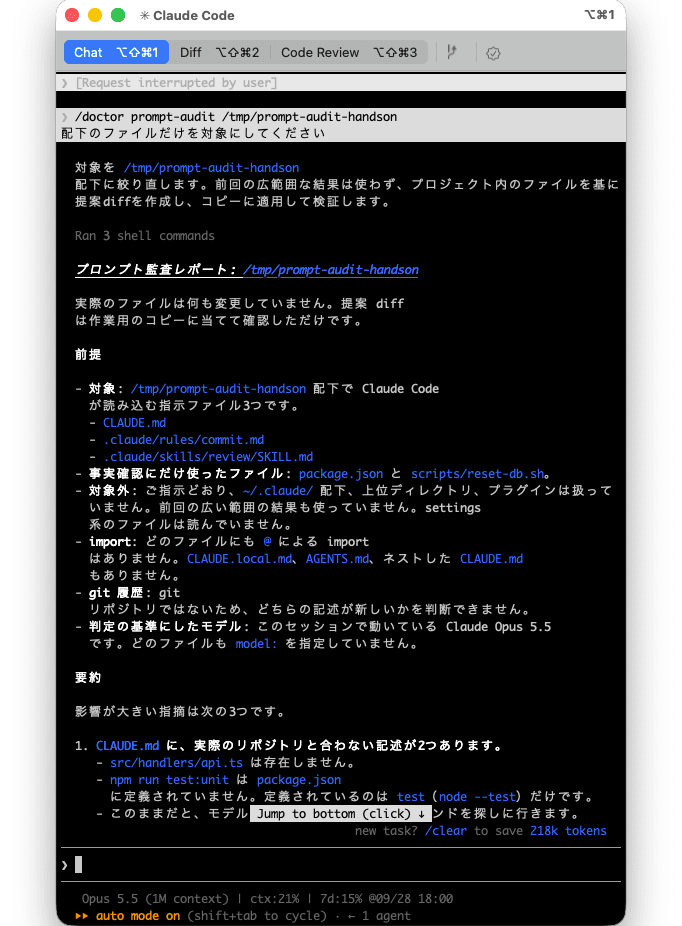
/checkup is an alias for /doctor, so /checkup prompt-audit works the same way. When the audit finishes, a report and proposed fixes (diffs) are shown.
Step 4: Check the report
Check the following points.
- The premise at the top: Is the scope of the audit under
/tmp/prompt-audit-handson? Which model the audit was based on is also written at the start. If findings for files in~/.claude/are mixed in, you can tell them apart by the location (file path) of each finding. - The top of the report: Do the findings for the outdated path (
src/handlers/api.ts), the outdated command (npm run test:unit), and the conflicting instruction files (the language of commit messages) come first? This ordering was improved in v2.1.283. - The content of each finding: Does it include the location (
file:line), the relevant text, which pattern it matches, why it is outdated, the confidence level, and the proposed action (delete, rewrite, and so on)? - Handling of content that should be kept: Is the prohibition with a reason, not running
scripts/reset-db.sh, not marked for deletion? - Proposed fixes (diffs): Are concrete rewrite proposals provided for the findings?
The full audit report
❯ /doctor prompt-audit /tmp/prompt-audit-handson 配下のファイルだけを対象にしてください

対象を /tmp/prompt-audit-handson 配下に絞り直します。前回の広範囲な結果は使わず、プロジェクト内のファイルを基に提案diffを作成し、コピーに適用して検証します。

  Ran 3 shell commands

プロンプト監査レポート: /tmp/prompt-audit-handson

実際のファイルは何も変更していません。提案 diff は作業用のコピーに当てて確認しただけです。

前提

- 対象: /tmp/prompt-audit-handson 配下で Claude Code が読み込む指示ファイル3つです。
  - CLAUDE.md
  - .claude/rules/commit.md
  - .claude/skills/review/SKILL.md
- 事実確認にだけ使ったファイル: package.json と scripts/reset-db.sh。
- 対象外: ご指示どおり、~/.claude/ 配下、上位ディレクトリ、プラグインは扱っていません。前回の広い範囲の結果も使っていません。settings 系のファイルは読んでいません。
- import: どのファイルにも @ による import はありません。CLAUDE.local.md、AGENTS.md、ネストした CLAUDE.md もありません。
- git 履歴: git リポジトリではないため、どちらの記述が新しいかを判断できません。
- 判定の基準にしたモデル: このセッションで動いている Claude Opus 5.5 です。どのファイルも model: を指定していません。

要約

影響が大きい指摘は次の3つです。

1. CLAUDE.md に、実際のリポジトリと合わない記述が2つあります。
   - src/handlers/api.ts は存在しません。
   - npm run test:unit は package.json に定義されていません。定義されているのは test(node --test)だけです。
   - このままだと、モデルは存在しないファイルやコマンドを探しに行きます。
2. コミットメッセージの言語を、2つのファイルが逆の内容で決めています。
   - CLAUDE.md は英語、.claude/rules/commit.md は日本語です。
   - 2つのファイルは同時に読み込まれるため、どちらに従うかが決まりません。
   - git 履歴がなく新旧を判断できないので、修正案は出していません。どちらにするかを決めてください。
3. review スキルに、古いモデル向けの書き方が集中しています。
   - 「Take a deep breath and plan before acting」という指示があります。
   - 語数の上限(300語)があり、claude-3 の出力切れへの対策だと書かれています。
   - STEP 1〜5 の手順を固定したうえで、それに厳密に従うよう強調しています。

グループ別の件数

┌───────────────────────────────────┬──────┬──────────────────────────────┐
│             グループ              │ 件数 │             内容             │
├───────────────────────────────────┼──────┼──────────────────────────────┤
│ Group 1(古いモデル向けの書き方) │ 7    │                              │
├───────────────────────────────────┼──────┼──────────────────────────────┤
│ Group 2(リポジトリと合わない記述 │ 4    │                              │
│ ・ファイル間の矛盾)              │      │                              │
├───────────────────────────────────┼──────┼──────────────────────────────┤
│                                   │ 対象 │ ツール定義がありません。スキ │
│ Group 3(ツールの説明文)         │ 外   │ ルの description             │
│                                   │      │ は起動条件の文なので残します │
├───────────────────────────────────┼──────┼──────────────────────────────┤
│ Group 4(API リクエストの設定)   │ 対象 │ リクエストを組み立てるコード │
│                                   │ 外   │ がありません                 │
└───────────────────────────────────┴──────┴──────────────────────────────┘

指摘一覧(確信度の高い順)

#: 1
場所: CLAUDE.md:13
該当箇所: 「API のハンドラは src/handlers/api.ts にあります」
パターン: G2 変わりやすい具体値
理由: src/ ディレクトリ自体がありません
確信度: High
対処: remove(ユーザー確認が必要)
────────────────────────────────────────
#: 2
場所: CLAUDE.md:14
該当箇所: 「npm run test:unit で実行します」
パターン: G2 変わりやすい具体値
理由: package.json にあるのは test だけです
確信度: High
対処: rewrite: npm test(ユーザー確認が必要)
────────────────────────────────────────
#: 3
場所: CLAUDE.md:18 と .claude/rules/commit.md:3
該当箇所: 「英語で書きます」と「日本語で書きます」
パターン: G2 ファイル同士の矛盾
理由: 常に同時に読み込まれ、指示が逆です。git
履歴がないため新旧を判断できません
確信度: High
対処: flag:
どちらの言語にするかを決めてください。決まれば、もう一方を削除します
────────────────────────────────────────
#: 4
場所: SKILL.md:15
該当箇所: at most 300 words (workaround for claude-3 truncation)
パターン: 1b 語数の上限 + 1d 旧モデル対策の名残
理由: 対策の対象だった claude-3
はもう使われていません。語数の上限は、難しいレビューで考える余地を削ります
確信度: High
対処: remove
────────────────────────────────────────
#: 5
場所: SKILL.md:7
該当箇所: Take a deep breath and plan before acting.
パターン: 1b
理由: 今のモデルは言われなくても計画を立てます。この指示は計画のしすぎにつながります。Opus
5.5 は thinking が常に有効で、考える深さは effort で調整するものです
確信度: High
対処: remove
────────────────────────────────────────
#: 6
場所: CLAUDE.md:9
該当箇所: Be thorough. Do not be lazy. Do not stop early.
パターン: 1a 強い強調による圧力(ガイドの例文と同じ文です)
理由: 今のモデルは最初から自分で進めます。この一文は過剰な動作を招くだけです
確信度: High
対処: remove
────────────────────────────────────────
#: 7
場所: SKILL.md:6
該当箇所: CRITICAL: You MUST follow these steps exactly.
パターン: 1a
理由: 判断が必要な作業を固定の手順に縛り、CRITICAL
の強調で融通が利かなくなります
確信度: Medium
対処: remove
────────────────────────────────────────
#: 8
場所: SKILL.md:9-13
該当箇所: STEP 1: 〜 STEP 5:
パターン: 1c 手順の指定しすぎ
理由: レビューは判断の作業です。手順ではなく、求める結果(重要度の高い順の指摘とまとめ)を書くほうが結果がよくなります
確信度: Medium
対処: rewrite(下の diff)
────────────────────────────────────────
#: 9
場所: CLAUDE.md:7
該当箇所: IMPORTANT: YOU MUST ALWAYS run the tests before committing!!
パターン: 1a
理由: 大文字と !!
による強調は、今のモデルでは過剰に適用されます。ルールそのものは必要です
確信度: Medium
対処: rewrite: Run the tests before committing.
────────────────────────────────────────
#: 10
場所: CLAUDE.md:8
該当箇所: CRITICAL: NEVER skip lint.
パターン: 1a
理由: #9 と同じです
確信度: Medium
対処: rewrite: Do not skip lint.
────────────────────────────────────────
#: 11
場所: CLAUDE.md:8
該当箇所: lint の実行方法
パターン: G2
理由: package.json に lint スクリプトがなく、lint
の設定ファイルも見つかりません。ルールがコマンドを挙げていないので、リポジトリと矛盾しているわけではありません
確信度: Low
対処: flag: lint のコマンドを明記するか、lint を導入するかを決めてください

残すと判断した記述

- CLAUDE.md:22(scripts/reset-db.sh を実行しない)
  - 理由が書かれた禁止事項です。スクリプトが実在することも確認しました。
- CLAUDE.md:3(You are a helpful assistant.)
  - 1行だけの役割の説明で、ほかにプロジェクトの情報も書かれているため、指摘対象にしていません。
- SKILL.md:3 の description
  - スキルを起動する条件を書いた文です。

提案 diff

- 1つの指摘を1つの hunk にしています。hunk ごとに採用するかを選べます。
- #1 と #2 はリポジトリの事実に基づく修正なので、採用前に内容を確認してください。
- #3 と #11 は判断が必要なため、diff に入れていません。

--- a/CLAUDE.md
+++ b/CLAUDE.md
@@ -7 +7 @@
-- IMPORTANT: YOU MUST ALWAYS run the tests before committing!!
+- Run the tests before committing.
@@ -8 +8 @@
-- CRITICAL: NEVER skip lint.
+- Do not skip lint.
@@ -9 +8,0 @@
-- Be thorough. Do not be lazy. Do not stop early.
@@ -13 +11,0 @@
-- API のハンドラは `src/handlers/api.ts` にあります。
@@ -14 +12 @@
-- テストは `npm run test:unit` で実行します。
+- テストは `npm test` で実行します。
--- a/.claude/skills/review/SKILL.md
+++ b/.claude/skills/review/SKILL.md
@@ -6 +5,0 @@
-CRITICAL: You MUST follow these steps exactly.
@@ -7,2 +5,0 @@
-Take a deep breath and plan before acting.
-
@@ -9,5 +6 @@
-STEP 1: 変更されたファイルを一覧にする
-STEP 2: 各ファイルを読む
-STEP 3: 問題点を列挙する
-STEP 4: 重要度の順に並べる
-STEP 5: まとめを書く
+変更されたファイルを読み、見つけた問題点を重要度の高い順に挙げ、最後に全体のまとめを書いてください。
@@ -14,2 +6,0 @@
-
-Keep the review to at most 300 words (workaround for claude-3 truncation).

作業用のコピーで patch -p1 を実行し、すべての hunk が問題なく当たることを確認しました。適用後の review スキルの本文は、上の1文だけになります。

パッチファイル: /private/tmp/claude-501/-private-tmp-prompt-audit-handson/fabc9d93-4aae-4ebe-a111-4941ebdd780d/scratchpad/prompt-audit.patch

✻ Brewed for 9m 39s · done 12:50

──────────────────────────────── 1 new message ─────────────────────────────────

※ recap: `/tmp/prompt-audit-handson` 配下の指示ファイル3つを監査し、レポートと検証済みの提案 diff を作りました。ファイルはまだ変更していません。次は、コミットメッセージを英語と日本語のどちらにするか決めてから、採用する hunk を選んでください。 (disable recaps in /config)

─────────────────────────────────────────────────────────────────────────
The contents of the report vary depending on the model that runs it. Not everything in the table above is necessarily flagged.
Step 5: Clean up
Exit Claude Code with /exit and delete the sample.
cd /tmp && rm -rf prompt-audit-handson
Notes
- Files are not rewritten: The audit goes only as far as producing a report and diffs, and does not change files. If you want to apply them, look at the diffs and explicitly ask. However, rewrites related to outdated paths and conflicts between instruction files are treated as proposals only. They are not applied in response to a blanket request such as "clean it up", and are confirmed individually.
- Conflicts may be left to the user's judgment: For conflicts between instruction files, it judges which is newer from git history. When there is no git history, as in this sample, it may flag the conflict by asking which one to align with, without proposing a rewrite.
- Settings files are not read: Because they may contain secrets,
.claude/settings*.jsonand.mcp.jsonare excluded from the audit. - Thinking keywords: The thinking keywords that Claude Code documents are left in place without being flagged (an improvement in v2.1.283).
- When trying it on a real project: Start
claudein your own project and run/doctor prompt-audit. If you also want to review user-level settings in~/.claude/, leave it as is; if you want to narrow it to the project only, add the target directory as in Step 3.
If it doesn't work
When "safeguards flagged this message" is shown and Details says [reasoning_extraction]
Instruction files loaded into the session, such as CLAUDE.md, may contain instructions that make the model write out its reasoning process in the response (for example: "Organize your thoughts inside <scratchpad> tags before answering"). The prompt-audit audit guide also explains that, with Claude Fable 5.1 and Claude Opus 5.5, instructing the model to write out its reasoning may result in refusal (reasoning extraction).
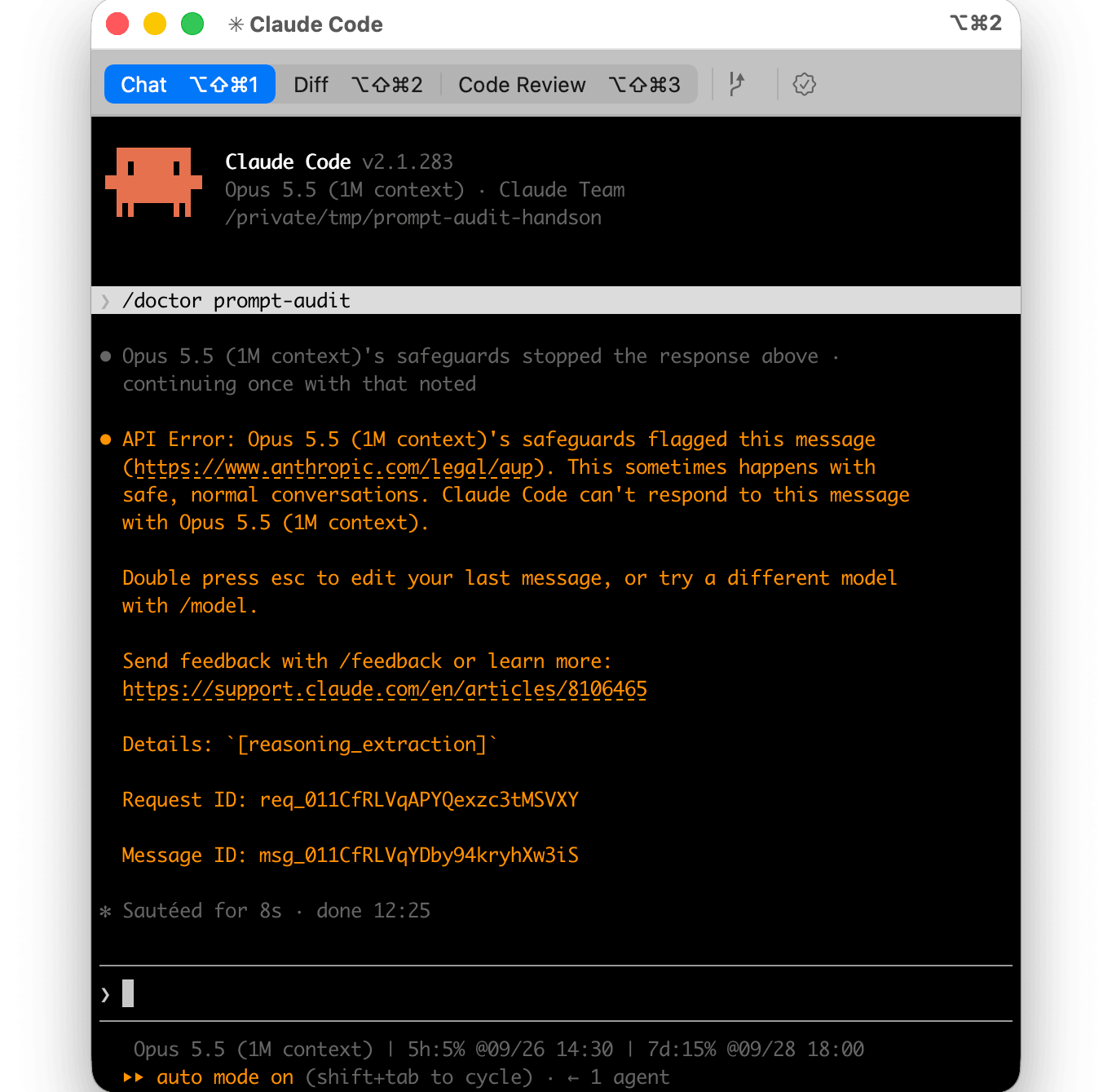
Delete the relevant instructions, then restart Claude Code and run it again. As the error message says, you can also switch to a different model with /model and run it.
Conclusion
/doctor prompt-audit is a good opportunity to review instructions that remain as they were written for older models, and I think it will be especially effective for those who have used CLAUDE.md and skills for a long time. Faster startup and resume and more stable MCP connections are also included, so I feel everyday usability is steadily improving.
There are also changes that alter behavior, such as making auto mode the default, so if any of them apply to you, check the "Breaking Changes" section and then consider updating and giving it a try.
References
