I investigated whether changing RDS Proxy authentication settings affects existing connections

This page has been translated by machine translation. View original
Hello, this is Hayashi.
When using a single database with multiple applications, there are cases where RDS Proxy is shared among applications rather than creating a separate Proxy for each one.
In that case, the secret for the user that the new application uses to connect is added to the Proxy's authentication settings.
What concerns me here is the impact on applications already connected through the Proxy.
If changing the authentication settings affects existing connections, it would be necessary to schedule the work during a low-traffic period.
What the Documentation Tells Us
I checked the API reference for ModifyDBProxy, which is called from the AWS CLI's modify-db-proxy.
The description of the Auth parameter, which specifies authentication settings, did not mention any impact on existing connections.
I also checked the CloudFormation reference.
The Auth property of AWS::RDS::DBProxy is classified as an item that does not interrupt Proxy operation when updated (No interruption). However, it did not mention whether existing connections through the Proxy would be affected.
So I tested whether the following four changes to Aurora PostgreSQL and RDS Proxy would affect existing connections.
- Adding a secret
- Deleting a secret
- Changing the client authentication type
- Changing IAM authentication to required
Conclusion First
None of the four changes I tested had any impact on existing connections.
Adding/deleting secrets and changing IAM authentication were reflected for new connections within a few seconds of running modify-db-proxy. The Proxy status entered the modifying state for about one minute, but the changes were reflected before it returned to available.
Verification Environment
Configuration
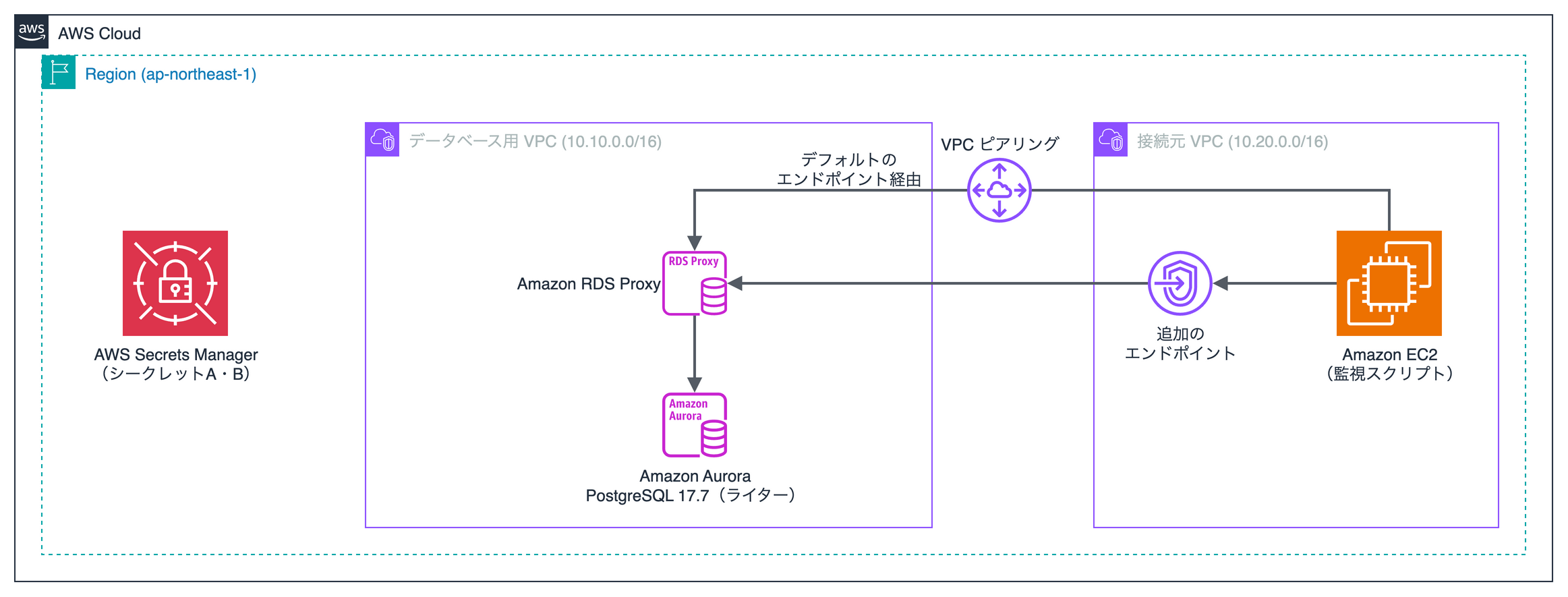
This time, I separated the VPC for the database from the VPC for the client, and placed an additional endpoint in the client VPC.
I connected to the default endpoint via VPC peering.
| Target | Details |
|---|---|
| Database | Aurora PostgreSQL 17.7 (LTS), db.t4g.medium |
| Client | EC2 running Amazon Linux 2023, Python 3.9.25, psycopg2 2.9.12 |
| Region | Tokyo (ap-northeast-1) |
Proxy Authentication Settings
Two secrets were used in the Proxy's authentication settings.
| Secret | User | Usage |
|---|---|---|
| Secret A | dbadmin (master user) | Added to authentication settings from the start |
| Secret B | app2 | Added, deleted, and modified during verification |
For both secrets, the client authentication type was set to POSTGRES_SCRAM_SHA_256 and IAM authentication was disabled (DISABLED).
In the console, the authentication settings are displayed in the Authentication section of the Proxy details page.

To separately verify role policy changes and authentication setting changes, the Proxy's role was granted read access to both Secret A and Secret B.
Conditions Not Tested
- Aurora MySQL, RDS for MySQL, RDS for PostgreSQL
- Clients connected with IAM authentication
- Behavior of existing connections more than 120 seconds after the Proxy status returns to available
Since the results in this article are not documented specifications, they may vary depending on conditions or future updates.
Before working in a production environment, please verify in a verification environment with the same configuration.
Verification Method
I changed the authentication settings while remaining connected to the Proxy and checked whether errors occurred on each connection.
- Connect to the Proxy from EC2 using four different methods
- After 60 seconds, change the authentication settings using
modify-db-proxy - Check for connection errors until 120 seconds after the Proxy status returns to available
If no errors occurred on existing connections, I judged that there was no impact.
In addition to this, I also checked the Proxy status.
Connection Types
Four types of connections were prepared for each of the default endpoint and the additional endpoint.
The non-pinned connection, the pinned connection, and the in-progress query were all connected before the change and monitored as existing connections.
New connections reconnected every second throughout the change period.
| Connection | Actions performed within the connection |
|---|---|
| Non-pinned connection | Execute SELECT 1 every second |
| Pinned connection | Create a temporary table and read from it every second |
| In-progress query | Repeat SELECT pg_sleep(30) |
| New connection | Connect every second, execute SELECT 1, then disconnect |
The Proxy can share a database connection with other clients each time a transaction ends.
However, a session that has created a temporary table enters a state called pinning, where it continues using the same database connection until the session ends.
When pinning is released and the connection switches to a different database connection, the temporary table becomes unreadable. Therefore, whether an error occurs allows us to verify the impact on pinned connections.
Authentication Setting Changes
When changing authentication settings in the console, the client authentication type and IAM authentication values are applied collectively to all secrets in the Proxy.
Since I wanted to change only the settings for Secret B this time, I used the AWS CLI's modify-db-proxy to make the changes.
For --auth, all authentication settings after the change must be specified.
aws rds modify-db-proxy --db-proxy-name rdsproxy-auth-verify-proxy \
  --auth '[{"AuthScheme":"SECRETS","SecretArn":"<Secret A ARN>","IAMAuth":"DISABLED","ClientPasswordAuthType":"POSTGRES_SCRAM_SHA_256"},
           {"AuthScheme":"SECRETS","SecretArn":"<Secret B ARN>","IAMAuth":"DISABLED","ClientPasswordAuthType":"POSTGRES_SCRAM_SHA_256"}]'
Results
| Change | Impact on existing connections |
|---|---|
| Adding a secret | None |
| Deleting a secret | None |
| Changing client authentication type | None |
| Changing IAM authentication to required | None |
No errors occurred for any of the non-pinned connections, pinned connections, or in-progress queries.
Deleting a secret refers to removing it from the Proxy's authentication settings. The secret itself in Secrets Manager was not deleted.
Existing connections for the user whose secret was deleted were also unaffected.
If you want to terminate connections, you will need to separately restart the application to close the connections.
Summary
I verified whether changing RDS Proxy authentication settings would impact existing connections. The key takeaways are the following two points.
- Under the conditions tested, changing authentication settings had no impact on existing connections
- Adding/deleting secrets and changing IAM authentication are reflected for new connections within a few seconds, before the Proxy status returns to available
The behavior when deleting or modifying the Secrets Manager secret itself has been verified in the following article.
I hope this article is helpful to someone. Thank you for reading to the end!
References
