
Claude Code v2.1.287 Major Updates - Addition of Claude Mods and Enhanced Shell Write Safety Measures

This page has been translated by machine translation. View original
This is Ishikawa from the Cloud Business Division. Claude Code v2.1.287 (released 2026-10-01) has been released. In this article, I'll summarize the key changes and today I actually tried out the new Claude Mods feature that has been the talk of the town.
The previous update article is here.
Update Summary
v2.1.287 includes 106 changes. The CHANGELOG breakdown is: 67 Fixed, 20 Improved, 10 Changed, and 9 Added. The additions include plugin extension mechanisms and features related to MCP and OpenTelemetry. The changes include confirmation for shell-based writes and default values for context windows in Bedrock and similar services. Many fixes are related to screen reader mode, cloud sessions and Remote Control, and the VS Code extension.
Notable Updates
Claude Mods Added (New Feature)
"Claude Mods" has been added, allowing plugins to change Claude Code's display and behavior itself. Existing configuration file hooks, skills, status lines, and MCP servers operate outside of Claude Code, either running scripts or passing text and tools to Claude. Mods run inside Claude Code, enabling changes that those cannot make.
According to the official documentation, a mod is a plugin with an event handler (hooks module) written in JavaScript or TypeScript. When events such as tool calls, prompt submissions, and screen rendering occur, Claude Code calls the mod's hook. The hook can either observe the event, rewrite it, or respond itself to replace the original processing. This allows you to render a custom pane beside the transcript or a banner above the prompt, and add a /command that runs your own function without going through Claude's turn.
Mods are available from v2.1.287 onwards and are enabled by default. Like regular plugins, they can be installed from the marketplace, and can also be temporarily loaded with --plugin-dir. Mods are not sandboxed and can read and write files, launch programs, and make network requests with the user's permissions. Therefore, the official documentation asks users to only install mods from trusted authors and the marketplace.
To stop a mod, you can disable it individually with /plugin, start with --safe-mode, or set "disableAllHooks": true in ~/.claude/settings.json. Organization administrators can also stop loading mods installed by users via managed settings. Note that the early access environment variable CLAUDE_CODE_ENABLE_FUNCTION_HOOKS is ignored from v2.1.287 onwards, so setting it to 0 will not disable mods.
I feel this is a useful change for those who want to extend Claude Code for their own use, such as displaying a custom pane beside the transcript, or adding a /command that immediately runs a self-made function without having Claude respond.
Built-in Mod "You should know" Added (New Feature)
A built-in mod called "You should know" has been added. When this mod is enabled, a separate agent runs in parallel alongside the Claude you're working with, and notifies you of things that you or Claude might overlook.
This is available in first-party sessions with telemetry enabled. A first-party session refers to a session connected directly to Anthropic's API, not via Amazon Bedrock or Google Cloud's Agent Platform. Telemetry is enabled by default for these connections. Enable the mod with the following command.
/plugin enable cc-plugin-you-should-know@builtin
According to the list of built-in mods in the official documentation, this mod is disabled by default. While Claude is working on a longer task, it displays notes about things you should know as a banner above the prompt.
I feel it's worth enabling and checking the behavior for those who are connected directly to Anthropic's API, have not disabled telemetry, and are assigning longer tasks.
Fixed Issue Where CLAUDE.md Was Attached Again (Bug Fix)
The issue where a folder's CLAUDE.md was attached again after resuming a session or after compaction has been fixed.
For usage patterns involving repeated resumptions and compaction in long sessions, I expect this will reduce wasted context by eliminating duplicate CLAUDE.md entries.
Strengthened Confirmation for Shell-Based Deletion and Writes (Security)
Three changes and fixes have been made to expand the scope of confirmation requests for shell command-based deletions and writes.
- Dangerous
rmcommands (such as those targeting/or the home directory) always require confirmation, but a problem where this confirmation was bypassed when output was redirected to paths with~or wildcards in the same command has been fixed. - Shell commands that write to sensitive files or outside the working tree via symlinks committed to the repository will now wait for human confirmation showing the write destination. Lines with
~as the write destination are also targeted. - Even with
Bashallow rules that permit the entire tool, or hooks that return permission, shell writes to files that Claude Code's file tool rejects (Anthropic's profile store, host credential files) will no longer be executed and will instead request confirmation.
I feel these changes are particularly relevant for those who have permitted the entire Bash tool, or those who handle external repositories containing committed symlinks.
prompt_text Added to OpenTelemetry user_prompt Event (Security)
A prompt_text attribute has been added to the OpenTelemetry user_prompt event. It is a copy of prompt provided for backends that handle dotted keys nested. The CHANGELOG advises that wherever prompt is being deleted or masked, prompt_text should be handled the same way. Note that the official documentation explains that prompt is redacted by default, and setting OTEL_LOG_USER_PROMPTS=1 includes the full text.
For configurations where OTEL_LOG_USER_PROMPTS=1 is used to send prompt text and prompt is masked by specifying attribute names on the collector or backend side, I believe the prompt text will remain unmasked unless prompt_text is also added to the rules.
Update Details
New Features
- Claude Mods: Plugins can now modify deeper behavior of Claude Code (described above).
- Built-in mod "You should know": A built-in mod where a separate agent from Claude notifies you of things you might overlook (described above).
- OpenTelemetry
prompt_text:prompt_text, a copy ofprompt, has been added to theuser_promptevent (described above). n:<text>filter for agents view: A filter matching session names and tasks has been added. When filtering, matches within collapsed sections are also displayed, and pressing Enter opens the first match.- Built-in
gh apifor self-hosted runners: For macOS/Linux machines without GitHub CLI installed in sessions using Anthropic-managed git, a REST-onlygh apihas been built in. - [VS Code] Run in background: Running commands and sub-agents can now be moved to the background to continue working.
- [VS Code] Output display in agent map: Background shell and Monitor output is now displayed on agent map cards.
- [Windows] Warning for settings that disable shell tools: A warning is now displayed at startup when rejecting the Bash tool would also disable the PowerShell tool, leaving Claude unable to use shell tools.
MCP server URL prompt support is covered in "Breaking Changes and Default Value Changes" below.
Security
- Strengthened confirmation for shell-based deletion and writes: Three items: dangerous
rm, writes via committed symlinks, and shell writes to protected files (described above). - Fixed issue where organization permission limits were ignored for MCP tools named
__proto__: The per-tool permission limits set by the organization were being silently ignored for MCP tools named__proto__. - Fixed issue where sandboxed Bash commands on Linux inherited handles to the executable: Sandboxed Bash commands were inheriting open handles to the Claude Code executable.
Improvements
- Changed handling of replies from
claude agents: Replies now arrive as queued messages. Slash commands other than/stopsent while a turn is running will be executed when that turn ends. - Changed behavior of
alwaysLoad: falsefor MCP servers: All tools from that server are now deferred to after tool search. - Improved passing of
/skillnames mid-message to Claude as skills: This also applies to skills withdisable-model-invocationset. - Improved handling of large MCP tool results: Memory usage and session files are smaller, and for results that significantly exceed the limit, an additional upload to count tokens is no longer performed.
- [Windows] Improved Bash tool speed: The subshell that ran before every command has been removed.
- Additionally, improvements and changes have been made to key operations in
/configand/memory, permission prompt display (wrapping tool calls in dashed borders, displaying pending prompts in oldest-first order), light theme contrast, maintaining effort levels during automatic model switching, timing of right-click and middle-click pasting, handling of files sent by Claude from remote sessions (retries, streaming from disk, error descriptions), plugin and marketplace error display, and minor behaviors in the VS Code extension, Claude Tag, and Code Review. The screen reader mode has changed how lines are written, and settingCLAUDE_AX_PREPARK_MS=50reverts to the previous waiting behavior.
Fixes
- Fixed issue where CLAUDE.md was attached again: A folder's CLAUDE.md was being attached again after resuming a session or after compaction (described above).
- Fixed issue where MCP connector tool calls were executed twice: When an MCP server changed the protocol version it supports, connector tool calls would occasionally be executed twice, or calls to that connector would fail until restart.
- Fixed a cause of full-screen session crashes: On slow or high-load machines, holding down scroll keys during long conversations could result in exit with "Claude Code exited after an unrecoverable interface error", and one cause of this has been fixed.
- Fixed issue where
availableModelswas ignored in Bedrock/Vertex: The model check at startup was ignoring the enforcedavailableModelslist, causing/modelto show only one line for Opus. - Fixed issue where Bedrock Guardrails blocks resulted in API errors: When a response started with thinking, Amazon Bedrock Guardrails blocks received mid-response were ending the turn as an API error rather than a guardrails message.
- Fixed issue where requests were rejected by gateways using Bedrock as a backend: Even when
CLAUDE_CODE_DISABLE_EXPERIMENTAL_BETASwas set, the structured-output format was not removed from session title and prompt hook requests, causing rejection by gateways using Bedrock as a backend. - Fixed issue where conversations were lost in cloud sessions: When a session restarted during compaction, conversations from before that point were being lost.
- Fixed issue where Remote Control was not receiving messages: When there was no response to a reconnection request, messages would not be received for several minutes. It now cuts off after 30 seconds and retries.
- Fixed issue where
asyncRewakehook was repeatedly waking Claude: When the hook's script file did not exist, Claude was being repeatedly woken by "found issues" notifications. Broken hooks are now reported only once. - Additionally, numerous minor bugs have been fixed in screen reader mode, Remote Control and cloud sessions,
claude agents,/ultrareview, the VS Code extension, Claude Tag, Code Review, and more.
Breaking Changes and Default Value Changes
MCP Server URL Prompt Support (Change with Compatibility Impact)
You can now receive URL prompts for sign-in and similar purposes from MCP servers using the 2025-11-25 version of the protocol. The official documentation explains that when a URL mode request is received, Claude Code asks whether to open the link in a browser, and opens it if accepted.
The CHANGELOG advises that if any MCP servers become unable to connect after this update, add "bareElicitationCapability": true to that MCP configuration entry. Below is an example configuration (server name and URL are placeholder values).
Before fix (configuration that fails to connect in v2.1.287):
{
  "mcpServers": {
    "example-server": {
      "type": "http",
      "url": "https://mcp.example.com/mcp"
    }
  }
}
After fix:
{
  "mcpServers": {
    "example-server": {
      "type": "http",
      "url": "https://mcp.example.com/mcp",
      "bareElicitationCapability": true
    }
  }
}
1M Context Now Default for Bedrock, Vertex, Foundry, and Claude Apps Gateway (Default Value Change)
Opus 4.7 and later and Fable on Bedrock, Vertex, Foundry, and Claude apps gateway now use a 1M context window by default without the [1m] suffix. To maintain 200K, set CLAUDE_CODE_DISABLE_1M_CONTEXT=1.
The official documentation (Model configuration, as of 2026-10-02) states that model IDs without [1m] on Amazon Bedrock, Google Cloud's Agent Platform, and Microsoft Foundry operate at 200K, and to use 1M, append [1m] to the model ID. Below is an example configuration for cases where the model ID is fixed via environment variable (the format of model IDs varies by provider).
Before change (up to v2.1.286):
# To use 1M context, append [1m] to the model ID
export ANTHROPIC_DEFAULT_OPUS_MODEL='claude-opus-4-8[1m]'
After change (v2.1.287 onwards):
# Opus 4.7 and later defaults to 1M context even without [1m]
export ANTHROPIC_DEFAULT_OPUS_MODEL='claude-opus-4-8'

# To maintain 200K
export CLAUDE_CODE_DISABLE_1M_CONTEXT=1
Trying Out Claude Mods
Let's try Claude Mods using the minimal mod "first-mod" from the tutorial in the official documentation (Create a mod). first-mod counts the number of Claude's tool calls and displays it beside the spinner, and adds a /tally command that outputs the count.
The spinner is the single line displayed above the prompt input area while Claude is working. It shows words like Thinking… to indicate that work is in progress. first-mod appends a count like · tool calls: 3… after this word.
Overall Flow
Prerequisites
- Claude Code v2.1.287
- macOS or Linux bash / zsh
File Structure When Complete
first-mod/
├── .claude-plugin/
│   └── plugin.json
└── hooks/
    ├── hooks.json
    └── register.js
| File | Role |
|---|---|
.claude-plugin/plugin.json |
Plugin manifest. No special fields for mods |
hooks/hooks.json |
Specifies the path to the hooks module (mod code) with the modules key. Having this key causes the plugin to be treated as a mod |
hooks/register.js |
Hooks module. Registers with Claude Code which function to run for which event |
The 4 hooks in register.js share the variable calls as follows.
Step 1: Create Directories
Navigate to your working directory and create two directories for the mod files. All subsequent commands are run from this directory.
mkdir -p first-mod/.claude-plugin first-mod/hooks
Step 2: Create the Manifest (plugin.json)
cat > first-mod/.claude-plugin/plugin.json <<'EOF'
{
  "name": "first-mod",
  "version": "0.1.0",
  "description": "Counts Claude's tool calls, shows the count beside the spinner, and adds a /tally command",
  "author": { "name": "Your Name" }
}
EOF
Step 3: Specify the Code Location (hooks.json)
For modules, specify one hooks module using a path relative to hooks.json.
cat > first-mod/hooks/hooks.json <<'EOF'
{
  "description": "The first-mod hooks module",
  "modules": ["./register.js"]
}
EOF
Step 4: Write the Mod Code (register.js)
cat > first-mod/hooks/register.js <<'EOF'
// The count, shared by the hooks below
let calls = 0

// Claude Code calls this once when the mod loads
export function register(on) {
  // Runs when the session starts, before your first prompt
  on('session.start', async ($, e, next) => {
    // Add the /tally command
    await $.command.register({
      name: 'tally',
      description: 'Show how many tool calls Claude has made',
    })
    // Let the session start as usual
    return next(e)
  })

  // Runs each time Claude is about to use a tool
  on('tool.call', async ($, e, next) => {
    calls += 1
    // Ask Claude Code to draw the interface again, so the new count shows
    $.ui.invalidate('ui.render')
    // Let the tool run as usual
    return next(e)
  })

  // Runs when you type /tally, and only then, because of the matcher
  on('command.run', { command: 'tally' }, async () => {
    // The text to print in the transcript
    return { text: 'Claude has made ' + calls + ' tool calls since this mod loaded' }
  })

  // Runs each time Claude Code draws the spinner
  on('ui.render', { component: 'Spinner' }, async ($, e, next) => {
    // Keep Claude Code's spinner, with the count added after its word
    return next({ ...e, props: { ...e.props, suffix: ' · tool calls: ' + calls + '…' } })
  })
}
EOF
When the mod is loaded, Claude Code calls the register function and passes the function on as an argument. Each call to on registers one hook (event handler) for the specified event. Each hook receives three arguments: the mods API ($), the event input (e), and a function to pass to the next process (next).
| Hook | When it runs | What it does | How the event is handled |
|---|---|---|---|
session.start |
On session start (before the first prompt) and when the mod is reloaded | Register the /tally command |
Observe (returns next(e), session starts as usual) |
tool.call |
Just before Claude uses a tool | Add 1 to calls and request a screen redraw |
Observe (returns next(e), tool runs as usual) |
command.run |
When /tally is entered (narrowed by { command: 'tally' }) |
Return text containing the count | Respond (does not call next, returns its own result) |
ui.render |
When the spinner is drawn (narrowed by { component: 'Spinner' }) |
Add the count after the spinner's word | Rewrite (passes e with modified suffix to next) |
Confirm that all 3 files are in place.
% find first-mod -type f | sort
first-mod/.claude-plugin/plugin.json
first-mod/hooks/hooks.json
first-mod/hooks/register.js
Step 5: Validate the Mod
claude plugin validate inspects the manifest and performs the same static analysis on the hooks module source as Claude Code does when loading a mod. The mod's code is not executed.
% claude plugin validate ./first-mod
Validating plugin manifest: /Users/ishikawa.satoru/workspaces/cc/blog/20261002-v
2.1.287/first-mod/.claude-plugin/plugin.json

Validating hooks: /Users/ishikawa.satoru/workspaces/cc/blog/20261002-v2.1.287/fi
rst-mod/hooks/hooks.json

  ❯ ./register.js hooks: session.start, tool.call, command.run{command=tally},
ui.render{component=Spinner}
  ❯ ./register.js calls: $.command.register, $.ui.invalidate

✔ Validation passed
Verification Points
- The
hooks:line lists the events the mod handles (filters are in curly braces) - The
calls:line lists the mods API methods the mod calls ✔ Validation passedis displayed at the end
The official documentation also recommends this command as a way to check what a mod does before installing one made by someone else.
Step 6: Run the Mod's Command in -p Mode
In Step 5, we examined the mod's contents without executing its code. In Step 6, we actually load first-mod into Claude Code and verify that the /tally command added by the mod works.
We won't use the interactive screen, but will run with -p (print mode). -p is a mode that processes the given input once, outputs the result, and exits. Here we pass /tally as the input.
% claude -p "/tally" --plugin-dir ./first-mod --max-turns 1
first-mod: Claude has made 0 tool calls since this mod loaded
| Option | Meaning |
|---|---|
-p "/tally" |
Pass /tally as input without opening the interactive screen, output the result, and exit |
--plugin-dir ./first-mod |
Load first-mod only for this session without installing it |
--max-turns 1 |
Limit the agent's number of turns to 1. This is an option added during this verification; the official tutorial runs without it and shows the same output |
When this command is executed, the following sequence occurs.
- Claude Code loads first-mod, calls the
registerfunction, and registers 4 hooks - At session start, the
session.starthook registers the/tallycommand - The
command.runhook responds to the input/tallyand returns text containing the count. Since the hook does not callnext, Claude does not respond - Claude Code prepends the plugin name (
first-mod:) to the text, outputs it, and exits
Since we haven't asked Claude to do any work, no tool calls occur, and the count is 0.
Verification Points
first-mod: Claude has made 0 tool calls since this mod loadedis displayed
Only the session.start and command.run hooks run in this Step. The tool.call hook that counts calls and the ui.render hook that displays the count on the spinner are verified in Step 7 in interactive mode. Mod hooks also run with claude -p, but pane and spinner display only occurs in interactive mode terminal and the Desktop app.
Checking the Auto-Generated Files
When a mod is loaded with --plugin-dir, Claude Code writes TypeScript type definition files to the mod's directory.
% find first-mod -maxdepth 4 | sort
first-mod
first-mod/.claude-plugin
first-mod/.claude-plugin/plugin.json
first-mod/.claude-plugin/types
first-mod/.claude-plugin/types/.gitignore
first-mod/.claude-plugin/types/claude-code
first-mod/.claude-plugin/types/claude-code-mcp
first-mod/.claude-plugin/types/claude-code-mcp/index.d.ts
first-mod/.claude-plugin/types/claude-code-tools
first-mod/.claude-plugin/types/claude-code-tools/index.d.ts
first-mod/.claude-plugin/types/claude-code/index.d.ts
first-mod/.claude-plugin/types/tsconfig.json
first-mod/hooks
first-mod/hooks/hooks.json
first-mod/hooks/register.js
first-mod/tsconfig.json
| Path | Contents (from official documentation) |
|---|---|
.claude-plugin/types/claude-code/index.d.ts |
Events, mods API methods, and renderable elements available in the running version of Claude Code |
.claude-plugin/types/claude-code-tools/index.d.ts |
Built-in tool inputs and results |
.claude-plugin/types/claude-code-mcp/index.d.ts |
Inputs for connected MCP tools |
.claude-plugin/types/tsconfig.json |
Compiler options for hooks modules |
tsconfig.json (mod root) |
Added if the mod has no tsconfig.json, references the above tsconfig.json via extends |
The contents of .claude-plugin/types/.gitignore is *, excluding the type definition files from Git management. According to the official documentation, since events and methods may change with each release, if the documentation and type definition files conflict, the type definition files take precedence.
Step 7: Verify the spinner and /tally in interactive mode
The content displayed in this Step is based on the official documentation.
-
Load the mod and launch Claude Code in interactive mode.
$ claude --plugin-dir ./first-mod -
Run
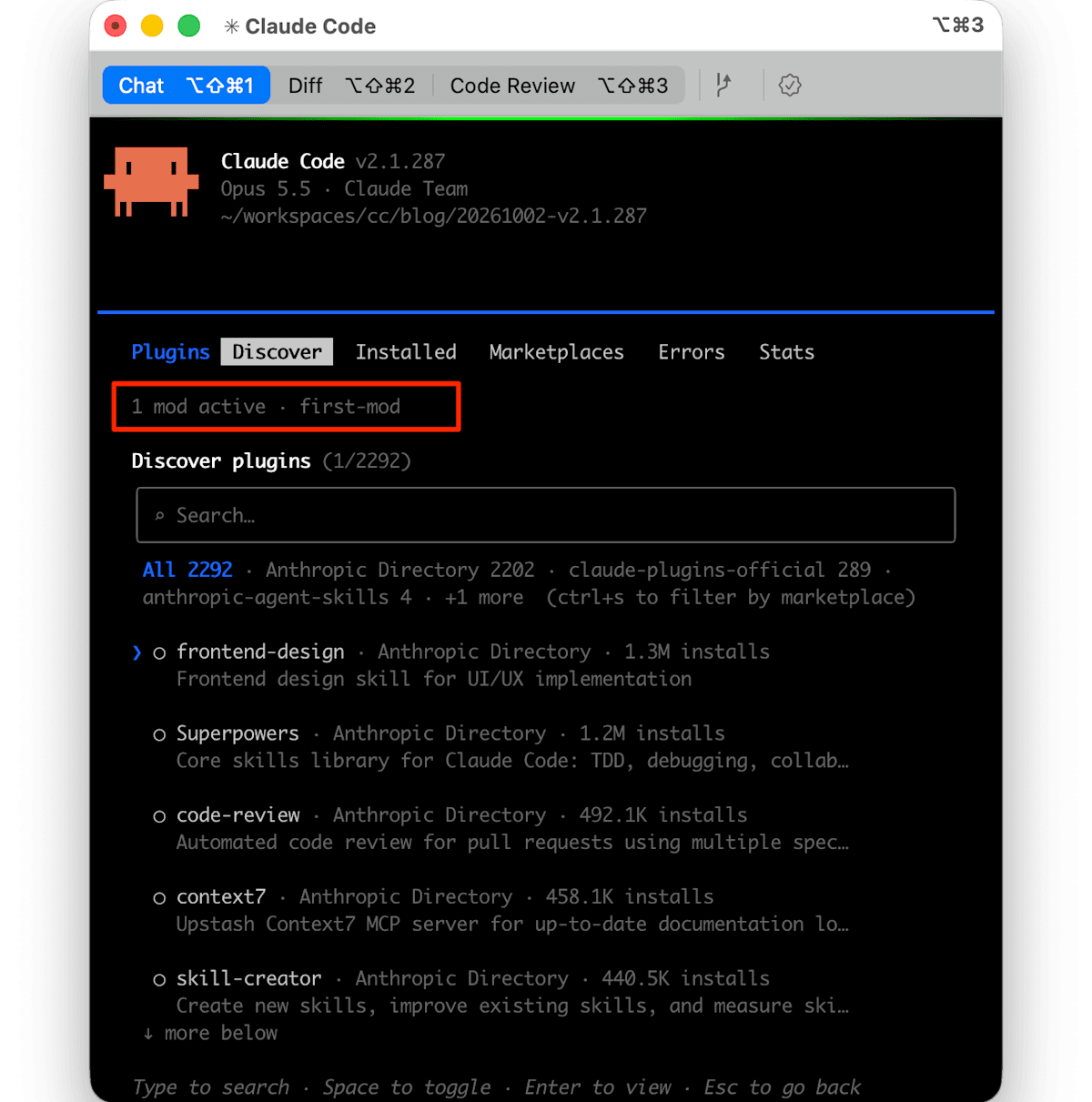
/pluginat the prompt. Confirm that the number of loaded mods and their names are displayed below the tab, like1 mod active · first-mod, then close the/pluginscreen.
-
Send a prompt that calls tools several times. For example, enter the following:
first-mod ディレクトリのファイルを一覧して、hooks/register.js を読んでWhile Claude is working, a count is displayed after the spinner text, incrementing with each tool call (e.g.,
Thinking · tool calls: 2…). -
Once Claude's response is complete, type
/tallyand press Enter. The following text, including the number of tool calls from Step 3, will appear in the transcript.first-mod: Claude has made 1 tool calls since this mod loaded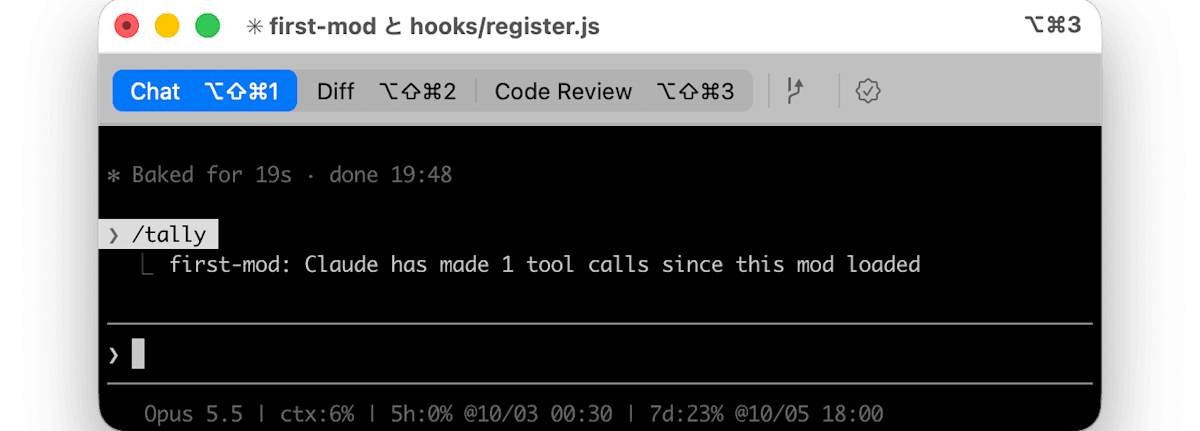
The built-in /diff is also implemented as a mod, and its source is publicly available. I think it's worth reading first as a reference implementation when writing your own mods.
Closing Thoughts
Mods are enabled by default, and installed mods run with user-level permissions. If your organization uses Claude Code, it would be a good idea to review how mods are handled and the fact that Opus 4.7+/Fable with 1M context on Bedrock and similar services is now the default, before deploying.
If you want to extend Claude Code to suit your own workflow, consider updating and trying it out starting with the official tutorial mods.
References
