
Claude Code v2.1.288 Major Updates - Added --max-findings to /code-review and Fixed Missing Dangerous rm Confirmation Detection Inside bash -c

This page has been translated by machine translation. View original
This is Ishikawa from the Cloud Business Division. Claude Code v2.1.288 (released 2026-10-02) has been released. This article summarizes the major changes, and today I tried out the --max-findings option added to /code-review.
The previous update article is here.
Update Summary
v2.1.288 includes 89 changes. The breakdown of CHANGELOG entries is: 64 Fixed, 12 Improved, 7 Added, and 6 Changed. Fixes are concentrated in session resume and compaction, plugins and mods, cloud sessions, and permission checks and hooks. Changes include the scope of background command time limits and the rename from claude project purge to claude purge.
Notable Updates
--max-findings Added to /code-review (New Feature)
A --max-findings option has been added to /code-review for specifying the number of findings to report. Use --max-findings <n> to report a maximum of n findings, or --max-findings all to report all findings instead of the normal limit. You can specify values both larger and smaller than the normal limit for n.
The specified value is also used in subsequent reviews, and passing --max-findings default returns to the normal limit. According to the command list in the official documentation, the same option can be specified with the alias /review.
I feel this is a useful change for reviews with large diffs where the number of findings seems likely to exceed the normal limit.
In the latter half of this article, I tested specifying --max-findings 1 against a diff containing bugs to confirm that the reported findings are limited to 1, that the specification carries over to the next review run without the flag, and that --max-findings default restores the original count — please take a look.
/code-review --max-findings in Practice
Restore Ctrl+C-Cleared Prompts with the ↑ Key (New Feature)
You can now restore prompts that were cleared with Ctrl+C. Pressing the ↑ key when the prompt is empty brings back the cleared draft. Pasted text and images are also restored.
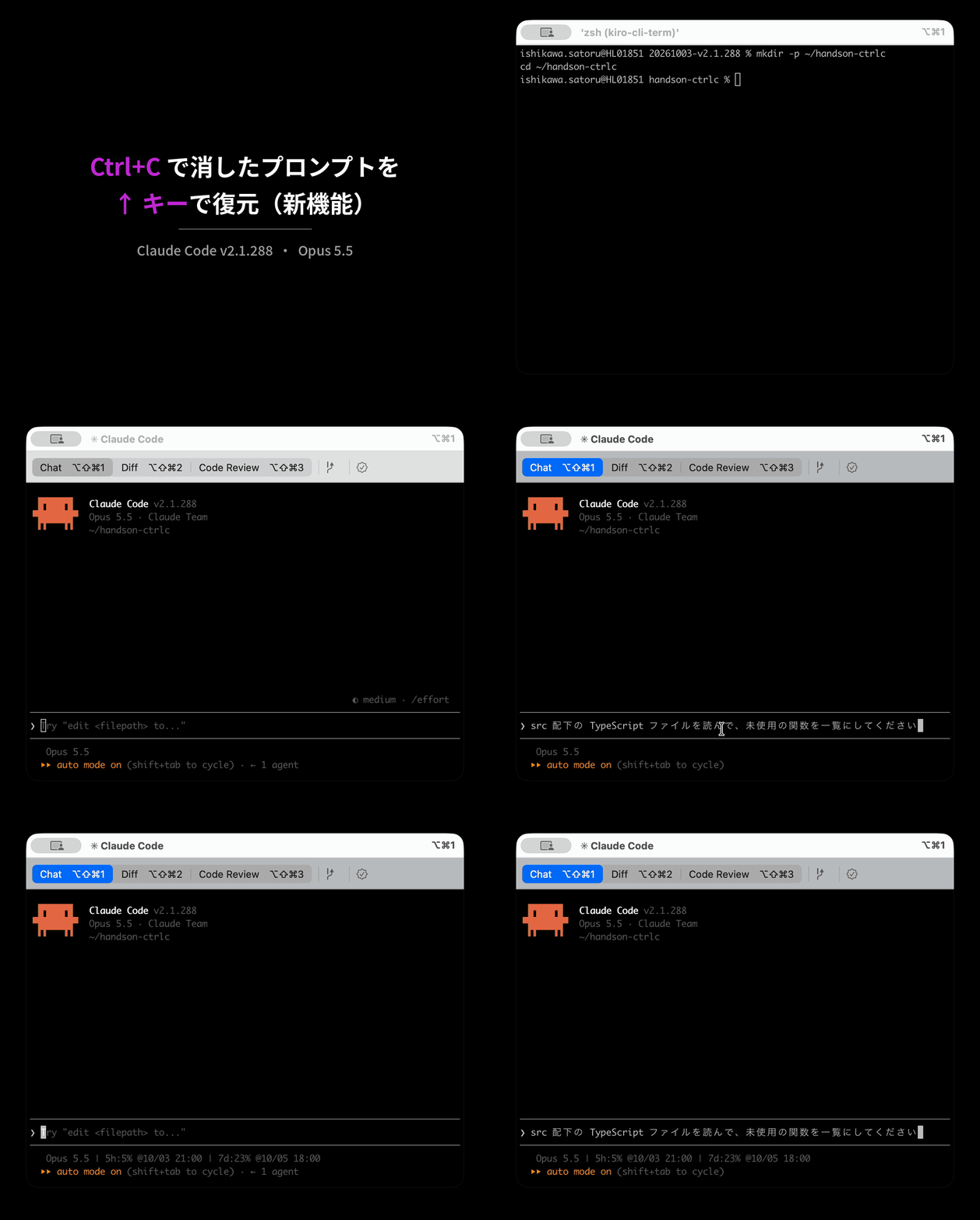
According to the official documentation (Interactive mode), pressing Ctrl+C in Claude Code when no process is running clears the prompt input, and pressing it again exits.
I think this is a welcome change for anyone who has accidentally cleared a long instruction or pasted image with Ctrl+C.
Fix for Path-Scoped Rules and Nested CLAUDE.md Not Being Loaded on Write/Edit (Bug Fix)
A bug has been fixed where .claude/rules rules with paths specified and nested CLAUDE.md files in subdirectories were not loaded when Write or Edit created or modified files within scope. Previously, they were only loaded during Read.
Path-scoped rules are specified using paths in the YAML frontmatter as follows (example from the official Memory documentation):
---
paths:
  - "src/api/**/*.ts"
---

# API Development Rules

- All API endpoints must include input validation
- Use the standard error response format
- Include OpenAPI documentation comments
The official documentation also explains that path-scoped rules are loaded when Claude uses any of the Read, Write, or Edit tools on files matching the pattern.
I think the significant improvement here is that path-scoped rules now take effect even when Claude creates a new file without reading an existing one.
Fix for Mid-Response API Timeouts and "Prompt is too long" Failures (Bug Fix)
Two issues that caused turns to fail mid-task have been fixed.
- When the API timed out mid-response, the turn would fail. Non-interactive sessions and sub-agents now continue from the partial response, and thinking-only responses are retried.
- Long conversations were not being auto-compacted when the last response reported zero token usage, causing failures with "Prompt is too long."
I expect this fix will have a significant impact for anyone who was re-running jobs after every timeout in CI or other non-interactive sessions.
Fix for Dangerous rm Inside bash -c and Hook Skipping (Security)
Two issues where tools were executed without going through permission checks or hook-based checks have been fixed.
- Under bypassPermissions mode or a shell allow rule, dangerous
rmcommands (targeting/, the home directory, etc.) insidebash -corsh -cscripts were executed without confirmation (anthropics/claude-code#96300). - PreToolUse and PermissionRequest hooks were being skipped when hook matching failed or when tool input could not be serialized to JSON. In these cases, tool calls are now blocked.
The official documentation (Permission modes) describes filesystem root, home directory, and working directory as critical paths, and states that rm and rmdir targeting these paths are not approved even when allow rules, PreToolUse hooks returning "allow", or modes that skip other confirmations are in place. The first issue was that rm written inside bash -c/sh -c was executed without going through this check.
I feel this is a fix that users running shell allow rules or bypassPermissions mode, or using PreToolUse hooks to stop dangerous commands, will want to apply as soon as possible.
Background Command Time Limits Now Apply to Unattended Sessions Only (Default Change)
The background command time limit introduced in v2.1.285 now applies only to unattended sessions (-p, Agent SDK, CI, cloud). Sessions in terminal, desktop app, and VS Code no longer have the limit. A before/after comparison is covered in the "Breaking Changes / Default Changes" section below.
I think this is a welcome change for anyone whose long-running background commands in the terminal were being stopped at 30 minutes between v2.1.285 and v2.1.287.
Update Details
New Features
--max-findingsfor/code-review: You can now specify the number of findings to report (see above).- Restore Ctrl+C-cleared prompts: Pressing the ↑ key on an empty prompt brings back the cleared draft (see above).
- Re-authentication for additional MCP server scopes: When an MCP server requests additional OAuth scopes during a tool call, a re-authentication prompt is now shown.
- Ctrl+F and Alt+↑/↓ in the agents view: Ctrl+F for searching sessions by name and Alt+↑/↓ for moving between groups have been added. These two shortcuts and rename can be remapped in keybindings.json.
$.ui.selection()for mods: Returns the last selected text in full-screen mode. If the selection fits within a single transcript line, that line is also returned.- Built-in
gh apifor cloud sessions: The built-ingh apiis now available in cloud sessions running images without the GitHub CLI installed. A related fix has also been applied for an issue where the built-in version was sending control characters in filenames, jq filters, and GitHub errors to the terminal. - Permission mode announcement in screen reader mode: When a plan is approved (including approval via Shift+Tab), the new permission mode is now announced.
Security
- Fix for dangerous
rminsidebash -cand hook skipping: Two issues (see above). - Fix for
BASHPIDassignment being silently allowed: The Bash tool's permission check was silently allowing commands that assign a value toBASHPIDthat the shell evaluates as an arithmetic expression. It now prompts for confirmation. - Fix for
sandbox.credentials.filesnot taking effect: Whenpermissions.blockReadsOutsideWorkingDirectorieswas enabled,sandbox.credentials.filesentries for git configuration files were not being honored.
Improvements
- Handling long conversations in auto mode: When a conversation becomes too long for the client-side safety classifier to review, it now compacts the conversation instead of prompting for confirmation or failing on every tool call.
- Per-model storage of
/autocompactsettings: Auto-compaction windows are now saved per model, so each model's setting is preserved when switching models. - Waiting on URL prompts from MCP: For URL prompts from servers that cannot signal completion, tool calls no longer continue until "I'm done, continue" is pressed. This lets you finish browser-based operations first.
- Enter in the agents view
n:filter: Now opens the session that best matches the name rather than the top row. The same applies to Ctrl+F search. - Additional improvements have been made to screen reader mode announcements and display, Remote Control credential refresh, built-in
gh apifor self-hosted runners, reasons displayed in Bash permission prompts, Claude Tag, and error display for/usage-creditsand artifact databases.
Fixes
- Fix for mid-response timeout and "Prompt is too long" failures: Two issues (see above).
- Fix for path-scoped rules and nested CLAUDE.md not being loaded on Write/Edit: Previously only loaded during Read (see above).
- Fix for missing context on session resume:
--resumecould drop context such as files restored by the previous compaction. Also fixed: the last turn response in a resumed session not being saved so the prompt appeared unanswered on the next--resume, and previous model thinking being dropped when resuming a conversation started before v2.1.286. - Fix for MCP tool calls executing twice: This could happen when results from a remote server exceeded 16 MB or could not be parsed.
- Fix for failures in environments that reject structured outputs: Session titles, memory recall, and prompt hooks were failing in Mantle and gateway environments that reject structured outputs. An environment variable
CLAUDE_CODE_DISABLE_STRUCTURED_OUTPUTShas also been added to disable structured outputs. According to the official documentation, Mantle is an Amazon Bedrock endpoint that provides Claude models using the Anthropic API format rather than the Bedrock Invoke API. Setting this environment variable to1stops sending theoutput_config.formatfield for structured output and the correspondinganthropic-betavalue, while other pre-release features disabled byCLAUDE_CODE_DISABLE_EXPERIMENTAL_BETASremain enabled. - Fix for headless sessions ignoring SIGTERM:
-p/SDK sessions would occasionally ignore SIGTERM when supervisors such astimeoutor systemd sent SIGCONT alongside SIGTERM. - Fix for LSP tool calls hanging: LSP tool calls would hang indefinitely when a language server used dynamic capability registration or became unresponsive. Requests now time out after 60 seconds (per-server
requestTimeout). - Fix for
/loginresult display: "Login successful" was shown even when credentials could not be saved to secure storage (anthropics/claude-code#73861). Failures are now displayed, and a retry is suggested when a new login is not reflected. Also fixed:/loginin a--baresession performing a sign-in that the session would not read and potentially replacing a saved login. - Fix for npm auto-updater falsely reporting success: Success was reported even when downloading platform-specific binaries failed and only a placeholder
claudestub was installed. - Fix for GitHub-source plugin installation failures:
claude plugin installwas failing on macOS and Linux machines without a GitHub SSH key. Cloning now falls back to HTTPS and shows a notification. - A quietly welcome fix: Under sandbox auto-allow, here documents with an unquoted delimiter whose body consisted only of plain text and simple
$VARreferences (e.g.,python3 <<EOF) were prompting for approval on every execution. I think this is a quietly welcome fix for anyone who was being prompted for approval every time Claude wrotepython3 <<EOF. - Numerous other minor bugs have also been fixed in Remote Control and cloud sessions (including Cowork), plugins and mods, the VS Code extension, Claude Tag, screen reader mode, and more.
Breaking Changes / Default Changes
Background Command Time Limits Now Apply to Unattended Sessions Only (Default Change)
According to the v2.1.285 CHANGELOG, starting from that version, background Bash and PowerShell commands were stopped by a time limit (default 30 minutes, up to 2 hours via run_in_background's timeout). Starting from v2.1.288, this time limit applies only to unattended sessions. The official documentation (Tools reference) also notes that prior to v2.1.288 it applied to all sessions.
| Session type | v2.1.285–v2.1.287 | v2.1.288+ |
|---|---|---|
-p, Agent SDK, CI jobs, cloud sessions |
Time limit applies | Time limit applies |
| Terminal, desktop app, VS Code extension | Time limit applies | No time limit |
The time limit for unattended sessions can be raised via environment variables. According to the official documentation, setting BASH_DEFAULT_TIMEOUT_MS to a value greater than 1800000 (30 minutes) replaces the default 30-minute limit, and setting BASH_MAX_TIMEOUT_MS to a value greater than 7200000 (2 hours) replaces the 2-hour maximum, each with the configured value.
claude project purge Renamed to claude purge (Name Change)
claude project purge has been renamed to claude purge. The old name continues to work and displays a notification. According to the official documentation (CLI reference), claude purge is the command that deletes a project's local state (transcripts, task lists, debug logs, file edit history, prompt history lines, and the project entry in ~/.claude.json).
Before (up to v2.1.287):
claude project purge ~/work/repo --dry-run
After (v2.1.288+):
claude purge ~/work/repo --dry-run
The following is the result of running --help with both the old and new names in a v2.1.288 environment (deletion was not performed; option lists are omitted).
claude project purge --help
Usage: claude project purge [options] [path]

`claude project purge` is now `claude purge`. Delete all Claude Code state for a
project (transcripts, tasks, file history, config entry)
claude purge --help
Usage: claude purge [options] [path]

Delete all Claude Code state for a project (transcripts, tasks, file history,
config entry)
Verified with: Claude Code v2.1.288
Client-Side auto Mode Classifier Ignores Sonnet 5.5/Opus 5.5 Pins (Behavior Change)
The client-side auto mode classifier now ignores ANTHROPIC_DEFAULT_SONNET_MODEL pins specifying Claude Sonnet 5.5 or Opus 5.5, and uses Claude Sonnet 5 instead. The official documentation (Permission modes) explains that the classifier runs on Claude Sonnet 5 by default, not on the /model selection.
The following is an example configuration (model ID format varies by provider, so a placeholder notation is used here):
export ANTHROPIC_DEFAULT_SONNET_MODEL='<Claude Sonnet 5.5 model ID>'
- Before (up to v2.1.287): The client-side auto mode classifier does not ignore this pin.
- After (v2.1.288+): The client-side auto mode classifier ignores this pin and uses Claude Sonnet 5.
/code-review --max-findings in Practice
This is a procedure to verify how --max-findings for /code-review changes the upper limit on reported findings and how the specified value carries over. Since the normal limit count is not documented in the CHANGELOG or official documentation, I verified using --max-findings 1 to reduce the limit, and treat all as an optional additional step.
According to the official documentation (Code Review), /code-review reviews commits ahead of the branch's upstream and uncommitted changes. The review runs as a background sub-agent and delivers findings to the conversation when complete.
Prerequisites
- git
- bash / zsh on macOS or Linux
Step 1: Create a Repository for Testing
Create a git repository in a throwaway directory and make an initial commit.
% mkdir review-demo && cd review-demo
% git init -q
% printf 'def average(xs):\n    return sum(xs) / len(xs)\n' > stats.py
% git add stats.py
% git commit -qm "init"
Step 2: Add Changes Containing Bugs
Add changes with multiple bugs to the working tree without committing. The following is an example (contains bugs such as skipping the first element, division by zero on an empty list, and a float being used as an index).
% cat > stats.py <<'EOF'
def average(xs):
    total = 0
    for i in range(1, len(xs)):
        total += xs[i]
    return total / len(xs)

def median(xs):
    xs.sort()
    return xs[len(xs) / 2]

def percent(part, whole):
    return part / whole * 100
EOF
The directory structure at this point is as follows.
% tree -d -a
.
└── .git
    ├── hooks
    ├── info
    ├── logs
    │   └── refs
    │       └── heads
    ├── objects
    │   ├── 2b
    │   ├── 69
    │   ├── 9b
    │   ├── info
    │   └── pack
    └── refs
        ├── heads
        └── tags
Step 3: Review with the Normal Limit
Launch claude in the review-demo directory and run without flags. Note the number of findings reported.
/code-review
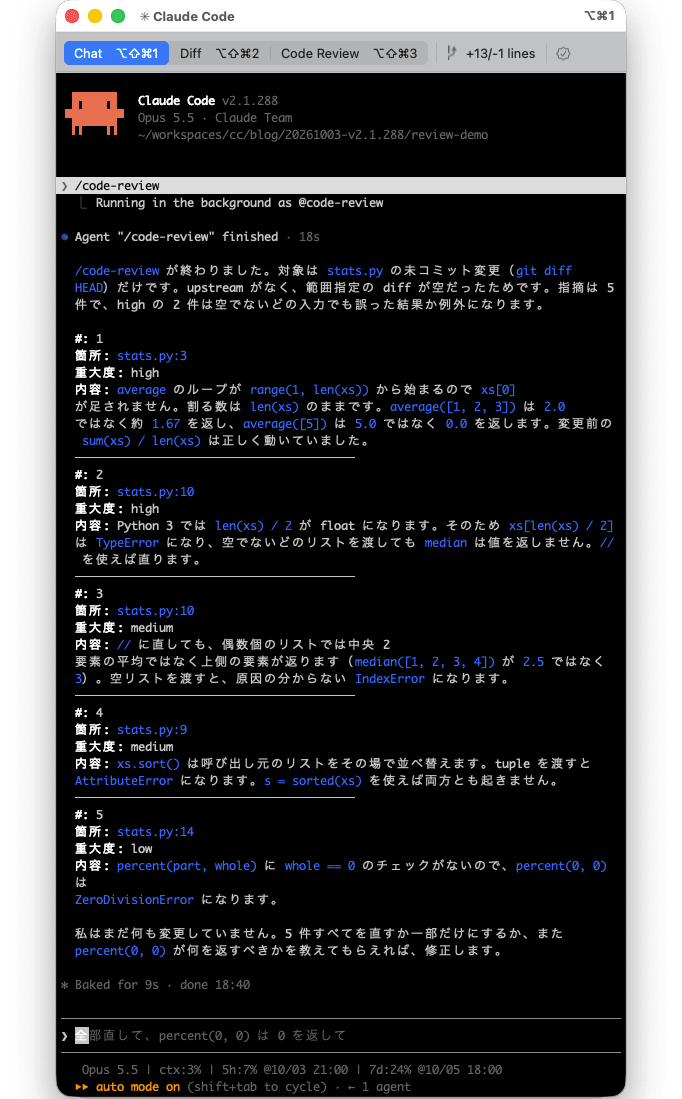
The review ran as a background agent @code-review and completed in 18 seconds. 5 findings were reported, with severity breakdown of 2 high, 2 medium, and 1 low.
Step 4: Review with --max-findings 1
/code-review --max-findings 1
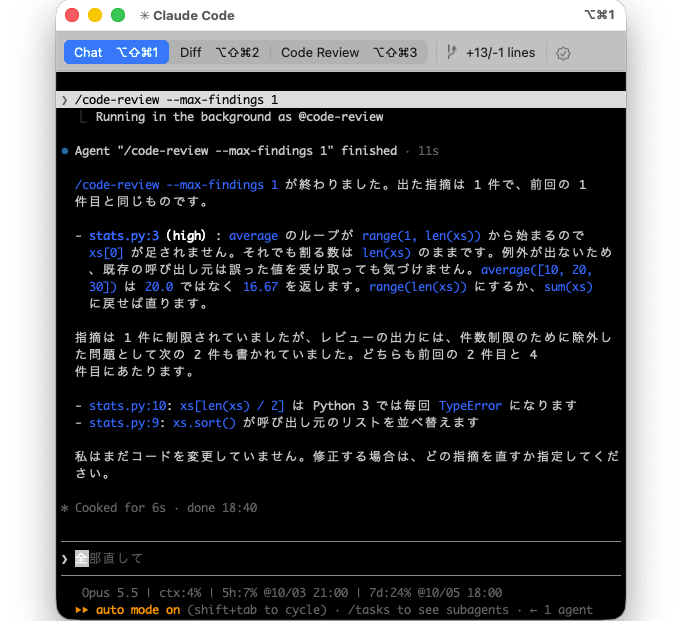
Only 1 finding was reported. The finding reported was the same as the first finding in Step 3: stats.py:3 (high), the loop issue in average.
According to Claude's explanation, the review output also listed the following 2 issues as excluded due to the findings limit. Both were findings reported in Step 3.
stats.py:10:xs[len(xs) / 2]causes aTypeError(2nd finding in Step 3)stats.py:9:xs.sort()sorts the caller's list (4th finding in Step 3)
Step 5: Run Again Without Flags
Run without flags to verify that the 1 from Step 4 has carried over.
/code-review
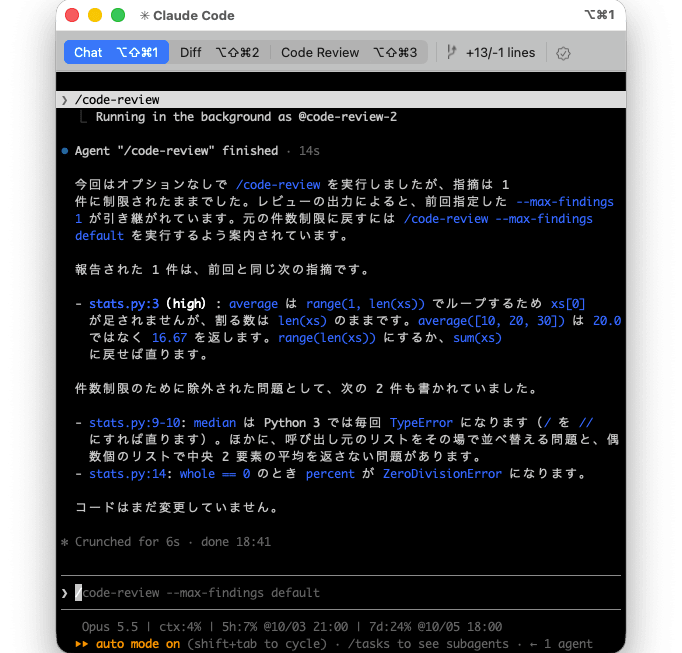
Even though it was run without flags, only 1 finding was reported. According to Claude's explanation, the review output indicated that --max-findings 1 specified in Step 4 had carried over, and it advised running /code-review --max-findings default to return to the original findings limit.
The 1 reported finding was the same stats.py:3 (high) finding as in Step 4. Two issues excluded due to the findings limit were also listed: stats.py:9-10 (TypeError in median, etc.) and stats.py:14 (ZeroDivisionError in percent).
Step 6: Restore the Normal Limit
/code-review --max-findings default
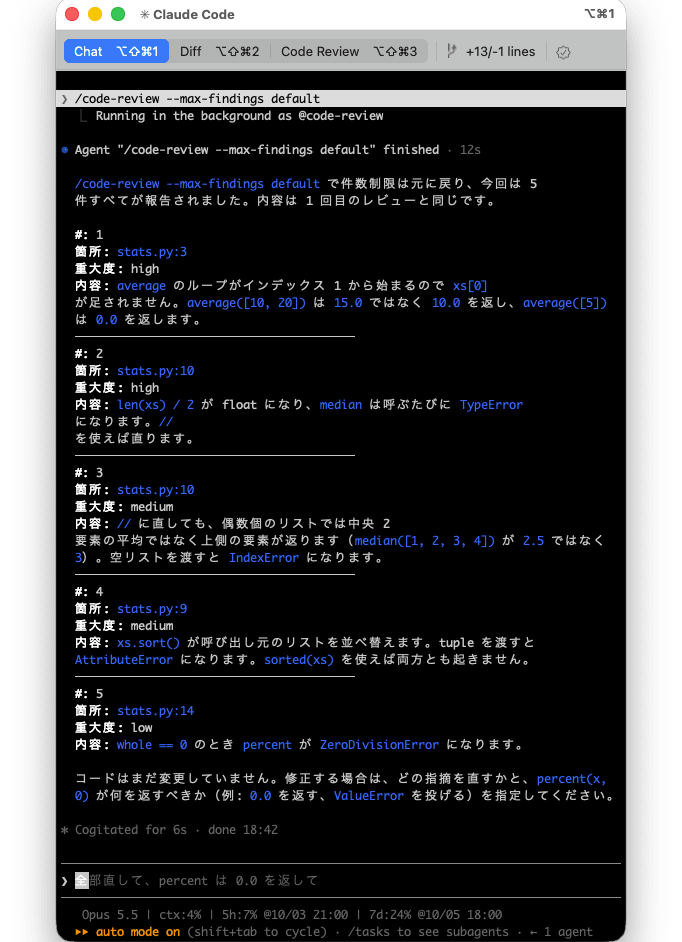
The findings limit returned to the normal limit, and all 5 findings were reported. The finding locations and severities were the same as in Step 3 (2 high, 2 medium, 1 low).
The following table summarizes the number of findings reported in Steps 3–6.
| Step | Command | Findings Reported |
|---|---|---|
| 3 | /code-review |
5 |
| 4 | /code-review --max-findings 1 |
1 |
| 5 | /code-review (no flag) |
1 (carries over 1 from Step 4) |
| 6 | /code-review --max-findings default |
5 |
The --max-findings 1 specification carried over to the next review run without flags (Step 5), and passing --max-findings default restored it. This matches the CHANGELOG description: "the choice is reused until you pass --max-findings default." However, since the findings in Steps 3 and 6 numbered 5 with this diff and it is unclear from the screen whether the normal limit was reached, the actual value of the normal limit itself could not be confirmed.
Note that the default appears to be that the normal limit is not a single fixed value, but varies by the combination of effort level and model.
It is now possible to receive more findings than the normal limit in a single review. I think this is an option worth trying for anyone using /code-review for pre-merge checks.
Closing
Several issues that were interrupting long tasks mid-way — such as mid-response timeouts, "Prompt is too long" failures, and missing context on resume — have been fixed together. I expect this will increase the frequency of long-running tasks completing successfully when assigned via -p or sub-agents.
In particular, if you are running Claude Code with -p or bypassPermissions mode, consider updating and giving it a try.
References
