![[Update] I Tried Running a SageMaker AI Processing Job from Claude Code Using the AWS AI/ML Skills in Agent Toolkit for AWS](https://devio2024-media.developers.io/image/upload/f_auto,q_auto,w_3840/f_auto,q_auto/v1790875157/eyecatch/zettwdjcftbeaqfmbezn.png)
[Update] I Tried Running a SageMaker AI Processing Job from Claude Code Using the AWS AI/ML Skills in Agent Toolkit for AWS

This page has been translated by machine translation. View original
I'm Ishikawa from the Cloud Business Division. The AWS AI/ML skill (aws-ai-ml) in the Agent Toolkit for AWS has become a core skill, and its coverage of Amazon SageMaker AI has expanded, so I actually used it from Claude Code to run a SageMaker AI Processing job.
It was announced that the AWS AI/ML skill has become a core skill of the Agent Toolkit for AWS. A coding agent can combine it with other skills in the Agent Toolkit for AWS (EC2, Bedrock, etc.) to carry out model selection, training, optimization, and deployment on SageMaker AI through natural-language requests.
The announcement explains that the Agent Toolkit for AWS has become the only supported integration point, replacing the previous AWS Labs skills and plugins. The skill is also preinstalled in SageMaker Studio JupyterLab and can be used from coding agents such as Kiro.
In addition, the areas of SageMaker AI that the skill supports have been expanded as follows.
- Inference optimization (optimizing the latency, throughput, and cost of deployed models)
- Model customization (fine-tuning from use case definition through training, evaluation, and deployment)
- Serverless training for both traditional machine learning and generative AI
- MLflow (experiment tracking and model lifecycle management)
- JumpStart model deployment and model recommendation
- Processing jobs (data preparation and ETL on managed compute)
There is no additional charge for the skill itself; you only pay for the AWS resources the agent uses.
In this article, with the aws-core plugin of the Agent Toolkit for AWS installed in Claude Code, I'll try the following three things.
- Update the plugin and check the version and structure of the
aws-ai-mlskill - Have it recommend a JumpStart model (no AWS resources are created)
- Have it run a preprocessing job using the newly added Processing jobs
The Agent Toolkit for AWS itself is introduced in the following article.
What is the AWS AI/ML skill (aws-ai-ml)?
The Agent Toolkit for AWS is a toolkit for AI coding agents to work on AWS. It consists of four parts: the AWS MCP Server, skills, plugins, and rule files. aws-ai-ml is the skill targeting SageMaker AI, and in Claude Code it is included in the aws-core plugin.
The entry point of the skill, SKILL.md, has a routing table that determines which reference folder to read for each type of request. The agent reads only the folders relevant to the request and works according to the procedures, scripts, and code templates written there. The version I installed this time (metadata.version: "5") had the following 15 folders.
| reference folder | Target requests |
|---|---|
| planning | Planning model customization or deployment, identifying the scope of work |
| use-case-specification | Requirements definition such as business problems and success criteria |
| model-selection | Selecting the base model (including resolving Hub model IDs) |
| finetuning-technique | Choosing among SFT / DPO / RLVR / RLAIF |
| dataset-evaluation | Checking the quality and format of training data |
| dataset-transformation | Converting the dataset format |
| finetuning | Generating fine-tuning code and starting training |
| training-jobs | Training with SageMaker Training jobs |
| processing-jobs | Preprocessing and ETL with SageMaker Processing jobs |
| model-evaluation | Evaluating and benchmarking trained models |
| model-deployment | Deployment to endpoints or Bedrock, inference optimization |
| sdk-getting-started | Preliminary checks of IAM roles, S3 buckets, and the SDK |
| directory-management | Managing project directories and artifacts |
| manage-mlflow | Creating, updating, and deleting SageMaker Managed MLflow Apps |
| endpoint-diagnostics | Diagnosing endpoint failures and latency |
SKILL.md also contains common rules, instructing you to set AWS_SDK_UA_APP_ID=AWSSkill-SageMaker before running the AWS CLI or scripts.
The documentation describes the following three ways to install it in Claude Code.
- Install the
aws-coreplugin (/plugin install aws-core@claude-plugins-official) - Install only
aws-ai-mlwith the Skills CLI (npx skills add aws/agent-toolkit-for-aws/skills/core-skills/aws-ai-ml --all --agent claude-code --copy) - Use
aws configure agent-toolkitin AWS CLI 2.35.0 or later to handle agent detection, skill installation, and AWS MCP Server configuration all at once
The source from which the skill is obtained differs depending on the installation method. The aws-core plugin from the agent-toolkit-for-aws marketplace that I used this time fetches the skill from the GitHub aws/agent-toolkit-for-aws repository. The AWS CLI aws agent-toolkit add-skill command fetches the skill from the AWS skills catalog. The skills catalog is provided only in us-east-1.
For this verification, I ran Claude Code in the following configuration.
Giving it a try
Prerequisites
- A SageMaker AI execution role (an existing role that allows
AmazonSageMakerFullAccessand S3 Get/Put/List) - Verification environment
- Region: ap-northeast-1 (only the
aws agent-toolkitcommand uses us-east-1) - Claude Code 2.1.296 (model: claude-opus-5-5)
aws-coreplugin 1.1.0 (agent-toolkit-for-awsmarketplace)- AWS CLI 2.37.9
- Python 3.12.11, SageMaker Python SDK 3.24.0 (venv created with uv)
- Region: ap-northeast-1 (only the
AWS account IDs included in command output are replaced with <アカウント ID>, and IAM role IDs with <ロール ID>.
To keep the agent's execution logs, I ran Claude Code headless (claude -p) in a verification directory demo. To exclude the influence of personal settings, I limited the loaded settings to the project's with --setting-sources project, and excluded the user's CLAUDE.md via claudeMdExcludes. I disabled the claude.ai connectors with the environment variable ENABLE_CLAUDEAI_MCP_SERVERS=false.
In demo/.claude/settings.json, only the aws-core plugin is enabled.
demo/.claude/settings.json
{
  "enabledPlugins": {
    "aws-core@agent-toolkit-for-aws": true
  },
  "env": {
    "AWS_REGION": "ap-northeast-1",
    "AWS_DEFAULT_REGION": "ap-northeast-1"
  }
}
I separated the permission rules into the file demo/headless-settings.json, passed with --settings. At first I wrote them in demo/.claude/settings.json, but when running claude -p a warning "this workspace has not been trusted" appeared and the permission rules were ignored, so I moved them here. With --permission-mode dontAsk, operations not on the allow list are denied without confirmation. For the AWS CLI, I allowed only read-type commands and the creation of Processing jobs, and denied IAM changes and the creation of endpoints, domains, and MLflow Apps. The following is the content at the end of the verification; I added rules along the way (the reasons for the additions are described in each step).
headless-settings.json
{
  "claudeMdExcludes": [
    "/Users/ishikawa/.claude/CLAUDE.md",
    "/Users/ishikawa/.claude/**"
  ],
  "permissions": {
    "allow": [
      "Skill",
      "Read",
      "Glob",
      "Grep",
      "Edit(./**)",
      "Bash(export AWS_SDK_UA_APP_ID=*)",
      "Bash(python -c:*)",
      "Bash(python:*)",
      "Bash(python3:*)",
      "Bash(ls:*)",
      "Bash(cat:*)",
      "Bash(aws sts get-caller-identity:*)",
      "Bash(aws sagemaker list-*)",
      "Bash(aws sagemaker describe-*)",
      "mcp__plugin_aws-core_aws-mcp__aws___search_documentation",
      "mcp__plugin_aws-core_aws-mcp__aws___read_documentation",
      "mcp__plugin_aws-core_aws-mcp__aws___retrieve_skill",
      "Bash(cd:*)",
      "Bash(rm -f -- /var/folders/:*)",
      "Bash(rm -f -- \"/var/folders/:*)",
      "Bash(rm -f /var/folders/:*)",
      "Bash(mkdir:*)",
      "Bash(aws iam get-*)",
      "Bash(aws iam list-*)",
      "Bash(aws iam simulate-principal-policy *)",
      "Bash(aws s3 ls *)",
      "Bash(aws s3api head-object *)",
      "Bash(aws s3api list-objects-v2 *)",
      "Bash(aws s3api get-bucket-location *)",
      "Bash(aws s3api get-bucket-tagging *)",
      "Bash(aws s3 cp s3://20261018-blog/*)",
      "Bash(aws logs get-log-events *)",
      "Bash(aws logs describe-log-streams *)",
      "Bash(aws logs filter-log-events *)",
      "Bash(aws logs tail *)",
      "Bash(aws service-quotas get-service-quota *)",
      "Bash(aws service-quotas list-service-quotas *)",
      "Bash(head:*)",
      "Bash(wc:*)",
      "Bash(aws s3 cp * s3://20261018-blog/code/*)",
      "Bash(aws sagemaker create-processing-job *)",
      "Bash(aws sagemaker stop-processing-job *)",
      "Bash(aws ecr describe-images *)",
      "Bash(echo:*)"
    ],
    "deny": [
      "mcp__plugin_aws-core_aws-mcp__aws___run_script",
      "Bash(aws sagemaker delete-*)",
      "Bash(aws s3 rm:*)",
      "Bash(aws s3 rb:*)",
      "Bash(aws iam create-*)",
      "Bash(aws iam delete-*)",
      "Bash(aws iam put-*)",
      "Bash(aws iam attach-*)",
      "Bash(aws iam detach-*)",
      "Bash(aws iam update-*)",
      "Bash(aws s3 mb *)",
      "Bash(aws sagemaker create-endpoint*)",
      "Bash(aws sagemaker create-model*)",
      "Bash(aws sagemaker create-domain*)",
      "Bash(aws sagemaker create-space*)",
      "Bash(aws sagemaker create-app*)",
      "Bash(aws sagemaker create-mlflow*)",
      "Bash(aws sagemaker create-training-job*)"
    ]
  }
}
For requests to the agent, I passed request files placed in demo/prompts/ to -p and ran them with a wrapper script. The commands shown in each step are the expanded form of what the script executed. The script sets the following environment variables before launching claude.
cd demo
export ENABLE_CLAUDEAI_MCP_SERVERS=false
export AWS_SDK_UA_APP_ID=AWSSkill-SageMaker

claude --setting-sources project --settings headless-settings.json
Update the plugin and check the version of aws-ai-ml
Because the contents of the aws-core plugin can differ even when the version is the same, I uninstalled the plugin and then installed it again.
% claude plugin uninstall aws-core@agent-toolkit-for-aws --json
{"command":"uninstall","outcome":"ok","plugin":"aws-core@agent-toolkit-for-aws","pluginId":"aws-core@agent-toolkit-for-aws","scope":"user","keptData":false,"message":"Successfully uninstalled plugin: aws-core (scope: user)"}
% claude plugin install aws-core@agent-toolkit-for-aws --json -y
{"command":"install","outcome":"ok","plugin":"aws-core@agent-toolkit-for-aws","pluginId":"aws-core@agent-toolkit-for-aws","scope":"user","message":"Successfully installed plugin: aws-core@agent-toolkit-for-aws (scope: user)"}
Confirm that the skill is loaded
Following the procedure in the official blog, I asked Claude Code which skills are available. The prompt was as follows.
どのようなスキルが利用可能ですか? aws-ai-ml が含まれるかどうかと、その説明を 3 行で教えてください。
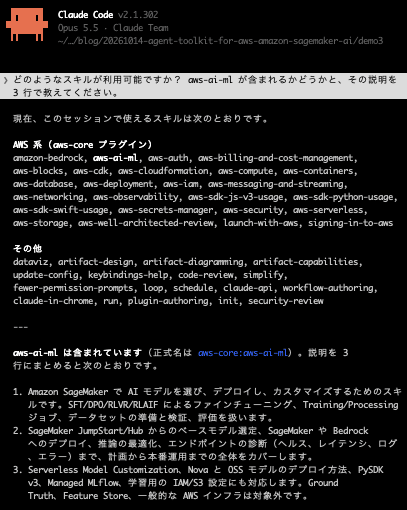
It was loaded as aws-core:aws-ai-ml, and its description includes Training / Processing jobs.
Have it recommend a JumpStart model
I asked it to choose a model to deploy without fine-tuning. I asked it not to create any AWS resources. The prompt was as follows.
SageMaker AI で、社内の日本語の問い合わせ文を要約する用途に使うモデルを選びたいです。ファインチューニングはせず、そのままリアルタイムエンドポイントへデプロイする前提です。リージョンは ap-northeast-1 です。今回はモデル候補の推薦までにして、エンドポイントなどの AWS リソースは作成しないでください。
I answered the following question.
⏺ User answered Claude's questions:
  ⎿  · モデルのサイズ・コスト感について希望はありますか?(ap-northeast-1 のリア
     ルタイムエンドポイントは常時課金のため、インスタンス費用に直結します) →
     小型・低コスト重視
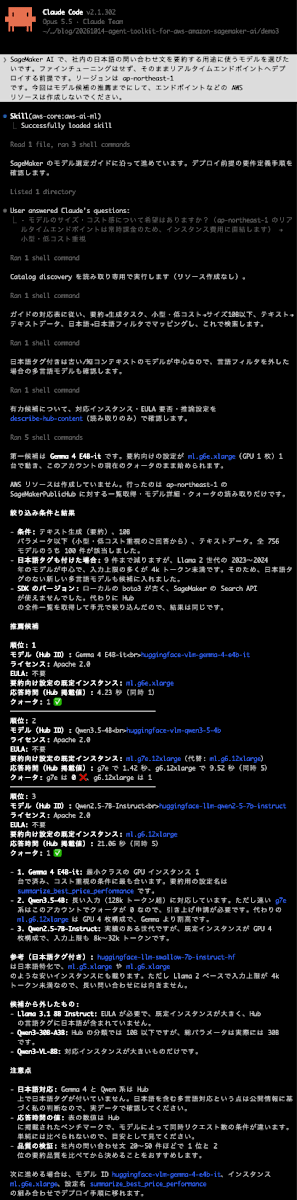
It selected a model for summarizing Japanese inquiries from SageMaker in ap-northeast-1, and finished up to the recommendation without creating AWS resources. The first candidate is a configuration running Gemma 4 E4B-it on ml.g6e.xlarge.
As noted at the end of the answer, the next step is to compare the summarization quality of the top two models using internal data. No AWS resources were created in this model recommendation.
Have it run a Processing job
As the preprocessing target, I created synthetic support ticket data (500 rows) with the following script. Missing values are included in channel, response_minutes, and satisfaction.
import csv, random
random.seed(20261014)
p="./demo/data/support_tickets.csv"
cats=["billing","technical","account","shipping"]; chans=["email","chat","phone"]; pri=["low","medium","high"]
with open(p,"w",newline="") as f:
    w=csv.writer(f); w.writerow(["ticket_id","category","channel","priority","response_minutes","message_length","satisfaction","resolved"])
    for i in range(1,501):
        c=random.choice(cats); ch=random.choice(chans); pr=random.choices(pri,[5,3,2])[0]
        rm=round(random.lognormvariate(3.2,0.8),1) if random.random()>0.08 else ""
        ml=int(random.gauss(600,250)); ml=max(ml,20)
        sat=random.randint(1,5) if random.random()>0.12 else ""
        res=1 if random.random()<(0.85 if pr!="high" else 0.65) else 0
        if random.random()<0.04: ch=""
        w.writerow([f"T{i:05d}",c,ch,pr,rm,ml,sat,res])
The first 5 lines are as follows.
% head -5 demo/data/support_tickets.csv
ticket_id,category,channel,priority,response_minutes,message_length,satisfaction,resolved
T00001,technical,phone,medium,29.6,408,5,1
T00002,shipping,chat,low,,837,3,0
T00003,shipping,chat,medium,339.7,548,1,0
T00004,account,chat,high,138.8,433,3,0
I uploaded this file as support_tickets.csv to the verification S3 bucket 20261018-blog. The bucket is tagged with run_id, owner, purpose, and ttl.
In this session, so that the agent could read the skill folder located outside the working directory, I added the skill folder with --add-dir (the result of not adding it is discussed in the considerations).
claude --setting-sources project --settings headless-settings.json --add-dir ~/.claude/plugins/cache/agent-toolkit-for-aws/aws-core/1.1.0/skills/aws-ai-ml
In a new session, I made the following request. The prompt was as follows.
s3://20261018-blog/input/support_tickets.csv(問い合わせチケットの CSV、500 行、欠損値あり)を scikit-learn で前処理する SageMaker Processing job を実行したいです。

前処理の内容:
- 欠損値の補完(数値列は中央値、カテゴリ列は最頻値)
- カテゴリ列の One-Hot エンコーディング、数値列の標準化
- resolved を目的変数として train/test を 8:2 に分割し、CSV で出力

条件:
- リージョン: ap-northeast-1
- 実行ロール: arn:aws:iam::<アカウント ID>:role/service-role/AmazonSageMaker-ExecutionRole-20230126T113346
- インスタンス: ml.m5.large を 1 台、最大実行時間 15 分
- 出力先: s3://20261018-blog/output/
- コードのアップロード先も s3://20261018-blog/ 配下にし、SageMaker のデフォルトバケットは作成しない
- ジョブにタグ run_id=20261018-blog, owner=blog, purpose=blog-verification を付与
- エンドポイント、IAM ロール、VPC、ドメイン、MLflow App は作成しない

まず計画を提示し、私が承認するまでジョブは起動しないでください。
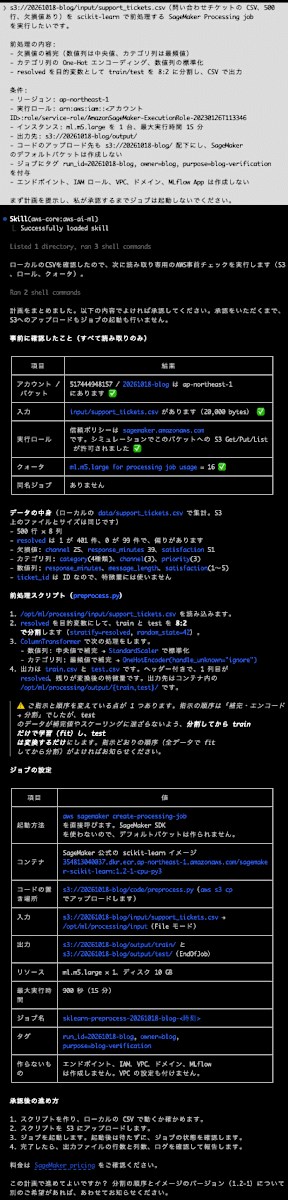
After loading aws-ai-ml, the agent read processing-jobs/overview.md, the code template code_templates/script_processing.py, and references/configuration.md, checked the columns using the local CSV, and then presented the following plan.
この計画で進めてください。
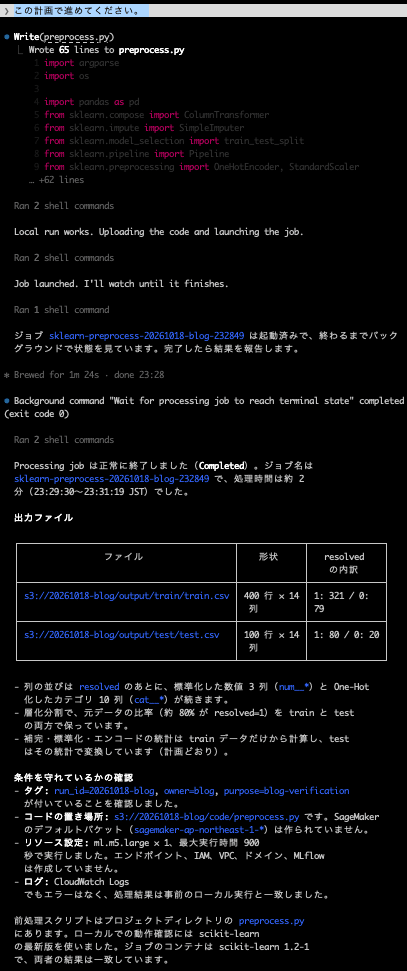
Considerations
Of the announced areas of support, this time I verified JumpStart model recommendation and Processing jobs. I did not verify the preinstallation in SageMaker Studio JupyterLab, nor deployment involving endpoints and inference optimization.
Updating the plugin may not bring in the new skill
In this environment, claude plugin update judged version 1.1.0 as "latest" as is, and aws-ai-ml stayed at version 3, which lacks the Training / Processing jobs procedures. Uninstalling and reinstalling brought it to version 5. If you have had aws-core installed for a while, it's a good idea to check the metadata.version in SKILL.md, or whether processing-jobs and training-jobs exist under references.
The skill's procedures determine the agent's order of checks and its output
In the model recommendation, the Hub script search (9 out of 752), the license and EULA checks, and the comparison of token limits per hosting configuration were all performed according to the model-selection procedure. In the Processing job, code generation following the template, pinning the image version, and checking permissions and quotas before launch were carried out, and it stopped to ask for approval before launching the job.
If the agent cannot read the skill's references, the skill's procedures are not used
For the Processing job, I had previously made the same request once without --add-dir. In that case, ls on the skill folder outside the working directory was denied in dontAsk mode, and the agent made its plan without reading the processing-jobs procedure document. That plan directly called boto3's create_processing_job, and it estimated the cost as a figure of "a few yen to a dozen or so yen," which differed from the content of the procedure document (use the SDK v3 template, and show the pricing as a link). When I redid it in a new session with the skill folder made readable via --add-dir, the plan was based on reading the procedure document and template, as described above. When using it in headless execution or in an environment with restricted permissions, you need to make the skill folder readable.
Differences in the documentation
As of October 14, 2026, the JupyterLab coding assistant page describes a procedure to update the skill from the AWSLabs repository (awslabs/agent-plugins). Also, the npx skills add path in the official blog is aws/agent-toolkit-for-aws/skills/aws-ai-ml, but the skill in the repository is located at skills/core-skills/aws-ai-ml, and the SageMaker AI installation procedure page also uses this path. When installing, please check the path in the SageMaker AI documentation.
I look forward to the following going forward.
- A plugin version update (so that
claude plugin updatebrings in the new skill) - The procedure on the JupyterLab page being updated to match the Agent Toolkit for AWS
Conclusion
I used the aws-ai-ml skill of the Agent Toolkit for AWS from Claude Code, and tried JumpStart model recommendation and running a Processing job. The agent selected instances from Hub searches and model configuration information, and for the Processing job it ran the job after going through template-based code and pre-launch checks. The cost of this Processing job was about $0.0045.
In the SKILL.md of aws-ai-ml, things such as invoking Bedrock foundation models and Bedrock Agents are outside the scope of this skill's verified procedures. The same aws-core plugin also includes the amazon-bedrock skill, so work spanning both services can be handled with a single plugin. If you already have aws-core installed, first check the skill's version, and if it is old, reinstall it and give it a try. I'd like to verify the preinstallation in SageMaker Studio JupyterLab and inference optimization again at a later time.
Related reading
