
Claude Code v2.1.308 to v2.1.309 Key Updates - Mandatory Trust Confirmation for ultrareview and sed -i Behavior Changes

This page has been translated by machine translation. View original
This is Ishikawa from the Cloud Business Division. Claude Code v2.1.308 ~ v2.1.309 (released October 22, 2026) has been released. This article focuses on notable updates and results from hands-on verification. Today, I tried out the behavioral change to sed -i.
The previous update article is here.
Update Summary
This covers 2 versions (v2.1.308, v2.1.309), both released on October 22, 2026. The CHANGELOG for v2.1.308 contains only the single line "Bug fixes and reliability improvements," with specific changes listed across 79 items in v2.1.309. In this article's classification, the 79 items in v2.1.309 consist of 48 fixes, 14 security, 8 improvements, 4 breaking changes, 3 developer experience, and 2 performance.
Security includes fixes related to sandboxing, Bash/PowerShell permission checks, and worktree isolation. There are no changes classified as new features in this article's classification (the addition of a VS Code log warning is classified under developer experience), and all 4 breaking changes are listed as "Changed" in the CHANGELOG. There are also changes to the VS Code extension, Cloud sessions, Claude Tag, and Code Review.
Notable Updates
claude ultrareview Now Requires Workspace Trust (v2.1.309)
claude ultrareview now requires workspace trust. When run from a terminal, it asks for confirmation; otherwise, it refuses to run. When running from scripts, pass --trust-workspace (which takes no value, with PR numbers or base branches placed before it) or set the environment variable CLAUDE_CODE_DISABLE_ULTRAREVIEW_TRUST_CHECK=1. The before/after usage is shown in "Breaking Changes/Deprecations."
For those calling claude ultrareview from outside a terminal—such as CI or scripts—execution will be refused after updating without the flag or environment variable, so it should be added before updating.
sed -i Now Runs as a Regular Bash Command and Is No Longer Subject to /rewind (v2.1.309)
sed -i is now executed as described through the normal Bash permission prompt, rather than being treated as a simulated preview of file editing. Like other Bash-based edits, it will no longer be restored by /rewind. The behavior in acceptEdits mode is verified in the later section "Trying Out the sed -i Behavior Change."
Those who have been using /rewind to revert changes made by Claude with sed -i will need to prepare an alternative rollback method, such as saving changes with git.
Fixed Issue Where Shell Startup Files Run Outside the Sandbox in Sandboxed Bash (v2.1.309)
A bug has been fixed where shell startup files were being executed outside the sandbox before each command in sandboxed Bash commands on macOS and Linux.
For those who have sandboxing enabled on macOS or Linux, this is a fix related to sandbox boundaries and feels like one to incorporate sooner rather than later.
Fixed Issue Where MCP Config File Passed via --mcp-config Could Be Modified (v2.1.309)
A bug has been fixed where sandboxed commands or auto-approved edits could modify the MCP configuration file passed via --mcp-config.
Those who pass an MCP config file via --mcp-config and run Claude Code with auto-approval or sandboxing should consider this a high-priority fix to update for.
Fixed Issue Where Split-Pane Teammates Did Not Inherit Leader's Tool Restrictions (v2.1.309)
A bug has been fixed where agent team members (teammates) running in split panes were not inheriting the tool deny rules and --tools rules specified on the leader's command line.
Those who use agent teams with --tools or deny rules specified at leader startup to restrict tools should be aware that prior to this update, those restrictions were not taking effect for split-pane teammates.
Fixed Issue Where Large Nested CLAUDE.md Caused Repeated Compaction (v2.1.309)
A bug has been fixed where sessions would repeatedly compact after reading files under a very large nested CLAUDE.md. Nested CLAUDE.md files that exceed the size limit will now only have their beginning portion read.
Those who have large CLAUDE.md files in subdirectories should place important instructions at the top of the file, as content beyond the limit will no longer be read.
Target Versions and Period
| Version | Release Date |
|---|---|
| v2.1.308 | October 22, 2026 |
| v2.1.309 | October 22, 2026 |
Security
- Fixed issue where startup files run outside the sandbox in sandboxed Bash: See Notable Updates (v2.1.309)
- Fixed issue where macOS sandbox denyWrite was not applied via symbolic links: When reaching a pattern's folder via a symbolic link, the
denyWriteglob pattern was not being applied to the actual location of the path (v2.1.309) - Fixed issue where MCP config file passed via --mcp-config could be modified: See Notable Updates (v2.1.309)
- Fixed issue where disabled MCP servers were reconnected: In print mode and SDK sessions, disabled MCP servers were being reconnected by subsequent permission prompts (v2.1.309)
- Fixed issue where Bash permission check trusted redirect variables that could fail: Bash permission checks were trusting variables set in commands that could fail to open their redirect targets (v2.1.309)
- Fixed issue where git compound commands with cd did not show permission prompts: Some compound commands that changed directory before running git did not show the usual permission prompt for
cdwhencdwas wrapped or prefixed (v2.1.309) - Fixed issue where Edit(path) deny rules did not block Bash redirects: In some commands involving subshells,
Edit(path)deny rules were not blocking Bash redirects to those paths (v2.1.309) - Fixed issue where worktree isolation session accepted commands it should have rejected: Some commands with locale prefixes and some arithmetic commands in zsh were being accepted by the isolation guard when they should have been rejected (v2.1.309)
- Fixed issue where write protection of the profile store was not applied via symbolic links: When reaching the settings directory via a symbolic link, write protection of the profile store was not being applied (v2.1.309)
- Fixed issue where split-pane teammates did not inherit leader's tool restrictions: See Notable Updates (v2.1.309)
- Fixed issues where PowerShell hooks did not block and failed open: Hooks running in PowerShell were not blocking even when the hook program exited with exit code 2. Also, on Windows when Git for Windows was not installed,
PreToolUse/PermissionRequesthooks with"shell": "powershell"specified were failing open (permitting on failure) (v2.1.309) - Fixed issue where sandbox write denial was released on Linux: When background commands continued running after the session ended, the sandbox write denial was being released (v2.1.309)
- Fixed issue where Windows PowerShell permission check auto-approved some Set-Location / cd commands: Some
Set-Location/cdcommands targeting the current directory with additional arguments were being auto-approved. They will now prompt for approval (v2.1.309)
Improvements
- When creating or reusing a worktree, git has been changed to not fetch objects on demand. This applies to normal clones and partial clones with Bash sandbox configured—such partial clones will now fetch objects in advance (v2.1.309).
- Display when disk space is insufficient has been improved. Bash commands interrupted due to a full disk now indicate this and show which folder to clear, and launching with a full temporary volume now displays an understandable message instead of a raw ENOSPC error (v2.1.309).
- The
/claude-apiskill now builds Managed Agents sub-agent teams withmultiagent_20261001with dynamic workflows enabled by default, rather thancoordinator(v2.1.309). - When a hooks module is too deeply nested to load, the relevant file is now shown in addition to the stack overflow message (v2.1.309).
- [VS Code] A log warning with remediation guidance has been added for when dictation or extension-own requests fail certificate validation (such as under a proxy performing TLS inspection) (v2.1.309).
- Additionally, the /claude-api skill (OpenTelemetry tracing suggestions, checking the latest documentation before answering unsupported), the bundled dataviz skill (APCA support), Self-hosted runner, and the Cloud sessions Changes pane have been improved and updated (v2.1.309).
Performance
- Many git commands that Claude Code runs for itself on Windows have been sped up. Also, on all platforms, errors from those commands will now be displayed in English even if git is configured to use another language (v2.1.309).
- [VS Code] Edit and Write in the chat panel have been sped up. The time waiting for new problems after each edit has been reduced from the previous 1–1.5 seconds to 0.75 seconds in most cases (v2.1.309).
Fixes (Major Items)
A selection of fixes related to stability and usability.
- Fixed issue where large nested CLAUDE.md caused repeated compaction: See Notable Updates (v2.1.309)
- Fixed issue where worktrees created by Claude Code did not ignore git replace refs: Worktrees and branch checkouts created by Claude Code will now ignore git replace refs. Claude Code's other git operations already ignored them (v2.1.309)
- Fixed issue where messages were lost in sessions hosted by Claude Desktop: Messages could be lost during connection updates (v2.1.309)
- Fixed issue where /rewind list showed "No code changes": This occurred on turns where checkpoint-tracked files were changed by
/code-review --fix, sub-agents, or shell commands (v2.1.309) - Fixed issue where skills inside --add-dir folders could not be called due to name conflicts: Skills that shared a name with an existing skill could not be called. They are now presented in the
<folder>:<name>format (v2.1.309) - Fixed issue where plugins and skills synced from claude.ai were deleted: They could be deleted after disk read errors, and could also be deleted mid-session (v2.1.309)
- Fixed issue where fine-grained tool streaming remained disabled on Amazon Bedrock: This occurred when the default
bedrock-runtime.<region>.amazonaws.comendpoint was set forANTHROPIC_BEDROCK_BASE_URL(v2.1.309) - Fixed issue where unrelated users were notified on GitHub: Claude was writing role names and placeholders in mention format in PRs, Issues, and comments (v2.1.309)
- Fixed issue where Command Line Developer Tools dialog opened on every launch on macOS: This occurred on Macs with neither Xcode nor Command Line Tools installed (v2.1.309)
- [VS Code] Fixed issue where Claude panel remained blank: This occurred after the editor cached an incomplete copy of a file. It will now recover automatically or display an explanation and instructions for fixing it (v2.1.309)
- [Claude Tag] Fixed issue where approved drafts were posted to DMs: Slack's Claude was incorrectly posting channel-approved drafts to users' DMs. Posts without a specified channel will now be rejected, and posts will go to the approved channel (v2.1.309)
- A quietly welcome fix: A bug was fixed where long tool output previews were being cut off in the middle of emoji, causing session transcripts to fail
jqparsing (v2.1.309). This is a quietly welcome fix for those who aggregate transcripts withjq. - Additionally, numerous minor bugs have been fixed in keyboard shortcuts (ctrl+enter, ctrl+o), /claude-api skill descriptions, the VS Code extension, Cloud sessions, Claude Tag, and more.
Breaking Changes / Deprecations
Of the 6 items listed as "Changed" in the CHANGELOG, this covers the 4 that affect existing operations or automation. No deprecations are noted.
sed -i No Longer Restored by /rewind (v2.1.309)
This is the change introduced in Notable Updates. Below are command examples (commands and filenames are examples). The sed syntax is GNU-style. For macOS's standard sed, use sed -i ''.
Before (up to v2.1.308):
# Example command run by Claude
sed -i 's/oldName/newName/g' src/config.ts
# → Treated as a simulated preview of file editing
# → Can be restored to pre-change content with /rewind
After (v2.1.309 and later):
# Same command
sed -i 's/oldName/newName/g' src/config.ts
# → Executed as described through the normal Bash permission prompt
# → Like other Bash-based edits, not restored by /rewind
claude ultrareview Now Requires Workspace Trust (v2.1.309)
This is the change introduced in Notable Updates. Based on the CHANGELOG description, the differences in behavior depending on how it is run are shown in the following diagram.
Below are configuration examples (PR numbers are examples). The claude ultrareview 1234 syntax follows the examples in the official documentation (Ultrareview), and the position of --trust-workspace was confirmed with claude ultrareview --help in v2.1.309.
Before (up to v2.1.308): Workspace trust was not required.
# Example of reviewing PR 1234 in a CI job
claude ultrareview 1234
After (v2.1.309 and later): Running from outside a terminal will reject the above command. Use one of the following instead.
# Option 1: Add --trust-workspace (place PR numbers or base branches before it)
claude ultrareview 1234 --trust-workspace

# Option 2: Disable the trust check with an environment variable
CLAUDE_CODE_DISABLE_ULTRAREVIEW_TRUST_CHECK=1 claude ultrareview 1234
Dangerous rm / rmdir Immediately Rejected in Bypass Permissions Mode (v2.1.309)
In Desktop app and VS Code bypass permissions mode, the confirmation prompt previously shown for dangerous rm / rmdir commands has been changed to immediately reject the command with a hint for rewriting it. The CHANGELOG notes that this allows unattended sessions to continue without stopping. The before/after behavior is as follows.
Before (up to v2.1.308):
Scope: Desktop app / VS Code bypass permissions mode
Dangerous rm / rmdir → Show confirmation prompt
After (v2.1.309 and later):
Scope: Desktop app / VS Code bypass permissions mode
Dangerous rm / rmdir → Immediately rejected with a hint for rewriting (unattended sessions continue without stopping)
The CHANGELOG does not specify which rm / rmdir commands are judged as dangerous.
Change in Handling of Sandbox-Excluded Commands When Sandbox Cannot Run (v2.1.309)
The handling of commands excluded from sandboxing in settings has changed for the state where sandboxing is enabled but cannot run. The before/after behavior is as follows.
Before (up to v2.1.308):
State: Sandbox enabled but cannot run
Scope: Commands excluded from sandbox in settings
→ No confirmation before writing; fallback execution without sandbox was performed (inferred)
After (v2.1.309 and later):
State: Sandbox enabled but cannot run
Scope: Commands excluded from sandbox in settings
→ Prompts for confirmation before writing to paths on the sandbox write allowlist
→ Fallback execution without sandbox is rejected
The behavior before the change is not explicitly stated in the CHANGELOG; this is inferred from the descriptions "changed to prompt for confirmation before writing" and "fallback execution without sandbox is rejected."
Trying Out the sed -i Behavior Change
In v2.1.309, sed -i is now executed through the normal Bash permission prompt rather than as a simulated file edit preview, and will no longer be restored by /rewind. Here, I verify how sed -i is handled in claude -p with acceptEdits mode, which auto-approves file edits. Since permission prompt display and /rewind behavior require interactive operation, only the steps are shown for those.
The verification steps and output were confirmed by running on Claude Code v2.1.309 on macOS. The behavior under the same conditions in v2.1.308 or earlier has not been verified.
What This Verification Confirms
- Whether
sed -iis treated as a Bash command requiring permission when requested inacceptEditsmode - The difference from
sedwithout-i - The permission prompt display in interactive mode and the fact that changes made by
sed -iare not restored by/rewind(confirmed manually)
Prerequisites
- According to the official documentation (Permission modes),
acceptEditsmode auto-approves not only file edits but also file operation commands such asmkdir,touch,rm,rmdir,mv,cp, andsed, provided the paths are within the working directory. - macOS's standard sed (BSD version) is used. BSD sed's
-itakes an extension as an argument immediately after, and passing a zero-length extension creates no backup. Therefore, for in-place editing only, usesed -i ''. The GNU-style syntaxsed -i 's/…/…/' filecauses an error with macOS's standard sed. claude -pis run 3 times, each with--max-turns 1to limit turns. User settings (~/.claude/settings.json) are not modified; the permission mode is specified via--permission-mode.
Step 1: Create Working Directory and Sample File
% mkdir -p ~/sed-i-handson
% cd ~/sed-i-handson
% printf 'oldName\n' > sample.txt
Step 2: Request sed -i Execution in acceptEdits Mode
Request execution of sed -i '' 's/oldName/newName/g' sample.txt with the Bash tool and save the result as JSON.
$ cat sample.txt
oldName
$ claude -p --max-turns 1 --permission-mode acceptEdits --output-format json "Please run the following command exactly once using the Bash tool. Do not use any other tools: sed -i '' 's/oldName/newName/g' sample.txt" > result.json
exit code: 1
$ jq '{subtype, is_error, num_turns, permission_denials}' result.json
{
  "subtype": "error_max_turns",
  "is_error": true,
  "num_turns": 2,
  "permission_denials": [
    {
      "tool_name": "Bash",
      "tool_use_id": "toolu_016BvVftey9xbct8coESk153",
      "tool_input": {
        "command": "sed -i '' 's/oldName/newName/g' sample.txt",
        "description": "Replace oldName with newName in sample.txt"
      }
    }
  ]
}
$ cat sample.txt
oldName
The meaning of each option is as follows.
| Option | Description |
|---|---|
-p |
Run once without opening an interactive screen |
--max-turns 1 |
Limit the number of agent turns to 1 |
--permission-mode acceptEdits |
Set permission mode to acceptEdits (mode where Claude Code auto-approves file edits) |
--output-format json |
Output the result as a single JSON |
The permission_denials recorded a tool_name of Bash with the requested sed -i command as-is. sample.txt remains as oldName. Even in acceptEdits mode, sed with -i was not auto-approved and was not executed. The subtype is error_max_turns and the exit code is 1. The errors in result.json records "Reached maximum number of turns (1)," and the official documentation (CLI reference) also states that --max-turns exits with an error when the limit is reached.
Step 3: Compare sed -i.bak and sed Without -i
To verify that the same result occurs with syntax that does not include the empty argument '', I also test with sed -i.bak.
$ claude -p --max-turns 1 --permission-mode acceptEdits --output-format json "Please run the following command exactly once using the Bash tool. Do not use any other tools: sed -i.bak 's/oldName/newName/g' sample.txt" > result.json
exit code: 1
$ jq '{subtype, is_error, num_turns, permission_denials}' result.json
{
  "subtype": "error_max_turns",
  "is_error": true,
  "num_turns": 2,
  "permission_denials": [
    {
      "tool_name": "Bash",
      "tool_use_id": "toolu_01MjAkdKqWVdC8pRcjrhoQ1M",
      "tool_input": {
        "command": "sed -i.bak 's/oldName/newName/g' sample.txt",
        "description": "Replace oldName with newName in sample.txt and create a backup"
      }
    }
  ]
}
$ ls
result.json
sample.txt
$ cat sample.txt
oldName
With sed -i.bak as well, it was recorded in permission_denials, sample.txt was not changed, and the backup sample.txt.bak was also not created.
Next, I test sed without -i. This command does not modify a file; it only outputs the substitution result to standard output. To verify the tool call and result, I use --output-format stream-json --verbose. The reason for using stream-json instead of --output-format json is that the --output-format json output (result.json) is a JSON summarizing only the final result and does not include tool calls (tool_use) and their results (tool_result). Checking the keys in the local result.json, I found permission_denials but not these two.
$ claude -p --max-turns 1 --permission-mode acceptEdits --output-format stream-json --verbose "Please run the following command exactly once using the Bash tool. Do not use any other tools: sed 's/oldName/newName/g' sample.txt" > stream.jsonl
exit code: 1
$ jq -c 'select(.type=="assistant" or .type=="user") | .message.content[]? | select(.type=="tool_use" or .type=="tool_result") | {type, name, command: .input.command, content, is_error}' stream.jsonl
{"type":"tool_use","name":"Bash","command":"sed 's/oldName/newName/g' sample.txt","content":null,"is_error":null}
{"type":"tool_result","name":null,"command":null,"content":"newName","is_error":false}
$ jq -c 'select(.type=="result") | {subtype, permission_denials}' stream.jsonl
{"subtype":"error_max_turns","permission_denials":[]}
$ cat sample.txt
oldName
sed without -i was executed without a permission prompt, and newName was returned as the tool result. permission_denials is empty.
Summary of Results
| Requested Command | permission_denials | sample.txt After Execution |
|---|---|---|
sed -i '' 's/oldName/newName/g' sample.txt |
Recorded as Bash (rejected) | Remains oldName |
sed -i.bak 's/oldName/newName/g' sample.txt |
Recorded as Bash (rejected) | Remains oldName (sample.txt.bak also not created) |
sed 's/oldName/newName/g' sample.txt |
Empty (executed, output newName) |
Remains oldName (because no -i) |
While the official documentation (Permission modes) lists sed among the commands auto-approved in acceptEdits mode, in this verification with v2.1.309, sed with -i was not auto-approved in either syntax and was recorded in permission_denials. How the documentation's description corresponds to this result has not been confirmed.
Step 4 (Manual): Confirm the Permission Prompt and /rewind
According to the official documentation (Checkpointing), once Claude edits a file with a file editing tool, subsequent changes made to that file by Bash commands are also restored by /rewind. On the other hand, files changed only by Bash commands are not tracked and remain as-is. Here, I use sample.txt, which has not been edited by Claude's file editing tool.
-
In
~/sed-i-handson, launchclaudewith Manual mode specified for the permission mode. Manual mode prompts for confirmation before most operations, including file edits and shell command execution. Since auto mode uses a classifier instead of permission prompts, specify Manual mode here even if your default permission mode is auto.manualis the value displayed as a--permission-modeoption inclaude --helpfor v2.1.309.% cd ~/sed-i-handson % claude --permission-mode manual -
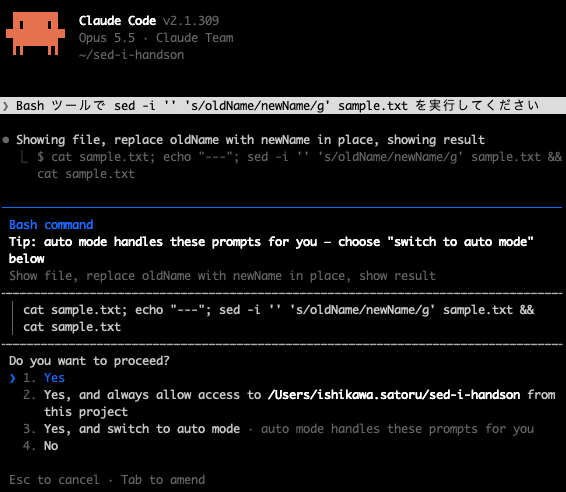
Send the following prompt.
Please run sed -i '' 's/oldName/newName/g' sample.txt with the Bash tool -
Confirm that the displayed confirmation is a regular Bash command permission prompt rather than a file edit preview, and approve it.
-
Enter
!cat sample.txtat the prompt and run it to confirm the content has changed tonewName. Input prefixed with!is executed as a shell command without going through Claude (official documentation Interactive mode, Shell mode).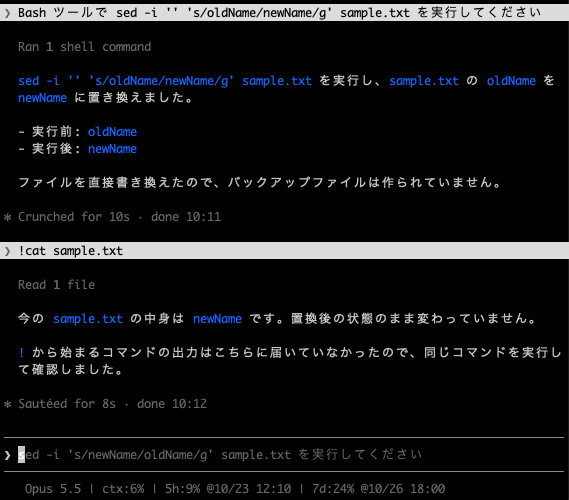
-
Run
/rewind, select the prompt from step 2, and check the available operations. According to the official documentation, the two operations that restore code (Restore code and conversation and Restore code) are only shown when there are tracked file changes at the selected point.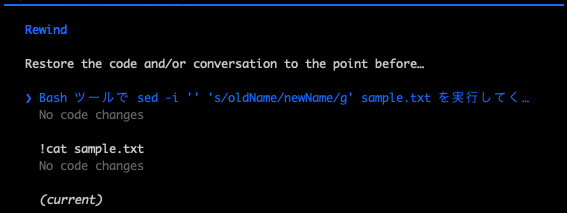
-
If the code restore operation is shown, select it and then run
!cat sample.txtto confirm the content remainsnewName(not restored). If it is not shown, close the menu with Never mind. Restore conversation is an operation that rewinds only the conversation while leaving files in their current state, so it is not selected for this verification.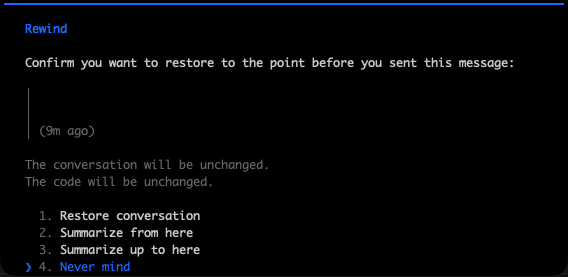
Since changes made by sed -i cannot be reverted with /rewind for files not edited by Claude's file editing tool, it feels safer to save changes with git before approving sed -i.
Closing Thoughts
v2.1.308–v2.1.309 feels like a release centered on fixes to sandboxing and permission checks, with no changes classified as new features. However, the behavioral changes to sed -i and claude ultrareview directly affect workflows that use /rewind for rollback or CI jobs, so they are changes worth checking before updating.
Those using claude ultrareview in CI or making active use of /rewind may want to review the breaking changes section, then update and give it a try.
References
