
Claude Code v2.1.311 Major Updates - ultrathink's Upgrade to xhigh Effort and Changes to DISABLE_COMPACT

This page has been translated by machine translation. View original
This is Ishikawa from the Cloud Business Division. Claude Code v2.1.311 (released October 26, 2026) has been released. This article introduces the notable updates.
The previous update article is here.
Update Summary
v2.1.311 includes 92 changes. In this article's classification, there are 56 fixes, 17 improvements, 10 developer experience changes, 5 new features, 3 performance improvements, and 1 breaking change.
No items are explicitly marked as breaking changes or deprecated in the CHANGELOG, but there is 1 change that causes existing settings to stop working, so it is covered in the "Breaking Changes and Deprecations" section. There are also changes to the VS Code extension, Cloud sessions, Claude Tag, and Code Review.
Notable Updates
ultrathink Now Runs That Turn with xhigh Effort
Using ultrathink in an interactive terminal now runs that turn with xhigh effort for Opus 5.5, Sonnet 5.5, Haiku 5.5, and Fable 5.1 via the Anthropic API. If entered while Claude is working, it raises the effort for the remainder of that turn. Additionally, the rainbow display for ultrathink now only appears in places where the keyword can raise the effort, and will no longer appear inside quotation marks or as part of file paths.
As of the time of writing (October 27, 2026), the official documentation (Model configuration) still states that ultrathink adds context instructions to the prompt and does not change the effort level sent to the API. The same page explains that the default effort for Opus 5.5, Sonnet 5.5, and Haiku 5.5 is medium, and that xhigh is the level that reasons more deeply using more tokens.
This change applies when using the above 4 models via the Anthropic API in an interactive terminal.
For those who habitually write ultrathink in their prompts, starting from v2.1.311 that turn will run at xhigh, so it would be good to be selective about when to include it.
DISABLE_COMPACT Now Only Works in the Direction of Disabling Compaction from Settings Files
DISABLE_COMPACT specified in settings files and mod's $.env.set can now only be used in the direction of disabling compaction. It can no longer be used to re-enable compaction. The differences from before the change are summarized in the "Breaking Changes and Deprecations" section.
Those who were using DISABLE_COMPACT in settings files or mod's $.env.set to re-enable compaction will find that this setting no longer works after the update, so they will need to review their configuration.
Model Configuration on Bedrock, Mantle, Vertex, and Foundry Now Loaded from downloads.claude.ai
Claude Code on Bedrock, Mantle, Vertex, and Foundry now loads model configuration from signed files on downloads.claude.ai. This loading can be disabled with the environment variable CLAUDE_CODE_MODEL_CATALOG=off.
The official documentation (Enterprise network configuration) as of the time of writing states that downloads.claude.ai is used for downloading plugin executables, native installers, native auto-updaters, and version checks for updates. It also states that when installing via npm, downloads.claude.ai is not required for installer and auto-updater purposes. The model configuration loading and CLAUDE_CODE_MODEL_CATALOG were not found when searching the full text of the official documentation (llms-full.txt) as of the time of writing. The behavior when unable to connect to downloads.claude.ai is also not described in the CHANGELOG.
Those using Claude Code on Bedrock or similar environments with restricted external communications should decide whether to allow communication to downloads.claude.ai or to set CLAUDE_CODE_MODEL_CATALOG=off.
Fixed Issue Where Standard Context Sessions Stop at Over 200K Tokens
An issue where sessions with standard context would display "Usage credits required for 1M context" and stop when requests exceed 200K tokens has been fixed. In v2.1.311, instead of stopping, it compacts the conversation and continues.
For those who continue long sessions with standard context, this is a fix worth updating to, as work will no longer stop when exceeding 200K tokens.
VS Code Extension Now Launches Sessions with DISABLE_TELEMETRY When Telemetry Setting is Off
While VS Code's telemetry setting is off, the VS Code extension now launches Claude Code sessions with DISABLE_TELEMETRY set. These sessions do not send usage metrics or error reports, and do not fetch feature flags.
The official documentation (Environment variables) explains that sessions that do not fetch feature flags cannot use certain features, with the advisor tool and /skill-doctor given as examples.
For those who have turned off VS Code's telemetry, transmission will stop without needing to configure Claude Code separately, but features that require feature flags will become unavailable, so it would be good to check whether your commonly used features are affected.
Update Details
New Features
--hold-idle-fileand--max-hold-minhave been added toself-hosted-runner. This allows idle sessions to be held while the host reports that processes left by the session are running.- Hints for the Explanatory output style have been added. They are displayed when asking Claude for explanations.
- [VS Code] Syntax highlighting has been added to code blocks in Claude's responses. Supports light, dark, and high contrast dark themes.
- [VS Code] A "Running UserPromptSubmit hooks" spinner display and screen reader announcement have been added for time-consuming UserPromptSubmit hooks.
- [Claude Tag] A Skills view has been added to Claude Tag analytics. You can see how often Claude runs each skill attached in Slack channels and which skills are unused. A link to Usage has been added to the admin settings.
Improvements and Developer Experience
- Turns using
ultrathinkare now executed with xhigh effort (see Notable Updates). - The source for loading model configuration on Bedrock, Mantle, Vertex, and Foundry has changed (see Notable Updates).
- [VS Code] Sessions are now launched with
DISABLE_TELEMETRYset while VS Code's telemetry setting is off (see Notable Updates). - Shell commands that have reached timeout now display the output so far and indicate that the command is running in the background.
- During compaction, if the model's response does not include a summary, it will now typically request a summary again before replacing the conversation.
- DEL, C1 control characters, and Unicode format characters within strings in
--output-format jsonandstream-jsonoutput are now escaped in\uXXXXformat. The values after parsing remain unchanged. - For models where the
[1m]suffix has no effect, the suffix and its label have been removed from model names and IDs. Specifications with the suffix are still accepted. The official documentation (Model configuration) explains thatsonnet[1m]has no effect on Sonnet 5.5 and Sonnet 5, andopus[1m]has no effect on Opus 4.7 and later. - "Connection dropped" errors occurring with the Anthropic API now indicate the first place to check. It guides users to check any proxy or gateway in use, or if none, a VPN or firewall. No changes for Bedrock, Vertex, or Foundry.
- Additionally, improvements and changes have been made to
/teleportwarnings, messages when background session processes exit, Artifact tool page and document selection, checking channel topics before posting in Slack connectors, screen reader mode announcements, effort specification in/code-review, startup warnings about permission rules,claude purgedisplay, and Claude Tag and Code Review behavior.
Performance
- For Pro and Max accounts, 2 network requests are now skipped for startups within 1 hour of the last check, reducing startup time.
- Startup time has been reduced for launches where the arguments consist only of an option and its value, such as
claude --model opus. - [VS Code] The session list sidebar now loads Web sessions when a Web tab is first opened, rather than at startup.
Fixes
- Fixed issue where standard context sessions stop at over 200K tokens: See Notable Updates
- Fixed freezing caused by long list items in CLAUDE.md: Very long list items in CLAUDE.md caused long freezes at startup or after reading or editing the file
- Fixed issue where subagents could not use tools from MCP servers that connected later: Subagents could not use tools from MCP servers that completed connection after the subagent was launched
- Fixed issue where outdated MEMORY.md and CLAUDE.md were referenced immediately after auto-compaction: If MEMORY.md or CLAUDE.md had been edited during a session, Claude would reference outdated content immediately after auto-compaction
- Fixed issue where SubagentStop hook was executed repeatedly: The
SubagentStophook was being executed approximately twice per minute for each running subagent, rather than once when a subagent ended - Fixed issue where long thinking was cut off on Vertex AI, Foundry, and Claude Platform on AWS: On Google Vertex AI, Microsoft Foundry, and Claude Platform on AWS, long hidden thinking was being treated as idle and cut off when the endpoint sent thinking progress updates
- Fixed issue where requests instructed not to retry were being retried: Claude Code was retrying requests that the API instructed not to retry, causing turns to stop for several minutes. In unattended retry mode (
CLAUDE_CODE_RETRY_WATCHDOG), it could stop indefinitely - [VS Code] Fixed issue where custom skills sent from the panel did not include files or selected lines: Custom skills and custom slash commands sent from the VS Code/JetBrains panel did not include the open file or selected lines that are normally included in regular messages (anthropics/claude-code#102799)
- A subtly satisfying fix: An issue where a lone backslash inside quotation marks or parentheses, such as
"\""or(\), would disappear from Claude's responses has been fixed. Since a missing character in an escaping explanation or code snippet changes the meaning, this feels like a subtly satisfying fix. - Additionally, numerous minor bugs have been fixed in
claude mcpcommands and/mcpdisplay, background sessions and Remote Control, agent teams,/rewindand/idedisplay,claude -p/SDK transcripts, Write/Edit, VS Code extension, Cloud sessions, and more.
Breaking Changes and Deprecations
No items are explicitly marked as breaking changes or deprecations in the CHANGELOG. Here we cover the DISABLE_COMPACT change that causes existing settings to stop working.
DISABLE_COMPACT in Settings Files Can No Longer Re-enable Compaction
DISABLE_COMPACT specified in settings files and mod's $.env.set can now only be used in the direction of disabling compaction, and can no longer be used to re-enable it. From the CHANGELOG's phrasing "not back on," it can be read that before this change, compaction could be re-enabled using values in settings files and similar (speculation).
The official documentation (Environment variables) explains that setting DISABLE_COMPACT to 1 disables both auto-compaction and manual /compact. It also explains that for variables that toggle on and off, 0, false, no, and off will turn them off. Additionally, the official documentation (Settings files and precedence) explains that local settings take priority over user settings.
The following is a configuration example. It assumes DISABLE_COMPACT is set to 1 in user settings, and 0 is specified in the project's local settings.
~/.claude/settings.json (user settings):
{
  "env": {
    "DISABLE_COMPACT": "1"
  }
}
.claude/settings.local.json (local settings):
{
  "env": {
    "DISABLE_COMPACT": "0"
  }
}
Before the change (~v2.1.310):
The local settings' "0" takes priority, and compaction is re-enabled (speculation)
After the change (v2.1.311~):
Since DISABLE_COMPACT in settings files only works in the direction of disabling compaction,
the local settings' "0" does not re-enable compaction, and it remains disabled
To re-enable compaction in this example, it appears that DISABLE_COMPACT would need to be removed from the user settings that are disabling it (speculation).
Additionally, an issue where teammates in agent teams would compact history even when DISABLE_COMPACT was set, and an issue where "Summarize from here" and "Summarize up to here" appeared in the rewind menu, have also been fixed.
Testing the xhigh Effort Behavior of ultrathink
In Claude Code v2.1.311, turns using ultrathink in an interactive terminal are now executed with xhigh effort. In this verification, we use the environment variable CLAUDE_EFFORT passed to Bash tool subprocesses to confirm the effort level for each turn.
The verification status is as follows.
- Step 7 (non-interactive mode) was executed on macOS with Claude Code v2.1.311 on October 27, 2026, and the results are included.
- Results for Steps 1–6 (interactive terminal) are not filled in. Please run them and record the results in the "Results Table."
What This Verification Checks
The v2.1.311 CHANGELOG describes the following changes.
- Using
ultrathinkin an interactive terminal runs that turn with xhigh effort for Opus 5.5, Sonnet 5.5, Haiku 5.5, and Fable 5.1 via the Anthropic API - Inputting
ultrathinkwhile Claude is working raises the remaining effort for that turn - The rainbow display for
ultrathinkonly appears where the keyword can raise effort. It does not appear inside quotation marks or as part of file paths
The official documentation (Model configuration) as of the time of writing (October 27, 2026) states that ultrathink adds in-context instructions and does not change the effort level sent to the API. This verification confirms whether effort actually changes in v2.1.311 on the following 4 points.
- Whether turns with
ultrathinkare executed at xhigh - Whether effort returns to the original level on the next turn
- Whether sending
ultrathinkduring work causes the rest of that turn to become xhigh - What happens in non-interactive mode (
claude -p)
How to Observe Effort Levels
According to the official documentation (Environment variables), Claude Code automatically sets the environment variable CLAUDE_EFFORT for Bash tool subprocesses. The value is the effort level at the time the subprocess was launched (low, medium, high, xhigh, max). Having Claude execute echo $CLAUDE_EFFORT allows you to check the effort level at that point.
The value is determined at subprocess launch time. Repeating echo within a single Bash call will not change the value partway through. For Step 6, which checks for changes during a turn, the Bash calls are split and executed separately.
Prerequisites
| Item | Condition | Step to Verify |
|---|---|---|
| Claude Code | v2.1.311 or later | Step 1 |
| Connection | Connected directly to the Anthropic API without going through Bedrock, Vertex, Foundry, etc. | Step 1 |
| Model | One of Opus 5.5, Sonnet 5.5, Haiku 5.5, Fable 5.1. This verification uses Opus 5.5 | Step 2 |
| Execution mode | Interactive terminal (except Step 7) | — |
| Effort fixed | Environment variable CLAUDE_CODE_EFFORT_LEVEL is not set |
Step 1 |
CLAUDE_CODE_EFFORT_LEVEL is described in the official documentation as taking priority over --effort and /effort. If set, it prevents setting effort to medium in Step 2, so remove it for the duration of the verification.
The official documentation explains that you can set an effort ceiling with your organization or personal settings (maxEffortLevel). The behavior of ultrathink when the ceiling is lower than xhigh is not described in the CHANGELOG, so this is tested in an environment without a ceiling set.
The docs explain that xhigh is the level that reasons more deeply using more tokens. The requests in this verification are limited to simply running a short echo.
Step 1: Verify the Environment
Run the following 2 commands in the terminal.
- The first command should display a version of
2.1.311or later - The second command should display nothing
$ claude --version
$ env | grep -E '^(CLAUDE_CODE_USE_(BEDROCK|VERTEX|FOUNDRY|ANTHROPIC_AWS)|CLAUDE_CODE_EFFORT_LEVEL|ANTHROPIC_BASE_URL)='
2.1.311 (Claude Code)
If the second command displays CLAUDE_CODE_USE_BEDROCK or similar, you are not directly connected to the Anthropic API. If ANTHROPIC_BASE_URL is displayed, you are going through a gateway or similar. Since the handling of gateway routing is not described in the CHANGELOG, this verification uses a direct connection.
Step 2: Start in the Working Directory with Effort Set to medium
$ mkdir -p ~/handson-ultrathink && cd ~/handson-ultrathink
$ claude --model opus --effort medium
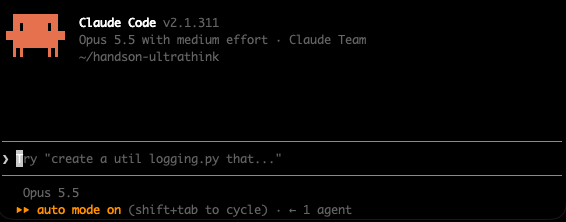
In the session header, "with medium effort" is displayed next to the model name.
--model opusspecifies using the latest Opus. In the author's environment, this becameclaude-opus-5-5as shown in the Step 7 log.--effortis a flag that sets effort for that session only. Saved settings are not changed.- Entering a level after
/effort, such as/effort medium, saves that level as the model's default. Use--effortif you do not want to save it. - When opening a folder for the first time, you may be asked whether to trust it. Confirm it is your working directory before trusting it.
Step 3: Confirm the Baseline Value Without ultrathink
Send the following request. If asked to allow Bash execution, allow it.
Run echo $CLAUDE_EFFORT in Bash and answer with only the output
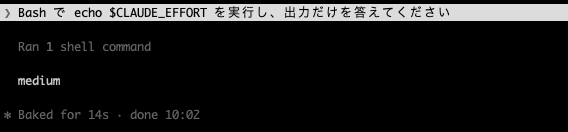
It was confirmed that the output is medium.
Step 4: Send with ultrathink
Send the same request with ultrathink added to the beginning.
ultrathink Run echo $CLAUDE_EFFORT in Bash and answer with only the output
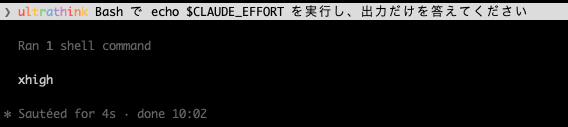
The rainbow display appeared for ultrathink in the input field, and it was confirmed that the output is xhigh.
If you surround ultrathink in quotation marks or write it as part of a file path, the rainbow display will not appear. If the display does not appear, rewrite it as a standalone word outside of quotation marks.
Step 5: Confirm It Returns to the Original on the Next Turn
Send the same request as Step 3, without ultrathink.
Run echo $CLAUDE_EFFORT in Bash and answer with only the output
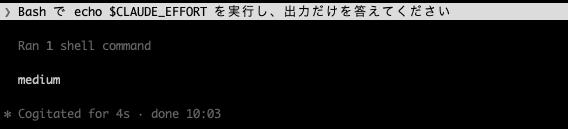
It was confirmed that the output returns to medium.
Note that the CHANGELOG states that xhigh applies only to "that turn" where ultrathink is used. The docs also explain that ultrathink does not change the session's effort setting.
Step 6: Send ultrathink During Work
According to the official documentation (Interactive mode), messages entered and submitted with Enter while Claude is executing a tool are queued. Queued messages are passed to Claude within the same turn after the current tool call finishes. Using this mechanism, we send ultrathink mid-turn.
The green area in the diagram is the range expected to become xhigh.
-
Send the following request.
Please run the following 3 commands in order, each as a separate Bash call. Check the output of the previous command before running the next one. 1. echo "1st: $CLAUDE_EFFORT" 2. echo "2nd: $CLAUDE_EFFORT" 3. echo "3rd: $CLAUDE_EFFORT" Finally, list all 3 outputs as-is. -
Immediately after sending, type the following message and press
Enter. Since sending onlyultrathinkmay cause Claude to reply to the word itself, additional instructions are included.ultrathink Please continue with the remaining commands
The execution results are as follows.
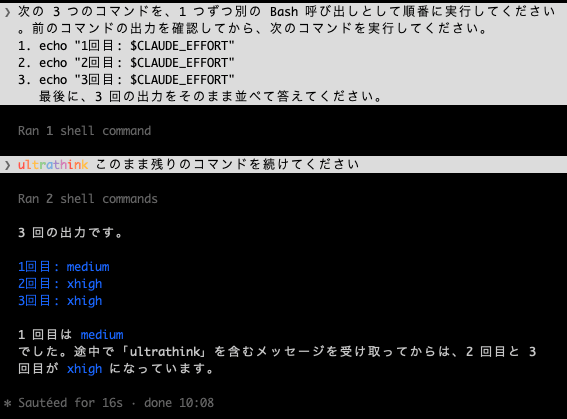
It was confirmed that the output becomes xhigh for commands after the queued message was passed to Claude, while the output of commands before that remains medium.
Which command's value changes first may vary depending on the timing of when the message was sent. If all 3 show medium, the message may have arrived after the turn ended.
Step 7: Compare with Non-interactive Mode
The CHANGELOG states that this change targets interactive terminals. We also record the result when ultrathink is used in non-interactive mode (claude -p) for comparison.
claude -p 'ultrathink Run echo $CLAUDE_EFFORT in Bash and answer with only the output' --model opus --effort medium --max-turns 3 --allowedTools 'Bash(echo *)'
There are 3 points to note when writing the command.
-
Enclose the prompt in single quotes. Using double quotes will cause
$CLAUDE_EFFORTto be expanded by the local shell before being passed to Claude Code. -
Place the prompt immediately after
-p.--allowedToolsis an option that accepts multiple values. Placing the prompt after--allowedToolsresulted in the following error in the author's environment.Error: Input must be provided either through stdin or as a prompt argument when using --print -
--allowedTools 'Bash(echo *)'allows commands starting withechoto be executed without confirmation.--max-turns 3is a value with margin for the number of turns needed for Bash execution and the reply.
Execution Results in the Author's Environment
The verification environment is as follows.
- macOS, Claude Code v2.1.311
CLAUDE_CODE_USE_BEDROCK,CLAUDE_CODE_USE_VERTEX,CLAUDE_CODE_USE_FOUNDRY,CLAUDE_CODE_USE_ANTHROPIC_AWS,ANTHROPIC_BASE_URL, andCLAUDE_CODE_EFFORT_LEVELare all unset
Results of running without ultrathink and with ultrathink.
% claude -p 'Run echo $CLAUDE_EFFORT in Bash and answer with only the output' --model opus --effort medium --max-turns 3 --allowedTools 'Bash(echo *)'
medium

% claude -p 'ultrathink Run echo $CLAUDE_EFFORT in Bash and answer with only the output' --model opus --effort medium --max-turns 3 --allowedTools 'Bash(echo *)'
medium
This output is the text Claude answered. To verify the actual Bash tool output and model, it was run with --output-format stream-json --verbose and extracted with jq.
% claude -p 'ultrathink Run echo $CLAUDE_EFFORT in Bash and answer with only the output' --model opus --effort medium --max-turns 3 --allowedTools 'Bash(echo *)' --output-format stream-json --verbose \
  | jq -r 'if .type=="system" and .subtype=="init" then "model: \(.model) / version: \(.claude_code_version)" elif .type=="user" then (.message.content[]? | select(.type=="tool_result") | "tool_result: \(.content | if type=="string" then . else (map(.text? // "") | join("")) end)") else empty end'
model: claude-opus-5-5 / version: 2.1.311
tool_result: medium
In non-interactive mode, even with ultrathink, the Bash tool's CLAUDE_EFFORT remained medium. This is consistent with the CHANGELOG stating that the target is interactive terminals.
Results Table
The actual outputs for each input are as follows.
| Step | Input | Actual Output |
|---|---|---|
| 3 | Without ultrathink |
medium |
| 4 | With ultrathink |
xhigh |
| 5 | Without ultrathink (turn after Step 4) |
medium |
| 6 | Send ultrathink during work |
1st medium, 2nd and 3rd xhigh |
| 7 | With ultrathink in claude -p |
medium (author's environment) |
It is worth thinking of this as being able to pinpoint the effort change to xhigh for individual turns or even within a turn.
Closing
v2.1.311 feels like a release centered on ultrathink now actually raising effort to xhigh, and the change in how DISABLE_COMPACT is handled. There are 56 fixes, a large number, including fixes around compaction such as the issue where work stops when the 1M context credit is required.
For those using ultrathink or specifying DISABLE_COMPACT in settings files, we recommend reviewing the Notable Updates and "Breaking Changes and Deprecations" sections before updating and giving it a try.
References
