![[Update] Trying Out Amazon Redshift Automatic Cross-Region Backup with Redshift Serverless](https://devio2024-media.developers.io/image/upload/f_auto,q_auto,w_3840/f_auto,q_auto/v1790870385/eyecatch/y1ipevknntjfjxlyd7ow.png)
[Update] Trying Out Amazon Redshift Automatic Cross-Region Backup with Redshift Serverless

This page has been translated by machine translation. View original
I'm Ishikawa from the Cloud Business Division. Amazon Redshift has announced automated cross-region backups, which copy the latest snapshot to another region without manual operation, so I tried it out with Amazon Redshift Serverless.
Amazon Redshift has announced automated cross-region snapshot copy (hands-off automated cross-region backups). You can automatically back up an Amazon Redshift provisioned cluster or Serverless workgroup to a region of your choice.
This feature always copies the latest snapshot to the destination region without manual operation. Because it copies the latest snapshot available in the system, you don't need to wait for the next snapshot to be created, and it operates independently of the local cluster's snapshot schedule. It is available in all commercial regions and the AWS GovCloud (US) regions.
On the other hand, as of the writing of this article (October 31, 2026), the AWS CLI CHANGELOG (up to 2.39.3) showed no API changes related to Redshift snapshot copy. The Redshift Serverless create-snapshot-copy-configuration takes a single destination region via --destination-region. The official documentation also states "only one destination region at a time." So in this article, I verified on a real environment how the statements in the announcement actually behave.
What are Amazon Redshift automated cross-region backups?
Amazon Redshift cross-region backup is a feature that automatically copies backups created in the source region to a specified destination region. Because you can restore a new cluster or workgroup from a backup in the destination region, it serves as a recovery method when a failure occurs in the source region.
In Redshift Serverless, there are two types of backups: snapshots that you create manually, and recovery points that are created automatically. Recovery points are created every 30 minutes or every 5 GB of data change per node, and are retained for 24 hours. When you configure cross-region backup, both snapshots and recovery points are copied to the destination region.
The specifications of Redshift Serverless cross-region backup described in the documentation are as follows.
| Item | Details |
|---|---|
| Destination region | One at a time |
| Snapshot retention period at destination | Indefinite by default. If specified, 1 to 3653 days |
| Recovery point retention period | 1 day (cannot be changed) |
| Encryption | Default is an AWS owned key (AWS_OWNED_KMS_KEY). If you choose a customer managed key, Amazon Redshift Serverless automatically creates a grant (KMS grant) that permits use of that key in the destination region |
| Required IAM permissions | redshift-serverless:CreateSnapshotCopyConfiguration / UpdateSnapshotCopyConfiguration / ListSnapshotCopyConfigurations / DeleteSnapshotCopyConfiguration (kms:CreateGrant and kms:DescribeKey are also required when using a customer managed key) |
The documentation for provisioned clusters explains that when you enable cross-region copy, "newly created manual and automated snapshots" are copied, and the names of copied snapshots are prefixed with copy:. The behavior described in this announcement, "copying the latest snapshot without waiting for the next snapshot," differs from this explanation that "newly created snapshots are copied."
Trying it out
Prerequisites
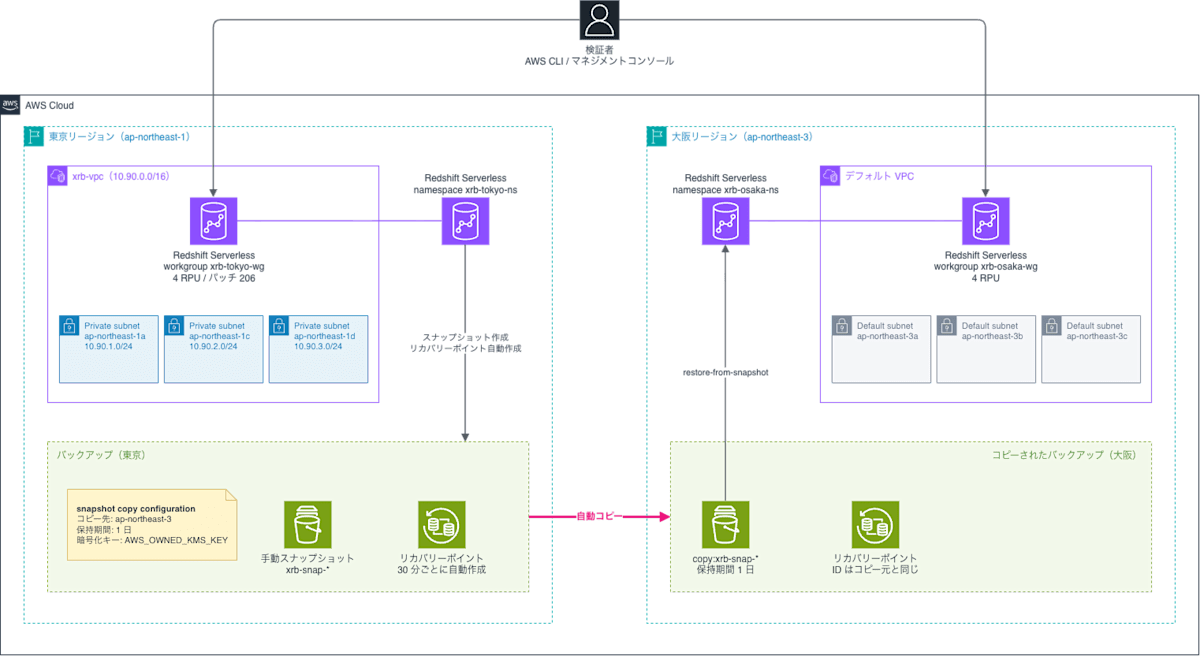
- Source region: Tokyo (ap-northeast-1), destination region: Osaka (ap-northeast-3)
- Amazon Redshift Serverless: base capacity 4 RPU, patch version 206, workgroup version 1.0.520420
- In Tokyo, I used a VPC created for this verification (subnets in 3 AZs); in Osaka, I used the default VPC
This article verifies only Redshift Serverless. Provisioned clusters were not verified.
System configuration of the verification environment
What to verify
Based on the differences between the announcement and the documentation, I will verify the following four points.
| No. | What to verify | Description in announcement/documentation |
|---|---|---|
| 1 | Whether a snapshot created before enabling is copied without waiting for the next snapshot | Announcement: copies the latest snapshot |
| 2 | Whether only the latest one or all existing snapshots are copied upon enabling | Announcement: the most recent snapshot |
| 3 | Whether multiple destination regions can be configured | Announcement: region(s); documentation: one at a time |
| 4 | Snapshot names at the destination, copying of recovery points, and restore results | Announcement: copy prefix, restore to a new workgroup |
Creating a Serverless environment for verification
I create a namespace and workgroup for verification in the Tokyo region.
% aws redshift-serverless create-namespace \
  --region ap-northeast-1 \
  --namespace-name xrb-tokyo-ns \
  --db-name dev \
  --query 'namespace.{name:namespaceName,status:status,kmsKeyId:kmsKeyId,creationDate:creationDate}' \
  --output json
{
    "name": "xrb-tokyo-ns",
    "status": "AVAILABLE",
    "kmsKeyId": "AWS_OWNED_KMS_KEY",
    "creationDate": "2026-10-31T06:03:16.103000+00:00"
}

% aws redshift-serverless create-workgroup \
  --region ap-northeast-1 \
  --workgroup-name xrb-tokyo-wg \
  --namespace-name xrb-tokyo-ns \
  --base-capacity 4 \
  --subnet-ids $SUBNET_IDS \
  --security-group-ids $SECURITY_GROUP_ID \
  --no-publicly-accessible \
  --query 'workgroup.{name:workgroupName,status:status,baseCapacity:baseCapacity}' \
  --output json
{
    "name": "xrb-tokyo-wg",
    "status": "CREATING",
    "baseCapacity": 4
}
I confirm that the workgroup has become available.
% aws redshift-serverless get-workgroup \
  --region ap-northeast-1 \
  --workgroup-name xrb-tokyo-wg \
  --query 'workgroup.{name:workgroupName,namespace:namespaceName,status:status,baseCapacity:baseCapacity,patchVersion:patchVersion,workgroupVersion:workgroupVersion}' \
  --output table
--------------------------------------
|            GetWorkgroup            |
+-------------------+----------------+
|  baseCapacity     |  4             |
|  name             |  xrb-tokyo-wg  |
|  namespace        |  xrb-tokyo-ns  |
|  patchVersion     |  206           |
|  status           |  AVAILABLE     |
|  workgroupVersion |  1.0.520420    |
+-------------------+----------------+
Creating a table and loading data
So that I can compare the data after restoring, I created a table and inserted 3 rows. The note column records when each row was inserted.
CREATE TABLE public.backup_test (id INT, note VARCHAR(100), inserted_at TIMESTAMP DEFAULT GETDATE());

INSERT INTO public.backup_test (id, note) VALUES (1, 'before enable'), (2, 'before enable'), (3, 'before enable');

SELECT id, note, inserted_at FROM public.backup_test ORDER BY id;
| id | note | inserted_at |
|---|---|---|
| 1 | before enable | 2026-10-31 06:04:44 |
| 2 | before enable | 2026-10-31 06:04:44 |
| 3 | before enable | 2026-10-31 06:04:44 |
Creating a manual snapshot before enabling
Before enabling cross-region backup, I create a manual snapshot xrb-snap-before-enable.
% aws redshift-serverless create-snapshot \
  --region ap-northeast-1 \
  --namespace-name xrb-tokyo-ns \
  --snapshot-name xrb-snap-before-enable \
  --retention-period 1

% aws redshift-serverless list-snapshots \
  --region ap-northeast-1 \
  --namespace-name xrb-tokyo-ns \
  --query 'snapshots[].{name:snapshotName,status:status,createTime:snapshotCreateTime,sizeMB:totalBackupSizeInMegaBytes}' \
  --output table
----------------------------------------------------
|                   ListSnapshots                  |
+-------------+------------------------------------+
|  createTime |  2026-10-31T06:05:05.826000+00:00  |
|  name       |  xrb-snap-before-enable            |
|  sizeMB     |  104.0                             |
|  status     |  AVAILABLE                         |
+-------------+------------------------------------+
At this point, there are no snapshots or recovery points in the Osaka region.
% aws redshift-serverless list-snapshots --region ap-northeast-3 --output json
{
    "snapshots": []
}

% aws redshift-serverless list-recovery-points --region ap-northeast-3 --output json
{
    "recoveryPoints": []
}
Checking the settings screen in the Management Console
Before configuring via the CLI, I checked the cross-region backup settings screen in the Management Console. Open it from [Edit] under [Backup details] on the [Data backup] tab of the namespace.
When you select [Yes] for [Copy backups], the destination AWS Region, recovery point retention period, snapshot retention period, and encryption settings are displayed. The recovery point retention period is fixed at 1 day and cannot be changed. The default snapshot retention period is [Indefinite].
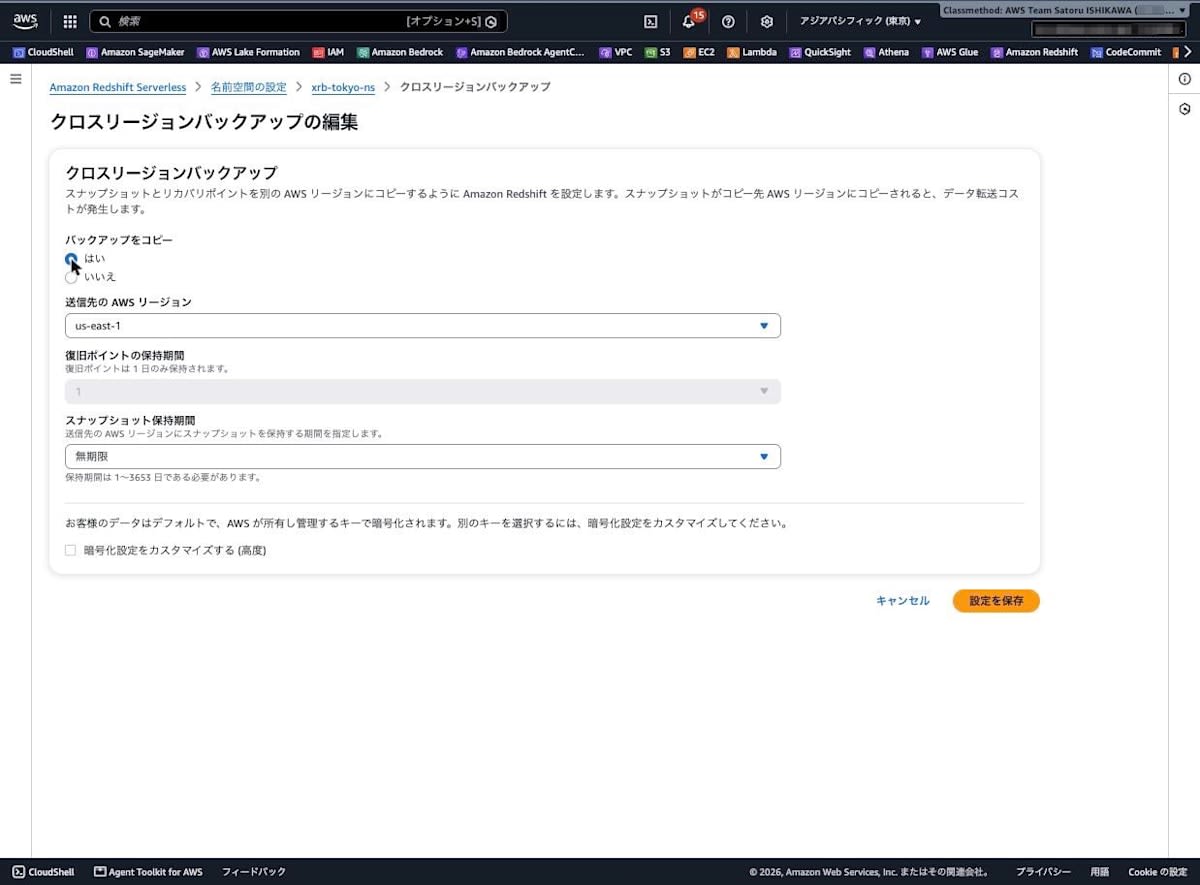
The destination AWS Region dropdown is single-select, and there was no UI for choosing multiple regions.
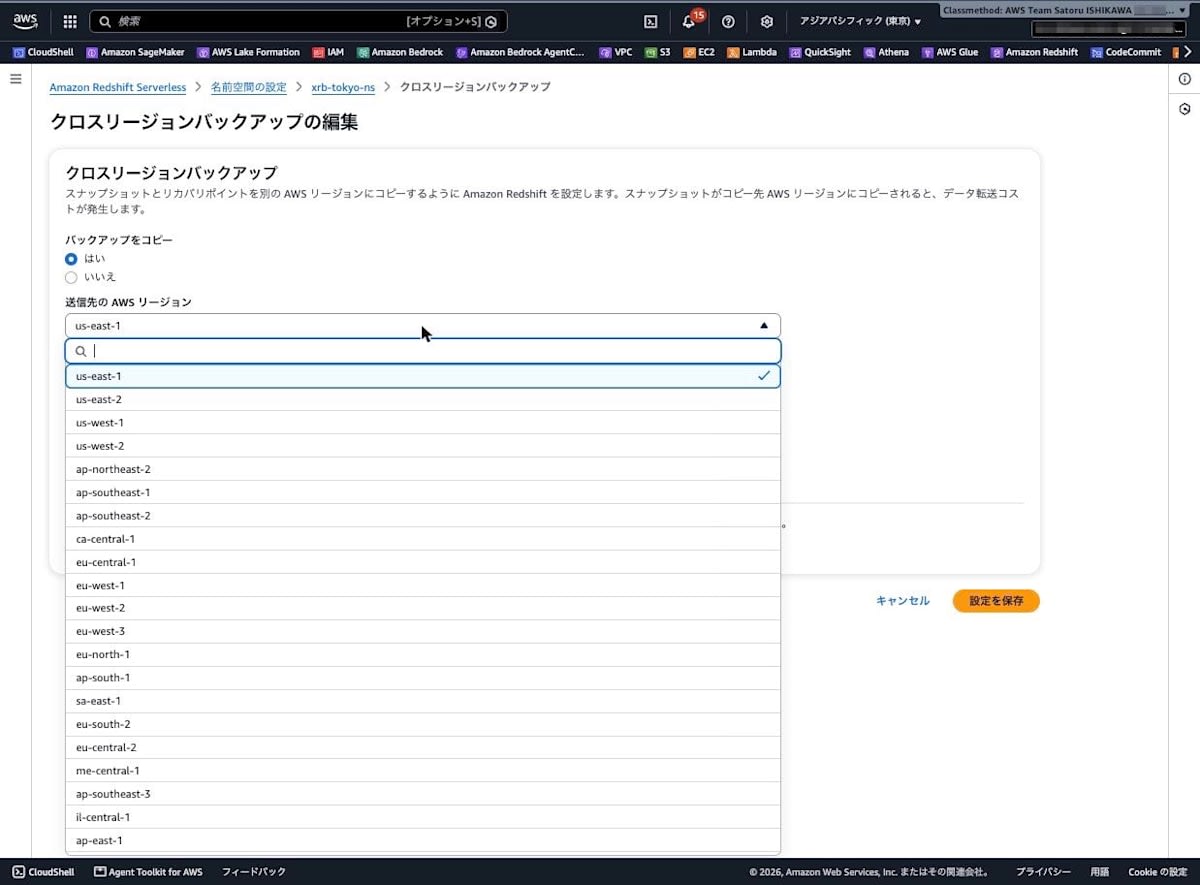
This time I canceled without saving the settings, and did the rest of the configuration via the CLI.
Enabling cross-region backup
At 06:07:44, I created a snapshot copy configuration from the Tokyo namespace to Osaka. The retention period at the destination is set to 1 day.
% aws redshift-serverless create-snapshot-copy-configuration \
  --region ap-northeast-1 \
  --namespace-name xrb-tokyo-ns \
  --destination-region ap-northeast-3 \
  --snapshot-retention-period 1 \
  --output json
{
    "snapshotCopyConfiguration": {
        "destinationKmsKeyId": "AWS_OWNED_KMS_KEY",
        "destinationRegion": "ap-northeast-3",
        "namespaceName": "xrb-tokyo-ns",
        "snapshotCopyConfigurationArn": "arn:aws:redshift-serverless:ap-northeast-1:123456789012:snapshotcopyconfiguration/419bed9b-a916-4be1-8436-ede43294444b",
        "snapshotCopyConfigurationId": "419bed9b-a916-4be1-8436-ede43294444b",
        "snapshotRetentionPeriod": 1
    }
}
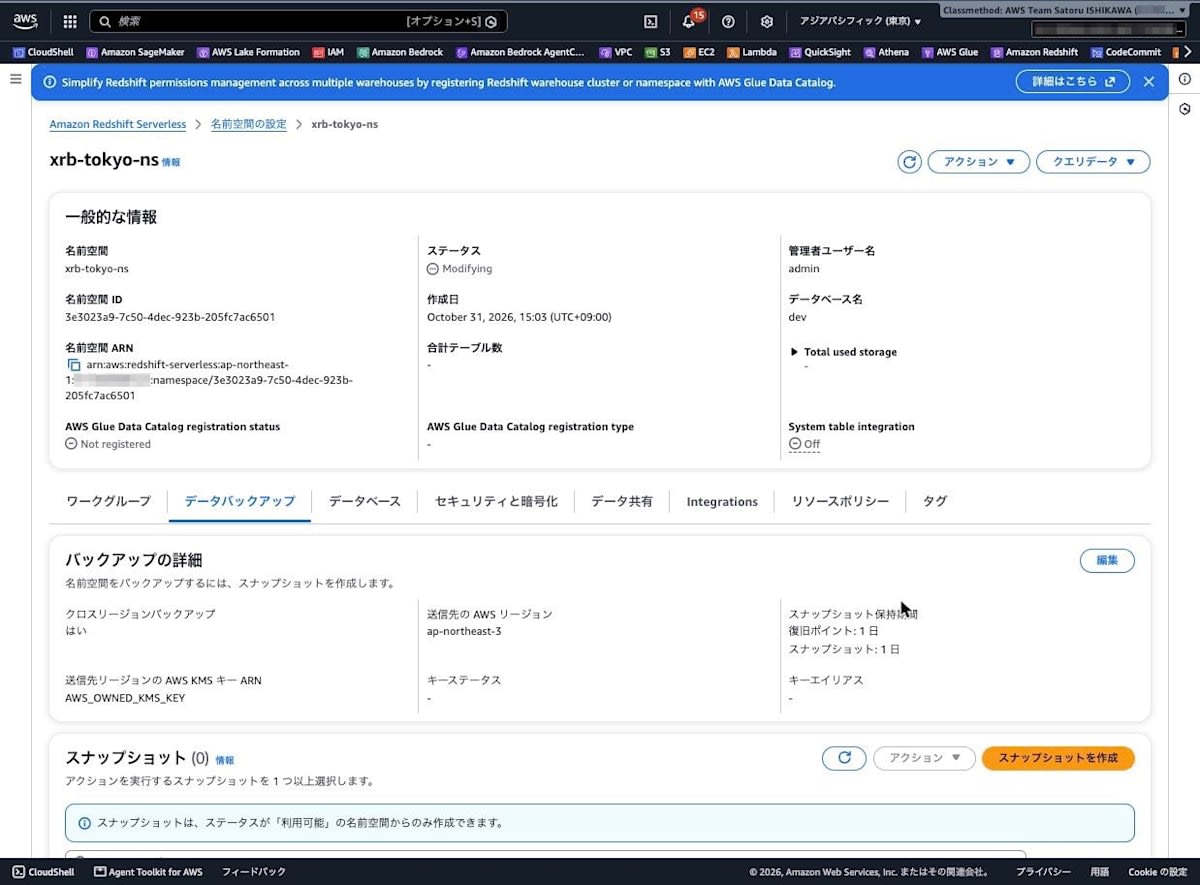
The destination region and retention periods (recovery points 1 day, snapshots 1 day) were also reflected in [Backup details] in the console.
Checking whether the pre-enable snapshot is copied
Immediately after enabling, I ran list-snapshots in the Osaka region at 30-second intervals.
This is the output 11 seconds after enabling (06:07:55).
% aws redshift-serverless list-snapshots \
  --region ap-northeast-3 \
  --query 'snapshots[].[snapshotName,status,snapshotCreateTime]' \
  --output text
copy:xrb-snap-before-enable	COPYING	2026-10-31T06:05:05.826000+00:00
This is the output at 06:10:00.
% aws redshift-serverless list-snapshots \
  --region ap-northeast-3 \
  --query 'snapshots[].[snapshotName,status,snapshotCreateTime]' \
  --output text
copy:xrb-snap-before-enable	AVAILABLE	2026-10-31T06:05:05.826000+00:00
The results in chronological order are as follows.
| Time (UTC) | Tokyo | Osaka |
|---|---|---|
| 06:05:05 | Created xrb-snap-before-enable |
None |
| 06:07:44 | Created copy configuration | None |
| 06:07:55 | - | copy:xrb-snap-before-enable is COPYING |
| 06:09:29 | - | copy:xrb-snap-before-enable is COPYING |
| 06:10:00 | - | copy:xrb-snap-before-enable is AVAILABLE |
Eleven seconds after enabling, copying of the snapshot created before enabling had already started in Osaka. During this time, no new snapshots were created in Tokyo. The copy completed within about 2 minutes 16 seconds of enabling.
Here are the details of the copied snapshot.
% aws redshift-serverless get-snapshot \
  --region ap-northeast-3 \
  --snapshot-name 'copy:xrb-snap-before-enable' \
  --output json
{
    "snapshot": {
        "accountsWithProvisionedRestoreAccess": [],
        "accountsWithRestoreAccess": [],
        "actualIncrementalBackupSizeInMegaBytes": 106.0,
        "adminUsername": "admin",
        "backupProgressInMegaBytes": 106.0,
        "currentBackupRateInMegaBytesPerSecond": 2.1828,
        "elapsedTimeInSeconds": 1,
        "estimatedSecondsToCompletion": 0,
        "kmsKeyId": "AWS_OWNED_KMS_KEY",
        "namespaceArn": "arn:aws:redshift-serverless:ap-northeast-3:123456789012:namespace/3e3023a9-7c50-4dec-923b-205fc7ac6501",
        "namespaceName": "xrb-tokyo-ns",
        "ownerAccount": "123456789012",
        "snapshotArn": "arn:aws:redshift-serverless:ap-northeast-3:123456789012:snapshot/555654c1-f2b9-4093-ae50-cef4c9f70e22",
        "snapshotCreateTime": "2026-10-31T06:05:05.826000+00:00",
        "snapshotName": "copy:xrb-snap-before-enable",
        "snapshotRemainingDays": 0,
        "snapshotRetentionPeriod": 1,
        "snapshotRetentionStartTime": "2026-10-31T06:05:05.826000+00:00",
        "status": "AVAILABLE",
        "totalBackupSizeInMegaBytes": 104.0
    }
}
- The snapshot name is prefixed with
copy: namespaceNameremains the sourcexrb-tokyo-ns- The region in
namespaceArnisap-northeast-3, and the namespace ID (3e3023a9-...) is the same as the source snapshotCreateTimeis the same as the creation time of the source snapshot
Trying to configure two destination regions
Because the announcement says "destination region(s)," I tried adding a second copy configuration (N. Virginia, us-east-1) to the same namespace.
% aws redshift-serverless create-snapshot-copy-configuration \
  --region ap-northeast-1 \
  --namespace-name xrb-tokyo-ns \
  --destination-region us-east-1 \
  --snapshot-retention-period 1 \
  --output json
aws: [ERROR]: An error occurred (ValidationException) when calling the CreateSnapshotCopyConfiguration operation: You can only have one snapshot copy configuration per namespace.
I got an error saying that only one copy configuration is allowed per namespace. In Redshift Serverless as of this writing, there is only one destination region.
Checking whether snapshots created after enabling are also copied
After adding 2 rows, I created a new manual snapshot xrb-snap-after-enable.
INSERT INTO public.backup_test (id, note) VALUES (4, 'after enable'), (5, 'after enable');
% aws redshift-serverless create-snapshot \
  --region ap-northeast-1 \
  --namespace-name xrb-tokyo-ns \
  --snapshot-name xrb-snap-after-enable \
  --retention-period 1 \
  --query 'snapshot.{name:snapshotName,status:status,createTime:snapshotCreateTime}' \
  --output json
{
    "name": "xrb-snap-after-enable",
    "status": "CREATING",
    "createTime": "2026-10-31T06:10:50.589000+00:00"
}
These are the results of checking the state in Tokyo and Osaka at 15-second intervals.
| Time (UTC) | Tokyo xrb-snap-after-enable |
Osaka copy:xrb-snap-after-enable |
|---|---|---|
| 06:10:50 | CREATING | None |
| 06:11:06 | AVAILABLE | None |
| 06:13:49 | AVAILABLE | None |
| 06:14:05 | AVAILABLE | COPYING |
| 06:15:26 | AVAILABLE | COPYING |
| 06:15:42 | AVAILABLE | AVAILABLE |
The snapshot created after enabling was also copied automatically. Copying started about 3 minutes 15 seconds after the snapshot was created and completed about 4 minutes 50 seconds after. Compared with the copy right after enabling (started after 11 seconds), it took longer to start.
Checking whether only the latest snapshot is copied upon enabling
In the previous step, there was only one snapshot before enabling, so I couldn't distinguish between "only the latest one is copied" and "all existing ones are copied." So I deleted the copy configuration once, created two snapshots while it was disabled, and then enabled it again.
First, I delete the copy configuration.
% aws redshift-serverless delete-snapshot-copy-configuration \
  --region ap-northeast-1 \
  --snapshot-copy-configuration-id 419bed9b-a916-4be1-8436-ede43294444b \
  --output json
{
    "snapshotCopyConfiguration": {
        "destinationKmsKeyId": "AWS_OWNED_KMS_KEY",
        "destinationRegion": "ap-northeast-3",
        "namespaceName": "xrb-tokyo-ns",
        "snapshotCopyConfigurationArn": "arn:aws:redshift-serverless:ap-northeast-1:123456789012:snapshotcopyconfiguration/419bed9b-a916-4be1-8436-ede43294444b",
        "snapshotCopyConfigurationId": "419bed9b-a916-4be1-8436-ede43294444b",
        "snapshotRetentionPeriod": 1
    }
}
Even immediately after deletion, the 2 already-copied snapshots remained in Osaka.
% aws redshift-serverless list-snapshots \
  --region ap-northeast-3 \
  --query 'snapshots[].[snapshotName,status,snapshotCreateTime]' \
  --output text
copy:xrb-snap-after-enable	AVAILABLE	2026-10-31T06:10:50.589000+00:00
copy:xrb-snap-before-enable	AVAILABLE	2026-10-31T06:05:05.826000+00:00
With copying disabled, I created two snapshots while adding one row each time.
INSERT INTO public.backup_test (id, note) VALUES (6, 'while disabled 1');
-- Create xrb-snap-disabled-1 after this
INSERT INTO public.backup_test (id, note) VALUES (7, 'while disabled 2');
-- Create xrb-snap-disabled-2 after this
The Tokyo snapshots immediately before re-enabling are as follows.
% aws redshift-serverless list-snapshots \
  --region ap-northeast-1 \
  --namespace-name xrb-tokyo-ns \
  --query 'snapshots[].[snapshotName,status,snapshotCreateTime]' \
  --output text
xrb-snap-disabled-2	AVAILABLE	2026-10-31T06:19:02.573000+00:00
xrb-snap-disabled-1	AVAILABLE	2026-10-31T06:16:17.761000+00:00
xrb-snap-after-enable	AVAILABLE	2026-10-31T06:10:50.589000+00:00
xrb-snap-before-enable	AVAILABLE	2026-10-31T06:05:05.826000+00:00
At 06:21:26 I recreated the copy configuration and checked Osaka at 15-second intervals.
% aws redshift-serverless create-snapshot-copy-configuration \
  --region ap-northeast-1 \
  --namespace-name xrb-tokyo-ns \
  --destination-region ap-northeast-3 \
  --snapshot-retention-period 1 \
  --query 'snapshotCopyConfiguration.{id:snapshotCopyConfigurationId,destinationRegion:destinationRegion,retention:snapshotRetentionPeriod}' \
  --output json
{
    "id": "1b27b7a3-8936-4818-bae6-063b14bbeeb2",
    "destinationRegion": "ap-northeast-3",
    "retention": 1
}
| Time (UTC) | copy:xrb-snap-disabled-1 |
copy:xrb-snap-disabled-2 |
|---|---|---|
| 06:21:26 | None | None (copy configuration recreated) |
| 06:22:45 | None | None |
| 06:23:01 | None | COPYING |
| 06:23:48 | None | AVAILABLE |
| 06:30:35 | None | AVAILABLE |
About 1 minute 35 seconds after re-enabling, copying of the latest snapshot, xrb-snap-disabled-2, started. xrb-snap-disabled-1, which was created before it, was not copied until 06:30:35, when I ended observation (about 9 minutes after re-enabling). Upon enabling, only the single latest snapshot at that point is copied.
Checking whether recovery points are also copied
In Tokyo, a recovery point was automatically created at 06:29:55.
% aws redshift-serverless list-recovery-points \
  --region ap-northeast-1 \
  --namespace-name xrb-tokyo-ns \
  --query 'recoveryPoints[].{id:recoveryPointId,createTime:recoveryPointCreateTime,namespace:namespaceName,sizeMB:totalSizeInMegaBytes}' \
  --output table
--------------------------------------------------------
|                  ListRecoveryPoints                  |
+-------------+----------------------------------------+
|  createTime |  2026-10-31T06:29:55.006000+00:00      |
|  id         |  3485facc-b0f9-40bc-98f5-7de43bec741b  |
|  namespace  |  xrb-tokyo-ns                          |
|  sizeMB     |  104.0                                 |
+-------------+----------------------------------------+
When I checked Osaka at 30-second intervals, a recovery point with the same ID already existed in Osaka at 06:32:05.
% aws redshift-serverless get-recovery-point \
  --region ap-northeast-3 \
  --recovery-point-id 3485facc-b0f9-40bc-98f5-7de43bec741b \
  --output json
{
    "recoveryPoint": {
        "namespaceArn": "arn:aws:redshift-serverless:ap-northeast-3:123456789012:namespace/3e3023a9-7c50-4dec-923b-205fc7ac6501",
        "namespaceName": "xrb-tokyo-ns",
        "recoveryPointCreateTime": "2026-10-31T06:29:55.006000+00:00",
        "recoveryPointId": "3485facc-b0f9-40bc-98f5-7de43bec741b",
        "totalSizeInMegaBytes": 104.0
    }
}
Unlike snapshots, recovery points do not get a copy: prefix in their name, and their ID was the same as the source.
Checking the copied snapshots in the Osaka console
The [Data backup] screen of Redshift Serverless in the Osaka region also showed the 3 copied snapshots as [Available]. xrb-snap-disabled-1 is not there.
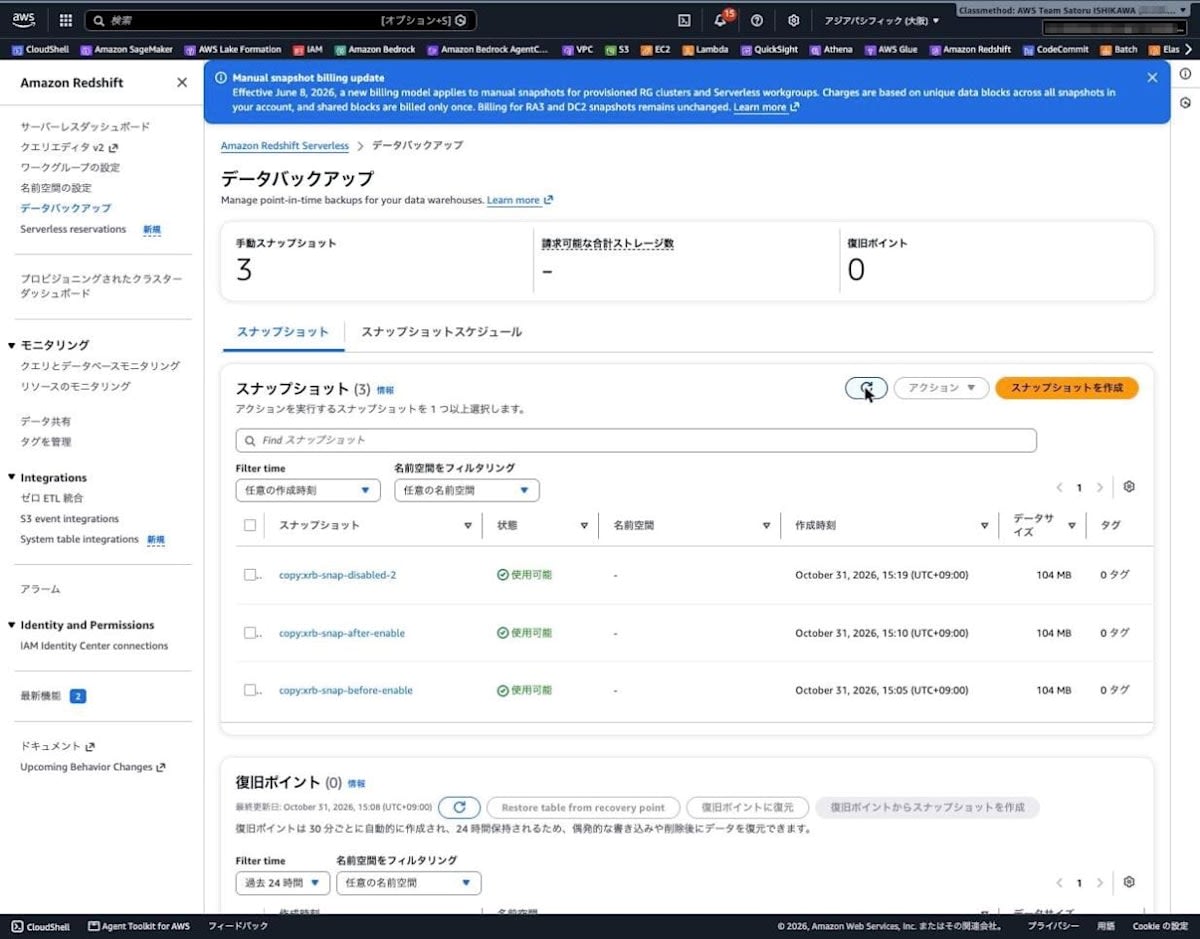
The source snapshots had 4 tags, but the tags on the destination snapshots were shown as [0 tags]. Also, the [Namespace] column showed [-].
Restoring in Osaka
Finally, I restore the latest snapshot copied to Osaka, copy:xrb-snap-disabled-2, to a new namespace in Osaka. As the restore target, I created a namespace and workgroup in Osaka.
% aws redshift-serverless create-namespace \
  --region ap-northeast-3 \
  --namespace-name xrb-osaka-ns \
  --db-name dev \
  --query 'namespace.{name:namespaceName,status:status}' \
  --output json
{
    "name": "xrb-osaka-ns",
    "status": "AVAILABLE"
}

% aws redshift-serverless create-workgroup \
  --region ap-northeast-3 \
  --workgroup-name xrb-osaka-wg \
  --namespace-name xrb-osaka-ns \
  --base-capacity 4 \
  --subnet-ids $OSAKA_SUBNET_IDS \
  --security-group-ids $OSAKA_SECURITY_GROUP_ID \
  --no-publicly-accessible \
  --query 'workgroup.{name:workgroupName,status:status,baseCapacity:baseCapacity}' \
  --output json
{
    "name": "xrb-osaka-wg",
    "status": "CREATING",
    "baseCapacity": 4
}
Once the workgroup became available, I ran the restore.
% aws redshift-serverless restore-from-snapshot \
  --region ap-northeast-3 \
  --namespace-name xrb-osaka-ns \
  --workgroup-name xrb-osaka-wg \
  --snapshot-name 'copy:xrb-snap-disabled-2' \
  --query '{namespace:namespace.namespaceName,status:namespace.status,snapshotName:snapshotName}' \
  --output json
{
    "namespace": "xrb-osaka-ns",
    "status": "MODIFYING",
    "snapshotName": "copy:xrb-snap-disabled-2"
}
The restore started at 06:31:12, and the namespace became AVAILABLE at 06:39:41 (about 8 minutes 30 seconds).
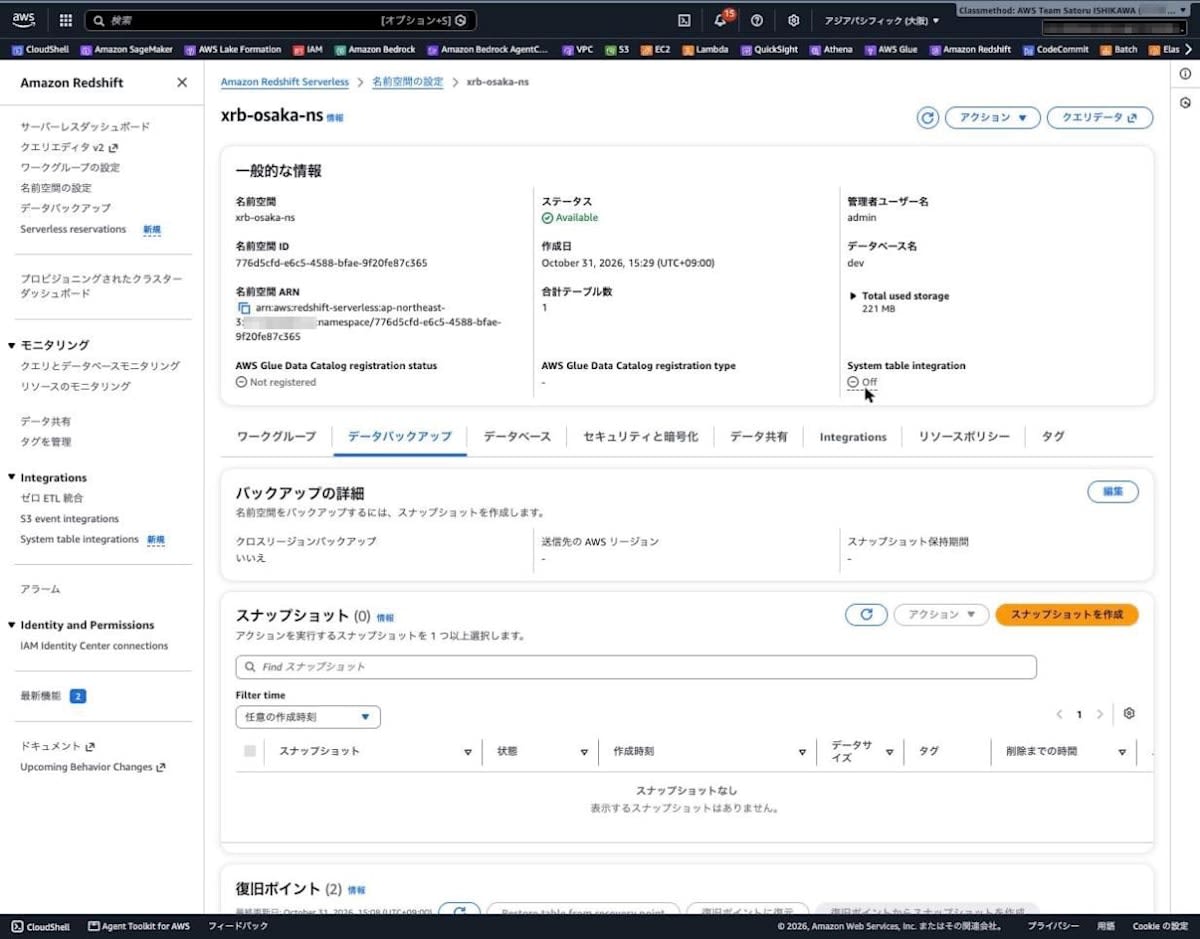
I check the table in the Osaka workgroup.
SELECT id, note, inserted_at FROM public.backup_test ORDER BY id;
| id | note | inserted_at |
|---|---|---|
| 1 | before enable | 2026-10-31 06:04:44 |
| 2 | before enable | 2026-10-31 06:04:44 |
| 3 | before enable | 2026-10-31 06:04:44 |
| 4 | after enable | 2026-10-31 06:10:46 |
| 5 | after enable | 2026-10-31 06:10:46 |
| 6 | while disabled 1 | 2026-10-31 06:16:13 |
| 7 | while disabled 2 | 2026-10-31 06:19:00 |
The 7 rows as of when xrb-snap-disabled-2 was created were restored in Osaka, matching the result of running the same SELECT in Tokyo.
Cleanup
After the verification, I deleted the copy configuration, the workgroups, namespaces, and snapshots in both regions, and the VPC created for verification.
Only the recovery point copied to Osaka (3485facc-...) remained. The Redshift Serverless CLI has no command to delete recovery points (only convert-recovery-point-to-snapshot, get-recovery-point, list-recovery-points, restore-from-recovery-point, and restore-table-from-recovery-point), and it is deleted once the 1-day retention period elapses.
Discussion
The latest snapshot at the time of enabling is copied
The snapshot created before enabling began copying 11 seconds after enabling. When I re-enabled it, the latest snapshot at that point also began copying about 1 minute 35 seconds later. Unlike the documentation's explanation that "newly created snapshots are copied," I was able to confirm the behavior stated in the announcement that "there is no need to wait for the next snapshot."
However, in this verification I did not check the behavior before the announcement in the same environment. The difference from the previous behavior is based on comparison with the description in the documentation.
Only the latest one is copied
Upon enabling, only the single latest snapshot was copied, and snapshots created before it were not copied during the roughly 9 minutes I observed. Within the scope of this verification, what was created at the destination was the latest snapshot at the time of enabling, plus the snapshots and recovery points created afterward. If you need to place snapshots from before the time of enabling in the destination, you need to plan with this behavior in mind.
Up to one destination region
The announcement says "destination region(s)," but in Redshift Serverless a second copy configuration was rejected with a ValidationException, and region selection in the console was also single-select. As of this writing, only one destination region can be configured per namespace.
Operational notes
- The snapshot retention period at the destination is indefinite if not specified (the default in the documentation and console). To manage storage costs at the destination, explicitly specify a retention period
- The tags attached to the source snapshots were not attached to the destination snapshots. If you do cost allocation or resource inventory by tags, you need to manage the destination snapshots separately
- Even after deleting the copy configuration, the already-copied snapshots remained at the destination (checked immediately after deletion). Copies that are no longer needed should be deleted manually or left to expire after the retention period
- Recovery points copied to the destination cannot be deleted from the CLI and are deleted after 1 day
- The snapshots this time were 104 MB, and the copy times and restore time in this article are results at this size
Pricing
The announcement directs readers to "Backup and storage" and "Data transfer" on the Amazon Redshift pricing page for pricing. The cross-region backup edit screen in the console also indicates that data transfer costs are incurred when snapshots are copied to the destination region.
The Tokyo region pricing relevant to this verification, as confirmed with the AWS Pricing API, is as follows (as of October 31, 2026).
| Item | Price |
|---|---|
| Redshift Serverless compute | $0.494 / RPU-hour |
| Redshift Serverless snapshot storage (PaidUniqueSnapshots:Serverless) | $0.025 / GB-month |
In addition, the Redshift Serverless console displayed a notice that, starting June 8, 2026, a new billing model applies to RG node provisioned clusters and Serverless manual snapshots, with billing based on unique data blocks across all snapshots in the account.
Conclusion
I tried Amazon Redshift automated cross-region backups by copying from Tokyo to Osaka with Redshift Serverless. When cross-region backup was enabled, the latest snapshot at that point was copied without waiting for the next snapshot, and snapshots and recovery points created afterward were also copied automatically. Restoring from the snapshot copied to Osaka also completed in about 8 minutes 30 seconds, and I confirmed that the data matched Tokyo.
Configuration is done with the existing create-snapshot-copy-configuration (the cross-region backup edit screen in the console). When enabling it newly, please configure it keeping in mind that copying starts from the latest snapshot at the time of enabling, that there is only one destination region, and that the default retention period at the destination is indefinite. For environments that configure disaster recovery across two regions such as Tokyo and Osaka, I recommend checking from which point in time snapshots exist at the destination, as well as the retention period.
References
