I Tried Checking What Happens to Existing Connections and DNS Names When You Change an RDS Proxy Identifier or Endpoint Name

This page has been translated by machine translation. View original
Hello, this is Hayashi.
The DNS name of an RDS Proxy endpoint includes the Proxy's identifier and the endpoint's name.
I checked whether changing the identifier or endpoint name of a running Proxy affects existing connections, and how the DNS names change.
The impact of changing authentication settings was verified in the previous article.
What the documentation tells us
The user guide includes examples of commands for changing the identifier and the endpoint name.
I could not confirm from the documentation the impact on existing connections or how the pre-change DNS names are handled.
So, using a configuration of Aurora PostgreSQL and RDS Proxy with password-authenticated clients, I tested the following three changes.
- Changing the Proxy identifier
- Changing the name of an additional endpoint
- Changing the security group of an additional endpoint
Conclusions first
- Changing the identifier, the endpoint name, or the endpoint's security group has no impact on existing connections
- Changing the identifier changes only the DNS name of the default endpoint
- New connections to the pre-change DNS name fail with a name resolution error, so you need to change the application's connection target at the same time as the name change
Test environment
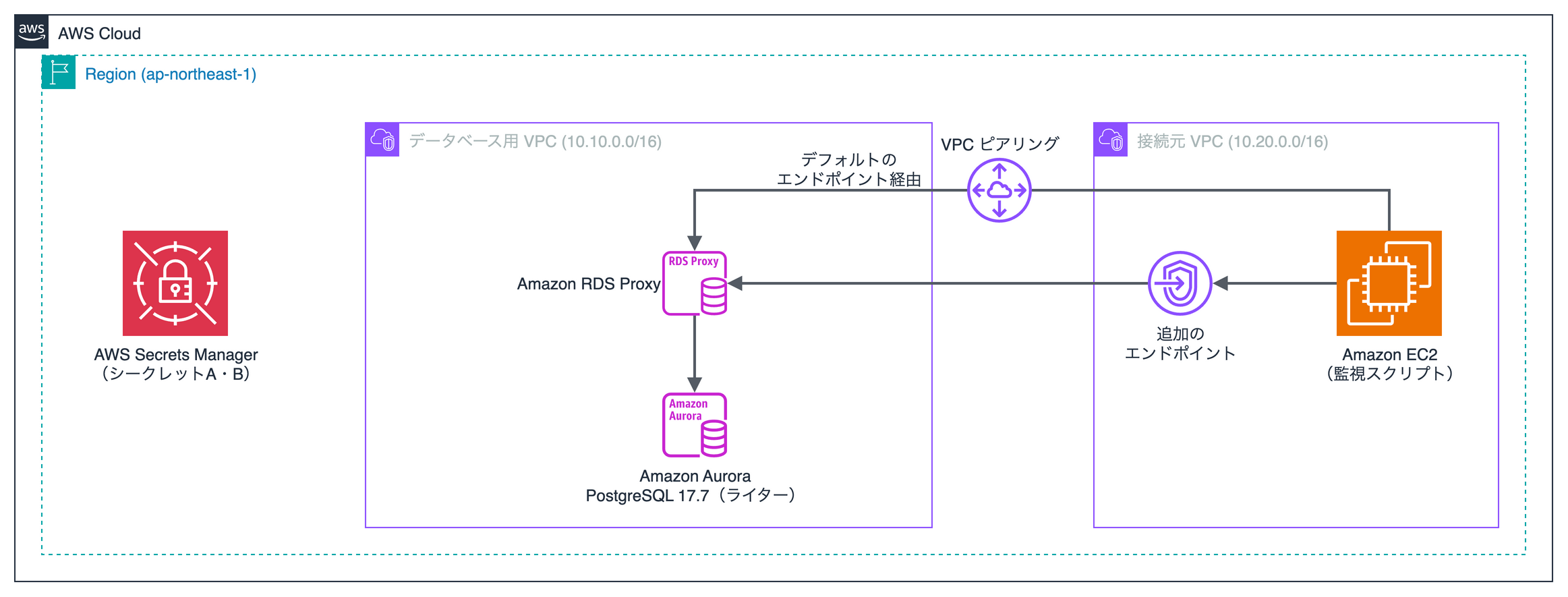
The configuration is the same as in the previous article.
I separated the VPC for the database from the VPC for the client, and placed an additional endpoint in the client VPC.
The default endpoint was connected to via VPC peering.
| Item | Details |
|---|---|
| Database | Aurora PostgreSQL 17.7 (LTS), db.t4g.medium |
| Client | Amazon Linux 2023 EC2, Python 3.9.25, psycopg2 2.9.12 |
| Region | Tokyo (ap-northeast-1) |
Test method
I changed the settings while connected to the Proxy and checked whether errors occurred on each connection.
- Connect to the Proxy from EC2 using four types of methods
- After about 1 minute has passed, change the setting
- Check for connection errors until 120 seconds have passed after the Proxy and endpoint statuses return to available
- Check name resolution and new connections using the pre-change DNS name and the post-change DNS name
If no errors occurred on the existing connections, I judged that there was no impact.
The connections are the same four types as in the previous article. I prepared them for each of the default endpoint and the additional endpoint.
I checked three kinds of existing connections: unpinned connections, pinned connections, and running queries.
For new connections, I reconnected every second to the DNS name in effect at the point each change was started.
Commands used for the changes
Changing the Proxy identifier.
aws rds modify-db-proxy --db-proxy-name stg-order-proxy \
  --new-db-proxy-name stg-order-proxy-v2
Changing the name of the additional endpoint.
aws rds modify-db-proxy-endpoint --db-proxy-endpoint-name stg-order-app \
  --new-db-proxy-endpoint-name stg-order-app-v2
Changing the security group of the additional endpoint. The new security group was configured with the same rules as the old one.
aws rds modify-db-proxy-endpoint --db-proxy-endpoint-name stg-order-app-v2 \
  --vpc-security-group-ids sg-xxxxxxxxxxxxxxxxx
Results
There was no impact on existing connections
| Change | Errors on existing connections | Time required for the change |
|---|---|---|
| Proxy identifier | None | About 2 minutes |
| Additional endpoint name | None | About 2 minutes 40 seconds |
| Additional endpoint security group | None | About 1 minute 30 seconds |
No errors occurred with unpinned connections, pinned connections, or running queries.
The results were the same via the default endpoint and via the additional endpoint.
While the security group was being changed, no errors occurred on new connections either.
Only the DNS name of the renamed target changes
| Change | DNS name of the default endpoint | DNS name of the additional endpoint |
|---|---|---|
| Proxy identifier | Changes | Does not change |
| Additional endpoint name | Does not change | Changes |
| Additional endpoint security group | Does not change | Does not change |
This is the DNS name of the default endpoint when the identifier was changed.
変更前: stg-order-proxy.proxy-xxxxxxxxxxxx.ap-northeast-1.rds.amazonaws.com
変更後: stg-order-proxy-v2.proxy-xxxxxxxxxxxx.ap-northeast-1.rds.amazonaws.com
This is the DNS name of the additional endpoint when the name of the additional endpoint was changed.
変更前: stg-order-app.endpoint.proxy-xxxxxxxxxxxx.ap-northeast-1.rds.amazonaws.com
変更後: stg-order-app-v2.endpoint.proxy-xxxxxxxxxxxx.ap-northeast-1.rds.amazonaws.com
Applications connected to the additional endpoint did not need to change their connection target even when the identifier was changed.
New connections to the pre-change DNS name fail
After the name was changed, new connections to the pre-change DNS name failed with a name resolution error.
This is the log from when the identifier was changed.
12:26:14 modify-db-proxy を実行
12:28:20 Proxyのステータスが available
12:28:24 default/dbadmin new ERROR OperationalError: could not translate host name "stg-order-proxy.proxy-xxxxxxxxxxxx.ap-northeast-1.rds.amazonaws.com" to address: Name or service not known
New connections to the post-change DNS name succeeded in both changes.
You need to switch the application's connection target to the post-change DNS name at the same time as the name change.
There was a period during which connections to the pre-change DNS name were still possible, but after about 1 hour the name could no longer be resolved.
Summary
I checked the impact on existing connections and DNS names when changing the identifier or endpoint name of RDS Proxy.
- Changing the identifier, the endpoint name, or the endpoint's security group has no impact on existing connections
- Changing the identifier changes only the DNS name of the default endpoint
- New connections to the pre-change DNS name fail with a name resolution error, so you need to change the application's connection target at the same time as the name change
I hope this article is helpful to someone. Thank you for reading to the end!
References
