![[Update] I Tried Custom Designations in Amazon SageMaker Unified Studio That Let You Separate Permissions by Project Member](https://devio2024-media.developers.io/image/upload/f_auto,q_auto,w_3840/f_auto,q_auto/v1790870550/eyecatch/vjg6jd2ycyvwyh4xjrng.png)
[Update] I Tried Custom Designations in Amazon SageMaker Unified Studio That Let You Separate Permissions by Project Member

This page has been translated by machine translation. View original
I'm Ishikawa from the Cloud Business Division. Amazon SageMaker Unified Studio now supports custom designations, which let you define the operations that project members can perform as permission sets, so I tried them out.
In Amazon SageMaker Unified Studio (hereafter, SageMaker Unified Studio), only two designations could previously be assigned to project members, Owner and Contributor, and their permissions were almost the same. If you wanted to separate permissions among data engineers, data stewards, and analysts, you had to split the project itself.
With this update, domain administrators can create their own permission sets (custom designations) and assign them to project members. You select permissions from categories such as Catalog, Subscriptions, Connections, Notebooks, and Data Agent. Designations are defined at the domain level and can be assigned in any project within the domain. Each domain has the managed designations Owner and Contributor, and you can create up to 10 custom designations in addition to these. It is available in all AWS Regions where SageMaker Unified Studio is available.
An explanatory article has also been published on the AWS Big Data Blog.
What are custom designations?
A designation is a named permission set that defines the actions members can perform within a project. The permissions are actually Amazon DataZone API actions, written in the Cedar policy language. In the Japanese UI, it is displayed as "Specification" (a literal Japanese translation).
| Type | Description |
|---|---|
| Managed designation | Owner and Contributor, managed by AWS. They cannot be edited or deleted |
| Custom designation | A permission set created by the domain administrator. You select permissions to match your organization's requirements |
You set one designation for a member by direct assignment. If the member inherits a different designation through a group, the member's permissions are the union of both.
Relationship with IAM
The documentation explains the relationship between designations and IAM as follows.
- IAM evaluates, at the AWS API boundary, whether a principal can call DataZone or SageMaker APIs
- A designation evaluates whether the assigned permission set allows that operation within the project
- An operation succeeds only when both allow it. An IAM Deny rejects the operation regardless of the contents of the designation
- You do not need to change existing IAM policies to use designations
In addition, in IAM-based domains, the IAM role of a project member needs the SageMakerStudioUserIAMConsolePolicy managed policy (or equivalent permissions). All members of a project have the same access to data and compute, and that access is managed by the project's execution role.
Constraints
From the Considerations in the documentation, here are the ones relevant to this verification.
- Custom designations can be used only in projects in V2 domains
- You cannot create or assign custom designations in the domain's admin project
- Data Agent actions are required and cannot be excluded. They are added automatically on the creation screen
- The permissions you can select are limited to predefined sets
- Because the new query editor is built on top of notebooks, Notebooks permissions also apply to query books
- DataSource APIs are authorized by IAM alone and are not subject to designations
Permission categories
The creation screen showed the following categories and permissions. I confirmed the breakdown of Subscriptions in the documentation.
| Category | Permissions |
|---|---|
| Project | All actions / Read-only actions / Manage membership / Manage environments / Manage user compute / Access external links |
| Catalog | All actions / Read-only actions / Manage assets / Manage data products / Manage asset publishing / Manage glossaries / Manage asset types / Manage metadata forms / Manage time series data / Manage predictions / Execute metadata generation / Manage governed terms |
| Subscriptions | All actions / Read-only actions / Manage subscription requests / Manage subscription approvals / Manage asset filters |
| Connections | All actions / Read-only actions / Use connection / Manage connections |
| Notebooks and query books | All actions / Read-only actions |
| Data agent | All actions |
The API actions included in each permission are listed in Custom designation permissions in the documentation.
Trying it out
Prerequisites
- An IAM-based V2 domain of SageMaker Unified Studio (
Default_11012026_Domain, IDdzd-68r3uno2uxmrix) - Executor: the domain administrator's IAM role
cm-user - Verification environment: ap-northeast-1 (Tokyo), verification date 2026-11-01, AWS CLI 2.39.3
- Creating and deleting IAM roles, and disabling user profiles (which could not be done in the GUI), were done with the AWS CLI; everything else was done in the Management Console and the domain administration portal. I also used AWS CLI read-only commands to check results
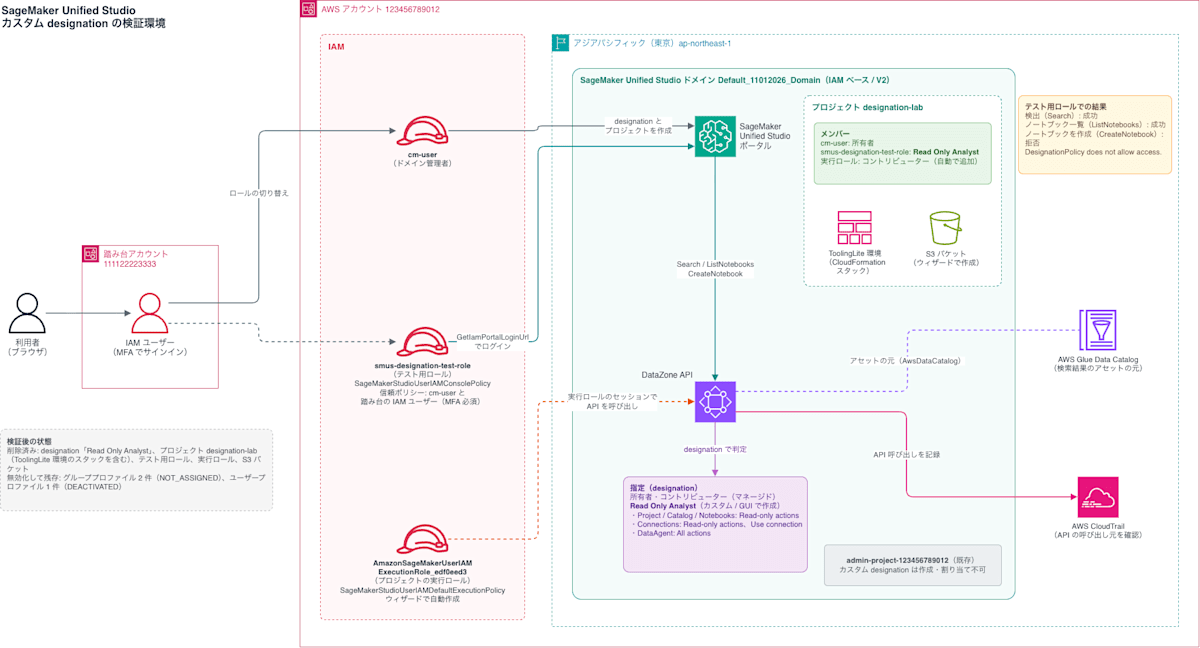
To check how the operations of a member with an assigned designation are restricted, I created a test IAM role smus-designation-test-role and made it a member of a verification project. I assigned the test role the designation "Read Only Analyst", which allows only viewing the catalog and notebooks, switched to this role in the console, and operated SageMaker Unified Studio.
AWS architecture diagram of the verification environment
Checking the initial designations
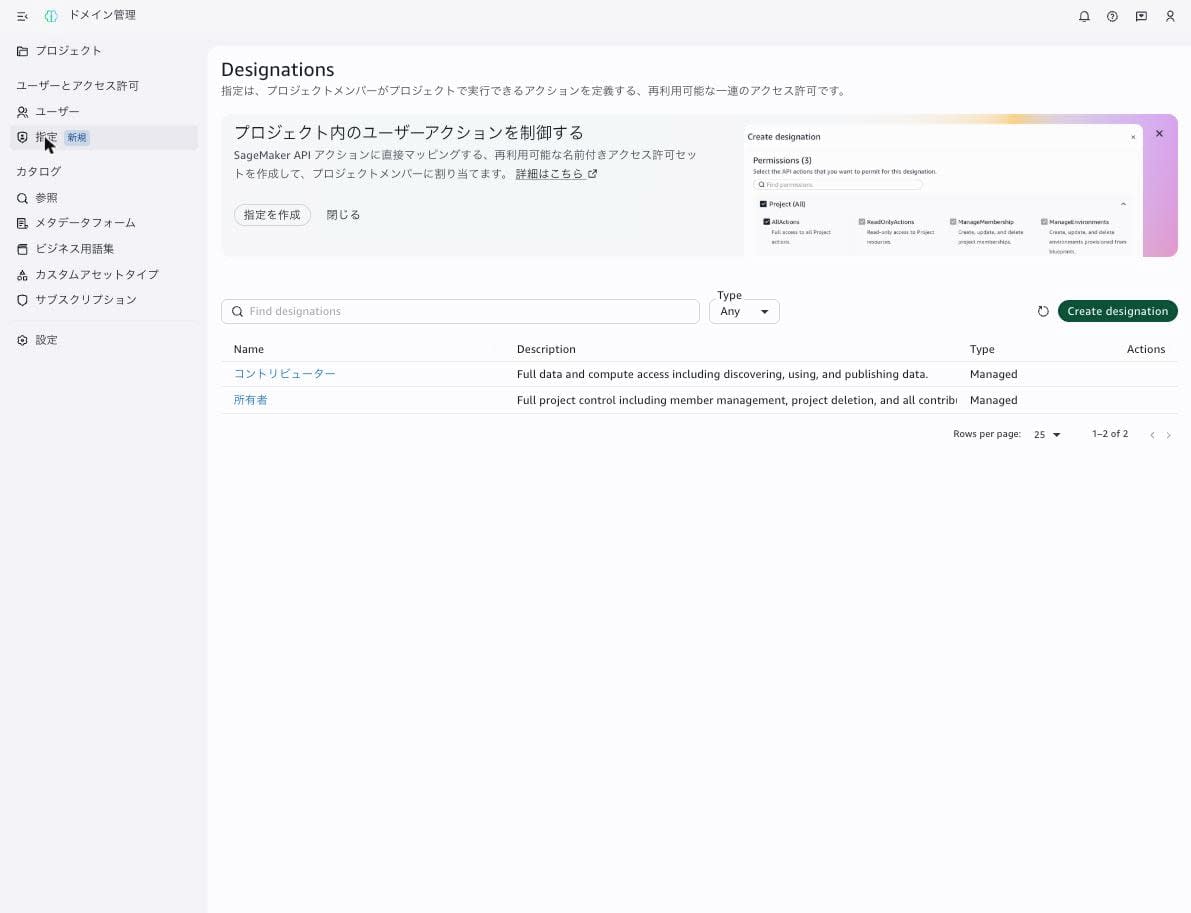
When I opened "Designations" in the left menu of the domain administration portal, the Designations screen showed two managed designations, "Contributor" and "Owner". (Only the menu is literally translated as "Specification" in Japanese, which actually makes it harder to understand.)
Creating a designation in the domain administration portal
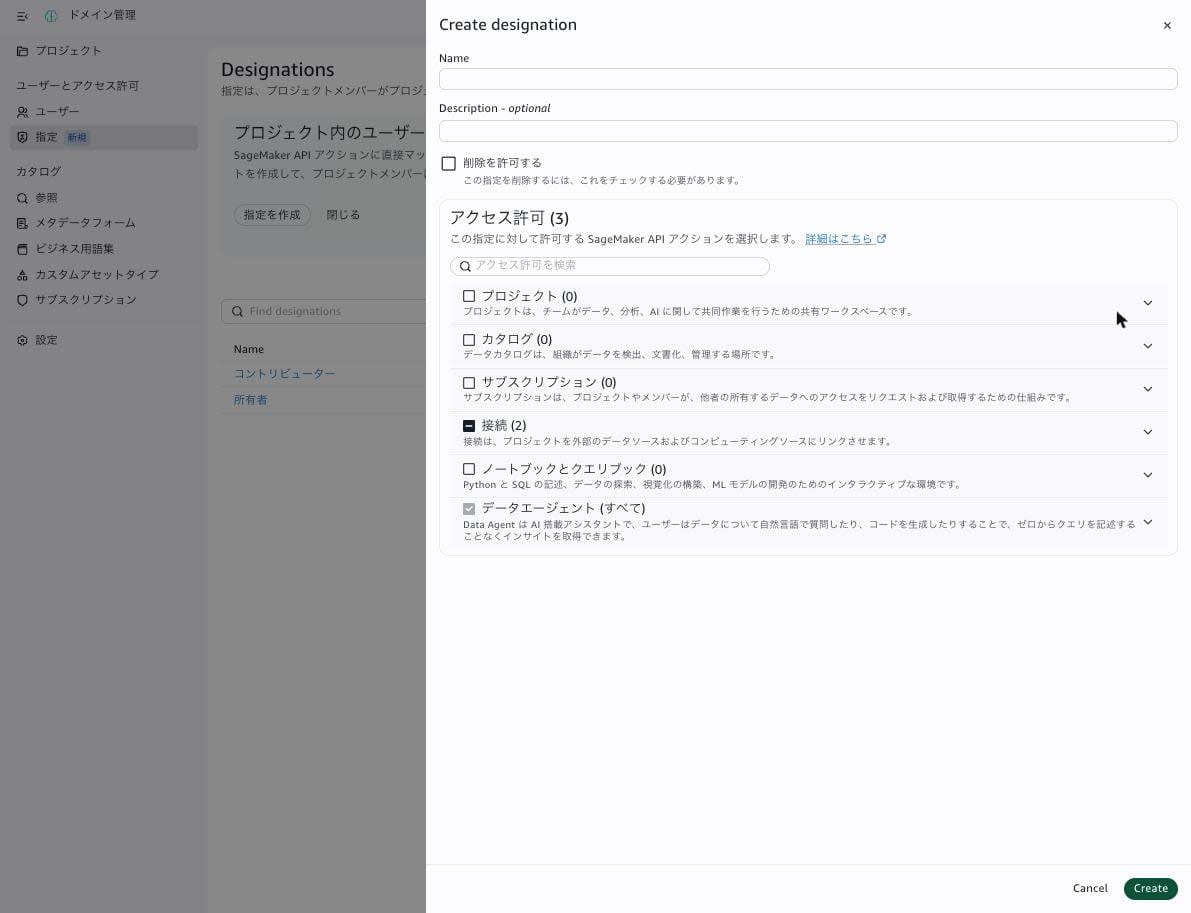
When you click "Create designation", the creation screen opens on the right side. In the initial state, two permissions, "Data agent (all)" and "Connections" (Read-only actions and Use connection), were already selected and could not be unchecked. "Allow deletion" is off by default.
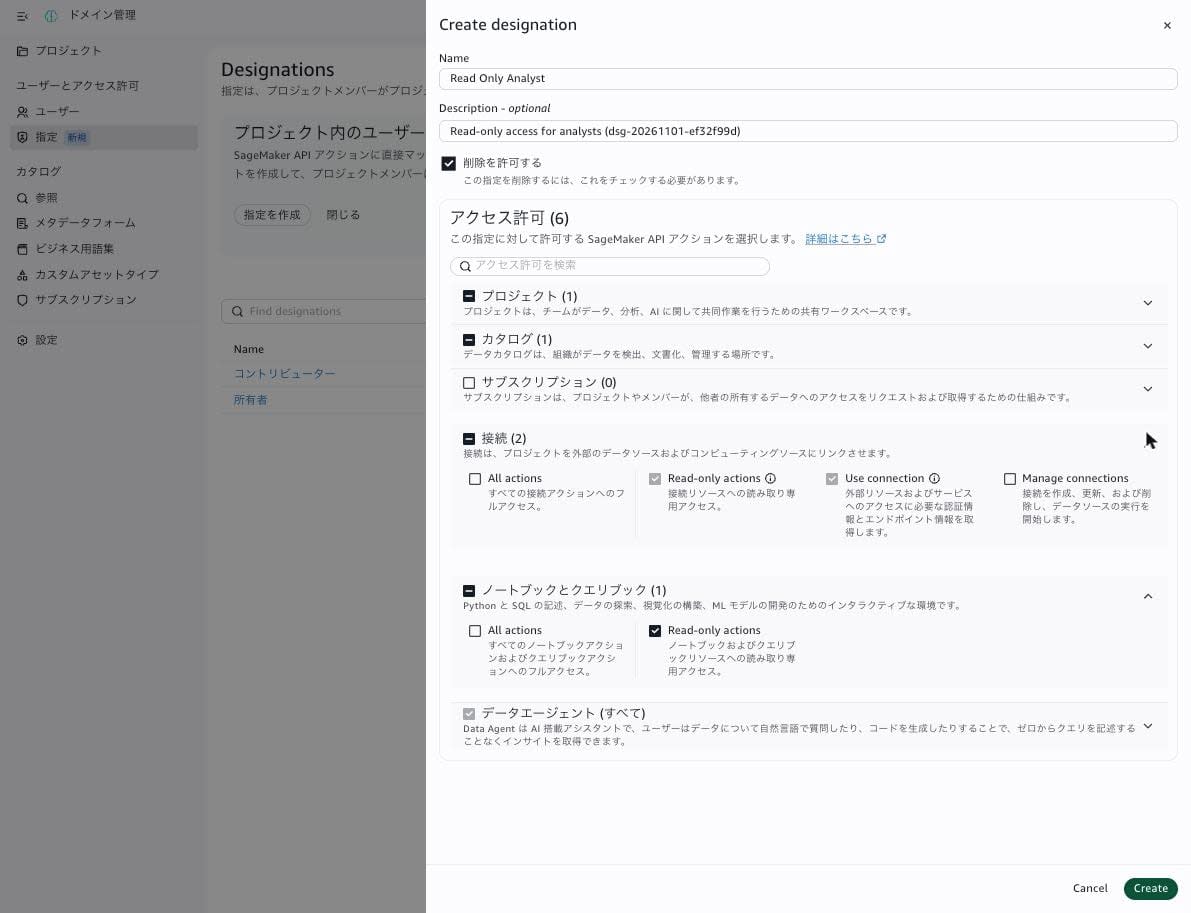
I created a designation with the following settings.
- Name:
Read Only Analyst - Description:
Read-only access for analysts (dsg-20261101-ef32f99d) - Allow deletion: On (because I would delete it during cleanup)
- Permissions: Read-only actions for Project, Catalog, and Notebooks and query books (the two Connections permissions and Data agent were left selected)
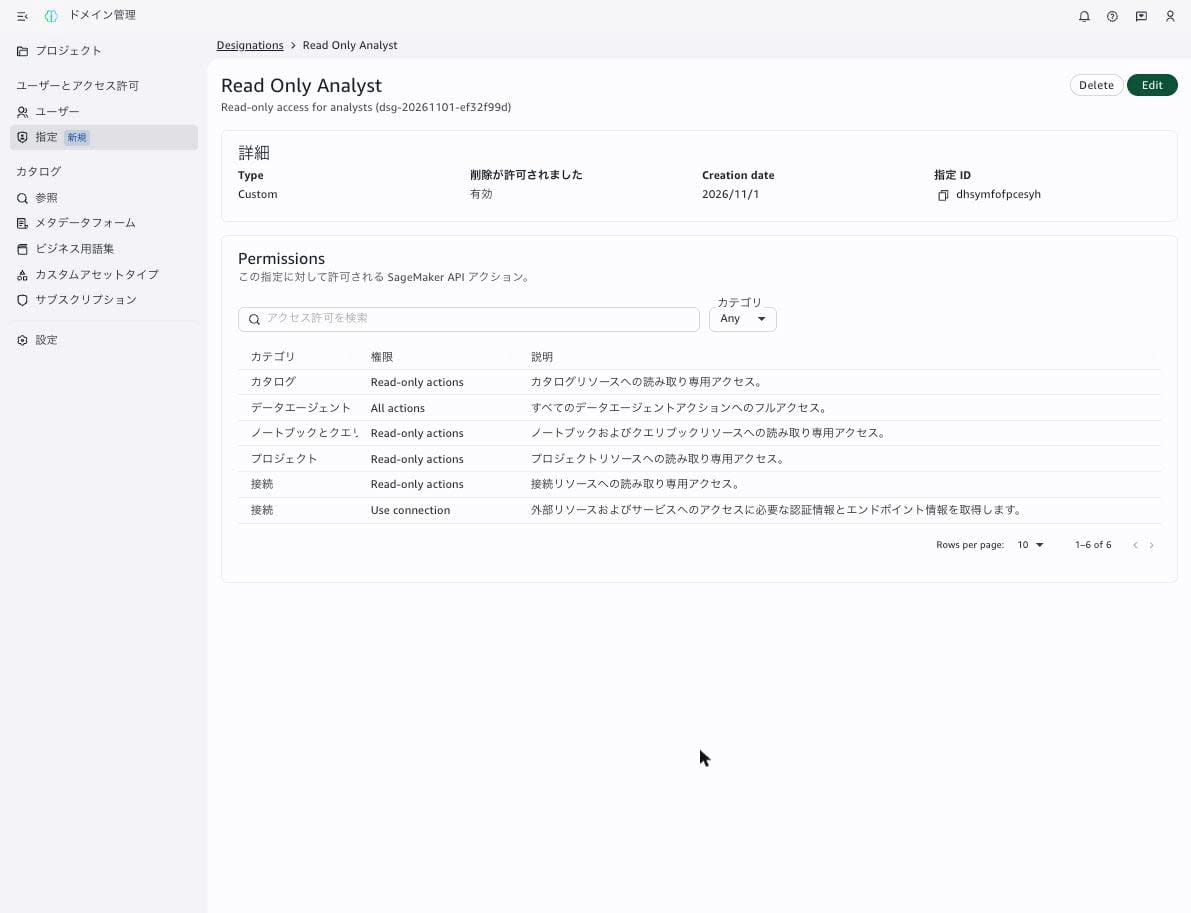
The number of permissions went from 3 in the initial state to 6.
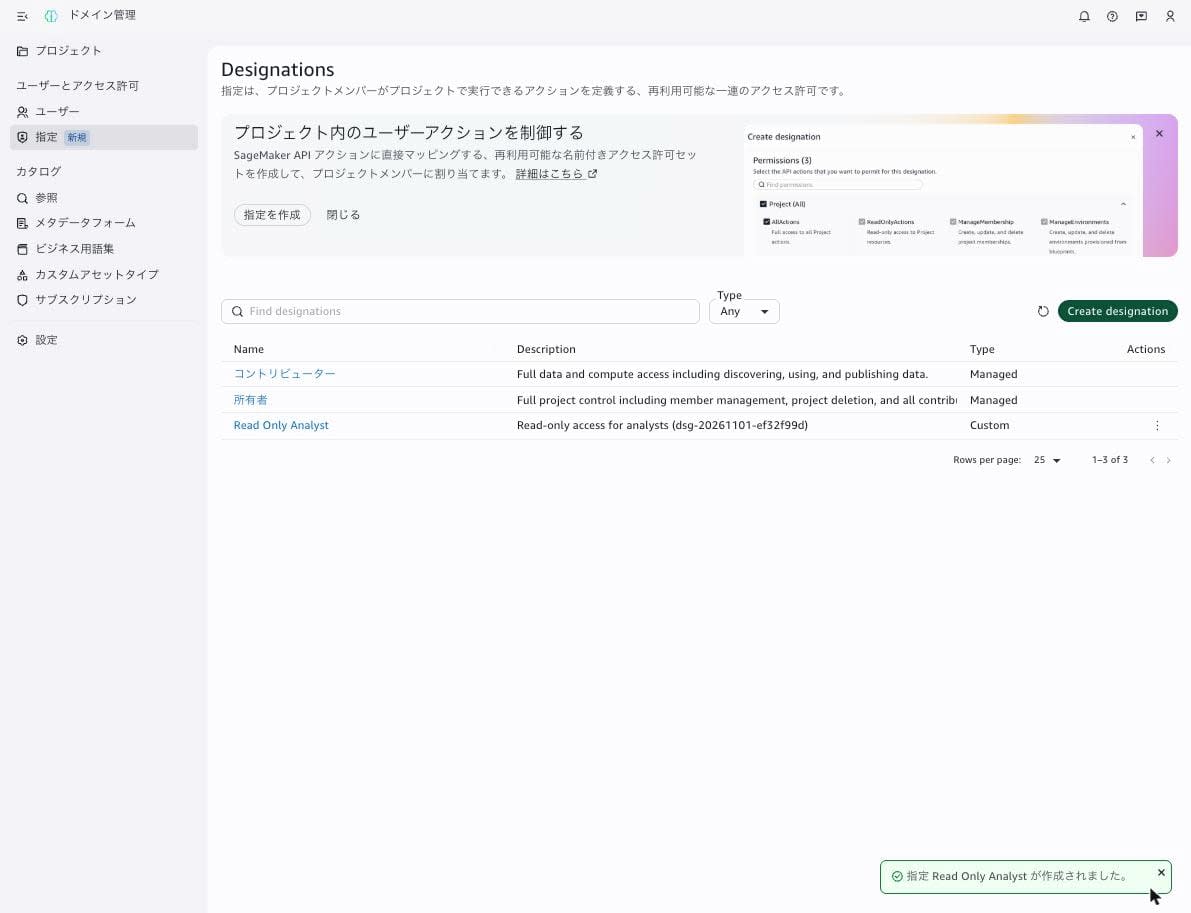
When I clicked "Create", it was added to the list as a designation of Type Custom.
The details screen shows the six selected permissions and the designation ID (dhsymfofpcesyh).
I used the AWS CLI to check how the permissions selected in the GUI were stored as a Cedar policy.
% aws datazone get-designation \
  --domain-identifier dzd-68r3uno2uxmrix \
  --identifier dhsymfofpcesyh \
  --output json
{
    "domainId": "dzd-68r3uno2uxmrix",
    "id": "dhsymfofpcesyh",
    "name": "Read Only Analyst",
    "description": "Read-only access for analysts (dsg-20261101-ef32f99d)",
    "designationType": "USER_CREATED",
    "policy": "// namespace: Project\npermit(\n  principal,\n  action in [\n    Project::Action::\"ReadOnlyActions\"\n  ],\n  resource\n);\n\n// namespace: Catalog\npermit(\n  principal,\n  action in [\n    Catalog::Action::\"ReadOnlyActions\"\n  ],\n  resource\n);\n\n// namespace: Connections\npermit(\n  principal,\n  action in [\n    Connections::Action::\"ReadOnlyActions\",\n    Connections::Action::\"UseConnection\"\n  ],\n  resource\n);\n\n// namespace: Notebooks\npermit(\n  principal,\n  action in [\n    Notebooks::Action::\"ReadOnlyActions\"\n  ],\n  resource\n);\n\n// namespace: DataAgent\npermit(\n  principal,\n  action in [\n    DataAgent::Action::\"AllActions\"\n  ],\n  resource\n);",
    "deletionProtection": false,
    "createdBy": "08a7ad58-1f74-4b7f-932f-41eb38dcf4e8",
    "createdAt": "2026-11-01T04:43:19.293088+00:00",
    "lastUpdatedAt": "2026-11-01T04:43:19.293088+00:00"
}
Expanding the line breaks in the policy gives the following. The permit statements are separated by category (namespace), and the action names are permission-unit names from the GUI, such as ReadOnlyActions. The designationType is USER_CREATED, and because I turned on "Allow deletion", deletionProtection is false.
// namespace: Project
permit(
  principal,
  action in [
    Project::Action::"ReadOnlyActions"
  ],
  resource
);

// namespace: Catalog
permit(
  principal,
  action in [
    Catalog::Action::"ReadOnlyActions"
  ],
  resource
);

// namespace: Connections
permit(
  principal,
  action in [
    Connections::Action::"ReadOnlyActions",
    Connections::Action::"UseConnection"
  ],
  resource
);

// namespace: Notebooks
permit(
  principal,
  action in [
    Notebooks::Action::"ReadOnlyActions"
  ],
  resource
);

// namespace: DataAgent
permit(
  principal,
  action in [
    DataAgent::Action::"AllActions"
  ],
  resource
);
Creating the test IAM role
I attached only the aforementioned SageMakerStudioUserIAMConsolePolicy to the test role. Checking the contents of this policy (version v10 at the time of verification), the allowed DataZone actions include logging in to the portal (datazone:GetIamPortalLoginUrl), viewing domains and projects, creating and deleting projects, and viewing environments and connections. It does not include datazone:Search or notebook creation.
Because this role is used by switching to it in the console, the trust policy specifies, in addition to the domain administrator role, the IAM user who first signs in to the console (in this environment, an IAM user in a different account, narrowed by aws:userid and limited to sessions authenticated with MFA).
{
  "Version": "2012-10-17",
  "Statement": [
    {
      "Effect": "Allow",
      "Principal": { "AWS": "arn:aws:iam::123456789012:role/cm-user" },
      "Action": "sts:AssumeRole"
    },
    {
      "Effect": "Allow",
      "Principal": { "AWS": "arn:aws:iam::111122223333:root" },
      "Action": "sts:AssumeRole",
      "Condition": {
        "StringEquals": {
          "aws:userid": "AIDAEXAMPLEUSERID1234"
        },
        "Bool": {
          "aws:MultiFactorAuthPresent": "true"
        }
      }
    }
  ]
}
% aws iam create-role \
  --role-name smus-designation-test-role \
  --assume-role-policy-document file://iam/test-role-trust.json \
  --description 'SMUS custom designation verification (dsg-20261101-ef32f99d)' \
  --max-session-duration 3600 \
  --tags Key=run_id,Value=dsg-20261101-ef32f99d Key=owner,Value=cm-user Key=ttl,Value=2026-11-02 Key=purpose,Value=blog-verification \
  --query 'Role.[RoleName,Arn]' \
  --output text
smus-designation-test-role	arn:aws:iam::123456789012:role/smus-designation-test-role
% aws iam attach-role-policy \
  --role-name smus-designation-test-role \
  --policy-arn arn:aws:iam::aws:policy/SageMakerStudioUserIAMConsolePolicy

% aws iam list-attached-role-policies \
  --role-name smus-designation-test-role \
  --output table
---------------------------------------------------------------------------------
|                           ListAttachedRolePolicies                            |
+-------------------------------------------------------------------------------+
||                              AttachedPolicies                               ||
|+------------+----------------------------------------------------------------+|
||  PolicyArn |  arn:aws:iam::aws:policy/SageMakerStudioUserIAMConsolePolicy   ||
||  PolicyName|  SageMakerStudioUserIAMConsolePolicy                           ||
|+------------+----------------------------------------------------------------+|
Creating a project in the domain administration portal
Because custom designations cannot be used in the admin project, I created a verification project from "Projects" → "Create project" in the domain administration portal.
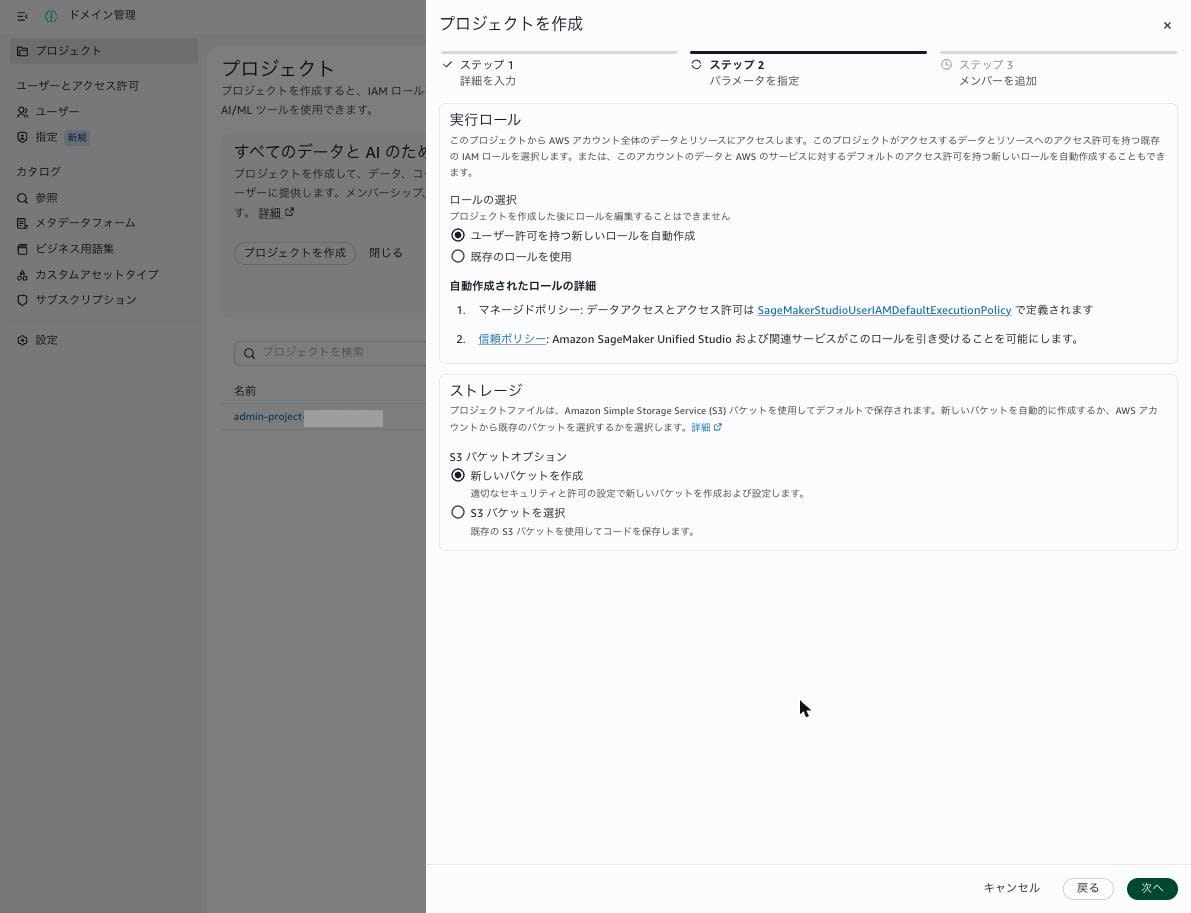
In step 1, I entered the project name designation-lab and a description, and proceeded with the default values in step 2. The execution role was "Automatically create a new role with user permissions", and the storage was "Create a new bucket".
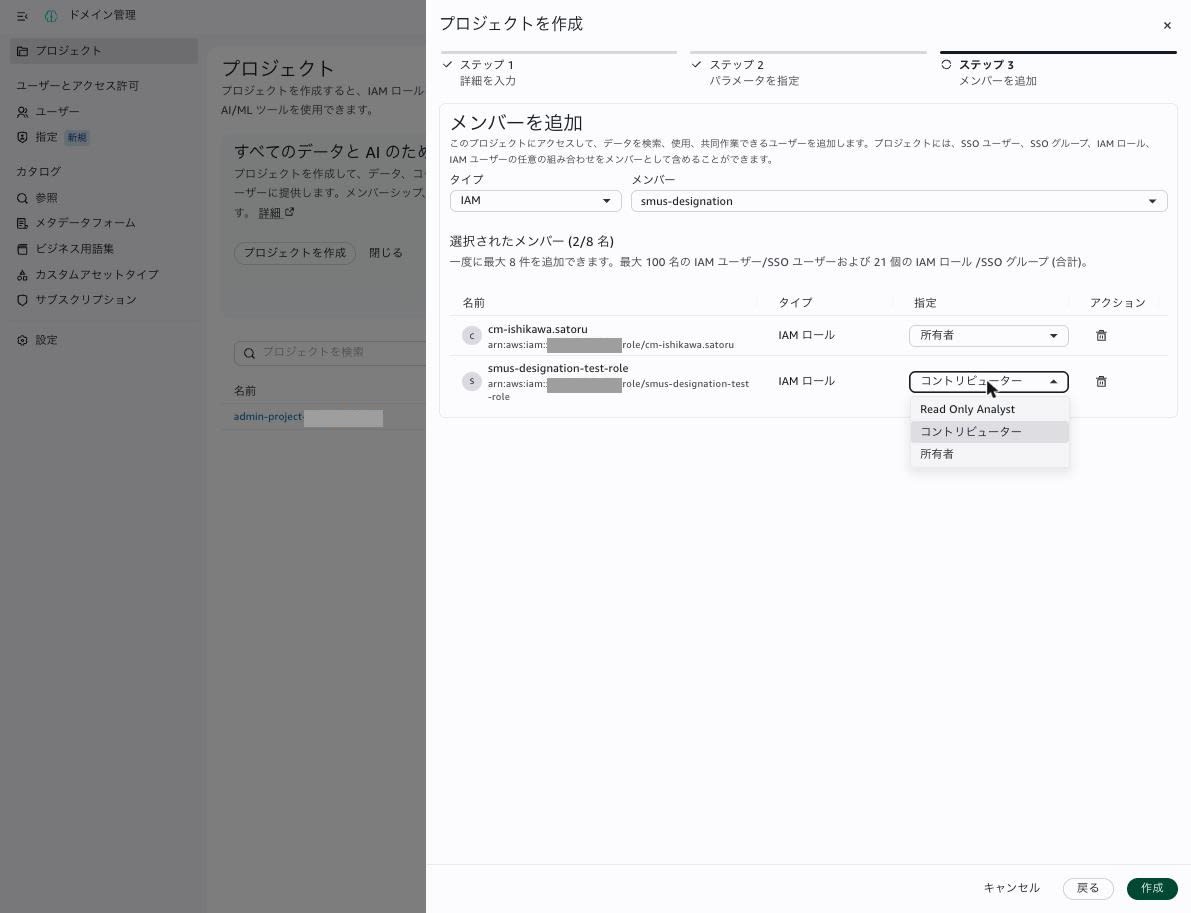
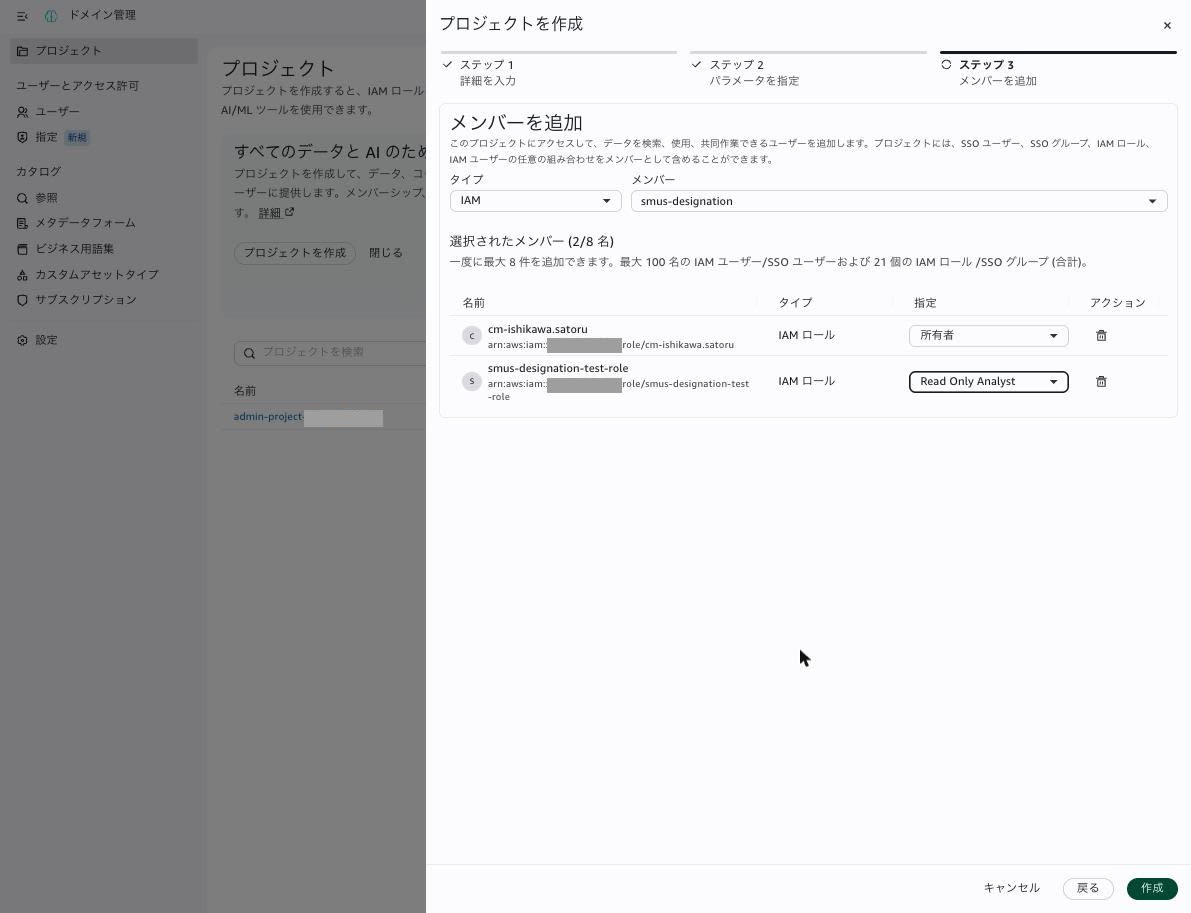
In step 3 (Add members), when I searched for members of type "IAM" by entering smus-designation, the test role I created appeared as a candidate. Immediately after adding it, its designation was "Contributor", so I selected "Read Only Analyst" from the dropdown. The dropdown showed three options: Read Only Analyst, Contributor, and Owner.
When I clicked "Create", a progress dialog appeared. After closing the dialog and waiting a while, the project status became ACTIVE and the environment deployment status (environmentDeploymentDetails.overallDeploymentStatus in GetProject) became SUCCESSFUL. The "Members" tab of the project after creation is as follows.
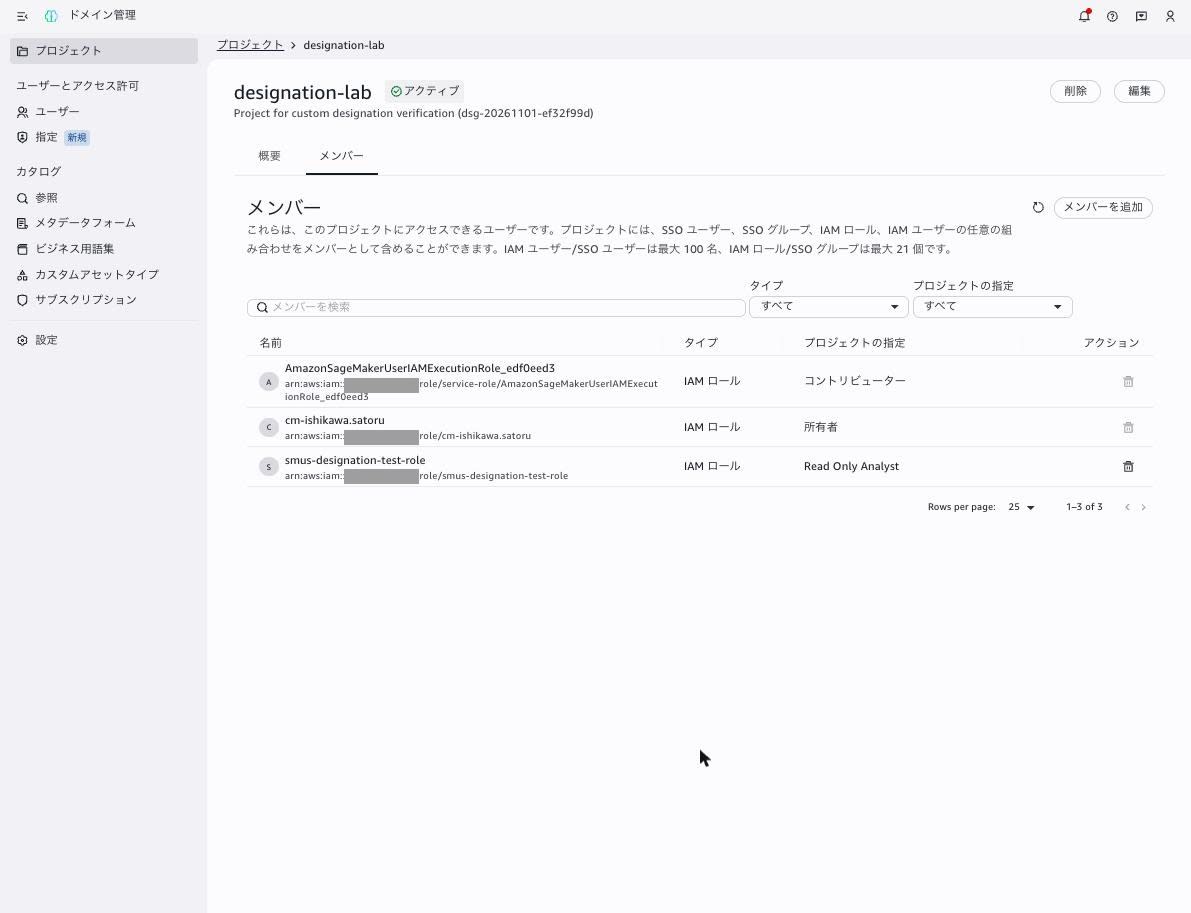
In addition to the test role I specified (Read Only Analyst) and the administrator role (Owner), the execution role AmazonSageMakerUserIAMExecutionRole_edf0eed3 created by the wizard had been added as a Contributor.
I also checked the members through the API.
% aws datazone list-project-memberships \
  --domain-identifier dzd-68r3uno2uxmrix \
  --project-identifier b6sdu4ri4gqxzt \
  --output json
{
    "members": [
        {
            "memberDetails": {
                "group": {
                    "groupId": "574fd943-5faa-4c9d-b302-25d4c8a877f1"
                }
            },
            "designation": "PROJECT_OWNER"
        },
        {
            "memberDetails": {
                "group": {
                    "groupId": "184fa1d1-8f07-32ae-bf0a-ac755dea886d"
                }
            },
            "designation": "USER_CREATED_DESIGNATION",
            "userCreatedDesignationId": "dhsymfofpcesyh"
        },
        {
            "memberDetails": {
                "group": {
                    "groupId": "35380cbb-ab07-3510-8f16-0f89560a1f06"
                }
            },
            "designation": "PROJECT_CONTRIBUTOR"
        }
    ]
}
IAM roles are members as group profiles. The group profile of the test role (184fa1d1-8f07-32ae-bf0a-ac755dea886d) was created automatically when I added it as a member in the GUI.
% aws datazone search-group-profiles \
  --domain-identifier dzd-68r3uno2uxmrix \
  --group-type IAM_ROLE_SESSION_GROUP \
  --output json
{
    "items": [
        {
            "id": "a85eed25-1a92-3202-9bf6-f3fa03a48209",
            "status": "ASSIGNED",
            "rolePrincipalArn": "arn:aws:iam::123456789012:role/service-role/AmazonSageMakerAdminIAMExecutionRole",
            "rolePrincipalId": "AROAXQ6Q7KC6RFIAFGWKK"
        },
        {
            "id": "35380cbb-ab07-3510-8f16-0f89560a1f06",
            "status": "ASSIGNED",
            "rolePrincipalArn": "arn:aws:iam::123456789012:role/service-role/AmazonSageMakerUserIAMExecutionRole_edf0eed3",
            "rolePrincipalId": "AROAXQ6Q7KC662R46DRTX"
        },
        {
            "id": "574fd943-5faa-4c9d-b302-25d4c8a877f1",
            "status": "ASSIGNED",
            "rolePrincipalArn": "arn:aws:iam::123456789012:role/cm-user",
            "rolePrincipalId": "AROAIQYDPIIE4D75QUZEM"
        },
        {
            "id": "184fa1d1-8f07-32ae-bf0a-ac755dea886d",
            "status": "ASSIGNED",
            "rolePrincipalArn": "arn:aws:iam::123456789012:role/smus-designation-test-role",
            "rolePrincipalId": "AROAXQ6Q7KC6SJTKG3K3K"
        }
    ]
}
Switching to the test role in the console
Using "Switch role" in the Management Console, I switched to the test role with the display name designation-test. The display name at the top right of the console became designation-test, and the cost widget on the console home showed "Access denied".
Operating SageMaker Unified Studio with the test role
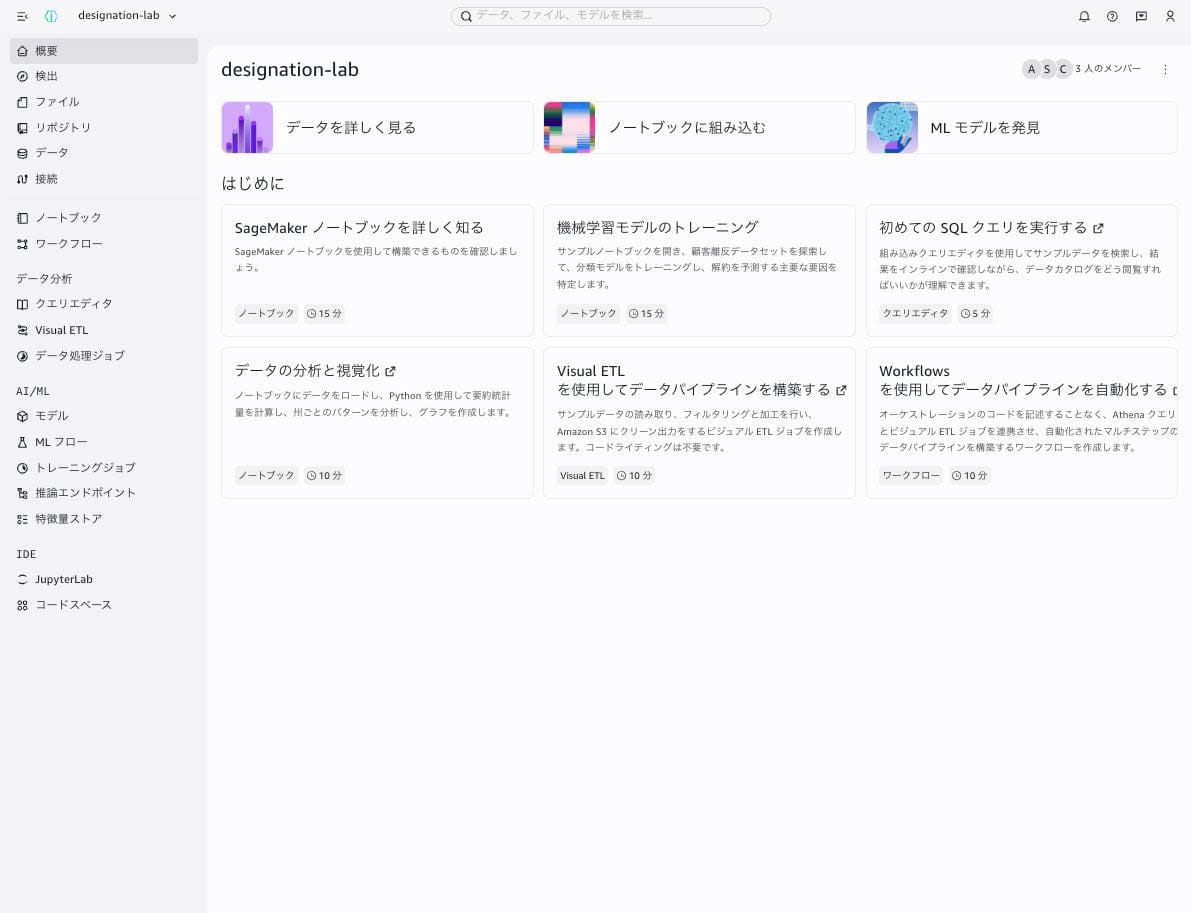
Still using the test role, I clicked "Open" for the IAM-based domain on the Amazon SageMaker "Domains" screen in the console, and the overview screen of the designation-lab project opened. The "Domain management" link at the bottom left was not displayed.
Searching the catalog (an allowed operation)
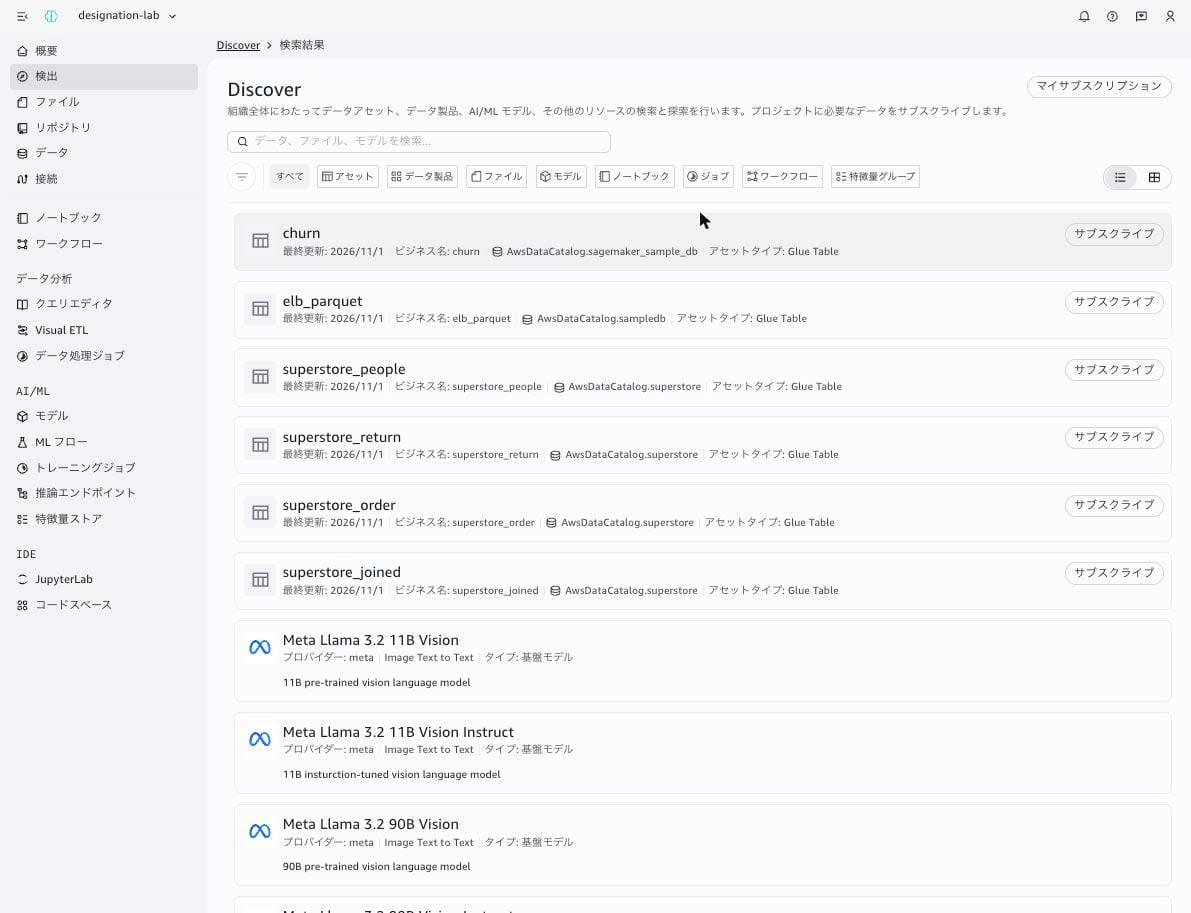
I searched by entering sample in "Discover". Because I had attached Catalog's Read-only actions, the search results showed Glue table assets (churn, elb_parquet, superstore_people, and others) and models.
Creating a notebook (a denied operation)
When I opened "Notebooks", the list showed "No notebooks". Because I had attached Notebooks' Read-only actions, displaying the list works. The "Create notebook" button was also displayed in a clickable state.
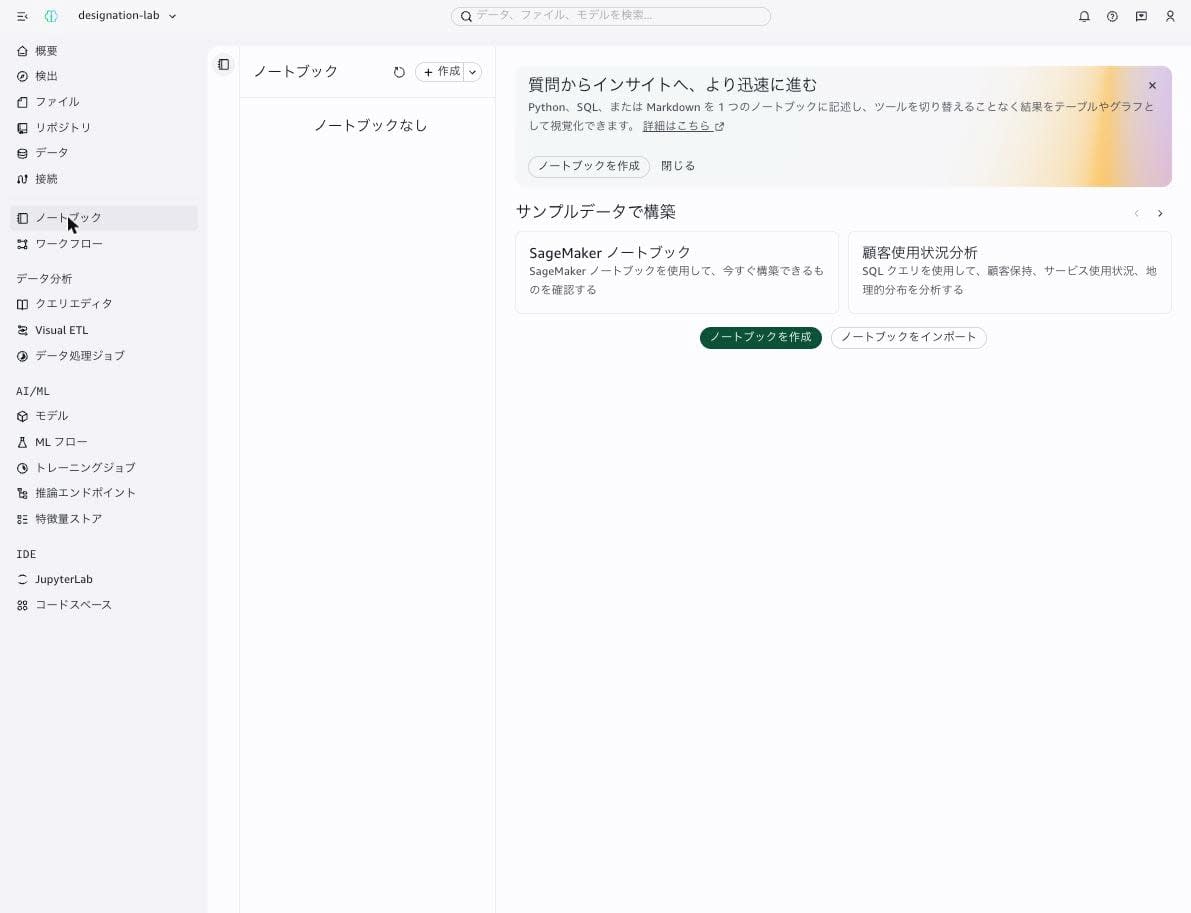
When I clicked "Create notebook", the following error appeared at the bottom right of the screen, and the notebook was not created. This error disappears after a few seconds.
User is not permitted to perform operation: CreateNotebook DesignationPolicy does not allow access.
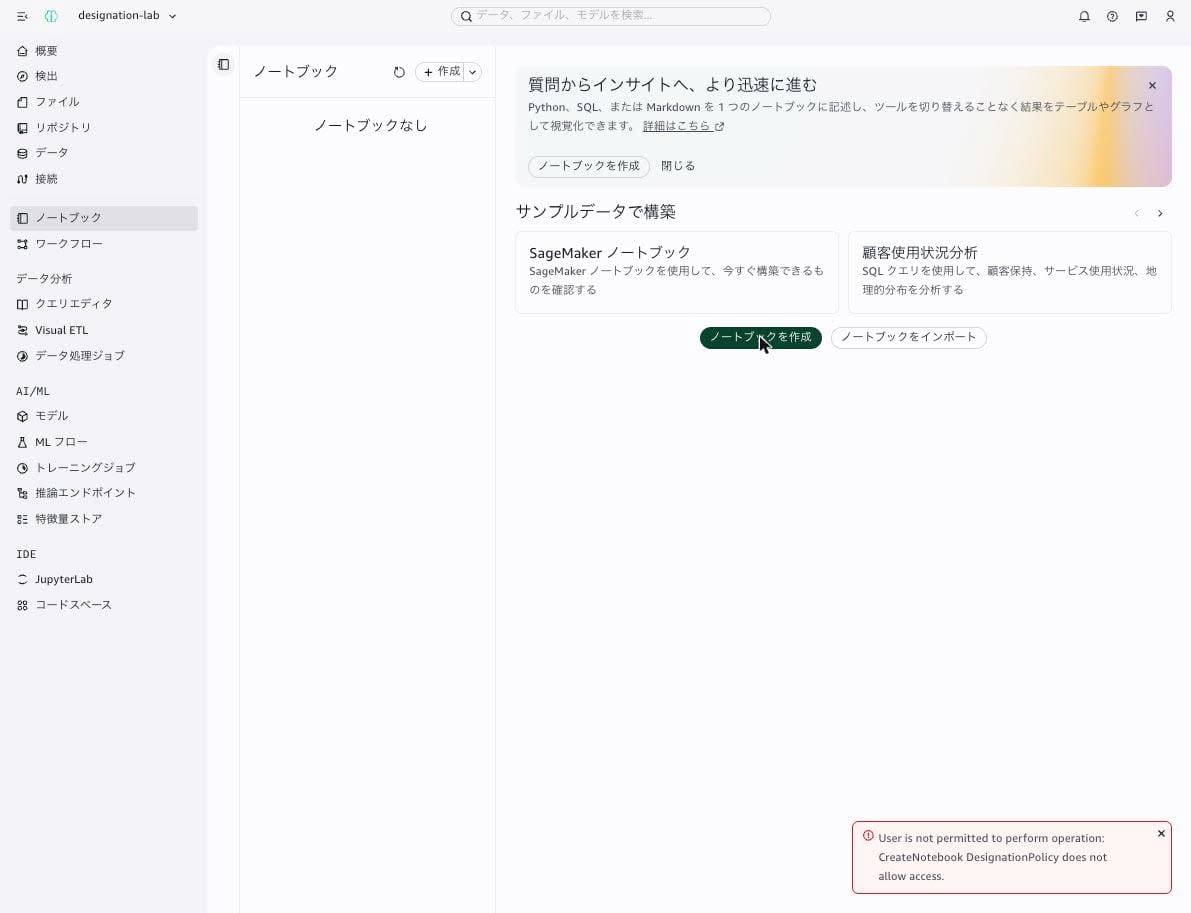
Because it says DesignationPolicy does not allow access., this is a denial by the designation. This is because Read Only Analyst does not include Notebooks' All actions.
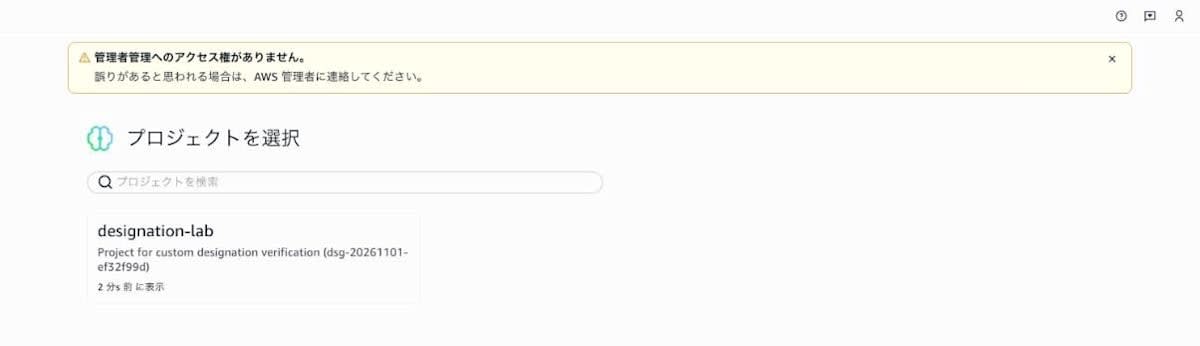
Also, when I opened the project details URL of the domain administration portal (/admin/projects/b6sdu4ri4gqxzt) in the test role's session, it displayed "You do not have access to administrator management." and moved to the project selection screen.
Checking the API caller in CloudTrail
The test role's IAM policy does not include datazone:Search, yet the search succeeded. So I checked how the API calls from the portal were recorded in CloudTrail (LookupEvents in ap-northeast-1, 2026-11-01T04:50Z to 05:00Z).
[
  {"event": "CreateNotebook", "time": "2026-11-01T04:55:09Z", "eventSource": "datazone.amazonaws.com", "errorCode": "AccessDenied", "userIdentity.type": "AssumedRole", "userIdentity.arn": "arn:aws:sts::123456789012:assumed-role/AmazonSageMakerUserIAMExecutionRole_edf0eed3/18b5607a-a007-4d16-bd61-86337d23eb75@bfd3xm0vnbk2zd"},
  {"event": "Search", "time": "2026-11-01T04:55:00Z", "eventSource": "datazone.amazonaws.com", "errorCode": null, "userIdentity.type": "AssumedRole", "userIdentity.arn": "arn:aws:sts::123456789012:assumed-role/AmazonSageMakerUserIAMExecutionRole_edf0eed3/18b5607a-a007-4d16-bd61-86337d23eb75@bfd3xm0vnbk2zd"},
  {"event": "ListNotebooks", "time": "2026-11-01T04:54:59Z", "eventSource": "datazone.amazonaws.com", "errorCode": null, "userIdentity.type": "AssumedRole", "userIdentity.arn": "arn:aws:sts::123456789012:assumed-role/AmazonSageMakerUserIAMExecutionRole_edf0eed3/18b5607a-a007-4d16-bd61-86337d23eb75@bfd3xm0vnbk2zd"}
]
All three calls were executed not by the test role but in the session of the project's execution role AmazonSageMakerUserIAMExecutionRole_edf0eed3. The session name 18b5607a-a007-4d16-bd61-86337d23eb75 is the ID of the user profile created when logging in to the portal with the test role, and bfd3xm0vnbk2zd is the ID of the project's ToolingLite environment.
Discussion
In IAM-based domains, portal operations call APIs with the execution role
According to the CloudTrail records, operations the test role performed in the portal called DataZone APIs in the session of the project's execution role. The only policy attached to the test role was SageMakerStudioUserIAMConsolePolicy for logging in to the portal, and datazone:Search is not allowed, yet the search succeeded.
From this, it appears that when you use the portal in an IAM-based domain, what IAM evaluates for API calls from the portal is the project's execution role rather than the member's IAM role, and differences between members are applied through designations. This is also consistent with the earlier documentation statement that in IAM-based domains, all members' access is managed by the project's execution role. If you want to separate operations among members of the same project, control it with designations rather than the members' IAM policies.
Buttons for operations without permission are still displayed
Even with the test role assigned Read Only Analyst, the "Create notebook" button was displayed in a clickable state. When clicked, the DesignationPolicy does not allow access. error is shown for only a few seconds, so you need to tell members in advance which designation is assigned to them and what they cannot do.
Also, according to the documentation, Notebooks permissions also apply to query books. I did not verify this time, but setting Notebooks to Read-only actions may also restrict operations in the new query editor.
Some resources remain even after deleting the project
When the execution role and S3 bucket were automatically created by the project creation wizard, the execution role and S3 bucket remained even after the project was deleted. Group profiles and user profiles also have no delete API, so they remain in a disabled state. When creating a project for verification, you need to include these in your cleanup targets.
What I'd like to see in the future
- Disable or hide buttons for operations without permission according to the designation
- In the designation deletion dialog, align the wording of the guidance with the string you actually need to enter
- When deleting a project, also allow deleting the execution role and S3 bucket automatically created by the wizard
Conclusion
With custom designations, you can separate the operations each member can perform within the same project. This time, I created a designation that allows only viewing the catalog and notebooks in the domain administration portal, and assigned it to the test role in the project creation wizard. With the test role, I could search the catalog and display the notebook list, but creating a notebook was denied with DesignationPolicy does not allow access..
In the operations I checked this time, API calls from the portal were made with the project's execution role. In IAM-based domains, differences in permissions between members are applied through designations. If data engineers, data stewards, and analysts are using the same project, consider switching from assigning Contributor uniformly to custom designations for each role.
Related reading
