
[Update] AWS Backup Restore Testing Now Supports Amazon Redshift, So I Tried It Out

This page has been translated by machine translation. View original
I'm Ishikawa from the Cloud Business Division. AWS Backup restore testing now supports Amazon Redshift provisioned clusters, so I created a restore testing plan and tried everything from restoring to checking the data, registering the validation result, and automatic deletion.
AWS Backup restore testing now supports Amazon Redshift. Restore testing automatically checks on a schedule whether you can actually restore from a backup. The time it takes for the restore job to complete is also recorded, so you can compare it with your recovery time objective (RTO).
Until now, restore testing supported Aurora, Amazon DocumentDB, Amazon DynamoDB, Amazon EBS, Amazon EC2, Amazon EFS, Amazon FSx, Amazon Neptune, Amazon RDS, and Amazon S3. With this update, Amazon Redshift has been added. Resources are assigned to a restore testing plan by ARN or tag, and you can choose the latest or a random recovery point.
What is AWS Backup restore testing?
Restore testing consists of two parts: a "restore testing plan" and a "resource assignment (restore testing selection)".
- Restore testing plan: Specifies the test frequency (cron expression), start time, start window (how many hours after the start time the job must begin), and which vault and period of recovery points to use (latest or random)
- Resource assignment: Specifies the target resource type and protected resources (ARNs or tag conditions), the IAM role used for the restore, restore parameter overrides, and the retention time before cleanup
According to the documentation, when the scheduled time arrives, AWS Backup starts the restore job at a randomly chosen time within the start window. The restore job runs the same way as an on-demand restore and is recorded in CloudTrail as a StartRestoreJob call. In the console job list, it appears as a job whose restore type is "test". Restored resources are deleted by AWS Backup once a validation result is registered or the retention time ends. Deletion does not happen immediately, and the time it takes depends on the resource type.
Of these, I confirmed in the "Trying it out" section later that the restore job starts within the start window and that the restored resource is deleted after the validation result is registered. I did not check the CloudTrail record or the display of the restore type in the console job list this time.
Things to know about Amazon Redshift restore testing
These are Amazon Redshift-specific specifications I confirmed in the official documentation. Of these, I also confirmed the contents of the inferred metadata and the parameters that can be overridden in the console in steps 3 and 5 of "Trying it out". That Redshift Serverless is not supported, the quotas, and the pricing structure are based on the documentation and pricing page, and I did not verify them in this test.
Only provisioned clusters are supported
In the AWS Backup feature availability table, only "Amazon Redshift" has a check in the restore testing column. The "Amazon Redshift Serverless" row has no check. Redshift Serverless namespaces are currently not supported by restore testing.
Inferred restore metadata and parameters you can override
In restore testing, AWS Backup infers the metadata required for the restore. For Redshift, the following four items are inferred.
| Key | Inferred value |
|---|---|
clusterIdentifier |
A random value starting with awsbackup-restore-test- |
encrypted |
true |
publiclyAccessible |
false |
restoreType |
CLUSTER_RESTORE |
Parameters you can override include availabilityZone, clusterParameterGroupName, clusterSubnetGroupName, vpcSecurityGroupIds, nodeType, numberOfNodes, kmsKeyId, iamRoles, manageMasterPassword, and port. List-type values such as vpcSecurityGroupIds are specified as a JSON array turned into a string, like "[\"sg-xxxx\"]".
The documentation also says AWS Backup may infer metadata that restores a resource to default settings (for example, restoring an Amazon EC2 instance or Amazon RDS cluster to the default VPC). If the default VPC or subnets have been deleted and no override is specified, the restore does not succeed. In this test, I overrode the subnet group and security group in an account with no default VPC and confirmed that the restore succeeded. I did not test whether the restore fails when no override is specified.
Quotas and pricing
According to the quota list in the documentation, the default number of Redshift restore jobs that can run concurrently from restore testing plans is 30 (can be increased). In this test I ran only one restore job.
According to the pricing page, restore testing charges consist of the following two parts.
- Evaluation charge: A fixed charge for each recovery point restored by a restore testing plan. In the Tokyo Region it was $1.80 per recovery point (as of November 4, 2026, confirmed with the AWS Price List API)
- Charge based on restored data volume: For certain resource types, a charge based on the amount of data (GB) restored in the month. The unit price is the same as for normal restores
Regarding the data-volume charge, I checked the AWS Backup price items for the Tokyo Region with the AWS Price List API. Items priced per restored GB exist for Amazon EFS, Amazon S3, Amazon DynamoDB, Amazon Timestream, Aurora DSQL, SAP HANA on Amazon EC2, VMware, and others, but there was no item for Amazon Redshift (as of November 5, 2026).
As noted on the pricing page, separately from restore testing charges, you are charged while the restored resource is retained. For Redshift, this is the node charge while the restored cluster exists.
Prices may change, so check the pricing page for the latest unit prices and supported resource types.
Trying it out
Prerequisites
- Region: Asia Pacific (Tokyo) ap-northeast-1
- Amazon Redshift: rg.large single-node cluster (cluster version 1.0.520420)
- I tested in an account with no default VPC in the Tokyo Region. So I first created a dedicated VPC with two private subnets (1a / 1c), a Redshift subnet group, and a security group with no inbound rules
- For the restore IAM role, I used the AWS Backup default role (
AWSBackupDefaultServiceRole)
The flow of the test is as follows. Creating prerequisite resources, taking the backup, and checking data were done with the AWS CLI, and creating the restore testing plan was done in the Management Console.
1. Prepare a test cluster and sample data
I created an rg.large single-node cluster.
% aws redshift create-cluster \
  --cluster-identifier rsrt-source \
  --node-type rg.large \
  --cluster-type single-node \
  --db-name dev \
  --master-username awsuser \
  --master-user-password "${MASTER_PW}" \
  --cluster-subnet-group-name rsrt-subnet-group \
  --vpc-security-group-ids sg-04a466d0eac8c0ffd \
  --no-publicly-accessible \
  --query 'Cluster.{Id:ClusterIdentifier,NodeType:NodeType,Nodes:NumberOfNodes,Status:ClusterStatus,Encrypted:Encrypted,AZ:AvailabilityZone}' \
  --output table
-----------------------------------------------------------------------
|                            CreateCluster                            |
+------+------------+--------------+-----------+---------+------------+
|  AZ  | Encrypted  |     Id       | NodeType  |  Nodes  |  Status    |
+------+------------+--------------+-----------+---------+------------+
|  None|  True      |  rsrt-source |  rg.large |  1      |  creating  |
+------+------------+--------------+-----------+---------+------------+
Using the Redshift Data API, I created a table and inserted 5 rows. Specifying --db-user in the Data API lets you connect with temporary credentials, so you can run SQL without using the admin password.
% aws redshift-data execute-statement \
  --cluster-identifier rsrt-source --database dev --db-user awsuser \
  --sql "CREATE TABLE public.sales (sale_id INT, item VARCHAR(32), amount INT, sold_at DATE);"

% aws redshift-data execute-statement \
  --cluster-identifier rsrt-source --database dev --db-user awsuser \
  --sql "INSERT INTO public.sales VALUES (1,'coffee',450,'2026-11-01'),(2,'tea',380,'2026-11-01'),(3,'cake',520,'2026-11-02'),(4,'coffee',450,'2026-11-03'),(5,'sandwich',680,'2026-11-03');"
I recorded the values before the backup. I'll compare against them after the restore.
SELECT COUNT(*) AS cnt, SUM(amount) AS total_amount, MAX(sold_at) AS last_sold FROM public.sales;
| cnt | total_amount | last_sold |
|---|---|---|
| 5 | 2480 | 2026-11-03 |
2. Take an on-demand backup with AWS Backup
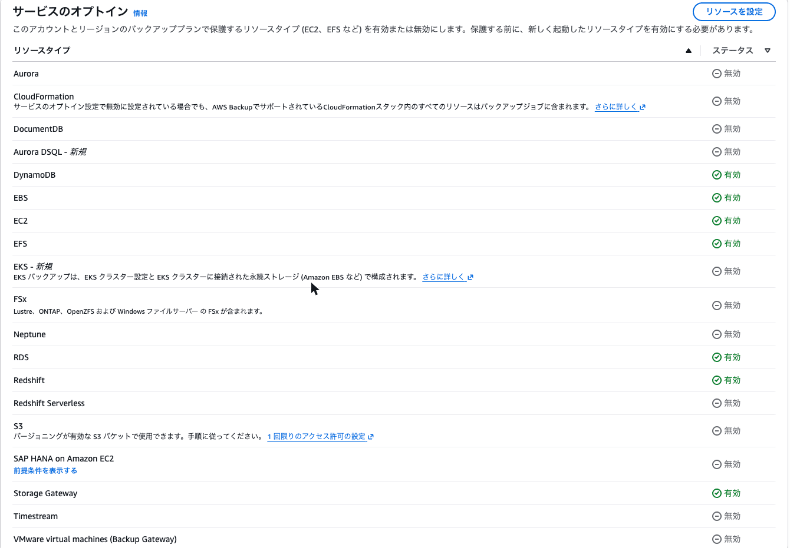
In this account, Redshift was disabled in the AWS Backup service opt-in. After enabling it, I created a dedicated vault rsrt-vault.
% aws backup update-region-settings --resource-type-opt-in-preference Redshift=true
% aws backup create-backup-vault --backup-vault-name rsrt-vault
I started an on-demand backup.
% aws backup start-backup-job \
  --backup-vault-name rsrt-vault \
  --resource-arn arn:aws:redshift:ap-northeast-1:123456789012:cluster:rsrt-source \
  --iam-role-arn arn:aws:iam::123456789012:role/service-role/AWSBackupDefaultServiceRole \
  --lifecycle DeleteAfterDays=7 \
  --output table
----------------------------------------------------------
|                     StartBackupJob                     |
+---------------+----------------------------------------+
|  BackupJobId  |  876e43e8-00a8-46e4-ad2e-7f07a419c414  |
|  CreationDate |  2026-11-04T11:55:15.634000+09:00      |
|  IsParent     |  False                                 |
+---------------+----------------------------------------+
The backup job reached COMPLETED in about 1 minute. A Redshift recovery point is created as a Redshift manual snapshot.
% aws backup describe-backup-job --backup-job-id 876e43e8-00a8-46e4-ad2e-7f07a419c414 \
  --query "{State:State,ResourceType:ResourceType,RecoveryPointArn:RecoveryPointArn,Created:CreationDate,Completed:CompletionDate,Message:StatusMessage}" \
  --output table
----------------------------------------------------------------------------------------------------------------------------------------------
|                                                              DescribeBackupJob                                                             |
+------------------+-------------------------------------------------------------------------------------------------------------------------+
|  Completed       |  2026-11-04T11:56:17.164000+09:00                                                                                       |
|  Created         |  2026-11-04T11:55:15.634000+09:00                                                                                       |
|  Message         |  None                                                                                                                   |
|  RecoveryPointArn|  arn:aws:redshift:ap-northeast-1:123456789012:snapshot:rsrt-source/awsbackup:job-876e43e8-00a8-46e4-ad2e-7f07a419c414   |
|  ResourceType    |  Redshift                                                                                                               |
|  State           |  COMPLETED                                                                                                              |
+------------------+-------------------------------------------------------------------------------------------------------------------------+
3. Check the inferred metadata
With get-restore-testing-inferred-metadata, you can check in advance the metadata that AWS Backup infers during restore testing.
% aws backup get-restore-testing-inferred-metadata \
  --backup-vault-name rsrt-vault \
  --recovery-point-arn "arn:aws:redshift:ap-northeast-1:123456789012:snapshot:rsrt-source/awsbackup:job-876e43e8-00a8-46e4-ad2e-7f07a419c414"
{
    "InferredMetadata": {
        "clusteridentifier": "awsbackup-restore-test-ab1a338f-2092-43e4-aeac-247d957c9f2d",
        "encrypted": "true",
        "publiclyaccessible": "false",
        "restoretype": "CLUSTER_RESTORE"
    }
}
As the documentation says, only four items were inferred. The subnet group and security group are not included in the inferred metadata. As mentioned above, the documentation explains that if the default VPC or subnets do not exist and no override is specified, the restore does not succeed. This account has no default VPC, so in the next step I decided to override the subnet group and security group.
4. Create a restore testing plan (console)
From "Restore testing" in the AWS Backup console, choose "Create restore testing plan". The settings were as follows.
- Restore testing plan name:
rsrt_redshift_plan - Test frequency: Daily
- Start time: 12:10 (Asia/Tokyo)
- Start within: 1 hour (the minimum you can specify)
- Source vault: Specific vault (
rsrt-vault) - Eligible recovery points: Past 7 days
- Recovery point selection criteria: Latest recovery point
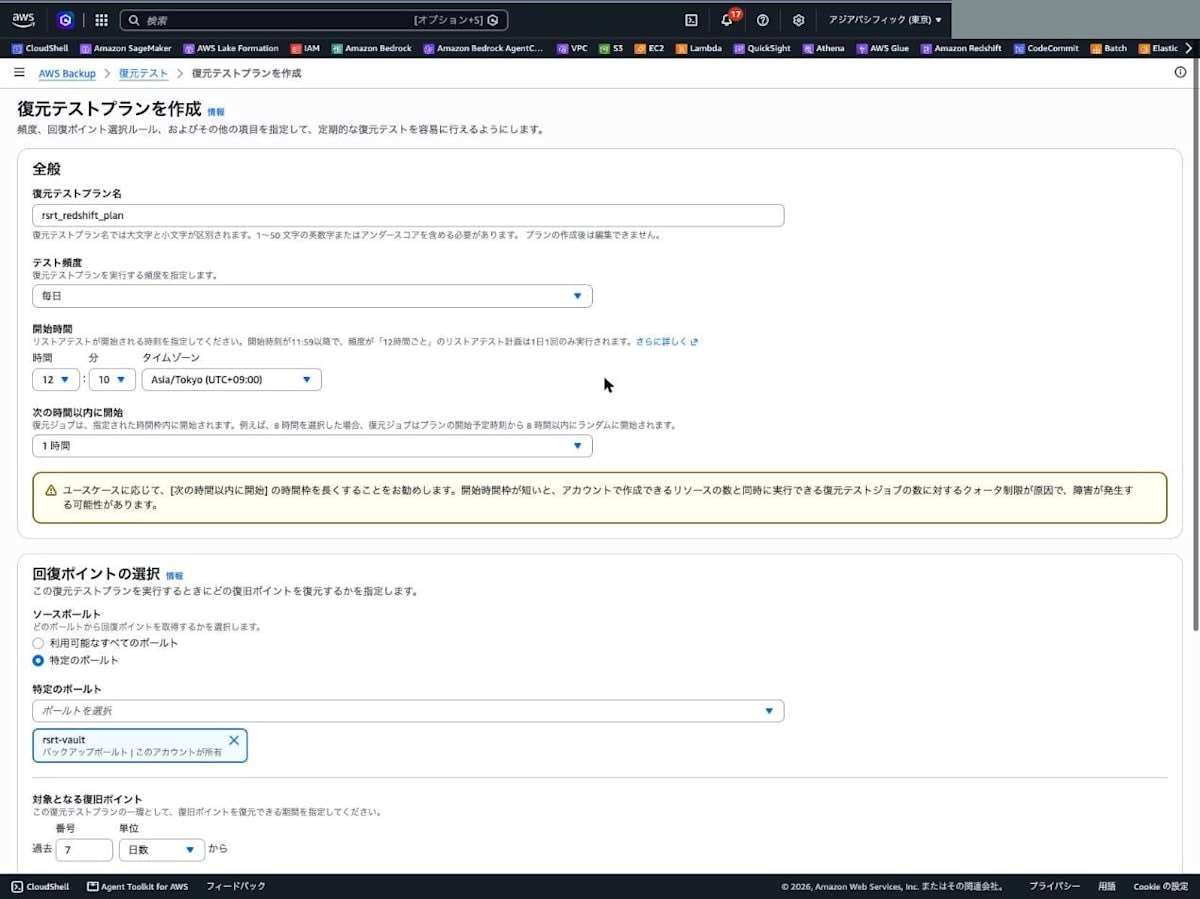
When I set the start window to 1 hour, a warning appeared saying, in effect, that a short start window may cause failures due to the quota on the number of restore testing jobs that can run concurrently. Since there was only one job this time, I proceeded as is.
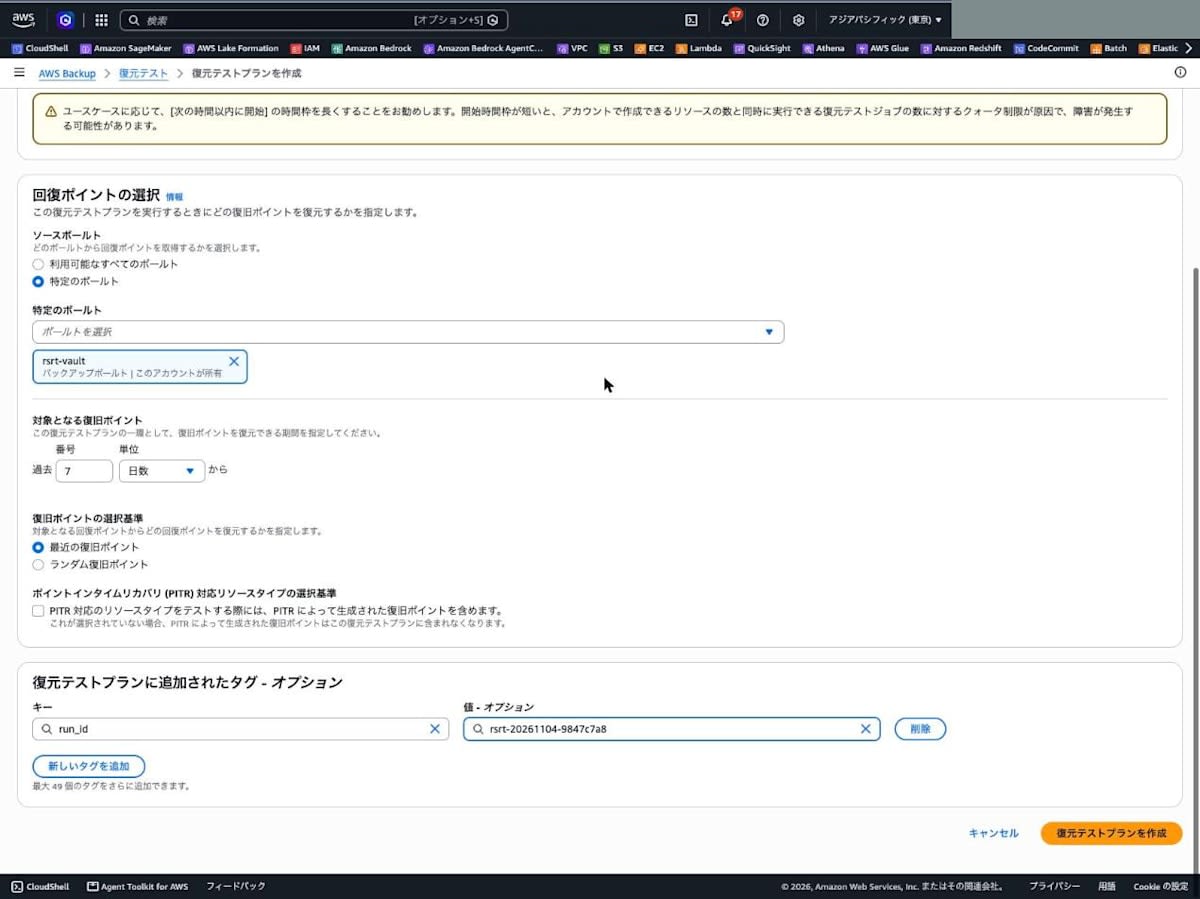
5. Assign the resource and override restore parameters (console)
After creating the plan, you go straight to the "Assign resources" screen. "Redshift" has been added to the resource type list.
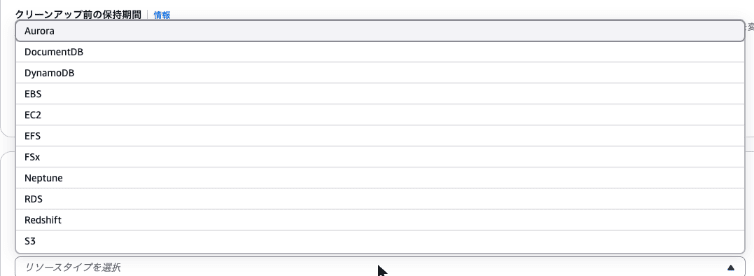
The settings were as follows.
- Resource assignment name:
rsrt_redshift_selection - IAM role: Default role
- Retention period before cleanup: Retain for a specific number of hours (2 hours)
- Resource type: Redshift
- Resource selection scope: Specific protected resource (
rsrt-source)
Under "Restore parameters", the non-editable defaults are shown: "Cluster identifier (random identifiers start with awsbackup-restore-test)", "Encrypted: True", "Publicly accessible: False", and "Restore type: Cluster". They match the inferred metadata I confirmed in step 3.
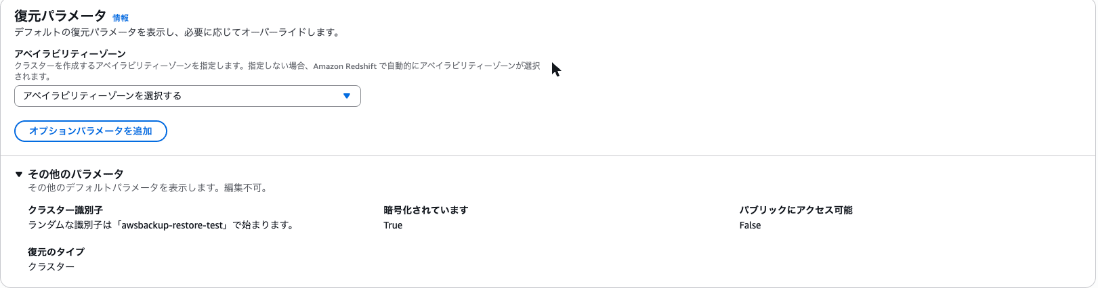
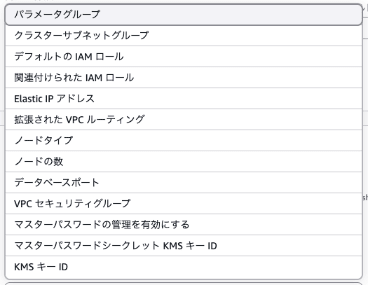
The parameters that can be overridden from "Add optional parameters" numbered 13, as follows.
Here I specified rsrt-subnet-group for "Cluster subnet group" and rsrt-redshift-sg for "VPC security groups".
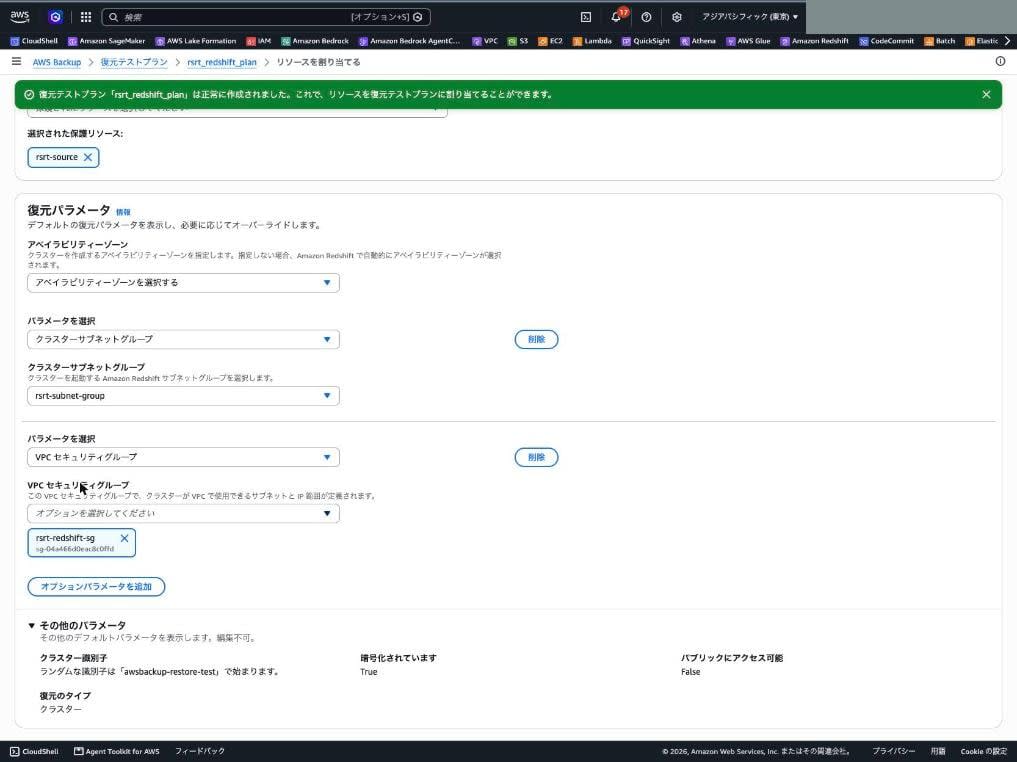
Checking the created plan and selection with the CLI, the overrides I specified in the console were in RestoreMetadataOverrides. VpcSecurityGroupIds is a JSON array string.
% aws backup get-restore-testing-selection \
  --restore-testing-plan-name rsrt_redshift_plan \
  --restore-testing-selection-name rsrt_redshift_selection
{
    "RestoreTestingSelection": {
        "CreationTime": "2026-11-04T12:00:19.835000+09:00",
        "IamRoleArn": "arn:aws:iam::123456789012:role/service-role/AWSBackupDefaultServiceRole",
        "ProtectedResourceArns": [
            "arn:aws:redshift:ap-northeast-1:123456789012:cluster:rsrt-source"
        ],
        "ProtectedResourceConditions": {
            "StringEquals": [],
            "StringNotEquals": []
        },
        "ProtectedResourceType": "Redshift",
        "RestoreMetadataOverrides": {
            "ClusterSubnetGroupName": "rsrt-subnet-group",
            "VpcSecurityGroupIds": "[\"sg-04a466d0eac8c0ffd\"]"
        },
        "RestoreTestingPlanName": "rsrt_redshift_plan",
        "RestoreTestingSelectionName": "rsrt_redshift_selection",
        "ValidationWindowHours": 2
    }
}
As for the plan, "Daily 12:10" in the console was saved as cron(10 12 ? * * *) and "Latest recovery point" as LATEST_WITHIN_WINDOW.
% aws backup get-restore-testing-plan --restore-testing-plan-name rsrt_redshift_plan
{
    "RestoreTestingPlan": {
        "CreationTime": "2026-11-04T11:58:17.809000+09:00",
        "LastUpdateTime": "2026-11-04T11:58:17.809000+09:00",
        "RecoveryPointSelection": {
            "Algorithm": "LATEST_WITHIN_WINDOW",
            "ExcludeVaults": [],
            "IncludeVaults": [
                "arn:aws:backup:ap-northeast-1:123456789012:backup-vault:rsrt-vault"
            ],
            "RecoveryPointTypes": [
                "SNAPSHOT"
            ],
            "SelectionWindowDays": 7
        },
        "RestoreTestingPlanArn": "arn:aws:backup:ap-northeast-1:123456789012:restore-testing-plan:rsrt_redshift_plan-9e90b8bc-454c-4764-83e3-238ffc2500b6",
        "RestoreTestingPlanName": "rsrt_redshift_plan",
        "ScheduleExpression": "cron(10 12 ? * * *)",
        "ScheduleExpressionTimezone": "Asia/Tokyo",
        "StartWindowHours": 1
    }
}
6. Check the restore job result
I ran list-restore-jobs every 60 seconds in the loop below and waited for the job to be created. The time at the start of each output line is the execution time (JST) added inside the loop. After the job became COMPLETED, the job list is output as JSON. The job was created at 12:31, about 21 minutes after the 12:10 start time, and became COMPLETED at 12:33.
% PLAN_ARN="arn:aws:backup:ap-northeast-1:123456789012:restore-testing-plan:rsrt_redshift_plan-9e90b8bc-454c-4764-83e3-238ffc2500b6"

% for i in $(seq 1 150); do
  L=$(aws backup list-restore-jobs --by-restore-testing-plan-arn "$PLAN_ARN" \
        --query "RestoreJobs[0].[RestoreJobId,Status,PercentDone,CreatedResourceArn]" --output text 2>&1)
  echo "$(TZ=Asia/Tokyo date +%H:%M:%S) $L"
  S=$(echo "$L" | awk '{print $2}')
  case "$S" in COMPLETED|FAILED|ABORTED) break;; esac
  sleep 60
done
12:00:44 None
12:01:45 None
12:02:46 None
12:03:46 None
12:04:47 None
12:05:48 None
12:06:48 None
12:07:49 None
12:08:50 None
12:09:50 None
12:10:51 None
12:11:52 None
12:12:52 None
12:13:53 None
12:14:54 None
12:15:54 None
12:16:55 None
12:17:56 None
12:18:56 None
12:19:57 None
12:20:58 None
12:21:58 None
12:22:59 None
12:24:00 None
12:25:00 None
12:26:01 None
12:27:02 None
12:28:02 None
12:29:03 None
12:30:04 None
12:31:05 None
12:32:05 63a3d8a4-54a4-4faa-9ae7-e92f4c51e223	RUNNING	0.00%	None
12:33:06 63a3d8a4-54a4-4faa-9ae7-e92f4c51e223	RUNNING	0.00%	arn:aws:redshift:ap-northeast-1:123456789012:cluster:awsbackup-restore-test-17b2d653-504e-4466-a6dd-9233e8182e22
12:34:06 63a3d8a4-54a4-4faa-9ae7-e92f4c51e223	COMPLETED	100.00%	arn:aws:redshift:ap-northeast-1:123456789012:cluster:awsbackup-restore-test-17b2d653-504e-4466-a6dd-9233e8182e22

% aws backup list-restore-jobs --by-restore-testing-plan-arn "$PLAN_ARN" --output json
{
    "RestoreJobs": [
        {
            "AccountId": "123456789012",
            "RestoreJobId": "63a3d8a4-54a4-4faa-9ae7-e92f4c51e223",
            "RecoveryPointArn": "arn:aws:redshift:ap-northeast-1:123456789012:snapshot:rsrt-source/awsbackup:job-876e43e8-00a8-46e4-ad2e-7f07a419c414",
            "SourceResourceArn": "arn:aws:redshift:ap-northeast-1:123456789012:cluster:rsrt-source",
            "BackupVaultArn": "arn:aws:backup:ap-northeast-1:123456789012:backup-vault:rsrt-vault",
            "CreationDate": "2026-11-04T12:31:27.995000+09:00",
            "CompletionDate": "2026-11-04T12:33:45.841000+09:00",
            "Status": "COMPLETED",
            "PercentDone": "100.00%",
            "BackupSizeInBytes": 0,
            "IamRoleArn": "arn:aws:iam::123456789012:role/service-role/AWSBackupDefaultServiceRole",
            "CreatedResourceArn": "arn:aws:redshift:ap-northeast-1:123456789012:cluster:awsbackup-restore-test-17b2d653-504e-4466-a6dd-9233e8182e22",
            "ResourceType": "Redshift",
            "RecoveryPointCreationDate": "2026-11-04T11:55:15.634000+09:00",
            "IsParent": false,
            "CreatedBy": {
                "RestoreTestingPlanArn": "arn:aws:backup:ap-northeast-1:123456789012:restore-testing-plan:rsrt_redshift_plan-9e90b8bc-454c-4764-83e3-238ffc2500b6"
            }
        }
    ]
}
This is the result of describe-restore-job. From CreationDate to CompletionDate was 2 minutes 18 seconds. CreatedBy contains the ARN of the restore testing plan, and ValidationStatus is VALIDATING.
% aws backup describe-restore-job --restore-job-id 63a3d8a4-54a4-4faa-9ae7-e92f4c51e223
{
    "AccountId": "123456789012",
    "RestoreJobId": "63a3d8a4-54a4-4faa-9ae7-e92f4c51e223",
    "RecoveryPointArn": "arn:aws:redshift:ap-northeast-1:123456789012:snapshot:rsrt-source/awsbackup:job-876e43e8-00a8-46e4-ad2e-7f07a419c414",
    "SourceResourceArn": "arn:aws:redshift:ap-northeast-1:123456789012:cluster:rsrt-source",
    "BackupVaultArn": "arn:aws:backup:ap-northeast-1:123456789012:backup-vault:rsrt-vault",
    "CreationDate": "2026-11-04T12:31:27.995000+09:00",
    "CompletionDate": "2026-11-04T12:33:45.841000+09:00",
    "Status": "COMPLETED",
    "PercentDone": "100.00%",
    "BackupSizeInBytes": 0,
    "IamRoleArn": "arn:aws:iam::123456789012:role/service-role/AWSBackupDefaultServiceRole",
    "CreatedResourceArn": "arn:aws:redshift:ap-northeast-1:123456789012:cluster:awsbackup-restore-test-17b2d653-504e-4466-a6dd-9233e8182e22",
    "ResourceType": "Redshift",
    "RecoveryPointCreationDate": "2026-11-04T11:55:15.634000+09:00",
    "CreatedBy": {
        "RestoreTestingPlanArn": "arn:aws:backup:ap-northeast-1:123456789012:restore-testing-plan:rsrt_redshift_plan-9e90b8bc-454c-4764-83e3-238ffc2500b6"
    },
    "ValidationStatus": "VALIDATING",
    "IsParent": false
}
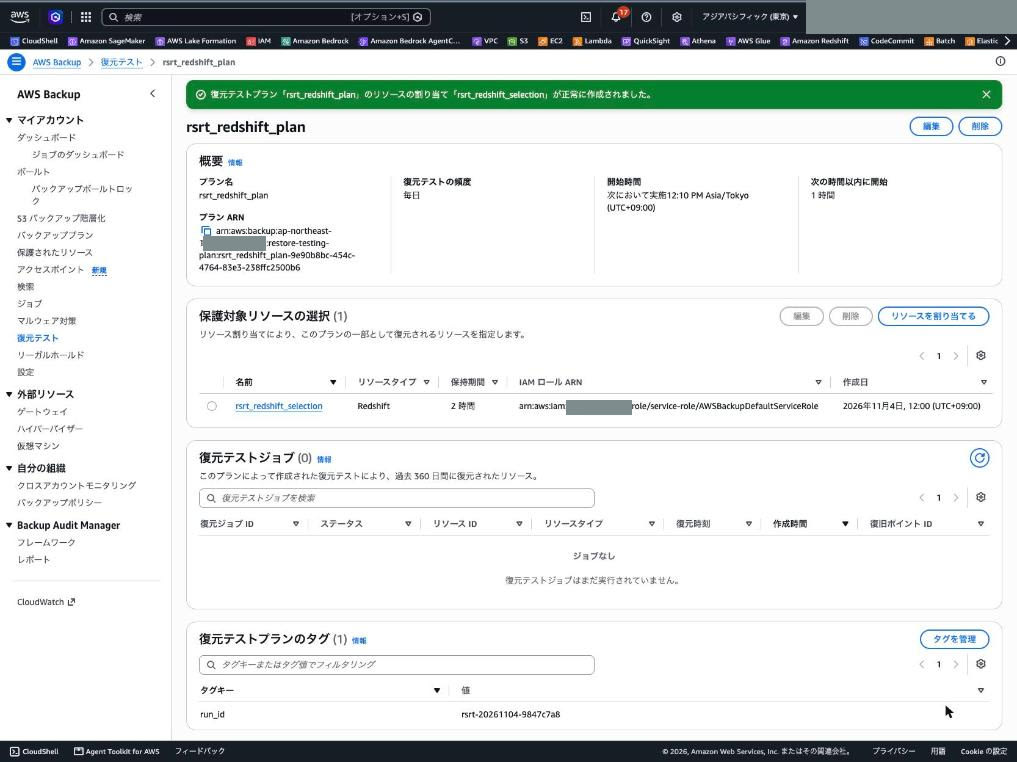
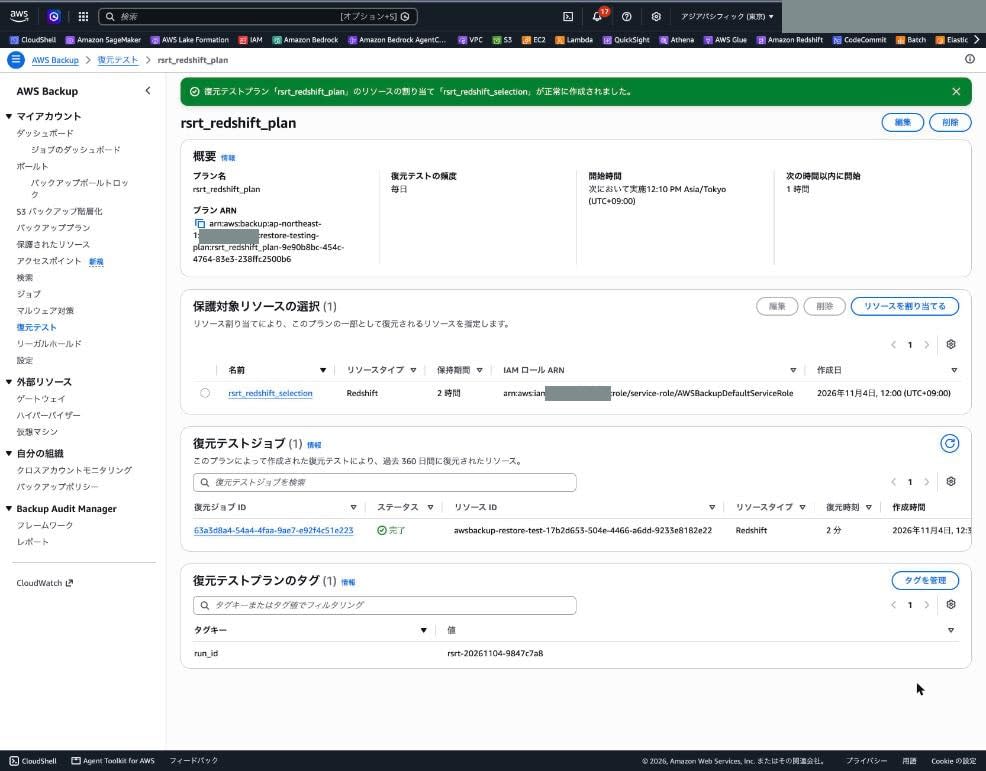
The detail screen of the restore testing plan in the console also showed the job with status "Completed" and restore time "2 minutes".
With get-restore-job-metadata, I checked the metadata actually used for the restore. The overridden clustersubnetgroupname and vpcsecuritygroupids were added to the four inferred items.
% aws backup get-restore-job-metadata --restore-job-id 63a3d8a4-54a4-4faa-9ae7-e92f4c51e223
{
    "RestoreJobId": "63a3d8a4-54a4-4faa-9ae7-e92f4c51e223",
    "Metadata": {
        "clusteridentifier": "awsbackup-restore-test-17b2d653-504e-4466-a6dd-9233e8182e22",
        "clustersubnetgroupname": "rsrt-subnet-group",
        "encrypted": "true",
        "publiclyaccessible": "false",
        "restoretype": "CLUSTER_RESTORE",
        "vpcsecuritygroupids": "[\"sg-04a466d0eac8c0ffd\"]"
    }
}
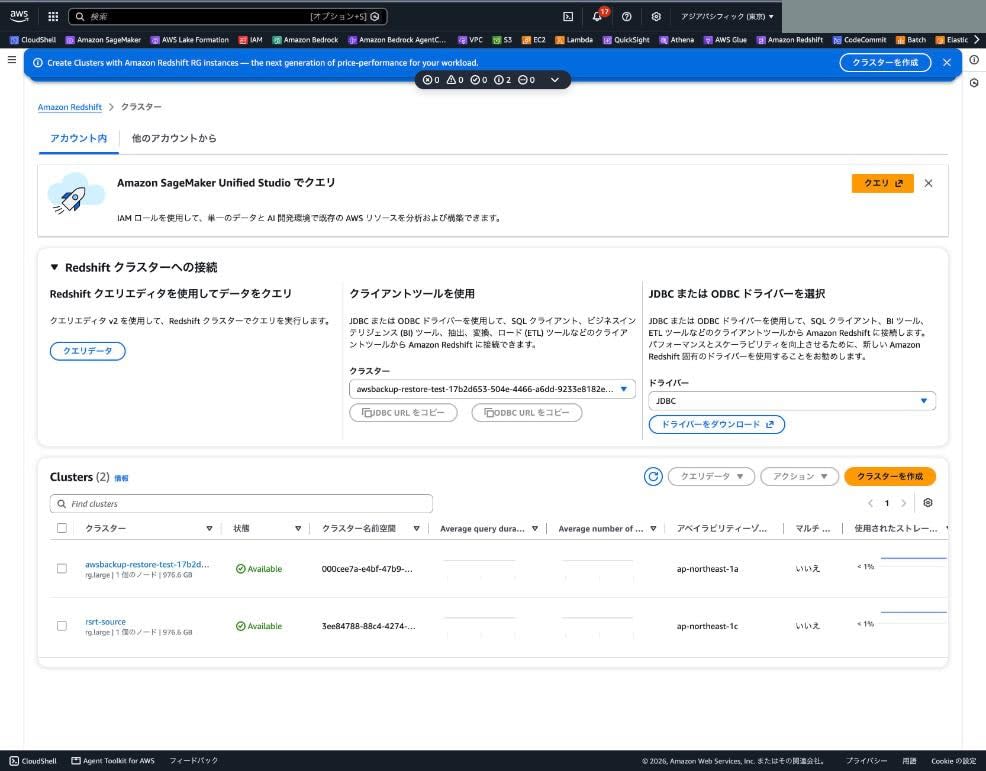
The restored cluster was a single-node rg.large like the original, created in the specified subnet group and security group. The AZ was ap-northeast-1a, different from the original cluster (ap-northeast-1c).
% aws redshift describe-clusters --cluster-identifier awsbackup-restore-test-17b2d653-504e-4466-a6dd-9233e8182e22 \
  --query "Clusters[0].{Id:ClusterIdentifier,Status:ClusterStatus,NodeType:NodeType,Nodes:NumberOfNodes,AZ:AvailabilityZone,SubnetGroup:ClusterSubnetGroupName,SG:VpcSecurityGroups[0].VpcSecurityGroupId,VpcId:VpcId,Encrypted:Encrypted,Public:PubliclyAccessible,Created:ClusterCreateTime}" \
  --output table
--------------------------------------------------------------------------------
|                               DescribeClusters                               |
+-------------+----------------------------------------------------------------+
|  AZ         |  ap-northeast-1a                                               |
|  Created    |  2026-11-04T03:33:31.841000+00:00                              |
|  Encrypted  |  True                                                          |
|  Id         |  awsbackup-restore-test-17b2d653-504e-4466-a6dd-9233e8182e22   |
|  NodeType   |  rg.large                                                      |
|  Nodes      |  1                                                             |
|  Public     |  False                                                         |
|  SG         |  sg-04a466d0eac8c0ffd                                          |
|  Status     |  available                                                     |
|  SubnetGroup|  rsrt-subnet-group                                             |
|  VpcId      |  vpc-02c2dca3c3d3d8bf1                                         |
+-------------+----------------------------------------------------------------+
I also checked the tags on the restored cluster. The four tags attached to the original cluster were carried over as is, and the awsbackup-restore-test tag described in the documentation was not attached at this point (13:02).
% aws redshift describe-clusters --cluster-identifier awsbackup-restore-test-17b2d653-504e-4466-a6dd-9233e8182e22 \
  --query "Clusters[0].Tags" --output table
---------------------------------------
|          DescribeClusters           |
+----------+--------------------------+
|    Key   |          Value           |
+----------+--------------------------+
|  owner   |  ishikawa                |
|  run_id  |  rsrt-20261104-9847c7a8  |
|  purpose |  blog-verification       |
|  ttl     |  2026-11-04T08:52:43Z    |
+----------+--------------------------+
7. Check the data in the restored cluster
On the restored cluster, I ran the same aggregate SQL as in step 1 with the Data API.
aws redshift-data execute-statement \
  --cluster-identifier awsbackup-restore-test-17b2d653-504e-4466-a6dd-9233e8182e22 \
  --database dev --db-user awsuser \
  --sql "SELECT COUNT(*) AS cnt, SUM(amount) AS total_amount, MAX(sold_at) AS last_sold FROM public.sales;"
+-----+--------------+------------+
| cnt | total_amount | last_sold  |
+-----+--------------+------------+
| 5   | 2480         | 2026-11-03 |
+-----+--------------+------------+
I also retrieved all rows. They match the 5 rows inserted before the backup.
| sale_id | item | amount | sold_at |
|---|---|---|---|
| 1 | coffee | 450 | 2026-11-01 |
| 2 | tea | 380 | 2026-11-01 |
| 3 | cake | 520 | 2026-11-02 |
| 4 | coffee | 450 | 2026-11-03 |
| 5 | sandwich | 680 | 2026-11-03 |
8. Register the validation result and check automatic deletion
I registered the result of the check with put-restore-validation-result.
% aws backup put-restore-validation-result \
  --restore-job-id 63a3d8a4-54a4-4faa-9ae7-e92f4c51e223 \
  --validation-status SUCCESSFUL \
  --validation-status-message "row count 5 / sum(amount) 2480 / max(sold_at) 2026-11-03 matched source"
Checking 5 seconds after registration, ValidationStatus was SUCCESSFUL. At this point DeletionStatus was empty, and the restored cluster was still available.
% aws backup describe-restore-job --restore-job-id 63a3d8a4-54a4-4faa-9ae7-e92f4c51e223 \
  --query "{Status:Status,ValidationStatus:ValidationStatus,ValidationStatusMessage:ValidationStatusMessage,DeletionStatus:DeletionStatus,DeletionStatusMessage:DeletionStatusMessage}" \
  --output table
--------------------------------------------------------------------------------------------------------
|                                          DescribeRestoreJob                                          |
+--------------------------+---------------------------------------------------------------------------+
|  DeletionStatus          |  None                                                                     |
|  DeletionStatusMessage   |  None                                                                     |
|  Status                  |  COMPLETED                                                                |
|  ValidationStatus        |  SUCCESSFUL                                                               |
|  ValidationStatusMessage |  row count 5 / sum(amount) 2480 / max(sold_at) 2026-11-03 matched source  |
+--------------------------+---------------------------------------------------------------------------+
% aws redshift describe-clusters --cluster-identifier awsbackup-restore-test-17b2d653-504e-4466-a6dd-9233e8182e22 \
  --query "Clusters[0].ClusterStatus" --output text
available
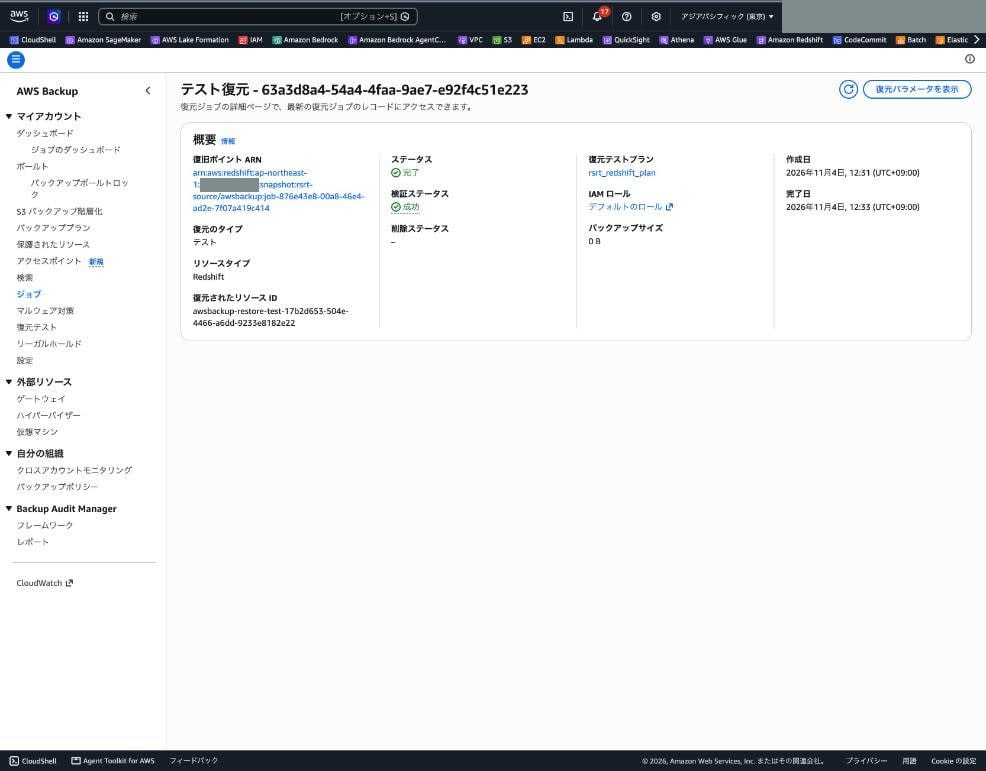
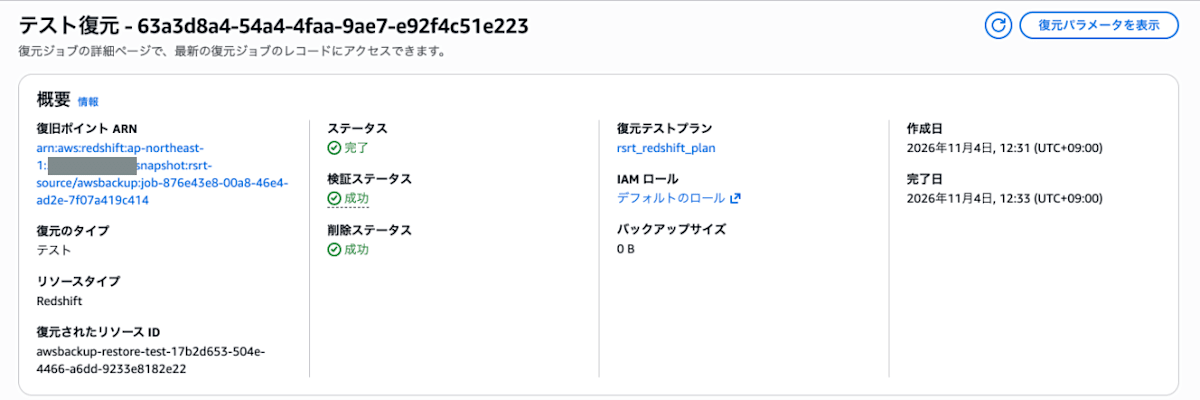
The job detail screen in the console also showed the validation status as "Successful".
After that, I checked the deletion status and the state of the restored cluster every 60 seconds in the loop below. The time at the start of each output line is the execution time (JST) added inside the loop. After DeletionStatus became SUCCESSFUL, the state of the restore job is output as a table.
% RJ_ID=63a3d8a4-54a4-4faa-9ae7-e92f4c51e223
% RESTORED=awsbackup-restore-test-17b2d653-504e-4466-a6dd-9233e8182e22

% for i in $(seq 1 90); do
  D=$(aws backup describe-restore-job --restore-job-id $RJ_ID \
        --query "[DeletionStatus,DeletionStatusMessage]" --output text 2>&1)
  C=$(aws redshift describe-clusters --cluster-identifier $RESTORED \
        --query "Clusters[0].ClusterStatus" --output text 2>&1 | tail -1)
  echo "$(TZ=Asia/Tokyo date +%H:%M:%S) deletion=[$D] cluster=[$C]"
  case "$D" in SUCCESSFUL*|FAILED*) break;; esac
  sleep 60
done
13:03:10 deletion=[None	None] cluster=[available]
13:04:12 deletion=[None	None] cluster=[available]
13:05:14 deletion=[None	None] cluster=[available]
13:06:15 deletion=[None	None] cluster=[available]
13:07:17 deletion=[None	None] cluster=[available]
13:08:18 deletion=[None	None] cluster=[available]
13:09:20 deletion=[None	None] cluster=[available]
13:10:22 deletion=[None	None] cluster=[available]
13:11:23 deletion=[None	None] cluster=[available]
13:12:25 deletion=[None	None] cluster=[available]
13:13:26 deletion=[DELETING	None] cluster=[deleting]
13:14:28 deletion=[DELETING	None] cluster=[aws: [ERROR]: An error occurred (ClusterNotFound) when calling the DescribeClusters operation: Cluster awsbackup-restore-test-17b2d653-504e-4466-a6dd-9233e8182e22 not found.]
13:15:29 deletion=[DELETING	None] cluster=[aws: [ERROR]: An error occurred (ClusterNotFound) when calling the DescribeClusters operation: Cluster awsbackup-restore-test-17b2d653-504e-4466-a6dd-9233e8182e22 not found.]
13:16:30 deletion=[DELETING	None] cluster=[aws: [ERROR]: An error occurred (ClusterNotFound) when calling the DescribeClusters operation: Cluster awsbackup-restore-test-17b2d653-504e-4466-a6dd-9233e8182e22 not found.]
13:17:31 deletion=[DELETING	None] cluster=[aws: [ERROR]: An error occurred (ClusterNotFound) when calling the DescribeClusters operation: Cluster awsbackup-restore-test-17b2d653-504e-4466-a6dd-9233e8182e22 not found.]
13:18:33 deletion=[DELETING	None] cluster=[aws: [ERROR]: An error occurred (ClusterNotFound) when calling the DescribeClusters operation: Cluster awsbackup-restore-test-17b2d653-504e-4466-a6dd-9233e8182e22 not found.]
13:19:34 deletion=[DELETING	None] cluster=[aws: [ERROR]: An error occurred (ClusterNotFound) when calling the DescribeClusters operation: Cluster awsbackup-restore-test-17b2d653-504e-4466-a6dd-9233e8182e22 not found.]
13:20:35 deletion=[DELETING	None] cluster=[aws: [ERROR]: An error occurred (ClusterNotFound) when calling the DescribeClusters operation: Cluster awsbackup-restore-test-17b2d653-504e-4466-a6dd-9233e8182e22 not found.]
13:21:36 deletion=[DELETING	None] cluster=[aws: [ERROR]: An error occurred (ClusterNotFound) when calling the DescribeClusters operation: Cluster awsbackup-restore-test-17b2d653-504e-4466-a6dd-9233e8182e22 not found.]
13:22:37 deletion=[SUCCESSFUL	None] cluster=[aws: [ERROR]: An error occurred (ClusterNotFound) when calling the DescribeClusters operation: Cluster awsbackup-restore-test-17b2d653-504e-4466-a6dd-9233e8182e22 not found.]

% aws backup describe-restore-job --restore-job-id $RJ_ID \
  --query "{Status:Status,ValidationStatus:ValidationStatus,DeletionStatus:DeletionStatus,DeletionStatusMessage:DeletionStatusMessage}" \
  --output table
------------------------------------------------------------------------------
|                             DescribeRestoreJob                             |
+----------------+-------------------------+------------+--------------------+
| DeletionStatus |  DeletionStatusMessage  |  Status    | ValidationStatus   |
+----------------+-------------------------+------------+--------------------+
|  SUCCESSFUL    |  None                   |  COMPLETED |  SUCCESSFUL        |
+----------------+-------------------------+------------+--------------------+
About 10 minutes after the validation result was registered at 13:02, DeletionStatus became DELETING at 13:13. One minute later the cluster returned ClusterNotFound, and at 13:22 DeletionStatus became SUCCESSFUL. Deletion started when the validation result was registered, without waiting for the 2-hour retention time I had set.
Checking the Redshift snapshots after deletion, only the AWS Backup recovery point (manual snapshot) remained. No final snapshot was created for the restored cluster.
% aws redshift describe-cluster-snapshots \
  --query "Snapshots[?starts_with(ClusterIdentifier, \`awsbackup-restore-test\`) || ClusterIdentifier==\`rsrt-source\`].{Id:SnapshotIdentifier,Cluster:ClusterIdentifier,Type:SnapshotType,Status:Status,Created:SnapshotCreateTime}" \
  --output table
-------------------------------------------------------------------
|                    DescribeClusterSnapshots                     |
+---------+-------------------------------------------------------+
|  Cluster|  rsrt-source                                          |
|  Created|  2026-11-04T02:55:29.210000+00:00                     |
|  Id     |  awsbackup:job-876e43e8-00a8-46e4-ad2e-7f07a419c414   |
|  Status |  available                                            |
|  Type   |  manual                                               |
+---------+-------------------------------------------------------+
Discussion
Without a default VPC, override the subnet group and security group
The inferred metadata for Redshift did not include the subnet group or security group. The documentation explains that if no default configuration exists and no override is given, the restore fails. In this test, I overrode clusterSubnetGroupName and vpcSecurityGroupIds in an account with no default VPC and confirmed that the cluster was restored to the specified location. I did not test what happens without the overrides.
If you include a production cluster in restore testing, preparing a restore-destination subnet group and security group separate from production helps avoid creating restore test clusters in the production network.
Restore time depends on data volume, so measure with real clusters
This restore job completed in 2 minutes 18 seconds. That is for a small setup: a backup size of 48 MB (TotalBackupSizeInMegaBytes from get-recovery-point-restore-metadata) and an rg.large single node. To use this for checking RTO, you need results from restore tests against your actual clusters.
If you want to keep evaluating restore time, the AWS Backup Audit Manager control "Restore time for resources meet target" lets you check whether the target restore time is exceeded.
Start times vary within the window
In this plan, with a 12:10 start time and a 1-hour start window, the job was created at 12:31. The minimum start window is 1 hour (the quota list in the documentation gives a minimum of 1 hour and a maximum of 168 hours).
Also, at the time of this test (November 4, 2026), I could not find an operation to run a restore testing plan on the spot. What I checked was the commands in the aws backup help command list of the AWS CLI (aws-cli/2.39.3) whose names contain restore-testing, restore-job, or validation, and the creation and detail screens of restore testing plans in the Management Console. I have not checked whether it can be done any other way.
If a person checks the data after the restore, you need to allow time considering both the start window and the retention time.
Data can be checked with the Data API
The restored cluster has public access disabled and was created in a security group with no inbound rules. Even so, by specifying --db-user in the Redshift Data API, I could run SQL and check the data without preparing a network path. The documentation introduces a method where a Lambda function is triggered by the restore job completion event (EventBridge Restore Job State Change) and registers the check result with PutRestoreValidationResult. This Data API check can be built into that Lambda function's processing.
Also, the "Restore an Amazon Redshift cluster" page in the AWS Backup documentation explains that when restoring a cluster that uses the Amazon Redshift admin password (admin password managed by AWS Secrets Manager), you need to set ManageMasterPassword to true in the restore metadata and add Secrets Manager permissions (such as secretsmanager:CreateSecret) to the restore IAM role. That page describes normal restores, not restore testing.
This test used a cluster that does not use a managed password, so I did not try this setting. I have not verified the behavior when a cluster that uses a managed password is targeted by restore testing, or when manageMasterPassword is overridden in a restore testing selection.
Registering the validation result starts deletion without waiting for the retention time
I had set the retention time to 2 hours, but deletion started about 10 minutes after I registered the validation result, and the deletion status became SUCCESSFUL about 20 minutes after. If you automate validation and register the result once the restore completes, you can shorten the time the restored cluster exists and reduce the node charges accordingly.
The restored cluster inherits the original cluster's tags
The restored cluster had the same tags as the original cluster. On the other hand, the awsbackup-restore-test tag that the documentation says is attached to resources that support tag-on-restore was not attached at the time of this check. If you use the original cluster's tags for cost allocation or tag-based automation, you should assume the restored cluster carries the same tags. Note that the documentation says normal backup plans exclude resources whose names start with awsbackup-restore-test.
What I'd like to see next
- Support for Redshift Serverless namespaces (currently not supported by restore testing)
- An operation to run a restore testing plan on the spot
Conclusion
Since AWS Backup restore testing now supports Amazon Redshift provisioned clusters, I tried the whole flow from creating a restore testing plan to restoring, checking the data, registering the validation result, and automatic deletion.
- Redshift was added to the console's resource types, and I could set up restore testing for a cluster specified by ARN using the same steps as other resources
- The inferred metadata does not include the subnet group or security group, so overrides were needed in an environment with no default VPC
- I connected to the restored cluster with the Data API and confirmed it had the same data as before the backup
- The restore job completed in 2 minutes 18 seconds. However, this is for a small setup with a 48 MB backup and an rg.large single node. To check RTO, you need the results of restore tests on your actual clusters
- After the validation result was registered, the restored cluster was deleted without waiting for the retention time, and no final snapshot remained
If you have been checking Redshift restores by manually restoring snapshots, replacing that with a restore testing plan lets AWS Backup handle periodic execution, recording of restore time, and deletion after the test. I suggest starting by assigning just one small cluster, checking the restore-destination network settings, duration, and cost, and then expanding the scope. If you use Redshift Serverless, note that it is currently not supported by restore testing.