
[Update] AWS Glue ETL Jobs Now Support Specifying Auto for the Glue Version, So I Tried the Automatic Upgrade from 5.1 to 6.0

This page has been translated by machine translation. View original
I'm Ishikawa from the Cloud Business Division. In AWS Glue Spark ETL jobs, when you specify "Auto" as the Glue version, migration to a new Glue version is now evaluated automatically and applied after your approval. I changed an existing Glue 5.1 job to Auto and tried the whole process, up to the completion of the upgrade to Glue 6.0, from the Management Console.
In the AWS Glue API changes, you can now specify auto for GlueVersion in a job definition. In addition, three APIs for retrieving and operating on the analysis status of automatic upgrades were added, and AutoUpgradeMetadata, which indicates the automatic upgrade status, was added to responses such as GetJob.
Until now, to migrate an existing job to a new Glue version, you had to rewrite the Glue version in the job definition, or run an analysis with generative AI Spark upgrade (Upgrade analysis) by specifying an S3 output path for the results and then apply the proposed script.
The Glue 6.0 announcement blog also mentions that existing jobs can be automatically upgraded to Glue 6.0 with the auto-upgrade feature.
As of the morning of November 6, 2026, when I ran this test, I could not find a What's New post or user guide for this feature. This test is therefore based on the API changes, the SDK reference, the Management Console display, and observations of actual behavior.
What Is Automatic Glue Version Upgrade (Auto)?
When you set the Glue version of a Spark ETL job to Auto, AWS Glue observes the job's runs, evaluates whether migration to a new version is possible, and runs the job on the new version only after you approve. The console's Glue version options show "Auto - New versions are assessed automatically and applied with your approval".
The state transitions I observed in this test are shown below. Dotted lines are transitions I did not test; they are based on the descriptions in the console and the report.
The following three APIs were added.
| API | Description |
|---|---|
GetJobUpgradeAnalysis |
Specify a job name and analysis ID to get the analysis status, the source and target versions, and the report URIs |
StartJobUpgradeAnalysis |
Resumes an analysis in WAITING_FOR_CONSENT with upgradeConsent=APPROVE or DECLINE |
StopJobUpgradeAnalysis |
Stops an analysis in progress |
The status values differ between AutoUpgradeMetadata.Status on the job side and status of GetJobUpgradeAnalysis on the analysis side.
| Source | Values |
|---|---|
AutoUpgradeMetadata.Status in GetJob etc. |
OBSERVING / WAITING_FOR_CONSENT / UPGRADING / UPGRADE_SUCCEEDED / UPGRADE_FAILED / STOPPED |
status of GetJobUpgradeAnalysis |
OBSERVING / WAITING_FOR_CONSENT / UPGRADING / SUCCEEDED / FAILED / TIMEOUT / STOPPED |
The target, Glue 6.0, runs on Spark 4.1 and Python 3.13, and includes changes such as Spark SQL ANSI mode being enabled by default.
Trying It Out
Prerequisites
- Test environment: Tokyo Region
- AWS CLI: 2.39.5 (the latest version at the time of writing is required)
AWS CLI 2.39.5 included the three commands get-job-upgrade-analysis, start-job-upgrade-analysis, and stop-job-upgrade-analysis.
Creating a Job for Testing
I prepared a PySpark script that aggregates 20 rows of order data (CSV) by customer and writes the result to S3 as Parquet. To check the runtime, it logs the Spark version, the Python version, and the value of spark.sql.ansi.enabled.
orders_agg.py
import sys
from awsglue.utils import getResolvedOptions
from awsglue.context import GlueContext
from awsglue.job import Job
from pyspark.context import SparkContext
from pyspark.sql import functions as F
from pyspark.sql.types import StructType, StructField, StringType, IntegerType, DoubleType, DateType

args = getResolvedOptions(sys.argv, ["JOB_NAME", "input_path", "output_path"])

sc = SparkContext.getOrCreate()
glue_context = GlueContext(sc)
spark = glue_context.spark_session
job = Job(glue_context)
job.init(args["JOB_NAME"], args)

print(f"[runtime] spark.version={spark.version}")
print(f"[runtime] python={sys.version.split()[0]}")
print(f"[runtime] spark.sql.ansi.enabled={spark.conf.get('spark.sql.ansi.enabled')}")

schema = StructType([
    StructField("order_id", IntegerType(), False),
    StructField("customer_id", StringType(), False),
    StructField("unit_price", DoubleType(), False),
    StructField("quantity", IntegerType(), False),
    StructField("order_date", DateType(), False),
])

orders = spark.read.option("header", "true").schema(schema).csv(args["input_path"])

summary = (
    orders.withColumn("amount", F.col("unit_price") * F.col("quantity"))
    .groupBy("customer_id")
    .agg(F.count("order_id").alias("order_count"), F.round(F.sum("amount"), 2).alias("total_amount"))
    .orderBy("customer_id")
)

summary.write.mode("overwrite").parquet(args["output_path"])

rows = summary.collect()
print(f"[result] input_rows={orders.count()} output_rows={len(rows)}")
for r in rows:
    print(f"[result] {r['customer_id']} order_count={r['order_count']} total_amount={r['total_amount']}")

job.commit()
I created the job with Glue 5.1 and 2 G.1X workers.
create_job.json
{
  "Name": "glue-autoupg-orders",
  "Description": "Verification job for Glue auto version upgrade",
  "Role": "arn:aws:iam::123456789012:role/AWSGlueServiceRoleDefault",
  "Command": {"Name": "glueetl", "ScriptLocation": "s3://glue-autoupg-123456789012-20261106/scripts/orders_agg.py", "PythonVersion": "3"},
  "DefaultArguments": {
    "--job-language": "python",
    "--job-bookmark-option": "job-bookmark-disable",
    "--TempDir": "s3://glue-autoupg-123456789012-20261106/temporary/",
    "--enable-continuous-cloudwatch-log": "true",
    "--input_path": "s3://glue-autoupg-123456789012-20261106/input/",
    "--output_path": "s3://glue-autoupg-123456789012-20261106/output/orders_summary/"
  },
  "MaxRetries": 0,
  "Timeout": 10,
  "GlueVersion": "5.1",
  "WorkerType": "G.1X",
  "NumberOfWorkers": 2,
  "ExecutionProperty": {"MaxConcurrentRuns": 1}
}
% aws glue create-job --cli-input-json file://create_job.json
% aws glue start-job-run --job-name glue-autoupg-orders
I ran the job once as a baseline before changing to Auto and checked the logs.
% aws logs filter-log-events \
  --log-group-name /aws-glue/jobs/output \
  --log-stream-name-prefix jr_13753386a96c53c81ec9af57ce88fa231361bcc56a411b534fe85e8eb26e3419 \
  --filter-pattern '?"[runtime]" ?"[result]"' \
  --query 'events[].message' --output text
[runtime] spark.version=3.5.6-amzn-1
[runtime] python=3.11.15
	[runtime] spark.sql.ansi.enabled=false
	[result] input_rows=20 output_rows=5
[result] C001 order_count=4 total_amount=6000.0
[result] C002 order_count=4 total_amount=6550.5
[result] C003 order_count=4 total_amount=7950.0
[result] C004 order_count=4 total_amount=5780.0
[result] C005 order_count=4 total_amount=5303.0
Glue 5.1 ran on Spark 3.5.6 and Python 3.11, with ANSI mode disabled.
Changing the Glue Version to Auto
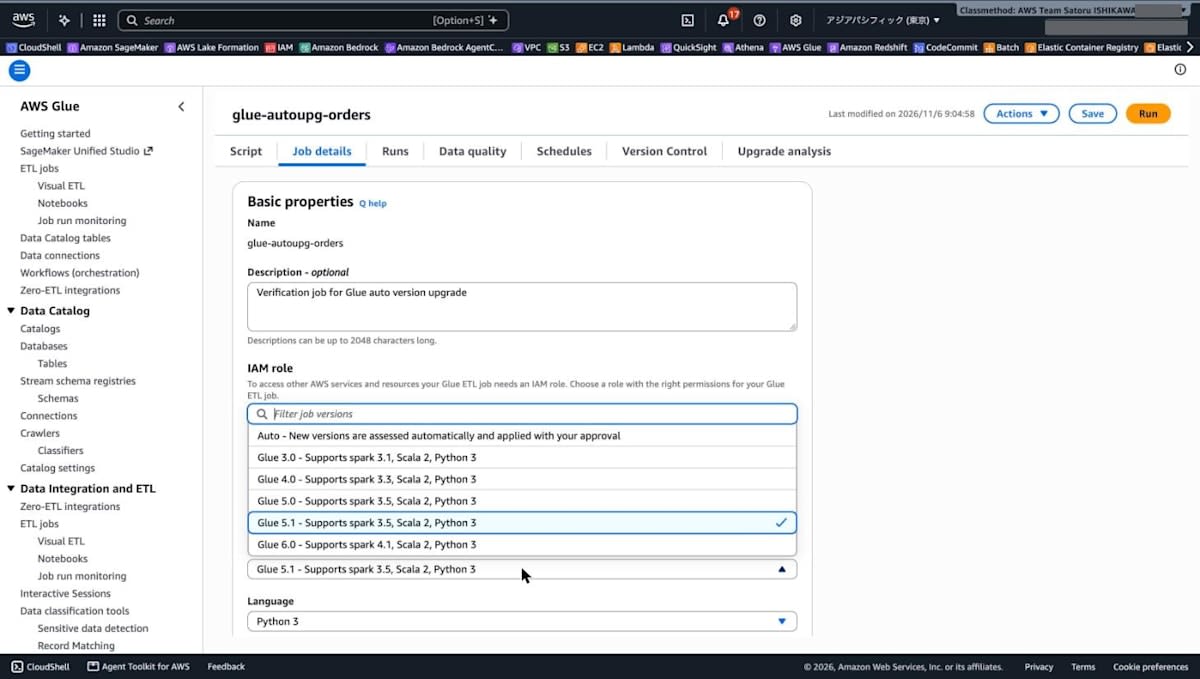
When I opened the job in AWS Glue Studio and opened the [Glue version] drop-down on the [Job details] tab, Auto appeared at the top of the options.
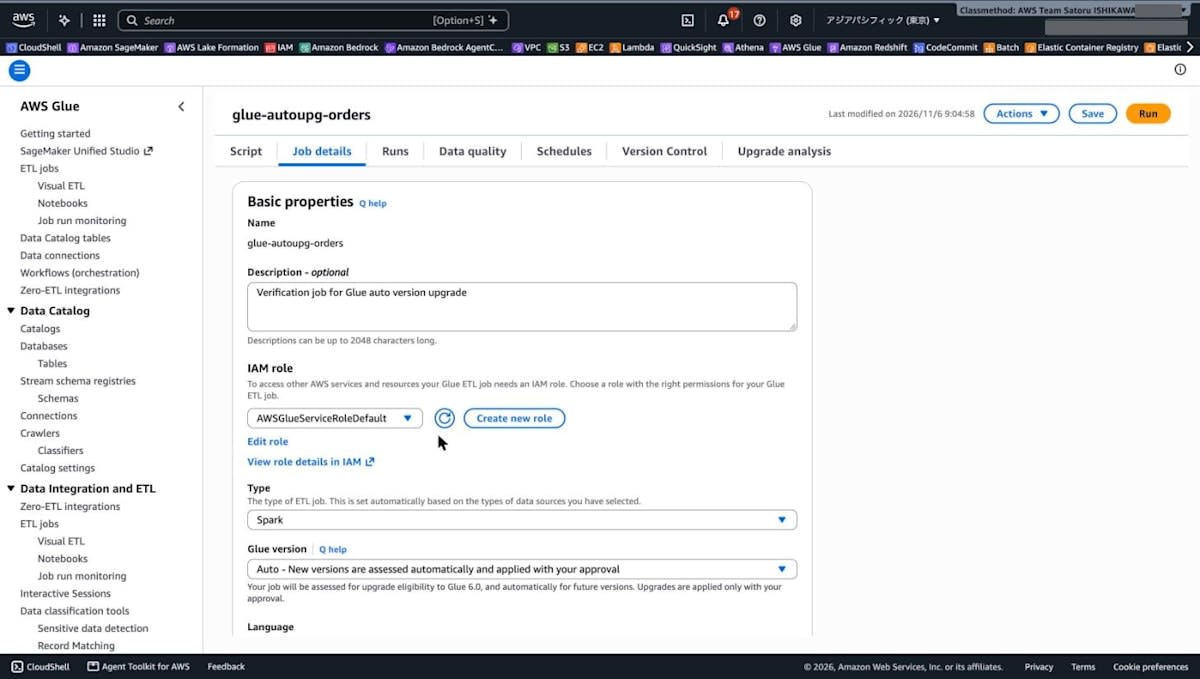
When you select Auto, the message "Your job will be assessed for upgrade eligibility to Glue 6.0, and automatically for future versions. Upgrades are applied only with your approval." appears below the drop-down. It says that eligibility for migration to Glue 6.0 will be assessed, that future versions will also be assessed automatically, and that upgrades are applied only if you approve.
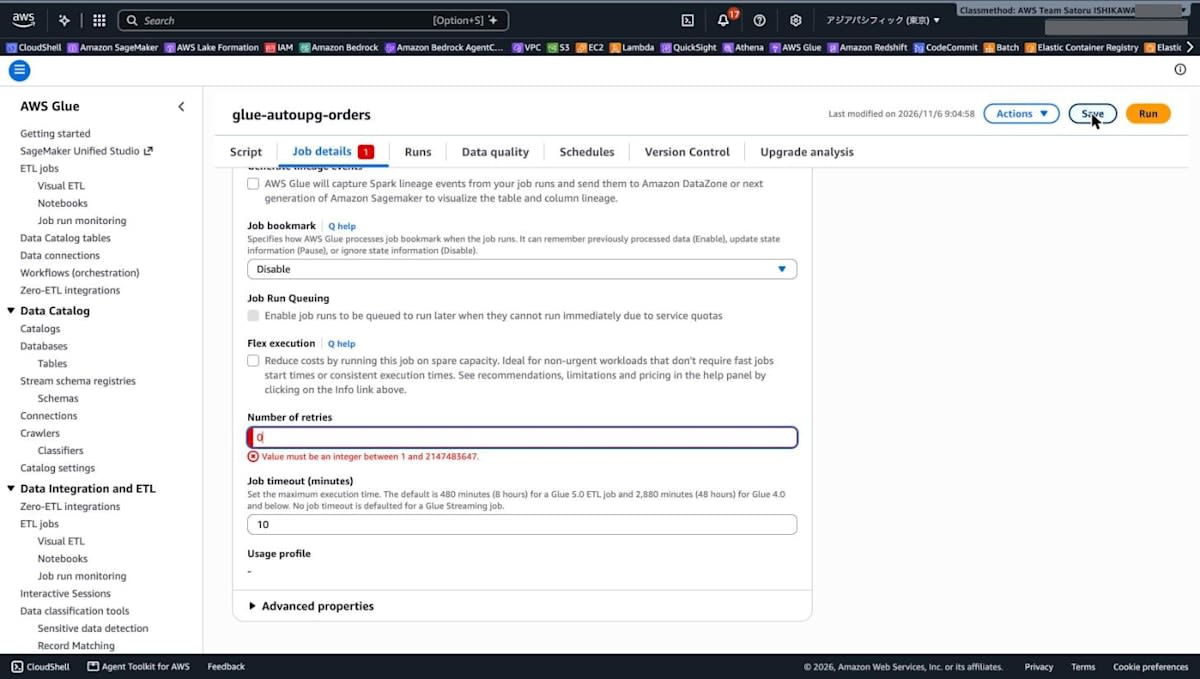
When I clicked [Save], I couldn't save because [Number of retries] showed "Value must be an integer between 1 and 2147483647." This was because I had set MaxRetries to 0 when creating the job with the CLI. This time I changed it to 1 and saved.
According to the user guide, using Auto requires MaxRetries to be 1 or more. This is because when a run on the new version fails, AWS Glue uses this retry to rerun the job on the original version. This retry is counted within the job's normal retry count. The guide also lists job run queuing being disabled as a requirement.
Right after saving, I retrieved the job definition with the CLI.
% aws glue get-job --job-name glue-autoupg-orders --output json
{
    "Job": {
        "Name": "glue-autoupg-orders",
        "JobMode": "SCRIPT",
        "JobRunQueuingEnabled": false,
        "Description": "Verification job for Glue auto version upgrade",
        "Role": "arn:aws:iam::123456789012:role/AWSGlueServiceRoleDefault",
        "CreatedOn": "2026-11-06T09:04:58.321000+09:00",
        "LastModifiedOn": "2026-11-06T09:09:01.284000+09:00",
        "ExecutionProperty": {
            "MaxConcurrentRuns": 1
        },
        "Command": {
            "Name": "glueetl",
            "ScriptLocation": "s3://glue-autoupg-123456789012-20261106/scripts/orders_agg.py",
            "PythonVersion": "3"
        },
        "DefaultArguments": {
            "--enable-job-insights": "true",
            "--enable-observability-metrics": "false",
            "--enable-continuous-cloudwatch-log": "true",
            "--input_path": "s3://glue-autoupg-123456789012-20261106/input/",
            "--job-bookmark-option": "job-bookmark-disable",
            "--job-language": "python",
            "--TempDir": "s3://glue-autoupg-123456789012-20261106/temporary/",
            "--output_path": "s3://glue-autoupg-123456789012-20261106/output/orders_summary/"
        },
        "MaxRetries": 1,
        "AllocatedCapacity": 2,
        "Timeout": 10,
        "MaxCapacity": 2.0,
        "WorkerType": "G.1X",
        "NumberOfWorkers": 2,
        "GlueVersion": "auto",
        "ExecutionClass": "STANDARD",
        "AutoUpgradeMetadata": {
            "TargetVersion": "6.0",
            "SourceVersion": "5.1",
            "Status": "OBSERVING",
            "AnalysisId": "ja-a7da8000-acd7-4f9c-9cf1-2e3fefe829ba"
        }
    }
}
GlueVersion became auto, and AutoUpgradeMetadata was set with source 5.1, target 6.0, status OBSERVING, and an analysis ID. I also retrieved the analysis status by specifying the analysis ID.
% aws glue get-job-upgrade-analysis \
  --job-name glue-autoupg-orders \
  --analysis-id ja-a7da8000-acd7-4f9c-9cf1-2e3fefe829ba \
  --output json
{
    "jobName": "glue-autoupg-orders",
    "analysisId": "ja-a7da8000-acd7-4f9c-9cf1-2e3fefe829ba",
    "status": "OBSERVING",
    "sourceVersion": "5.1",
    "targetVersion": "6.0",
    "analysisType": "AUTO_UPGRADE"
}
The analysis type is AUTO_UPGRADE. At this point, the report URI fields were not included.
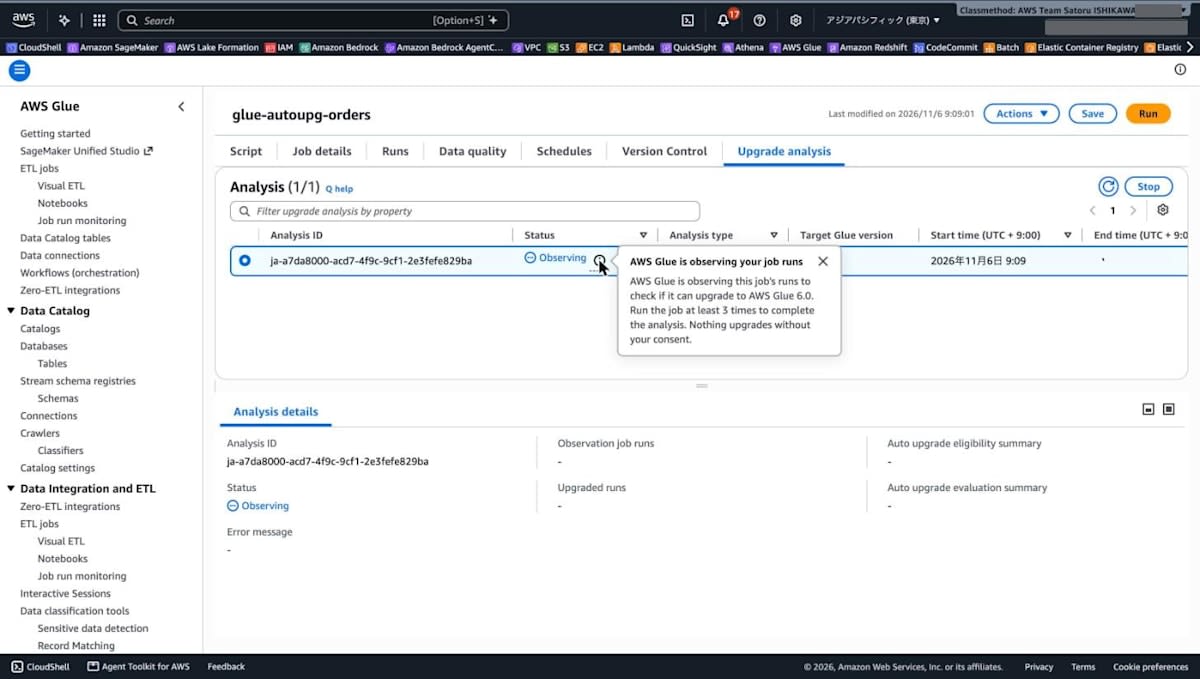
The analysis is also shown in the console's [Upgrade analysis] tab. In the [Analysis details] panel at the bottom of the screen, the middle column has [Observation job runs] and [Upgraded runs], and the right column has [Auto upgrade eligibility summary] and [Auto upgrade evaluation summary]; at this point their values are blank (-).
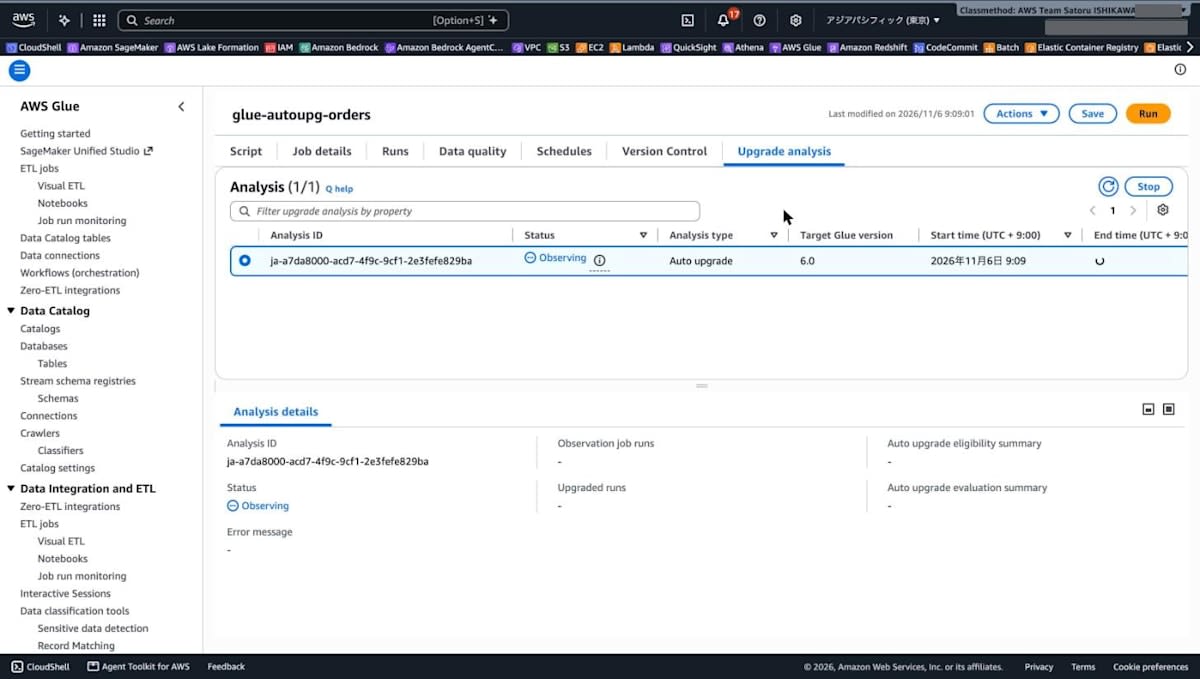
When I clicked the info icon next to the status, it showed "AWS Glue is observing this job's runs to check if it can upgrade to AWS Glue 6.0. Run the job at least 3 times to complete the analysis. Nothing upgrades without your consent." You need to run the job at least 3 times to complete the analysis.
Running the Job 3 Times for Observation (OBSERVING)
I ran the job 3 times with [Run] in the console. The results of each run obtained with get-job-runs are as follows.
| Start time | End time | Status | Glue version | Execution time | DPU seconds |
|---|---|---|---|---|---|
| 09:09:47 | 09:12:05 | SUCCEEDED | 5.1 | 123 seconds | 247 |
| 09:13:21 | 09:14:59 | SUCCEEDED | 5.1 | 75 seconds | 151 |
| 09:16:33 | 09:18:19 | SUCCEEDED | 5.1 | 85 seconds | 170 |
During OBSERVING, the job definition's GlueVersion is auto, but the runs were executed on the source version, 5.1.
Comparing the runtime arguments, the runs after the change to Auto had the following arguments that are not in the job definition. The baseline run before the change to Auto did not have them.
--conf spark.plugins.defaultList=com.amazonaws.services.glue.spark.SparkMetadataTrackerPlugin--conf spark.sql.operation.metadata.path=presigned-b64:<masked>(the value is a Base64-encoded presigned URL and contains temporary credentials, so I've masked it. When decoded, it pointed to a per-run path in the AWS-side S3 bucketglue-auto-version-artifacts-prod-ap-northeast-1. For the first observation run, it was the URLhttps://glue-auto-version-artifacts-prod-ap-northeast-1.s3.ap-northeast-1.amazonaws.com/123456789012/ja-a7da8000-acd7-4f9c-9cf1-2e3fefe829ba/data_quality_artifacts/job_run_metadata/jr_f1b499ffb342bd1c2d9c61bb8c02894ea31335f4f240a00710458f79d3b91909/metadata.jsonwith a signature query string attached)
The runtime arguments also included --enable-job-insights (true) and --enable-observability-metrics (false). However, as shown in the get-job output right after saving above, these two are in the job definition's DefaultArguments. They were not in the definition when I created the job with the CLI, so they were added to the job definition when I saved in the console.
Also, when I clicked [Run] right after the second run finished (09:15:37 in the CloudTrail record), it failed to start with ConcurrentRunsExceededException. There were no running jobs in get-job-runs. This job has the concurrent run limit (MaxConcurrentRuns) set to 1.
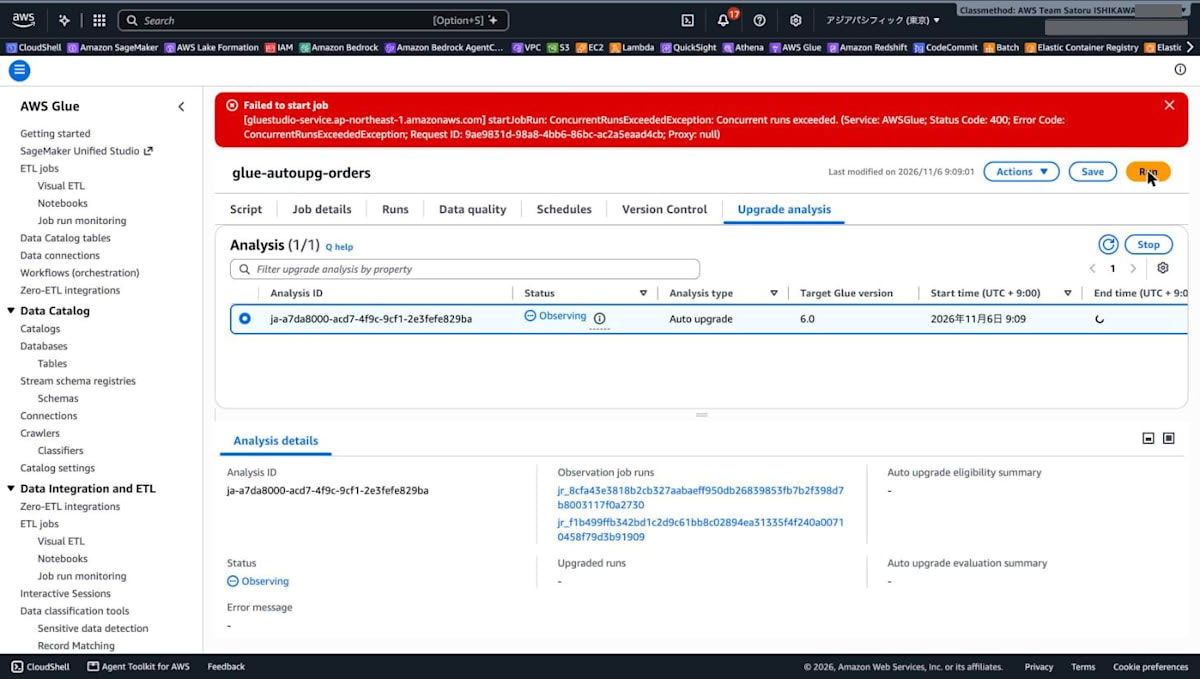
After this, a fourth run ID (jr_c4cf04fa4982aeb9cadecece745627a6f9c8e76ab4c06f7d854f3637d1d89668) appeared in [Observation job runs], but querying this ID with get-job-run returned EntityNotFoundException. The baseline in the evaluation summary described later said "3 observation runs".
Checking the Consent Report and Approving
The third observation run finished at 09:18:19, and when I checked with the CLI at 09:19:47, the status was WAITING_FOR_CONSENT.
% aws glue get-job-upgrade-analysis \
  --job-name glue-autoupg-orders \
  --analysis-id ja-a7da8000-acd7-4f9c-9cf1-2e3fefe829ba \
  --output json
{
    "jobName": "glue-autoupg-orders",
    "analysisId": "ja-a7da8000-acd7-4f9c-9cf1-2e3fefe829ba",
    "status": "WAITING_FOR_CONSENT",
    "sourceVersion": "5.1",
    "targetVersion": "6.0",
    "analysisType": "AUTO_UPGRADE",
    "autoUpgradeEligibilitySummary": "https://glue-auto-version-artifacts-prod-ap-northeast-1.s3.ap-northeast-1.amazonaws.com/123456789012/ja-a7da8000-acd7-4f9c-9cf1-2e3fefe829ba/upgrade_eligibility_report.md?X-Amz-Security-Token=<masked>&X-Amz-Algorithm=AWS4-HMAC-SHA256&X-Amz-Date=20261106T001948Z&X-Amz-SignedHeaders=host&X-Amz-Expires=3600&X-Amz-Credential=<masked>&X-Amz-Signature=<masked>"
}
autoUpgradeEligibilitySummary holds the URI of the consent report. The report is not placed in your own S3 bucket but in the AWS-side bucket glue-auto-version-artifacts-prod-ap-northeast-1, and was returned as a presigned URL valid for 3,600 seconds.
In the console, the status became [Waiting for consent], and [Approve] and [Decline] buttons appeared in [Analysis details]. A notification, "1 jobs are waiting for your consent to upgrade to Glue 6.0", also appears at the top of the page.
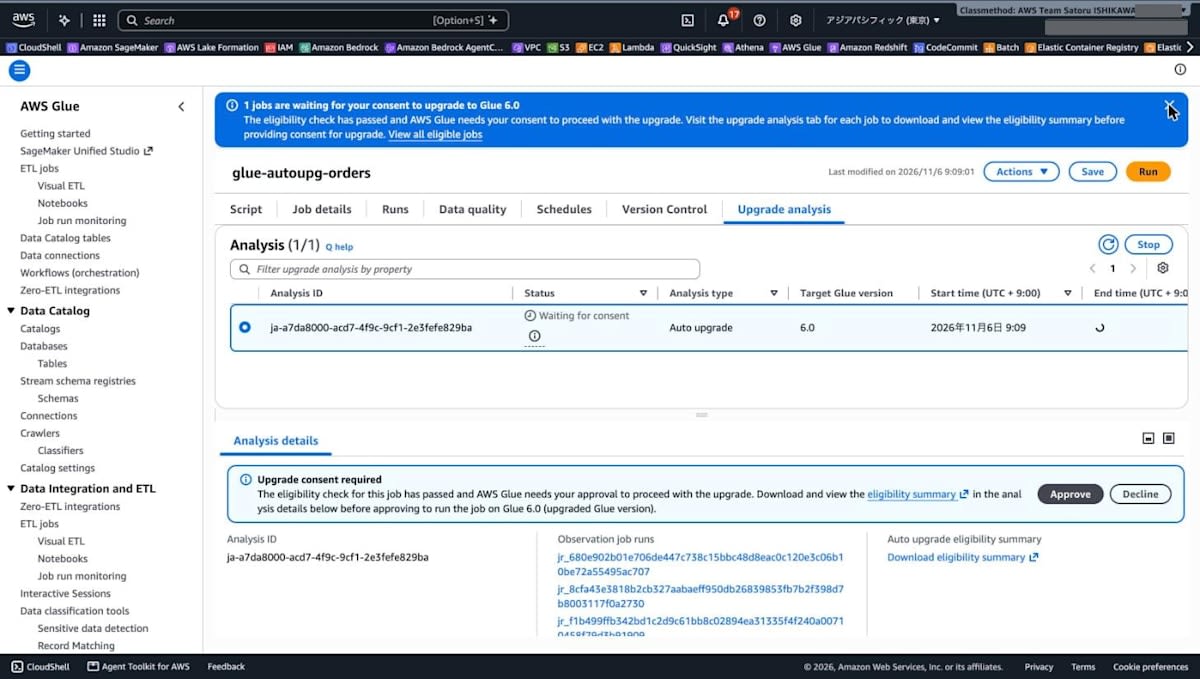
The consent report (upgrade_eligibility_report.md) is in Markdown format, and its main contents were as follows.
- It states "This job is eligible for upgrade." at the top
- As the Compatibility Summary, it checked the following 3 items, and all were PASS
| Item | What is checked |
|---|---|
| Configuration | Deprecated Spark settings in --conf arguments, and deprecated Glue features in the job's default arguments |
| Application Code | Spark and Python compatibility of the script, extra-py-files, and extra-files with the target version |
| Dependencies | Incompatible version specifications in additional-python-modules, imports of modules no longer included by default in the target, and wheel files built for a different Python version |
- As Write Paths, it records the path written during the observation runs (
s3://glue-autoupg-123456789012-20261106/output/orders_summary), the mode (overwrite), and the format (parquet) - It explains that in the upgrade validation phase, if a run on the new version fails and is rerun on the current version, both runs may write to the same path. For jobs in append mode, output may be duplicated, and for overwrite mode no action is needed
- It states that if you Approve, the job runs on the new version from the next run, and if you Decline, Auto is disabled and the job returns to the original Glue version
After reviewing the contents, I clicked [Approve] in the console.
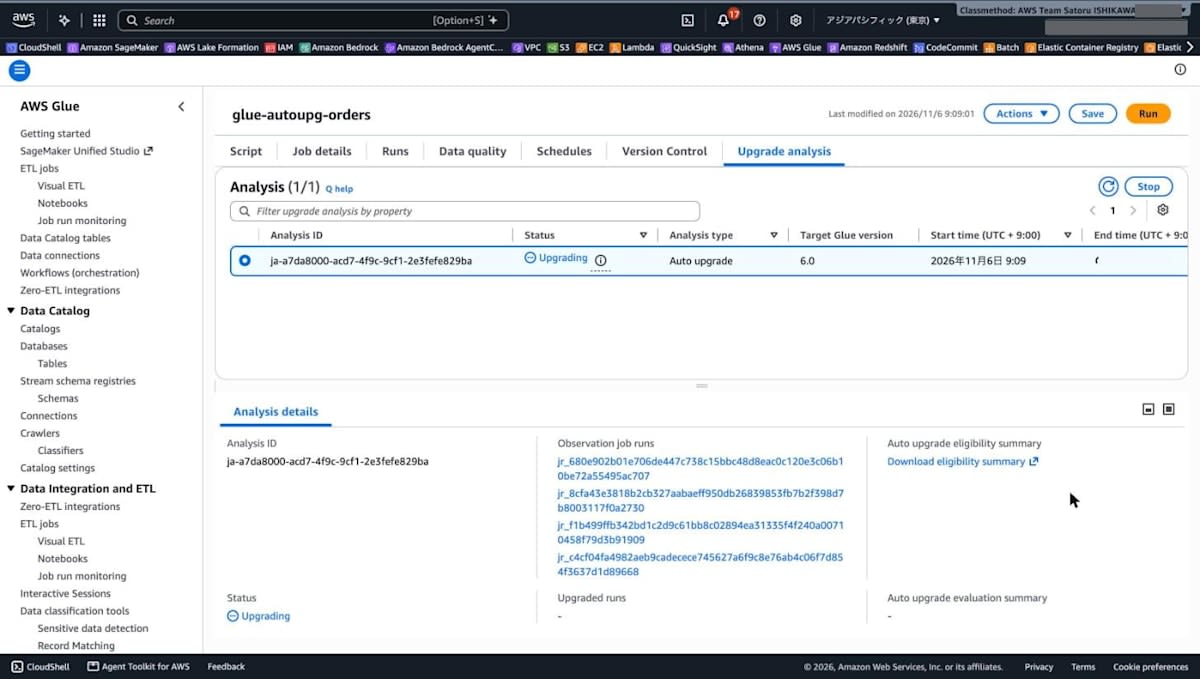
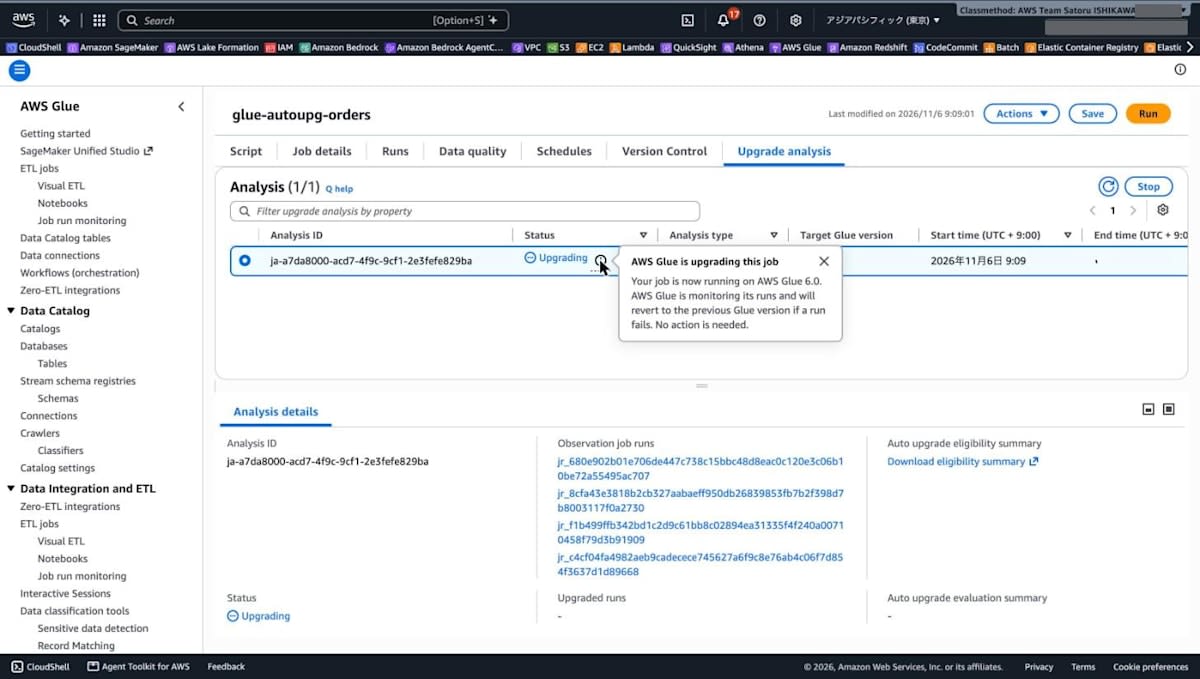
The status immediately became [Upgrading]. The info icon showed "Your job is now running on AWS Glue 6.0. AWS Glue is monitoring its runs and will revert to the previous Glue version if a run fails. No action is needed." If a run on 6.0 fails, the job is reverted to the original version.
Running the Job After Approval (UPGRADING)
After approval, I ran the job 3 times with [Run] in the console.
| Start time | End time | Status | Glue version | Execution time | DPU seconds |
|---|---|---|---|---|---|
| 09:21:43 | 09:22:45 | SUCCEEDED | 6.0 | 56 seconds | 112 |
| 09:24:11 | 09:25:26 | SUCCEEDED | 6.0 | 68 seconds | 136 |
| 09:26:46 | 09:27:50 | SUCCEEDED | 6.0 | 58 seconds | 116 |
The job definition's GlueVersion stayed auto, and the runs were executed on 6.0. The log of the first run is as follows.
% aws logs filter-log-events \
  --log-group-name /aws-glue/jobs/output \
  --log-stream-name-prefix jr_cf561e77f5b85dc22f9a7759396fe0c4a943c5cd60277ba4da37bd36c18b3921 \
  --filter-pattern '?"[runtime]" ?"[result]"' \
  --query 'events[].message' --output text
[runtime] spark.version=4.1.1-amzn-0
[runtime] python=3.13.14
	[runtime] spark.sql.ansi.enabled=true
	[result] input_rows=20 output_rows=5
[result] C001 order_count=4 total_amount=6000.0
[result] C002 order_count=4 total_amount=6550.5
[result] C003 order_count=4 total_amount=7950.0
[result] C004 order_count=4 total_amount=5780.0
[result] C005 order_count=4 total_amount=5303.0
It ran on Spark 4.1.1 and Python 3.13 with ANSI mode enabled. The aggregation results were the same as the baseline.
Confirming the Upgrade Is Complete
After the third run following approval finished, when I checked at 09:29:11, the analysis was SUCCEEDED and the job side was UPGRADE_SUCCEEDED.
% aws glue get-job --job-name glue-autoupg-orders --output json
{
    "Job": {
        "Name": "glue-autoupg-orders",
        "JobMode": "SCRIPT",
        "JobRunQueuingEnabled": false,
        "Description": "Verification job for Glue auto version upgrade",
        "Role": "arn:aws:iam::123456789012:role/AWSGlueServiceRoleDefault",
        "CreatedOn": "2026-11-06T09:04:58.321000+09:00",
        "LastModifiedOn": "2026-11-06T09:28:53.756000+09:00",
        "ExecutionProperty": {
            "MaxConcurrentRuns": 1
        },
        "Command": {
            "Name": "glueetl",
            "ScriptLocation": "s3://glue-autoupg-123456789012-20261106/scripts/orders_agg.py",
            "PythonVersion": "3"
        },
        "DefaultArguments": {
            "--enable-job-insights": "true",
            "--enable-observability-metrics": "false",
            "--enable-continuous-cloudwatch-log": "true",
            "--input_path": "s3://glue-autoupg-123456789012-20261106/input/",
            "--job-bookmark-option": "job-bookmark-disable",
            "--job-language": "python",
            "--TempDir": "s3://glue-autoupg-123456789012-20261106/temporary/",
            "--output_path": "s3://glue-autoupg-123456789012-20261106/output/orders_summary/"
        },
        "MaxRetries": 1,
        "AllocatedCapacity": 2,
        "Timeout": 10,
        "MaxCapacity": 2.0,
        "WorkerType": "G.1X",
        "NumberOfWorkers": 2,
        "GlueVersion": "auto",
        "ExecutionClass": "STANDARD",
        "AutoUpgradeMetadata": {
            "TargetVersion": "6.0",
            "SourceVersion": "5.1",
            "Status": "UPGRADE_SUCCEEDED",
            "AnalysisId": "ja-a7da8000-acd7-4f9c-9cf1-2e3fefe829ba"
        }
    }
}
% aws glue get-job-upgrade-analysis \
  --job-name glue-autoupg-orders \
  --analysis-id ja-a7da8000-acd7-4f9c-9cf1-2e3fefe829ba \
  --output json
{
    "jobName": "glue-autoupg-orders",
    "analysisId": "ja-a7da8000-acd7-4f9c-9cf1-2e3fefe829ba",
    "status": "SUCCEEDED",
    "sourceVersion": "5.1",
    "targetVersion": "6.0",
    "analysisType": "AUTO_UPGRADE",
    "autoUpgradeEvaluationSummary": "https://glue-auto-version-artifacts-prod-ap-northeast-1.s3.ap-northeast-1.amazonaws.com/123456789012/ja-a7da8000-acd7-4f9c-9cf1-2e3fefe829ba/auto_upgrade_summary.md?X-Amz-Security-Token=<masked>&X-Amz-Algorithm=AWS4-HMAC-SHA256&X-Amz-Date=20261106T002912Z&X-Amz-SignedHeaders=host&X-Amz-Expires=3599&X-Amz-Credential=<masked>&X-Amz-Signature=<masked>",
    "autoUpgradeEligibilitySummary": "https://glue-auto-version-artifacts-prod-ap-northeast-1.s3.ap-northeast-1.amazonaws.com/123456789012/ja-a7da8000-acd7-4f9c-9cf1-2e3fefe829ba/upgrade_eligibility_report.md?X-Amz-Security-Token=<masked>&X-Amz-Algorithm=AWS4-HMAC-SHA256&X-Amz-Date=20261106T002912Z&X-Amz-SignedHeaders=host&X-Amz-Expires=3600&X-Amz-Credential=<masked>&X-Amz-Signature=<masked>"
}
Even after completion, the job definition's GlueVersion remains auto. Compared with the job definition right after I changed to Auto and saved, only AutoUpgradeMetadata.Status and LastModifiedOn had changed. The contents of the script on S3 also did not change.
The result of the evaluation summary (auto_upgrade_summary.md) was "UPGRADE COMPLETED". Using the 3 observation runs on 5.1 as the baseline, it compared the 3 runs on 6.0 from three perspectives, Performance, Correctness (output correctness), and Cost (resource consumption), and all were PASS. The individual check items are as follows.
| Check item | Expected value | Run 1 on 6.0 | Run 2 on 6.0 | Run 3 on 6.0 | Result |
|---|---|---|---|---|---|
| Operation structure | 1 write operation (same count, type, and order) | Match | Match | Match | PASS |
| Schema match | Exact match | Match | Match | Match | PASS |
| Output file format | Exact match | Match | Match | Match | PASS |
| Output row count | 3.50–6.50 | 5.00 | 5.00 | 5.00 | PASS |
| Output file count | 0.70–1.30 | 1.00 | 1.00 | 1.00 | PASS |
| Execution time | 2.85 minutes or less | 0.94 minutes | 1.14 minutes | 0.97 minutes | PASS |
| Resource usage | 341.69 DPU seconds or less | 120.00 | 136.32 | 120.00 | PASS |
| Estimated cost (USD) | 0.04 or less | 0.01 | 0.01 | 0.01 | PASS |
In addition, it also checked write and read throughput, and the schema and the percentage of non-NULL values for each output column. Next Steps said "Your job now runs on Glue 6.0 and stays enrolled in auto upgrade, so it will be upgraded automatically when a newer version becomes available." This means the job now runs on 6.0, remains a target of Auto, and will again be a target of automatic upgrade when a newer version is released.
In the console as well, the status became [Succeeded], the [Apply upgraded script] button was disabled, and "Your job is already on the latest Glue version" was displayed. The [Glue version] on the [Job details] tab remains Auto.
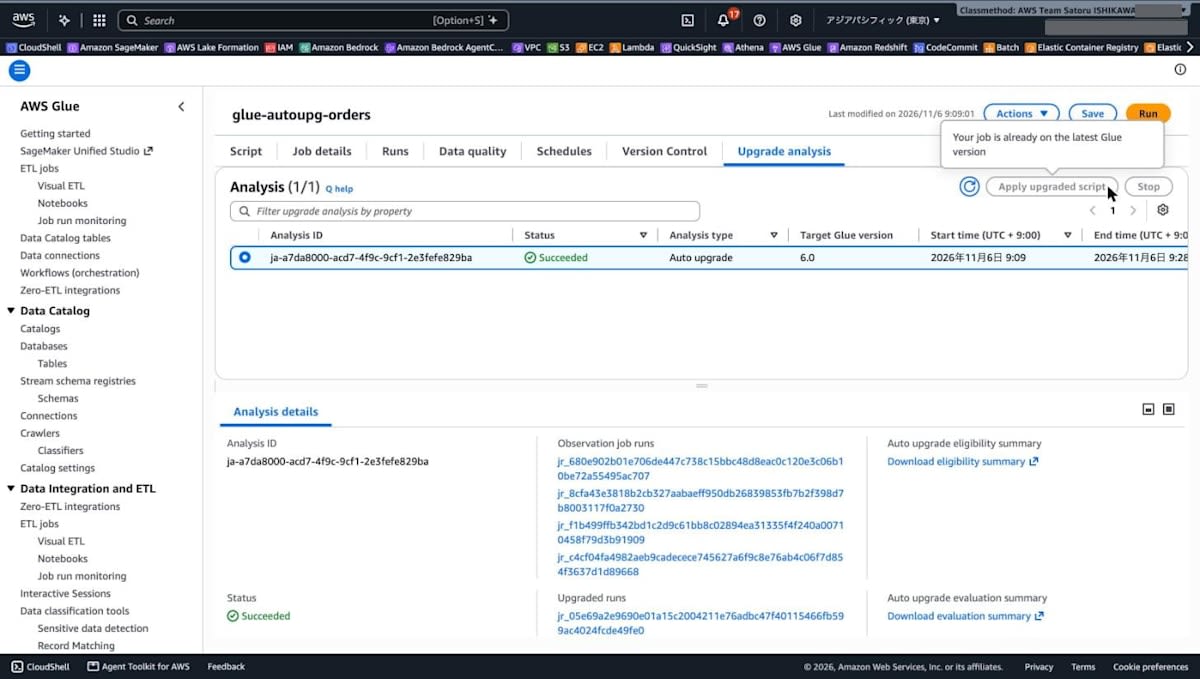
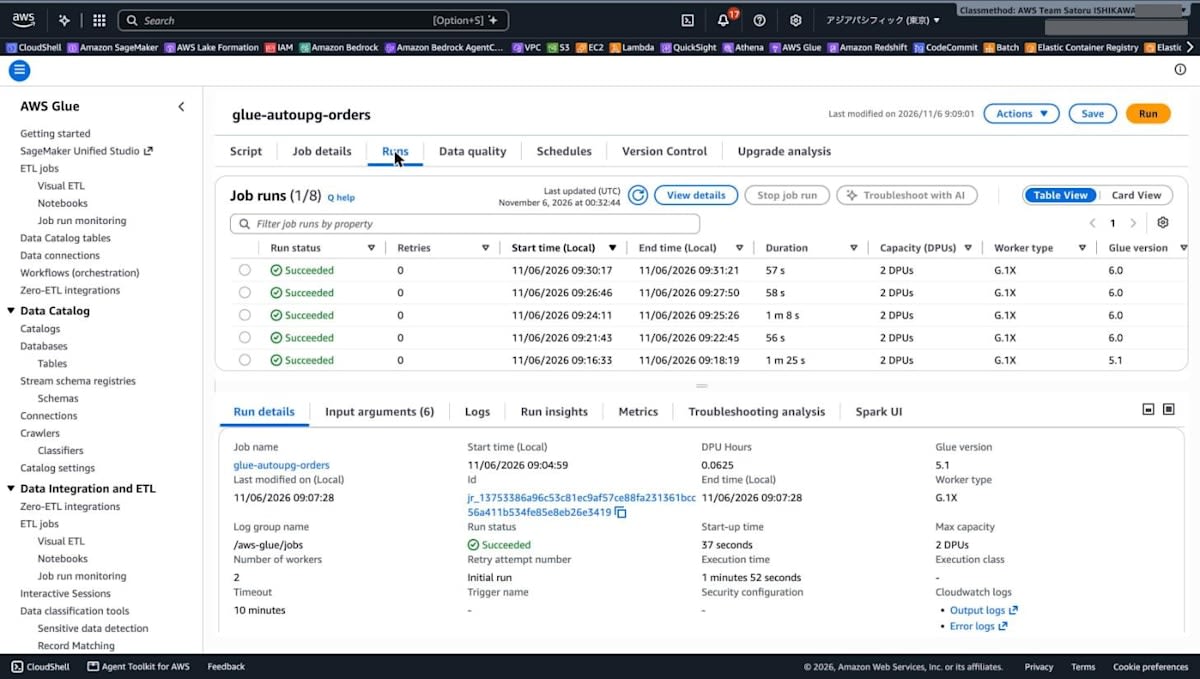
When I ran the job once more after completion, it SUCCEEDED on Glue 6.0 and the aggregation results were the same as before. The --conf for SparkMetadataTrackerPlugin that had been added during the analysis was not added in this run. In the list on the [Runs] tab, you can confirm that the Glue version changed from 5.1 to 6.0.
Discussion
The Job Definition Doesn't Tell You the Glue Version Used at Runtime
For a job set to Auto, GlueVersion stayed auto before and after the upgrade. The version that actually runs switched from 5.1 to 6.0 depending on the analysis status. Since you can't tell the executed version from the job definition alone, you need to check the actual version through each run's (JobRun) GlueVersion or the job's AutoUpgradeMetadata.
Completing the Upgrade Requires Job Runs
In this test, 3 runs for observation and 3 runs for validation after approval, 6 job runs in total, were needed. The console's description also says at least 3 runs are needed, and the status advanced each time only after the third run finished. This time I ran the job manually in succession and it finished in about 20 minutes, but if the same number of runs is needed for a job scheduled once a day, observation and validation would each take 3 days.
Validation After Approval Happens in Production Runs
The 3 runs after approval were not on a separate validation job; they were normal runs of the job itself executed on 6.0, and they wrote to the output destination as is. The consent report warns that if a run on 6.0 fails and is rerun on the current version, output may be duplicated for jobs in append mode. If you set Auto on a job whose write mode is append, or on a job whose downstream processing cannot tolerate duplicates, you need to check the consent report's Write Paths before approving.
Settings for Analysis and Where Reports Are Stored
During the Auto analysis, the job runs were given the SparkMetadataTrackerPlugin setting and presigned URLs for writing run metadata to an AWS-side S3 bucket. The consent report and evaluation summary were also placed in the AWS-side bucket and retrieved via presigned URLs with an expiration. Unlike the existing generative AI Spark upgrade, there was no step where you specify an S3 output path for the results. If you want to keep the reports, you need to retrieve and save them within the presigned URL's expiration.
What Happened During Job Runs
- When I tried to start a run right after the previous run became SUCCEEDED, it sometimes resulted in
ConcurrentRunsExceededException. This job had its concurrent run limit set to 1. I couldn't identify the cause - After a failed start, [Observation job runs] in the console showed a run ID that could not be found with
get-job-run. The baseline in the evaluation summary was stated as 3 runs - For the job whose
MaxRetriesI had set to 0 with the CLI, I had to change it to 1 or more when changing to Auto and saving in the console. The user guide also states thatMaxRetriesof 1 or more is a requirement for Auto
Points Described in the User Guide
I didn't test the following two points, but they are explained in the user guide.
- A job newly created with
GlueVersionset toautofrom the start has no baseline and no version change to approve, so it runs on the target version without observation, compatibility checks, or approval. When the first run succeeds, the evaluation completes and the job remains on Auto. If the first run fails, the default Glue version for new jobs is set. To try the same flow as this article (from observation to approval), you need to create the job on an existing version and then change it to Auto - Auto applies to Spark ETL jobs (
glueetl) on Glue 2.0 and later. Streaming, Python shell, and Ray jobs are not supported
Conclusion
I set the Glue version to Auto on an AWS Glue Spark ETL job and tried the process until an existing Glue 5.1 job was upgraded to Glue 6.0. With Auto, AWS Glue observed 3 job runs on 5.1 to check compatibility, and after approval, ran the job 3 times on 6.0, compared output, performance, and resource consumption, and then completed the upgrade. Nothing is upgraded unless you approve, and you can review and approve the consent report from the console's [Upgrade analysis] tab.
On the other hand, since the job definition's GlueVersion stays auto, you need to check the version that actually runs for each run. Also, because validation after approval is done in the job's normal runs, please check the impact on the write mode and downstream processing before approving.
In a Glue version migration, the Spark and Python versions change, and the Glue 6.0 migration guide also lists breaking changes. With Auto, AWS Glue performs the compatibility checks and output comparison before and after migration within normal job runs. As a first step, try it on a job in a test environment and review the contents of the consent report and the evaluation summary.