
Key Updates in Claude Code v2.1.324–v2.1.325 - Changes to the Permission Flow for Bash in the Sandbox and Fixes to Bash Permission Checks

This page has been translated by machine translation. View original
I'm Ishikawa from the Cloud Business Division. This article covers the Claude Code updates from v2.1.324 to v2.1.325 (2026-11-13). v2.1.324 is published on npm but has no CHANGELOG entry, so this article covers the changes in v2.1.325. The Code Mode documentation, which returned a 404 in the previous article, is now public, so I also tried the experimental feature "Code Mode".
The previous update article is here.
Update Summary
This covers 2 versions (v2.1.324 to v2.1.325, 2026-11-13), and the CHANGELOG lists 139 entries for v2.1.325. In this article's categorization: 68 fixes, 31 security items, 13 developer experience items, 9 breaking changes, 9 improvements, 6 new features, 2 performance items, and 1 deprecation. There are many items about permission checks and the sandbox, including changes to default behavior that alter when confirmation is required.
Highlighted Updates
Bash in the sandbox now follows the normal permission flow by default (v2.1.325)
Bash commands in the sandbox now follow the normal permission flow by default. To run them without confirmation as before, set sandbox.autoAllowBashIfSandboxed: true. If the sandbox is enabled through managed settings, set sandbox.autoAllowBashIfSandboxed: true in the highest-priority managed settings source.
If you relied on automatic approval by the sandbox, you may see confirmations or permission denials after updating, so it's worth checking your settings.
Bash permission check fixes (v2.1.325)
The following 3 issues in Bash permission checks were fixed.
- Deny and ask rules not being applied to some Bash commands
- Some compound commands running without confirmation (now they ask for confirmation)
- Bash allow rules allowing a program different from the one written in the rule to run
These fixes matter if you restrict operations with Bash allow, ask, and deny rules, so I think it's best to update early.
Fix for token counting sending data to Amazon Bedrock when allowedProviders doesn't allow it (v2.1.325)
Fixed an issue where token counting on Amazon Bedrock sent the conversation to Bedrock even though the managed setting allowedProviders did not allow Amazon Bedrock.
For administrators of organizations that don't allow Amazon Bedrock in allowedProviders, this fixes a bug where conversations were sent to Bedrock during token counting, so it's worth considering an early rollout.
Security fix for decoding zstd-compressed responses (v2.1.325)
Fixed a security issue in the decoding of zstd-compressed responses.
The CHANGELOG gives no details, but since it is a security fix, I think it's best to update early.
Target Versions and Period
| Version | Release date | CHANGELOG entries |
|---|---|---|
| v2.1.324 | 2026-11-13 | None |
| v2.1.325 | 2026-11-13 | 139 |
New Features
- Added a line under the error shown when an organization policy blocks a request, indicating how to continue (change the message with
/rewind, or run/clear) (v2.1.325) - Added a note passed to Claude when
git checkout,git stash, or a pull with autostash in the sandbox cannot update protected files such as those inside.claude(v2.1.325) - After Claude reads or edits a Jupyter notebook, a spinner hint about re-running notebook cells is shown in integrated terminals such as VS Code (v2.1.325)
New VS Code extension features are covered under "Other Platforms".
Improvements
- For subagents cut off by the output token limit, Claude is now asked to redo the whole answer more concisely instead of returning only the tail of the answer (v2.1.325)
CLAUDE_CODE_MAX_CONTEXT_TOKENSnow also sets the context window for unknown model IDs starting withclaude-, such as a gateway'sclaude-sonnet-latest(v2.1.325)claude remote-controlnow exits with status 4 when it stops by itself (a single-session run stays at 0) and 69 when it cannot register, so service managers can restart it (v2.1.325)- Claude is now told that an MCP task is waiting for the user's answer so it can point to
/tasks(v2.1.325) - For questions from background MCP tasks, Esc now means "answer later". Nothing is sent to the server, and the question stays in
/tasks(v2.1.325) claude -pwith no cached account data now waits for that data before the first request. A first run in a clean environment may start a few seconds slower (v2.1.325)/cost,$.session.usage(),--max-budget-usd, and the cost and token metrics now also count mod calls to$.model.completeand$.model.classify(v2.1.325)- After 8 consecutive turns started by background or scheduled tasks, terminal prompt suggestions are now refreshed less often and usage is kept low until you press a key or return to the terminal (v2.1.325)
- Plugin MCP bundles (
.mcpb,.dxt) are now extracted under the plugin directory instead of.mcpb-cacheinside the plugin folder, so they load even from read-only plugin folders (v2.1.325) - New sessions in tmux and iTerm2 teammates and opened with ← in the agent view now start in the session's folder instead of where the shell last
cd'd (v2.1.325) - Also improved: startup with keyless Console sign-in, the
HTTPS authentication failedmessage for private plugin marketplaces,claude --desktopsign-in errors, the/voice"No audio detected" message on macOS and Windows, the bundled dataviz skill's advice, and more (v2.1.325)
Security
In addition to the items in the highlighted updates, there are the following fixes and changes.
- Permission rules
- Fixed relative-path deny and ask permission rules such as
Read(./.env)no longer targeting the project after acd. They also apply to additional directories (v2.1.325) - Fixed deny and ask permission rules starting with
mcp__plugin_*_not matching plugin MCP servers and tools written with different letter case (v2.1.325) - Fixed deny rules not being applied to permission approvals that arrived after a Claude Code restart in self-hosted runner and
claude remote-controlsessions (v2.1.325) - Fixed a committed
.claude/settings.local.jsonsometimes being treated as the user's own when Claude Code is launched in a particular subfolder of a repository (v2.1.325) - Fixed permissions granted by a slash command's
allowed-toolsalso applying to background agents started during or after that turn (v2.1.325) - Fixed the agent and skill lock from the managed setting
strictPluginOnlyCustomizationnot being reflected in running sessions (v2.1.325) - Fixed deny and ask permission rules and hooks for the Artifact tool not being applied in some cloud sessions, and connector tool approval prompts being answered automatically while plugins load in cloud sessions (v2.1.325)
- Fixed relative-path deny and ask permission rules such as
- Sandbox
- Fixed commands in the sandbox sometimes being able to write to the native updater's download folder (v2.1.325)
- Fixed cases where the Bash sandbox did not fully protect worktree settings and hooks, or the shared git folder of linked worktrees (v2.1.325)
- Writes from the sandbox to
.claudesettings, skills, agents, commands, and hooks in additional directories are now denied, as in the launch folder (v2.1.325)
- Credentials and personal information
- Programs that Claude Code's sandbox launches for itself (such as the network bridge) now run without the Claude Code sign-in token and API key in their environment variables (v2.1.325)
- ripgrep, local git commands, and sandbox runtime helper programs now run without the mTLS client key passphrase in their environment variables (v2.1.325)
- Expanded the account email check so scripts run by commands, file writes, web fetches, and MCP calls also refuse to use the user's email address as client identification (v2.1.325)
- Fixed
/feedbackand/bugto upload other sessions only if they were recorded under the signed-in account or organization (v2.1.325)
- Artifact
- Fixed some subagents modifying Artifacts viewable by people outside the organization, or uploading files, without confirmation when allow rules were set or uploads had been approved before (v2.1.325)
- Fixed confirmation sometimes being skipped when publishing pages viewable outside the organization after choosing "don't ask again" for Artifacts (v2.1.325)
- Fixed auto mode only judging the first change to an Artifact viewable outside the organization. The approval applies only to that change (v2.1.325)
- Other changes include showing that plugins can run code in plugin install warnings and similar, denying
git bisect runand similar in worktree-isolated sessions, skipping unsafe paths in plugin folders, and asking for confirmation before privacy setting changes in/login(v2.1.325)
Fixes
Here are the main fixes related to stability and usability.
- Fixed subagents with their own model switching to the plan mode model when the model setting is
opusplanorhaiku, and subagents running on a different model from the main session sizing file reads and MCP results based on the main session's model (v2.1.325) - Fixed many third-party gateway and Foundry sessions stopping every turn with a context length error instead of compacting (v2.1.325)
- Fixed the latest turns sometimes missing in sessions resumed after Claude Code did not exit cleanly (v2.1.325)
- Fixed shell commands running in the launch directory after the working directory was deleted. Commands now fail with a message and can be rerun (v2.1.325)
- Fixed edits to an approved plan being lost when the
plansDirectoryfolder is not writable. The plan is now saved to the default plan folder, and a warning shows where and why (v2.1.325) - Fixed a saved
sonnet[1m]model setting being rewritten on fresh installs to a model ID the API doesn't accept (v2.1.325) - Fixed short-lived commands such as
claude auth statusleaving a lock on the Console profile and stalling the next session for about 1 minute (v2.1.325) - Fixed background sessions started with a claude.ai login using the API key or token from the shell that launched the background service, and being billed to it. Also fixed cases where a session switched to a different sign-in in the background (v2.1.325)
- Fixed AWS
credential_processhelpers and Google Cloud default credentials failing when Claude Code is launched without theHOMEenvironment variable (v2.1.325) - Fixed a single invalid value in an Agent SDK
applyFlagSettings()call silently discarding the settings from all earlier calls. The offending call is now rejected with an error (v2.1.325) - Fixed MCP servers staying at "needs authentication" and
mcp_toolhooks being skipped after a temporarily rejected token refresh, and SDK host MCP tool calls returning "Not connected" even after the MCP server reconnected on a tool call (v2.1.325) - Many other small bugs were also fixed, including those in Code Mode, OpenTelemetry
user_promptevents, MCP tasks, Windows/resume, and Bash in the Linux sandbox.
Breaking Changes and Deprecations
Permission flow for Bash in the sandbox (v2.1.325)
Bash commands in the sandbox follow the normal permission flow by default.
Before (up to v2.1.323): With the following setting, Bash commands in the sandbox ran without confirmation.
{
  "sandbox": {
    "enabled": true
  }
}
After (v2.1.325 onward): The same setting follows the normal permission flow. To run without confirmation as before, add autoAllowBashIfSandboxed.
{
  "sandbox": {
    "enabled": true,
    "autoAllowBashIfSandboxed": true
  }
}
If the sandbox is enabled through managed settings, put this setting in the highest-priority managed settings source.
According to the official documentation (settings-reference), even when true, commands that cannot run in the sandbox follow the normal permission flow, and deny rules and ask rules that specify content, such as Bash(git push *), still apply. When false, the decision is made by allow rules and the permission mode. Note that at the time of writing (2026-11-14), the official documentation (sandboxing, settings-reference) states the default of autoAllowBashIfSandboxed as true, which does not match the CHANGELOG.
Running skills in scheduled tasks and /loop (v2.1.325)
Scheduled tasks and /loop now ask for confirmation before running skills that declare allowed-tools or hooks.
Before (up to v2.1.323): Scheduled tasks and /loop did not ask for confirmation before running these skills.
(スキルの実行前の確認なし)
After (v2.1.325 onward): To run unattended, add Skill(name) to permissions.allow. Below is an example setting (name is the target skill's name).
{
  "permissions": {
    "allow": ["Skill(name)"]
  }
}
List of breaking changes and deprecations
| Target | Before | After / required action |
|---|---|---|
| Bash in the sandbox | Ran without confirmation | Follows the normal permission flow. To run without confirmation, set sandbox.autoAllowBashIfSandboxed: true |
| Enabling the sandbox via managed settings | Ran without confirmation | Set sandbox.autoAllowBashIfSandboxed: true in the highest-priority managed settings source |
| Read-only git commands in repositories that are neither the project's nor trusted | Ran without confirmation | Asks for confirmation before running. To run without confirmation, specify the repository with --add-dir rather than the additionalDirectories setting |
Skills declaring allowed-tools or hooks in scheduled tasks and /loop |
Ran without confirmation | Asks for confirmation before running. To run unattended, add Skill(name) to permissions.allow |
| "Always allow" in Desktop, IDE, and SDK hosts | Offered the rule alone | The rule alone is offered only when saving it would allow that command again. Scheduled tasks that relied on this may wait for user action |
.claude/skills inside a --plugin-dir plugin |
Loaded from sessions started in a parent folder | No longer loaded from sessions started in a parent folder. Launch Claude Code in the plugin's folder |
-p and SDK runs in worktrees and submodules mounted in containers |
Applied .claude/settings.local.json allow rules before trust |
Applied only after the folder is trusted |
Marketplace ref |
— | Accepts the full ID of any commit on a branch or tag. Clients older than v2.1.325 cannot clone with this specification and cannot load that marketplace |
Plugin marketplaces and plugin downloads in environments with only ALL_PROXY set |
— | Uses a CONNECT tunnel. Fails with proxies that reject CONNECT |
pluginDigests (deprecated) |
— | Deprecated and ignored. Plugins from remote marketplaces declared and enabled by managed settings and listed in prependPlugins or appendPlugins are treated as organization plugins |
All entries in the list are changes in v2.1.325.
Other Platforms
VS Code extension
- The extension now also shows prompt suggestions wherever the terminal shows them. Accept with Tab; set
promptSuggestionEnabled: falsein Claude Code's settings.json to disable (v2.1.325) - Added Console sign-in that doesn't create an API key (v2.1.325)
- In SSH, WSL, and container windows, added a field to paste the redirect URL when signing in to an MCP server from the panel (v2.1.325)
- Also fixed the model picker checkmark, effort options, sign-in screen, MCP tool permission prompts, and the message shown when organization settings couldn't be loaded, and improved notes and error messages for untrusted folders (v2.1.325)
Claude Code on the web / cloud sessions
- Fixed MCP tool descriptions loaded via tool search being cut at 4,096 characters in new cloud sessions. They are now 16,384 characters, the same as other Claude Code sessions (v2.1.325)
- Claude Code on the web, cloud scheduled tasks, and Cowork cloud sessions now start even with
sandbox.failIfUnavailable. Hosted containers have no command sandbox (v2.1.325)
Claude Desktop / Claude Tag
- Fixed Claude Desktop third-party deployments staying at "Stopping" until token refresh finished. This takes effect once Claude Desktop picks up this version (v2.1.325)
- Fixed Claude Tag not attaching a card to Artifact links pasted into Slack when the poster's Claude sign-in had expired in a workspace not managed by the organization. A plain card is now shown (v2.1.325)
Trying Code Mode
In the previous article, the Code Mode documentation returned a 404 as of 2026-11-13, so I couldn't confirm the steps. When I checked on 2026-11-14 it was public, so I enabled Code Mode and ran the same task without and with Code Mode to compare. v2.1.325 also includes 3 Code Mode fixes, such as one for Code Mode scripts ignoring a worktree entered with EnterWorktree.
The test environment was macOS (Darwin 25.6.0, arm64) with Claude Code v2.1.325.
How Code Mode works
According to the documentation, without Code Mode, Claude directly requests tool calls such as Bash, Read, and Edit, reads the results, and then decides the next action. With Code Mode, Claude writes JavaScript that makes the tool calls, and Claude Code runs that code inside the session. In a single piece of code, it can run commands in parallel, use the result of one call in the next, and return only the part of the output Claude needs to read.
Code Mode is experimental and disabled by default. The main prerequisites listed in the documentation are:
- Claude Code v2.1.323 or later, native build
- An interactive
claudesession in the terminal (not available with-p, the Agent SDK, the VS Code panel, the Desktop app, or cloud sessions) - A Claude subscription or Console account (not available via a gateway, Amazon Bedrock, Claude Platform on AWS, Google Cloud's Agent Platform, or Microsoft Foundry)
- One of the models Claude Opus 5.5, Sonnet 5.5, Haiku 5.5, or Fable 5.2
- The organization does not use a HIPAA configuration or zero data retention
- On Windows, Git for Windows is installed
- It does not start if you use an API key helper, agent teams, OpenTelemetry export,
DISABLE_TELEMETRY, and so on
Enabling it
Set the CLAUDE_CODE_EXPERIMENTAL_CODE_MODE environment variable to 1 and launch. To always enable it, set it in env in ~/.claude/settings.json (it is ignored if written in a project settings file).
My environment sets CLAUDE_CODE_EXPERIMENTAL_AGENT_TEAMS=1 in user settings (env in ~/.claude/settings.json), so launching with the following command as is displayed a line saying Code Mode can't be used, and it started with the normal tools.
% CLAUDE_CODE_EXPERIMENTAL_CODE_MODE=1 claude --model opus
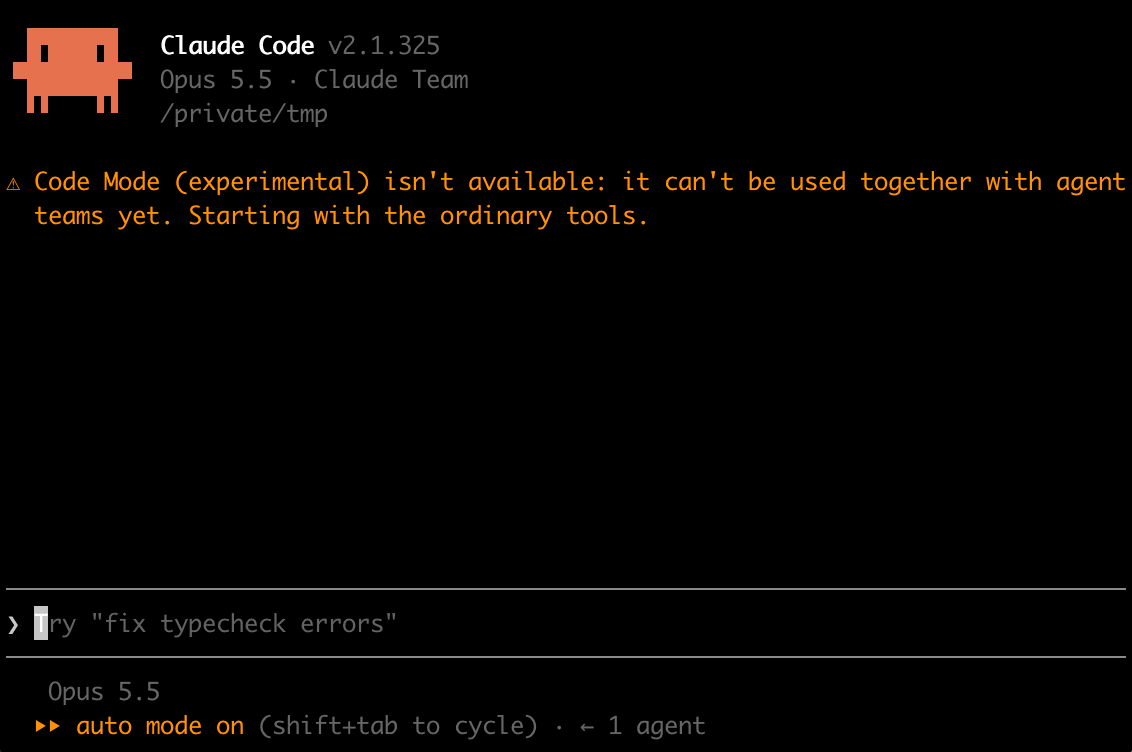
So I removed the agent teams environment variable and launched with --setting-sources project,local so that user settings weren't loaded. To keep the comparison conditions equal, I fixed the permission mode with --permission-mode default and the model with --model opus, and specified the fullscreen display I normally use via --settings.
The screens were captured by launching the session in tmux and displaying it in an iTerm2 window. Since I ran this from inside another Claude Code session, I prefixed the launch command with env -i when creating the tmux session, passing only minimal environment variables so the parent session's environment variables weren't inherited. iTerm2 just connects to that session with tmux attach for display.
The answer to the confirmation dialog is saved in codeModeCaveatsAcceptedV1 in ~/.claude.json. I had already chosen "Yes, turn on Code Mode" once before capturing, so I backed up ~/.claude.json, deleted only this key, and had the dialog shown again. The commands used for capturing are below (the backup destination is changed). ~/docs-site is the test project used in the next section.
# Back up ~/.claude.json and delete only the answer to the confirmation dialog
% cp -p ~/.claude.json ~/.claude.json.bak
% python3 - <<'EOF'
import json, os
p = os.path.expanduser("~/.claude.json")
d = json.load(open(p))
assert d.pop("codeModeCaveatsAcceptedV1", None) is True
tmp = p + ".tmp-cm"
json.dump(d, open(tmp, "w"), indent=2, ensure_ascii=False)
os.chmod(tmp, os.stat(p).st_mode & 0o777)
os.replace(tmp, p)
EOF

# Start the tmux server, hide the status bar, and set the window title to claude
% tmux -L cmtest new-session -d -s keep "cat"
% tmux -L cmtest set -g status off
% tmux -L cmtest set -g set-titles on
% tmux -L cmtest set -g set-titles-string "claude"

# Pass only minimal environment variables with env -i and start the Code Mode session
% CLEAN="env -i HOME=$HOME USER=$USER LOGNAME=$USER PATH=$PATH SHELL=/bin/zsh TERM=xterm-256color LANG=ja_JP.UTF-8 TMPDIR=$TMPDIR"
% tmux -L cmtest new-session -d -s cm2 -x 120 -y 40 -c "$HOME/docs-site" "$CLEAN CLAUDE_CODE_EXPERIMENTAL_CODE_MODE=1 claude --model opus --permission-mode default --setting-sources project,local --settings '{\"tui\":\"fullscreen\"}'"

# Run in an iTerm2 window of 120 columns x 40 rows
% tmux -L cmtest attach -t cm2
Since the environment variables passed with env -i don't include CLAUDE_CODE_EXPERIMENTAL_AGENT_TEAMS, the agent teams environment variable inherited from the parent Claude Code session is not passed. The setting in env in ~/.claude/settings.json is not loaded because of --setting-sources project,local.
The first launch shows the following confirmation dialog. The default selection is "No, start without it", so choose "Yes, turn on Code Mode".
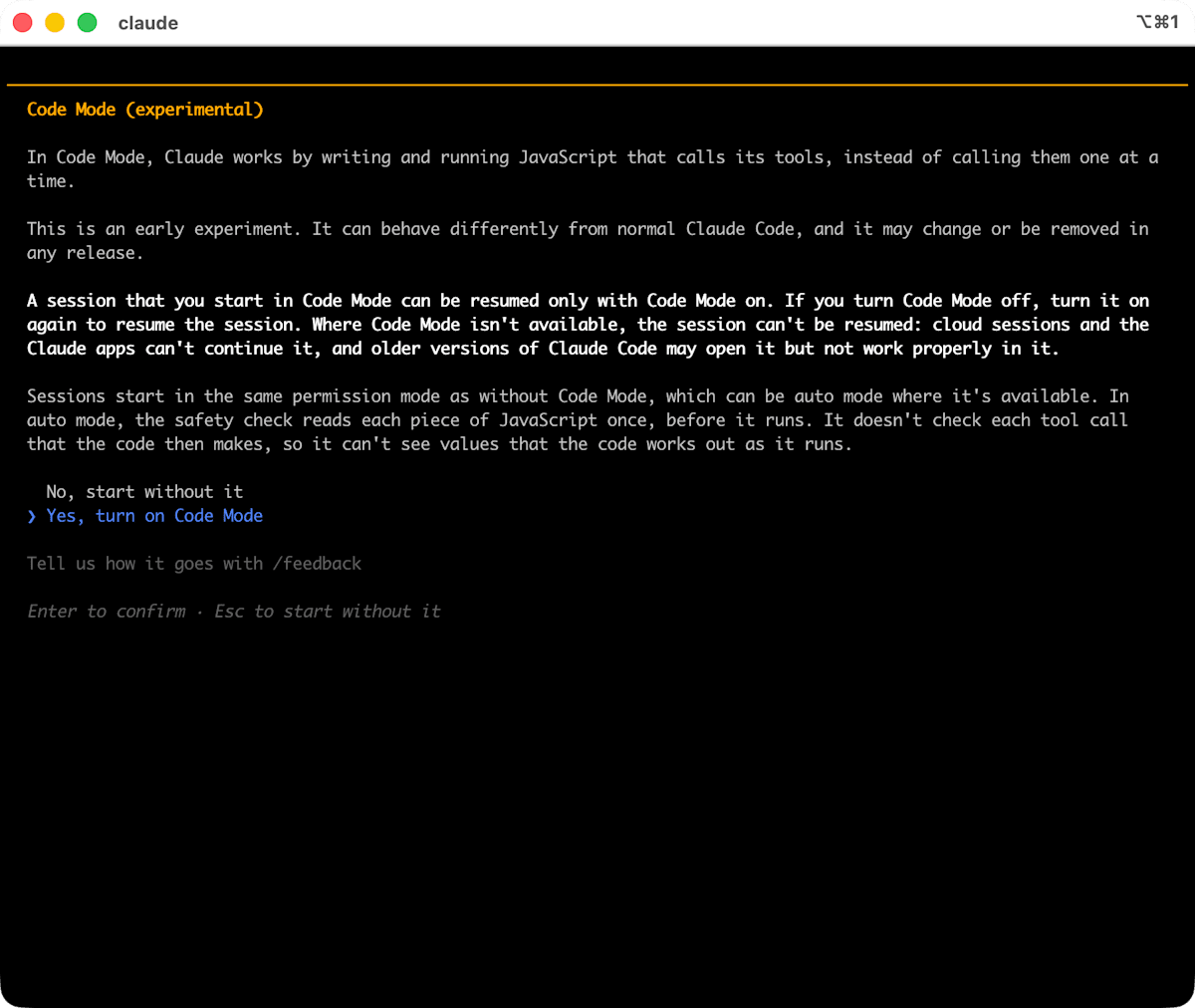
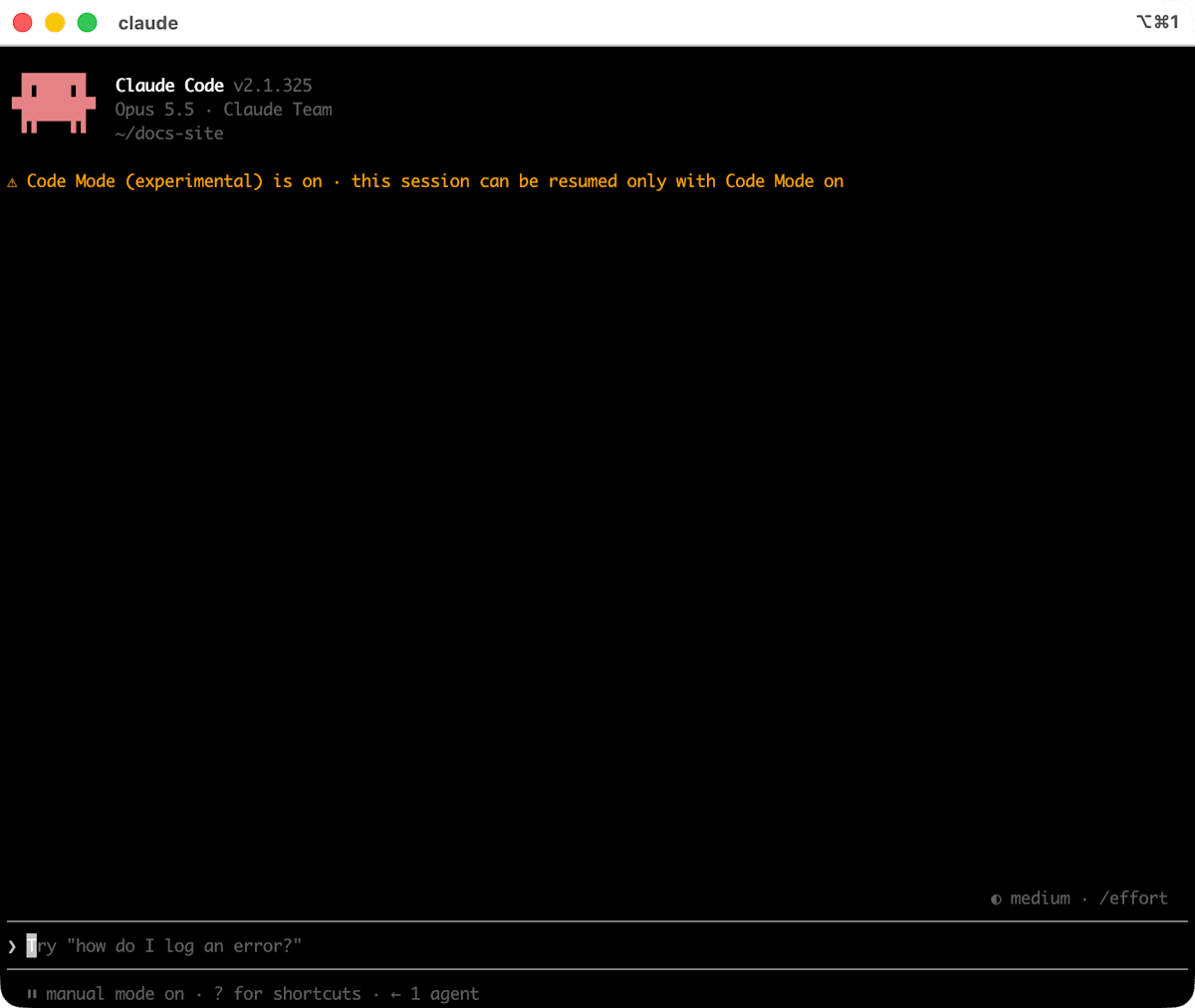
Claude Code restarted, and a line indicating that Code Mode is enabled appeared at the top of the session. A session started in Code Mode can be resumed only when Code Mode is enabled. At this point, codeModeCaveatsAcceptedV1 in ~/.claude.json had returned to true.
Comparing the same task without and with Code Mode
I prepared a test project with 5 Markdown files. Five of the links to local files point to nonexistent files. The file structure and contents are as follows.
docs-site/
├── README.md
├── docs/
│   ├── setup.md
│   └── usage.md
└── examples/
    ├── advanced.md
    └── basic.md
README.md
# Sample Docs

- [セットアップ](./docs/setup.md)
- [使い方](./docs/usage.md)
- [コントリビュートの方法](./CONTRIBUTING.md)
- [公式サイト](https://example.com)
docs/setup.md
# セットアップ
[README に戻る](../README.md)
詳しいインストール手順は [install.md](./install.md) を参照してください。

docs/usage.md
# 使い方

インストールは [セットアップ](./setup.md#install) を参照してください。

サンプルは [基本の例](../examples/basic.md) にあります。
examples/basic.md
# 基本の例

API の詳細は [API リファレンス](../docs/api.md) を参照してください。

次は [応用の例](./advanced.md) です。
examples/advanced.md
# 応用の例

[README](../README.md) / [よくある質問](../docs/faq.md)
The 5 links pointing to nonexistent files are ./CONTRIBUTING.md in README.md, ./install.md and ../images/arch.png in docs/setup.md, ../docs/api.md in examples/basic.md, and ../docs/faq.md in examples/advanced.md.
I placed the same content in folders without Code Mode (~/docs-site-normal) and with it (~/docs-site), and sent the same prompt to each session.
このプロジェクトの Markdown ファイルをすべて読み、存在しないローカルファイルを指しているリンクを一覧にしてください。
Here is the screen without Code Mode (the answer's table and notes are omitted).
❯ このプロジェクトの Markdown ファイルをすべて読み、存在しないローカルファイルを指しているリンクを一覧にしてください。

  Searched for 1 pattern, read 5 files

⏺ Markdown ファイル 5 つ(README.md、docs/setup.md、docs/usage.md、examples/basic.md、examples/advanced.md)をすべて読み
  ました。存在しないローカルファイルを指しているリンクは次の 5 件です。

✻ Worked for 13s · done 9:36
Here is the screen with Code Mode. The conversation shows not the code but a summary of the tool calls run from inside the code (Searched for 1 pattern, read 5 files, ran 12 shell commands).
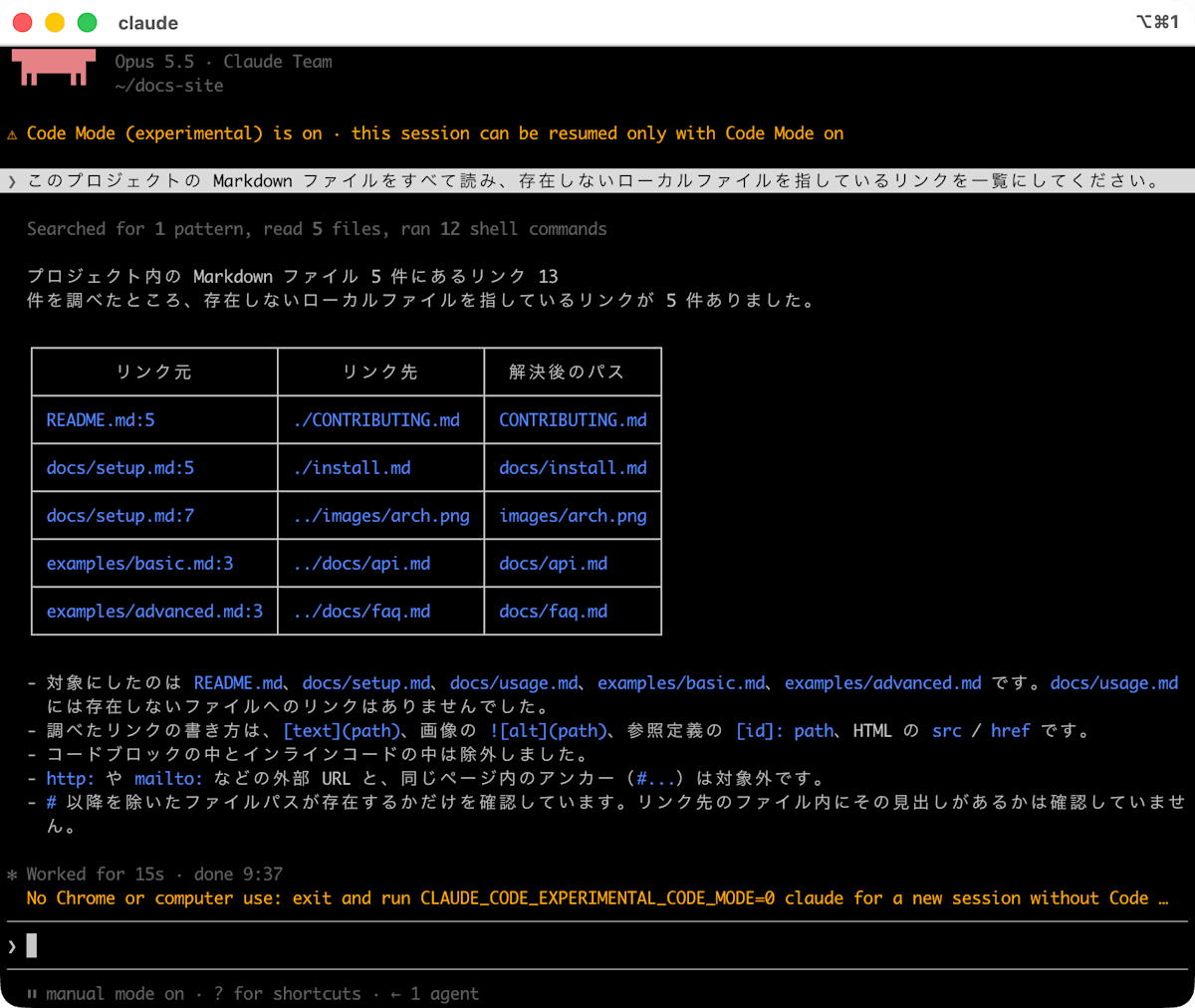
Both sessions listed the same 5 links to nonexistent files.
The JavaScript Claude wrote
The code Claude wrote can be read in the transcript viewer opened with Ctrl+O. The code is collapsed into a line "Code(…) · 29 lines (click to show)", and the tool calls run from inside the code are listed below it.
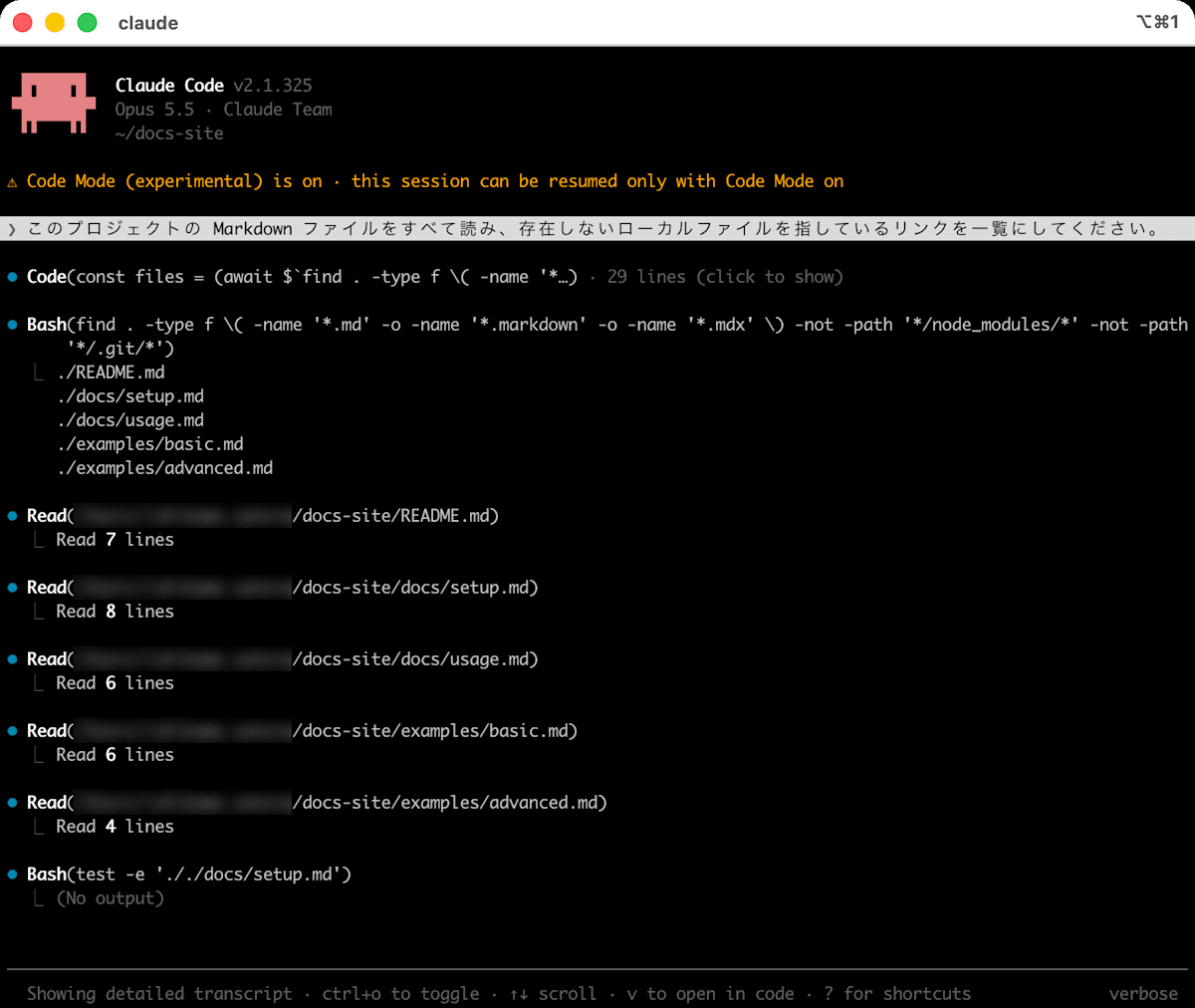
Clicking the Code line expands the code.
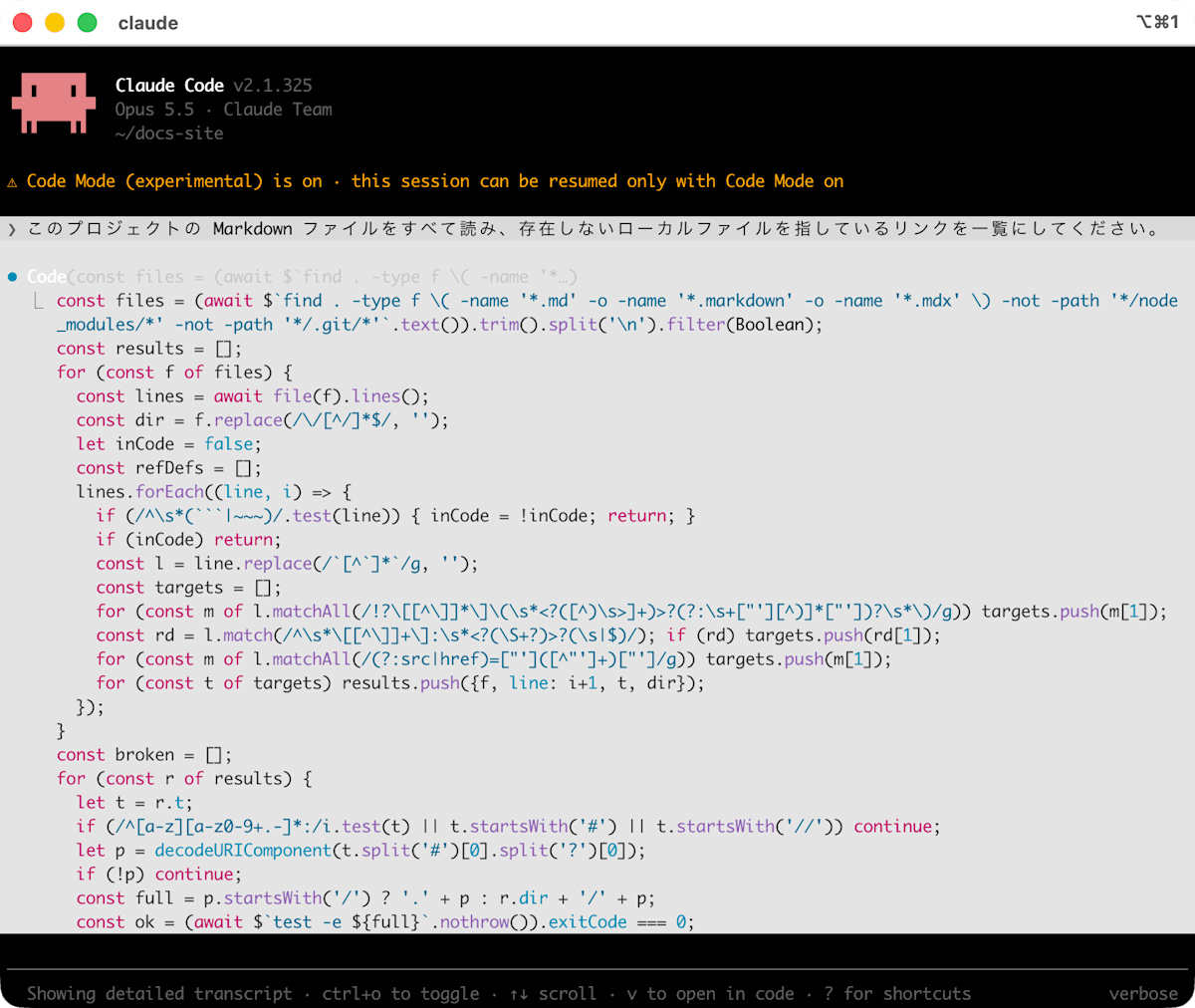
I extracted the full code from the session transcript (JSONL under ~/.claude/projects/) as the input of REPL, the tool that runs the code.
% jq -r 'select(.type=="assistant") | .message.content[]? | select(.type=="tool_use" and .name=="REPL") | .input.code' cm_transcript.jsonl
const files = (await $`find . -type f \( -name '*.md' -o -name '*.markdown' -o -name '*.mdx' \) -not -path '*/node_modules/*' -not -path '*/.git/*'`.text()).trim().split('\n').filter(Boolean);
const results = [];
for (const f of files) {
  const lines = await file(f).lines();
  const dir = f.replace(/\/[^/]*$/, '');
  let inCode = false;
  const refDefs = [];
  lines.forEach((line, i) => {
    if (/^\s*(```|~~~)/.test(line)) { inCode = !inCode; return; }
    if (inCode) return;
    const l = line.replace(/`[^`]*`/g, '');
    const targets = [];
    for (const m of l.matchAll(/!?\[[^\]]*\]\(\s*<?([^)\s>]+)>?(?:\s+["'][^)]*["'])?\s*\)/g)) targets.push(m[1]);
    const rd = l.match(/^\s*\[[^\]]+\]:\s*<?(\S+?)>?(\s|$)/); if (rd) targets.push(rd[1]);
    for (const m of l.matchAll(/(?:src|href)=["']([^"']+)["']/g)) targets.push(m[1]);
    for (const t of targets) results.push({f, line: i+1, t, dir});
  });
}
const broken = [];
for (const r of results) {
  let t = r.t;
  if (/^[a-z][a-z0-9+.-]*:/i.test(t) || t.startsWith('#') || t.startsWith('//')) continue;
  let p = decodeURIComponent(t.split('#')[0].split('?')[0]);
  if (!p) continue;
  const full = p.startsWith('/') ? '.' + p : r.dir + '/' + p;
  const ok = (await $`test -e ${full}`.nothrow()).exitCode === 0;
  if (!ok) broken.push(`${r.f}:${r.line}  ${r.t}`);
}
({count: files.length, files, linkCount: results.length, broken})
This code lists the Markdown files with find, reads each file, and extracts the links. Then, for the 12 links remaining after excluding external URLs and in-page links, it runs test -e one by one in a for loop, and returns the number of files, the file list, the link count, and the nonexistent links as the result. What Claude received as the result of running this code is below.
<repl-output>
<tools-used-before-summary>Bash, Read</tools-used-before-summary>
<result>{
  count: 5,
  files: [
    './README.md',
    './docs/setup.md',
    './docs/usage.md',
    './examples/basic.md',
    './examples/advanced.md'
  ],
  linkCount: 13,
  broken: [
    './README.md:5  ./CONTRIBUTING.md',
    './docs/setup.md:5  ./install.md',
    './docs/setup.md:7  ../images/arch.png',
    './examples/basic.md:3  ../docs/api.md',
    './examples/advanced.md:3  ../docs/faq.md'
  ]
}</result>
</repl-output>
Comparing the numbers
I tallied the transcripts of both sessions. metrics.py is a script I wrote that counts model requests per message.id and separately counts the tool calls run from inside the code. In the transcript, calls run from inside the code were recorded as messages with model set to <synthetic>. The elapsed time (elapsed_sec) is from the prompt's timestamp to the last assistant message's timestamp.
metrics.py
#!/usr/bin/env python3
"""セッションのトランスクリプト(JSONL)から、モデルへのリクエスト数・ツール呼び出し・トークン・所要時間を集計する"""
import json
import sys
from collections import Counter, OrderedDict
from datetime import datetime

path = sys.argv[1]
rows = [json.loads(l) for l in open(path)]

msgs = OrderedDict()  # message.id -> {"types": [...], "usage": {...}}
tool_uses = []
inner = []  # Tool calls run from inside the code (<synthetic>)
for r in rows:
    if r.get("type") != "assistant":
        continue
    m = r["message"]
    if m.get("model") == "<synthetic>" or r.get("isVirtual"):
        for c in m.get("content", []):
            if c["type"] == "tool_use":
                inner.append(c)
        continue
    e = msgs.setdefault(m["id"], {"types": [], "usage": None})
    for c in m.get("content", []):
        e["types"].append(c["type"])
        if c["type"] == "tool_use":
            tool_uses.append(c)
    e["usage"] = m.get("usage")  # Use the last usage for the same id

def ts(r):
    return datetime.fromisoformat(r["timestamp"].replace("Z", "+00:00"))

prompt_rows = [r for r in rows if r.get("type") == "user" and isinstance(r["message"].get("content"), str)]
asst_rows = [r for r in rows if r.get("type") == "assistant"]
start, end = ts(prompt_rows[0]), ts(asst_rows[-1])

tot = Counter()
for e in msgs.values():
    u = e["usage"] or {}
    for k in ("input_tokens", "cache_creation_input_tokens", "cache_read_input_tokens", "output_tokens"):
        tot[k] += u.get(k) or 0

result = {
    "model_requests": len(msgs),
    "tool_calls_requested_by_model": dict(Counter(t["name"] for t in tool_uses)),
    "tool_calls_inside_code": dict(Counter(t["name"] for t in inner)),
    "tokens": dict(tot),
    "elapsed_sec": round((end - start).total_seconds(), 1),
}
print(json.dumps(result, ensure_ascii=False))
nm_transcript.jsonl (without Code Mode) and cm_transcript.jsonl (with Code Mode) are copies of each session's transcript under ~/.claude/projects/.
% python3 metrics.py nm_transcript.jsonl
{"model_requests": 3, "tool_calls_requested_by_model": {"Bash": 1, "Read": 5}, "tool_calls_inside_code": {}, "tokens": {"input_tokens": 6, "cache_creation_input_tokens": 20479, "cache_read_input_tokens": 127939, "output_tokens": 1145}, "elapsed_sec": 13.5}
% python3 metrics.py cm_transcript.jsonl
{"model_requests": 2, "tool_calls_requested_by_model": {"REPL": 1}, "tool_calls_inside_code": {"Bash": 13, "Read": 5}, "tokens": {"input_tokens": 4, "cache_creation_input_tokens": 12735, "cache_read_input_tokens": 38641, "output_tokens": 1373}, "elapsed_sec": 15.3}
I also counted the number of characters Claude received as tool results (excluding records of calls run from inside the code).
% jq -s '[ .[] | select(.type=="user" and (.isVirtual|not)) | .message.content[]? | select(type=="object" and .type=="tool_result") | .content | if type=="array" then map(.text // "") | join("\n") else . end | length ] | add' nm_transcript.jsonl
651
% jq -s '[ .[] | select(.type=="user" and (.isVirtual|not)) | .message.content[]? | select(type=="object" and .type=="tool_result") | .content | if type=="array" then map(.text // "") | join("\n") else . end | length ] | add' cm_transcript.jsonl
513
| Item | Without Code Mode | With Code Mode |
|---|---|---|
| Requests to the model | 3 | 2 |
| Tool calls requested by the model | Bash 1, Read 5 | REPL 1 |
| Tool calls run from inside the code | None | Bash 13 (find 1, test -e 12), Read 5 |
| Output tokens | 1,145 | 1,373 |
| Input tokens (cache creation) | 20,479 | 12,735 |
| Input tokens (cache read) | 127,939 | 38,641 |
| Tool results Claude received | 651 characters | 513 characters |
| Prompt record to last response | 13.5 s | 15.3 s |
With Code Mode, the requests to the model dropped from 3 to 2, and the input tokens (cache creation and cache read) and the number of characters Claude received as tool results were also smaller. On the other hand, output tokens and elapsed time were higher with Code Mode. Before capturing, I also ran it once with the classic display and the test project in a different folder. The model requests were also 3 vs 2 then, but the tool result character counts (651 vs ... 652 characters without Code Mode, 1,020 with) and elapsed times (17.1 s without, 13.9 s with) were the reverse in magnitude of this time. Both are single-run results, so treat them as reference values.
Permission checks and how to disable it
According to the documentation, deny and ask permission rules and PreToolUse hooks also apply to each tool call run from inside the code. In auto mode, the safety check is done per piece of code before execution, not per tool call (the confirmation dialog says the same). If you want to check the code itself, a PreToolUse hook matching REPL can read tool_input.code. This time I ran in manual mode (--permission-mode default), and no permission prompts appeared for calls such as test -e.
To stop using Code Mode, remove CLAUDE_CODE_EXPERIMENTAL_CODE_MODE from both the shell and ~/.claude/settings.json, or set it to 0 in either, and start a new session. If one is 0, Code Mode is disabled even if the other is 1. To prevent use in an organization, set CLAUDE_CODE_EXPERIMENTAL_CODE_MODE to "0" in env of the managed settings. A running Code Mode session continues until it ends or is restarted, and afterward Code Mode sessions can't be resumed while 0 is set. Code Mode can't be enabled from managed settings.
Also, Claude in Chrome and computer use can't be used in a Code Mode session, and the following notice was shown at the bottom of the screen.
No Chrome or computer use: exit and run CLAUDE_CODE_EXPERIMENTAL_CODE_MODE=0 claude for a new session without Code …
For this task combining listing, reading, and existence-checking files, Claude bundled the work into one piece of code, and requests to the model dropped from 3 to 2. The difference is only a reference value, since it's a single-run comparison on a small project, but I think it's worth trying for use cases that check across many files.
Conclusion
In v2.1.325, I notice several changes that add confirmation to operations that previously ran without it, such as Bash in the sandbox, read-only git in repositories that are neither the project's nor trusted, and running skills that declare allowed-tools or hooks in /loop. If you run unattended jobs or scheduled tasks, I think it's best to check behavior after updating and make the necessary settings and allow rules explicit.
References