[Update] I Enabled S3 Server Access Logging on an Amazon S3 Tables Table Bucket and Checked What Gets Recorded

This page has been translated by machine translation. View original
I'm Ishikawa from the Cloud Business Division. S3 server access logs are now available for Amazon S3 Tables table buckets, so I configured them with the AWS CLI and the Management Console and checked the contents of the delivered logs.
Amazon S3 Tables table buckets now support S3 server access logs. Records of requests to a table bucket, such as table operations, namespace management, and data access, can be delivered to a general purpose bucket in the same account and the same Region. The stated use cases are security audits, access analysis, and cost allocation.
Each record includes the request source, operation, table name, namespace, response status, and request timing. The log format is the same space-delimited text as general purpose bucket server access logs, so you can reuse log analysis setups built for general purpose buckets and search with query engines such as Amazon Athena and DuckDB. There is no additional S3 Tables charge for generating and delivering logs; normal S3 charges apply, such as storage for the destination general purpose bucket.
It is available in all AWS Regions where S3 Tables is available, and can be configured from the AWS Management Console, AWS CLI, AWS SDKs, and AWS CloudFormation.
The PutTableBucketLogging and GetTableBucketLogging APIs were added. In the AWS CLI, aws s3tables put-table-bucket-logging / get-table-bucket-logging are available from 2.40.0.
Note that in June 2026, a feature to "deliver general purpose bucket server access logs to Amazon CloudWatch Logs and mirror them to S3 Tables" was announced. That feature uses S3 Tables as the storage for general purpose bucket logs. This update records requests to the table bucket itself, so it is a different thing.
What are S3 Tables server access logs?
Server access logs are enabled per table bucket. Once enabled, requests to all namespaces and tables in that table bucket are recorded and delivered as log files to the specified general purpose bucket. There is no per-namespace or per-table setting.
The settings specified in PutTableBucketLogging are as follows.
| Item | Required | Description |
|---|---|---|
targetBucket |
Required | Name of the general purpose bucket to deliver logs to |
targetPrefix |
Required | Prefix of the log object keys. Can be empty. A trailing / is not added automatically |
targetObjectKeyFormat.partitionedPrefix.partitionDateSource |
Required | Date used for the date folders in the key: EventTime (request date) or DeliveryTime (log delivery date) |
To disable logging, call PutTableBucketLogging with an empty tableBucketLoggingStatus ({}). There is no dedicated API to delete the setting.
The destination general purpose bucket has the following requirements.
- It must be in the same account and Region as the table bucket (cross-account and cross-Region delivery are not supported)
- Default encryption must be SSE-S3 (SSE-KMS / DSSE-KMS are not supported)
- S3 Object Lock must be disabled
- Requester Pays must be disabled
- The bucket policy must allow
s3:PutObjectfor the log delivery service principallogging.s3.amazonaws.com(added automatically when enabled from the console; you add it yourself with the CLI / SDK / REST API)
The following limitations also apply.
- Delivery to Amazon CloudWatch Logs is not supported (general purpose buckets only)
- It cannot be enabled on AWS managed tables
- The
SimplePrefixlog object key format is not supported (logs are always partitioned by date) - ACLs are not supported
- Requests sent to the wrong regional endpoint are not recorded
Log delivery is best effort. Most records are delivered within a few hours, but some records may be delayed significantly, not delivered, or duplicated. If you need to reliably record every request, you are advised to use AWS CloudTrail.
Trying it out
Prerequisites
- Verification Region: Asia Pacific (Tokyo) ap-northeast-1
- AWS CLI 2.40.0
- Integration of S3 Tables with AWS analytics services is enabled (to read and write tables from Athena)
Verification environment
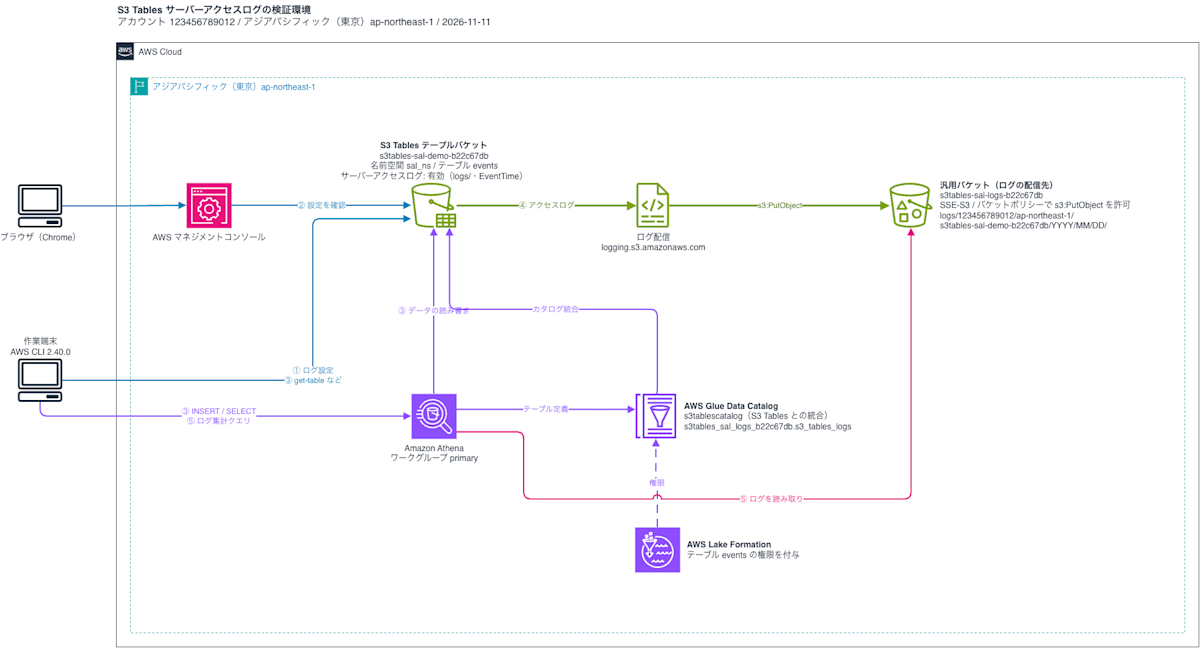
The verification environment is as follows. I configure the table bucket's server access logs with the CLI (①) and check the setting in the console (②). I send requests to the table bucket from the CLI and Athena (③), and aggregate the logs that arrive in the destination general purpose bucket (④) with Athena (⑤).
Create the destination general purpose bucket for logs
Steps
Create a general purpose bucket in the same Region as the table bucket as the log destination.
% aws s3api create-bucket --bucket s3tables-sal-logs-b22c67db --region ap-northeast-1 --create-bucket-configuration LocationConstraint=ap-northeast-1
{
    "Location": "http://s3tables-sal-logs-b22c67db.s3.amazonaws.com/",
    "BucketArn": "arn:aws:s3:::s3tables-sal-logs-b22c67db"
}
The destination's default encryption must be SSE-S3. The default encryption of the newly created general purpose bucket was SSE-S3 (AES256).
% aws s3api get-bucket-encryption --bucket s3tables-sal-logs-b22c67db --output table
------------------------------------------
|           GetBucketEncryption          |
+----------------------------------------+
||   ServerSideEncryptionConfiguration  ||
|+--------------------------------------+|
|||                Rules               |||
||+------------------------------------+||
|||          BucketKeyEnabled          |||
||+------------------------------------+||
|||  False                             |||
||+------------------------------------+||
||||ApplyServerSideEncryptionByDefault||||
|||+--------------------+-------------+|||
||||  SSEAlgorithm      |  AES256     ||||
|||+--------------------+-------------+|||
||||      BlockedEncryptionTypes      ||||
|||+----------------------------------+|||
|||||         EncryptionType         |||||
||||+--------------------------------+||||
|||||  SSE-C                         |||||
||||+--------------------------------+||||
When configuring logs with the CLI, you set the destination bucket policy yourself. Following the documentation example, I allowed s3:PutObject for the log delivery service principal logging.s3.amazonaws.com, and specified the table bucket ARN in aws:SourceArn and the account ID in aws:SourceAccount. Resource is limited to under the log prefix logs/.
{
    "Version": "2012-10-17",
    "Statement": [
        {
            "Sid": "S3TablesServerAccessLogsPolicy",
            "Effect": "Allow",
            "Principal": {
                "Service": "logging.s3.amazonaws.com"
            },
            "Action": "s3:PutObject",
            "Resource": "arn:aws:s3:::s3tables-sal-logs-b22c67db/logs/*",
            "Condition": {
                "ArnLike": {
                    "aws:SourceArn": "arn:aws:s3tables:ap-northeast-1:123456789012:bucket/s3tables-sal-demo-b22c67db"
                },
                "StringEquals": {
                    "aws:SourceAccount": "123456789012"
                }
            }
        }
    ]
}
% aws s3api put-bucket-policy --bucket s3tables-sal-logs-b22c67db --policy file://log-bucket-policy.json
The table bucket is created in the next step, so the bucket policy specifies the ARN of a table bucket that does not exist yet.
Create the table bucket, namespace, and table
Steps
Create a table bucket for verification, the namespace sal_ns, and the table events.
% aws s3tables create-table-bucket --name s3tables-sal-demo-b22c67db --tags run_id=s3tsal-20261111-b22c67db,owner=ishikawa,purpose=blog-verification,ttl=2026-11-12
{
    "arn": "arn:aws:s3tables:ap-northeast-1:123456789012:bucket/s3tables-sal-demo-b22c67db"
}
% aws s3tables create-namespace --table-bucket-arn arn:aws:s3tables:ap-northeast-1:123456789012:bucket/s3tables-sal-demo-b22c67db --namespace sal_ns
{
    "tableBucketARN": "arn:aws:s3tables:ap-northeast-1:123456789012:bucket/s3tables-sal-demo-b22c67db",
    "namespace": [
        "sal_ns"
    ]
}
I passed the table schema as a JSON file.
table-metadata.json:
{
    "iceberg": {
        "schema": {
            "fields": [
                {"name": "event_id", "type": "int", "required": true},
                {"name": "event_type", "type": "string"},
                {"name": "event_time", "type": "timestamp"}
            ]
        }
    }
}
% aws s3tables create-table --table-bucket-arn arn:aws:s3tables:ap-northeast-1:123456789012:bucket/s3tables-sal-demo-b22c67db --namespace sal_ns --name events --format ICEBERG --metadata file://table-metadata.json
{
    "tableARN": "arn:aws:s3tables:ap-northeast-1:123456789012:bucket/s3tables-sal-demo-b22c67db/table/24f3f0cf-870f-4fb7-ace7-7982df570663",
    "versionToken": "6cb9aa423c658249c7bf"
}
Check the initial state of the server access log setting
Running get-table-bucket-logging before enabling it returned an empty tableBucketLoggingStatus. Table bucket server access logs are disabled by default.
% aws s3tables get-table-bucket-logging --table-bucket-arn arn:aws:s3tables:ap-northeast-1:123456789012:bucket/s3tables-sal-demo-b22c67db
{
    "tableBucketLoggingStatus": {}
}
Enable server access logs
Write the log settings in a JSON file. I set the prefix to logs/ and the date source to EventTime.
logging-enabled.json:
{
    "loggingEnabled": {
        "targetBucket": "s3tables-sal-logs-b22c67db",
        "targetPrefix": "logs/",
        "targetObjectKeyFormat": {
            "partitionedPrefix": {
                "partitionDateSource": "EventTime"
            }
        }
    }
}
Set it with put-table-bucket-logging. Nothing is output on success.
% aws s3tables put-table-bucket-logging --table-bucket-arn arn:aws:s3tables:ap-northeast-1:123456789012:bucket/s3tables-sal-demo-b22c67db --table-bucket-logging-status file://logging-enabled.json
Running get-table-bucket-logging again returned the configured contents. The setting was made at 2026-11-10T23:24:35Z (08:24:35 on November 11 in JST).
% aws s3tables get-table-bucket-logging --table-bucket-arn arn:aws:s3tables:ap-northeast-1:123456789012:bucket/s3tables-sal-demo-b22c67db
{
    "tableBucketLoggingStatus": {
        "loggingEnabled": {
            "targetBucket": "s3tables-sal-logs-b22c67db",
            "targetPrefix": "logs/",
            "targetObjectKeyFormat": {
                "partitionedPrefix": {
                    "partitionDateSource": "EventTime"
                }
            }
        }
    }
}
Check in the Management Console
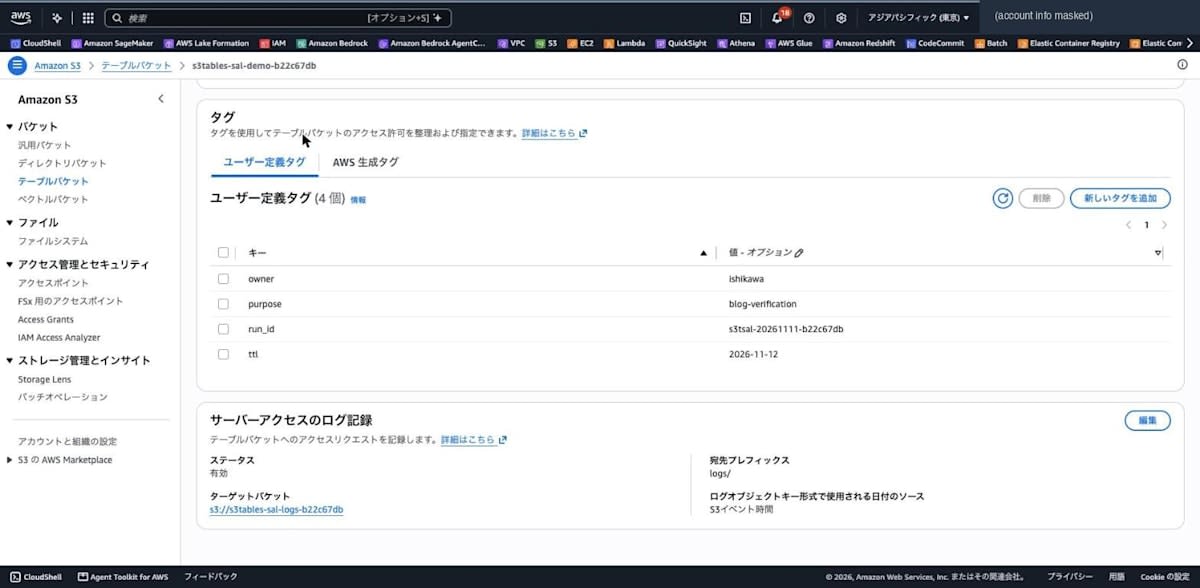
I opened the table bucket from [Table buckets] in the S3 console and displayed the [Properties] tab. At the bottom is a [Server access logging] section showing the settings made with the CLI (status "Enabled", target bucket, destination prefix logs/, date source "S3 event time").
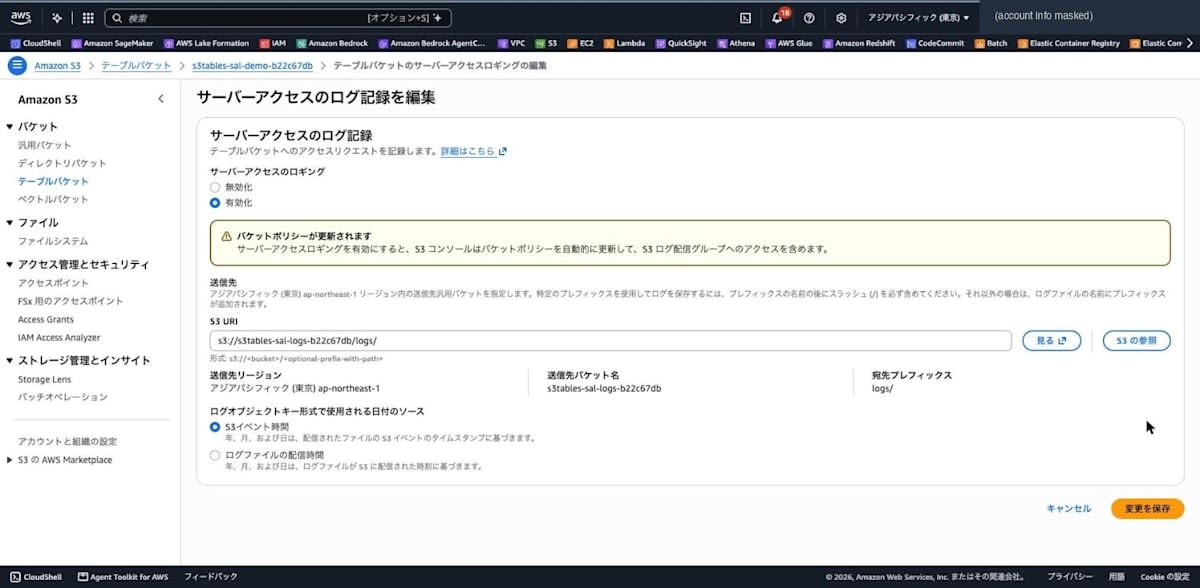
Clicking [Edit] showed a screen to enable or disable logging, set the destination S3 URI, and set the date source for the log object key ([S3 event time] or [Log file delivery time]). Choosing to enable it shows a warning that "the S3 console automatically updates the bucket policy". This time I only checked the contents and closed it with [Cancel].
Generate requests to be recorded in the server access logs
From the CLI, I send requests that reference the table bucket, namespace, and table.
Steps
% aws s3tables get-table-bucket --table-bucket-arn arn:aws:s3tables:ap-northeast-1:123456789012:bucket/s3tables-sal-demo-b22c67db
{
    "arn": "arn:aws:s3tables:ap-northeast-1:123456789012:bucket/s3tables-sal-demo-b22c67db",
    "name": "s3tables-sal-demo-b22c67db",
    "ownerAccountId": "123456789012",
    "createdAt": "2026-11-10T23:24:22.521919+00:00",
    "tableBucketId": "1dee7849-096f-4adf-bc76-207d09227220",
    "type": "customer"
}
% aws s3tables list-namespaces --table-bucket-arn arn:aws:s3tables:ap-northeast-1:123456789012:bucket/s3tables-sal-demo-b22c67db --output table
--------------------------------------------------------------
|                       ListNamespaces                       |
+------------------------------------------------------------+
||                        namespaces                        ||
|+-----------------+----------------------------------------+|
||  createdAt      |  2026-11-10T23:24:23.474246+00:00      ||
||  createdBy      |  123456789012                          ||
||  namespaceId    |  4d8995a8-be18-4604-868b-1b248078bffe  ||
||  ownerAccountId |  123456789012                          ||
||  tableBucketId  |  1dee7849-096f-4adf-bc76-207d09227220  ||
|+-----------------+----------------------------------------+|
|||                        namespace                       |||
||+--------------------------------------------------------+||
|||  sal_ns                                                |||
||+--------------------------------------------------------+||
% aws s3tables get-table --table-bucket-arn arn:aws:s3tables:ap-northeast-1:123456789012:bucket/s3tables-sal-demo-b22c67db --namespace sal_ns --name events --query "[name,type,format,versionToken]" --output table
--------------------------
|        GetTable        |
+------------------------+
|  events                |
|  customer              |
|  ICEBERG               |
|  6cb9aa423c658249c7bf  |
+------------------------+
% aws s3tables get-table-metadata-location --table-bucket-arn arn:aws:s3tables:ap-northeast-1:123456789012:bucket/s3tables-sal-demo-b22c67db --namespace sal_ns --name events
{
    "versionToken": "6cb9aa423c658249c7bf",
    "metadataLocation": "s3://24f3f0cf-870f-4fb7-1k9qszgn3mqwwn5ciebtnr4ugcto4apn1b--table-s3/metadata/00000-080ec784-f572-4e6b-93f0-eeee999cffeb.metadata.json",
    "warehouseLocation": "s3://24f3f0cf-870f-4fb7-1k9qszgn3mqwwn5ciebtnr4ugcto4apn1b--table-s3"
}
To see how errors are recorded, I specified a table that does not exist.
% aws s3tables get-table --table-bucket-arn arn:aws:s3tables:ap-northeast-1:123456789012:bucket/s3tables-sal-demo-b22c67db --namespace sal_ns --name not_exists
aws: [ERROR]: An error occurred (NotFoundException) when calling the GetTable operation: The specified table does not exist.
Next, I write data to the table from Athena. The first INSERT failed with No columns given to insert, and the SELECT failed with COLUMN_NOT_FOUND: line 1:8: Relation contains no accessible columns. Checking the permissions on the table events with aws lakeformation list-permissions showed that no principal had been granted any permissions (PrincipalResourcePermissions was empty).
% aws athena get-query-execution --query-execution-id 9c4e622e-e5ab-44b2-ac3a-4d6a10c70981 --query "QueryExecution.[Status.State,Status.StateChangeReason,Statistics.DataScannedInBytes]" --output table
-------------------------------------------------------------------------
|                           GetQueryExecution                           |
+-----------------------------------------------------------------------+
|  FAILED                                                               |
|  COLUMN_NOT_FOUND: line 1:8: Relation contains no accessible columns  |
|  0                                                                    |
+-----------------------------------------------------------------------+
I granted the execution role permissions on the table events and re-ran the queries.
% aws lakeformation grant-permissions --principal DataLakePrincipalIdentifier=arn:aws:iam::123456789012:role/cm-ishikawa.satoru --resource '{"Table":{"CatalogId":"123456789012:s3tablescatalog/s3tables-sal-demo-b22c67db","DatabaseName":"sal_ns","Name":"events"}}' --permissions ALL
% aws athena start-query-execution --work-group primary --query-execution-context Catalog=s3tablescatalog/s3tables-sal-demo-b22c67db,Database=sal_ns --query-string "INSERT INTO events VALUES (1, 'login', TIMESTAMP '2026-11-11 08:00:00'), (2, 'view', TIMESTAMP '2026-11-11 08:05:00'), (3, 'logout', TIMESTAMP '2026-11-11 08:10:00')"
{"QueryExecutionId": "8d5dfb63-9db4-4bec-ad4b-e83dd0d92f78"}
% aws athena start-query-execution --work-group primary --query-execution-context Catalog=s3tablescatalog/s3tables-sal-demo-b22c67db,Database=sal_ns --query-string "SELECT * FROM events ORDER BY event_id"
{"QueryExecutionId": "543292d3-2aa8-4866-8187-0ccd692ebb9d"}
% aws athena get-query-results --query-execution-id 543292d3-2aa8-4866-8187-0ccd692ebb9d --query "ResultSet.Rows[*].Data[*].VarCharValue" --output text
event_id	event_type	event_time
1	login	2026-11-11 08:00:00.000000
2	view	2026-11-11 08:05:00.000000
3	logout	2026-11-11 08:10:00.000000
The query IDs of the INSERT and SELECT (8d5dfb63-9db4-4bec-ad4b-e83dd0d92f78 and 543292d3-2aa8-4866-8187-0ccd692ebb9d) are matched against the logs later.
Check the delivered logs
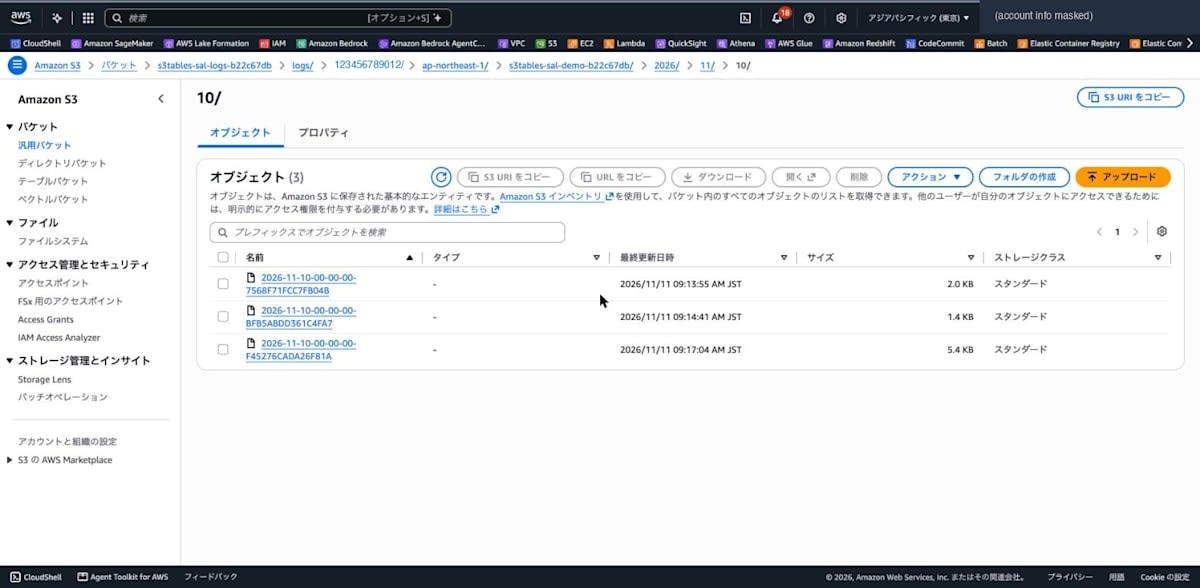
The first log object arrived at 00:13:55Z, about 49 minutes after logging was enabled at 23:24:35Z.
% aws s3api list-objects-v2 --bucket s3tables-sal-logs-b22c67db --prefix logs/ --query "Contents[].[Key,Size,LastModified]" --output table
------------------------------------------------------------------------------------------------------------------------------------------------------
|                                                                    ListObjectsV2                                                                   |
+---------------------------------------------------------------------------------------------------------------+-------+----------------------------+
|  logs/123456789012/ap-northeast-1/s3tables-sal-demo-b22c67db/2026/11/10/2026-11-10-00-00-00-7568F71FCC7FB04B  |  2052 |  2026-11-11T00:13:55+00:00 |
|  logs/123456789012/ap-northeast-1/s3tables-sal-demo-b22c67db/2026/11/10/2026-11-10-00-00-00-BFB5ABDD361C4FA7  |  1401 |  2026-11-11T00:14:41+00:00 |
+---------------------------------------------------------------------------------------------------------------+-------+----------------------------+
As documented, keys are created under logs/<account ID>/<Region>/<table bucket name>/YYYY/MM/DD/, and since I specified EventTime, the time part of the file name was 00-00-00. Partition projection makes fast and efficient queries possible. The date folder uses the UTC date, so requests at 08:xx JST on November 11 went into 2026/11/10/.
Log objects kept arriving every few minutes after that, and the last one arrived at 01:05:52Z. No new objects arrived by 01:53Z, so I stopped there. In total, 26 objects and 54 records arrived. Calculated from the difference between each record's request_time_iso and the object's last modified time, the time from request to delivery was about 47 minutes at the shortest, about 69 minutes at the median, and about 99 minutes at the longest.
Let's look at the log contents. This is the record for the CLI's get-table-metadata-location.
arn:aws:s3tables:ap-northeast-1:123456789012:bucket/s3tables-sal-demo-b22c67db [10/Nov/2026:23:26:06 +0000] arn:aws:s3tables:ap-northeast-1:123456789012:bucket/s3tables-sal-demo-b22c67db/table/24f3f0cf-870f-4fb7-ace7-7982df570663 sal_ns events - - 203.0.113.10 arn:aws:sts::123456789012:assumed-role/cm-ishikawa.satoru/ishikawa 3b365c17-150f-4d2e-b565-0153e488ac46 S3Tables.GetTableMetadataLocation 200 - 286 63 63 "-" "aws-cli/2.40.0 md/awscrt#0.38.1 ua/2.1 os/macos#25.6.0 md/arch#arm64 lang/python#3.14.8 md/pyimpl#CPython m/AN,Z,g,E,b cfg/retry-mode#standard md/installer#exe sid/f98775181009 md/prompt#off md/command#s3tables.get-table-metadata-location" SigV4 TLS_AES_128_GCM_SHA256 AuthHeader s3tables.ap-northeast-1.amazonaws.com TLSv1.3 2026-11-10T23:26:06.823Z -
The table bucket ARN, table ARN, namespace sal_ns, table name events, source IP, IAM role, S3Tables.GetTableMetadataLocation, and status 200 are all lined up on one line. The end of user_agent contains md/command#s3tables.get-table-metadata-location, the name of the CLI command that was run.
This is the record for writing a Parquet file to table storage with an Athena INSERT.
arn:aws:s3tables:ap-northeast-1:123456789012:bucket/s3tables-sal-demo-b22c67db [10/Nov/2026:23:27:29 +0000] arn:aws:s3tables:ap-northeast-1:123456789012:bucket/s3tables-sal-demo-b22c67db/table/24f3f0cf-870f-4fb7-ace7-7982df570663 sal_ns events data/20261110_232728_00178_yyke8-134b696e-72da-49a8-bdc9-ccdffd998892.parquet 557 198.51.100.20 arn:aws:sts::123456789012:assumed-role/cm-ishikawa.satoru/ishikawa MTQWMW597VXB277B REST.PUT.OBJECT 200 - - 57 18 "-" "AWS_ATHENA, aws-sdk-java/2.24.11 Linux/4.14.355-284.746.amzn2.aarch64 OpenJDK_64-Bit_Server_VM/21.0.13+10-LTS Java/21.0.13 kotlin/1.9.255-SNAPSHOT vendor/Amazon.com_Inc. io/sync http/Apache cfg/retry-mode/standard hll/cross-region, athenaQueryId=8d5dfb63-9db4-4bec-ad4b-e83dd0d92f78" SigV4 TLS_AES_128_GCM_SHA256 AuthHeader 24f3f0cf-870f-4fb7-1k9qszgn3mqwwn5ciebtnr4ugcto4apn1b--table-s3.s3.ap-northeast-1.amazonaws.com TLSv1.3 2026-11-10T23:27:29.000Z ap-northeast-1
operation is REST.PUT.OBJECT, key holds the key of the written Parquet file, and host_header holds the table storage endpoint (<ID>--table-s3.s3.ap-northeast-1.amazonaws.com). The athenaQueryId=8d5dfb63-9db4-4bec-ad4b-e83dd0d92f78 at the end of user_agent matched the INSERT's query ID. Note that request_time_iso in REST.* records is in seconds (.000Z), while in S3Tables.* records it is in milliseconds.
get-table on the nonexistent table was recorded with status 404 and error code NotFoundException. Since the table does not exist, table_arn is -.
arn:aws:s3tables:ap-northeast-1:123456789012:bucket/s3tables-sal-demo-b22c67db [10/Nov/2026:23:26:07 +0000] - sal_ns not_exists - - 203.0.113.10 arn:aws:sts::123456789012:assumed-role/cm-ishikawa.satoru/ishikawa 9e6d3bcb-c8d4-4572-93fa-7427a2815edc S3Tables.GetTable 404 NotFoundException 49 74 74 "-" "aws-cli/2.40.0 md/awscrt#0.38.1 ua/2.1 os/macos#25.6.0 md/arch#arm64 lang/python#3.14.8 md/pyimpl#CPython m/AN,Z,g,E,b cfg/retry-mode#standard md/installer#exe sid/f98775181009 md/prompt#off md/command#s3tables.get-table" SigV4 TLS_AES_128_GCM_SHA256 AuthHeader s3tables.ap-northeast-1.amazonaws.com TLSv1.3 2026-11-10T23:26:07.754Z -
Splitting the 54 records by source, remote_ip and user_agent looked like this.
| Source | Example operations recorded | remote_ip | user_agent | Other |
|---|---|---|---|---|
| AWS CLI | S3Tables.GetTable, S3Tables.ListNamespaces |
Source IP | aws-cli/2.40.0 md/awscrt#0.38.1 ua/2.1 os/macos#25.6.0 md/arch#arm64 lang/python#3.14.8 md/pyimpl#CPython m/AN,Z,g,E,b cfg/retry-mode#standard md/installer#exe sid/f98775181009 md/prompt#off md/command#s3tables.<command name> |
|
| Management Console | S3Tables.GetTableBucket, S3Tables.GetTableBucketLogging, S3Tables.ListTagsForResource |
Source IP | Browser User-Agent | referer is https://global.console.aws.amazon.com/ |
| Athena (table storage) | REST.PUT.OBJECT, REST.GET.OBJECT, REST.HEAD.OBJECT |
An IP different from my local machine | AWS_ATHENA, aws-sdk-java/2.24.11 Linux/4.14.355-284.746.amzn2.aarch64 OpenJDK_64-Bit_Server_VM/21.0.13+10-LTS Java/21.0.13 kotlin/1.9.255-SNAPSHOT vendor/Amazon.com_Inc. io/sync http/Apache cfg/retry-mode/standard hll/cross-region, athenaQueryId=<query ID> |
key and object_size are populated |
| Records at the times Athena queries or Glue / Lake Formation APIs were run | S3Tables.GetTableBucket, S3Tables.GetTable, REST.GET.OBJECT (metadata.json) |
- |
- |
requester is the execution role |
The user_agent values for AWS CLI and Athena in the table are examples of recorded values. One of the 6 AWS CLI records had AN,Z,g,E,C,b as the m/ value. The 14 Athena records had three different Linux/ values: 4.14.355-284.746.amzn2.aarch64, 4.14.355-284.746.amzn2.x86_64, and 4.14.355-287.755.amzn2.x86_64.
In the records in the last row, remote_ip and user_agent are -, so the caller cannot be identified from the record alone. They matched the times when Athena queries were submitted and Glue / Lake Formation APIs were run, so I judged them to be requests accompanying those operations.
Records such as GetTableBucketLogging and GetTableBucketEncryption from opening the table bucket properties in the console were also recorded. API calls made to render console screens are also recorded.
On the other hand, the following requests were not in the logs (within what arrived by 01:53Z).
- The
PutTableBucketLoggingthat enabled logging, and theGetTableBucketLoggingrun just before it. Records start from theGetTableBucketLoggingrun right after enabling (23:24:35.517Z) S3Tables.UpdateTableMetadataLocation, which corresponds to the commit of the Athena INSERT
Query the logs with Athena
I query the delivered logs with Athena. Based on the documentation example, I created a database and table. For LOCATION and storage.location.template, specify the destination bucket, prefix, account ID, Region, and table bucket name. Do not put a slash between the prefix and the account ID (since I used logs/ as the prefix, it becomes logs/123456789012/ap-northeast-1/s3tables-sal-demo-b22c67db/).
CREATE DATABASE s3tables_sal_logs_b22c67db
CREATE EXTERNAL TABLE s3tables_sal_logs_b22c67db.s3_tables_logs(
  `table_bucket_arn` STRING,
  `request_time` STRING,
  `table_arn` STRING,
  `namespace_name` STRING,
  `table_name` STRING,
  `key` STRING,
  `object_size` BIGINT,
  `remote_ip` STRING,
  `requester` STRING,
  `request_id` STRING,
  `operation` STRING,
  `http_status` STRING,
  `error_code` STRING,
  `bytes_sent` BIGINT,
  `total_time` STRING,
  `turnaround_time` STRING,
  `referer` STRING,
  `user_agent` STRING,
  `signature_version` STRING,
  `cipher_suite` STRING,
  `authentication_type` STRING,
  `host_header` STRING,
  `tls_version` STRING,
  `request_time_iso` STRING,
  `source_region` STRING)
PARTITIONED BY (
  `timestamp` string)
ROW FORMAT SERDE
  'org.apache.hadoop.hive.serde2.RegexSerDe'
WITH SERDEPROPERTIES (
  'input.regex'='([^ ]*) \\[(.*?)\\] ([^ ]*) ([^ ]*) ([^ ]*) ([^ ]*) ([^ ]*) ([^ ]*) ([^ ]*) ([^ ]*) ([^ ]*) ([^ ]*) ([^ ]*) ([^ ]*) ([^ ]*) ([^ ]*) (\"[^\"]*\"|-) (\"[^\"]*\"|-) ([^ ]*) ([^ ]*) ([^ ]*) ([^ ]*) ([^ ]*) ([^ ]*) ([^ ]*).*$')
STORED AS INPUTFORMAT
  'org.apache.hadoop.mapred.TextInputFormat'
OUTPUTFORMAT
  'org.apache.hadoop.hive.ql.io.HiveIgnoreKeyTextOutputFormat'
LOCATION
  's3://s3tables-sal-logs-b22c67db/logs/123456789012/ap-northeast-1/s3tables-sal-demo-b22c67db/'
TBLPROPERTIES (
  'projection.enabled'='true',
  'projection.timestamp.format'='yyyy/MM/dd',
  'projection.timestamp.interval'='1',
  'projection.timestamp.interval.unit'='DAYS',
  'projection.timestamp.range'='2026/11/01,NOW',
  'projection.timestamp.type'='date',
  'storage.location.template'='s3://s3tables-sal-logs-b22c67db/logs/123456789012/ap-northeast-1/s3tables-sal-demo-b22c67db/${timestamp}')
The following SQL was run with aws athena start-query-execution, and results were retrieved with aws athena get-query-results --query "ResultSet.Rows[*].Data[*].VarCharValue" --output text. First, the count per operation and status.
SELECT operation, http_status, count(*) AS cnt
FROM s3_tables_logs
WHERE timestamp = '2026/11/10'
GROUP BY operation, http_status
ORDER BY operation, http_status
operation	http_status	cnt
REST.GET.OBJECT	200	9
REST.GET.OBJECT	206	8
REST.HEAD.OBJECT	200	2
REST.PUT.OBJECT	200	4
S3Tables.GetNamespace	200	1
S3Tables.GetTable	200	7
S3Tables.GetTable	404	1
S3Tables.GetTableBucket	200	9
S3Tables.GetTableBucketEncryption	200	2
S3Tables.GetTableBucketLogging	200	4
S3Tables.GetTableBucketStorageClass	200	2
S3Tables.GetTableMetadataLocation	200	1
S3Tables.ListNamespaces	200	1
S3Tables.ListTables	200	1
S3Tables.ListTagsForResource	200	2
I classified the source by user_agent and counted S3 Tables API requests and table storage requests separately.
SELECT
  CASE
    WHEN user_agent LIKE '%aws-cli/%' THEN 'AWS CLI'
    WHEN user_agent LIKE '%Mozilla/%' THEN 'Browser (Console)'
    WHEN user_agent LIKE '%AWS_ATHENA%' THEN 'Athena'
    ELSE 'user_agent: -'
  END AS client,
  CASE WHEN operation LIKE 'REST.%' THEN 'table storage' ELSE 'S3 Tables API' END AS kind,
  count(*) AS cnt
FROM s3_tables_logs
WHERE timestamp = '2026/11/10'
GROUP BY 1, 2
ORDER BY 1, 2
client	kind	cnt
AWS CLI	S3 Tables API	6
Athena	table storage	14
Browser (Console)	S3 Tables API	12
user_agent: -	S3 Tables API	13
user_agent: -	table storage	9
Finally, I extracted the Athena query ID from user_agent and aggregated the number of table storage requests and bytes per query. bytes_sent is the response bytes and object_size is the object size.
SELECT
  regexp_extract(user_agent, 'athenaQueryId=([0-9a-f-]+)', 1) AS athena_query_id,
  operation,
  count(*) AS cnt,
  coalesce(sum(bytes_sent), 0) AS bytes_sent,
  coalesce(sum(object_size), 0) AS object_size
FROM s3_tables_logs
WHERE timestamp = '2026/11/10'
  AND user_agent LIKE '%athenaQueryId=%'
GROUP BY 1, 2
ORDER BY 1, 2
athena_query_id	operation	cnt	bytes_sent	object_size
543292d3-2aa8-4866-8187-0ccd692ebb9d	REST.GET.OBJECT	4	13922	13922
543292d3-2aa8-4866-8187-0ccd692ebb9d	REST.HEAD.OBJECT	1	0	4286
8d5dfb63-9db4-4bec-ad4b-e83dd0d92f78	REST.GET.OBJECT	2	5119	5119
8d5dfb63-9db4-4bec-ad4b-e83dd0d92f78	REST.HEAD.OBJECT	1	0	4286
8d5dfb63-9db4-4bec-ad4b-e83dd0d92f78	REST.PUT.OBJECT	4	0	13922
9c4e622e-e5ab-44b2-ac3a-4d6a10c70981	REST.GET.OBJECT	1	833	833
fc6ff786-0111-452f-998d-208b52680bd6	REST.GET.OBJECT	1	833	833
The INSERT (8d5dfb63-9db4-4bec-ad4b-e83dd0d92f78) wrote a total of 13,922 bytes with 4 REST.PUT.OBJECT requests: the Parquet file, metadata.json, the manifest, and the manifest list. The SELECT (543292d3-2aa8-4866-8187-0ccd692ebb9d) read four objects with REST.GET.OBJECT: metadata.json, the manifest list, the manifest, and the Parquet file. Even the two queries that failed for lack of Lake Formation permissions (fc6ff786-0111-452f-998d-208b52680bd6 and 9c4e622e-e5ab-44b2-ac3a-4d6a10c70981) had a read of metadata.json (833 bytes) recorded.
Note that --output text collapses columns with NULL values, so I replaced NULL with 0 using coalesce.
Disable server access logs
Disable logging by specifying an empty tableBucketLoggingStatus.
% aws s3tables put-table-bucket-logging --table-bucket-arn arn:aws:s3tables:ap-northeast-1:123456789012:bucket/s3tables-sal-demo-b22c67db --table-bucket-logging-status '{}'
The result of get-table-bucket-logging returned to the same empty state as before enabling.
% aws s3tables get-table-bucket-logging --table-bucket-arn arn:aws:s3tables:ap-northeast-1:123456789012:bucket/s3tables-sal-demo-b22c67db
{
    "tableBucketLoggingStatus": {}
}
Cleanup
I revoked the Lake Formation permissions, and deleted the table, namespace, and table bucket, the Glue table and database for the logs, the Athena query results, and the destination general purpose bucket.
% aws lakeformation revoke-permissions --principal DataLakePrincipalIdentifier=arn:aws:iam::123456789012:role/cm-ishikawa.satoru --resource '{"Table":{"CatalogId":"123456789012:s3tablescatalog/s3tables-sal-demo-b22c67db","DatabaseName":"sal_ns","Name":"events"}}' --permissions ALL
% aws s3tables delete-table --table-bucket-arn arn:aws:s3tables:ap-northeast-1:123456789012:bucket/s3tables-sal-demo-b22c67db --namespace sal_ns --name events
% aws s3tables delete-namespace --table-bucket-arn arn:aws:s3tables:ap-northeast-1:123456789012:bucket/s3tables-sal-demo-b22c67db --namespace sal_ns
% aws s3tables delete-table-bucket --table-bucket-arn arn:aws:s3tables:ap-northeast-1:123456789012:bucket/s3tables-sal-demo-b22c67db
% aws glue delete-table --database-name s3tables_sal_logs_b22c67db --name s3_tables_logs
% aws glue delete-database --name s3tables_sal_logs_b22c67db
% aws s3 rb s3://s3tables-sal-logs-b22c67db --force
Note: According to the documentation, delivered log files remain in the destination even if you delete the table bucket. Also, if you delete the destination general purpose bucket, the table bucket's log setting remains, and log records during that time are discarded. This time I disabled logging first and then deleted.
Effective use cases
Based on the log contents and delivery timing confirmed here, I list three use cases that seem effective. All of them are after-the-fact aggregation or investigation where it doesn't matter if logs take around an hour to arrive.
| Use case | Main fields | What was confirmed in this verification |
|---|---|---|
| Aggregating access volume per Athena query and per role (access analysis / cost allocation) | user_agent (athenaQueryId), requester, table_name, bytes_sent, object_size |
The number of files and bytes read and written could be aggregated per query ID |
| Understanding usage per table | namespace_name, table_name, requester, operation |
All table-level API and table storage requests included the namespace name and table name |
| Investigating access to nonexistent tables | http_status, error_code, table_name, requester, user_agent |
GetTable on a nonexistent table was recorded as 404 with the specified table name and the CLI command name |
Aggregate access volume per Athena query and per role
This suits cases where multiple teams use one table bucket with Athena. Grouping by athenaQueryId, as in the third SQL in "Query the logs with Athena", shows which query read and wrote how many bytes of which files. Grouping by requester gives request counts and bytes per IAM role (team), which can serve as a basis for the cost allocation mentioned in the What's New post.
However, 22 of the 54 records here had user_agent as -, so the query ID could not be extracted. For these, aggregate by requester and time.
Understand usage per table
Counting requests per namespace name and table name shows which tables are heavily used and which have had no access for a period. Since logging is configured per table bucket, all tables in the bucket are included in the aggregation.
Delivery is best effort and some records may not arrive. Before deleting a table with no access, also check CloudTrail.
Investigate access to nonexistent tables
This is for finding jobs or users that keep referencing an old name after a table was renamed or deleted. Records with http_status 404 include the specified table name, requester, and user_agent, so you can tell which role specified the old name from which client.
On the other hand, for an Athena query that failed due to insufficient Lake Formation permissions, only the read of metadata.json was recorded with status 200, and there was no error record. To investigate permission errors, you need to check the failure reason of the Athena query.
Discussion
About the setup
- Configuration is done with just two APIs,
PutTableBucketLogging/GetTableBucketLogging, and in the CLI I could enable it by passing a single JSON. CLI versions before 2.40.0 lack the commands, so a CLI update is required. - When configuring with the CLI / SDK, you allow
s3:PutObjectforlogging.s3.amazonaws.comin the destination bucket policy yourself. When enabling from the console, the console updates the bucket policy. - A slash is not automatically appended to the end of
targetPrefix, so specifying it with a slash such aslogs/makes keyslogs/<account ID>/<Region>/<table bucket name>/YYYY/MM/DD/, which is easier to organize.
S3 permissions required for the person configuring
This article's steps used a role with administrator permissions, so it was not an issue. However, when I separately called PutTableBucketLogging from a role with narrowed permissions, it failed with the following 400 error. The only permissions allowed for this role were s3tables:PutTableBucketLogging and s3tables:GetTableBucketLogging.
{"message":"The target logging bucket is not owned by you."}
Removing S3 permissions on the destination general purpose bucket one by one showed that the following four are required. If any one is missing, it fails.
| Permission | Error message when missing |
|---|---|
s3:ListBucket |
The target logging bucket is not owned by you. |
s3:GetBucketLocation |
The target logging bucket does not have the appropriate grants for the log-delivery group. |
s3:GetEncryptionConfiguration |
The target logging bucket does not have the appropriate grants for the log-delivery group. |
s3:GetBucketObjectLockConfiguration |
The target logging bucket does not have the appropriate grants for the log-delivery group. |
In CloudTrail, when PutTableBucketLogging was called, S3 Tables (invokedBy is s3tables.amazonaws.com) executed GetBucketLocation, GetBucketEncryption, and GetBucketObjectLockConfiguration on the destination bucket with the caller's permissions. It appears to check whether the destination is in the same Region, encrypted with SSE-S3, and has Object Lock disabled. The error messages say "not owned by you" and "no grants for the log-delivery group", so it is hard to tell that the cause is insufficient permissions.
At the time of writing, the documentation's IAM policy example for configuring logs lists only s3tables:PutTableBucketLogging and s3tables:GetTableBucketLogging. If you configure from a role with narrowed permissions, also grant the following permissions on the destination bucket.
{
    "Effect": "Allow",
    "Action": [
        "s3:ListBucket",
        "s3:GetBucketLocation",
        "s3:GetEncryptionConfiguration",
        "s3:GetBucketObjectLockConfiguration"
    ],
    "Resource": "arn:aws:s3:::<log destination bucket name>"
}
About delivery timing
- This time, delivery took about 47 to 99 minutes from request. These logs cannot be checked within minutes, so they are not suited to real-time monitoring. As the documentation says, for audit uses that need every request reliably recorded, it seems best to use AWS CloudTrail alongside.
- The
EventTimedate folder is based on UTC. Requests from 0:00 to 8:59 JST are the previous day in UTC, so they go into the previous day's folder. Be careful when specifying dates with Athena partition projection.
About the log contents
- Date partitions are in UTC, so you need to filter in UTC and convert to JST when displaying.
- Requests to table storage were recorded with
keyandobject_size, and requests from Athena includedathenaQueryIdinuser_agent. You can aggregate which files were read and written and how many bytes per query, which is useful for the access analysis and cost allocation mentioned in the What's New post. - Records such as
S3Tables.*recorded at the times Athena queries or Glue / Lake Formation APIs were run had-forremote_ipanduser_agent. These need to be matched with other logs byrequester(IAM role) and time. - Even Athena queries that failed for lack of permissions had their
metadata.jsonreads recorded. - The
PutTableBucketLoggingthat enabled logging was itself not recorded; records begin with requests right after enabling. To track changes to log settings, you also need to look at CloudTrail.
Conclusion
S3 Tables table buckets can now use server access logs, so I configured them with the CLI and Management Console and aggregated the delivered logs with Athena.
Setup is just passing one JSON to put-table-bucket-logging. If you prepare the destination general purpose bucket's policy, both API requests to the table bucket, namespaces, and tables, and data reads and writes to table storage are recorded. The log format is the same space-delimited format as general purpose bucket server access logs, and I could query it from Athena by changing things like LOCATION in the documentation's DDL. In particular, being able to aggregate table storage reads and writes per Athena query ID is useful when you want to know how much each query accessed which tables.
On the other hand, delivery takes around an hour and is best effort, so use CloudTrail alongside for reliable auditing.
If you operate S3 Tables as a shared data lake and want to understand per-table access, why not try enabling it first on a table bucket for verification?
